display FIAT BRAVO 2014 2.G Owners Manual
[x] Cancel search | Manufacturer: FIAT, Model Year: 2014, Model line: BRAVO, Model: FIAT BRAVO 2014 2.GPages: 275, PDF Size: 3.95 MB
Page 8 of 275
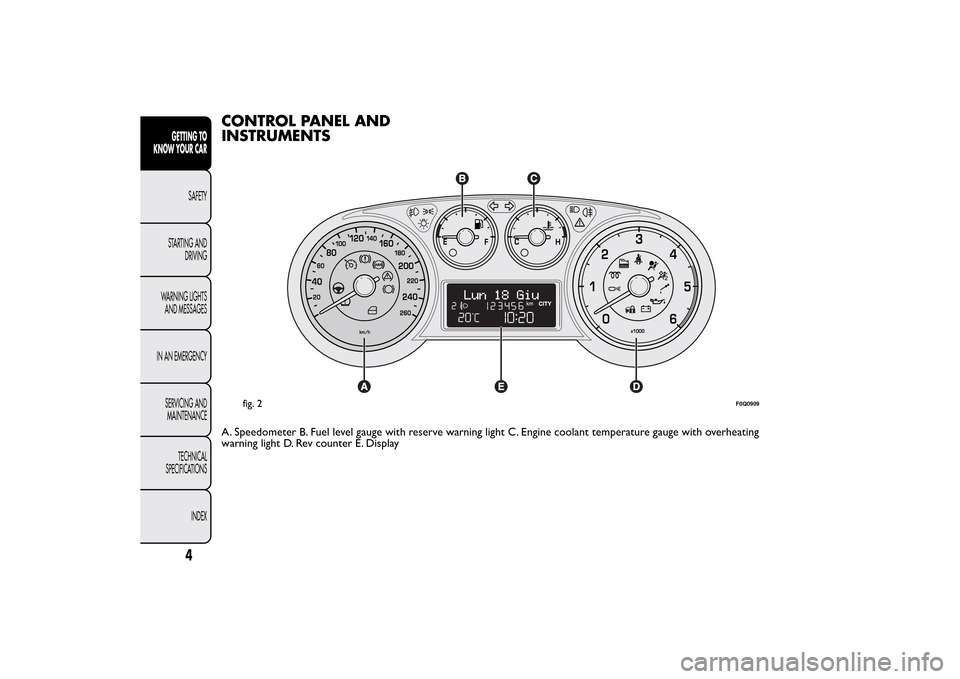
CONTROL PANEL AND
INSTRUMENTSA. Speedometer B. Fuel level gauge with reserve warning light C. Engine coolant temperature gauge with overheating
warning light D. Rev counter E. Display
fig. 2
F0Q0909
4
GETTING TO
KNOW YOUR CAR
SAFETY
STARTING AND
DRIVING
WARNING LIGHTS
AND MESSAGES
IN AN EMERGENCY
SERVICING AND
MAINTENANCE
TECHNICAL
SPECIFICATIONS
INDEX
Page 10 of 275
ENGINE COOLANT TEMPERATURE
INDICATOR
This shows the temperature of the engine coolant
fluid and starts working when the fluid temperature
exceeds approx. 50°C.
Under normal conditions, the needle assumes
different positions within the scale depending on the
usage conditions.C
Low engine coolant temperature
H
High engine coolant temperature.
Warning light B fig. 3 may light up (and a message on
the display may appear on certain versions) to
indicate that the coolant fluid temperature is too
high; in this case, stop the engine and contact a Fiat
Dealership.
If the needle for the engine coolant
temperature reaches the red area, stop
the engine immediately and contact a Fiat
Dealership.
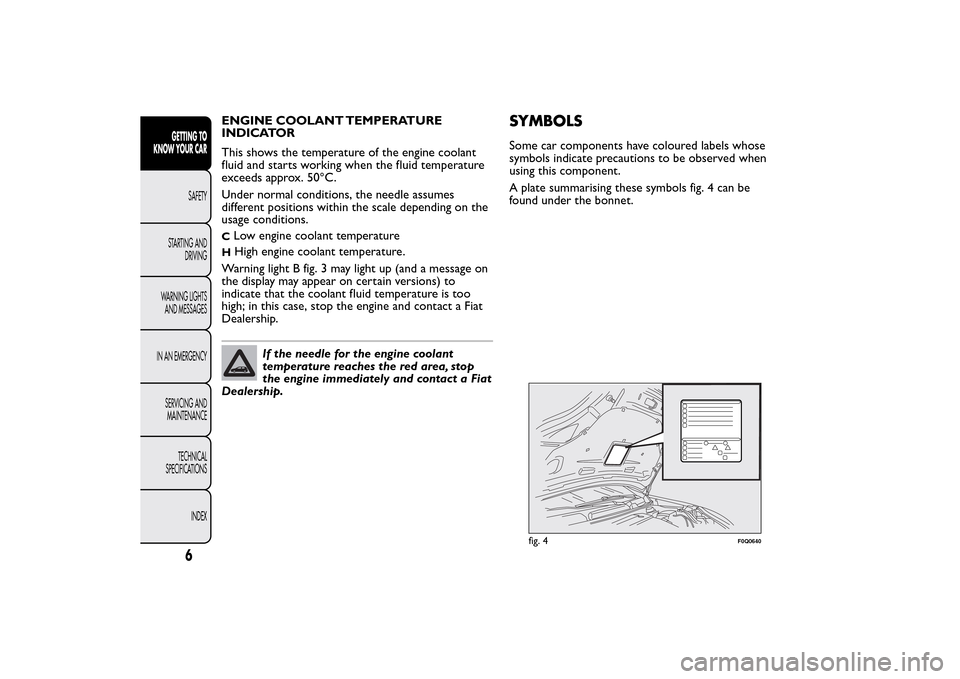
SYMBOLSSome car components have coloured labels whose
symbols indicate precautions to be observed when
using this component.
A plate summarising these symbols fig. 4 can be
found under the bonnet.
fig. 4
F0Q0640
6
GETTING TO
KNOW YOUR CAR
SAFETY
STARTING AND
DRIVING
WARNING LIGHTS
AND MESSAGES
IN AN EMERGENCY
SERVICING AND
MAINTENANCE
TECHNICAL
SPECIFICATIONS
INDEX
Page 11 of 275
THE FIAT CODE SYSTEMTo further protect your car from theft, it has been
fitted with an engine immobilising system. It is
automatically activated when the ignition key is
removed.
There is an electronic device in each key which can
identify the signal emitted, when the engine is
started, from an aerial built into the ignition switch.
The signal is the "password", different every time the
vehicle is started, through which the control unit
recognises the key and enables starting.
OPERATION
Each time the vehicle is started turning the ignition
key to MAR-ON, the Fiat CODE system control unit
sends an acknowledgement code to the engine
control unit to deactivate the immobiliser. The code
is sent only if the Fiat CODE system control unit
has acknowledged the code received from the key.
Each time the ignition key is turned to STOP, the Fiat
CODE system deactivates the functions of the
engine management control unit.
If, during starting, the code is not correctly
recognised, the
warning light (or symbol on the
display) switches on in the instrument panel.
In this case, turn the key to STOP and then to
MAR-ON; if it is still locked, try again with the other
keys that come with the vehicle. Contact a Fiat
Dealership if you still cannot start the engine.IMPORTANT Each key has its own code which must
be stored by the system’s control unit. To have
new keys stored, up to a maximum number of eight
keys, contact a Fiat Dealership and be ready to
present all the keys you have in your possession, the
CODE card, a personal identity document and the
car ownership documents. The codes for keys not
presented during the storing procedure will be
deleted to ensure that any keys that are lost or
stolen cannot be used to start the engine.
warning light (or symbol on the display)
on whilst driving
❒If the
warning light (or symbol in the display)
switches on, this means that the system is running
self-diagnosis (caused, for example, by a voltage
drop).
❒If thewarning light (or symbol in the display)
stays on, contact a Fiat dealership.
The electronic components inside the key
may be damaged if the key is subjected
to strong shocks.
7GETTING TO
KNOW YOUR CARSAFETY
STARTING AND
DRIVING
WARNING LIGHTS
AND MESSAGES
IN AN EMERGENCY
SERVICING AND
MAINTENANCE
TECHNICAL
SPECIFICATIONS
INDEX
Page 18 of 275
ALARM(for versions/markets, where provided)
The alarm, in addition to all the remote control
functions described previously, is controlled by the
receiver located under the dashboard near the
fuse box.
ALARM ACTIVATION
The alarm intervenes in the following instances:
❒when a door, the bonnet or the tailgate is opened
illegally (perimeter protection);
❒when the ignition system is started up (ignition key
turned to MAR-ON);
❒cutting of the battery leads;
❒movement inside the passenger compartment
(volume sensing protection);
❒anomalous lifting/tilting of the vehicle.
Depending on the market, the activation of the alarm
causes the activation of the siren and the direction
indicators (for about 26 seconds). Alarm tripping and
the number of cycles depend on the sales market.
There is a maximum number of acoustic/visual cycles.
When this is reached the system returns to normal
operation.
The volume sensing and anti-lift protection can be
excluded by adjusting the dedicated control on
the front roof light (see “Volume sensing/Anti-lift
protection”).IMPORTANT The engine stop function is guaranteed
by the Fiat CODE which is automatically activated
when the key is extracted from the ignition switch.
TURNING THE ALARM ON
With the doors, bonnet and tailgate closed and the
ignition key either turned to STOP or removed,
point the key with remote control towards the
vehicle and press and release button
.
Excluding some markets, the system produces an
acoustic signal (beep) and enables door locking.
The switching on of the alarm is preceded by a
self-diagnosis stage: if a fault is detected, the system
emits a new acoustic signal together with the display
of a message (see “Warning lights and messages”
chapter).
In this case switch off the alarm by pressing
, check
that all the doors, bonnet and tailgate are closed
correctly; then switch the alarm back on by pressing
the
button.
If a door, the bonnet and the tailgate are not
properly shut, they will be excluded from the check
by the alarm system.
If the alarm emits an acoustic signal even when the
doors, bonnet and tailgate are correctly closed, a
failure has occurred in system operation. Go to a Fiat
Dealership.
IMPORTANT The alarm does not come on when the
central locking is activated using the metal insert in
the key.
14GETTING TO
KNOW YOUR CAR
SAFETY
STARTING AND
DRIVING
WARNING LIGHTS
AND MESSAGES
IN AN EMERGENCY
SERVICING AND
MAINTENANCE
TECHNICAL
SPECIFICATIONS
INDEX
Page 19 of 275
IMPORTANT The alarm is adapted to meet
requirements in various countries.
TURNING THE ALARM OFF
Press button
on the key with remote control.
The following operations are performed (excluding
some versions for specific markets):
❒direction indicators flash twice;
❒there are two short acoustic signals (beeps);
❒doors are unlocked.
IMPORTANT The alarm does not switch off when
the central opening is activated using the metal insert
in the key.
VOLUME SENSING/ANTI-LIFT
PROTECTION
To guarantee the correct operation of the protection
system it is advisable to shut all the side windows
and the sun roof (for versions/markets, where
provided).
If necessary, the function can be turned off (if, for
example, you are leaving an animal in the car) by
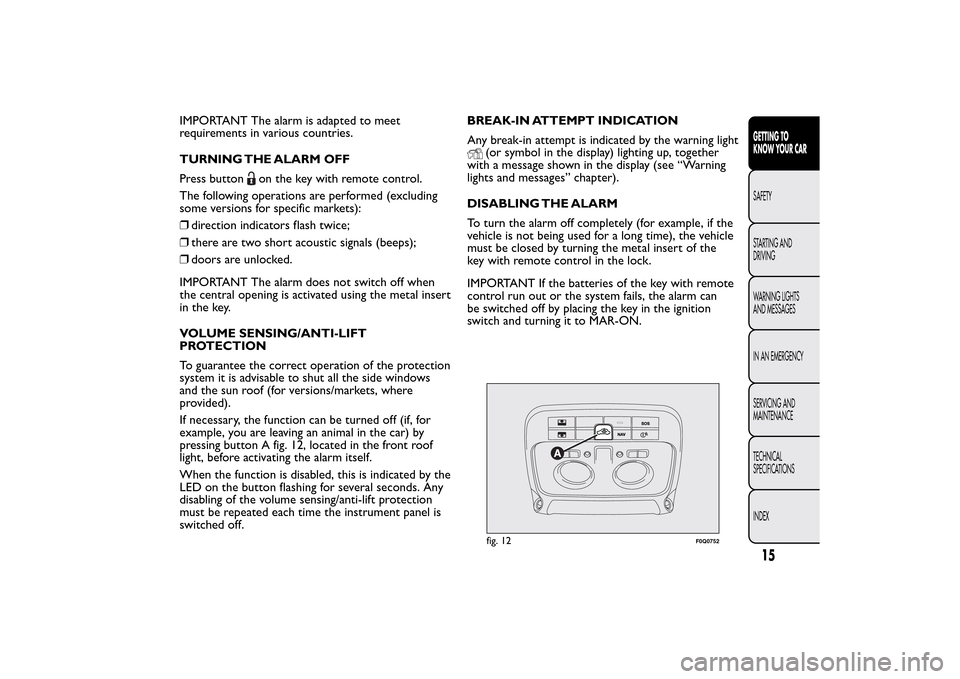
pressing button A fig. 12, located in the front roof
light, before activating the alarm itself.
When the function is disabled, this is indicated by the
LED on the button flashing for several seconds. Any
disabling of the volume sensing/anti-lift protection
must be repeated each time the instrument panel is
switched off.BREAK-IN ATTEMPT INDICATION
Any break-in attempt is indicated by the warning light
(or symbol in the display) lighting up, together
with a message shown in the display (see “Warning
lights and messages” chapter).
DISABLING THE ALARM
To turn the alarm off completely (for example, if the
vehicle is not being used for a long time), the vehicle
must be closed by turning the metal insert of the
key with remote control in the lock.
IMPORTANT If the batteries of the key with remote
control run out or the system fails, the alarm can
be switched off by placing the key in the ignition
switch and turning it to MAR-ON.fig. 12
F0Q0752
15GETTING TO
KNOW YOUR CARSAFETY
STARTING AND
DRIVING
WARNING LIGHTS
AND MESSAGES
IN AN EMERGENCY
SERVICING AND
MAINTENANCE
TECHNICAL
SPECIFICATIONS
INDEX
Page 21 of 275
WARNING
It is absolutely forbidden to carr y out
any aftermarket operation involving
steering system or steering column
modifications (e.g.: installation of anti-theft
device) that could badly affect performance and
safety, invalidate the warranty and also result
in non-compliance of the car with type-
approval requirements.
WARNING
Never remove the key while the car is
moving.The steering wheel will lock
as soon as it is turned.This holds true for cars
being towed as well.
DISPLAYThe car is equipped with a multifunction display that,
according to the previously applied settings, will
show useful driving information.
When one of the front doors is opened, the display
is activated, showing the time and mileage for a
few seconds.
NoteWith a low outside temperature (below 0°C)
it may take longer than normal for information to
appear on the display.
17GETTING TO
KNOW YOUR CARSAFETY
STARTING AND
DRIVING
WARNING LIGHTS
AND MESSAGES
IN AN EMERGENCY
SERVICING AND
MAINTENANCE
TECHNICAL
SPECIFICATIONS
INDEX
Page 22 of 275
MULTIFUNCTION DISPLAY “STANDARD”
SCREEN
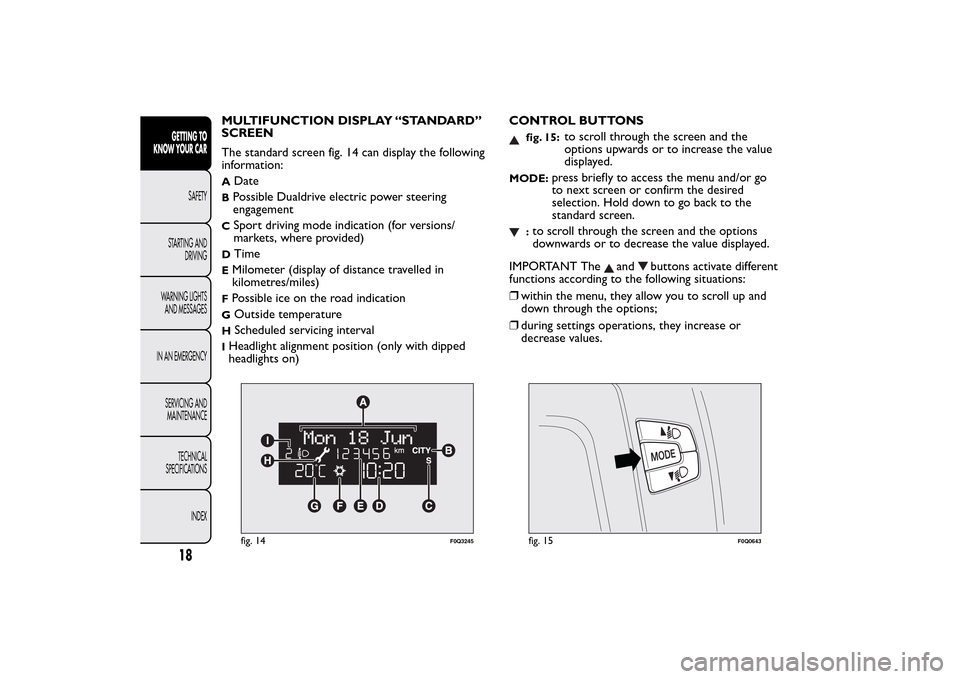
The standard screen fig. 14 can display the following
information:A
Date
BPossible Dualdrive electric power steering
engagementC
Sport driving mode indication (for versions/
markets, where provided)
D
Time
EMilometer (display of distance travelled in
kilometres/miles)FPossible ice on the road indicationG
Outside temperature
H
Scheduled servicing interval
IHeadlight alignment position (only with dipped
headlights on)CONTROL BUTTONS
fig. 15:
to scroll through the screen and the
options upwards or to increase the value
displayed.
MODE:
press briefly to access the menu and/or go
to next screen or confirm the desired
selection. Hold down to go back to the
standard screen.
:to scroll through the screen and the options
downwards or to decrease the value displayed.
IMPORTANT The
and
buttons activate different
functions according to the following situations:
❒within the menu, they allow you to scroll up and
down through the options;
❒during settings operations, they increase or
decrease values.
fig. 14
F0Q3245
fig. 15
F0Q0643
18GETTING TO
KNOW YOUR CAR
SAFETY
STARTING AND
DRIVING
WARNING LIGHTS
AND MESSAGES
IN AN EMERGENCY
SERVICING AND
MAINTENANCE
TECHNICAL
SPECIFICATIONS
INDEX
Page 23 of 275
IMPORTANT When one of the front doors is
opened, the display is activated, showing the time
and mileage for a few seconds.
SETUP MENU
The menu comprises a series of functions which can
be selected using the
and
buttons to access
the different selection and setting (setup) operations
indicated below.
Some options have a submenu.
The Setup Menu can be activated by pressing the
MODE button briefly.
If the Radionavigator is installed, only the following
functions can be adjusted/set from the instrument
panel: "Lighting", “Speed beep”, "Headlight sensor"
(for versions/markets, where provided), "Belt buzzer"
and "Passenger airbag". The other functions are
shown on the Radionavigator display. You can set and
adjust them there.
The menu comprises the following options:
❒LIGHTING
❒SPEED BEEP
❒HEADLIGHT SENSOR (for versions/markets,
where provided)
❒TRIP B ACTIVATION/DATA
❒SET TIME
❒SET DATE
❒FIRST PAGE (for versions/markets, where
provided)❒SEE RADIO
❒AUTOCLOSE
❒UNITS OF MEASUREMENT
❒LANGUAGE
❒WARNINGS VOLUME
❒BUTTON VOLUME
❒SEAT BELT BEEP/BUZZ.
❒SERVICE
❒AIRBAG/PASSENGER BAG
❒CORNERING LIGHTS (for versions/markets,
where provided)
❒EXIT MENU
Selecting an option from the main menu
without a submenu:
❒briefly press the MODE button to select the main
menu option that needs to be changed;
❒press buttons
or
(with single presses) to
select the new setting;
❒briefly press the MODE button to store the new
setting and at the same time go back to the
previously selected menu option.
19GETTING TO
KNOW YOUR CARSAFETY
STARTING AND
DRIVING
WARNING LIGHTS
AND MESSAGES
IN AN EMERGENCY
SERVICING AND
MAINTENANCE
TECHNICAL
SPECIFICATIONS
INDEX
Page 24 of 275
Selecting an option from the main menu with
a submenu:
❒briefly press the MODE button to display the first
submenu option;
❒press buttons
or
(with single presses) to
scroll through all the submenu options;
❒briefly press the MODE button to select the
displayed submenu option and to open the
relevant settings menu;
❒press buttons
or
(with single presses) to
select the new setting for this submenu option;
❒briefly press the MODE button to store the new
setting and at the same time go back to the
previously selected submenu option.
MENU ITEMSLighting (Interior light adjustment)
With the side lights on, this function is used to set
the brightness of the instrument panel, radio
controls and dual zone automatic climate control
system controls (for versions/markets where
provided) to 8 levels.
Proceed as follows to adjust the brightness:
❒briefly press the MODE button: the previously set
level flashes on the display;
❒press button
or
to set the required brightness
level;
❒briefly press the MODE button to return to the
menu screen or hold the button down to return
to the standard screen without storing.
Speed Beep (Speed limit)
This function is used to set the car speed limit (km/h
or mph); the driver is immediately alerted when
this limit is exceeded (see section “Warning lights
and messages”).
To set the desired speed limit, proceed as follows:
❒press the MODE button briefly, the display shows
the dedicated message;
❒press the
or
button to select speed limit
activation (On) or deactivation (Off );
❒if the function has been activated (On), press the
or
buttons to select the desired speed limit
and then press MODE to confirm.
20GETTING TO
KNOW YOUR CAR
SAFETY
STARTING AND
DRIVING
WARNING LIGHTS
AND MESSAGES
IN AN EMERGENCY
SERVICING AND
MAINTENANCE
TECHNICAL
SPECIFICATIONS
INDEX
Page 25 of 275
IMPORTANT Setting is possible between 30 and 200
km/h, or 20 and 125 mph, according to the
previously set unit. See the "Units of measurement
adjustment (Units of measurement)" paragraph
described below. The setting will increase/decrease
by 5 units each time button
/
is pressed. Hold
down the
/
button to automatically increase/
decrease the setting rapidly. Complete the
adjustment with single presses of the button when
you approach the desired value.
Briefly press the MODE button to return to the
menu screen or hold the button down to return to
the standard screen without storing.
To cancel the setting, proceed as follows:
❒briefly press button MODE, (On) will flash on the
display;
❒press button, (Off ) will flash on the display;
❒press the MODE button briefly to return to the
menu screen or hold the button down to return
to the standard screen without storing.
Headlight sensor (Automatic headlight/dusk
sensor sensitivity adjustment)
(for versions/markets, where provided)
This function is used to turn the headlights on or off
according to external lighting conditions.
The headlight sensor sensitivity can be adjusted
according to 3 levels (level 1 = minimum sensitivity,
level2=average sensitivity, level 3 = maximum
sensitivity). The higher the sensitivity set, the lesser
is the external light variation needed to switchthe lights on (e.g. with a setting on level 3 at sunset
the headlights come on in advance in relation to
levels 1 and 2).
Proceed as follows to set the desired adjustment:
❒briefly press the MODE button: the previously set
level flashes on the display;
❒press
or
to make your choice;
❒press the MODE button briefly to return to the
menu screen or hold the button down to return
to the standard screen without storing.
Cornering lights (Activation/deactivation of
“Cornering lights”)
(fog light with cornering function)
(for versions/markets where provided)
This function activates/deactivates the cornering
lights.
To activate/deactivate (On/Off ) the lights, proceed as
follows:
❒press the MODE button briefly, the display will
show “On” or “Off ” flashing depending on the
previous setting;
❒press
or
to make your choice;
❒briefly press the MODE button to return to the
menu screen or hold the button down to return
to the standard screen without storing.
21GETTING TO
KNOW YOUR CARSAFETY
STARTING AND
DRIVING
WARNING LIGHTS
AND MESSAGES
IN AN EMERGENCY
SERVICING AND
MAINTENANCE
TECHNICAL
SPECIFICATIONS
INDEX