buttons FIAT CROMA 2006 2.G User Guide
[x] Cancel search | Manufacturer: FIAT, Model Year: 2006, Model line: CROMA, Model: FIAT CROMA 2006 2.GPages: 240, PDF Size: 7.41 MB
Page 47 of 240
47
SAFETY
DEVICES
CORRECT USE
OF THE CAR
WARNING
LIGHTS AND
MESSAGES
IN AN
EMERGENCY
CAR
MAINTENANCE
TECHNICAL
SPECIFICATIONS
INDEX
DASHBOARD
AND CONTROLS
During fully automatic operation, the on-
ly manual settings required are the fol-
lowing:
❒MONO, to align the air temperature
and distribution set on the passenger’s
side (front or rear) with that on the
driver’s side;
❒…, air recirculation, to keep it al-
ways on or off;
❒-, to speed up demisting/defrosting
of windscreen, front side windows,
rear window and door mirrors;
❒(, to demist/defrost heated rear win-
dow and door mirrors.During full automatic system operation,
you can change at any time set tempera-
tures, air distribution and fan speed by us-
ing the relevant buttons or knobs: the sys-
tem will automatically change its settings
to adjust to the new requirements. Dur-
ing FULL AUTOoperation, changing air
distribution and/or flow and/or compres-
sor activation and/or air recirculation will
make the FULLwording disappear. In this
way functions will pass from automatic
control to manual control until pressing
again the AUTObutton. Fan speed is the
same for every area of the passenger com-
partment.
With one or more functions engaged man-
ually, the adjustment of the temperature
of the air admitted to the passenger com-
partment continues to be controlled au-
tomatically by the system, except with the
climate control compressor off: under this
condition in fact, the temperature of the
air admitted to the passenger compart-
ment cannot be lower than outside air
temperature.CONTROLS
Air temperature adjusting
knobs P-G
Turning the knobs clockwise or counter-
clockwise, respectively highers or lowers
the temperature of the air required re-
spectively in the front left zone (knob P)
or in the right zone (knob G) of the pas-
senger compartment.
Since the system controls two zones of
the passenger compartment, it is possi-
ble to personalise required temperatures
(driver and passenger).
The temperatures set are shown on the
displays near the relevant knobs.
Pressing button I (MONO) automatical-
ly aligns the temperature on the passen-
ger’s side with that on the driver’s side;
you can therefore set the same tempera-
ture for both zones by turning knob P on
driver side.
Separate operation of air temperatures
and distribution is restored by turning
knobs or pressing again button I
(MONO) when the button led is on.
Page 48 of 240
48
SAFETY
DEVICES
CORRECT USE
OF THE CAR
WARNING
LIGHTS AND
MESSAGES
IN AN
EMERGENCY
CAR
MAINTENANCE
TECHNICAL
SPECIFICATIONS
INDEX
DASHBOARD
AND CONTROLS
Turning the knobs fully clockwise or
counter-clockwise until they reach the ex-
treme selections HI or LO, the maximum
heating or cooling functions are respec-
tively engaged:
❒HI function (highest heating power):
this is turned on by rotating the temper-
ature knob clockwise and passing the max.
temperature value (32°C). It can be acti-
vated independently from driver or front
passenger side or both (also when the
MONOfunction is selected).
When this function is on, the display
shows HI.
This function can be engaged when re-
quiring to heat the passenger compart-
ment as quickly as possible, exploiting the
maximum potential of the system. This
function uses the maximum temperature
of the coolant fluid, while air distribution
and fan speed are controlled according to
the system settings.
More particularly, max. fan speed will not
be immediately engaged if coolant is not
hot enough; this to prevent admitting air
that is not warm enough to the passenger
compartment.
All manual settings are possible with this
function on.To switch the function off, simply turn the
knob counter-clockwise and set the re-
quired temperature.
❒LOfunction (highest cooling power):
this is turned on by rotating the temper-
ature knob counter-clockwise and passing
the min. temperature value (16°C). It can
be activated independently from driver or
front passenger side or both (also when
the MONOfunction is selected).
When this function is on, the display
shows LO.
This function can be engaged when re-
quiring to cool the passenger compart-
ment as quickly as possible, exploiting the
maximum potential of the system. This
function activates automatically:
❒MONOfunction;
❒air distribution at central / side vents
(shown by the relevant symbol on the
display);
❒fan at max. speed;
❒climate control compressor.
All manual settings are possible with this
function on.
To switch the function off, simply turn the
knob clockwise and set the required tem-
perature.Front air distribution buttons B-F
Pressing these buttons it is possible to
choose manually one of the seven possi-
ble air distributions to the passenger com-
partment (right or left side):
▲Air flow to the windscreen and front
side window vents to demist or de-
frost them.
˙Air flow at central and side dash-
board vents to ventilate the chest
and the face during the hot season.
▼Air flow towards the front and rear
lower parts of the passenger com-
partment. Due to the natural ten-
dency of heat to spread upwards,
this type of distribution allows heat-
ing of the passenger compartment
in the shortest time, also giving a
prompt feeling of warmth.
˙
▼Splitting of the air flow between the
vents to the lower part of the pas-
senger compartment (warmest air)
and the dashboard centre and side
outlets (coolest air). This air flow
distribution is particularly useful in
spring and autumn when the sun is
shining.
Page 49 of 240
49
SAFETY
DEVICES
CORRECT USE
OF THE CAR
WARNING
LIGHTS AND
MESSAGES
IN AN
EMERGENCY
CAR
MAINTENANCE
TECHNICAL
SPECIFICATIONS
INDEX
DASHBOARD
AND CONTROLS
▲
▼Splitting of the air flow between the
windscreen and side window
demisting/defrosting vents and the
lower part of the passenger com-
partment. This type of air distrib-
ution allows satisfactory heating of
the passenger compartment while
preventing possible misting of the
windows.
▲
˙Combined splitting of the air flow▼between the windscreen vents,
central/side outlets and vents at
the lower part of the passenger
compartment (feet area). This air
flow distribution enables to keep
good overall comfort conditions in
summer.
▲Splitting of the air flow between
˙the windscreen vents, central/side
outlets on the dashboard. This air
flow distribution enables to obtain
satisfactory cooling of the passen-
ger’s compartment and to keep the
required coolig condition in sum-
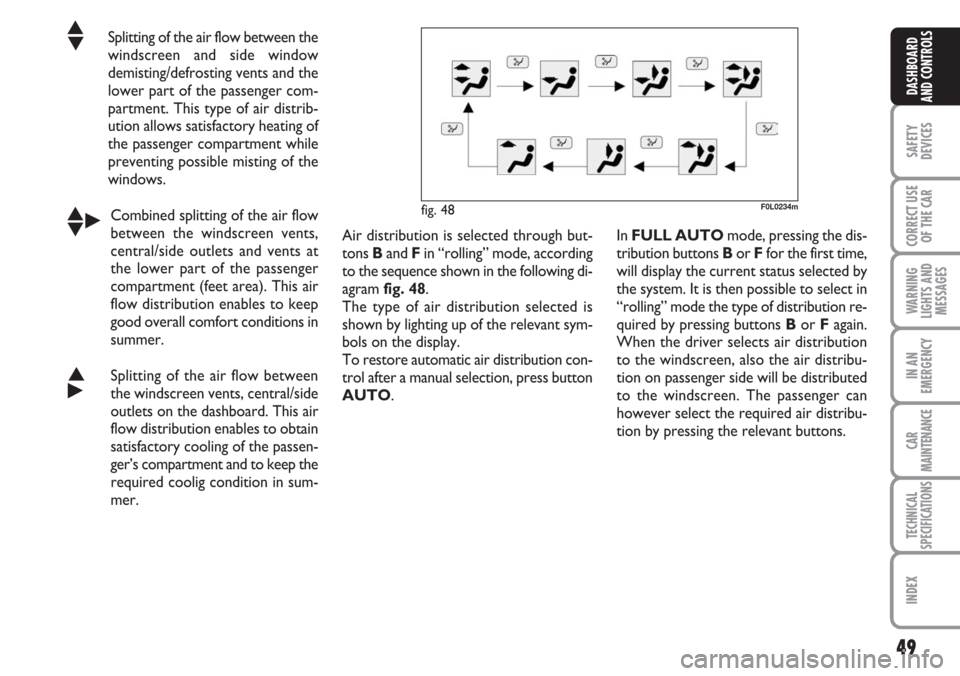
mer. Air distribution is selected through but-
tons Band F in “rolling” mode, according
to the sequence shown in the following di-
agram fig. 48.
The type of air distribution selected is
shown by lighting up of the relevant sym-
bols on the display.
To restore automatic air distribution con-
trol after a manual selection, press button
AUTO.
F0L0234m
In FULL AUTO mode, pressing the dis-
tribution buttons Bor Ffor the first time,
will display the current status selected by
the system. It is then possible to select in
“rolling” mode the type of distribution re-
quired by pressing buttons Bor Fagain.
When the driver selects air distribution
to the windscreen, also the air distribu-
tion on passenger side will be distributed
to the windscreen. The passenger can
however select the required air distribu-
tion by pressing the relevant buttons.
fig. 48
Page 50 of 240
50
SAFETY
DEVICES
CORRECT USE
OF THE CAR
WARNING
LIGHTS AND
MESSAGES
IN AN
EMERGENCY
CAR
MAINTENANCE
TECHNICAL
SPECIFICATIONS
INDEX
DASHBOARD
AND CONTROLS
Fan speed adjusting buttons M/N
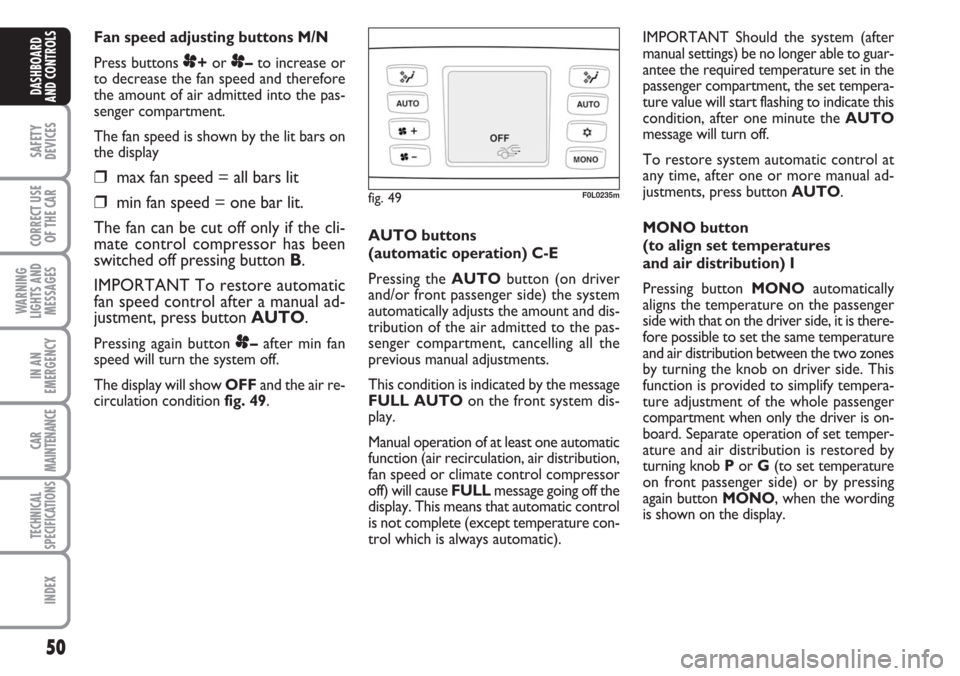
Press buttons
p+or p–to increase or
to decrease the fan speed and therefore
the amount of air admitted into the pas-
senger compartment.
The fan speed is shown by the lit bars on
the display
❒max fan speed = all bars lit
❒min fan speed = one bar lit.
The fan can be cut off only if the cli-
mate control compressor has been
switched off pressing button B.
IMPORTANT To restore automatic
fan speed control after a manual ad-
justment, press button AUTO.
Pressing again button p–after min fan
speed will turn the system off.
The display will show OFFand the air re-
circulation condition fig. 49. AUTO buttons
(automatic operation) C-E
Pressing the AUTObutton (on driver
and/or front passenger side) the system
automatically adjusts the amount and dis-
tribution of the air admitted to the pas-
senger compartment, cancelling all the
previous manual adjustments.
This condition is indicated by the message
FULL AUTOon the front system dis-
play.
Manual operation of at least one automatic
function (air recirculation, air distribution,
fan speed or climate control compressor
off) will cause FULL message going off the
display. This means that automatic control
is not complete (except temperature con-
trol which is always automatic).IMPORTANT Should the system (after
manual settings) be no longer able to guar-
antee the required temperature set in the
passenger compartment, the set tempera-
ture value will start flashing to indicate this
condition, after one minute the AUTO
message will turn off.
To restore system automatic control at
any time, after one or more manual ad-
justments, press button AUTO.
MONO button
(to align set temperatures
and air distribution) I
Pressing button MONOautomatically
aligns the temperature on the passenger
side with that on the driver side, it is there-
fore possible to set the same temperature
and air distribution between the two zones
by turning the knob on driver side. This
function is provided to simplify tempera-
ture adjustment of the whole passenger
compartment when only the driver is on-
board. Separate operation of set temper-
ature and air distribution is restored by
turning knob Por G(to set temperature
on front passenger side) or by pressing
again button MONO, when the wording
is shown on the display.
fig. 49F0L0235m
Page 53 of 240
53
SAFETY
DEVICES
CORRECT USE
OF THE CAR
WARNING
LIGHTS AND
MESSAGES
IN AN
EMERGENCY
CAR
MAINTENANCE
TECHNICAL
SPECIFICATIONS
INDEX
DASHBOARD
AND CONTROLS
When the max. demisting/defrosting func-
tion is on, the button led and the heated
rear window button led are on. FULL
AUTOwording on the display is off.
When the max. demisting/defrosting func-
tion is on, the only manual operations pos-
sible are manual adjustment of the fan
speed and switching heated rear window
off.
With max. demisting/defrosting function
on, the fan works according to the previ-
ously set air distribution in order to guar-
antee top climatic comfort under what-
ever condition.
Pressing the max. demisting/defrosting
button or the air distribution buttons or
operating the temperature knobs, the sys-
tem switches off the max. demisting/de-
frosting function and restores the operat-
ing conditions of the system prior to func-
tion activation.Heated rear window and door
mirror demisting/defrosting
button H
Press this button to activate heated rear
window demisting/defrosting. When this
function is on, the button led is on.
This function is timed and switches off au-
tomatically after about 20 minutes or by
pressing again the button or by turning the
engine off. It will not be switched on au-
tomatically when restarting the engine.
IMPORTANT Do not apply stickers on
the inside of the rear window over the
heating filaments to avoid damage that
might cause it to stop working properly.ADDITIONAL HEATER
(Multijet versions)
This device enables quick warming up of
the passenger’s compartment in cold en-
vironmental conditions.
The additional heater will switch on au-
tomatically after turning the ignition key
to ON.
IMPORTANT The additional heater
works only with outside temperature be-
low 12°C, engine coolant temperature be-
low 50°C and car battery voltage over
10.25 V.
IMPORTANT Do not park the car over
flammable material such as paper, dry
grass or leaves: fire danger.
Page 73 of 240
73
SAFETY
DEVICES
CORRECT USE
OF THE CAR
WARNING
LIGHTS AND
MESSAGES
IN AN
EMERGENCY
CAR
MAINTENANCE
TECHNICAL
SPECIFICATIONS
INDEX
DASHBOARD
AND CONTROLS
DOORS
CENTRAL DOOR LOCKING
SYSTEM
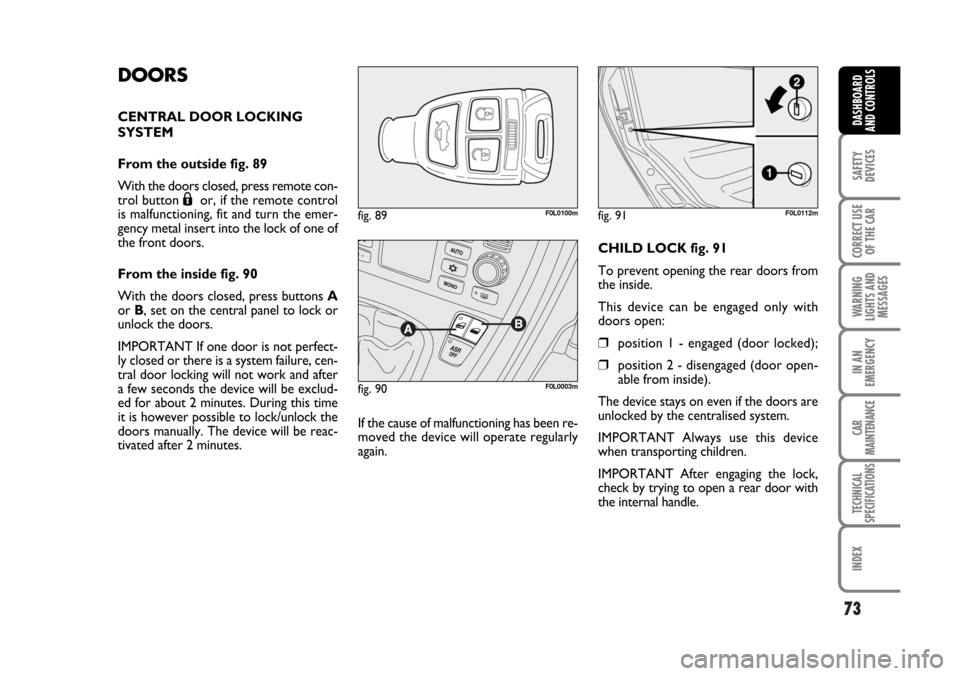
From the outside fig. 89
With the doors closed, press remote con-
trol button
Áor, if the remote control
is malfunctioning, fit and turn the emer-
gency metal insert into the lock of one of
the front doors.
From the inside fig. 90
With the doors closed, press buttons A
or B, set on the central panel to lock or
unlock the doors.
IMPORTANT If one door is not perfect-
ly closed or there is a system failure, cen-
tral door locking will not work and after
a few seconds the device will be exclud-
ed for about 2 minutes. During this time
it is however possible to lock/unlock the
doors manually. The device will be reac-
tivated after 2 minutes.If the cause of malfunctioning has been re-
moved the device will operate regularly
again.CHILD LOCK fig. 91
To prevent opening the rear doors from
the inside.
This device can be engaged only with
doors open:
❒position 1 - engaged (door locked);
❒position 2 - disengaged (door open-
able from inside).
The device stays on even if the doors are
unlocked by the centralised system.
IMPORTANT Always use this device
when transporting children.
IMPORTANT After engaging the lock,
check by trying to open a rear door with
the internal handle.
fig. 89F0L0100m
fig. 90F0L0003m
fig. 91F0L0112m
062-098 Croma TRW GB 20-11-2006 15:01 Pagina 73
Page 75 of 240
75
SAFETY
DEVICES
CORRECT USE
OF THE CAR
WARNING
LIGHTS AND
MESSAGES
IN AN
EMERGENCY
CAR
MAINTENANCE
TECHNICAL
SPECIFICATIONS
INDEX
DASHBOARD
AND CONTROLS
CONTROLS
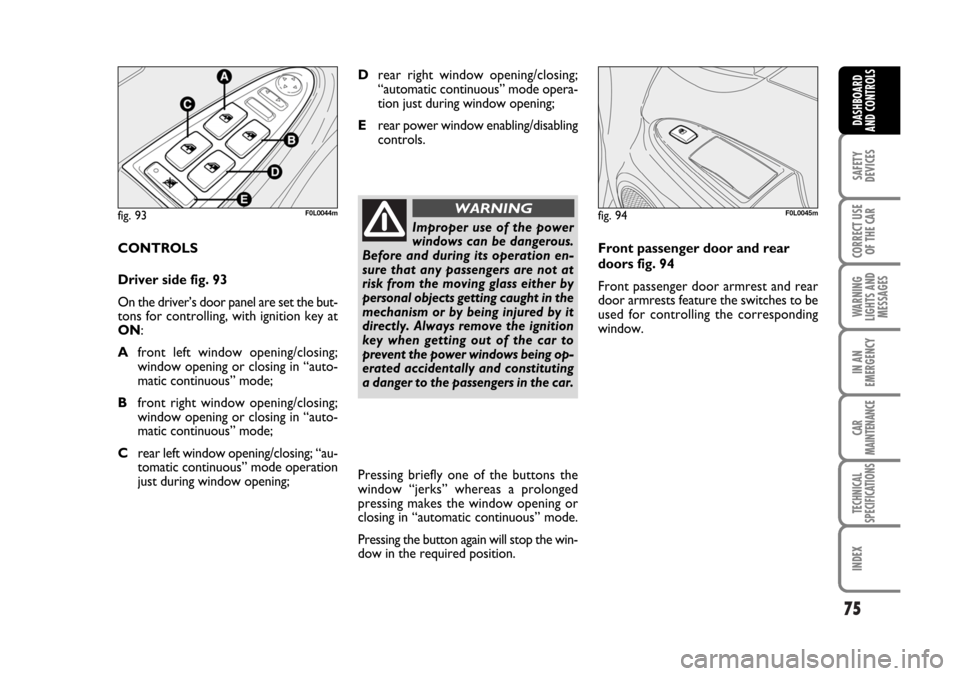
Driver side fig. 93
On the driver’s door panel are set the but-
tons for controlling, with ignition key at
ON:
Afront left window opening/closing;
window opening or closing in “auto-
matic continuous” mode;
Bfront right window opening/closing;
window opening or closing in “auto-
matic continuous” mode;
Crear left window opening/closing; “au-
tomatic continuous” mode operation
just during window opening;Pressing briefly one of the buttons the
window “jerks” whereas a prolonged
pressing makes the window opening or
closing in “automatic continuous” mode.
Pressing the button again will stop the win-
dow in the required position.Front passenger door and rear
doors fig. 94
Front passenger door armrest and rear
door armrests feature the switches to be
used for controlling the corresponding
window.
fig. 93F0L0044m
Improper use of the power
windows can be dangerous.
Before and during its operation en-
sure that any passengers are not at
risk from the moving glass either by
personal objects getting caught in the
mechanism or by being injured by it
directly. Always remove the ignition
key when getting out of the car to
prevent the power windows being op-
erated accidentally and constituting
a danger to the passengers in the car.
WARNINGfig. 94F0L0045m
Drear right window opening/closing;
“automatic continuous” mode opera-
tion just during window opening;
Erear power window enabling/disabling
controls.
062-098 Croma TRW GB 20-11-2006 15:01 Pagina 75
Page 232 of 240
232
WARNING
LIGHTS AND
MESSAGES
DASHBOARD
AND CONTROLS
SAFETY
DEVICES
CORRECT USE
OF THE CAR
IN AN
EMERGENCY
CAR
MAINTENANCE
TECHNICAL
SPECIFICATIONS
INDEX
– emergency opening........................ 77
– extension ......................................... 77
– luggage compartment cover ........ 79
– opening and closing ...................... 76
Boot light ............................................... 168
Brake Assist (brake assist
in an emergency)................................ 87
Brake fluid level..................................... 196
Brakes
– fluid level ......................................... 196
– technical data ................................. 214
Bulb (replacement)
– bulb types ........................................ 158
– general instructions ....................... 157
Capacity ................................................. 224
Car inactivity.......................................... 136
Car maintenance
– heavy-duty ........................................ 187
– routine maintenance...................... 187
– scheduled service .......................... 184
– Service Schedule ........................... 185
Carrying children safely ..................... 104
Ceiling lights
– central light ...................................... 62
– courtesy light................................... 62
– front................................................... 62
– rear .................................................... 62
Chassis (marking) ................................ 209
Checking fluid levels ............................ 188
Child lock ............................................... 73
Child restraint systems
(specifications for use)...................... 107Cigar lighter .......................................... 68
CO
2exhaust emissions ..................... 229
Code card............................................... 8
Coins tray .............................................. 68
Consumption
– engine oil .......................................... 194
– fuel ..................................................... 228
Containing running costs .................... 130
Control buttons .................................. 20
Correct use of the car ........................ 119
Courtesy mirror light ......................... 167
Cruise Control .................................... 60
Current outlet....................................... 69
Dashboard and controls.................... 4-5
– Dashboard (left hand drive) ....... 5
– Dashboard (right hand drive) .... 235
Dead lock device .................................. 14
– activation/deactivation .................. 15
Diesel filter
– draining condense water .............. 197
Dimensions ........................................... 220
Dipped beam headlights
– bulb replacement .......................... 162
– control ............................................. 54
Direction indicators
– control ............................................. 55
– front bulb replacement ................. 161
– rear bulb replacement .................. 164
– side bulb replacement ................... 163
Doors ..................................................... 73
ABS ........................................................ 86
Accessories purchased by the user 93
Additional heater .................................. 53
Air bags (front)...................................... 110
Air bags (side)........................................ 114
Air cleaner.............................................. 197
Air vents ................................................ 40
Alarm ....................................................... 12
Anchoring the load .............................. 81
Anti-raising sensor .............................. 13
Armrest
– front................................................... 66
– rear .................................................... 67
Ashtray
– front/rear ........................................ 69
ASR ......................................................... 89
– activation/deactivation ................. 89
Automatic climate control ................. 44
Automatic headlight sensor
(daylight sensor) ................................. 56
Battery
– checking the charge ...................... 198
– jump starting .................................. 150
– recharging......................................... 180
– replacing .......................................... 198
Bodywork
– maintenance ................................... 203
– version codes ................................. 210
Bonnet .................................................... 82
Boot ......................................................... 76
– anchoring the load ........................ 81
I I
N N
D D
E E
X X
232-240 Croma TRW GB 17-11-2006 11:09 Pagina 232