ignition FIAT CROMA 2006 2.G User Guide
[x] Cancel search | Manufacturer: FIAT, Model Year: 2006, Model line: CROMA, Model: FIAT CROMA 2006 2.GPages: 240, PDF Size: 7.41 MB
Page 28 of 240
28
SAFETY
DEVICES
CORRECT USE
OF THE CAR
WARNING
LIGHTS AND
MESSAGES
IN AN
EMERGENCY
CAR
MAINTENANCE
TECHNICAL
SPECIFICATIONS
INDEX
DASHBOARD
AND CONTROLS
at Dealership to carry out any service op-
eration provided by the “Service sched-
ule” or “Annual inspection plan”, and to
reset the display.
Exit Menu
This is the last function that closes the cir-
cular setting cycle listed in the initial menu
screen.
Briefly press button MODEto go back to
the standard screen without storing set-
tings.
Press button –to return to the first menu
option (Speed Lim.).Both functions are resettable (reset - start
of new mission).
“General Trip” displays the figures relat-
ing to:
– Range
– Trip distance
– Average consumption
– Instant consumption
– Average speed
– Travel time (driving time).
“Trip B” (only available on reconfigurable
multifunction display), displays the figures
relating to:
– Trip distance B
– Average consumption B
– Average speed B
– Travel time B (driving time).
NoteThe “Trip B” function can be ex-
cluded (see paragraph “Trip B On/Off”).
“Range” cannot be reset.TRIP COMPUTER
(where provided)
General features
The “Trip computer” is provided on cars
fitted with multifunction display or re-
configurable multifunction display. The
“Trip computer” displays information
(with ignition key at ON), relating to the
operating status of the car. This function
comprises the “General trip” concerning
the “complete mission” of the car (jour-
ney) and “Trip B”, (only available on re-
configurable multifunction display), con-
cerning the partial mission of the car; this
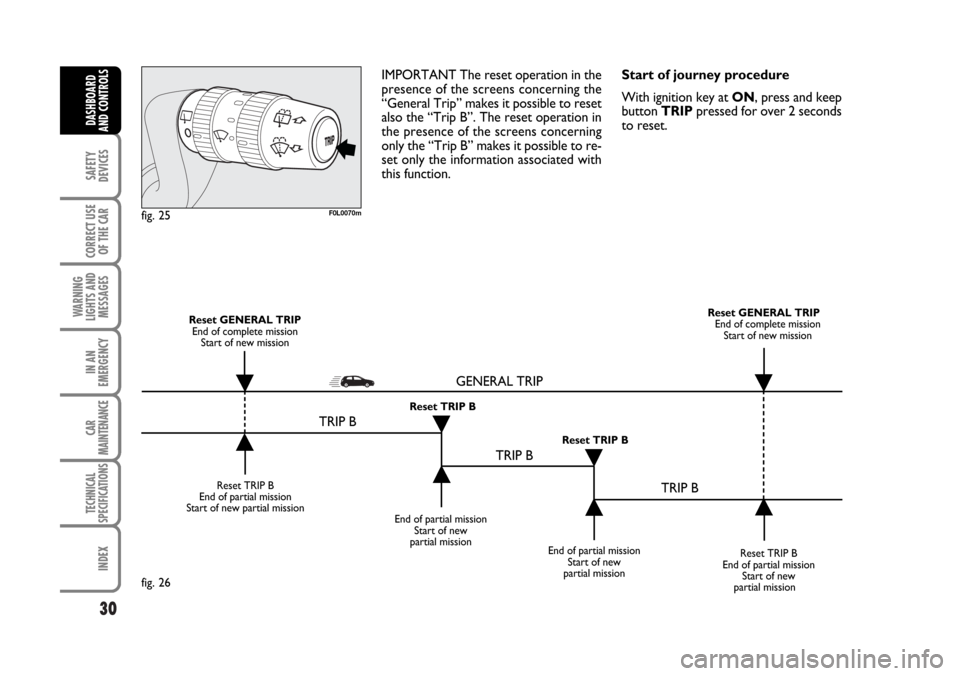
latter function(as shown in fig. 26) is “con-
tained” within the complete mission.
001-030 Croma TRW GB 20-11-2006 14:58 Pagina 28
Page 29 of 240

29
SAFETY
DEVICES
CORRECT USE
OF THE CAR
WARNING
LIGHTS AND
MESSAGES
IN AN
EMERGENCY
CAR
MAINTENANCE
TECHNICAL
SPECIFICATIONS
INDEX
DASHBOARD
AND CONTROLS
Values displayed
Range
This value shows the distance in km (or
mi) that the car can still cover before
needing fuel, assuming that driving condi-
tions are kept unvaried. The display will
show “----” in the following cases:
– value lower than 50 km (or 30 mi)
– car left parked with engine running for
long.
Trip distance
This value shows the distance covered
from the start of the new mission.
Average consumption
This value shows the average consump-
tion from the start of the new mission.
Instant consumption
This value shows instant fuel consumption
(this value is updated second by second).
If parking the car with engine on,
the display will show “----”.Average speed
This value shows the car average speed as
a function of the overall time elapsed since
the start of the new mission.
Travel time
This value shows the time elapsed since
the start of the new mission.
IMPORTANT Lacking information, Trip
computer values are displayed with “----”.
When normal operating condition is re-
set, calculation of different units will
restart regularly. Values displayed before
the failure will not be reset.TRIP button fig. 25
Button TRIP, set on the top of the right
steering column stalk, shall be used (with
ignition key at ON) to display and to re-
set the previously described values to start
a new mission:
– short push to display the different val-
ues
– long push to reset and then start a new
mission.
New mission
New mission starts after:
– “manual” resetting by the user, by press-
ing the relevant button;
– “automatic” resetting, when the “Trip dis-
tance” reaches 9999.9 km or when the
“Travel time” reaches 99.59 (99 hours and
59 minutes);
– after disconnecting/reconnecting the
battery.
001-030 Croma TRW GB 20-11-2006 14:58 Pagina 29
Page 30 of 240
30
SAFETY
DEVICES
CORRECT USE
OF THE CAR
WARNING
LIGHTS AND
MESSAGES
IN AN
EMERGENCY
CAR
MAINTENANCE
TECHNICAL
SPECIFICATIONS
INDEX
DASHBOARD
AND CONTROLS
IMPORTANT The reset operation in the
presence of the screens concerning the
“General Trip” makes it possible to reset
also the “Trip B”. The reset operation in
the presence of the screens concerning
only the “Trip B” makes it possible to re-
set only the information associated with
this function.Start of journey procedure
With ignition key at ON, press and keep
button TRIPpressed for over 2 seconds
to reset.
F0L0070mfig. 25
Reset TRIP B
End of partial mission
Start of new partial mission
End of partial mission
Start of new
partial mission
Reset TRIP B
End of partial mission
Start of new
partial mission Reset GENERAL TRIP
End of complete mission
Start of new missionReset GENERAL TRIP
End of complete mission
Start of new mission
End of partial mission
Start of new
partial mission Reset TRIP B
Reset TRIP B
TRIP B
TRIP B
TRIP B GENERAL TRIP˙
˙
˙
˙˙
˙
˙ ˙
fig. 26
001-030 Croma TRW GB 20-11-2006 14:58 Pagina 30
Page 32 of 240
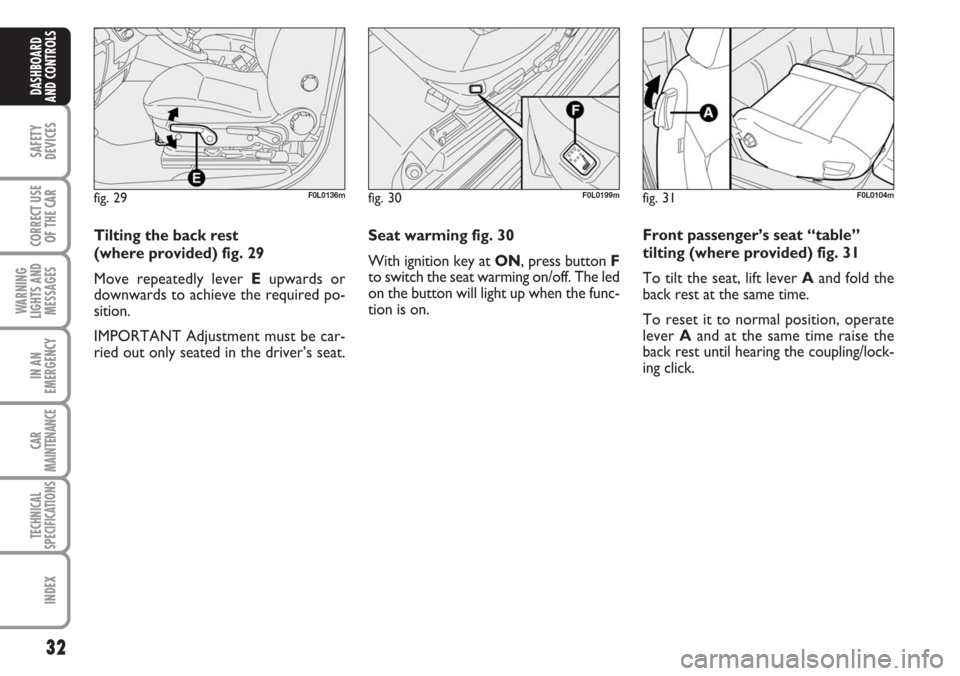
Seat warming fig. 30
With ignition key at ON, press button F
to switch the seat warming on/off. The led
on the button will light up when the func-
tion is on.
32
SAFETY
DEVICES
CORRECT USE
OF THE CAR
WARNING
LIGHTS AND
MESSAGES
IN AN
EMERGENCY
CAR
MAINTENANCE
TECHNICAL
SPECIFICATIONS
INDEX
DASHBOARD
AND CONTROLS
Tilting the back rest
(where provided) fig. 29
Move repeatedly lever Eupwards or
downwards to achieve the required po-
sition.
IMPORTANT Adjustment must be car-
ried out only seated in the driver’s seat.
fig. 29F0L0136mfig. 30F0L0199mfig. 31F0L0104m
Front passenger’s seat “table”
tilting (where provided) fig. 31
To tilt the seat, lift lever Aand fold the
back rest at the same time.
To reset it to normal position, operate
lever Aand at the same time raise the
back rest until hearing the coupling/lock-
ing click.
Page 33 of 240
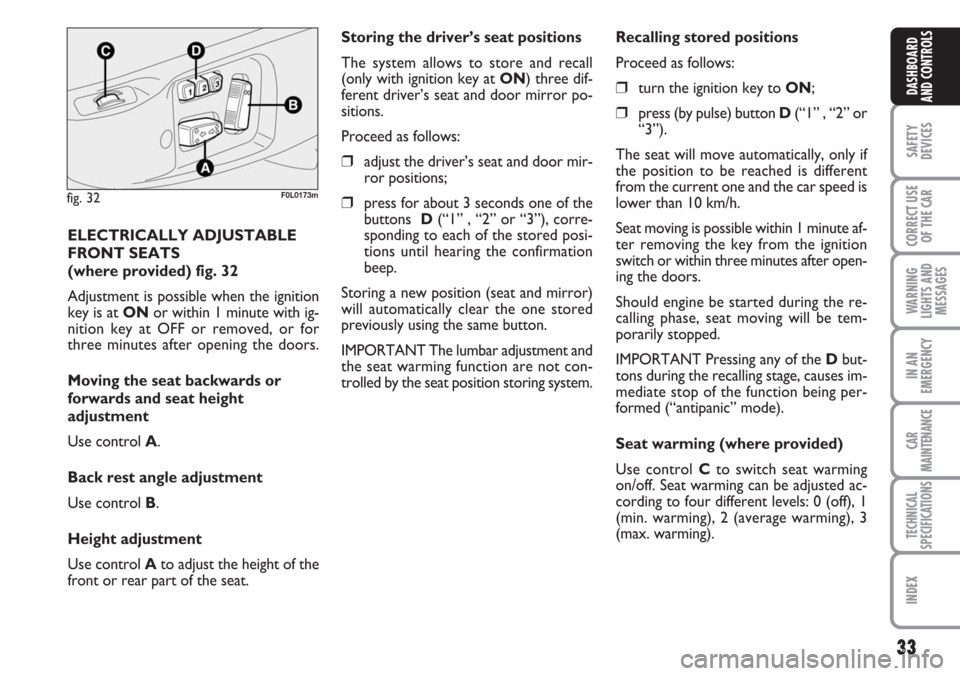
ELECTRICALLY ADJUSTABLE
FRONT SEATS
(where provided) fig. 32
Adjustment is possible when the ignition
key is at ONor within 1 minute with ig-
nition key at OFF or removed, or for
three minutes after opening the doors.
Moving the seat backwards or
forwards and seat height
adjustment
Use control A.
Back rest angle adjustment
Use control B.
Height adjustment
Use control Ato adjust the height of the
front or rear part of the seat.
fig. 32F0L0173m
33
SAFETY
DEVICES
CORRECT USE
OF THE CAR
WARNING
LIGHTS AND
MESSAGES
IN AN
EMERGENCY
CAR
MAINTENANCE
TECHNICAL
SPECIFICATIONS
INDEX
DASHBOARD
AND CONTROLS
Storing the driver’s seat positions
The system allows to store and recall
(only with ignition key at ON) three dif-
ferent driver’s seat and door mirror po-
sitions.
Proceed as follows:
❒adjust the driver’s seat and door mir-
ror positions;
❒press for about 3 seconds one of the
buttons D(“1” , “2” or “3”), corre-
sponding to each of the stored posi-
tions until hearing the confirmation
beep.
Storing a new position (seat and mirror)
will automatically clear the one stored
previously using the same button.
IMPORTANT The lumbar adjustment and
the seat warming function are not con-
trolled by the seat position storing system.Recalling stored positions
Proceed as follows:
❒turn the ignition key to ON;
❒press (by pulse) button D(“1” , “2” or
“3”).
The seat will move automatically, only if
the position to be reached is different
from the current one and the car speed is
lower than 10 km/h.
Seat moving is possible within 1 minute af-
ter removing the key from the ignition
switch or within three minutes after open-
ing the doors.
Should engine be started during the re-
calling phase, seat moving will be tem-
porarily stopped.
IMPORTANT Pressing any of the Dbut-
tons during the recalling stage, causes im-
mediate stop of the function being per-
formed (“antipanic” mode).
Seat warming (where provided)
Use control Cto switch seat warming
on/off. Seat warming can be adjusted ac-
cording to four different levels: 0 (off), 1
(min. warming), 2 (average warming), 3
(max. warming).
Page 37 of 240
37
SAFETY
DEVICES
CORRECT USE
OF THE CAR
WARNING
LIGHTS AND
MESSAGES
IN AN
EMERGENCY
CAR
MAINTENANCE
TECHNICAL
SPECIFICATIONS
INDEX
DASHBOARD
AND CONTROLS
To store the required mirror position
proceed as follows:
❒engage reverse with car stopped and
ignition key to ON;
❒turn selector B(to select the passen-
ger door mirror);
❒use selector Cto adjust the passenger
door mirror as required to obtain best
position for parking manoeuvres;
❒keep one of the seat storing/recalling
buttons pressed for 3 seconds at least;
Together with the passenger door mirror
“parking” position, also the driver seat and
door mirror positions will be stored.
The sound of a buzzer confirms that the
mirror position has been stored.Recalling the “parking” position of
the passenger door mirror
To recall automatically the “parking” po-
sition of the passenger door mirror, pro-
ceed as follows:
❒engage reverse with car stopped and
ignition key to ON;
❒turn selector Bto select the passen-
ger door mirror; the mirror will set
automatically to the previously stored
position.
If no parking position has been stored,
when engaging reverse the passenger door
mirror will slightly lower to aid the dri-
ver during parking.
The mirror will automatically return to its
original position in the following cases:
❒10 seconds after disengaging reverse;
❒when the car speed exceeds 10 km/h
in forward gear ;
❒when turning selector Bto neutral po-
sition or to driver mirror position.IMPORTANT “Parking” position can on-
ly be stored or recalled with ignition key
at ON.
Automatic door mirror
realignment
Each time the ignition key is turned to
ON, door mirrors return automatically to
the last position set and/or recalled at last
removal of the electronic key.
This enables mirror alignment if when
leaving the car parked one of the door
mirrors has been moved manually and/or
accidentally.
Page 53 of 240
53
SAFETY
DEVICES
CORRECT USE
OF THE CAR
WARNING
LIGHTS AND
MESSAGES
IN AN
EMERGENCY
CAR
MAINTENANCE
TECHNICAL
SPECIFICATIONS
INDEX
DASHBOARD
AND CONTROLS
When the max. demisting/defrosting func-
tion is on, the button led and the heated
rear window button led are on. FULL
AUTOwording on the display is off.
When the max. demisting/defrosting func-
tion is on, the only manual operations pos-
sible are manual adjustment of the fan
speed and switching heated rear window
off.
With max. demisting/defrosting function
on, the fan works according to the previ-
ously set air distribution in order to guar-
antee top climatic comfort under what-
ever condition.
Pressing the max. demisting/defrosting
button or the air distribution buttons or
operating the temperature knobs, the sys-
tem switches off the max. demisting/de-
frosting function and restores the operat-
ing conditions of the system prior to func-
tion activation.Heated rear window and door
mirror demisting/defrosting
button H
Press this button to activate heated rear
window demisting/defrosting. When this
function is on, the button led is on.
This function is timed and switches off au-
tomatically after about 20 minutes or by
pressing again the button or by turning the
engine off. It will not be switched on au-
tomatically when restarting the engine.
IMPORTANT Do not apply stickers on
the inside of the rear window over the
heating filaments to avoid damage that
might cause it to stop working properly.ADDITIONAL HEATER
(Multijet versions)
This device enables quick warming up of
the passenger’s compartment in cold en-
vironmental conditions.
The additional heater will switch on au-
tomatically after turning the ignition key
to ON.
IMPORTANT The additional heater
works only with outside temperature be-
low 12°C, engine coolant temperature be-
low 50°C and car battery voltage over
10.25 V.
IMPORTANT Do not park the car over
flammable material such as paper, dry
grass or leaves: fire danger.
Page 54 of 240
54
SAFETY
DEVICES
CORRECT USE
OF THE CAR
WARNING
LIGHTS AND
MESSAGES
IN AN
EMERGENCY
CAR
MAINTENANCE
TECHNICAL
SPECIFICATIONS
INDEX
DASHBOARD
AND CONTROLS
EXTERNAL LIGHTS
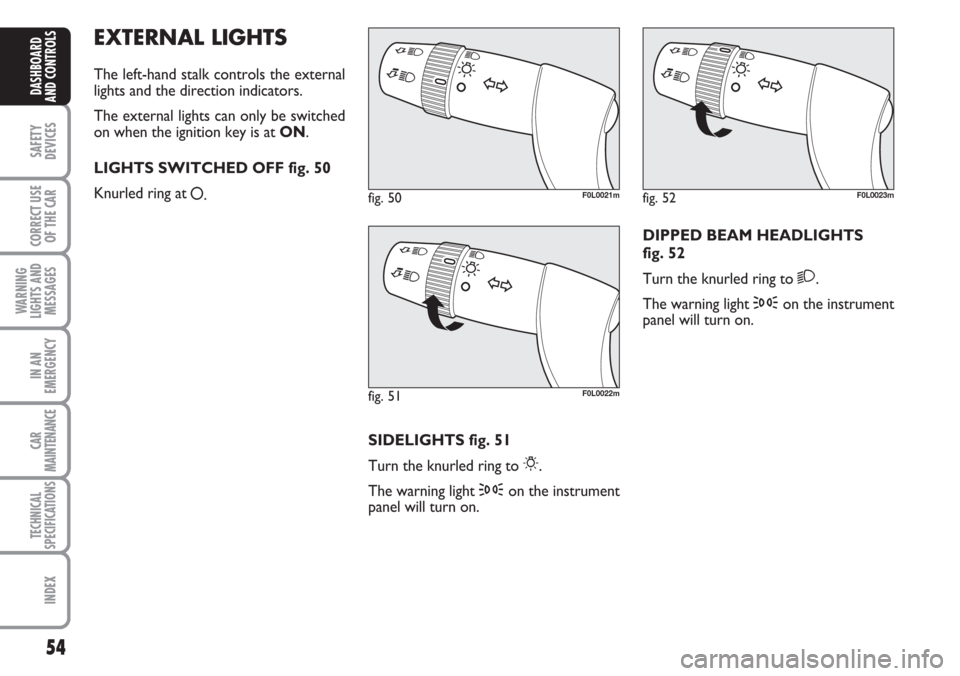
The left-hand stalk controls the external
lights and the direction indicators.
The external lights can only be switched
on when the ignition key is at ON.
LIGHTS SWITCHED OFF fig. 50
Knurled ring at
å.
SIDELIGHTS fig. 51
Turn the knurled ring to
6.
The warning light 3on the instrument
panel will turn on.DIPPED BEAM HEADLIGHTS
fig. 52
Turn the knurled ring to
2.
The warning light 3on the instrument
panel will turn on.
fig. 50F0L0021m
fig. 51F0L0022m
fig. 52F0L0023m
Page 56 of 240
56
SAFETY
DEVICES
CORRECT USE
OF THE CAR
WARNING
LIGHTS AND
MESSAGES
IN AN
EMERGENCY
CAR
MAINTENANCE
TECHNICAL
SPECIFICATIONS
INDEX
DASHBOARD
AND CONTROLS
“FOLLOW ME HOME” DEVICE
This function allows the illumination of the
space in front of the car for a preset pe-
riod of time.
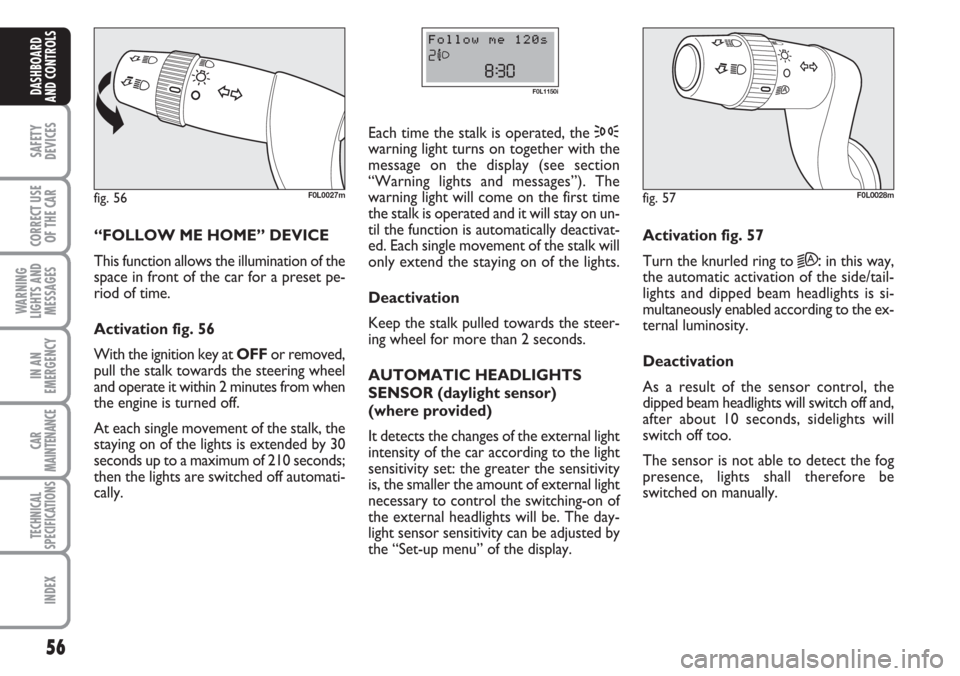
Activation fig. 56
With the ignition key at OFFor removed,
pull the stalk towards the steering wheel
and operate it within 2 minutes from when
the engine is turned off.
At each single movement of the stalk, the
staying on of the lights is extended by 30
seconds up to a maximum of 210 seconds;
then the lights are switched off automati-
cally. Each time the stalk is operated, the 3
warning light turns on together with the
message on the display (see section
“Warning lights and messages”). The
warning light will come on the first time
the stalk is operated and it will stay on un-
til the function is automatically deactivat-
ed. Each single movement of the stalk will
only extend the staying on of the lights.
Deactivation
Keep the stalk pulled towards the steer-
ing wheel for more than 2 seconds.
AUTOMATIC HEADLIGHTS
SENSOR (daylight sensor)
(where provided)
It detects the changes of the external light
intensity of the car according to the light
sensitivity set: the greater the sensitivity
is, the smaller the amount of external light
necessary to control the switching-on of
the external headlights will be. The day-
light sensor sensitivity can be adjusted by
the “Set-up menu” of the display.
fig. 56F0L0027m
F0L1150i
Activation fig. 57
Turn the knurled ring to
2A:in this way,
the automatic activation of the side/tail-
lights and dipped beam headlights is si-
multaneously enabled according to the ex-
ternal luminosity.
Deactivation
As a result of the sensor control, the
dipped beam headlights will switch off and,
after about 10 seconds, sidelights will
switch off too.
The sensor is not able to detect the fog
presence, lights shall therefore be
switched on manually.
fig. 57F0L0028m
Page 58 of 240
58
SAFETY
DEVICES
CORRECT USE
OF THE CAR
WARNING
LIGHTS AND
MESSAGES
IN AN
EMERGENCY
CAR
MAINTENANCE
TECHNICAL
SPECIFICATIONS
INDEX
DASHBOARD
AND CONTROLS
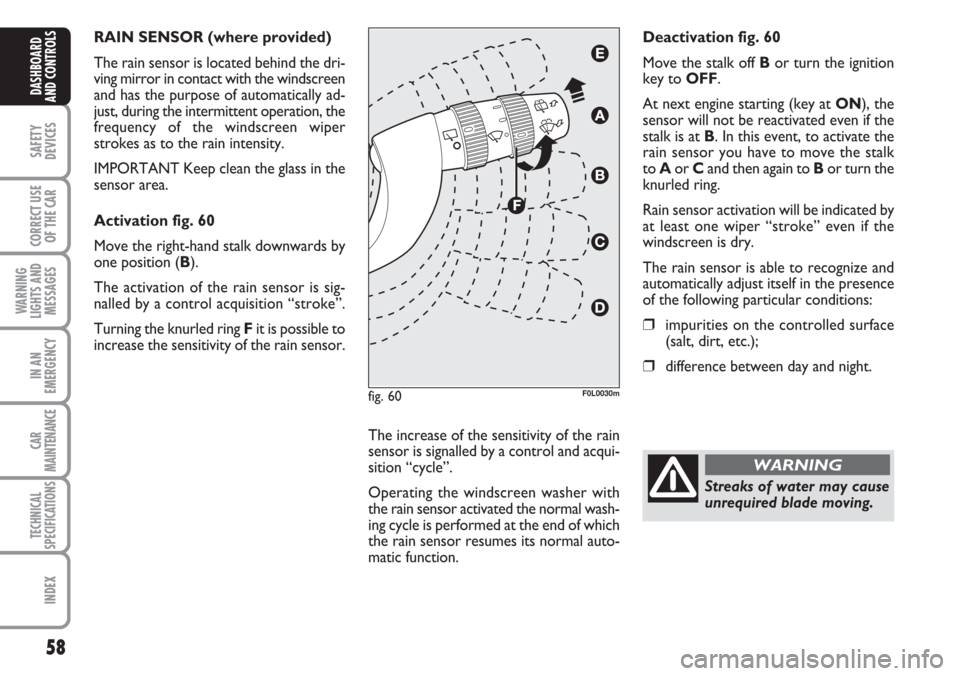
RAIN SENSOR (where provided)
The rain sensor is located behind the dri-
ving mirror in contact with the windscreen
and has the purpose of automatically ad-
just, during the intermittent operation, the
frequency of the windscreen wiper
strokes as to the rain intensity.
IMPORTANT Keep clean the glass in the
sensor area.
Activation fig. 60
Move the right-hand stalk downwards by
one position (B).
The activation of the rain sensor is sig-
nalled by a control acquisition “stroke”.
Turning the knurled ring Fit is possible to
increase the sensitivity of the rain sensor.
The increase of the sensitivity of the rain
sensor is signalled by a control and acqui-
sition “cycle”.
Operating the windscreen washer with
the rain sensor activated the normal wash-
ing cycle is performed at the end of which
the rain sensor resumes its normal auto-
matic function.Deactivation fig. 60
Move the stalk off Bor turn the ignition
key to OFF.
At next engine starting (key at ON), the
sensor will not be reactivated even if the
stalk is at B. In this event, to activate the
rain sensor you have to move the stalk
to Aor Cand then again to Bor turn the
knurled ring.
Rain sensor activation will be indicated by
at least one wiper “stroke” even if the
windscreen is dry.
The rain sensor is able to recognize and
automatically adjust itself in the presence
of the following particular conditions:
❒impurities on the controlled surface
(salt, dirt, etc.);
❒difference between day and night.
fig. 60F0L0030m
Streaks of water may cause
unrequired blade moving.
WARNING