ignition FIAT DOBLO COMBI 2015 2.G User Guide
[x] Cancel search | Manufacturer: FIAT, Model Year: 2015, Model line: DOBLO COMBI, Model: FIAT DOBLO COMBI 2015 2.GPages: 323, PDF Size: 46.77 MB
Page 42 of 323
LUGGAGE
COMPARTMENT LIGHT
(Doblò/Doblò Combi version)
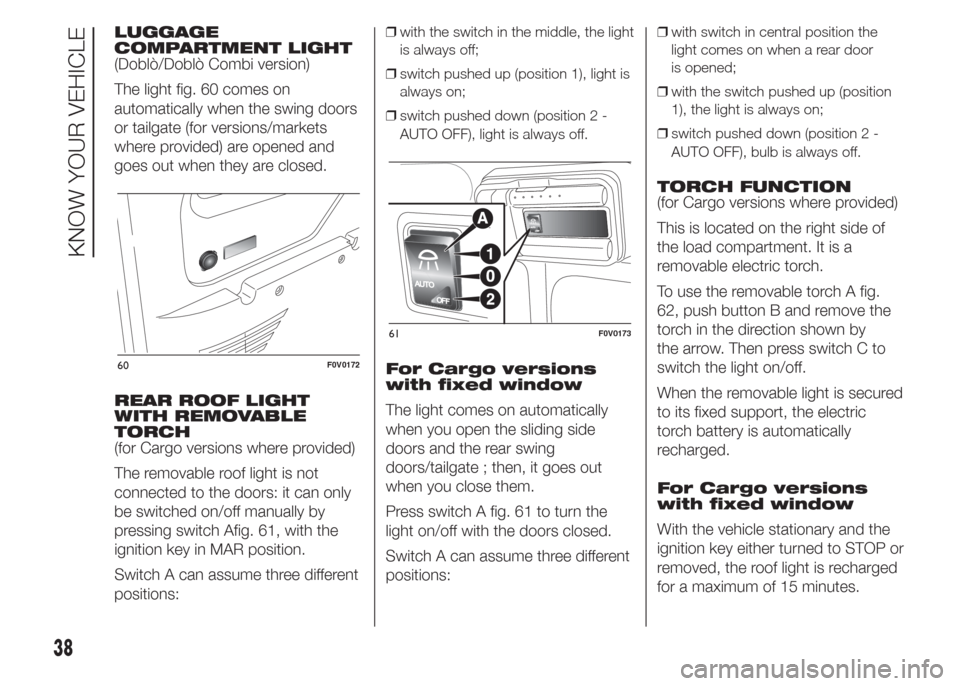
The light fig. 60 comes on
automatically when the swing doors
or tailgate (for versions/markets
where provided) are opened and
goes out when they are closed.
REAR ROOF LIGHT
WITH REMOVABLE
TORCH
(for Cargo versions where provided)
The removable roof light is not
connected to the doors: it can only
be switched on/off manually by
pressing switch Afig. 61, with the
ignition key in MAR position.
Switch A can assume three different
positions:❒with the switch in the middle, the light
is always off;
❒switch pushed up (position 1), light is
always on;
❒switch pushed down (position 2 -
AUTO OFF), light is always off.
For Cargo versions
with fixed window
The light comes on automatically
when you open the sliding side
doors and the rear swing
doors/tailgate ; then, it goes out
when you close them.
Press switch A fig. 61 to turn the
light on/off with the doors closed.
Switch A can assume three different
positions:
❒with switch in central position the
light comes on when a rear door
is opened;
❒with the switch pushed up (position
1), the light is always on;
❒switch pushed down (position 2 -
AUTO OFF), bulb is always off.
TORCH FUNCTION
(for Cargo versions where provided)
This is located on the right side of
the load compartment. It is a
removable electric torch.
To use the removable torch A fig.
62, push button B and remove the
torch in the direction shown by
the arrow. Then press switch C to
switch the light on/off.
When the removable light is secured
to its fixed support, the electric
torch battery is automatically
recharged.
For Cargo versions
with fixed window
With the vehicle stationary and the
ignition key either turned to STOP or
removed, the roof light is recharged
for a maximum of 15 minutes.
60F0V0172
61F0V0173
38
KNOW YOUR VEHICLE
Page 44 of 323
WINDSCREEN/REAR
WINDOW WIPER
IN BRIEF
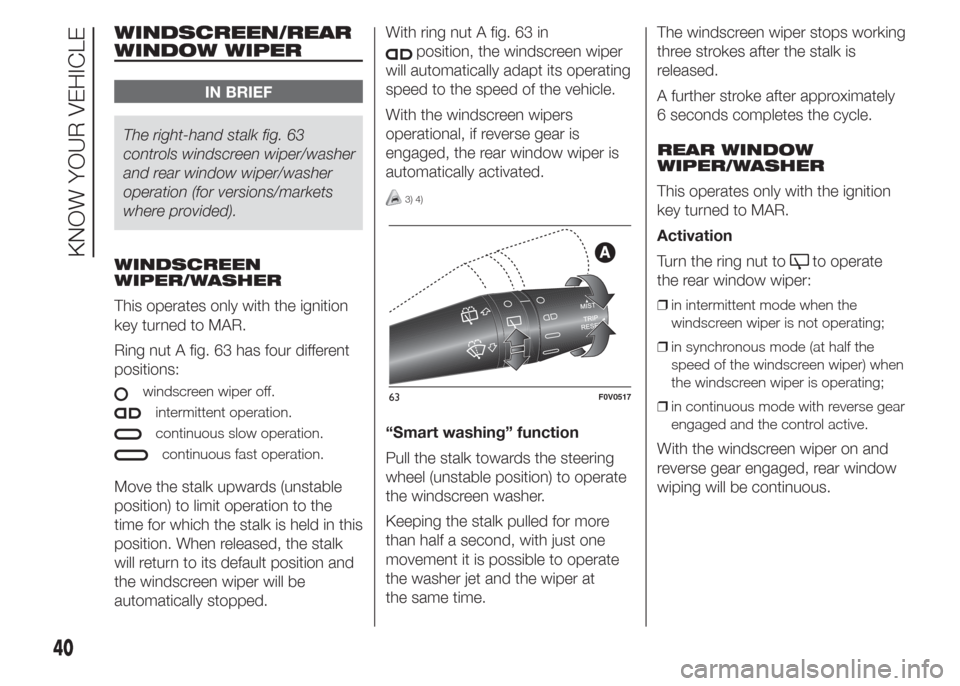
The right-hand stalk fig. 63
controls windscreen wiper/washer
and rear window wiper/washer
operation (for versions/markets
where provided).
WINDSCREEN
WIPER/WASHER
This operates only with the ignition
key turned to MAR.
Ring nut A fig. 63 has four different
positions:
windscreen wiper off.
intermittent operation.
continuous slow operation.
continuous fast operation.
Move the stalk upwards (unstable
position) to limit operation to the
time for which the stalk is held in this
position. When released, the stalk
will return to its default position and
the windscreen wiper will be
automatically stopped.With ring nut A fig. 63 in
position, the windscreen wiper
will automatically adapt its operating
speed to the speed of the vehicle.
With the windscreen wipers
operational, if reverse gear is
engaged, the rear window wiper is
automatically activated.
3) 4)
“Smart washing” function
Pull the stalk towards the steering
wheel (unstable position) to operate
the windscreen washer.
Keeping the stalk pulled for more
than half a second, with just one
movement it is possible to operate
the washer jet and the wiper at
the same time.The windscreen wiper stops working
three strokes after the stalk is
released.
A further stroke after approximately
6 seconds completes the cycle.
REAR WINDOW
WIPER/WASHER
This operates only with the ignition
key turned to MAR.
Activation
Turn the ring nut to
to operate
the rear window wiper:
❒in intermittent mode when the
windscreen wiper is not operating;
❒in synchronous mode (at half the
speed of the windscreen wiper) when
the windscreen wiper is operating;
❒in continuous mode with reverse gear
engaged and the control active.
With the windscreen wiper on and
reverse gear engaged, rear window
wiping will be continuous.
63F0V0517
40
KNOW YOUR VEHICLE
Page 60 of 323
When this function is active, the LED
on the corresponding button and
the one on the heated rear window
button switch on. The message
FULL AUTO goes off on the display.
You can only adjust the fan speed
and switch off the heated rear
window manually when this function
is active.
To restore the previous operating
conditions, simply press button B,
air recirculation button G,
compressor button F or AUTO
button A.
Heated rear window
and door mirrors
electric control
demisting/defrosting
button (L)
(for versions/markets, where
provided)
Push this button to activate the
demisting/defrosting of the heated
rear window and electric door
mirrors
When this function is active, the
button LED is on.This function switches off
automatically after about 20 minutes
or when you push the button again,
or when the engine is turned off. It
will not be switched on automatically
when the engine is restarted.
IMPORTANT Do not affix decals to
the inside of the heated rear window
over the heating filaments, to avoid
damage that might cause them
to stop working properly.
Switching the system
OFF (E)
Press button E to switch the climate
control system off. The display will
go out.
With the system off, the climate
control system conditions are as
follows: display off, temperature
setting not display, air recirculation
on thereby insulating the passenger
compartment from the outside
(recirculation LED on), climate
control compressor off, fan off.
Press the AUTO button to switch
the climate control system back on
in full automatic mode.ELECTRIC WINDOWS
FRONT ELECTRIC
WINDOWS
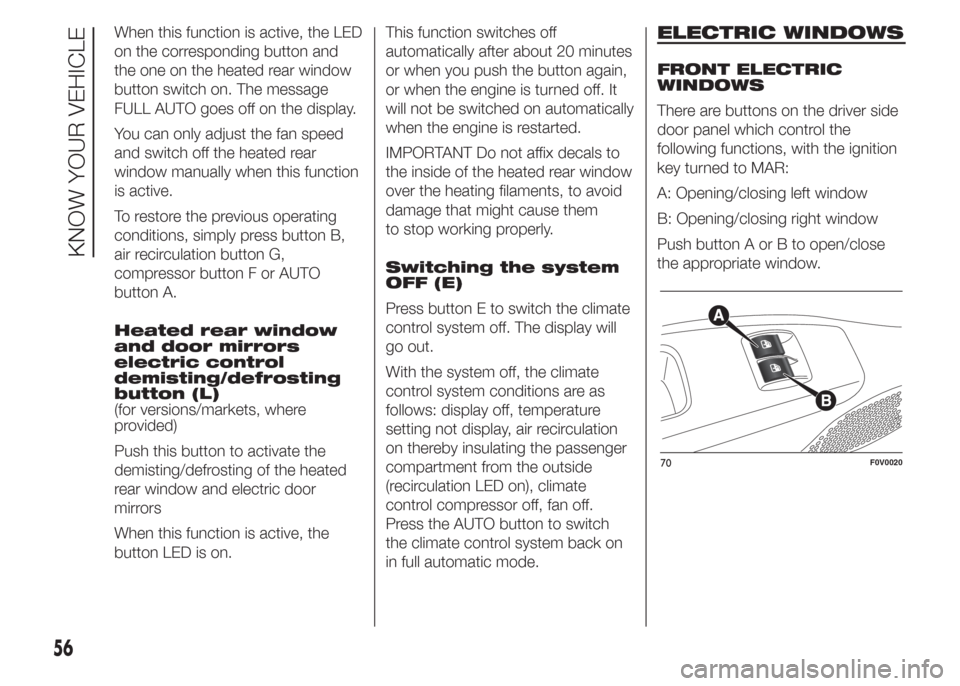
There are buttons on the driver side
door panel which control the
following functions, with the ignition
key turned to MAR:
A: Opening/closing left window
B: Opening/closing right window
Push button A or B to open/close
the appropriate window.
70F0V0020
56
KNOW YOUR VEHICLE
Page 61 of 323
When one of the two buttons is
pressed briefly, the window moves
in stages; if the button is held down,
"continuous automatic" operation
is activated both for closing and
opening. Press button A or B again
to stop the window in its current
position.
The electric windows are fitted with
a security system (where provided)
that can detect the presence of
an obstacle whilst the window
is closing; when this happens, the
system kicks in and the movement
of the glass is immediately reversed.
IMPORTANT In the event that the
anti-crushing function is activated 5
times in only 1 minute, the system
will automatically enter the
"recovery" mode (self-protection).
This condition is apparent from the
window closing in stages.
If this occurs, restore the system as
follows:
❒open the windows.
If no malfunction is present, the
window returns to its normal
operation automatically.IMPORTANT With the ignition key at
STOP or removed, the electric
windows remain activated for about
two minutes and are deactivated
as soon as a door is opened.
28) 29)
FRONT AND REAR
ELECTRIC WINDOWS
(for versions/markets, where
provided)
Driver side door
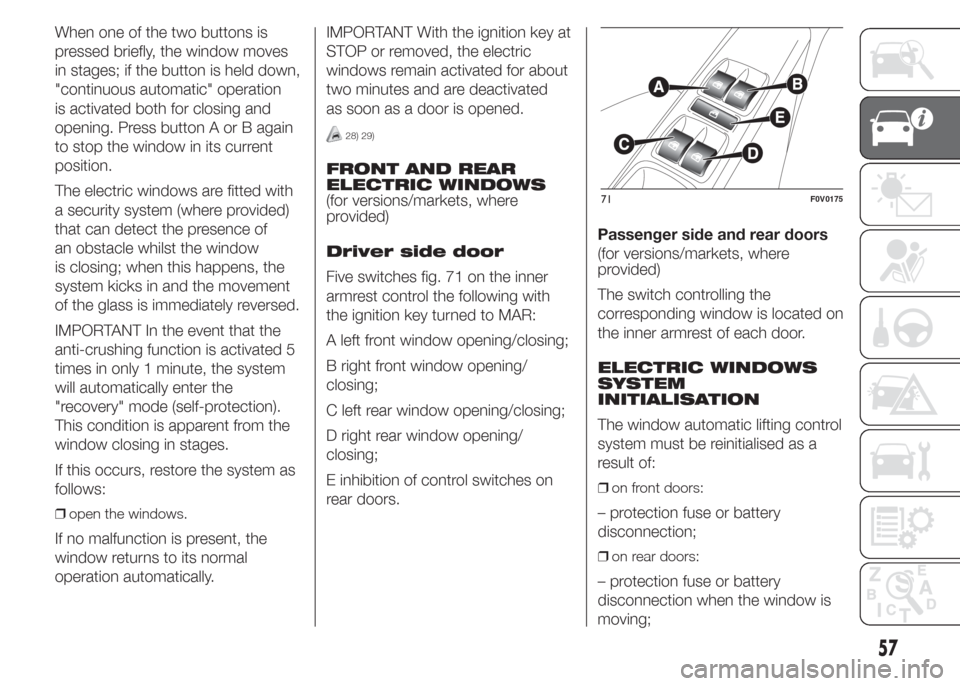
Five switches fig. 71 on the inner
armrest control the following with
the ignition key turned to MAR:
A left front window opening/closing;
B right front window opening/
closing;
C left rear window opening/closing;
D right rear window opening/
closing;
E inhibition of control switches on
rear doors.Passenger side and rear doors
(for versions/markets, where
provided)
The switch controlling the
corresponding window is located on
the inner armrest of each door.
ELECTRIC WINDOWS
SYSTEM
INITIALISATION
The window automatic lifting control
system must be reinitialised as a
result of:
❒on front doors:
– protection fuse or battery
disconnection;
❒on rear doors:
– protection fuse or battery
disconnection when the window is
moving;
71F0V0175
57
Page 62 of 323
– door opening with window
moving, due to the intervention of
the anti-pinch system;
– 50 window movements without
ever closing the window;
– 3 door opening movements, with
moving window, without ever
closing the window.
Proceed as follows for the
initialisation:
1. completely close the driver's door
window, keeping the operating
button pressed for at least 5
seconds after the (upper) end of
travel position
2. proceed in the same way on the
passenger's side door button and
on the buttons of rear doors.
WARNING
28) Incorrect use of the electric
windows may be dangerous.
Before and during their operation,
ensure that any passengers are
not at risk from the moving glass
either by personal objects getting
caught in the mechanism or by
being hit by it directly.
29) When leaving the vehicle,
always remove the ignition key to
avoid the risk of injury due to
accidental operation of the
electric windows.
CONTROLS
FOG LIGHTS
(for versions/markets, where
provided)
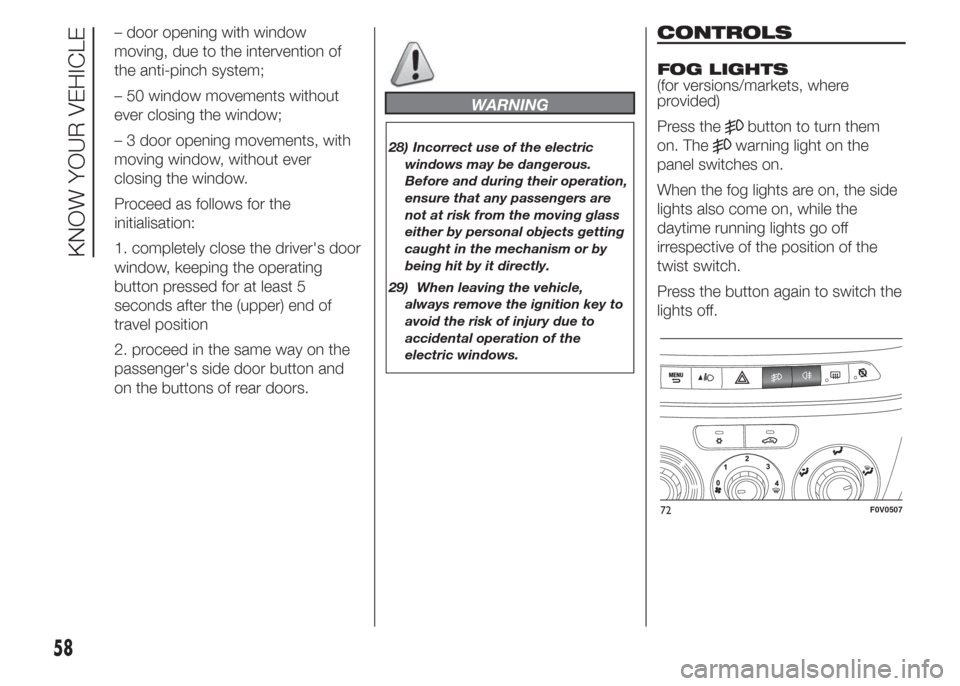
Press the
button to turn them
on. The
warning light on the
panel switches on.
When the fog lights are on, the side
lights also come on, while the
daytime running lights go off
irrespective of the position of the
twist switch.
Press the button again to switch the
lights off.
72F0V0507
58
KNOW YOUR VEHICLE
Page 69 of 323
POWER SOCKET (12 V)
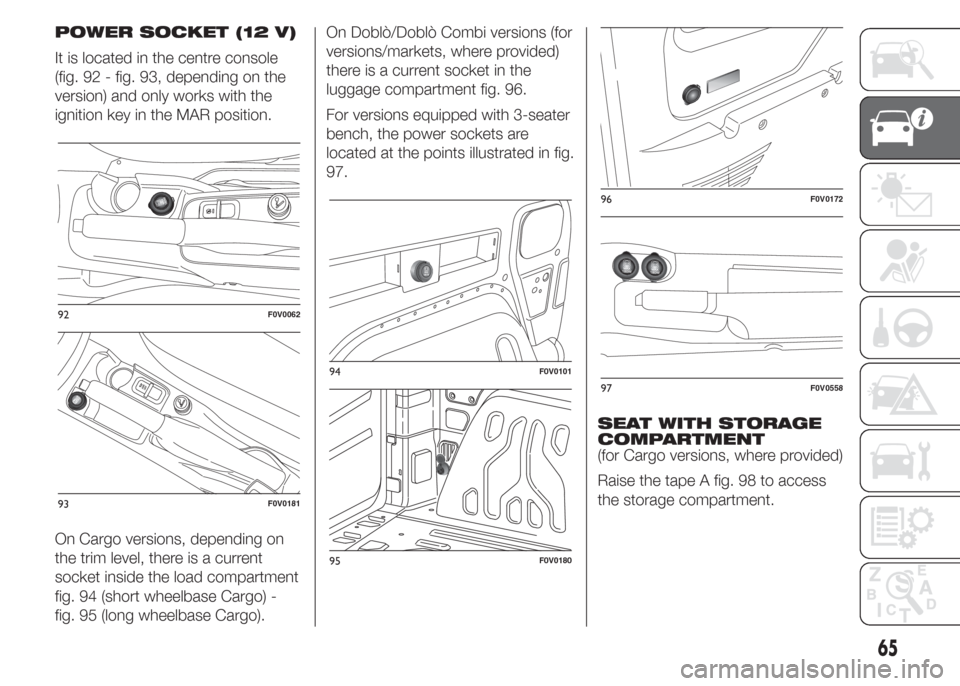
It is located in the centre console
(fig. 92 - fig. 93, depending on the
version) and only works with the
ignition key in the MAR position.
On Cargo versions, depending on
the trim level, there is a current
socket inside the load compartment
fig. 94 (short wheelbase Cargo) -
fig. 95 (long wheelbase Cargo).On Doblò/Doblò Combi versions (for
versions/markets, where provided)
there is a current socket in the
luggage compartment fig. 96.
For versions equipped with 3-seater
bench, the power sockets are
located at the points illustrated in fig.
97.
SEAT WITH STORAGE
COMPARTMENT
(for Cargo versions, where provided)
Raise the tape A fig. 98 to access
the storage compartment.
92F0V0062
93F0V0181
94F0V0101
95F0V0180
96F0V0172
97F0V0558
65
Page 71 of 323
CIGAR LIGHTER
(for versions/markets, where
provided)
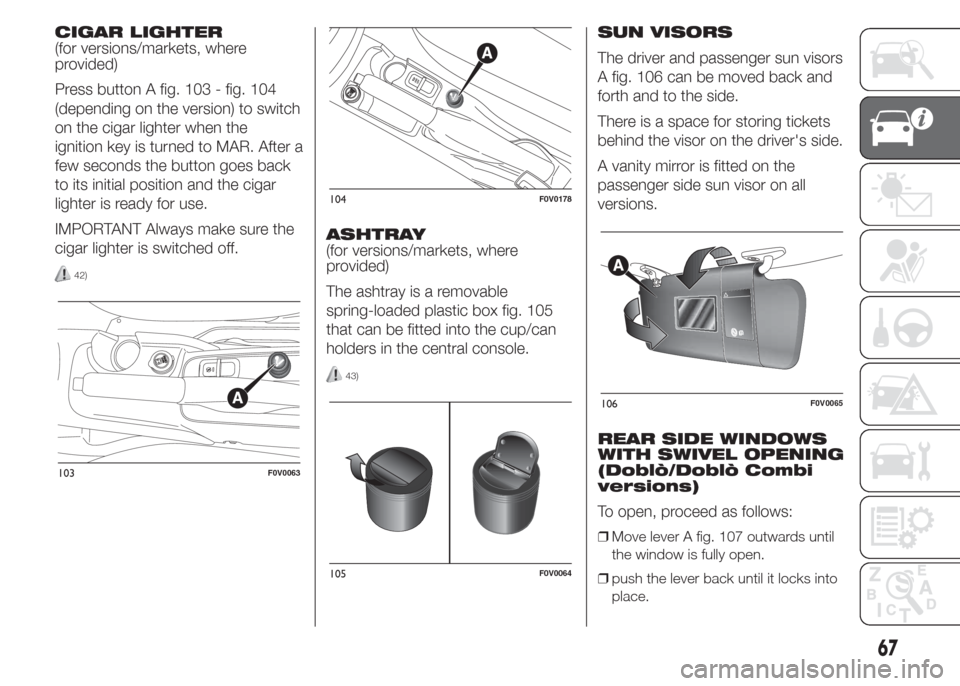
Press button A fig. 103 - fig. 104
(depending on the version) to switch
on the cigar lighter when the
ignition key is turned to MAR. After a
few seconds the button goes back
to its initial position and the cigar
lighter is ready for use.
IMPORTANT Always make sure the
cigar lighter is switched off.
42)
ASHTRAY
(for versions/markets, where
provided)
The ashtray is a removable
spring-loaded plastic box fig. 105
that can be fitted into the cup/can
holders in the central console.
43)
SUN VISORS
The driver and passenger sun visors
A fig. 106 can be moved back and
forth and to the side.
There is a space for storing tickets
behind the visor on the driver's side.
A vanity mirror is fitted on the
passenger side sun visor on all
versions.
REAR SIDE WINDOWS
WITH SWIVEL OPENING
(Doblò/Doblò Combi
versions)
To open, proceed as follows:
❒Move lever A fig. 107 outwards until
the window is fully open.
❒push the lever back until it locks into
place.
103F0V0063
104F0V0178
105F0V0064
106F0V0065
67
Page 73 of 323
WARNING
44) Strictly adhere to the laws in
force concerning maximum
clearance.
45) Check that the attachment fixing
screws are tight after a few
kilometres.
IMPORTANT
8) Evenly distribute the load and
take into account, when driving,
the increased responsiveness
of the vehicle to side wind.
9) Never exceed the maximum
permitted loads (see chapter
“Technical specifications”).
HEADLIGHTS
LIGHT BEAM
ALIGNMENT
The correct alignment of the
headlights is essential for the
comfort and safety of the driver and
other road users. To ensure the
best visibility when travelling with the
headlights on, the headlight
alignment must be correct. Contact
a Fiat Dealership to have the
headlights checked and adjusted.
HEADLIGHT
ALIGNMENT
CORRECTOR
This device works with the ignition
key in the MAR position and the
dipped beam headlights on.
The vehicle tilts backwards when it
is laden, raising the beam. The
beams must therefore be realigned
in this case.Headlight alignment
adjustment
Press theandfig. 109
buttons on the control panel to
adjust.
The display located on the
instrument panel provides a visual
indication of the adjustment
position.
Position 0 - one or two people in the
front seats.
Position 1 - five people.
Position 2 - five people + load in the
luggage compartment.
Position 3 - driver + maximum
permitted load stowed in the
luggage compartment.
IMPORTANT Check the light beam
alignment every time the load
transported changes.
FOG LIGHTS
ALIGNMENT
(for versions/markets, where
provided)
Contact a Fiat Dealership to have
the headlights checked and
adjusted.
69
Page 93 of 323
TRIP COMPUTER
IN BRIEF
The Trip computer is used to
display information on vehicle
operation when the ignition key is
turned to MAR. This function
allows you to define two separate
trips, called "Trip A" and "Trip
B", for monitoring the "complete
mission" (journey) of the vehicle in
a reciprocally independent
manner. Both functions can be
reset (reset means start of a new
journey).
"Trip A" can be used to display the
values relating to:
❒External temperature
❒Range
❒Distance travelled A
❒Average consumption A
❒Instant consumption
❒Average speed A
❒Trip time A (driving time)
❒Reset Trip A
"Trip B", available on multifunction
display only, is used to display
the values relating to:
❒Distance travelled B
❒Average consumption B
❒Average speed B
❒Trip time B (driving time)
❒Trip B reset
11)
Values displayed
External temperature
Indicates the temperature outside
the vehicle passenger compartment.
Range (for versions/markets, where
provided)
This indicates the distance that can
still be travelled with the fuel in the
tank, assuming that driving style
remains unvaried. The display will
show the reading "----"when the
following events take place:
❒range is lower than 50 km (or
corresponding figure in mi)
❒vehicle is left parked with the engine
running for a long time
IMPORTANT The range can be
affected by several factors: driving
style (see paragraph “Driving style”
in the “Starting and driving” section),
type of route (motorway, towns
and cities, mountain roads, etc…),
usage conditions (load, tyre
pressures, etc…). Trip planning must
therefore take the above into
account.
Distance travelled
This value shows the distance
travelled from the start of the new
journey.
Average consumption (for
versions/markets, where provided)
This value shows the approximate
average fuel consumption from
the start of the new journey.
Instant consumption (for versions/
markets where provided)
This value shows the fuel
consumption. The value is
constantly updated. The display will
show "----"ifthevehicle is parked
with the engine running.
89
Page 94 of 323
Average speed
This value shows the vehicle's
average speed based on the overall
time elapsed since the start of the
new journey.
Trip time
Time elapsed since the start of the
new journey.
IMPORTANT If there is no
information, the Trip computer
displays "----" in place of the value.
When normal operating conditions
are restored, the counting of the
various values is resumed, without
either zeroing the values displayed
prior to the problem, or starting a
new mission.
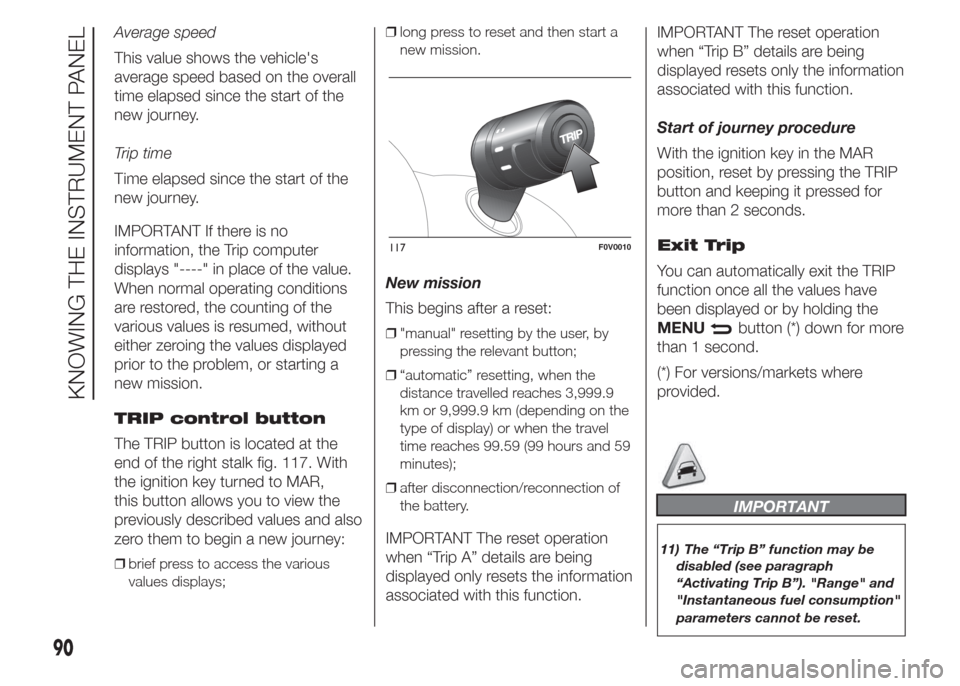
TRIP control button
The TRIP button is located at the
end of the right stalk fig. 117. With
the ignition key turned to MAR,
this button allows you to view the
previously described values and also
zero them to begin a new journey:
❒brief press to access the various
values displays;❒long press to reset and then start a
new mission.
New mission
This begins after a reset:
❒"manual" resetting by the user, by
pressing the relevant button;
❒“automatic” resetting, when the
distance travelled reaches 3,999.9
km or 9,999.9 km (depending on the
type of display) or when the travel
time reaches 99.59 (99 hours and 59
minutes);
❒after disconnection/reconnection of
the battery.
IMPORTANT The reset operation
when “Trip A” details are being
displayed only resets the information
associated with this function.IMPORTANT The reset operation
when “Trip B” details are being
displayed resets only the information
associated with this function.
Start of journey procedure
With the ignition key in the MAR
position, reset by pressing the TRIP
button and keeping it pressed for
more than 2 seconds.
Exit Trip
You can automatically exit the TRIP
function once all the values have
been displayed or by holding the
MENU
button (*) down for more
than 1 second.
(*) For versions/markets where
provided.
IMPORTANT
11) The “Trip B” function may be
disabled (see paragraph
“Activating Trip B”). "Range" and
"Instantaneous fuel consumption"
parameters cannot be reset.
117F0V0010
90
KNOWING THE INSTRUMENT PANEL