instrument panel FIAT DOBLO COMBI 2017 2.G Owners Manual
[x] Cancel search | Manufacturer: FIAT, Model Year: 2017, Model line: DOBLO COMBI, Model: FIAT DOBLO COMBI 2017 2.GPages: 300, PDF Size: 24.91 MB
Page 11 of 300
GRAPHICAL INDEX
KNOWING YOUR VEHICLE
KNOWING THE INSTRUMENT PANEL
SAFETY
STARTING AND DRIVING
IN AN EMERGENCY
SERVICING AND CARE
TECHNICAL DATA
INDEX
7
Page 15 of 300
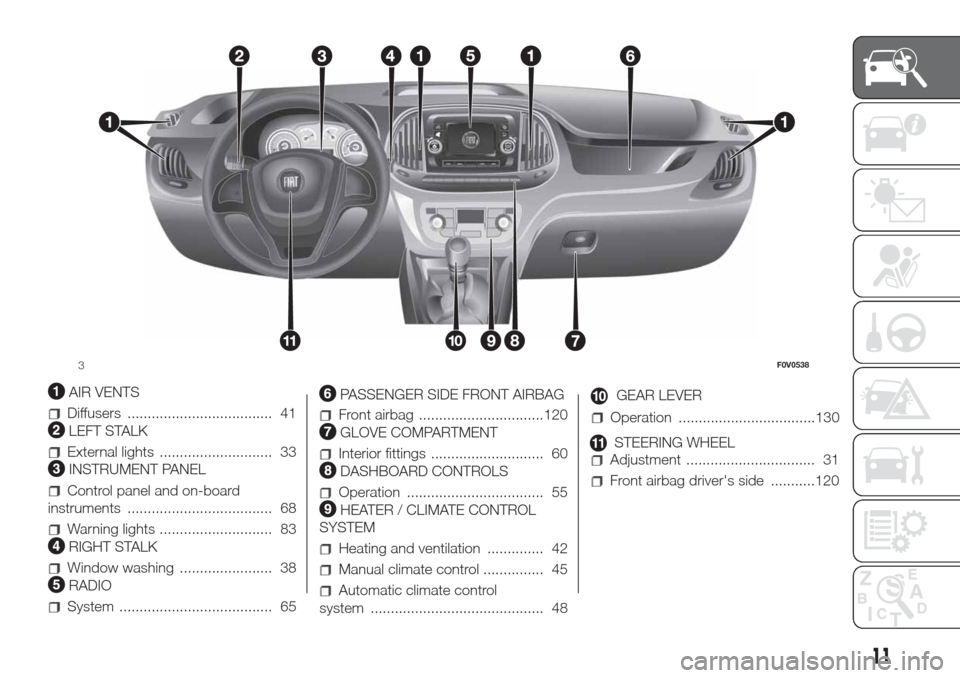
AIR VENTS
Diffusers .................................... 41
LEFT STALK
External lights ............................ 33
INSTRUMENT PANEL
Control panel and on-board
instruments .................................... 68
Warning lights ............................ 83
RIGHT STALK
Window washing ....................... 38
RADIO
System ...................................... 65
PASSENGER SIDE FRONT AIRBAG
Front airbag ...............................120
GLOVE COMPARTMENT
Interior fittings ............................ 60
DASHBOARD CONTROLS
Operation .................................. 55
HEATER / CLIMATE CONTROL
SYSTEM
Heating and ventilation .............. 42
Manual climate control ............... 45
Automatic climate control
system ........................................... 48
GEAR LEVER
Operation ..................................130
STEERING WHEEL
Adjustment ................................ 31
Front airbag driver's side ...........120
3F0V0538
11
Page 22 of 300
Each time the ignition key is turned to
STOP, the Fiat CODE system
deactivates the functions of the
Powertrain Control Module.
Irregular operation
If, during starting, the code has not
been recognised correctly the warning
light
on the instrument panel turns
on accompanied by the related
message on the display (see section
“Warning lights and messages”).
In this case, turn the key toSTOPand
then back toMAR; if the lock
continues, try with the other keys
provided with the vehicle. Contact a
Fiat Dealership if you still cannot start
the engine.
IMPORTANT Each key has its own
code which must be stored by the
system's control unit. Contact a Fiat
Dealership to have new keys (up to 8)
stored with a code.
Activation of
warning
light while driving
If the warning lightswitches on,
this means that the system is running
a self-diagnosis (for example due to
a voltage drop).
If the warning lightstays on,
contact a Fiat Dealership.
WARNING
1)The electronic components inside the
key may be damaged if the key is
subjected to strong shocks. In order to
ensure complete efficiency of the
electronic devices inside the key, it should
never be exposed to direct sunlight.
DOORS
DOOR CENTRAL
LOCKING/UNLOCKING
Locking doors from the outside
The doors will only be locked if all doors
are shut. If one or more of the doors is
open after button
is pressed on
the remote control, the direction
indicators will flash quickly for around
three seconds.
You can lock all the doors by turning
the key clockwise in the driver's door.
Pressing button
on the remote
control twice in quick succession
activates the dead lock device (see
"Dead lock").
Door unlocking from the outside
Press the
button shortly to remotely
unlock only the front doors (Cargo
version), to turn on the front ceiling
lights for a limited period and to double
flash the direction indicators.
Press the
button shortly to remotely
unlock the load compartment (Cargo
version), to turn on the rear ceiling lights
for a limited period and to double flash
the direction indicators. Turn the key
anticlockwise in the driver's door to
unlock the front doors only.
18
KNOWING YOUR VEHICLE
Page 37 of 300
WARNING
26)When driving, these mirrors must
always be in position A fig. 58. As door
mirrors are curved, they may slightly alter
the perception of distance.
EXTERNAL LIGHTS
IN BRIEF
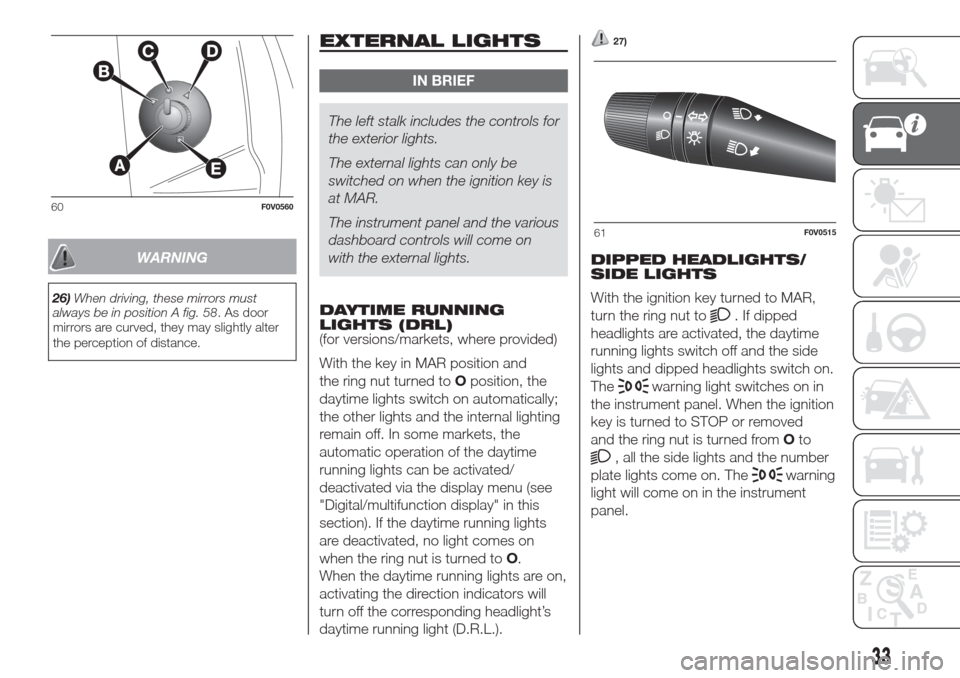
The left stalk includes the controls for
the exterior lights.
The external lights can only be
switched on when the ignition key is
at MAR.
The instrument panel and the various
dashboard controls will come on
with the external lights.
DAYTIME RUNNING
LIGHTS (DRL)
(for versions/markets, where provided)
With the key in MAR position and
the ring nut turned toOposition, the
daytime lights switch on automatically;
the other lights and the internal lighting
remain off. In some markets, the
automatic operation of the daytime
running lights can be activated/
deactivated via the display menu (see
"Digital/multifunction display" in this
section). If the daytime running lights
are deactivated, no light comes on
when the ring nut is turned toO.
When the daytime running lights are on,
activating the direction indicators will
turn off the corresponding headlight’s
daytime running light (D.R.L.).
27)
DIPPED HEADLIGHTS/
SIDE LIGHTS
With the ignition key turned to MAR,
turn the ring nut to
. If dipped
headlights are activated, the daytime
running lights switch off and the side
lights and dipped headlights switch on.
The
warning light switches on in
the instrument panel. When the ignition
key is turned to STOP or removed
and the ring nut is turned fromOto
, all the side lights and the number
plate lights come on. The
warning
light will come on in the instrument
panel.
60F0V0560
61F0V0515
33
Page 38 of 300
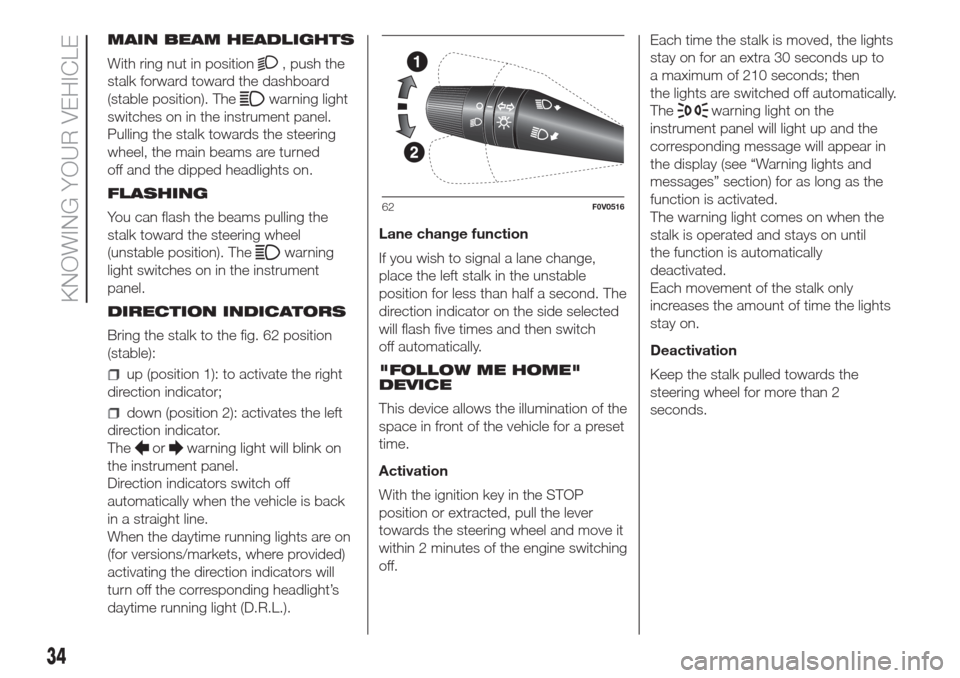
MAIN BEAM HEADLIGHTS
With ring nut in position
, push the
stalk forward toward the dashboard
(stable position). The
warning light
switches on in the instrument panel.
Pulling the stalk towards the steering
wheel, the main beams are turned
off and the dipped headlights on.
FLASHING
You can flash the beams pulling the
stalk toward the steering wheel
(unstable position). The
warning
light switches on in the instrument
panel.
DIRECTION INDICATORS
Bring the stalk to the fig. 62 position
(stable):
up (position 1): to activate the right
direction indicator;
down (position 2): activates the left
direction indicator.
The
orwarning light will blink on
the instrument panel.
Direction indicators switch off
automatically when the vehicle is back
in a straight line.
When the daytime running lights are on
(for versions/markets, where provided)
activating the direction indicators will
turn off the corresponding headlight’s
daytime running light (D.R.L.).Lane change function
If you wish to signal a lane change,
place the left stalk in the unstable
position for less than half a second. The
direction indicator on the side selected
will flash five times and then switch
off automatically.
"FOLLOW ME HOME"
DEVICE
This device allows the illumination of the
space in front of the vehicle for a preset
time.
Activation
With the ignition key in the STOP
position or extracted, pull the lever
towards the steering wheel and move it
within 2 minutes of the engine switching
off.Each time the stalk is moved, the lights
stay on for an extra 30 seconds up to
a maximum of 210 seconds; then
the lights are switched off automatically.
The
warning light on the
instrument panel will light up and the
corresponding message will appear in
the display (see “Warning lights and
messages” section) for as long as the
function is activated.
The warning light comes on when the
stalk is operated and stays on until
the function is automatically
deactivated.
Each movement of the stalk only
increases the amount of time the lights
stay on.
Deactivation
Keep the stalk pulled towards the
steering wheel for more than 2
seconds.
62F0V0516
34
KNOWING YOUR VEHICLE
Page 68 of 300
ROOF RACK/SKI
RACK
44) 45)
8) 9)
FASTENERS
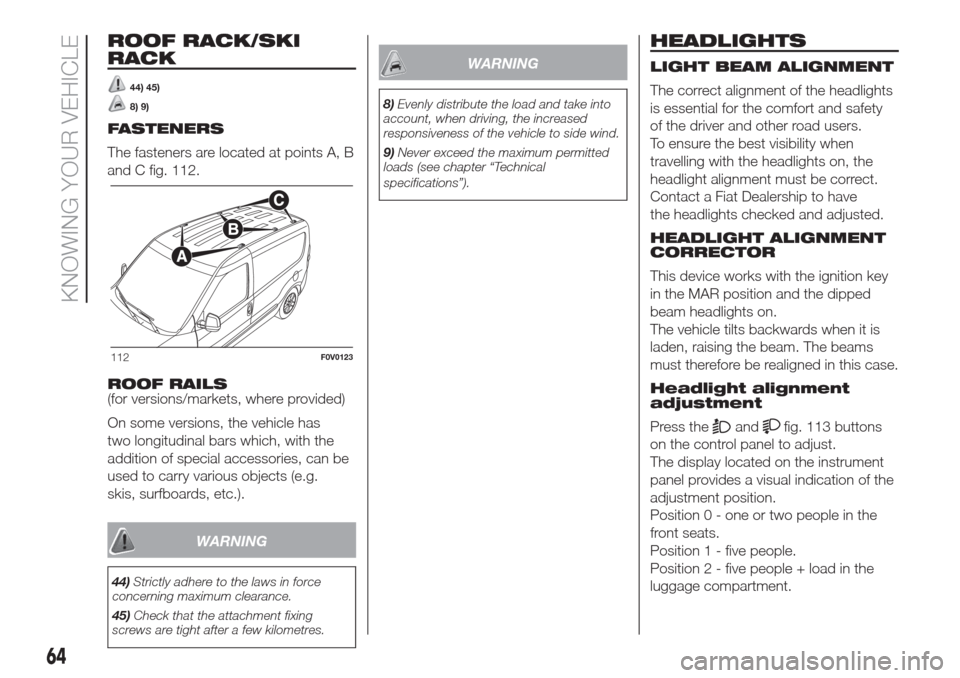
The fasteners are located at points A, B
and C fig. 112.
ROOF RAILS
(for versions/markets, where provided)
On some versions, the vehicle has
two longitudinal bars which, with the
addition of special accessories, can be
used to carry various objects (e.g.
skis, surfboards, etc.).
WARNING
44)Strictly adhere to the laws in force
concerning maximum clearance.
45)Check that the attachment fixing
screws are tight after a few kilometres.
WARNING
8)Evenly distribute the load and take into
account, when driving, the increased
responsiveness of the vehicle to side wind.
9)Never exceed the maximum permitted
loads (see chapter “Technical
specifications”).
HEADLIGHTS
LIGHT BEAM ALIGNMENT
The correct alignment of the headlights
is essential for the comfort and safety
of the driver and other road users.
To ensure the best visibility when
travelling with the headlights on, the
headlight alignment must be correct.
Contact a Fiat Dealership to have
the headlights checked and adjusted.
HEADLIGHT ALIGNMENT
CORRECTOR
This device works with the ignition key
in the MAR position and the dipped
beam headlights on.
The vehicle tilts backwards when it is
laden, raising the beam. The beams
must therefore be realigned in this case.
Headlight alignment
adjustment
Press the
andfig. 113 buttons
on the control panel to adjust.
The display located on the instrument
panel provides a visual indication of the
adjustment position.
Position 0 - one or two people in the
front seats.
Position 1 - five people.
Position 2 - five people + load in the
luggage compartment.
112F0V0123
64
KNOWING YOUR VEHICLE
Page 71 of 300
KNOWING THE INSTRUMENT PANEL
This section of the booklet gives you all
the information you need to
understand, interpret and use the
instrument panel correctly.CONTROL PANEL AND
ON-BOARD INSTRUMENTS ........... 68
DIGITAL DISPLAY............................ 70
MULTIFUNCTION DISPLAY ............. 73
TRIP COMPUTER ........................... 80
EOBD SYSTEM............................... 82
WARNING LIGHTS AND
MESSAGES .................................... 83
- LOW BRAKE FLUID/HANDBRAKE
APPLIED ............................................ 83
- EBD FAILURE .................................. 84
- AIR BAG FAILURE ............................ 84
- SEAT BELTS REMINDER .................. 85
- ENGINE COOLANT TEMPERATURE
TOO HIGH .......................................... 85
- LOW BATTERY CHARGE ................. 86
- LOW ENGINE OIL PRESSURE ......... 87
-DECAYED ENGINE OIL ..................... 87
-LOW ENGINE OIL LEVEL .................. 87
-DOORS OPEN .................................. 88
- EOBD/INJECTION SYSTEM
FAILURE ............................................. 89
- ABS FAILURE ................................... 90
-FUEL RESERVE ................................ 90
- GLOW PLUG PREHEATING/GLOW
PLUG PREHEATING FAILURE ............ 91
- WATER IN DIESEL FILTER ................ 91
-VEHICLE PROTECTION SYSTEM
FAILURE - FIAT CODE ........................ 92
- REAR FOG LIGHTS .......................... 92
-GENERAL FAILURE WARNING ......... 92
-DPF (PARTICULATE FILTER)
CLEANING UNDERWAY ..................... 93
-BRAKE PAD WEAR ........................... 94
-ASR SYSTEM DEACTIVATED ............ 94- TRACTION PLUS SYSTEM
ACTIVATION ....................................... 95
- TPMS ............................................... 95
-PARKING SENSOR FAILURE ............ 96
-START&STOP SYSTEM FAILURE ...... 96
- DIPPED BEAM HEADLIGHTS .......... 97
- FOLLOW ME HOME ........................ 97
- LEFT DIRECTION INDICATOR .......... 97
- RIGHT DIRECTION INDICATOR ....... 97
-FOG LIGHTS ..................................... 98
- CRUISE CONTROL .......................... 98
- MAIN BEAM HEADLIGHTS .............. 98
67
Page 72 of 300
CONTROL PANEL AND ON-BOARD INSTRUMENTS.
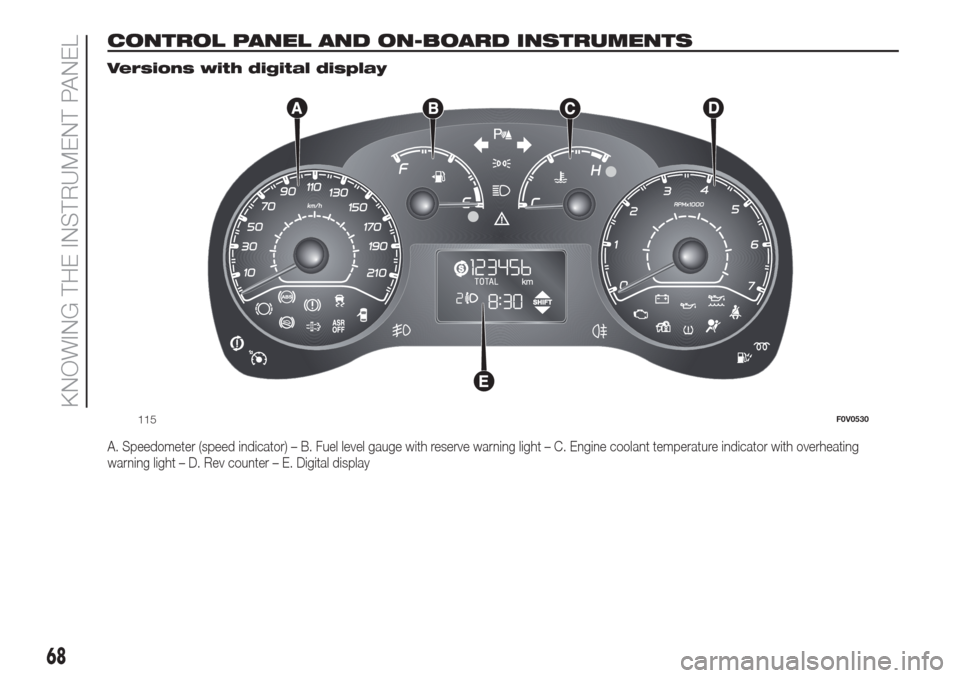
Versions with digital display
A. Speedometer (speed indicator) – B. Fuel level gauge with reserve warning light – C. Engine coolant temperature indicator with overheating
warning light – D. Rev counter – E. Digital display
115F0V0530
68
KNOWING THE INSTRUMENT PANEL
Page 74 of 300
SPEEDOMETER
This shows the speed at which the
vehicle is travelling.
REV COUNTER
The rev counter shows the engine rpm.
IMPORTANT The electronic injection
control system gradually shuts off
the flow of fuel when the engine
is “over-revving” resulting in a gradual
loss of engine power.
When the engine is idling, the rev
counter may indicate a gradual or
sudden increase of the speed.
This behaviour is standard as it takes
place during the activation of the
climate control system or the fan. It
should not be considered as a fault. In
such cases, a slight increase in engine
idle speed helps to sustain the battery
charge.
FUEL LEVEL GAUGE
This shows the amount of fuel left in the
fuel tank.
E tank empty.
F tank full (see the instructions provided
in the “Vehicle refuelling” paragraph).
The warning light on the gauge comes
on to indicate that approximately 8-10
litres of fuel are left in the tank.
Do not travel with the fuel tank almost
empty: any gaps in fuel supply could
damage the catalytic converter.IMPORTANT The needle will point to E
and warning light A will flash to indicate
a fault in the system. Contact a Fiat
Dealership to have the system
checked.
ENGINE COOLANT
TEMPERATURE
INDICATOR
This shows the temperature of the
engine coolant fluid and starts working
when the fluid temperature exceeds
approx. 50°C.
In normal usage, the needle should
hover around the middle of the scale.
C Low engine coolant temperature.
H High engine coolant temperature.
The warning light on the gauge may
light up (and a message on the
multifunction display may appear on
certain versions) to indicate that the
coolant fluid temperature is too high; in
this case, stop the engine and contact
a Fiat Dealership.
10)
WARNING
10)If the needle for the engine coolant
temperature reaches the red area, stop the
engine immediately and contact a Fiat
Dealership.
DIGITAL DISPLAY
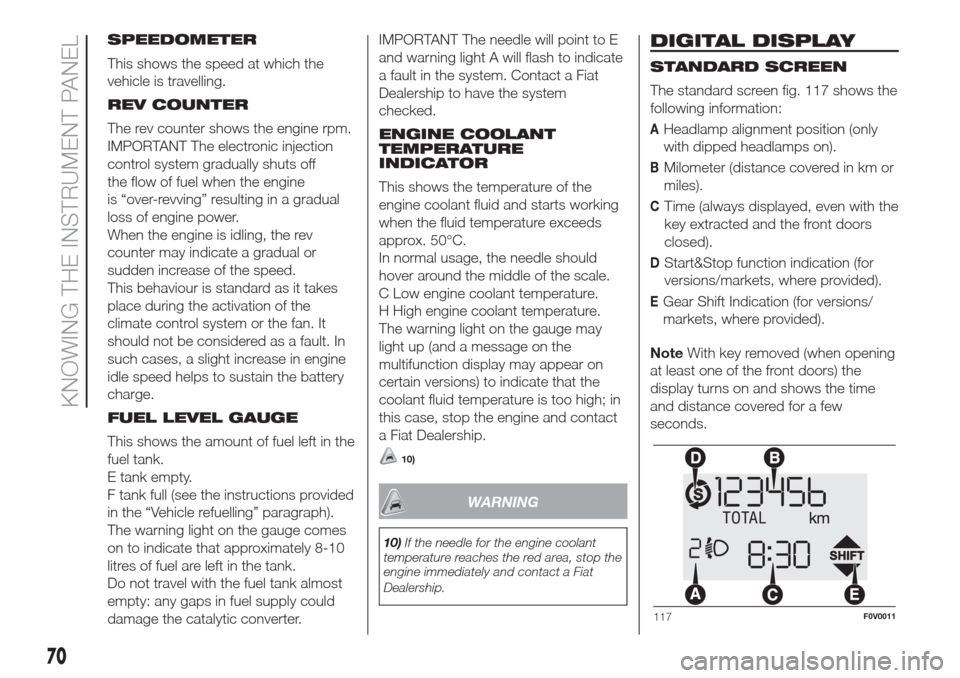
STANDARD SCREEN
The standard screen fig. 117 shows the
following information:
AHeadlamp alignment position (only
with dipped headlamps on).
BMilometer (distance covered in km or
miles).
CTime (always displayed, even with the
key extracted and the front doors
closed).
DStart&Stop function indication (for
versions/markets, where provided).
EGear Shift Indication (for versions/
markets, where provided).
NoteWith key removed (when opening
at least one of the front doors) the
display turns on and shows the time
and distance covered for a few
seconds.
117F0V0011
70
KNOWING THE INSTRUMENT PANEL
Page 75 of 300
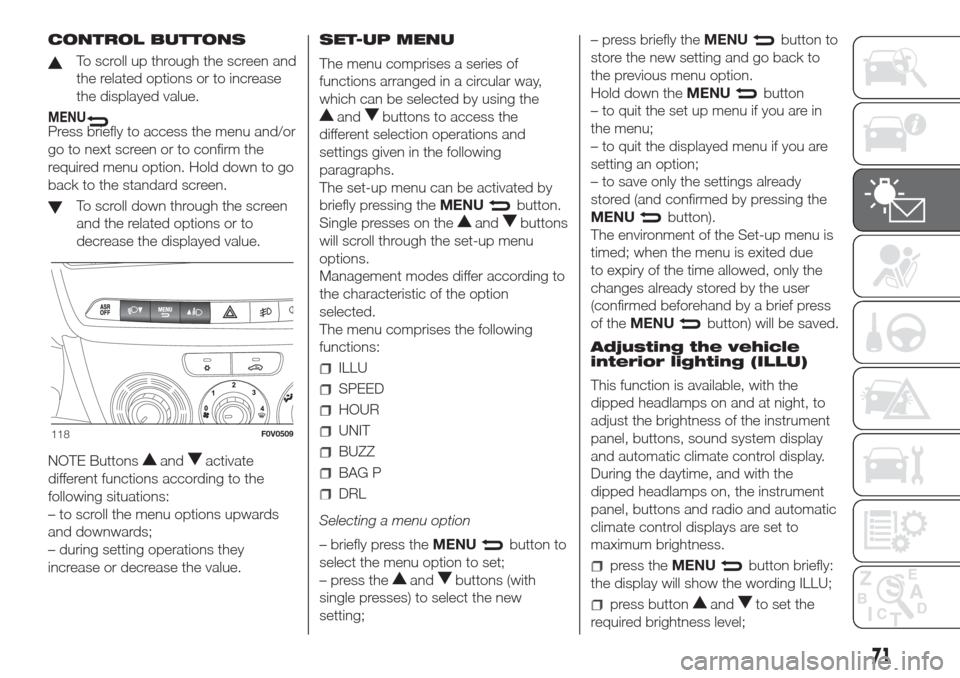
CONTROL BUTTONS
To scroll up through the screen and
the related options or to increase
the displayed value.
MENUPress briefly to access the menu and/or
go to next screen or to confirm the
required menu option. Hold down to go
back to the standard screen.
To scroll down through the screen
and the related options or to
decrease the displayed value.
NOTE Buttons
andactivate
different functions according to the
following situations:
– to scroll the menu options upwards
and downwards;
– during setting operations they
increase or decrease the value.SET-UP MENU
The menu comprises a series of
functions arranged in a circular way,
which can be selected by using the
andbuttons to access the
different selection operations and
settings given in the following
paragraphs.
The set-up menu can be activated by
briefly pressing theMENU
button.
Single presses on the
andbuttons
will scroll through the set-up menu
options.
Management modes differ according to
the characteristic of the option
selected.
The menu comprises the following
functions:
ILLU
SPEED
HOUR
UNIT
BUZZ
BAG P
DRL
Selecting a menu option
– briefly press theMENU
button to
select the menu option to set;
– press the
andbuttons (with
single presses) to select the new
setting;– press briefly theMENU
button to
store the new setting and go back to
the previous menu option.
Hold down theMENU
button
– to quit the set up menu if you are in
the menu;
– to quit the displayed menu if you are
setting an option;
– to save only the settings already
stored (and confirmed by pressing the
MENU
button).
The environment of the Set-up menu is
timed; when the menu is exited due
to expiry of the time allowed, only the
changes already stored by the user
(confirmed beforehand by a brief press
of theMENU
button) will be saved.
Adjusting the vehicle
interior lighting (ILLU)
This function is available, with the
dipped headlamps on and at night, to
adjust the brightness of the instrument
panel, buttons, sound system display
and automatic climate control display.
During the daytime, and with the
dipped headlamps on, the instrument
panel, buttons and radio and automatic
climate control displays are set to
maximum brightness.
press theMENUbutton briefly:
the display will show the wording ILLU;
press buttonandto set the
required brightness level;
118F0V0509
71