instrument panel FIAT DOBLO COMBI 2017 2.G User Guide
[x] Cancel search | Manufacturer: FIAT, Model Year: 2017, Model line: DOBLO COMBI, Model: FIAT DOBLO COMBI 2017 2.GPages: 300, PDF Size: 24.91 MB
Page 76 of 300
press theMENUbutton briefly
to return to the menu screen or hold
the button down to return to the
standard screen without storing.
Setting a speed limit
(SPEEd)
This function is used to set a speed
limit (km/h or mph); the driver is alerted
when this limit is exceeded (see
“Warning lights and messages”).
To set the desired speed limit, proceed
as follows:
- press theMENU
button briefly:
the display will show the wording
(SPEED) and the unit (km/h) or (mph)
previously set;
- press the
orbutton to select
speed limit activation (On) or
deactivation (Off);
- if the function is on, press the
or
button to select the required speed
limit and then pressMENU
to
confirm;NOTE The speed may be set in the
range from 30 to 200 km/h, or from 20
to 125 mph according to the previously
chosen unit (see “Setting the unit of
measurement” below). The setting will
increase/decrease by five units each
time the
/button is pressed. Hold
down the
/button to automatically
increase/decrease the setting rapidly.
Complete the adjustment with single
presses of the button when you
approach the desired value.
- press theMENU
button briefly to
return to the menu screen or hold the
button down to return to the standard
screen without storing.
To cancel the setting, proceed as
follows:
- briefly the pressMENU
button;
(On) will flash on the display;
- press button
, (Off) will flash on the
display;
- press theMENU
button briefly to
return to the menu screen or hold the
button down to return to the standard
screen without storing.
On some versions/markets, a warning
set to a fixed speed of 120 km/h which
cannot be excluded or adjusted is
present.Setting the clock (Hour);
With this function, it is possible to set
the time.
To adjust, proceed as follows:
- briefly press theMENU
button;
the “hours” will flash on the display;
- press the
orbutton to adjust;
- briefly press theMENU
button;
the “minutes” will flash on the display;
- press the
orbutton to adjust;
- press theMENU
button briefly to
return to the menu screen or hold the
button down to return to the standard
screen without storing.
Setting the distance unit
(Unit)
This function is used to set the unit of
measurement.
To adjust, proceed as follows:
- press theMENU
button briefly:
the display will show the wording (Unit)
and the previously set unit (km) or (mi);
- press
orto select the required
unit.
- press theMENU
button briefly to
return to the menu screen or hold the
button down to return to the standard
screen without storing.
72
KNOWING THE INSTRUMENT PANEL
Page 78 of 300
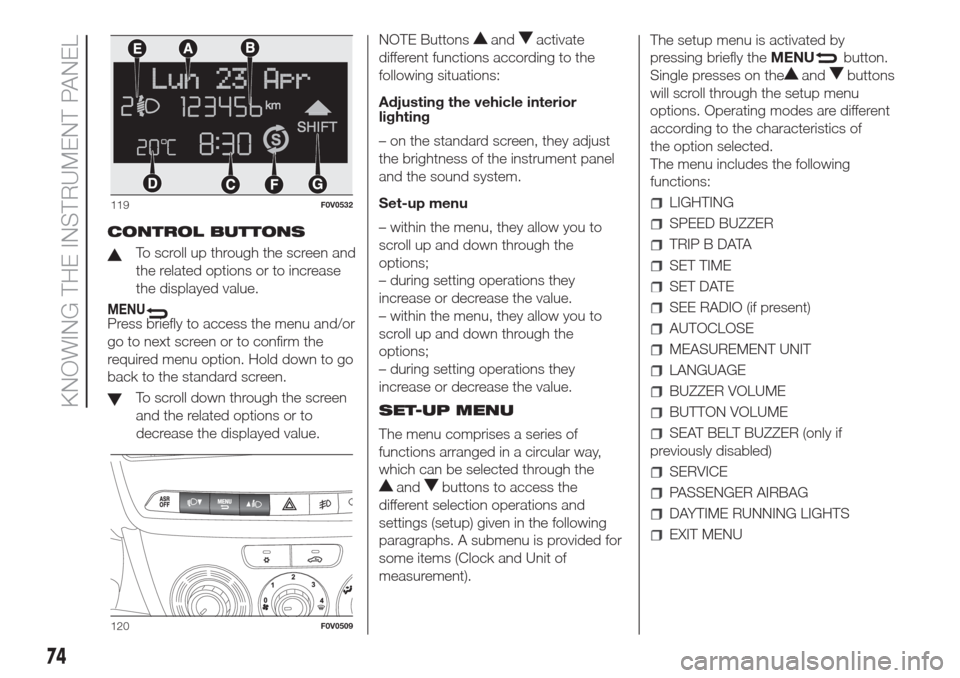
CONTROL BUTTONS
To scroll up through the screen and
the related options or to increase
the displayed value.
MENUPress briefly to access the menu and/or
go to next screen or to confirm the
required menu option. Hold down to go
back to the standard screen.
To scroll down through the screen
and the related options or to
decrease the displayed value.NOTE Buttons
andactivate
different functions according to the
following situations:
Adjusting the vehicle interior
lighting
– on the standard screen, they adjust
the brightness of the instrument panel
and the sound system.
Set-up menu
– within the menu, they allow you to
scroll up and down through the
options;
– during setting operations they
increase or decrease the value.
– within the menu, they allow you to
scroll up and down through the
options;
– during setting operations they
increase or decrease the value.
SET-UP MENU
The menu comprises a series of
functions arranged in a circular way,
which can be selected through the
andbuttons to access the
different selection operations and
settings (setup) given in the following
paragraphs. A submenu is provided for
some items (Clock and Unit of
measurement).The setup menu is activated by
pressing briefly theMENU
button.
Single presses on the
andbuttons
will scroll through the setup menu
options. Operating modes are different
according to the characteristics of
the option selected.
The menu includes the following
functions:
LIGHTING
SPEED BUZZER
TRIP B DATA
SET TIME
SET DATE
SEE RADIO (if present)
AUTOCLOSE
MEASUREMENT UNIT
LANGUAGE
BUZZER VOLUME
BUTTON VOLUME
SEAT BELT BUZZER (only if
previously disabled)
SERVICE
PASSENGER AIRBAG
DAYTIME RUNNING LIGHTS
EXIT MENU
119F0V0532
120F0V0509
74
KNOWING THE INSTRUMENT PANEL
Page 79 of 300
Selecting an option from the main
menu without a submenu:
– briefly press theMENU
button to
select the main menu option to be
set;
– press the
orbuttons (with single
presses) to select the new setting;
– briefly press theMENU
button to
store the new setting and to go back
to the same main menu option selected
previously.
Selecting an option from the main
menu with a submenu:
– briefly press theMENU
button to
display the first submenu option;
– press buttons
or(with single
presses) to scroll through all the
submenu options;
– briefly press theMENU
button to
select the displayed submenu option
and to open the relevant setup menu;
– press buttons
or(with single
presses) to select the new setting
for this submenu option;
– briefly press theMENU
button to
store the new setting and to go back
to the same submenu option selected
previously.Adjusting the vehicle
interior lighting
This function is available, with the
dipped headlamps on and at night, to
adjust the brightness of the instrument
panel, buttons, sound system display
and automatic climate control display.
During the daytime, and with the
dipped headlamps on, the instrument
panel, buttons and sound system
and automatic climate control displays
are set to maximum brightness.
Proceed as follows to adjust the
brightness:
– press theMENU
button briefly to
make the display flash the previously
stored level;
– press button
andto set the
required brightness level;
– press theMENU
button briefly to
return to the menu screen or hold the
button down to return to the standard
screen without storing.
Speed warning (Speed
limit)
This function enables setting of the
vehicle speed limit (km/h or mph).
When this limit is exceeded the driver is
immediately alerted (see section
“Warning lights and messages”).
To set the desired speed limit, proceed
as follows:– briefly press theMENU
button:
the display will show the words (Speed
Beep);
– press the
orbutton to select
speed limit activation (On) or
deactivation (Off);
– if the function is on, press the
or
buttons to select the required speed
limit and then pressMENU
to
confirm;
NOTE The speed may be set anywhere
between 30 and 200 km/h or 20 and
125 mph, depending on the previously
chosen unit (see “Setting the unit of
measurement (Unit)”). The setting will
increase/decrease by 5 units each time
button
/is pressed. Hold down
the
/button to automatically
increase/decrease the setting rapidly.
Complete the adjustment with single
presses of the button when you
approach the desired value.
– press theMENU
button briefly to
return to the menu screen or hold the
button down to return to the standard
screen without storing.
To cancel the setting, proceed as
follows:
– briefly press buttonMENU
, (On)
will flash on the display;
– press button
, (Off) will flash on the
display;
75
Page 80 of 300
– press buttonMENUbriefly to
return to the menu screen or hold the
button down to return to the standard
screen without storing.
Trip B data (Activating
Trip B)
This function can be used to activate
(On) or deactivate (Off) the Trip B
display (partial trip).
For more information see the "Trip
computer" section.
Proceed as follows to switch the
function on/off:
– press theMENU
button briefly to
make the display flash On or Off
according to the previous setting;
– press the
orbutton to select;
– press theMENU
button briefly to
return to the menu screen or hold the
button down to return to the standard
screen without storing.
Set Time (Setting the
clock)
This function enables the clock to be
set through two submenus: "Time" and
"Format".
To carry out the adjustment, proceed as
follows:
– briefly pressMENU
; the display
will show the two sub-menus “Time”
and “Mode”;
– press the
orbutton to switch
between the two submenus;– select the required option and then
pressMENU
briefly;
– if selecting the “Time” submenu,
briefly pressMENU
, the “hours”
will flash on the display;
– press the
orbutton to make the
adjustment;
– briefly press theMENU
button;
the “minutes” will flash on the display;
– press the
orbutton for setting.
NOTE The setting will increase or
decrease by one unit each time the
orbutton is pressed. Hold down
the button to increase/decrease the
setting rapidly and automatically.
Complete the adjustment with single
presses of the button when you
approach the desired value.
– when you select “Mode”, pressing the
MENU
button makes the mode
flash on the display;
– press the
orbutton to select
"24h" or "12h".
When you have made the required
settings, press theMENU
button
briefly to go back to the submenu
screen or hold the button down to go
back to the main menu screen without
saving.
– hold theMENU
button down
again to return to the standard screen
or to the main menu according to
where you are in the menu.Set Date (Setting the
date)
Using this function you can update the
date (day - month - year).
Proceed as follows to update:
– briefly press theMENU
button:
“year” will flash on the display;
– press the
orbutton to make the
adjustment;
– briefly press theMENU
button:
"month" will flash on the display;
– press the
orbutton to make the
adjustment;
– briefly press theMENU
button:
“day” will flash on the display;
– press the
orbutton for setting.
NOTE The setting will increase or
decrease by one unit each time the
orbutton is pressed. Hold down
the button to increase/decrease the
setting rapidly and automatically.
Complete the adjustment with single
presses of the button when you
approach the desired value.
– press theMENU
button briefly to
return to the menu screen or hold the
button down to return to the standard
screen without storing.
76
KNOWING THE INSTRUMENT PANEL
Page 82 of 300
Language (Language
selection)
Display messages can be shown in
different languages: Italian, English,
German, Portuguese, Spanish, French,
Dutch, Polish and Turkish.
To set the desired language, proceed
as follows:
– briefly press theMENU
button;
the previously set language will flash on
the display;
– press the
orbutton to select;
– press theMENU
button briefly to
return to the menu screen or hold the
button down to return to the standard
screen without storing.
Warnings volume
(Adjusting the
failure/warning acoustic
signal volume)
With this function the volume of the
acoustic signal which accompanies the
display of failure/warning can be
adjusted according to 8 levels.
To set the desired volume, proceed as
follows:
– briefly press theMENU
button;
the previously set volume level will flash
on the display;
– press the
orbutton to make the
adjustment;– press theMENU
button briefly to
return to the menu screen or hold the
button down to return to the standard
screen without storing.
Button volume
(Adjusting the button
volume)
This function may be used to adjust (to
8 levels) the volume of the noise made
when theMENU
,orbuttons
are pressed.
To set the desired volume, proceed as
follows:
– briefly press theMENU
button;
the previously set volume level will flash
on the display;
– press the
orbutton to make the
adjustment;
– press theMENU
button briefly to
return to the menu screen or hold the
button down to return to the standard
screen without storing.
Belt buzzer (Buzzer
activation for SBR
indication)
This function can be displayed only
after a Fiat Dealership has deactivated
the SBR system (see “SBR system”
in the “Safety” section).Service (Scheduled servicing)
Using this function you can display
information about the mileage intervals
for vehicle servicing.
To consult the information, proceed as
follows:
– briefly press theMENU
button,
which makes the display show the
service interval in km or mi according to
the previous setting (see "Distance
units of measurement" paragraph);
– briefly press theMENU
button to
go back to the menu screen or hold
the button down to go back to the
standard screen.
78
KNOWING THE INSTRUMENT PANEL
Page 84 of 300
TRIP COMPUTER
IN BRIEF
The Trip computer is used to display
information on vehicle operation
when the ignition key is turned to
MAR. This function allows you to
define two separate trips, called "Trip
A" and "Trip B", for monitoring the
"complete mission" (journey) of
the vehicle in a reciprocally
independent manner. Both functions
can be reset (reset means start of
a new journey).
"Trip A" can be used to display the
values relating to:
Outside Temperature
Range
Distance travelled A
Average consumption A
Instantaneous consumption
Average speed A
Trip time A (driving time)
Reset Trip A
"Trip B", available on multifunction
display only, is used to display
the values relating to:
Distance travelled B
Average consumption B
Average speed B
Trip time B (driving time)
Trip B reset
11)
Values displayed
Outside temperature (for versions/
markets, where provided)
Indicates the temperature outside the
vehicle passenger compartment.
Range (for versions/markets, where
provided)
This indicates the distance that can still
be travelled with the fuel in the tank,
assuming that driving style remains
unvaried. The display will show the
reading '-----' when the following
events take place:
range is lower than 50 km (or
corresponding figure in mi)
vehicle is left parked with the engine
running for a long time
IMPORTANT The range can be affected
by several factors: driving style (see
“Driving style” in the “Starting and
driving” section), type of route
(motorway, towns and cities, mountain
roads, etc.), conditions of use (load,
tyre pressures, etc.). Trip planning must
therefore take the above into account.Distance travelled
This value shows the distance travelled
from the start of the new journey.
Average consumption (for versions/
markets, where provided)
This value shows the approximate
average fuel consumption from the start
of the new journey.
Instant consumption (for versions/
markets where provided)
This value shows the fuel consumption.
The value is constantly updated. The
display will show "----" if the car is
parked with the engine running.
Average speed
This value shows the car's average
speed based on the overall time
elapsed since the start of the new
journey.
80
KNOWING THE INSTRUMENT PANEL
Page 86 of 300
EOBD SYSTEM
47)
The EOBD system (European On Board
Diagnosis) allows continuous diagnosis
of emission-related components on
the vehicle to be made. It also alerts the
driver, by turning on warning light
in the instrument panel (together
with the relevant message in the display
on some versions), when these
components are no longer in peak
condition (see "Warning lights and
messages" section).
The goal of the system is to:
monitor the efficiency of the system;
indicate an increase in emissions
due to vehicle malfunction;
indicate the need to replace
components which have deteriorated.
The system also has a connector
that can be interfaced with appropriate
equipment, which makes it possible
to read the error codes stored in the
control unit together with a series
of specific parameters for engine
operation and diagnosis.
This check can also be carried out by
traffic control authorities.
IMPORTANT After eliminating the
failure, to check the system completely,
Fiat Dealerships run a bench test and,
if necessary, road tests which may
also call for a long journey.
WARNING
47)If, when the ignition key is turned to
MAR, thewarning light does not
switch on, switches on constantly or
flashes when driving (on certain versions
together with the message on the display),
contact a Fiat Dealership as soon as
possible. The operation of
warning
light may be checked by the traffic police
using specific devices. Always comply with
the traffic regulations in force in the
country where you are driving.
82
KNOWING THE INSTRUMENT PANEL
Page 87 of 300
WARNING LIGHTS AND MESSAGES
The warning light switches on together with (where the instrument panel permits) a specific message and/or acoustic warning.
These indications are indicative and precautionary and as such must not be considered as exhaustive and/or alternative to
the information contained in the Owner Handbook, which you are advised to read carefully in all cases. Always refer to the
information in this section in the event of a failure warning.
IMPORTANT Failure indications displayed are divided into two categories: very serious and less serious failures. Serious faults
are indicated by a repeated and prolonged warning "cycle". Less serious faults are indicated by a warning "cycle" with a shorter
duration. The display cycle of both categories can be interrupted. The instrument panel warning light will stay on until the
cause of the malfunction is eliminated.
Warning lights on
panelWhat it means What to do
redLOW BRAKE FLUID/HANDBRAKE APPLIED
The warning light switches on when the key is turned to
MAR-ON, but it should switch off after a few seconds.
Low brake fluid level
The warning light turns on when the level of the brake
fluid in the reservoir falls below the minimum level,
possibly due to a leak in the circuit.Restore the brake fluid level, then check that the
warning light has switched off.
If the warning light turns on when travelling (on certain
versions together with the message on the display) stop
the vehicle immediately and contact a Fiat Dealership.
Handbrake applied
The warning light switches on when the handbrake is
engaged.Release the handbrake, then check that the warning
light has switched off.
If the warning light stays on, contact a Fiat Dealership.
83
Page 88 of 300
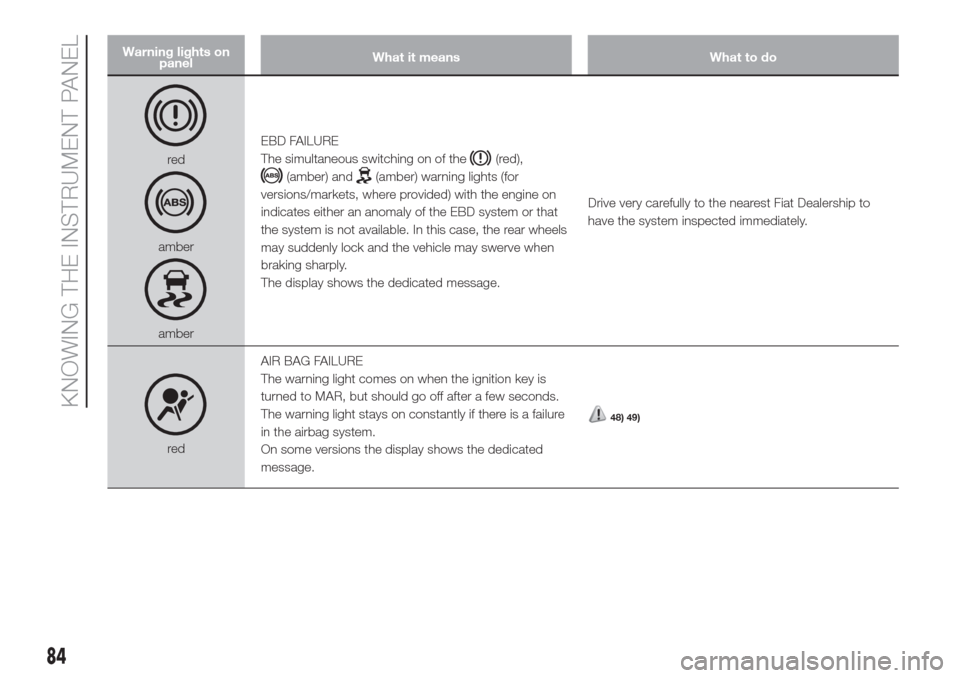
Warning lights on
panelWhat it means What to do
red
amber
amberEBD FAILURE
The simultaneous switching on of the
(red),
(amber) and(amber) warning lights (for
versions/markets, where provided) with the engine on
indicates either an anomaly of the EBD system or that
the system is not available. In this case, the rear wheels
may suddenly lock and the vehicle may swerve when
braking sharply.
The display shows the dedicated message.Drive very carefully to the nearest Fiat Dealership to
have the system inspected immediately.
redAIR BAG FAILURE
The warning light comes on when the ignition key is
turned to MAR, but should go off after a few seconds.
The warning light stays on constantly if there is a failure
in the airbag system.
On some versions the display shows the dedicated
message.
48) 49)
84
KNOWING THE INSTRUMENT PANEL
Page 90 of 300
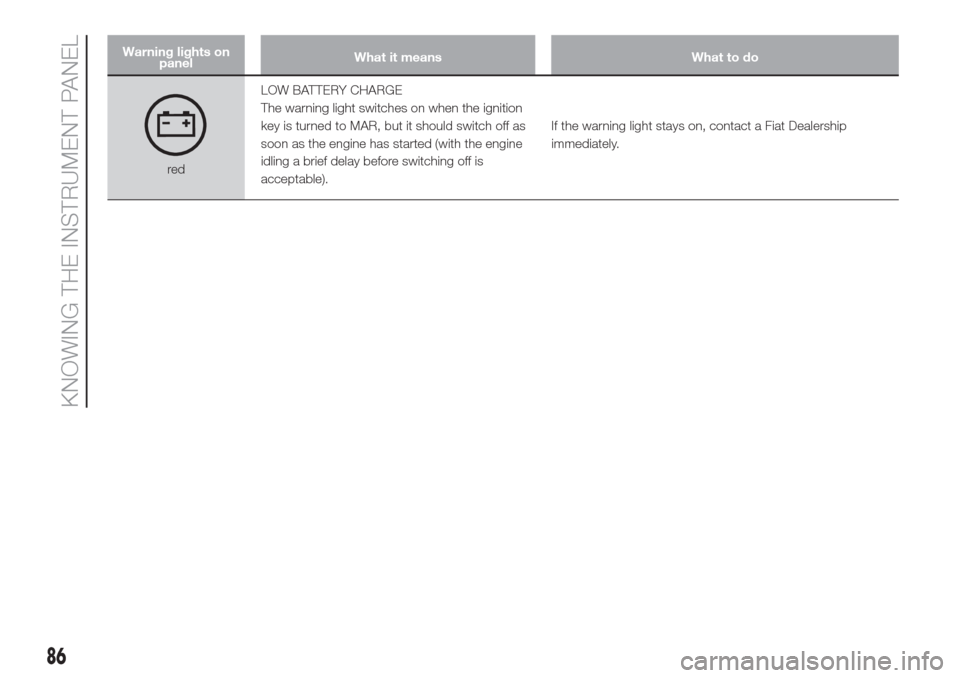
Warning lights on
panelWhat it means What to do
redLOW BATTERY CHARGE
The warning light switches on when the ignition
key is turned to MAR, but it should switch off as
soon as the engine has started (with the engine
idling a brief delay before switching off is
acceptable).If the warning light stays on, contact a Fiat Dealership
immediately.
86
KNOWING THE INSTRUMENT PANEL