instrument panel FIAT DOBLO PANORAMA 2015 2.G User Guide
[x] Cancel search | Manufacturer: FIAT, Model Year: 2015, Model line: DOBLO PANORAMA, Model: FIAT DOBLO PANORAMA 2015 2.GPages: 323, PDF Size: 47.13 MB
Page 85 of 323
MULTIFUNCTION
DISPLAY
(for versions/markets, where
provided)
The vehicle may be equipped with a
multifunction display that gives the
driver useful information depending
on the previous settings.
STANDARD SCREEN
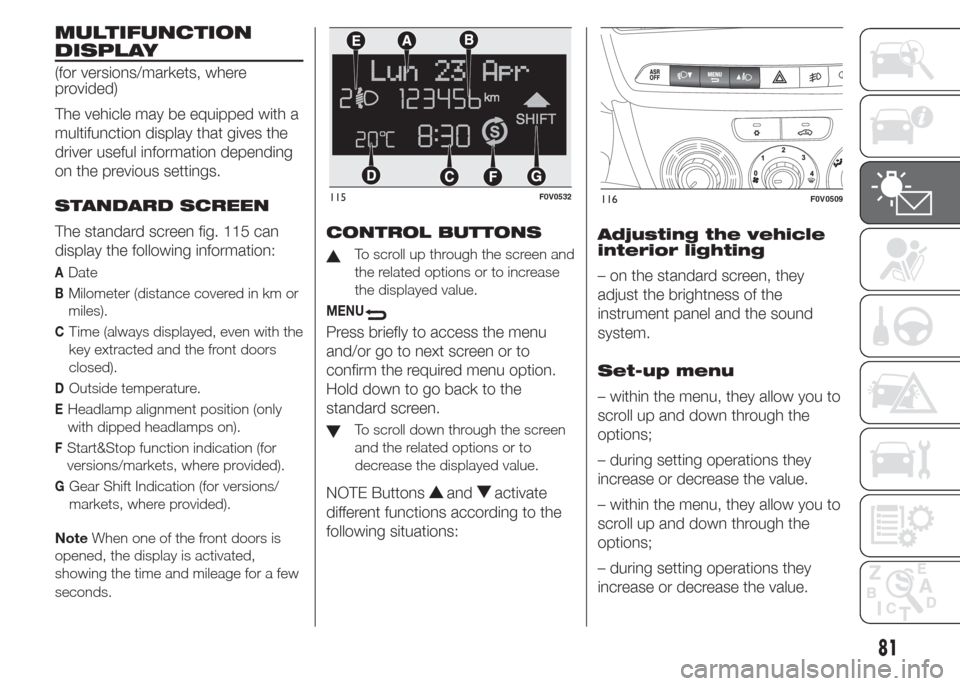
The standard screen fig. 115 can
display the following information:
ADate
BMilometer (distance covered in km or
miles).
CTime (always displayed, even with the
key extracted and the front doors
closed).
DOutside temperature.
EHeadlamp alignment position (only
with dipped headlamps on).
FStart&Stop function indication (for
versions/markets, where provided).
GGear Shift Indication (for versions/
markets, where provided).
NoteWhen one of the front doors is
opened, the display is activated,
showing the time and mileage for a few
seconds.
CONTROL BUTTONS
To scroll up through the screen and
the related options or to increase
the displayed value.
MENU
Press briefly to access the menu
and/or go to next screen or to
confirm the required menu option.
Hold down to go back to the
standard screen.
To scroll down through the screen
and the related options or to
decrease the displayed value.
NOTE Buttonsandactivate
different functions according to the
following situations:Adjusting the vehicle
interior lighting
– on the standard screen, they
adjust the brightness of the
instrument panel and the sound
system.
Set-up menu
– within the menu, they allow you to
scroll up and down through the
options;
– during setting operations they
increase or decrease the value.
– within the menu, they allow you to
scroll up and down through the
options;
– during setting operations they
increase or decrease the value.
115F0V0532116F0V0509
81
Page 86 of 323
SET-UP MENU
The menu comprises a series of
functions arranged in a circular way,
which can be selected through the
andbuttons to access the
different selection operations and
settings (setup) given in the following
paragraphs. A submenu is provided
for some items (Clock and Unit of
measurement).
The setup menu is activated by
pressing briefly theMENU
button. Single presses on the
andbuttons will scroll through
the setup menu options. Operating
modes are different according to the
characteristics of the option
selected.
The menu includes the following
functions:
❒LIGHTING
❒SPEED BUZZER
❒TRIP B DATA
❒SET TIME
❒SET DATE
❒SEE RADIO (if present)
❒AUTOCLOSE
❒MEASUREMENT UNIT❒LANGUAGE
❒BUZZER VOLUME
❒BUTTON VOLUME
❒SEAT BELT BUZZER (only if
previously disabled)
❒SERVICE
❒PASSENGER AIRBAG
❒DAYTIME RUNNING LIGHTS
❒EXIT MENU
Selecting an option from the main
menu without a submenu:
– briefly press theMENU
button to select the main menu
option to be set;
– press the
orbuttons (with
single presses) to select the new
setting;
– briefly press theMENU
button to store the new setting
and to go back to the same main
menu option selected previously.Selecting an option from the main
menu with a submenu:
– briefly press theMENU
button to display the first
submenu option;
– press buttons
or(with single
presses) to scroll through all the
submenu options;
– briefly press theMENU
button to select the displayed
submenu option and to open the
relevant setup menu;
– press buttons
or(with single
presses) to select the new setting
for this submenu option;
– briefly press theMENU
button to store the new setting
and to go back to the same
submenu option selected previously.
Adjusting the vehicle
interior lighting
This function is available, with the
dipped headlamps on and at night,
to adjust the brightness of the
instrument panel, buttons, sound
system display and automatic
climate control display.
82
KNOWING THE INSTRUMENT PANEL
Page 87 of 323
During the daytime, and with the
dipped headlamps on, the
instrument panel, buttons and
sound system and automatic
climate control displays are set to
maximum brightness.
Proceed as follows to adjust the
brightness:
– press theMENU
button
briefly to make the display flash the
previously stored level;
– press button
andto set the
required brightness level;
– press theMENU
button
briefly to return to the menu screen
or hold the button down to return
to the standard screen without
storing.
Speed warning
(Speed limit)
This function enables setting of the
vehicle speed limit (km/h or mph).
When this limit is exceeded the
driver is immediately alerted (see
section “Warning lights and
messages”).
To set the desired speed limit,
proceed as follows:– briefly press theMENU
button: the display will show the
words (Speed Beep);
– press the
orbutton to select
speed limit activation (On) or
deactivation (Off);
– if the function is on, press the
or
buttons to select the required
speed limit and then pressMENU
to confirm;
NOTE The speed may be set
anywhere between 30 and 200
km/h or 20 and 125 mph,
depending on the previously chosen
unit (see “Setting the unit of
measurement (Unit)”). The setting
will increase/decrease by 5 units
each time button
/is pressed.
Hold down the
/button to
automatically increase/decrease the
setting rapidly. Complete the
adjustment with single presses of
the button when you approach the
desired value.
– press theMENU
button
briefly to return to the menu screen
or hold the button down to return
to the standard screen without
storing.To cancel the setting, proceed as
follows:
– briefly press buttonMENU
,
(On) will flash on the display;
– press button
, (Off) will flash on
the display;
– press buttonMENU
briefly to
return to the menu screen or hold
the button down to return to the
standard screen without storing.
Trip B data (Activating
Trip B)
This function can be used to
activate (On) or deactivate (Off) the
Trip B display (partial trip).
For more information see the "Trip
computer" section.
Proceed as follows to switch the
function on/off:
– press theMENU
button
briefly to make the display flash On
or Off according to the previous
setting;
– press the
orbutton to select;
83
Page 88 of 323
– press theMENUbutton
briefly to return to the menu screen
or hold the button down to return
to the standard screen without
storing.
Set Time (Setting the
clock)
This function enables the clock to
be set through two submenus:
"Time" and "Format".
To carry out the adjustment,
proceed as follows:
– briefly pressMENU
; the
display will show the two sub-
menus “Time” and “Mode”;
– press the
orbutton to switch
between the two submenus;
– select the required option and
then pressMENU
briefly;
– if selecting the “Time” submenu,
briefly pressMENU
, the
“hours” will flash on the display;
– press the
orbutton to make
the adjustment;
– briefly press theMENU
button; the “minutes” will flash
on the display;– press the
orbutton for
setting.
NOTE The setting will increase or
decrease by one unit each time the
orbutton is pressed. Hold
down the button to increase/
decrease the setting rapidly and
automatically. Complete the
adjustment with single presses of
the button when you approach the
desired value.
– when you select “Mode”, pressing
theMENU
button makes the
mode flash on the display;
– press the
orbutton to select
"24h" or "12h".
When you have made the required
settings, press theMENU
button briefly to go back to the
submenu screen or hold the button
down to go back to the main menu
screen without saving.
– hold theMENU
button down
again to return to the standard
screen or to the main menu
according to where you are in the
menu.Set Date (Setting the
date)
Using this function you can update
the date (day - month - year).
Proceed as follows to update:
– briefly press theMENU
button: “year” will flash on the
display;
– press the
orbutton to make
the adjustment;
– briefly press theMENU
button: "month" will flash on the
display;
– press the
orbutton to make
the adjustment;
– briefly press theMENU
button: “day” will flash on the
display;
– press the
orbutton for
setting.
NOTE The setting will increase or
decrease by one unit each time the
orbutton is pressed. Hold
down the button to increase/
decrease the setting rapidly and
automatically. Complete the
adjustment with single presses of
the button when you approach the
desired value.
84
KNOWING THE INSTRUMENT PANEL
Page 90 of 323
when you select the “Consumption”
submenu: briefly pressing the
MENU
button makes “km/l”,
“l/100km” or “mpg” appear on
the display, depending on the
previous setting;
If the set distance unit of
measurement is "km", the fuel
consumption unit will be displayed in
km/l or l/100 km.
If the set distance unit of
measurement is "mi" the fuel
consumption unit will be displayed in
"mpg".
– press the
orbutton to select;
– if selecting the "Temperature"
submenu: briefly press theMENU
button and the display will show
"°C" or "°F" depending on the
previous setting;
– press the
orbutton to select;
When you have made the required
settings, press theMENU
button briefly to go back to the
submenu screen or hold the button
down to go back to the main menu
screen without saving.– hold theMENU
button down
again to return to the standard
screen or to the main menu
according to where you are in the
menu.
Language (Language
selection)
Display messages can be shown in
different languages: Italian, English,
German, Portuguese, Spanish,
French, Dutch, Polish and Turkish.
To set the desired language,
proceed as follows:
– briefly press theMENU
button; the previously set
language will flash on the display;
– press the
orbutton to select;
– press theMENU
button
briefly to return to the menu screen
or hold the button down to return
to the standard screen without
storing.Warnings volume
(Adjusting the
failure/warning
acoustic signal
volume)
With this function the volume of the
acoustic signal which accompanies
the display of failure/warning can
be adjusted according to 8 levels.
To set the desired volume, proceed
as follows:
– briefly press theMENU
button; the previously set
volume level will flash on the display;
– press the
orbutton to make
the adjustment;
– press theMENU
button
briefly to return to the menu screen
or hold the button down to return
to the standard screen without
storing.
Button volume
(Adjusting the button
volume)
This function may be used to adjust
(to 8 levels) the volume of the noise
made when theMENU
,or
buttons are pressed.
86
KNOWING THE INSTRUMENT PANEL
Page 92 of 323
Activating/
deactivating front
passenger side airbag
and side bag for
chest/head protection
(for versions/markets, where
provided)
This function is used to activate/
deactivate the front and side
passenger airbags (for versions/
markets where provided).
Proceed as follows:
– press theMENU
button and
then, after displaying the message
"Bag pass: Off" (to deactivate) or
"Bag pass: On" (to activate) by
means of the
andbuttons,
press theMENU
button again;
– the confirmation request message
appears in the display;
– by pressing the
orbuttons
select (Yes) (to confirm
activation/deactivation) or (No) (to
cancel);– press theMENU
button
briefly: a message confirming the
selection will be displayed and you
will return to the menu screen or,
pressing the button for longer, you
will return to the standard screen
without saving.
Daytime running lights
(DRL)
With this function it is possible to
turn the daytime running lights
on and off.
Proceed as follows to activate or
deactivate this function:
– press theMENU
button
briefly to display a submenu;
– press theMENU
button
briefly to make the display flash On
or Off according to the previous
setting;
– press the
orbutton to select;
– press theMENU
button
briefly to return to the submenu
screen or hold the button down to
return to the main menu screen
without saving;– hold theMENU
button down
again to return to the standard
screen or to the main menu
according to where you are in the
menu.
Exit Menu
This is the last function that closes
the cycle of settings listed in the
menu screen.
Pressing theMENU
button
briefly will return the display to the
standard screen without storing.
Press button
to return to the first
menu item on the display (Speed
Beep).
88
KNOWING THE INSTRUMENT PANEL
Page 94 of 323
Average speed
This value shows the vehicle's
average speed based on the overall
time elapsed since the start of the
new journey.
Trip time
Time elapsed since the start of the
new journey.
IMPORTANT If there is no
information, the Trip computer
displays "----" in place of the value.
When normal operating conditions
are restored, the counting of the
various values is resumed, without
either zeroing the values displayed
prior to the problem, or starting a
new mission.
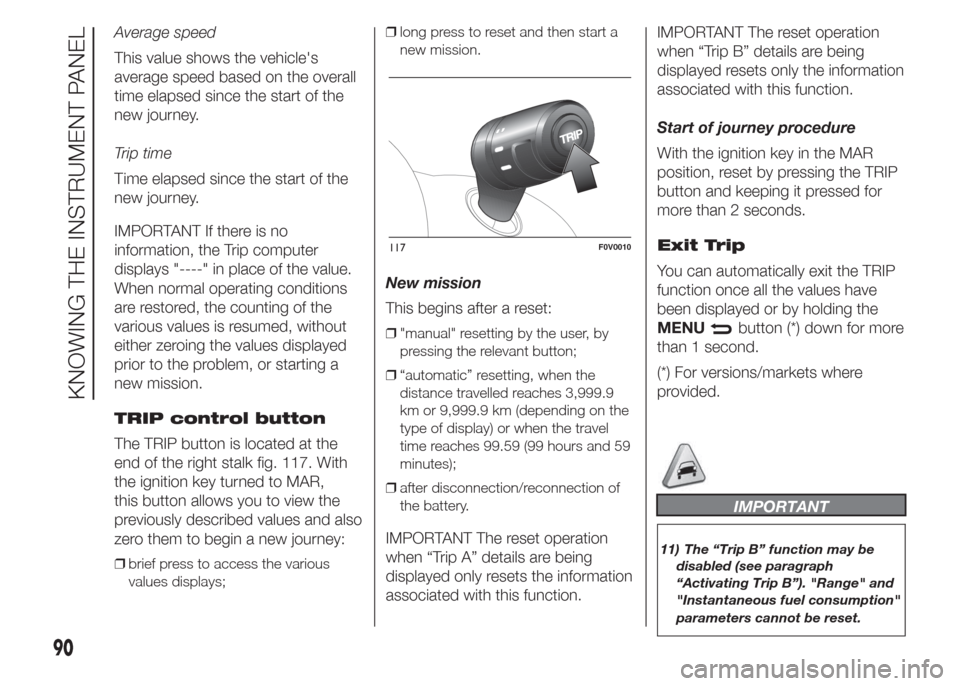
TRIP control button
The TRIP button is located at the
end of the right stalk fig. 117. With
the ignition key turned to MAR,
this button allows you to view the
previously described values and also
zero them to begin a new journey:
❒brief press to access the various
values displays;❒long press to reset and then start a
new mission.
New mission
This begins after a reset:
❒"manual" resetting by the user, by
pressing the relevant button;
❒“automatic” resetting, when the
distance travelled reaches 3,999.9
km or 9,999.9 km (depending on the
type of display) or when the travel
time reaches 99.59 (99 hours and 59
minutes);
❒after disconnection/reconnection of
the battery.
IMPORTANT The reset operation
when “Trip A” details are being
displayed only resets the information
associated with this function.IMPORTANT The reset operation
when “Trip B” details are being
displayed resets only the information
associated with this function.
Start of journey procedure
With the ignition key in the MAR
position, reset by pressing the TRIP
button and keeping it pressed for
more than 2 seconds.
Exit Trip
You can automatically exit the TRIP
function once all the values have
been displayed or by holding the
MENU
button (*) down for more
than 1 second.
(*) For versions/markets where
provided.
IMPORTANT
11) The “Trip B” function may be
disabled (see paragraph
“Activating Trip B”). "Range" and
"Instantaneous fuel consumption"
parameters cannot be reset.
117F0V0010
90
KNOWING THE INSTRUMENT PANEL
Page 95 of 323
EOBD SYSTEM
47)
The EOBD system (European On
Board Diagnosis) allows continuous
diagnosis of emission-related
components on the vehicle to be
made. It also alerts the driver, by
turning on warning light
in the
instrument panel (together with the
relevant message in the display
on some versions), when these
components are no longer in peak
condition (see "Warning lights and
messages" section).
The goal of the system is to:
❒monitor the efficiency of the system;
❒indicate an increase in emissions
due to vehicle malfunction;
❒indicate the need to replace
components which have
deteriorated.
The system also has a connector
that can be interfaced with
appropriate equipment, which
makes it possible to read the error
codes stored in the control unit
together with a series of specific
parameters for engine operation and
diagnosis.This check can also be carried out
by traffic control authorities.
IMPORTANT After eliminating the
failure, to check the system
completely, Fiat Dealerships run a
bench test and, if necessary, road
tests which may also call for a
long journey.
WARNING
47) If, when the ignition key is turned
to MAR, the
warning light
does not switch on, switches on
constantly or flashes when driving
(on certain versions together
with the message on the display),
contact a Fiat Dealership as soon
as possible. The operation of
warning light may be checked
by the traffic police using specific
devices. Always comply with the
traffic regulations in force in the
country where you are driving.
91
Page 96 of 323
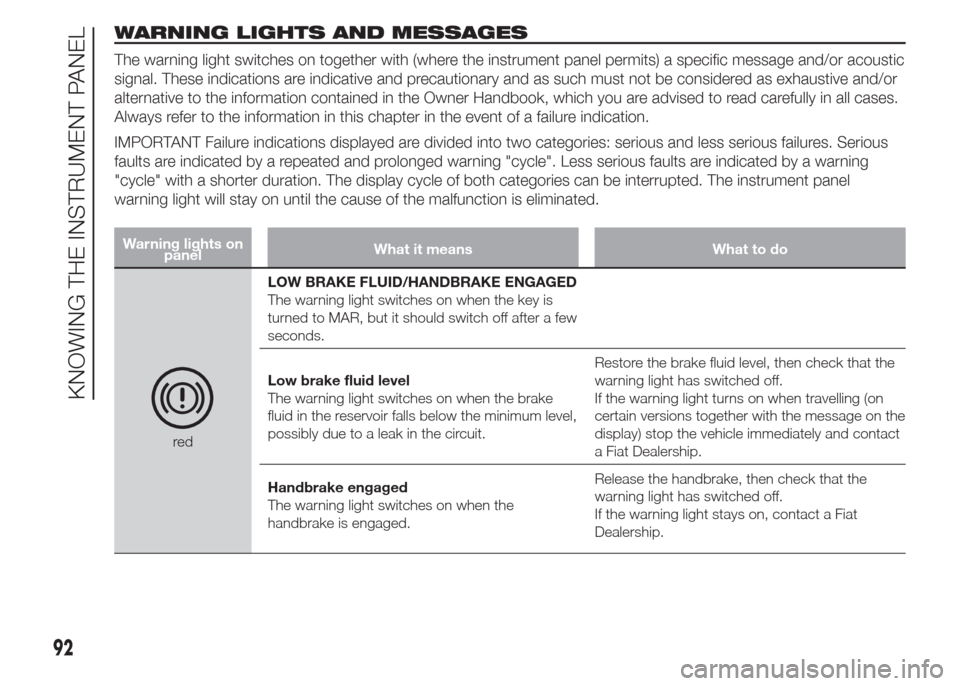
WARNING LIGHTS AND MESSAGES
The warning light switches on together with (where the instrument panel permits) a specific message and/or acoustic
signal. These indications are indicative and precautionary and as such must not be considered as exhaustive and/or
alternative to the information contained in the Owner Handbook, which you are advised to read carefully in all cases.
Always refer to the information in this chapter in the event of a failure indication.
IMPORTANT Failure indications displayed are divided into two categories: serious and less serious failures. Serious
faults are indicated by a repeated and prolonged warning "cycle". Less serious faults are indicated by a warning
"cycle" with a shorter duration. The display cycle of both categories can be interrupted. The instrument panel
warning light will stay on until the cause of the malfunction is eliminated.
Warning lights on
panelWhat it means What to do
redLOW BRAKE FLUID/HANDBRAKE ENGAGED
The warning light switches on when the key is
turned to MAR, but it should switch off after a few
seconds.
Low brake fluid level
The warning light switches on when the brake
fluid in the reservoir falls below the minimum level,
possibly due to a leak in the circuit.Restore the brake fluid level, then check that the
warning light has switched off.
If the warning light turns on when travelling (on
certain versions together with the message on the
display) stop the vehicle immediately and contact
a Fiat Dealership.
Handbrake engaged
The warning light switches on when the
handbrake is engaged.Release the handbrake, then check that the
warning light has switched off.
If the warning light stays on, contact a Fiat
Dealership.
92
KNOWING THE INSTRUMENT PANEL
Page 98 of 323
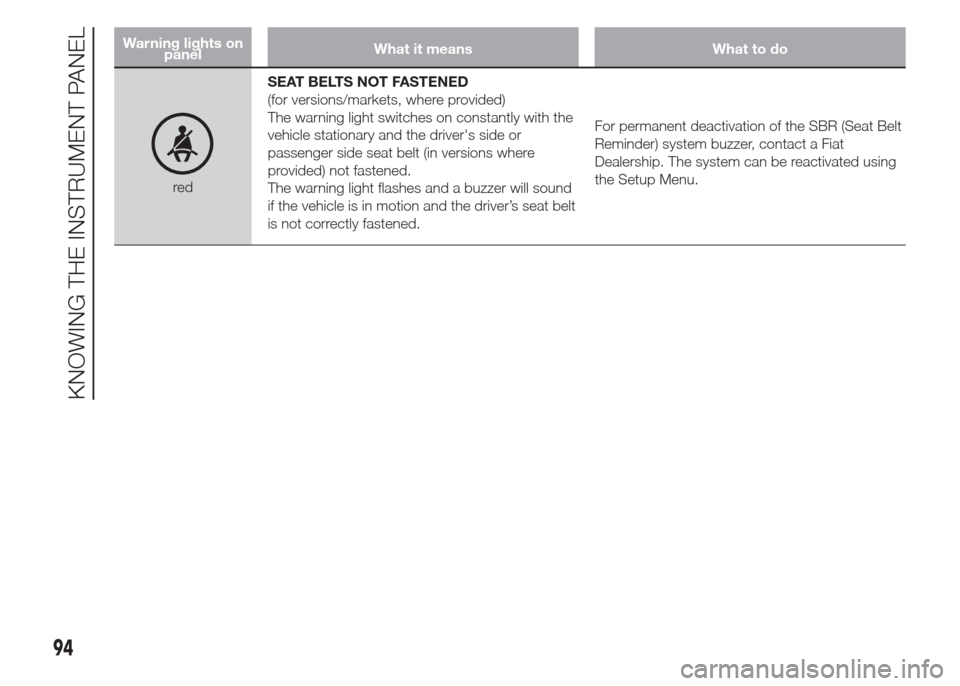
Warning lights on
panelWhat it means What to do
redSEAT BELTS NOT FASTENED
(for versions/markets, where provided)
The warning light switches on constantly with the
vehicle stationary and the driver's side or
passenger side seat belt (in versions where
provided) not fastened.
The warning light flashes and a buzzer will sound
if the vehicle is in motion and the driver’s seat belt
is not correctly fastened.For permanent deactivation of the SBR (Seat Belt
Reminder) system buzzer, contact a Fiat
Dealership. The system can be reactivated using
the Setup Menu.
94
KNOWING THE INSTRUMENT PANEL