Light FIAT DUCATO 2006 3.G Owner's Manual
[x] Cancel search | Manufacturer: FIAT, Model Year: 2006, Model line: DUCATO, Model: FIAT DUCATO 2006 3.GPages: 258, PDF Size: 4.05 MB
Page 41 of 258
40GETTING TO KNOW YOUR VEHICLE
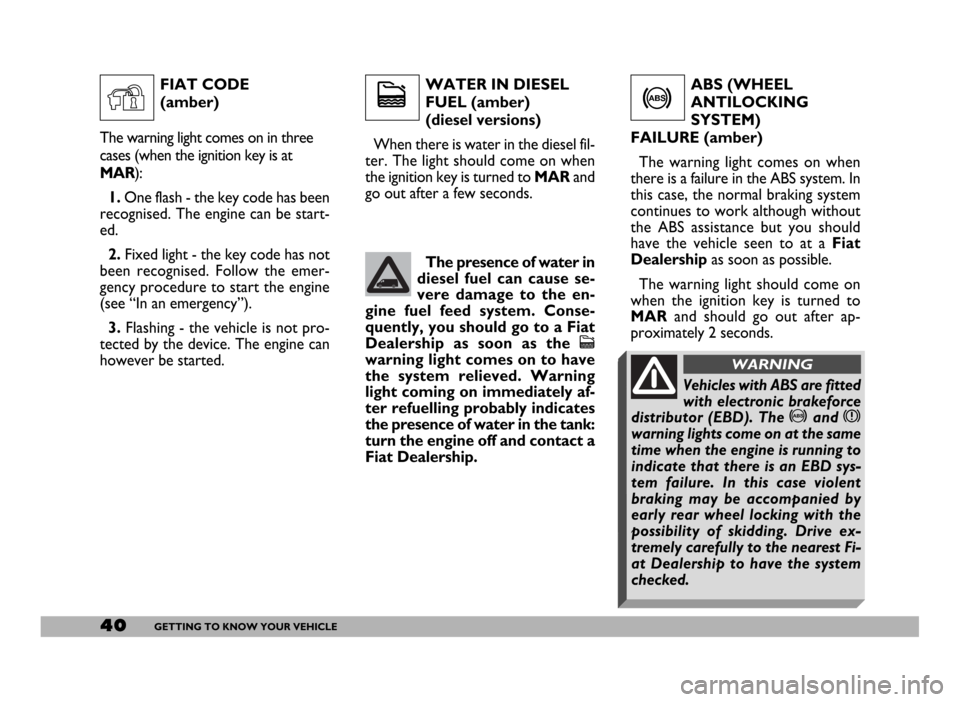
WATER IN DIESEL
FUEL (amber)
(diesel versions)
When there is water in the diesel fil-
ter. The light should come on when
the ignition key is turned to MAR and
go out after a few seconds.ABS (WHEEL
ANTILOCKING
SYSTEM)
FAILURE (amber)
The warning light comes on when
there is a failure in the ABS system. In
this case, the normal braking system
continues to work although without
the ABS assistance but you should
have the vehicle seen to at a Fiat
Dealershipas soon as possible.
The warning light should come on
when the ignition key is turned to
MARand should go out after ap-
proximately 2 seconds.
c
The presence of water in
diesel fuel can cause se-
vere damage to the en-
gine fuel feed system. Conse-
quently, you should go to a Fiat
Dealership as soon as the
c
warning light comes on to have
the system relieved. Warning
light coming on immediately af-
ter refuelling probably indicates
the presence of water in the tank:
turn the engine off and contact a
Fiat Dealership.
>
FIAT CODE
(amber)
The warning light comes on in three
cases (when the ignition key is at
MAR):
1.One flash - the key code has been
recognised. The engine can be start-
ed.
2.Fixed light - the key code has not
been recognised. Follow the emer-
gency procedure to start the engine
(see “In an emergency”).
3. Flashing - the vehicle is not pro-
tected by the device. The engine can
however be started.
Y
Vehicles with ABS are fitted
with electronic brakeforce
distributor (EBD). The >and x
warning lights come on at the same
time when the engine is running to
indicate that there is an EBD sys-
tem failure. In this case violent
braking may be accompanied by
early rear wheel locking with the
possibility of skidding. Drive ex-
tremely carefully to the nearest Fi-
at Dealership to have the system
checked.
WARNING
Page 42 of 258
41GETTING TO KNOW YOUR VEHICLE
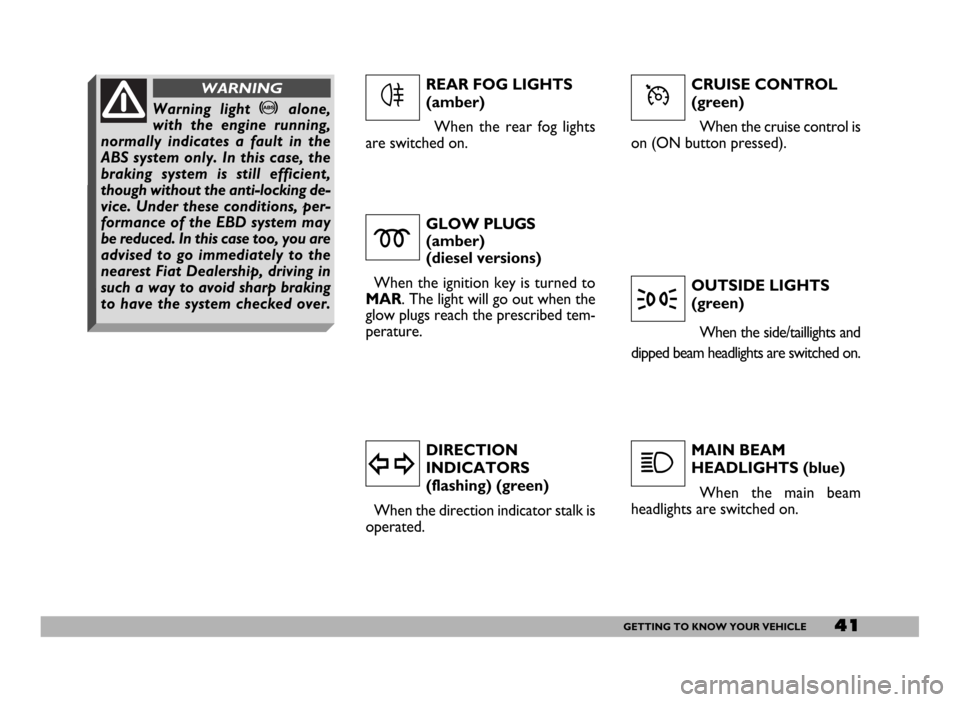
CRUISE CONTROL
(green)
When the cruise control is
on (ON button pressed).
GLOW PLUGS
(amber)
(diesel versions)
When the ignition key is turned to
MAR. The light will go out when the
glow plugs reach the prescribed tem-
perature.
DIRECTION
INDICATORS
(flashing) (green)
When the direction indicator stalk is
operated.OUTSIDE LIGHTS
(green)
When the side/taillights and
dipped beam headlights are switched on.
MAIN BEAM
HEADLIGHTS (blue)
When the main beam
headlights are switched on.
m
y
3
1
REAR FOG LIGHTS
(amber)
When the rear fog lights
are switched on.
4ÜWarning light >alone,
with the engine running,
normally indicates a fault in the
ABS system only. In this case, the
braking system is still efficient,
though without the anti-locking de-
vice. Under these conditions, per-
formance of the EBD system may
be reduced. In this case too, you are
advised to go immediately to the
nearest Fiat Dealership, driving in
such a way to avoid sharp braking
to have the system checked over.
WARNING
Page 49 of 258
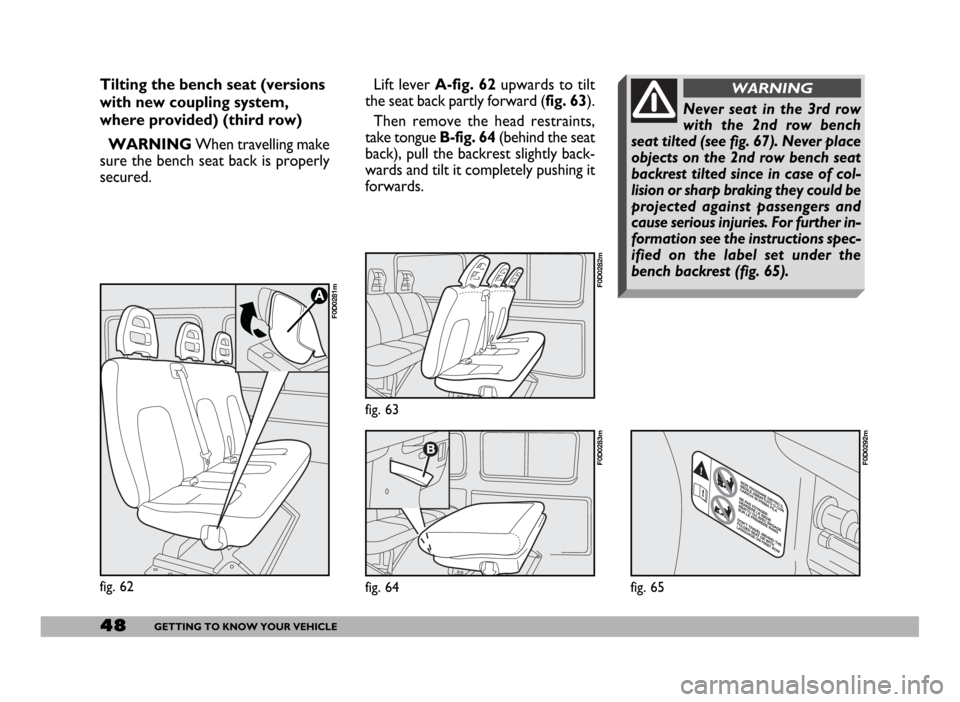
Lift lever A-fig. 62upwards to tilt
the seat back partly forward (fig. 63).
Then remove the head restraints,
take tongue B-fig. 64(behind the seat
back), pull the backrest slightly back-
wards and tilt it completely pushing it
forwards.
fig. 63
F0D0282m
fig. 64
F0D0283m
48GETTING TO KNOW YOUR VEHICLE
fig. 62
F0D0281m
Tilting the bench seat (versions
with new coupling system,
where provided) (third row)
WARNINGWhen travelling make
sure the bench seat back is properly
secured.
fig. 65
F0D0292m
Never seat in the 3rd row
with the 2nd row bench
seat tilted (see fig. 67). Never place
objects on the 2nd row bench seat
backrest tilted since in case of col-
lision or sharp braking they could be
projected against passengers and
cause serious injuries. For further in-
formation see the instructions spec-
ified on the label set under the
bench backrest (fig. 65).
WARNING
Page 62 of 258
61GETTING TO KNOW YOUR VEHICLE
IMPORTANTThe heater is
equipped with a thermal switch which
cuts off the heater in the event of
overheating caused by low or leaking
coolant. In this case, press the pro-
gram selection button to start the
heater again after repairing the cool-
ing system fault and/or topping up the
fluid.
The heater can turn itself off after en-
gine ignition or if the flame goes out.
In this case, turn the heater off man-
ually and attempt to turn it back on
again. If you cannot turn the heater on,
contact a Fiat Dealership.Turning the heater on
Before turning the heater on check
that:
– the heating/ventilation unit knob is
turned to “warm air”;
– the heating/ventilation fan speed
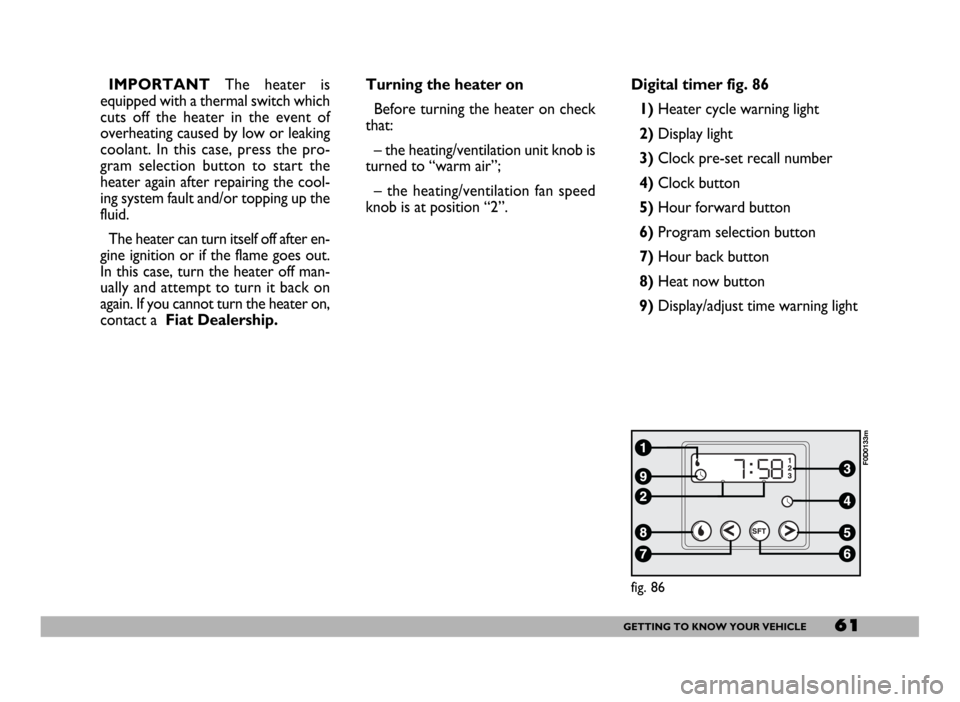
knob is at position “2”.Digital timer fig. 86
1) Heater cycle warning light
2)Display light
3)Clock pre-set recall number
4)Clock button
5)Hour forward button
6)Program selection button
7)Hour back button
8) Heat now button
9) Display/adjust time warning light
fig. 86
F0D0133m
Page 63 of 258
62GETTING TO KNOW YOUR VEHICLE
fig. 87
F0D0132m
fig. 88
F0D0134m
fig. 89
F0D0136m
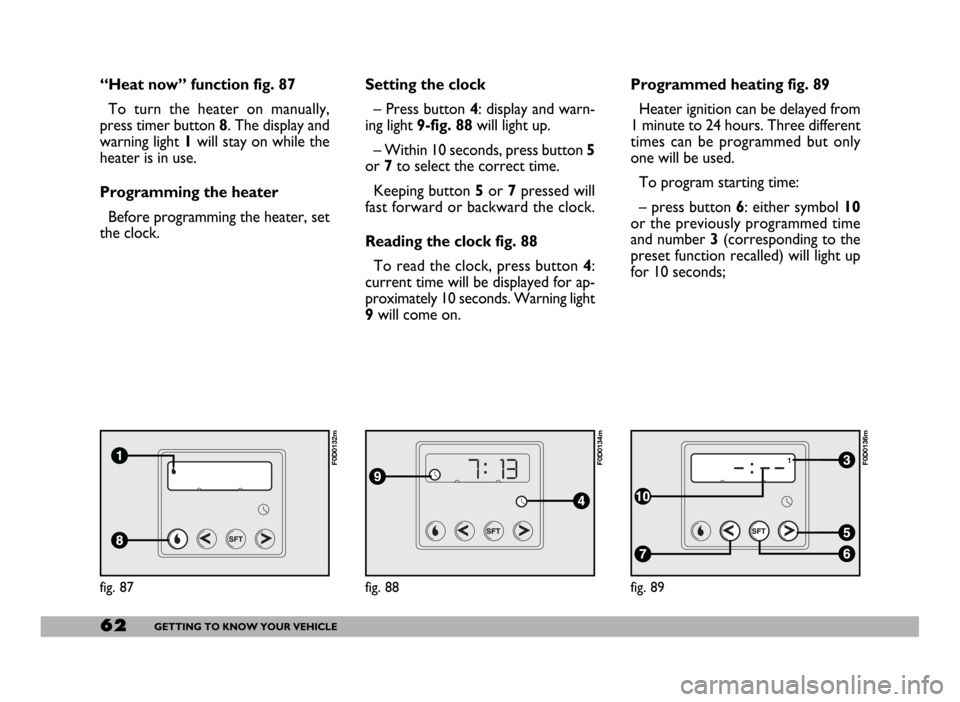
“Heat now” function fig. 87
To turn the heater on manually,
press timer button 8. The display and
warning light 1will stay on while the
heater is in use.
Programming the heater
Before programming the heater, set
the clock.Setting the clock
– Press button 4: display and warn-
ing light 9-fig. 88will light up.
– Within 10 seconds, press button 5
or 7to select the correct time.
Keeping button 5or 7pressed will
fast forward or backward the clock.
Reading the clock fig. 88
To read the clock, press button 4:
current time will be displayed for ap-
proximately 10 seconds. Warning light
9will come on.Programmed heating fig. 89
Heater ignition can be delayed from
1 minute to 24 hours. Three different
times can be programmed but only
one will be used.
To program starting time:
– press button 6: either symbol 10
or the previously programmed time
and number 3 (corresponding to the
preset function recalled) will light up
for 10 seconds;
Page 64 of 258
63GETTING TO KNOW YOUR VEHICLE
IMPORTANTTo recall other pre-
set times, press button 6within 10
seconds.
– press button 5or 7to select the
starting time required within 10 sec-
onds.
IMPORTANTStarting time disap-
pears and the number 3(correspond-
ing to the selected preset time) ap-
pears on the display to confirm the
starting time has been entered.
Deleting a programmed
starting time fig. 89
To delete the programmed starting
time, press button 6briefly: the dis-
play light will go off and number 3cor-
responding to the selected preset
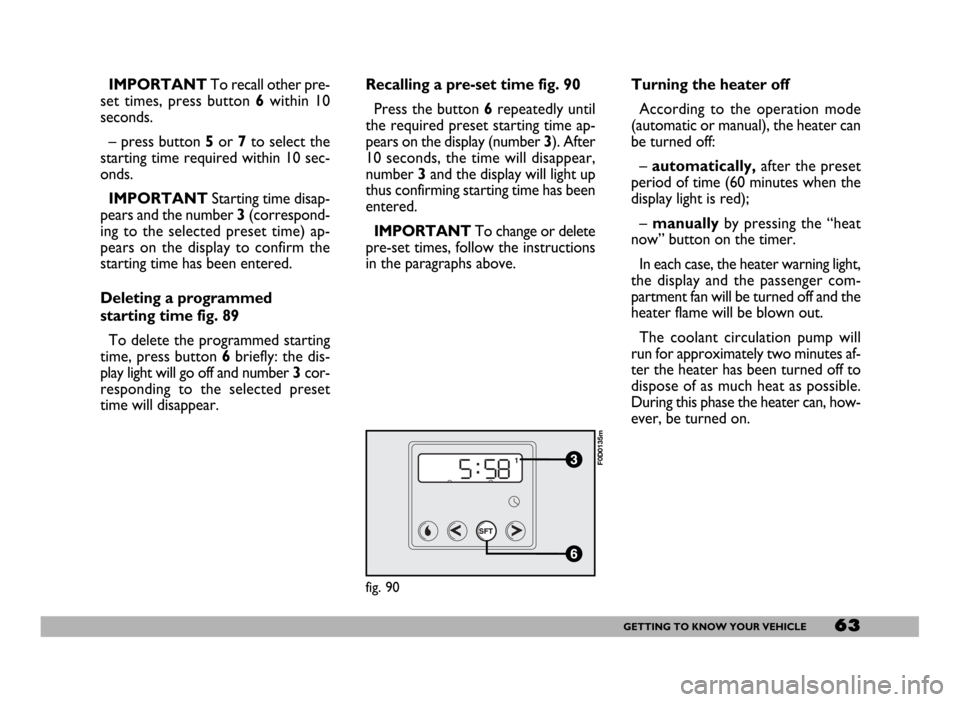
time will disappear.Recalling a pre-set time fig. 90
Press the button 6repeatedly until
the required preset starting time ap-
pears on the display (number 3). After
10 seconds, the time will disappear,
number 3and the display will light up
thus confirming starting time has been
entered.
IMPORTANTTo change or delete
pre-set times, follow the instructions
in the paragraphs above.Turning the heater off
According to the operation mode
(automatic or manual), the heater can
be turned off:
–automatically,after the preset
period of time (60 minutes when the
display light is red);
– manuallyby pressing the “heat
now” button on the timer.
In each case, the heater warning light,
the display and the passenger com-
partment fan will be turned off and the
heater flame will be blown out.
The coolant circulation pump will
run for approximately two minutes af-
ter the heater has been turned off to
dispose of as much heat as possible.
During this phase the heater can, how-
ever, be turned on.
fig. 90
F0D0135m
Page 66 of 258
65GETTING TO KNOW YOUR VEHICLE
STEERING COLUMN
STALKS
LEFT-HAND STALK
The left-hand stalk operates most of
the external lights.
The external lights can only be
switched on when the ignition key is
at MAR. The instrument panel and
the heating/ventilation (or climate con-
trol system) controls and the cigar
lighter ring will come on with the ex-
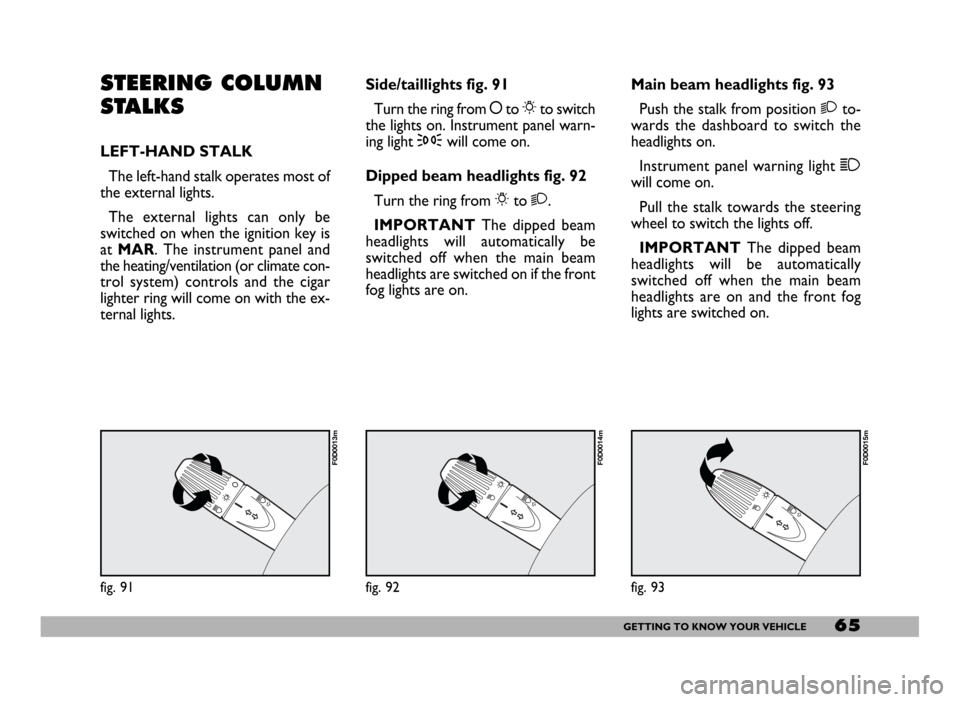
ternal lights.Side/taillights fig. 91
Turn the ring from åto 6to switch
the lights on. Instrument panel warn-
ing light 3will come on.
Dipped beam headlights fig. 92
Turn the ring from 6to 2.
IMPORTANTThe dipped beam
headlights will automatically be
switched off when the main beam
headlights are switched on if the front
fog lights are on.Main beam headlights fig. 93
Push the stalk from position 2to-
wards the dashboard to switch the
headlights on.
Instrument panel warning light 1
will come on.
Pull the stalk towards the steering
wheel to switch the lights off.
IMPORTANTThe dipped beam
headlights will be automatically
switched off when the main beam
headlights are on and the front fog
lights are switched on.
fig. 91
F0D0013m
fig. 92
F0D0014m
fig. 93
F0D0015m
Page 67 of 258
66GETTING TO KNOW YOUR VEHICLE
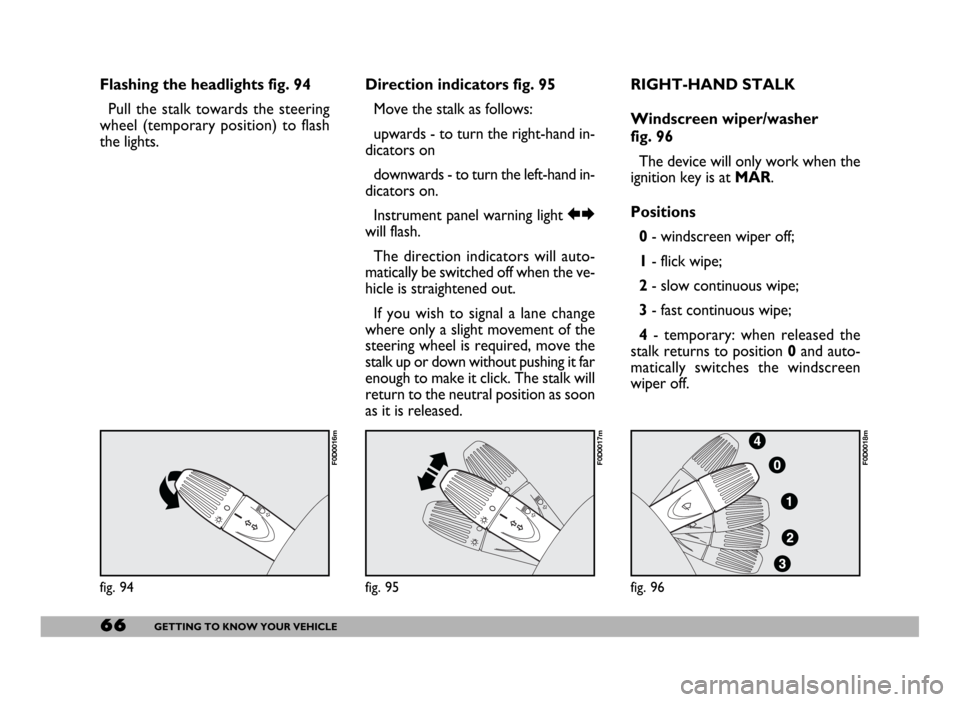
Flashing the headlights fig. 94
Pull the stalk towards the steering
wheel (temporary position) to flash
the lights.Direction indicators fig. 95
Move the stalk as follows:
upwards - to turn the right-hand in-
dicators on
downwards - to turn the left-hand in-
dicators on.
Instrument panel warning light RE
will flash.
The direction indicators will auto-
matically be switched off when the ve-
hicle is straightened out.
If you wish to signal a lane change
where only a slight movement of the
steering wheel is required, move the
stalk up or down without pushing it far
enough to make it click. The stalk will
return to the neutral position as soon
as it is released.RIGHT-HAND STALK
Windscreen wiper/washer
fig. 96
The device will only work when the
ignition key is at MAR.
Positions
0- windscreen wiper off;
1- flick wipe;
2- slow continuous wipe;
3- fast continuous wipe;
4- temporary: when released the
stalk returns to position 0and auto-
matically switches the windscreen
wiper off.
fig. 94
F0D0016m
fig. 95
F0D0017m
fig. 96
F0D0018m
Page 71 of 258
70GETTING TO KNOW YOUR VEHICLE
To increase the memorised
speed
The speed memorised can be in-
creased in two ways:
1 -pressing the accelerator and then
memorising the new speed reached
(pressing button + for more than
three seconds);
2 -pressing briefly button +: each
pressing will correspond to a slight in-
crease in speed (about 2.5 km/h) while
pressing continuously will correspond
to a continuous speed increase. Re-
leasing the button the new speed will
be memorised automatically.
To reduce the memorised
speed
The speed memorised can be re-
duced in two ways:
1 -disengaging the device (for in-
stance pressing the brake pedal) and
then memorising the new speed
(pressing button +for more than
three seconds);
2 -pressing button –until reaching
the new speed which will be memo-
rised automatically.To set to zero the memorised
speed
The memorised speed is automati-
cally reset:
– turning the engine off;
– pressing buttonOFF.Do not engage the device in town or
in busy flowing traffic conditions.
When travelling with the
cruise control on, do not
move the gearshift lever to neutral
and to not move the automatic
gearbox selector to N. We suggest
to engage the cruise control only
when the traffic and road condi-
tions allow doing it in complete
safety and so: straight and dry
roads, freeways or motorways,
smooth flowing traffic and even as-
phalt.
WARNING
The cruise control can be en-
gaged only with speeds high-
er than 40 km/h. The device may on-
ly be engaged in 4
thor 5thgear, de-
pending on the speed of the vehicle.
On vehicles with electronic automat-
ic gearbox it can only be engaged
with selector to D, in automatic mode
without then moving the selector
manually, or with 3
rdor 4thgear in se-
quential operation. Travelling down-
hill with the device engaged, the ve-
hicle speed may increase more than
the memorised one, due to the
change in the engine load.
WARNING
Page 72 of 258
71GETTING TO KNOW YOUR VEHICLE
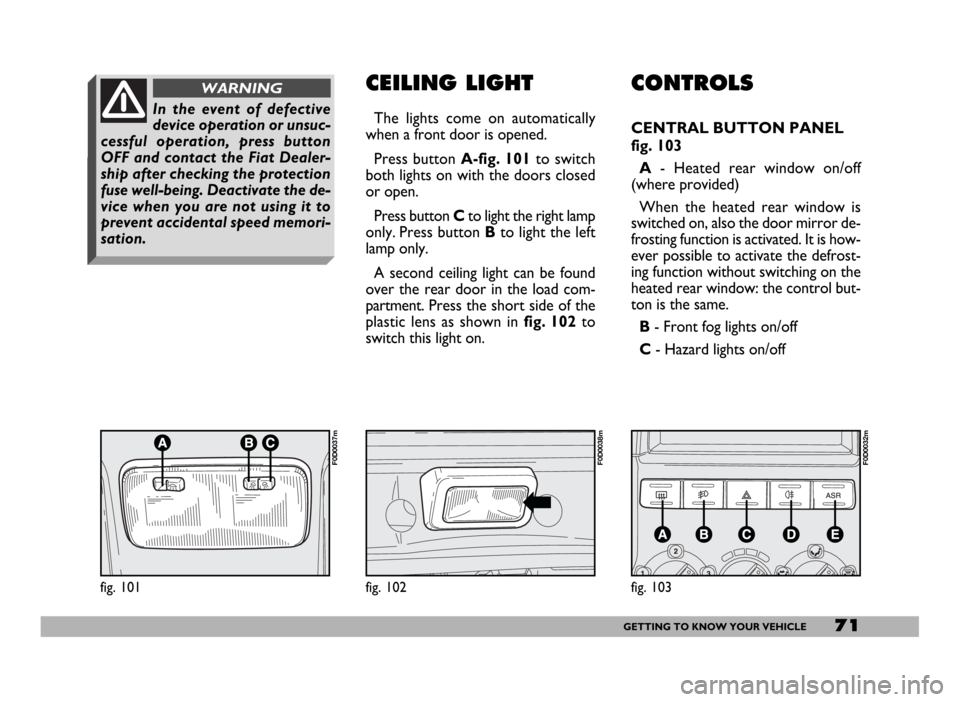
CONTROLS
CENTRAL BUTTON PANEL
fig. 103
A- Heated rear window on/off
(where provided)
When the heated rear window is
switched on, also the door mirror de-
frosting function is activated. It is how-
ever possible to activate the defrost-
ing function without switching on the
heated rear window: the control but-
ton is the same.
B - Front fog lights on/off
C- Hazard lights on/off
CEILING LIGHT
The lights come on automatically
when a front door is opened.
Press button A-fig. 101to switch
both lights on with the doors closed
or open.
Press button Cto light the right lamp
only. Press button Bto light the left
lamp only.
A second ceiling light can be found
over the rear door in the load com-
partment. Press the short side of the
plastic lens as shown in fig. 102to
switch this light on.
fig. 101
F0D0037m
fig. 102
F0D0038m
In the event of defective
device operation or unsuc-
cessful operation, press button
OFF and contact the Fiat Dealer-
ship after checking the protection
fuse well-being. Deactivate the de-
vice when you are not using it to
prevent accidental speed memori-
sation.
WARNING
fig. 103
F0D0032m