lock FIAT DUCATO 2006 3.G Owner's Manual
[x] Cancel search | Manufacturer: FIAT, Model Year: 2006, Model line: DUCATO, Model: FIAT DUCATO 2006 3.GPages: 258, PDF Size: 4.05 MB
Page 62 of 258
61GETTING TO KNOW YOUR VEHICLE
IMPORTANTThe heater is
equipped with a thermal switch which
cuts off the heater in the event of
overheating caused by low or leaking
coolant. In this case, press the pro-
gram selection button to start the
heater again after repairing the cool-
ing system fault and/or topping up the
fluid.
The heater can turn itself off after en-
gine ignition or if the flame goes out.
In this case, turn the heater off man-
ually and attempt to turn it back on
again. If you cannot turn the heater on,
contact a Fiat Dealership.Turning the heater on
Before turning the heater on check
that:
– the heating/ventilation unit knob is
turned to “warm air”;
– the heating/ventilation fan speed
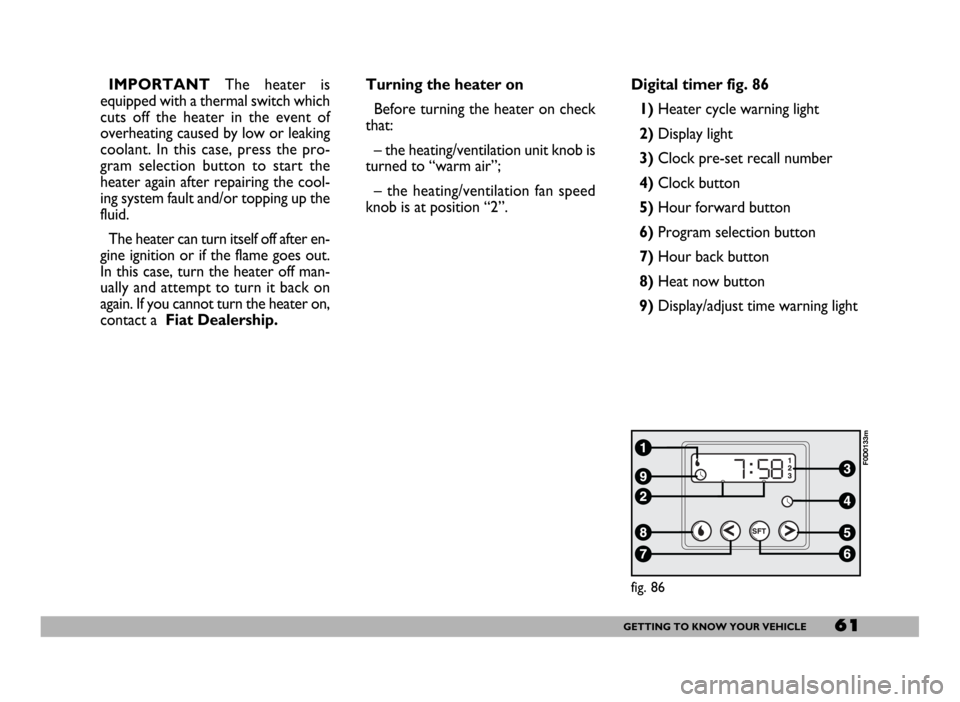
knob is at position “2”.Digital timer fig. 86
1) Heater cycle warning light
2)Display light
3)Clock pre-set recall number
4)Clock button
5)Hour forward button
6)Program selection button
7)Hour back button
8) Heat now button
9) Display/adjust time warning light
fig. 86
F0D0133m
Page 63 of 258
62GETTING TO KNOW YOUR VEHICLE
fig. 87
F0D0132m
fig. 88
F0D0134m
fig. 89
F0D0136m
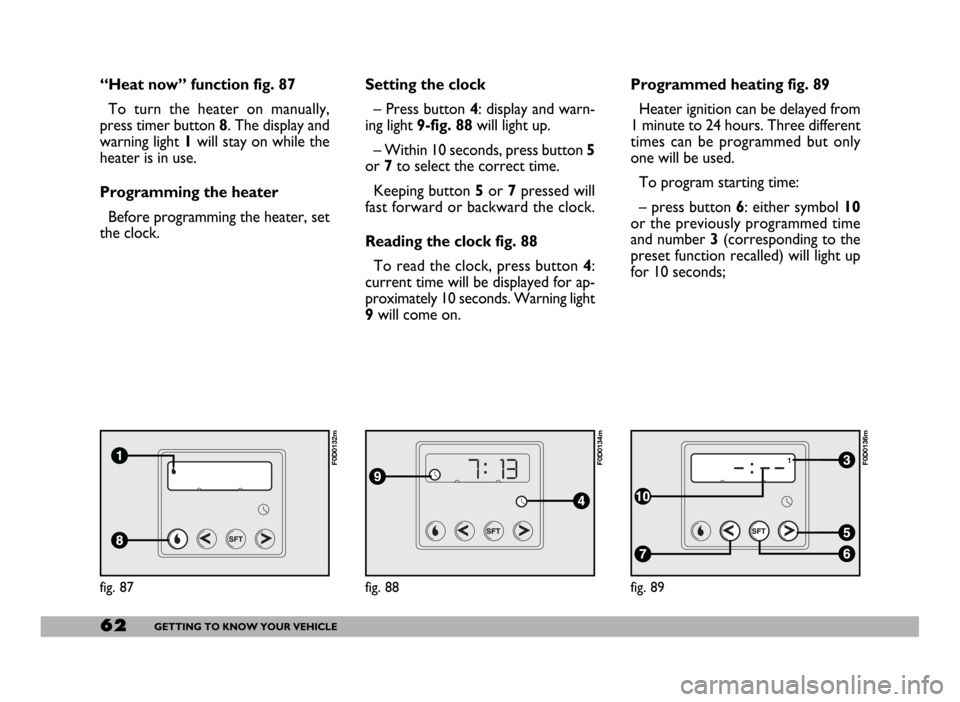
“Heat now” function fig. 87
To turn the heater on manually,
press timer button 8. The display and
warning light 1will stay on while the
heater is in use.
Programming the heater
Before programming the heater, set
the clock.Setting the clock
– Press button 4: display and warn-
ing light 9-fig. 88will light up.
– Within 10 seconds, press button 5
or 7to select the correct time.
Keeping button 5or 7pressed will
fast forward or backward the clock.
Reading the clock fig. 88
To read the clock, press button 4:
current time will be displayed for ap-
proximately 10 seconds. Warning light
9will come on.Programmed heating fig. 89
Heater ignition can be delayed from
1 minute to 24 hours. Three different
times can be programmed but only
one will be used.
To program starting time:
– press button 6: either symbol 10
or the previously programmed time
and number 3 (corresponding to the
preset function recalled) will light up
for 10 seconds;
Page 73 of 258
72GETTING TO KNOW YOUR VEHICLE
fig. 104
F0D00164m
fig. 105
F0D105m
All direction indicators will flash and
the instrument panel warning lights r
and ycome on when the button is
pressed regardless of the ignition key
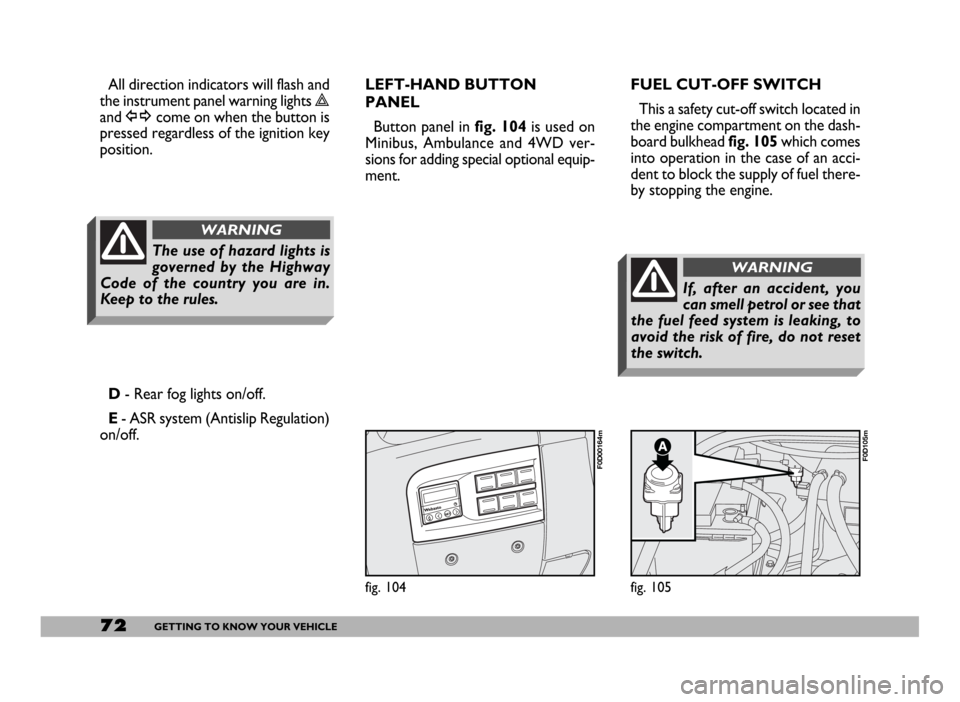
position.FUEL CUT-OFF SWITCH
This a safety cut-off switch located in
the engine compartment on the dash-
board bulkhead fig. 105which comes
into operation in the case of an acci-
dent to block the supply of fuel there-
by stopping the engine.
D- Rear fog lights on/off.
E- ASR system (Antislip Regulation)
on/off.LEFT-HAND BUTTON
PANEL
Button panel in fig. 104is used on
Minibus, Ambulance and 4WD ver-
sions for adding special optional equip-
ment.
The use of hazard lights is
governed by the Highway
Code of the country you are in.
Keep to the rules.
WARNING
If, after an accident, you
can smell petrol or see that
the fuel feed system is leaking, to
avoid the risk of fire, do not reset
the switch.
WARNING
Page 74 of 258
73GETTING TO KNOW YOUR VEHICLE
Inspect the vehicle carefully to make
sure there is no fuel leak in the en-
gine compartment, under the vehicle
or near the fuel tank.
If you cannot see any fuel leaks and
the vehicle is in a fit state to continue
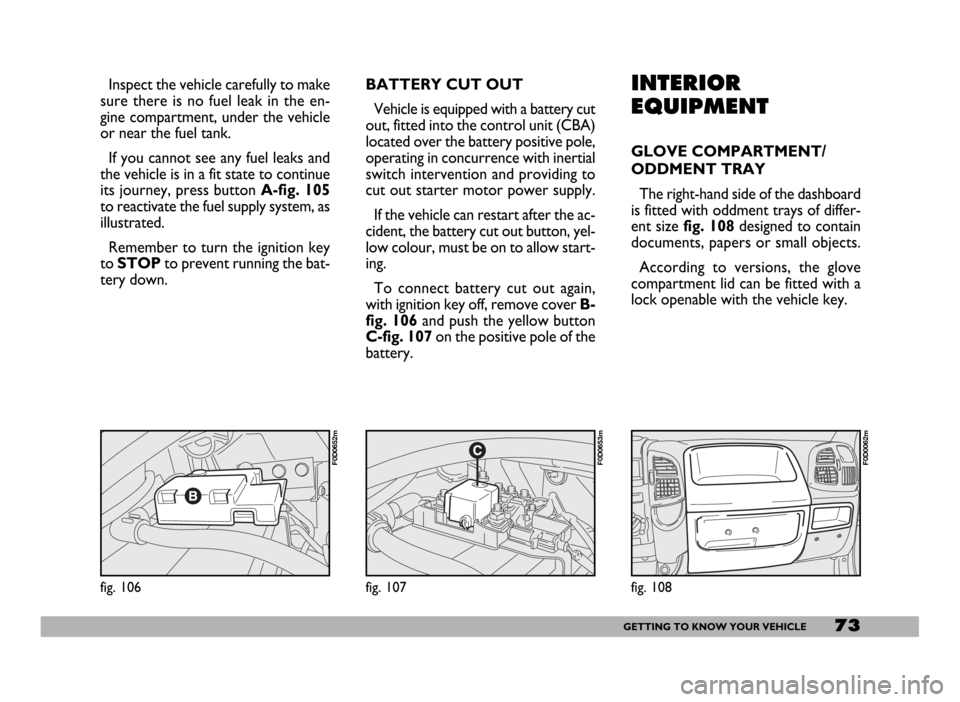
its journey, press button A-fig. 105
to reactivate the fuel supply system, as
illustrated.
Remember to turn the ignition key
to STOPto prevent running the bat-
tery down.INTERIOR
EQUIPMENT
GLOVE COMPARTMENT/
ODDMENT TRAY
The right-hand side of the dashboard
is fitted with oddment trays of differ-
ent sizefig. 108designed to contain
documents, papers or small objects.
According to versions, the glove
compartment lid can be fitted with a
lock openable with the vehicle key.
fig. 108
F0D0062m
fig. 106
F0D0652m
fig. 107
F0D0653m
BATTERY CUT OUT
Vehicle is equipped with a battery cut
out, fitted into the control unit (CBA)
located over the battery positive pole,
operating in concurrence with inertial
switch intervention and providing to
cut out starter motor power supply.
If the vehicle can restart after the ac-
cident, the battery cut out button, yel-
low colour, must be on to allow start-
ing.
To connect battery cut out again,
with ignition key off, remove cover B-
fig. 106 and push the yellow button
C-fig. 107 on the positive pole of the
battery.
Page 80 of 258
79GETTING TO KNOW YOUR VEHICLE
IMPORTANT NOTES
Do not use abrasive detergents or
solvents to clean the device. To clean
its external surface, use a wet cloth or
special products for cleaning synthet-
ic materials.
The multimeter is installed and
sealed with lead by authorised per-
sonnel: access to the device and rele-
vant power and recording cables is
forbidden.
The vehicle owner is responsible for
governing the instrument use. The in-
spection must be carried out at least
every two years and will include a test
to confirm correct operation.
After the inspection, check that the
plate is updated with specified data.DRIVER’S CAB DOORS
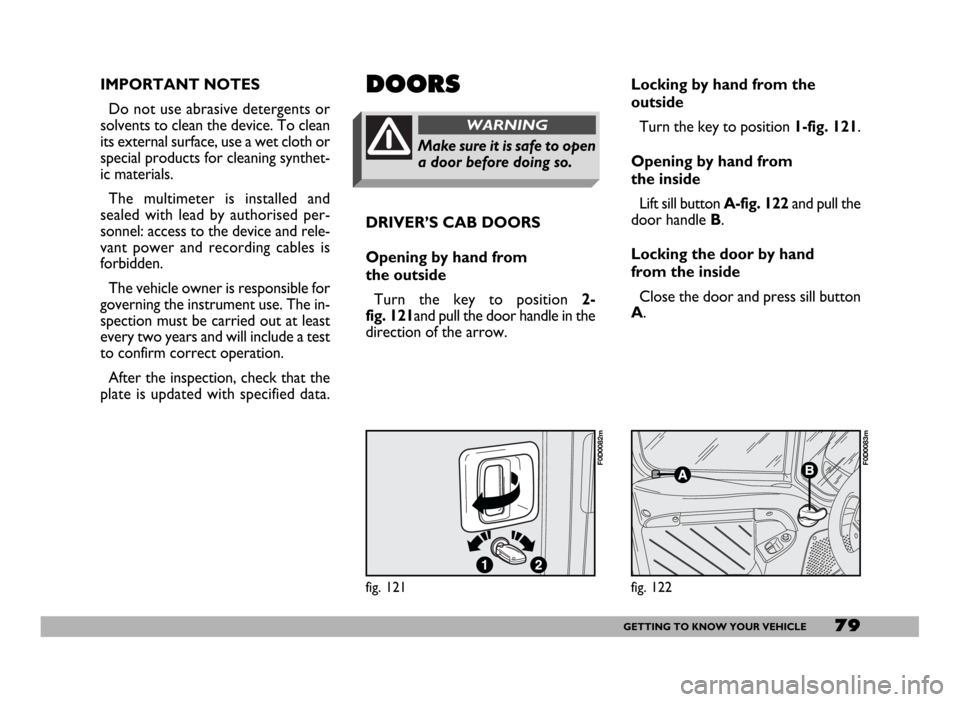
Opening by hand from
the outside
Turn the key to position 2-
fig. 121and pull the door handle in the
direction of the arrow.DOORS
Make sure it is safe to open
a door before doing so.
WARNING
Locking by hand from the
outside
Turn the key to position 1-fig. 121.
Opening by hand from
the inside
Lift sill button A-fig. 122and pull the
door handle B.
Locking the door by hand
from the inside
Close the door and press sill button
A.
fig. 121
F0D0082m
fig. 122
F0D0083m
Page 81 of 258
80GETTING TO KNOW YOUR VEHICLE
SIDE SLIDING DOOR
When leaving the vehicle
parked with the sliding
doors open, always check that the
door hooks are properly fastened
into the retaining device.
WARNING
fig. 123
F0D0084m
Do not move the vehicle
with side doors open.
WARNING
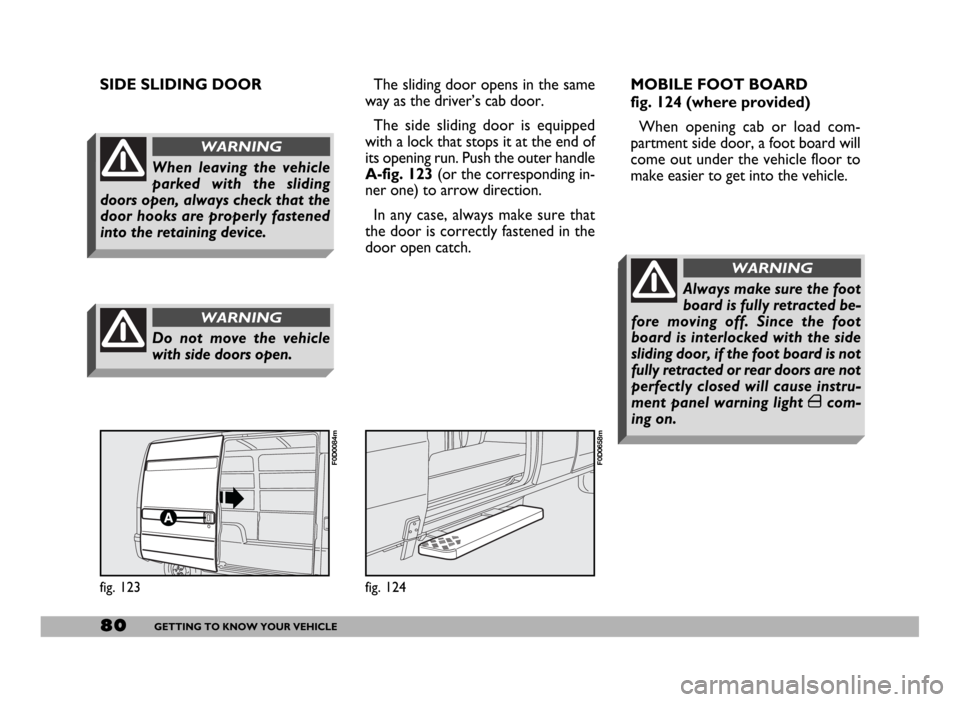
The sliding door opens in the same
way as the driver’s cab door.
The side sliding door is equipped
with a lock that stops it at the end of
its opening run. Push the outer handle
A-fig. 123(or the corresponding in-
ner one) to arrow direction.
In any case, always make sure that
the door is correctly fastened in the
door open catch.
fig. 124
F0D0658m
MOBILE FOOT BOARD
fig. 124 (where provided)
When opening cab or load com-
partment side door, a foot board will
come out under the vehicle floor to
make easier to get into the vehicle.
Always make sure the foot
board is fully retracted be-
fore moving off. Since the foot
board is interlocked with the side
sliding door, if the foot board is not
fully retracted or rear doors are not
perfectly closed will cause instru-
ment panel warning light ´com-
ing on.
WARNING
Page 82 of 258
81GETTING TO KNOW YOUR VEHICLE
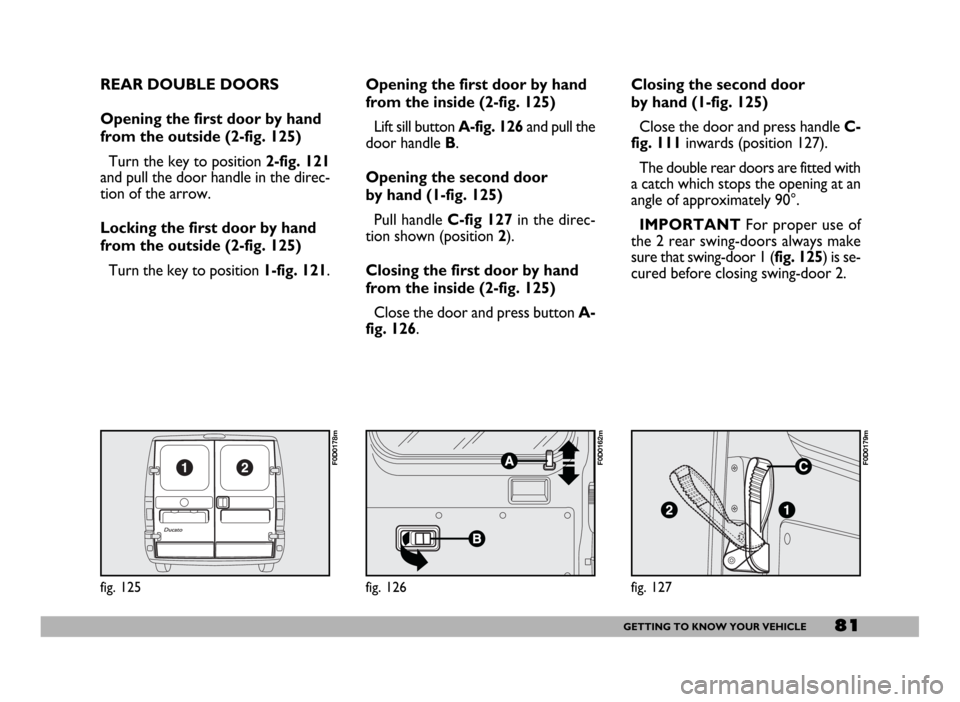
REAR DOUBLE DOORS
Opening the first door by hand
from the outside (2-fig. 125)
Turn the key to position 2-fig. 121
and pull the door handle in the direc-
tion of the arrow.
Locking the first door by hand
from the outside (2-fig. 125)
Turn the key to position 1-fig. 121.
fig. 125
F0D0178m
Opening the first door by hand
from the inside (2-fig. 125)
Lift sill button A-fig. 126and pull the
door handle B.
Opening the second door
by hand (1-fig. 125)
Pull handle C-fig 127in the direc-
tion shown (position2).
Closing the first door by hand
from the inside (2-fig. 125)
Close the door and press button A-
fig. 126.Closing the second door
by hand (1-fig. 125)
Close the door and press handle C-
fig. 111inwards (position 127).
The double rear doors are fitted with
a catch which stops the opening at an
angle of approximately 90°.
IMPORTANTFor proper use of
the 2 rear swing-doors always make
sure that swing-door 1 (fig. 125) is se-
cured before closing swing-door 2.
fig. 127
F0D0179m
fig. 126
F0D0162m
Page 83 of 258
82GETTING TO KNOW YOUR VEHICLE
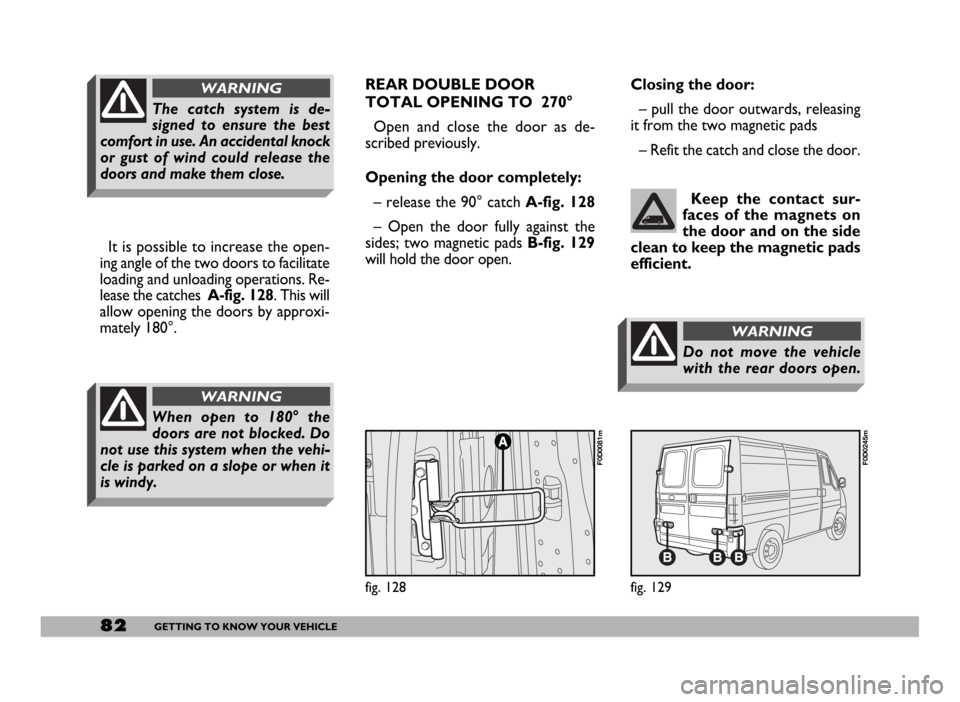
It is possible to increase the open-
ing angle of the two doors to facilitate
loading and unloading operations. Re-
lease the catches A-fig. 128. This will
allow opening the doors by approxi-
mately 180°.
When open to 180° the
doors are not blocked. Do
not use this system when the vehi-
cle is parked on a slope or when it
is windy.
WARNING
The catch system is de-
signed to ensure the best
comfort in use. An accidental knock
or gust of wind could release the
doors and make them close.
WARNINGREAR DOUBLE DOOR
TOTAL OPENING TO 270°
Open and close the door as de-
scribed previously.
Opening the door completely:
– release the 90° catch A-fig. 128
– Open the door fully against the
sides; two magnetic pads B-fig. 129
will hold the door open. Closing the door:
– pull the door outwards, releasing
it from the two magnetic pads
– Refit the catch and close the door.
Keep the contact sur-
faces of the magnets on
the door and on the side
clean to keep the magnetic pads
efficient.
fig. 129
F0D0245m
fig. 128
F0D0081m
Do not move the vehicle
with the rear doors open.
WARNING
Page 84 of 258
83GETTING TO KNOW YOUR VEHICLE
CENTRAL DOOR LOCKING
IMPORTANTCentral door locking
is active on all doors if front doors (cab
doors) are used for opening/closing.
When operating one of the rear or
side door lock, only that door will be
locked/unlocked.
From the outside
When the doors are closed, insert
and turn the key in the lock of one of
the driver’s cab doors.
From the inside
When the doors are closed, press
(to lock) or lift (to unlock) one of the
driver’s cab door safety sill buttons.
IMPORTANT If one of the cab
doors is not shut properly or there is
a failure in the system, the central
locking feature will not work and, af-
ter some attempts, the device will stop
working for about 2 minutes. In these
two minutes, the doors can be locked
or unlocked manually without the
electrical system coming into play.After the two minutes, the control
unit is ready to receive commands
once more. If the reason for the mal-
functioning has been removed, the de-
vice will start to work properly again.
If not, it will cut once more.
FRONT DOOR WINDOW
REGULATORS
Manual control
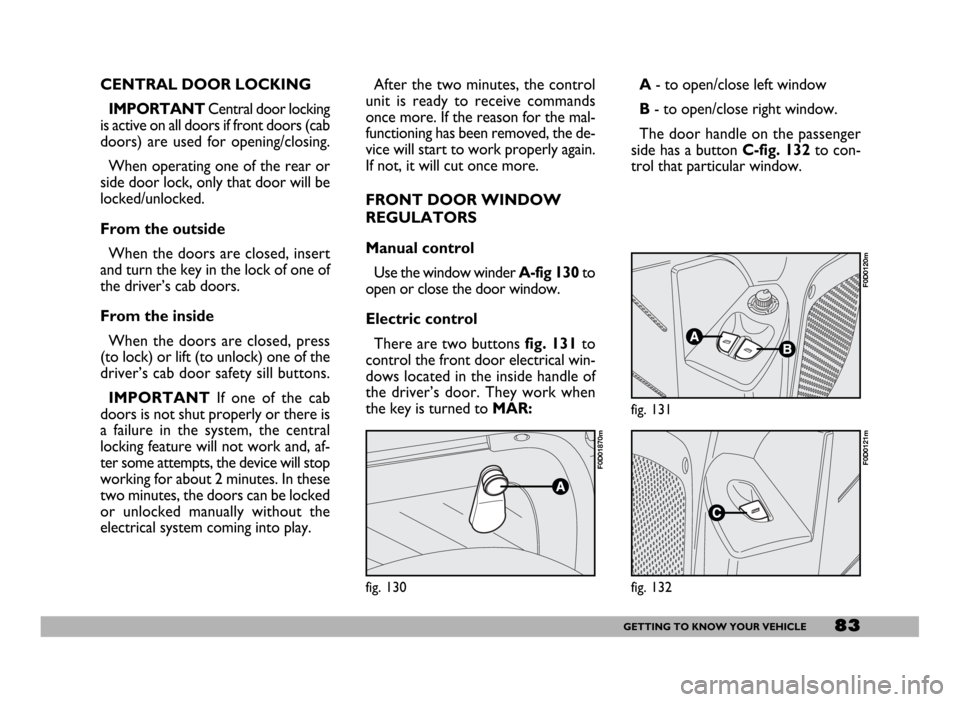
Use the window winderA-fig 130to
open or close the door window.
Electric control
There are two buttons fig. 131to
control the front door electrical win-
dows located in the inside handle of
the driver’s door. They work when
the key is turned to MAR:A- to open/close left window
B- to open/close right window.
The door handle on the passenger
side has a button C-fig. 132to con-
trol that particular window.
fig. 130
F0D01870m
fig. 131
F0D0120m
fig. 132
F0D0121m
Page 86 of 258
85GETTING TO KNOW YOUR VEHICLE
Be very cautious operating
the engine compartment
when the engine is hot - danger of
burns! Wait until the engine cools.
WARNING
Scarves, ties and other
loose articles of clothing
could easily get caught up in mov-
ing parts. This can be extremely
dangerous for the wearer.
WARNINGCLOSING
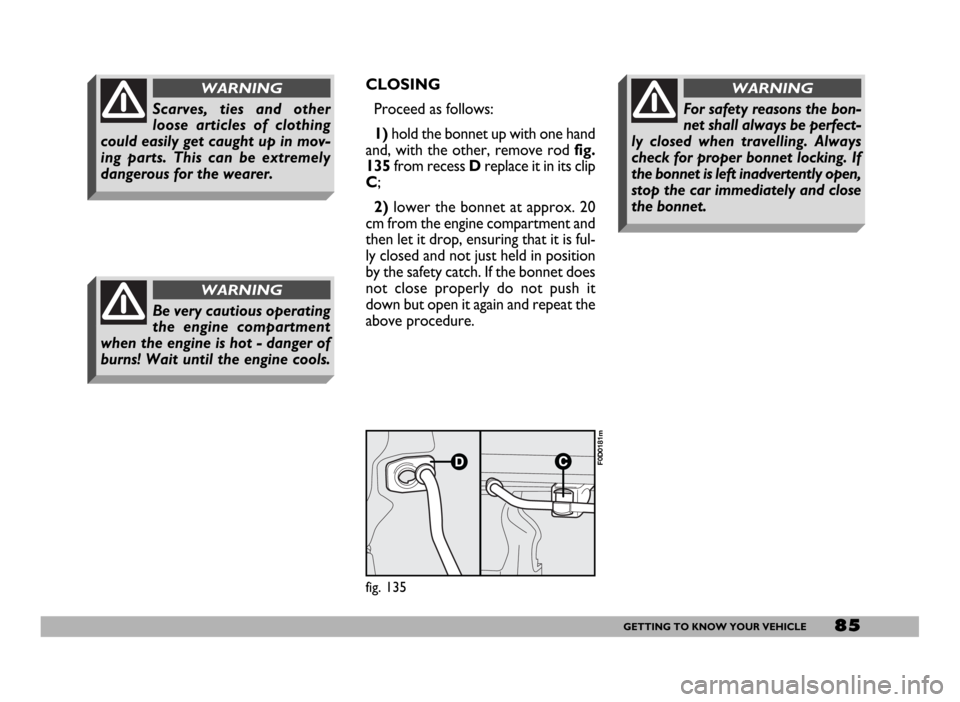
Proceed as follows:
1)hold the bonnet up with one hand
and, with the other, remove rodfig.
135from recess Dreplace it in its clip
C;
2)lower the bonnet at approx. 20
cm from the engine compartment and
then let it drop, ensuring that it is ful-
ly closed and not just held in position
by the safety catch. If the bonnet does
not close properly do not push it
down but open it again and repeat the
above procedure.
For safety reasons the bon-
net shall always be perfect-
ly closed when travelling. Always
check for proper bonnet locking. If
the bonnet is left inadvertently open,
stop the car immediately and close
the bonnet.
WARNING
fig. 135
F0D0181m