Deactivate FIAT DUCATO 2014 3.G Owners Manual
[x] Cancel search | Manufacturer: FIAT, Model Year: 2014, Model line: DUCATO, Model: FIAT DUCATO 2014 3.GPages: 367, PDF Size: 20.39 MB
Page 14 of 367
SYMBOLSSome vehicle components have
coloured labels whose symbols indicate
precautions to be observed when
using this component. Under the
bonnet there is also a label that
summarises all the symbols.
THE FIAT CODE
SYSTEM
IN BRIEF
This is an electrical engine locking
system which increases protection
against attempted theft of the vehicle.
It is automatically activated when
the ignition key is removed.
Each key contains an electronic
device which modulates the signal
emitted during ignition by an antenna
built into the ignition device. The
signal, which changes each time the
engine is started, is the “password”,
by means of which the control unit
recognises the key and enables
starting.
1)
Operation
Each time the vehicle is started turning
the ignition key toMAR-ON, the Fiat
CODE system control unit sends a
recognition code to the Powertrain
Control Module to deactivate the
immobiliser.The acknowledgement code is sent
only if the Fiat CODE system control
unit has recognised the code
transmitted from the key.
Each time the ignition key is turned to
STOP, the Fiat CODE system
deactivates the functions of the
Powertrain Control Module.
Irregular operation
If, during starting, the code has not
been recognised correctly the warning
light
on the instrument panel turns
on accompanied by the related
message on the display (see section
“Warning lights and messages”).
In this case, turn the key toSTOPand
then back toMAR-ON; if the lock
continues, try with the other keys
provided with the vehicle. Contact a
Fiat Dealership if you still cannot start
the engine.
IMPORTANT Each key has its own
code which must be stored by the
system's control unit. Contact the Fiat
Dealership to have new keys (up to
eight) stored with the code.
10
KNOW YOUR VEHICLE
Page 32 of 367
DIFFUSERSADJUSTABLE SIDE AND
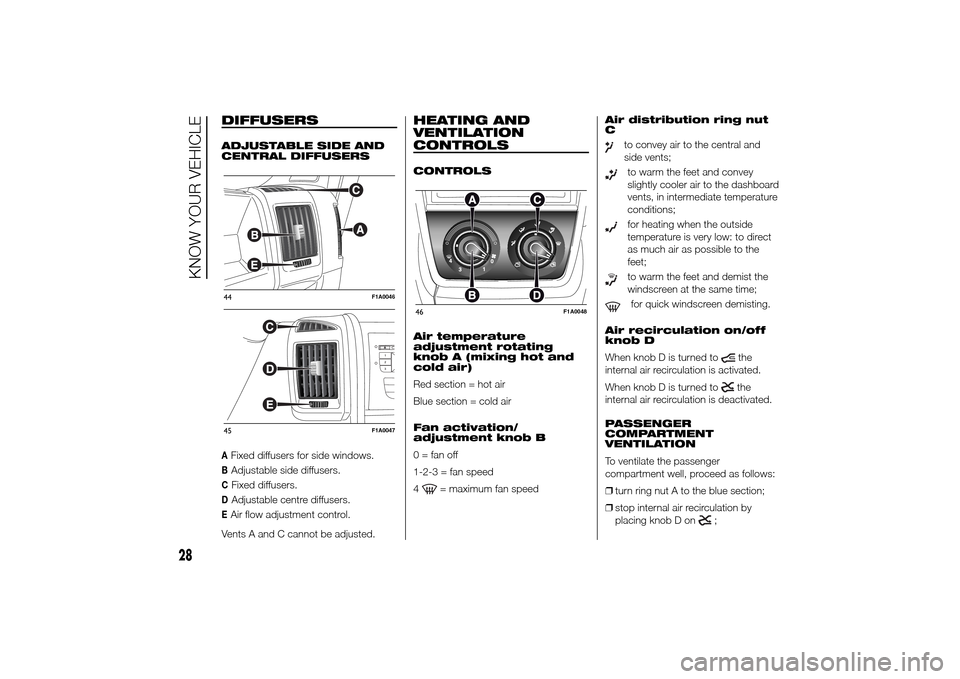
CENTRAL DIFFUSERSAFixed diffusers for side windows.BAdjustable side diffusers.CFixed diffusers.DAdjustable centre diffusers.EAir flow adjustment control.
Vents A and C cannot be adjusted.
HEATING AND
VENTILATION
CONTROLSCONTROLS
Air temperature
adjustment rotating
knob A (mixing hot and
cold air)
Red section = hot air
Blue section = cold air
Fan activation/
adjustment knob B
0 = fan off
1-2-3 = fan speed
4
= maximum fan speedAir distribution ring nut
C
to convey air to the central and
side vents;to warm the feet and convey
slightly cooler air to the dashboard
vents, in intermediate temperature
conditions;for heating when the outside
temperature is very low: to direct
as much air as possible to the
feet;to warm the feet and demist the
windscreen at the same time;for quick windscreen demisting.
Air recirculation on/off
knob D
When knob D is turned to
the
internal air recirculation is activated.
When knob D is turned tothe
internal air recirculation is deactivated.
PASSENGER
COMPARTMENT
VENTILATION
To ventilate the passenger
compartment well, proceed as follows:
❒turn ring nut A to the blue section;
❒stop internal air recirculation by
placing knob D on
;
44
F1A0046
45
F1A0047
46
F1A0048
28
KNOW YOUR VEHICLE
Page 33 of 367
❒turn ring nut C to
;
❒turn knob B to the required speed.
PASSENGER
COMPARTMENT HEATING
Proceed as follows:
❒turn ring nut A to the red section;
❒turn ring nut C to the required
position;
❒turn knob B to the required speed.
FAST PASSENGER
COMPARTMENT HEATING
For the fast heating of the passenger
compartment, proceed as follows:
❒turn ring nut A to the red section;
❒start internal air recirculation by
placing knob D on;
❒turn ring nut C to;
❒turn knob B to 4(max. fan
speed).
Then use the controls to maintain the
required comfort conditions and turn
knob D to
to turn the air
recirculation off and to prevent windows
from misting up.
IMPORTANT With a cold engine, you
have to wait for a few minutes to let the
system fluid reach optimum operating
temperature.FRONT WINDOW FAST
DEMISTING/DEFROSTING
(WINDSCREEN AND SIDE
WINDOWS)
Proceed as follows:
❒turn ring nut A to the red section;
❒stop internal air recirculation by
placing knob D on
;
❒turn ring nut C to;
❒turn knob B to 4(max. fan
speed).
IMPORTANT To guarantee rapid
demisting/defrosting, if an additional
heater is present (under the front or rear
seat on Panorama and Combi
versions), if activated, deactivate it
using the F button (LED off) located in
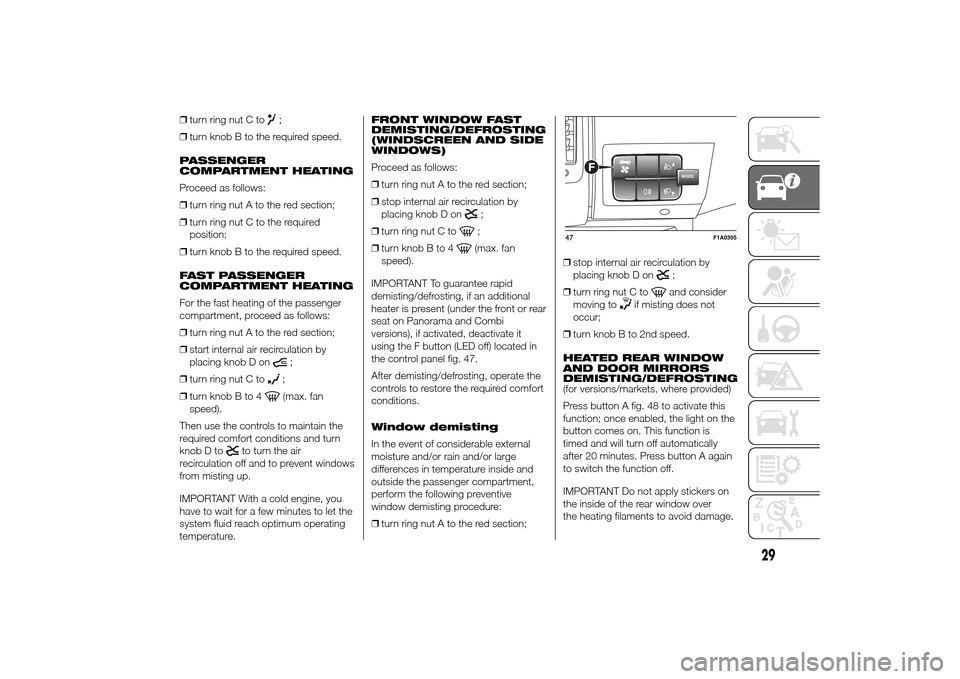
the control panel fig. 47.
After demisting/defrosting, operate the
controls to restore the required comfort
conditions.
Window demisting
In the event of considerable external
moisture and/or rain and/or large
differences in temperature inside and
outside the passenger compartment,
perform the following preventive
window demisting procedure:
❒turn ring nut A to the red section;❒stop internal air recirculation by
placing knob D on
;
❒turn ring nut C toand consider
moving to
if misting does not
occur;
❒turn knob B to 2nd speed.
HEATED REAR WINDOW
AND DOOR MIRRORS
DEMISTING/DEFROSTING
(for versions/markets, where provided)
Press button A fig. 48 to activate this
function; once enabled, the light on the
button comes on. This function is
timed and will turn off automatically
after 20 minutes. Press button A again
to switch the function off.
IMPORTANT Do not apply stickers on
the inside of the rear window over
the heating filaments to avoid damage.
MODE
F
47
F1A0305
29
Page 35 of 367
PASSENGER
COMPARTMENT
VENTILATION
To ventilate the passenger
compartment well, proceed as follows:
❒turn ring nut A to the blue section;
❒stop internal air recirculation by
placing knob D on
;
❒turn ring nut C to;
❒turn knob B to the required speed.
CLIMATE CONTROL
SYSTEM (cooling)
For fast cooling of the passenger
compartment, proceed as follows:
❒turn ring nut A to the blue section;
❒start internal air recirculation by
placing knob D on;
❒turn ring nut C to;
❒press button E to turn the climate
control system on; the LED on the
button will come on;
❒turn knob B to 4(maximum fan
speed).Cooling adjustment
❒turn ring nut A to the right to increase
the temperature;
❒stop internal air recirculation by
placing knob D on
;
❒turn knob B to reduce fan speed.
IMPORTANT When air conditioner
compressor button E is pressed, the
function is only activated if at least the
first fan speed is selected (knob B).
PASSENGER
COMPARTMENT HEATING
Proceed as follows:
❒turn ring nut A to the red section;
❒turn ring nut C to the required
position;
❒turn knob B to the required speed.
FAST PASSENGER
COMPARTMENT HEATING
For the fast heating of the passenger
compartment, proceed as follows:
❒turn ring nut A to the red section;
❒start internal air recirculation by
placing knob D on;
❒turn ring nut C to;
❒turn knob B to 4(max. fan
speed).Then use the controls to maintain the
required comfort conditions and turn
knob D to
to turn the air
recirculation off and to prevent windows
from misting up.
IMPORTANT With a cold engine, you
have to wait for a few minutes to let the
system fluid reach optimum operating
temperature.
FRONT WINDOW FAST
DEMISTING/DEFROSTING
(WINDSCREEN AND SIDE
WINDOWS)
Proceed as follows:
❒turn ring nut A to the red section;
❒turn knob B to 4
(max. fan
speed).
❒turn ring nut C to;
❒stop internal air recirculation by
placing knob D on;
IMPORTANT To guarantee rapid
demisting/defrosting, if an additional
heater/air conditioner is present (under
the front or rear seat on Panorama
and Combi versions), if activated,
deactivate it using F button fig. 50 (LED
off) located in the control panel.
After demisting/defrosting, operate the
controls to restore the required comfort
conditions.
31
Page 42 of 367
IMPORTANT The rapid demisting/
defrosting function for the windows
remains on for about 3 minutes from
when the engine coolant reaches the
appropriate temperature for a rapid
demisting of the windows.
When this function is active, the LED on
the corresponding button and the one
on the heated rear window button
switch on. The message FULL AUTO
goes off on the display.
You can only adjust the fan speed and
switch off the heated rear window
manually when this function is active.
To restore the previous operating
conditions, simply press button B, air
recirculation button G, compressor
button F or AUTO button A.
NoteTo guarantee rapid demisting/
defrosting, if an additional heater/air
conditioner is present (under the front
or rear seat on Panorama and Combi
versions), if activated, deactivate it
using button F (LED off) located
in control panel F fig. 55.Switching the system
OFF (E)
Press button E to switch the climate
control system off. The display will go
out.
The following climate control conditions
will be present when the system is off:
❒display off;
❒temperature setting not displayed;
❒air recirculation on, thereby insulating
the passenger compartment from the
outside (recirculation LED on);
❒climate control compressor off;
❒fan off.
Press the AUTO button to switch the
climate control system back on in
full automatic mode.
ADDITIONAL
HEATER(for versions/markets, where provided)
On some versions, an additional heater
is also present beneath the driver's
seat. The fan for this heater is operated
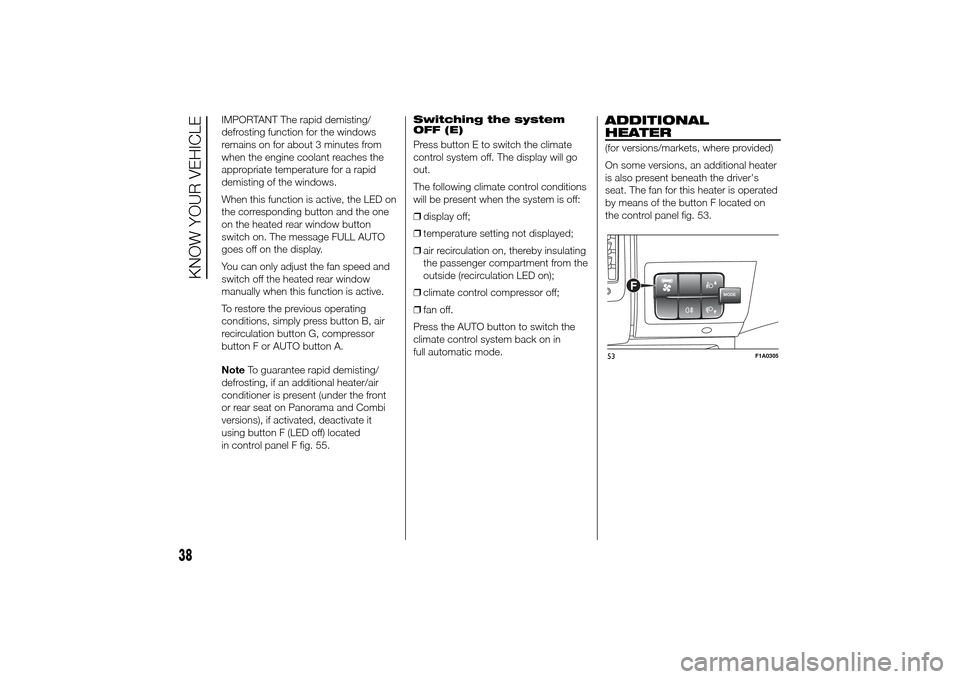
by means of the button F located on
the control panel fig. 53.
MODE
F
53
F1A0305
38
KNOW YOUR VEHICLE
Page 48 of 367
WARNING
21) The heater burns fuel in the
same way as the engine, though
to a lesser extent. To prevent
poisoning and asphyxiation, the
additional heater must never
be turned on, not even for short
periods, in closed environments
such as a garage or workshops
without extraction fans for the
exhaust gases.
22) The heater burns fuel in the
same way as the engine, though
to a lesser extent. To prevent
poisoning and asphyxiation, the
supplementary heater must never
be turned on, not even for short
periods, in closed environments
such as a garage or workshops
without extraction fans for the
exhaust gases.
EXTERNAL LIGHTS
IN BRIEF
The left stalk includes the controls for
the exterior lights.
The exterior lights can only be
switched on when the ignition key is
in the ON position.
LIGHTS OFF
Ring nut turned to positionOfig. 57.DAYTIME RUNNING
LIGHTS (DRL)
(for versions/markets, where provided)
With the ignition key turned to MAR-ON
and the ring nut turned to positionO
fig. 57 the daytime running lights are
automatically activated; the other lights
and interior lighting remain off. The
automatic operation of the daytime
running lights can be activated/
deactivated, for versions/markets
where provided, via the display menu
(see "Display" in the "Knowing the
instrument panel" chapter).
If the daytime running lights are
deactivated, no light comes on when
the ring nut is turned toO.
23)
DIPPED BEAM
HEADLIGHTS/SIDE
LIGHTS
With the ignition key turned to
MAR-ON, turn the ring nut to
fig.
58.
If dipped headlights are activated, the
daytime running lights switch off and
the side lights and dipped headlights
switch on.
The
warning light switches on in
the instrument panel.
57
F1A0064
44
KNOW YOUR VEHICLE
Page 49 of 367
When the ignition key is turned to
STOP or removed and the ring nut is
turned fromOto
, all the side lights
and the number plate lights come on.
The
warning light will come on
in the instrument panel.
MAIN BEAM HEADLIGHTS
When the ring nut is in position
,
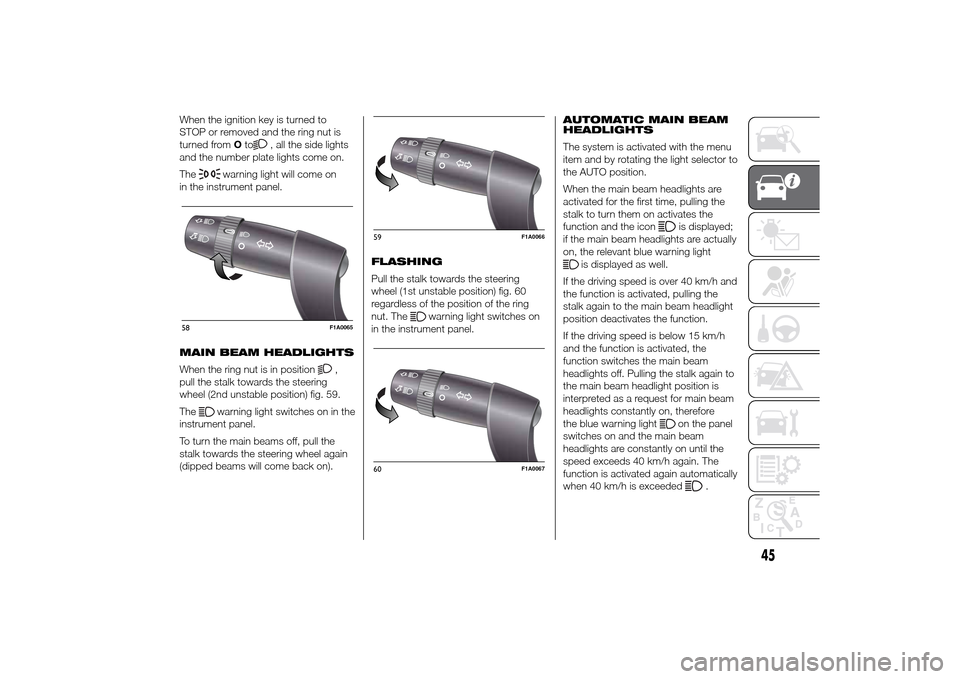
pull the stalk towards the steering
wheel (2nd unstable position) fig. 59.
The
warning light switches on in the
instrument panel.
To turn the main beams off, pull the
stalk towards the steering wheel again
(dipped beams will come back on).FLASHING
Pull the stalk towards the steering
wheel (1st unstable position) fig. 60
regardless of the position of the ring
nut. The
warning light switches on
in the instrument panel.AUTOMATIC MAIN BEAM
HEADLIGHTS
The system is activated with the menu
item and by rotating the light selector to
the AUTO position.
When the main beam headlights are
activated for the first time, pulling the
stalk to turn them on activates the
function and the icon
is displayed;
if the main beam headlights are actually
on, the relevant blue warning light
is displayed as well.
If the driving speed is over 40 km/h and
the function is activated, pulling the
stalk again to the main beam headlight
position deactivates the function.
If the driving speed is below 15 km/h
and the function is activated, the
function switches the main beam
headlights off. Pulling the stalk again to
the main beam headlight position is
interpreted as a request for main beam
headlights constantly on, therefore
the blue warning light
on the panel
switches on and the main beam
headlights are constantly on until the
speed exceeds 40 km/h again. The
function is activated again automatically
when 40 km/h is exceeded
.
58
F1A0065
59
F1A0066
60
F1A0067
45
Page 50 of 367
If the stalk is pulled again in this
condition, to request main beam
headlight deactivation, the function
remains off and the main beam
headlights switch off.
Rotate the ring nut to the position
fig. 58 to deactivate the automatic
function.25) 24)
PARKING LIGHTS
These lights can only be turned on with
ignition key in STOP position or
removed, by moving the left stalk ring
nut first to positionOand then to
position
or
.
The
warning light switches on in
the instrument panel.
DIRECTION INDICATORS
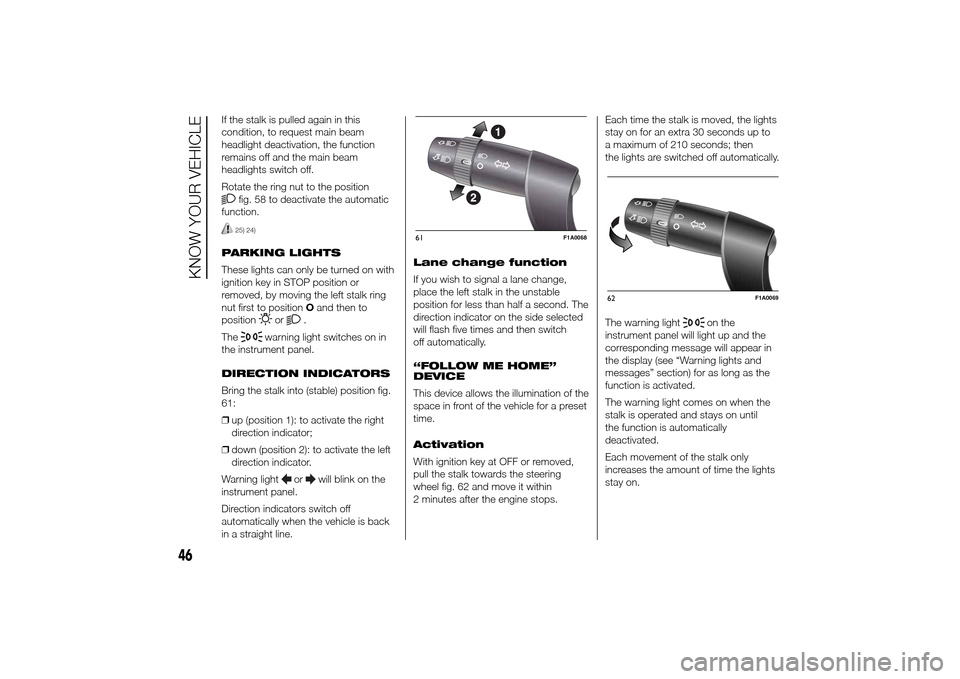
Bring the stalk into (stable) position fig.
61:
❒up (position 1): to activate the right
direction indicator;
❒down (position 2): to activate the left
direction indicator.
Warning light
or
will blink on the
instrument panel.
Direction indicators switch off
automatically when the vehicle is back
in a straight line.Lane change function
If you wish to signal a lane change,
place the left stalk in the unstable
position for less than half a second. The
direction indicator on the side selected
will flash five times and then switch
off automatically.
“FOLLOW ME HOME”
DEVICE
This device allows the illumination of the
space in front of the vehicle for a preset
time.
Activation
With ignition key at OFF or removed,
pull the stalk towards the steering
wheel fig. 62 and move it within
2 minutes after the engine stops.Each time the stalk is moved, the lights
stay on for an extra 30 seconds up to
a maximum of 210 seconds; then
the lights are switched off automatically.
The warning light
on the
instrument panel will light up and the
corresponding message will appear in
the display (see “Warning lights and
messages” section) for as long as the
function is activated.
The warning light comes on when the
stalk is operated and stays on until
the function is automatically
deactivated.
Each movement of the stalk only
increases the amount of time the lights
stay on.
61
F1A0068
62
F1A0069
46
KNOW YOUR VEHICLE
Page 51 of 367
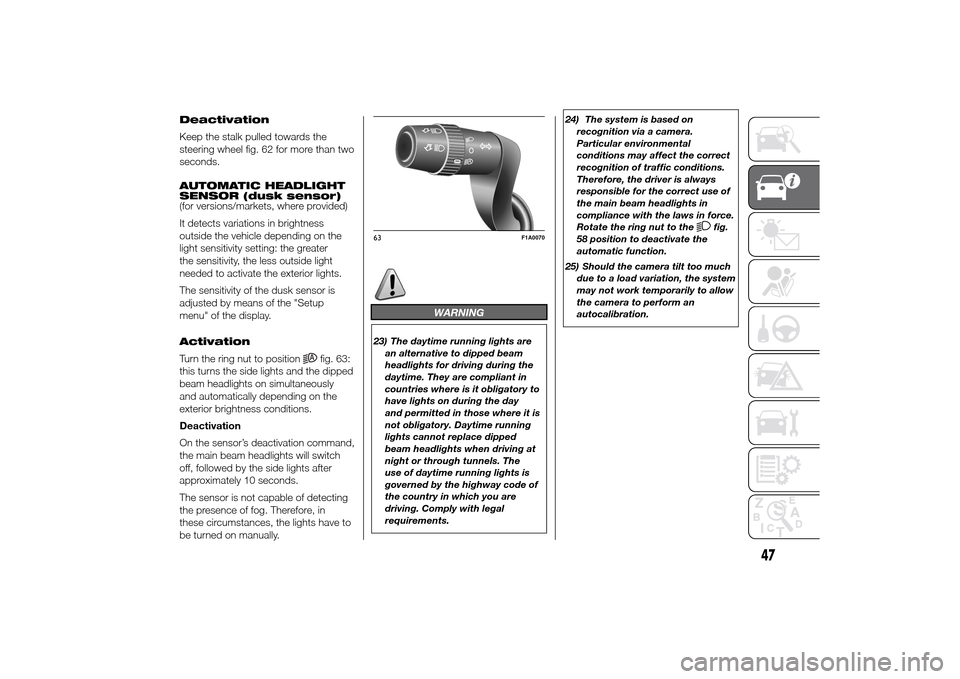
Deactivation
Keep the stalk pulled towards the
steering wheel fig. 62 for more than two
seconds.
AUTOMATIC HEADLIGHT
SENSOR (dusk sensor)
(for versions/markets, where provided)
It detects variations in brightness
outside the vehicle depending on the
light sensitivity setting: the greater
the sensitivity, the less outside light
needed to activate the exterior lights.
The sensitivity of the dusk sensor is
adjusted by means of the "Setup
menu" of the display.
Activation
Turn the ring nut to position
fig. 63:
this turns the side lights and the dipped
beam headlights on simultaneously
and automatically depending on the
exterior brightness conditions.
Deactivation
On the sensor’s deactivation command,
the main beam headlights will switch
off, followed by the side lights after
approximately 10 seconds.
The sensor is not capable of detecting
the presence of fog. Therefore, in
these circumstances, the lights have to
be turned on manually.
WARNING
23) The daytime running lights are
an alternative to dipped beam
headlights for driving during the
daytime. They are compliant in
countries where is it obligatory to
have lights on during the day
and permitted in those where it is
not obligatory. Daytime running
lights cannot replace dipped
beam headlights when driving at
night or through tunnels. The
use of daytime running lights is
governed by the highway code of
the country in which you are
driving. Comply with legal
requirements.24) The system is based on
recognition via a camera.
Particular environmental
conditions may affect the correct
recognition of traffic conditions.
Therefore, the driver is always
responsible for the correct use of
the main beam headlights in
compliance with the laws in force.
Rotate the ring nut to the
fig.
58 position to deactivate the
automatic function.
25) Should the camera tilt too much
due to a load variation, the system
may not work temporarily to allow
the camera to perform an
autocalibration.
63
F1A0070
47
Page 54 of 367
CRUISE CONTROL(for versions/markets, where provided)
IN BRIEF
This is an electronic driving aid that
allows you to drive at a speed of
above 30 km/h on long and straight
dry roads with few driving changes
(e.g. motorways) at a preset speed
without having to press the
accelerator pedal. It is therefore not
recommended to use this device
on extra-urban roads with traffic. Do
not use it in town.
Switching the device on
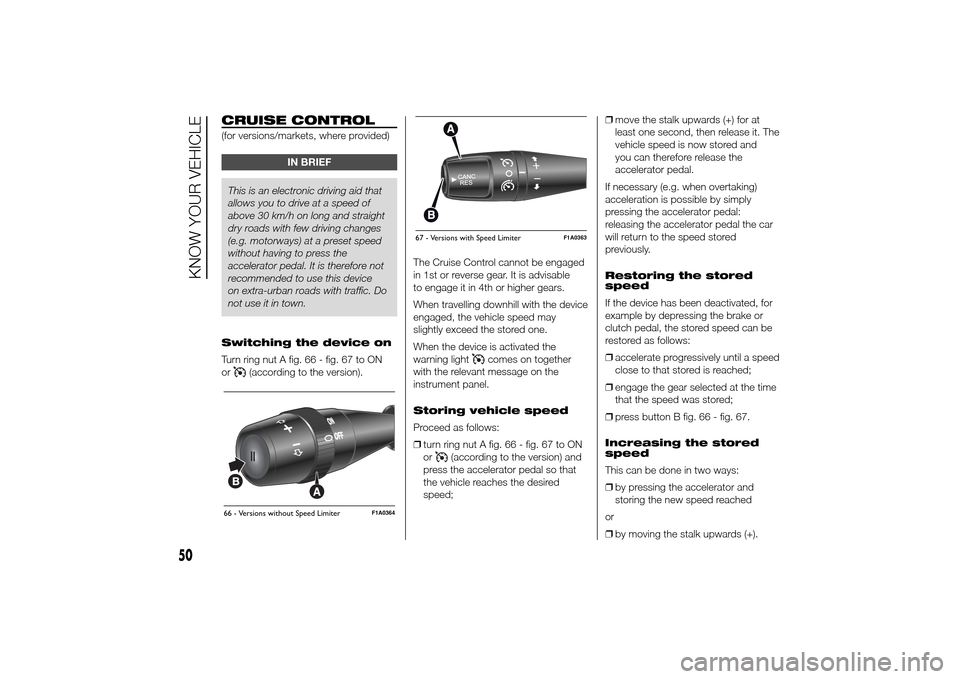
Turn ring nut A fig. 66 - fig. 67 to ON
or
(according to the version).The Cruise Control cannot be engaged
in 1st or reverse gear. It is advisable
to engage it in 4th or higher gears.
When travelling downhill with the device
engaged, the vehicle speed may
slightly exceed the stored one.
When the device is activated the
warning light
comes on together
with the relevant message on the
instrument panel.
Storing vehicle speed
Proceed as follows:
❒turn ring nut A fig. 66 - fig. 67 to ON
or
(according to the version) and
press the accelerator pedal so that
the vehicle reaches the desired
speed;❒move the stalk upwards (+) for at
least one second, then release it. The
vehicle speed is now stored and
you can therefore release the
accelerator pedal.
If necessary (e.g. when overtaking)
acceleration is possible by simply
pressing the accelerator pedal:
releasing the accelerator pedal the car
will return to the speed stored
previously.
Restoring the stored
speed
If the device has been deactivated, for
example by depressing the brake or
clutch pedal, the stored speed can be
restored as follows:
❒accelerate progressively until a speed
close to that stored is reached;
❒engage the gear selected at the time
that the speed was stored;
❒press button B fig. 66 - fig. 67.
Increasing the stored
speed
This can be done in two ways:
❒by pressing the accelerator and
storing the new speed reached
or
❒by moving the stalk upwards (+).
66 - Versions without Speed Limiter
F1A0364
67 - Versions with Speed Limiter
F1A0363
50
KNOW YOUR VEHICLE