without FIAT DUCATO 2014 3.G Owners Manual
[x] Cancel search | Manufacturer: FIAT, Model Year: 2014, Model line: DUCATO, Model: FIAT DUCATO 2014 3.GPages: 367, PDF Size: 20.39 MB
Page 1 of 367

The data contained in this publication is intended merely as a guide. FIAT reserves the right to modify the models and
versions described in this booklet at any time for technical and commercial reasons.
If you have any further questions please consult your FIAT dealer.
Printed in recycled paper without chlorine.
OWNER HANDBOOK
FIATDUCATO
ENGLISH
DUCATO LUM GB 17-12-2008 9:57 Pagina 1
Page 6 of 367
READ THIS CAREFULLYREFUELLING
Only refuel with automotive diesel conforming to the European specification EN590. The use of other products or mixtures may damage the
engine beyond repair and consequently invalidate the warranty, due to the damage caused.
STARTING THE ENGINE
Make sure that the handbrake is engaged; set the gear lever to neutral; fully depress the clutch pedal without pressing the accelerator, then
turn the ignition key to MAR-ON and wait for the warning lights
and
to switch off; turn the ignition key to AVV and release it as
soon as the engine has started.
PARKING ON FLAMMABLE MATERIAL
The catalytic converter develops high temperatures during operation. Do not park on grass, dry leaves, pine needles or other flammable
material: fire hazard.
RESPECTING THE ENVIRONMENT
The vehicle is fitted with a system that allows continuous diagnosis of the emission-related components in order to help protect the
environment.
ELECTRICAL ACCESSORIES
If, after buying the vehicle, you decide to add electrical accessories (with the risk of gradually draining the battery), visit a Fiat Dealership. They
can calculate the overall electrical requirement and check that the vehicle's electrical system can support the required load.
SCHEDULED SERVICING
Correct maintenance enables the vehicle to perfectly maintain performance and safety characteristics, its environmental friendliness and low
running costs over time.
THE OWNER HANDBOOK CONTAINS
... important information, advice and warnings for correct use, driving safety and maintenance of your vehicle over time. Special attention
must be paid to the symbols
(safety of persons)
(environmental protection)
(vehicle integrity).
Page 15 of 367
Activation of
warning
light while driving
❒If the warning lightswitches on,
this means that the system is running
a self-diagnosis (for example for a
voltage drop).
❒If the warning lightstays on,
contact a Fiat Dealership.
IMPORTANT
1) The electronic components inside
the key may be damaged if the
key is subjected to sharp knocks.
In order to ensure complete
efficiency of the electronic
devices inside the key, it should
never be exposed to direct
sunlight.
THE KEYSKEY WITHOUT REMOTE
CONTROL
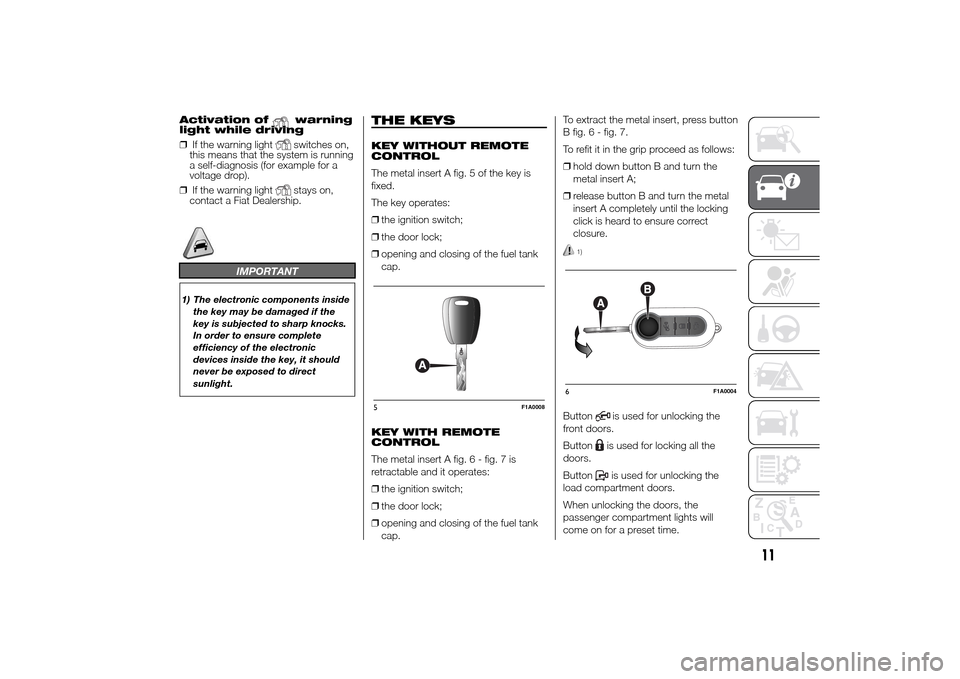
The metal insert A fig. 5 of the key is
fixed.
The key operates:
❒the ignition switch;
❒the door lock;
❒opening and closing of the fuel tank
cap.
KEY WITH REMOTE
CONTROL
The metal insert A fig.6-fig.7is
retractable and it operates:
❒the ignition switch;
❒the door lock;
❒opening and closing of the fuel tank
cap.To extract the metal insert, press button
B fig. 6 - fig. 7.
To refit it in the grip proceed as follows:
❒hold down button B and turn the
metal insert A;
❒release button B and turn the metal
insert A completely until the locking
click is heard to ensure correct
closure.
1)
Button
is used for unlocking the
front doors.
Buttonis used for locking all the
doors.
Buttonis used for unlocking the
load compartment doors.
When unlocking the doors, the
passenger compartment lights will
come on for a preset time.
5
F1A0008
6
F1A0004
11
Page 23 of 367
SEAT BASE PLASTIC
COVERS
(for versions/markets, where provided)
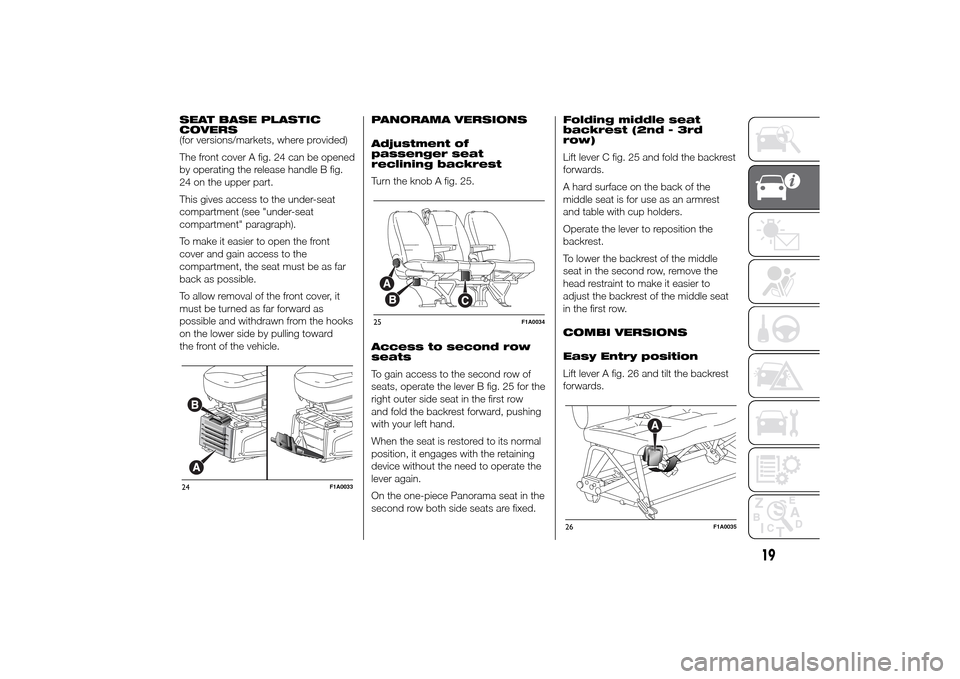
The front cover A fig. 24 can be opened
by operating the release handle B fig.
24 on the upper part.
This gives access to the under-seat
compartment (see "under-seat
compartment" paragraph).
To make it easier to open the front
cover and gain access to the
compartment, the seat must be as far
back as possible.
To allow removal of the front cover, it
must be turned as far forward as
possible and withdrawn from the hooks
on the lower side by pulling toward
the front of the vehicle.PANORAMA VERSIONS
Adjustment of
passenger seat
reclining backrest
Turn the knob A fig. 25.
Access to second row
seats
To gain access to the second row of
seats, operate the lever B fig. 25 for the
right outer side seat in the first row
and fold the backrest forward, pushing
with your left hand.
When the seat is restored to its normal
position, it engages with the retaining
device without the need to operate the
lever again.
On the one-piece Panorama seat in the
second row both side seats are fixed.Folding middle seat
backrest (2nd - 3rd
row)
Lift lever C fig. 25 and fold the backrest
forwards.
A hard surface on the back of the
middle seat is for use as an armrest
and table with cup holders.
Operate the lever to reposition the
backrest.
To lower the backrest of the middle
seat in the second row, remove the
head restraint to make it easier to
adjust the backrest of the middle seat
in the first row.
COMBI VERSIONS
Easy Entry position
Lift lever A fig. 26 and tilt the backrest
forwards.24
F1A0033
25
F1A0034
26
F1A0035
19
Page 37 of 367
SYSTEM SERVICING
In winter, the climate control system
must be turned on at least once a
month for about 10 minutes. Before
summer, have the system checked at a
Fiat Dealership.
NoteThe system uses R134a coolant
which does not pollute the environment
in the event of accidental leakage.
Never use R12 fluid, which is not
compatible with the system
components.
AUTOMATIC
CLIMATE CONTROL
SYSTEM(for versions/markets, where provided)
GENERAL INFORMATION
The automatic climate control system
adjusts the temperature, the quantity
and the distribution of the air in the
passenger compartment.
The temperature control is based on
the "equivalent temperature": in other
words, the system continuously works
to keep the comfort level inside the
vehicle constant and to compensate for
possible variations in outside
conditions, including the sun's rays
detected by a dedicated sensor.
The automatically controlled
parameters and functions are:
❒air temperature at the vents;
❒air distribution at the vents;
❒fan speed (continuous variation of the
air flow);
❒compressor activation (for cooling/
dehumidifying the air);
❒air recirculation.All functions may be changed manually.
In other words, you may select one or
more functions and change the
parameters as required. Automatic
control of the manually changed
functions will be suspended: the
system will override your settings only
for safety-related reasons (e.g. risk
of misting).
Manual selections will always take
priority over automatic settings and will
be stored until the user switches the
system back to automatic operation by
pressing the AUTO button again except
for the cases in which the system will
intervene for particular, safety-related
reasons.
You can adjust one function manually
without affecting the automatic control
of the others.
The temperature of the air sent is
always controlled automatically,
depending on the temperature set in
the display (except when the system is
off or in certain conditions when the
compressor is switched off).
33
Page 45 of 367
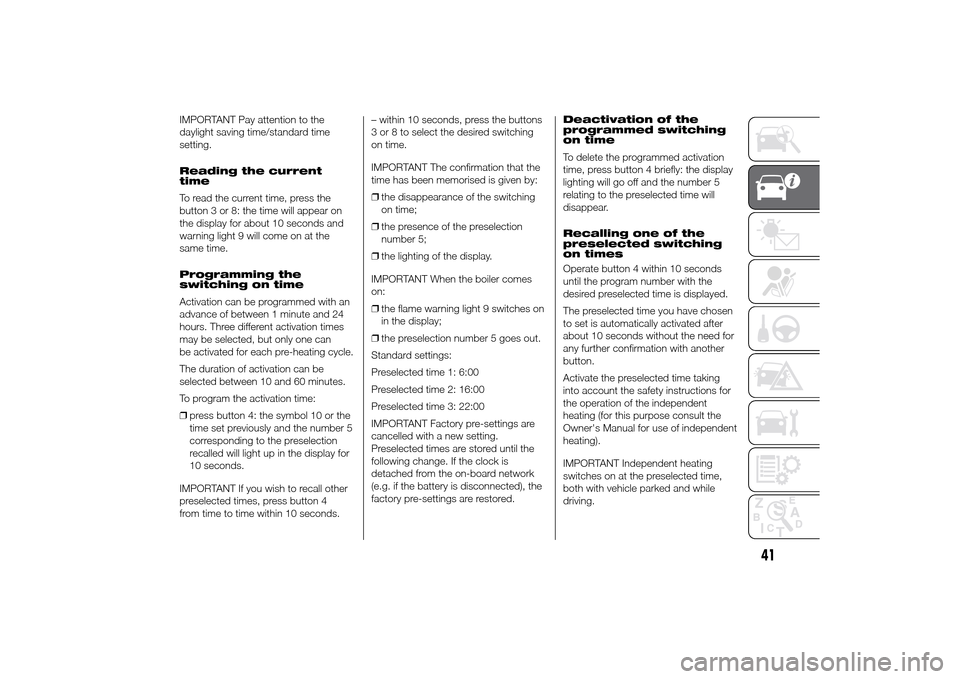
IMPORTANT Pay attention to the
daylight saving time/standard time
setting.
Reading the current
time
To read the current time, press the
button 3 or 8: the time will appear on
the display for about 10 seconds and
warning light 9 will come on at the
same time.
Programming the
switching on time
Activation can be programmed with an
advance of between 1 minute and 24
hours. Three different activation times
may be selected, but only one can
be activated for each pre-heating cycle.
The duration of activation can be
selected between 10 and 60 minutes.
To program the activation time:
❒press button 4: the symbol 10 or the
time set previously and the number 5
corresponding to the preselection
recalled will light up in the display for
10 seconds.
IMPORTANT If you wish to recall other
preselected times, press button 4
from time to time within 10 seconds.– within 10 seconds, press the buttons
3 or 8 to select the desired switching
on time.
IMPORTANT The confirmation that the
time has been memorised is given by:
❒the disappearance of the switching
on time;
❒the presence of the preselection
number 5;
❒the lighting of the display.
IMPORTANT When the boiler comes
on:
❒the flame warning light 9 switches on
in the display;
❒the preselection number 5 goes out.
Standard settings:
Preselected time 1: 6:00
Preselected time 2: 16:00
Preselected time 3: 22:00
IMPORTANT Factory pre-settings are
cancelled with a new setting.
Preselected times are stored until the
following change. If the clock is
detached from the on-board network
(e.g. if the battery is disconnected), the
factory pre-settings are restored.Deactivation of the
programmed switching
on time
To delete the programmed activation
time, press button 4 briefly: the display
lighting will go off and the number 5
relating to the preselected time will
disappear.
Recalling one of the
preselected switching
on times
Operate button 4 within 10 seconds
until the program number with the
desired preselected time is displayed.
The preselected time you have chosen
to set is automatically activated after
about 10 seconds without the need for
any further confirmation with another
button.
Activate the preselected time taking
into account the safety instructions for
the operation of the independent
heating (for this purpose consult the
Owner's Manual for use of independent
heating).
IMPORTANT Independent heating
switches on at the preselected time,
both with vehicle parked and while
driving.
41
Page 48 of 367
WARNING
21) The heater burns fuel in the
same way as the engine, though
to a lesser extent. To prevent
poisoning and asphyxiation, the
additional heater must never
be turned on, not even for short
periods, in closed environments
such as a garage or workshops
without extraction fans for the
exhaust gases.
22) The heater burns fuel in the
same way as the engine, though
to a lesser extent. To prevent
poisoning and asphyxiation, the
supplementary heater must never
be turned on, not even for short
periods, in closed environments
such as a garage or workshops
without extraction fans for the
exhaust gases.
EXTERNAL LIGHTS
IN BRIEF
The left stalk includes the controls for
the exterior lights.
The exterior lights can only be
switched on when the ignition key is
in the ON position.
LIGHTS OFF
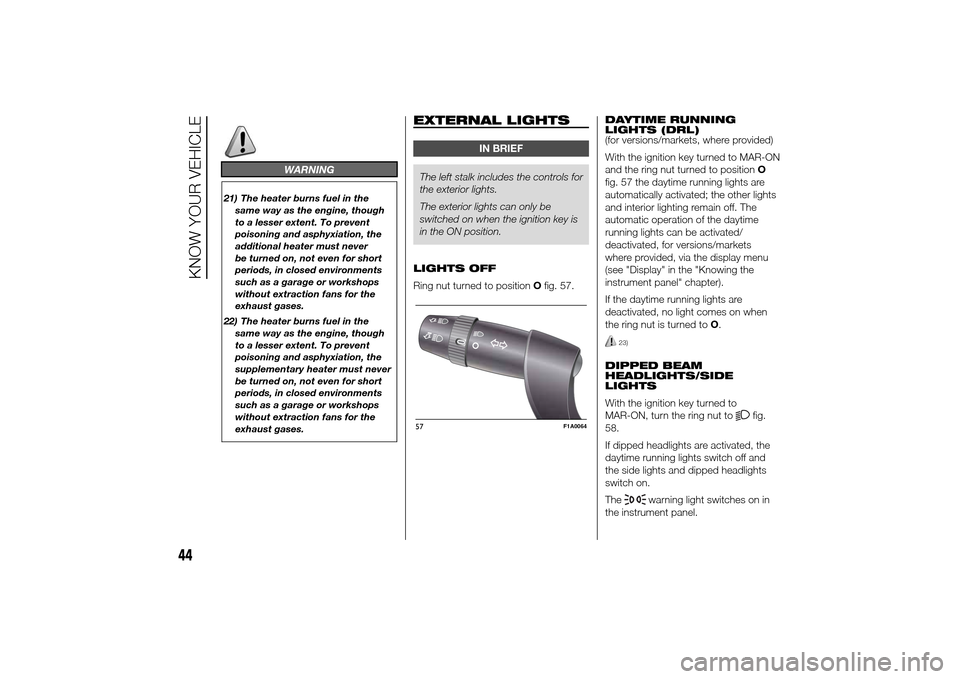
Ring nut turned to positionOfig. 57.DAYTIME RUNNING
LIGHTS (DRL)
(for versions/markets, where provided)
With the ignition key turned to MAR-ON
and the ring nut turned to positionO
fig. 57 the daytime running lights are
automatically activated; the other lights
and interior lighting remain off. The
automatic operation of the daytime
running lights can be activated/
deactivated, for versions/markets
where provided, via the display menu
(see "Display" in the "Knowing the
instrument panel" chapter).
If the daytime running lights are
deactivated, no light comes on when
the ring nut is turned toO.
23)
DIPPED BEAM
HEADLIGHTS/SIDE
LIGHTS
With the ignition key turned to
MAR-ON, turn the ring nut to
fig.
58.
If dipped headlights are activated, the
daytime running lights switch off and
the side lights and dipped headlights
switch on.
The
warning light switches on in
the instrument panel.
57
F1A0064
44
KNOW YOUR VEHICLE
Page 54 of 367
CRUISE CONTROL(for versions/markets, where provided)
IN BRIEF
This is an electronic driving aid that
allows you to drive at a speed of
above 30 km/h on long and straight
dry roads with few driving changes
(e.g. motorways) at a preset speed
without having to press the
accelerator pedal. It is therefore not
recommended to use this device
on extra-urban roads with traffic. Do
not use it in town.
Switching the device on
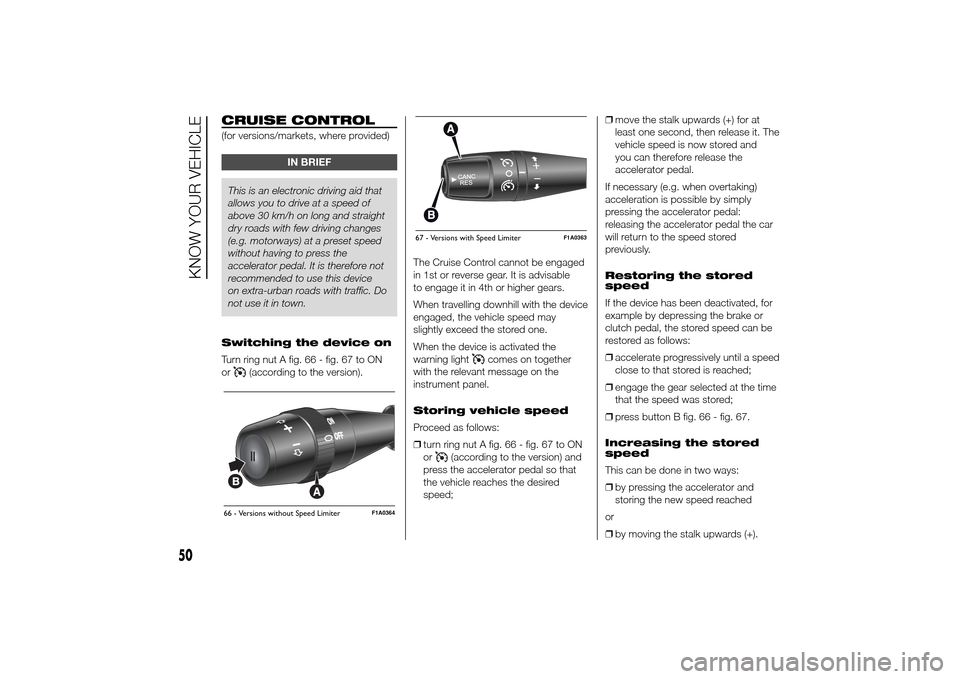
Turn ring nut A fig. 66 - fig. 67 to ON
or
(according to the version).The Cruise Control cannot be engaged
in 1st or reverse gear. It is advisable
to engage it in 4th or higher gears.
When travelling downhill with the device
engaged, the vehicle speed may
slightly exceed the stored one.
When the device is activated the
warning light
comes on together
with the relevant message on the
instrument panel.
Storing vehicle speed
Proceed as follows:
❒turn ring nut A fig. 66 - fig. 67 to ON
or
(according to the version) and
press the accelerator pedal so that
the vehicle reaches the desired
speed;❒move the stalk upwards (+) for at
least one second, then release it. The
vehicle speed is now stored and
you can therefore release the
accelerator pedal.
If necessary (e.g. when overtaking)
acceleration is possible by simply
pressing the accelerator pedal:
releasing the accelerator pedal the car
will return to the speed stored
previously.
Restoring the stored
speed
If the device has been deactivated, for
example by depressing the brake or
clutch pedal, the stored speed can be
restored as follows:
❒accelerate progressively until a speed
close to that stored is reached;
❒engage the gear selected at the time
that the speed was stored;
❒press button B fig. 66 - fig. 67.
Increasing the stored
speed
This can be done in two ways:
❒by pressing the accelerator and
storing the new speed reached
or
❒by moving the stalk upwards (+).
66 - Versions without Speed Limiter
F1A0364
67 - Versions with Speed Limiter
F1A0363
50
KNOW YOUR VEHICLE
Page 55 of 367
Each activation of the lever
corresponds to an increase in speed of
about 1 km/h, whilst keeping the lever
upwards varies the speed continuously.
Reducing the stored
speed
This can be done in two ways:
❒by switching off the device and then
storing the new speed;
or
❒by moving the stalk downwards (-)
until the new speed, which will be
stored automatically, is reached.
Each movement of the lever will
correspond to a slight reduction in
speed of about 1 km/h, while keeping
the lever held downwards will decrease
the speed continuously.
Deactivating the device
The device can be switched off by
the driver in the following ways:
❒turning ring nut A to OFF orO
(according to the version);
❒by stopping the engine;Deactivating the
function
The device can be switched off by the
driver in the following ways:
❒turning ring nut A to OFF orO
(according to the version);
❒pressing the button B, both with
symbolIIand symbol CANC/RES,
the system pauses;
❒by stopping the engine;
❒by pressing the brake pedal or
operating the handbrake;
❒by pressing the clutch pedal;
❒requesting a gear shift with an
automatic transmission in sequential
mode;
❒with the vehicle speed below the set
limit
❒by pressing the accelerator pedal; in
this case the system is not actually
turned off but the acceleration
request takes priority; the Cruise
Control remains activated, without
the need to press the CANC/RES
button to restore the previous
conditions once the acceleration is
over.
The device is automatically switched off
in the following cases:
❒if the ABS or ESP systems cut in;❒in the event of system failure.
27) 28)
SPEED LIMITER
This device allows the speed of the car
to be limited to values which can be
set by the driver.
The maximum speed can be set both
with vehicle stationary and in motion.
The minimum speed that can be set is
30 km/h.
When the device is active, the car
speed depends on the pressure at the
accelerator pedal, until the
programmed speed limit is reached
(see "Speed limit programming"
paragraph).
If necessary (in the event of overtaking
for example), the set speed limit can
be exceeded by fully depressing the
accelerator pedal.
By gradually reducing the pressure on
the accelerator pedal, the function
will be reactivated as soon as the car
speed drops below the set speed.
51
Page 56 of 367
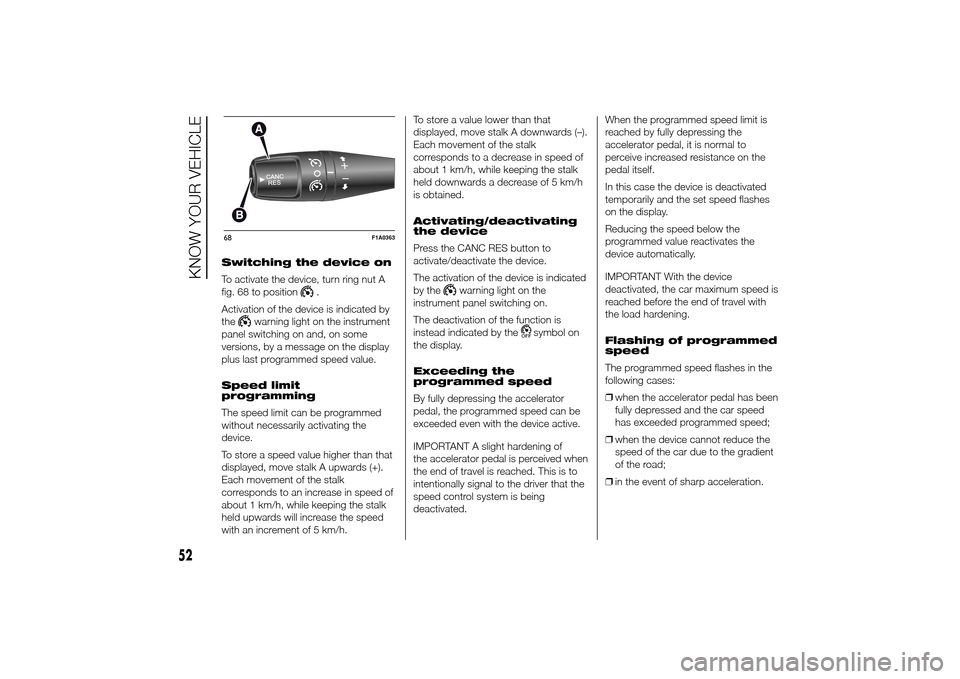
Switching the device on
To activate the device, turn ring nut A
fig. 68 to position
.
Activation of the device is indicated by
the
warning light on the instrument
panel switching on and, on some
versions, by a message on the display
plus last programmed speed value.
Speed limit
programming
The speed limit can be programmed
without necessarily activating the
device.
To store a speed value higher than that
displayed, move stalk A upwards (+).
Each movement of the stalk
corresponds to an increase in speed of
about 1 km/h, while keeping the stalk
held upwards will increase the speed
with an increment of 5 km/h.To store a value lower than that
displayed, move stalk A downwards (–).
Each movement of the stalk
corresponds to a decrease in speed of
about 1 km/h, while keeping the stalk
held downwards a decrease of 5 km/h
is obtained.
Activating/deactivating
the device
Press the CANC RES button to
activate/deactivate the device.
The activation of the device is indicated
by the
warning light on the
instrument panel switching on.
The deactivation of the function is
instead indicated by the
symbol on
the display.
Exceeding the
programmed speed
By fully depressing the accelerator
pedal, the programmed speed can be
exceeded even with the device active.
IMPORTANT A slight hardening of
the accelerator pedal is perceived when
the end of travel is reached. This is to
intentionally signal to the driver that the
speed control system is being
deactivated.When the programmed speed limit is
reached by fully depressing the
accelerator pedal, it is normal to
perceive increased resistance on the
pedal itself.
In this case the device is deactivated
temporarily and the set speed flashes
on the display.
Reducing the speed below the
programmed value reactivates the
device automatically.
IMPORTANT With the device
deactivated, the car maximum speed is
reached before the end of travel with
the load hardening.
Flashing of programmed
speed
The programmed speed flashes in the
following cases:
❒when the accelerator pedal has been
fully depressed and the car speed
has exceeded programmed speed;
❒when the device cannot reduce the
speed of the car due to the gradient
of the road;
❒in the event of sharp acceleration.
68
F1A0363
52
KNOW YOUR VEHICLE