ad blue FIAT DUCATO 2016 3.G Owner's Manual
[x] Cancel search | Manufacturer: FIAT, Model Year: 2016, Model line: DUCATO, Model: FIAT DUCATO 2016 3.GPages: 296, PDF Size: 15.08 MB
Page 240 of 296
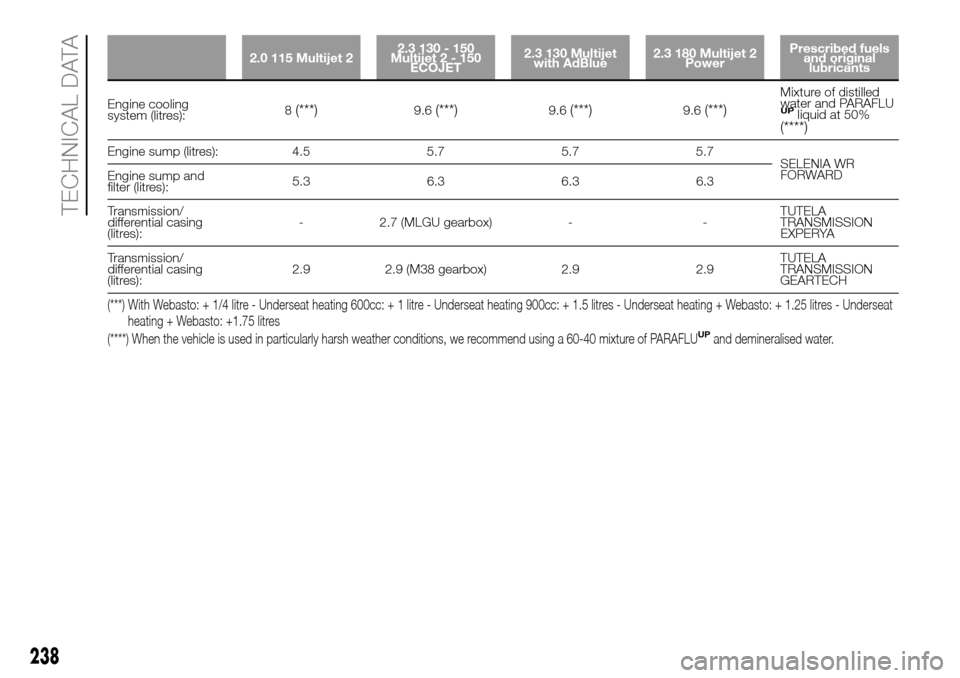
2.0 115 Multijet 22.3 130 - 150
Multijet2-150
ECOJET2.3 130 Multijet
with AdBlue2.3 180 Multijet 2
PowerPrescribed fuels
and original
lubricants
Engine cooling
system (litres):8(***)9.6(***)9.6(***)9.6(***)
Mixture of distilled
water and PARAFLU
UPliquid at 50%(****)
Engine sump (litres): 4.5 5.7 5.7 5.7
SELENIA WR
FORWARD
Engine sump and
filter (litres):5.3 6.3 6.3 6.3
Transmission/
differential casing
(litres):- 2.7 (MLGU gearbox) - -TUTELA
TRANSMISSION
EXPERYA
Transmission/
differential casing
(litres):2.9 2.9 (M38 gearbox) 2.9 2.9TUTELA
TRANSMISSION
GEARTECH
(***) With Webasto: + 1/4 litre - Underseat heating 600cc: + 1 litre - Underseat heating 900cc: + 1.5 litres - Underseat heating + Webasto: + 1.25 litres - Underseat
heating + Webasto: +1.75 litres
(****) When the vehicle is used in particularly harsh weather conditions, we recommend using a 60-40 mixture of PARAFLU
UPand demineralised water.
238
TECHNICAL DATA
Page 241 of 296
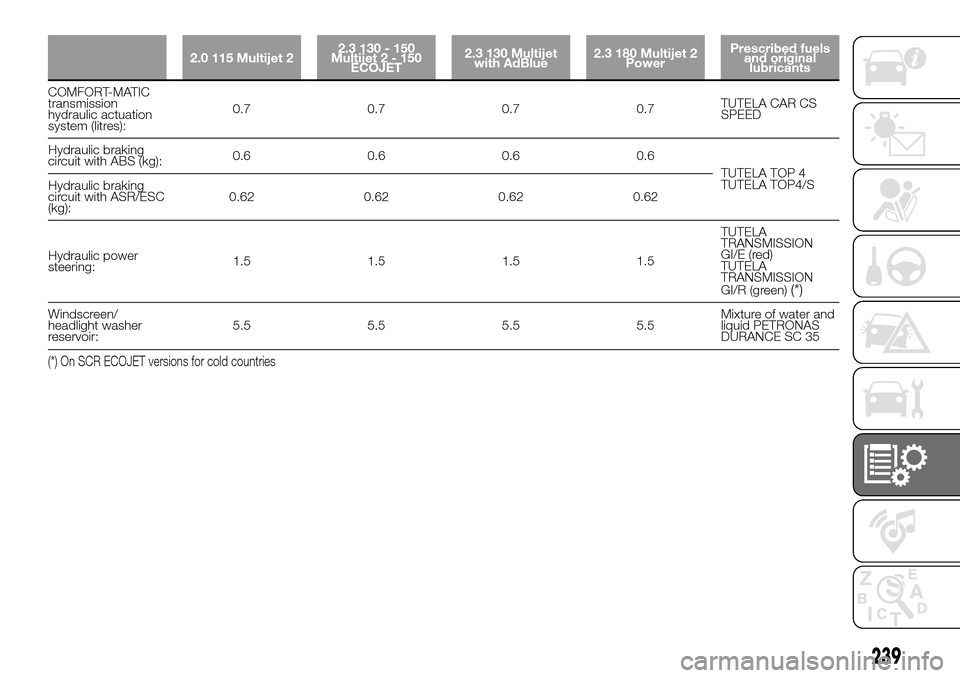
2.0 115 Multijet 22.3 130 - 150
Multijet2-150
ECOJET2.3 130 Multijet
with AdBlue2.3 180 Multijet 2
PowerPrescribed fuels
and original
lubricants
COMFORT-MATIC
transmission
hydraulic actuation
system (litres):0.7 0.7 0.7 0.7TUTELA CAR CS
SPEED
Hydraulic braking
circuit with ABS (kg):0.6 0.6 0.6 0.6
TUTELA TOP 4
TUTELA TOP4/S
Hydraulic braking
circuit with ASR/ESC
(kg):0.62 0.62 0.62 0.62
Hydraulic power
steering:1.5 1.5 1.5 1.5TUTELA
TRANSMISSION
GI/E (red)
TUTELA
TRANSMISSION
GI/R (green)
(*)
Windscreen/
headlight washer
reservoir:5.5 5.5 5.5 5.5Mixture of water and
liquid PETRONAS
DURANCE SC 35
(*) On SCR ECOJET versions for cold countries
239
Page 243 of 296
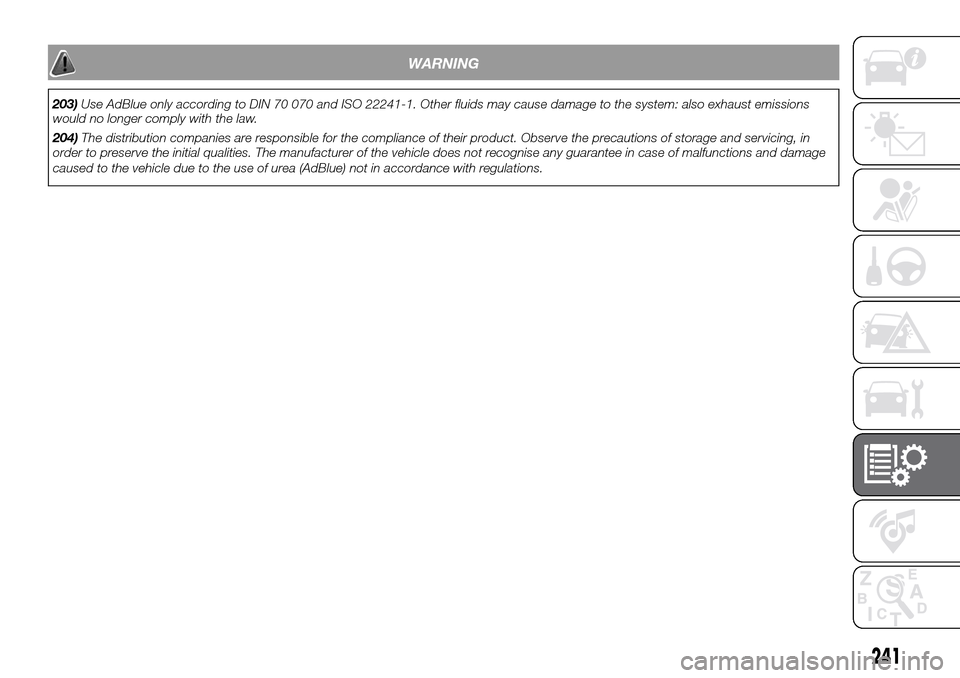
WARNING
203)Use AdBlue only according to DIN 70 070 and ISO 22241-1. Other fluids may cause damage to the system: also exhaust emissions
would no longer comply with the law.
204)The distribution companies are responsible for the compliance of their product. Observe the precautions of storage and servicing, in
order to preserve the initial qualities. The manufacturer of the vehicle does not recognise any guarantee in case of malfunctions and damage
caused to the vehicle due to the use of urea (AdBlue) not in accordance with regulations.
241
Page 246 of 296
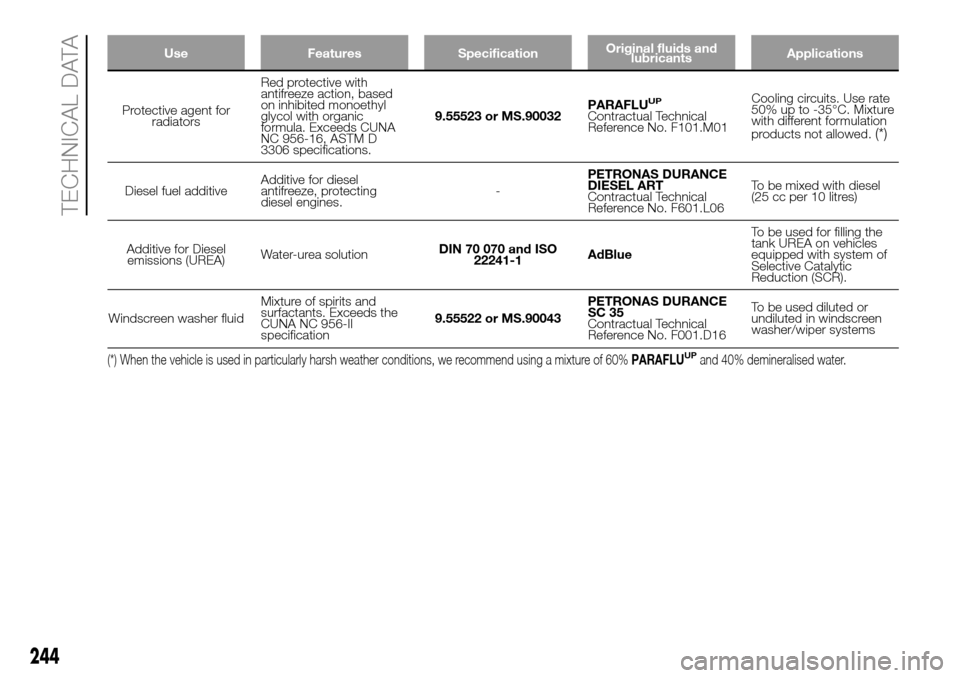
Use Features SpecificationOriginal fluids and
lubricantsApplications
Protective agent for
radiatorsRed protective with
antifreeze action, based
on inhibited monoethyl
glycol with organic
formula. Exceeds CUNA
NC 956-16, ASTM D
3306 specifications.9.55523 or MS.90032PARAFLUUP
Contractual Technical
Reference No. F101.M01Cooling circuits. Use rate
50% up to -35°C. Mixture
with different formulation
products not allowed.
(*)
Diesel fuel additiveAdditive for diesel
antifreeze, protecting
diesel engines.-PETRONAS DURANCE
DIESEL ART
Contractual Technical
Reference No. F601.L06To be mixed with diesel
(25 cc per 10 litres)
Additive for Diesel
emissions (UREA)Water-urea solutionDIN 70 070 and ISO
22241-1AdBlueTo be used for filling the
tank UREA on vehicles
equipped with system of
Selective Catalytic
Reduction (SCR).
Windscreen washer fluidMixture of spirits and
surfactants. Exceeds the
CUNA NC 956-II
specification9.55522 or MS.90043PETRONAS DURANCE
SC 35
Contractual Technical
Reference No. F001.D16To be used diluted or
undiluted in windscreen
washer/wiper systems
(*) When the vehicle is used in particularly harsh weather conditions, we recommend using a mixture of 60%PARAFLUUPand 40% demineralised water.
244
TECHNICAL DATA
Page 251 of 296
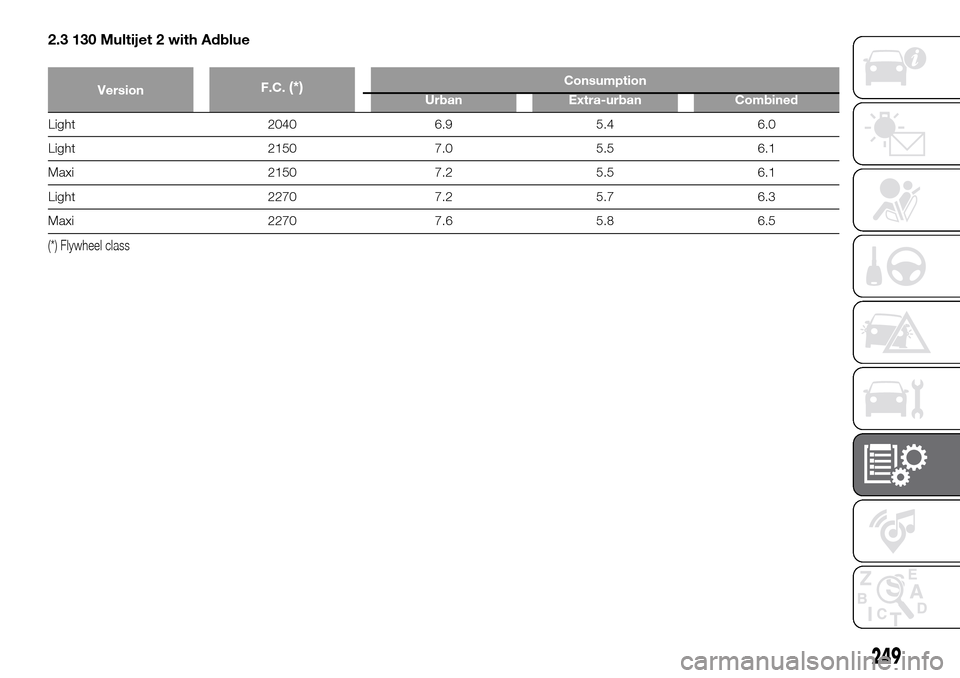
2.3 130 Multijet 2 with Adblue
VersionF.C.(*)Consumption
Urban Extra-urban Combined
Light 2040 6.9 5.4 6.0
Light 2150 7.0 5.5 6.1
Maxi 2150 7.2 5.5 6.1
Light 2270 7.2 5.7 6.3
Maxi 2270 7.6 5.8 6.5
(*) Flywheel class
249
Page 258 of 296
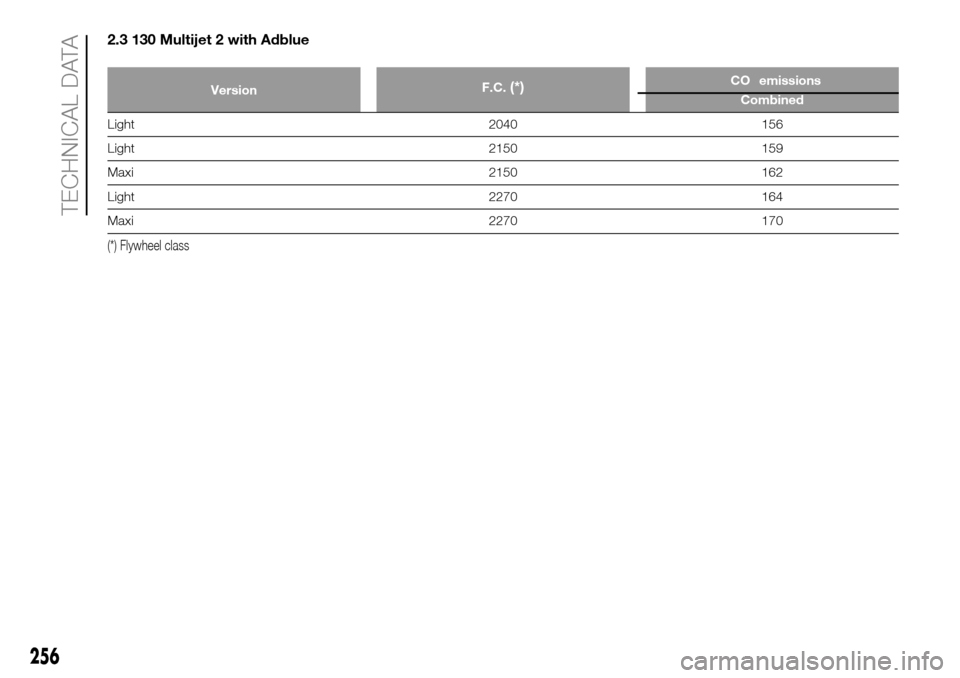
2.3 130 Multijet 2 with Adblue
VersionF.C.(*)CO2emissions
Combined
Light 2040 156
Light 2150 159
Maxi 2150 162
Light 2270 164
Maxi 2270 170
(*) Flywheel class
256
TECHNICAL DATA
Page 272 of 296
USB/iPod SOURCE
To activate USB/iPod mode, connect
the corresponding device (USB or iPod)
to the vehicle's USB port.
208)
If a USB/iPod device is connected to
the system on, this starts playing the
tracks present on the device.
AUX SOURCE
To activate AUX mode, use a suitable
cable to connect a device to the
vehicle's AUX socket.
209)
When you connect a device with AUX
output socket, the system starts AUX
source playback, provided that it is
already playing.
Adjust the volume using the
button/
knob on the front panel or using the
volume adjustment control on the
connected device.
For the "Audio source selection"
function, see the "Media mode"
chapter.
IMPORTANT NOTES
The functions of the device connected
with the AUX socket are directly
managed by the device itself: it is not
possible to change track/folder/playlist
or control playing start/end/pause
with the controls on the front panel or
on the steering wheel.Do not leave the cable of your portable
player connected to the AUX socket
after disconnection, to avoid possible
hiss from the speakers.
PHONE MODE
Phone mode activation
Press the PHONE button on the front
panel to activate the Phone mode.
The available commands can be used
to:
dial the wished phone number;
display and call the contacts in the
mobile phone phonebook;
display and call contacts from the
registers of previous calls;
pair up to 8 phones to make access
and connection easier and quicker;
transfer calls from the system to the
mobile phone and vice versa and
deactivate the microphone audio for
private conversations.
The mobile phone audio is transmitted
through the vehicle’s audio system;
the system automatically mutes the
radio when the Phone function is used.
Shown on display
When a phone is connected to the
system, the display shows various
information (if available):
status of roaming;
network signal intensity;
mobile phone battery charge;
mobile phone name.
Pairing a mobile phone
To pair the mobile phone, proceed as
follows:
activate theBluetooth® function on
the mobile phone;
press thePHONEbutton on the
front panel;
if no phone is paired with the system
yet, the display shows a dedicated
screen;
select "Connect Phone" to start the
pairing procedure then search for the
Uconnect™ device on the mobile
phone (if "No" is selected, the Phone
main screen is displayed);
when prompted by the mobile
phone, use its keypad to enter the PIN
code shown on the system display
or confirm on the mobile phone the PIN
displayed;
from the "Settings" menu you can
always pair a mobile phone by selecting
"Phone menu/Add phone", then
proceed as described above;
during the pairing stage a screen is
displayed showing the progress of
the operation;
270
MULTIMEDIA
Page 276 of 296
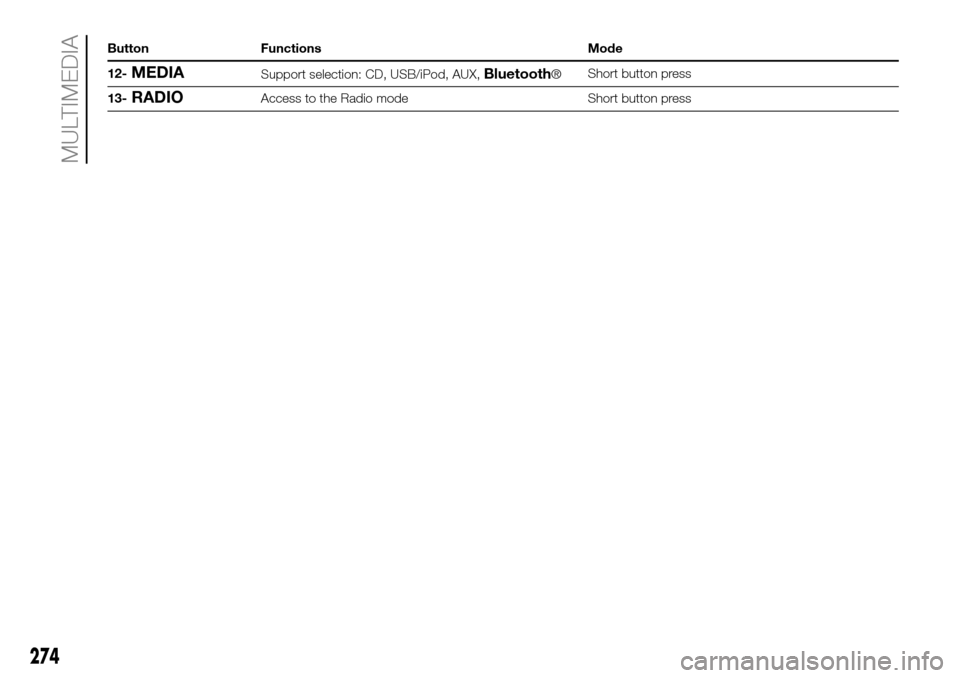
Button Functions Mode
12-
MEDIASupport selection: CD, USB/iPod, AUX,Bluetooth®Short button press
13-
RADIOAccess to the Radio mode Short button press
274
MULTIMEDIA
Page 278 of 296
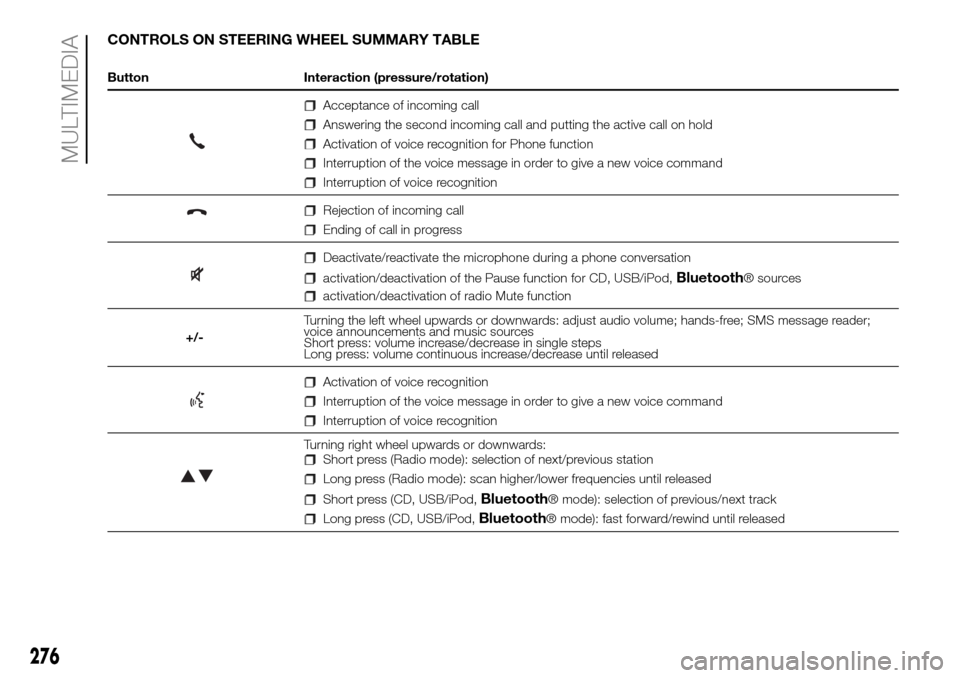
CONTROLS ON STEERING WHEEL SUMMARY TABLE
Button Interaction (pressure/rotation)
Acceptance of incoming call
Answering the second incoming call and putting the active call on hold
Activation of voice recognition for Phone function
Interruption of the voice message in order to give a new voice command
Interruption of voice recognition
Rejection of incoming call
Ending of call in progress
Deactivate/reactivate the microphone during a phone conversation
activation/deactivation of the Pause function for CD, USB/iPod,Bluetooth® sources
activation/deactivation of radio Mute function
+/-Turning the left wheel upwards or downwards: adjust audio volume; hands-free; SMS message reader;
voice announcements and music sources
Short press: volume increase/decrease in single steps
Long press: volume continuous increase/decrease until released
Activation of voice recognition
Interruption of the voice message in order to give a new voice command
Interruption of voice recognition
Turning right wheel upwards or downwards:Short press (Radio mode): selection of next/previous station
Long press (Radio mode): scan higher/lower frequencies until released
Short press (CD, USB/iPod,Bluetooth® mode): selection of previous/next track
Long press (CD, USB/iPod,Bluetooth® mode): fast forward/rewind until released
276
MULTIMEDIA
Page 279 of 296
OPERATION
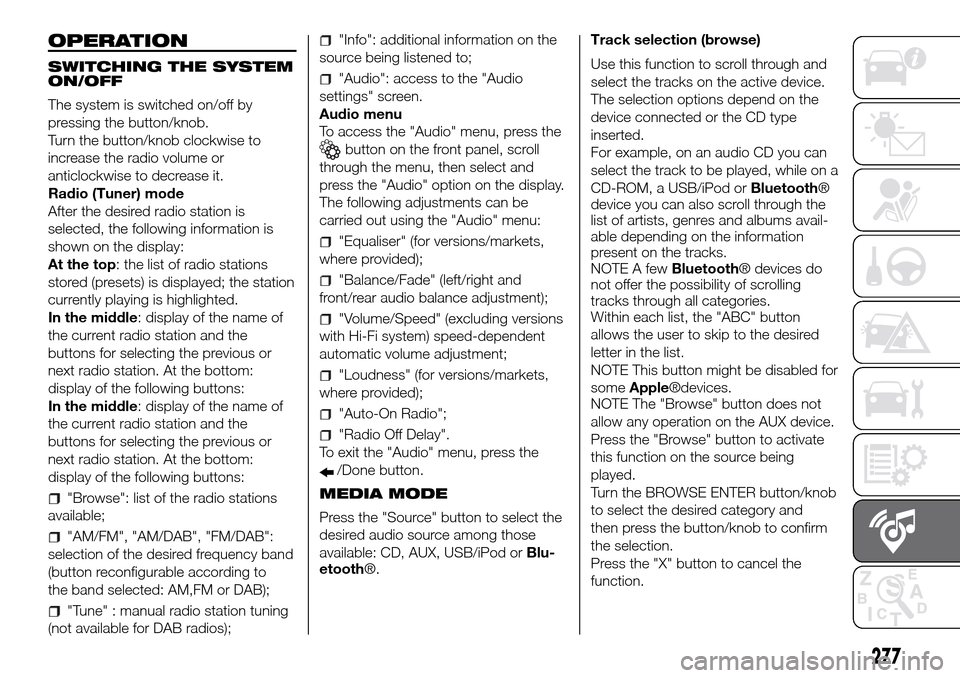
SWITCHING THE SYSTEM
ON/OFF
The system is switched on/off by
pressing the button/knob.
Turn the button/knob clockwise to
increase the radio volume or
anticlockwise to decrease it.
Radio (Tuner) mode
After the desired radio station is
selected, the following information is
shown on the display:
At the top: the list of radio stations
stored (presets) is displayed; the station
currently playing is highlighted.
In the middle: display of the name of
the current radio station and the
buttons for selecting the previous or
next radio station. At the bottom:
display of the following buttons:
In the middle: display of the name of
the current radio station and the
buttons for selecting the previous or
next radio station. At the bottom:
display of the following buttons:
"Browse": list of the radio stations
available;
"AM/FM", "AM/DAB", "FM/DAB":
selection of the desired frequency band
(button reconfigurable according to
the band selected: AM,FM or DAB);
"Tune" : manual radio station tuning
(not available for DAB radios);
"Info": additional information on the
source being listened to;
"Audio": access to the "Audio
settings" screen.
Audio menu
To access the "Audio" menu, press the
button on the front panel, scroll
through the menu, then select and
press the "Audio" option on the display.
The following adjustments can be
carried out using the "Audio" menu:
"Equaliser" (for versions/markets,
where provided);
"Balance/Fade" (left/right and
front/rear audio balance adjustment);
"Volume/Speed" (excluding versions
with Hi-Fi system) speed-dependent
automatic volume adjustment;
"Loudness" (for versions/markets,
where provided);
"Auto-On Radio";
"Radio Off Delay".
To exit the "Audio" menu, press the
/Done button.
MEDIA MODE
Press the "Source" button to select the
desired audio source among those
available: CD, AUX, USB/iPod orBlu-
etooth®.Track selection (browse)
Use this function to scroll through and
select the tracks on the active device.
The selection options depend on the
device connected or the CD type
inserted.
For example, on an audio CD you can
select the track to be played, while on a
CD-ROM, a USB/iPod orBluetooth®
device you can also scroll through the
list of artists, genres and albums avail-
able depending on the information
present on the tracks.
NOTE A fewBluetooth® devices do
not offer the possibility of scrolling
tracks through all categories.
Within each list, the "ABC" button
allows the user to skip to the desired
letter in the list.
NOTE This button might be disabled for
someApple®devices.
NOTE The "Browse" button does not
allow any operation on the AUX device.
Press the "Browse" button to activate
this function on the source being
played.
Turn the BROWSE ENTER button/knob
to select the desired category and
then press the button/knob to confirm
the selection.
Press the "X" button to cancel the
function.
277