Relé FIAT DUCATO 244 2005 3.G User Guide
[x] Cancel search | Manufacturer: FIAT, Model Year: 2005, Model line: DUCATO 244, Model: FIAT DUCATO 244 2005 3.GPages: 258, PDF Size: 4.05 MB
Page 50 of 258
49GETTING TO KNOW YOUR VEHICLE
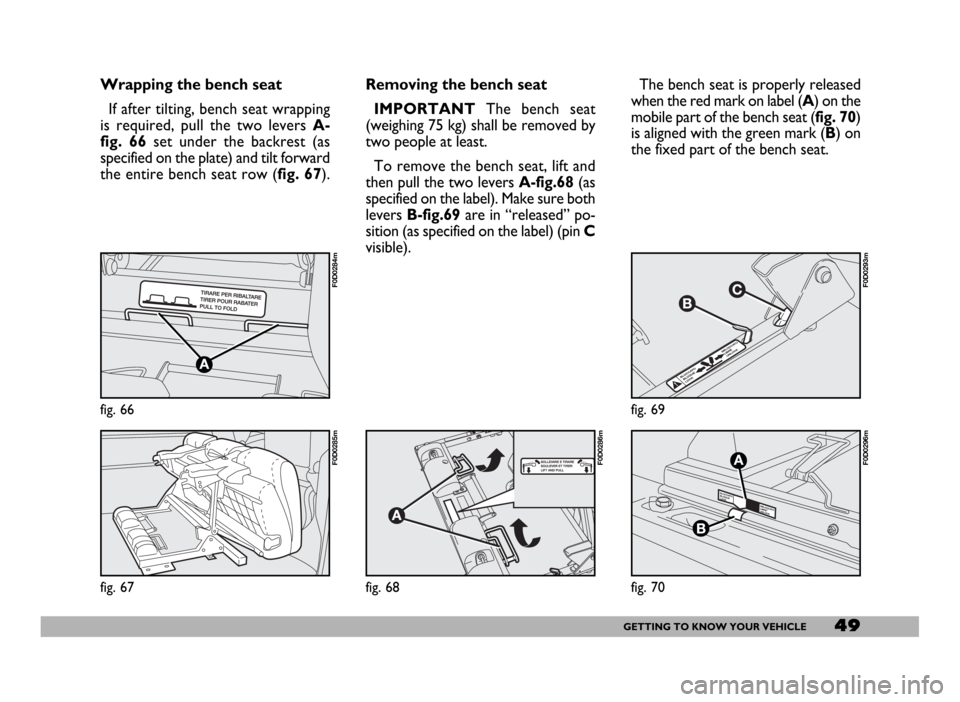
Wrapping the bench seat
If after tilting, bench seat wrapping
is required, pull the two levers A-
fig. 66set under the backrest (as
specified on the plate) and tilt forward
the entire bench seat row (fig. 67).
fig. 66
F0D0284m
fig. 67
F0D0285m
Removing the bench seat
IMPORTANTThe bench seat
(weighing 75 kg) shall be removed by
two people at least.
To remove the bench seat, lift and
then pull the two levers A-fig.68(as
specified on the label). Make sure both
levers B-fig.69are in “released” po-
sition (as specified on the label) (pin C
visible).The bench seat is properly released
when the red mark on label (A) on the
mobile part of the bench seat (fig. 70)
is aligned with the green mark (B) on
the fixed part of the bench seat.
fig. 68
F0D0286m
fig. 69
F0D0293m
fig. 70
F0D0296m
Page 51 of 258
50GETTING TO KNOW YOUR VEHICLE
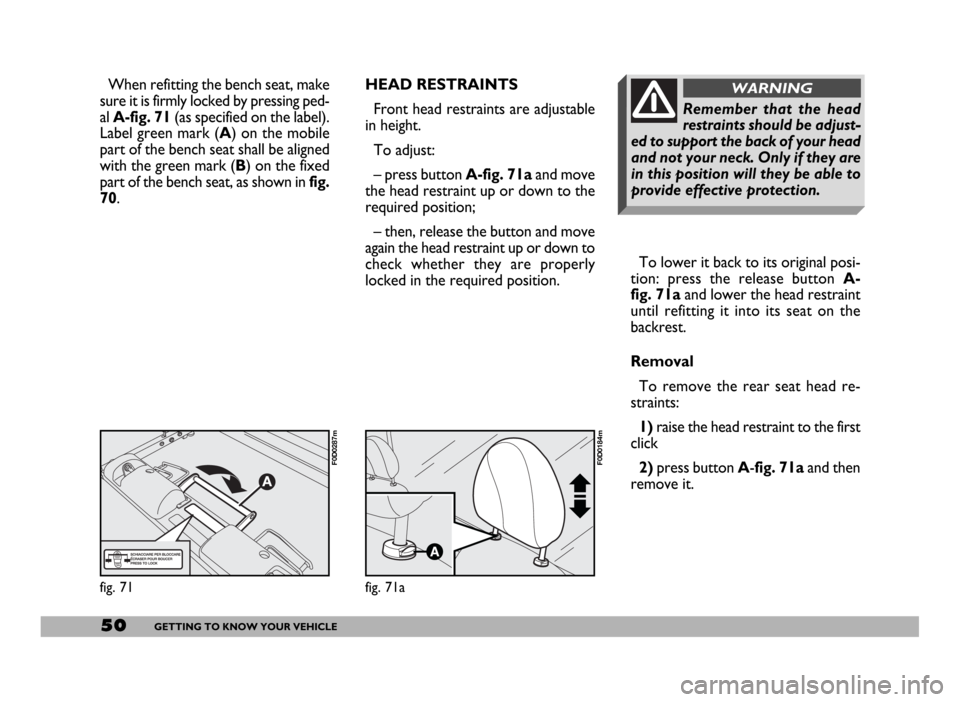
To lower it back to its original posi-
tion: press the release button A-
fig. 71aand lower the head restraint
until refitting it into its seat on the
backrest.
Removal
To remove the rear seat head re-
straints:
1) raise the head restraint to the first
click
2)press button A-fig. 71a and then
remove it.
Remember that the head
restraints should be adjust-
ed to support the back of your head
and not your neck. Only if they are
in this position will they be able to
provide effective protection.
WARNINGHEAD RESTRAINTS
Front head restraints are adjustable
in height.
To adjust:
– press button A-fig. 71aand move
the head restraint up or down to the
required position;
– then, release the button and move
again the head restraint up or down to
check whether they are properly
locked in the required position.
fig. 71
F0D0287m
fig. 71a
F0D0184m
When refitting the bench seat, make
sure it is firmly locked by pressing ped-
al A-fig. 71(as specified on the label).
Label green mark (A) on the mobile
part of the bench seat shall be aligned
with the green mark (B) on the fixed
part of the bench seat, as shown in fig.
70.
Page 52 of 258
51GETTING TO KNOW YOUR VEHICLE
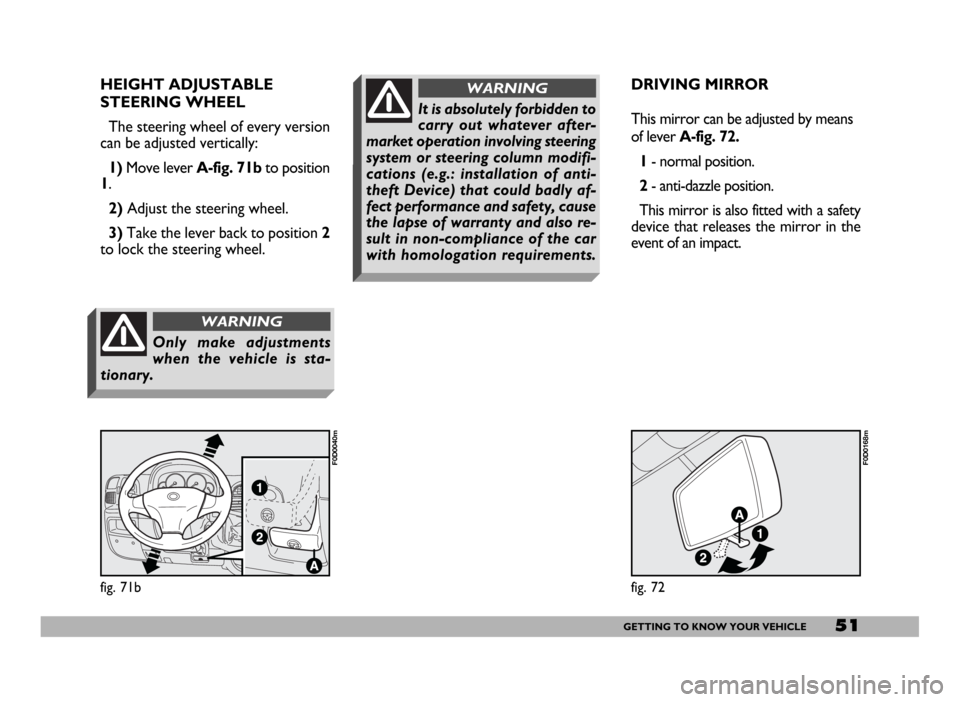
HEIGHT ADJUSTABLE
STEERING WHEEL
The steering wheel of every version
can be adjusted vertically:
1)Move lever A-fig. 71b to position
1.
2)Adjust the steering wheel.
3)Take the lever back to position 2
to lock the steering wheel.
fig. 71b
F0D0040m
Only make adjustments
when the vehicle is sta-
tionary.
WARNING
DRIVING MIRROR
This mirror can be adjusted by means
of lever A-fig. 72.
1- normal position.
2- anti-dazzle position.
This mirror is also fitted with a safety
device that releases the mirror in the
event of an impact.
fig. 72
F0D0168m
It is absolutely forbidden to
carry out whatever after-
market operation involving steering
system or steering column modifi-
cations (e.g.: installation of anti-
theft Device) that could badly af-
fect performance and safety, cause
the lapse of warranty and also re-
sult in non-compliance of the car
with homologation requirements.
WARNING
Page 59 of 258
58GETTING TO KNOW YOUR VEHICLE
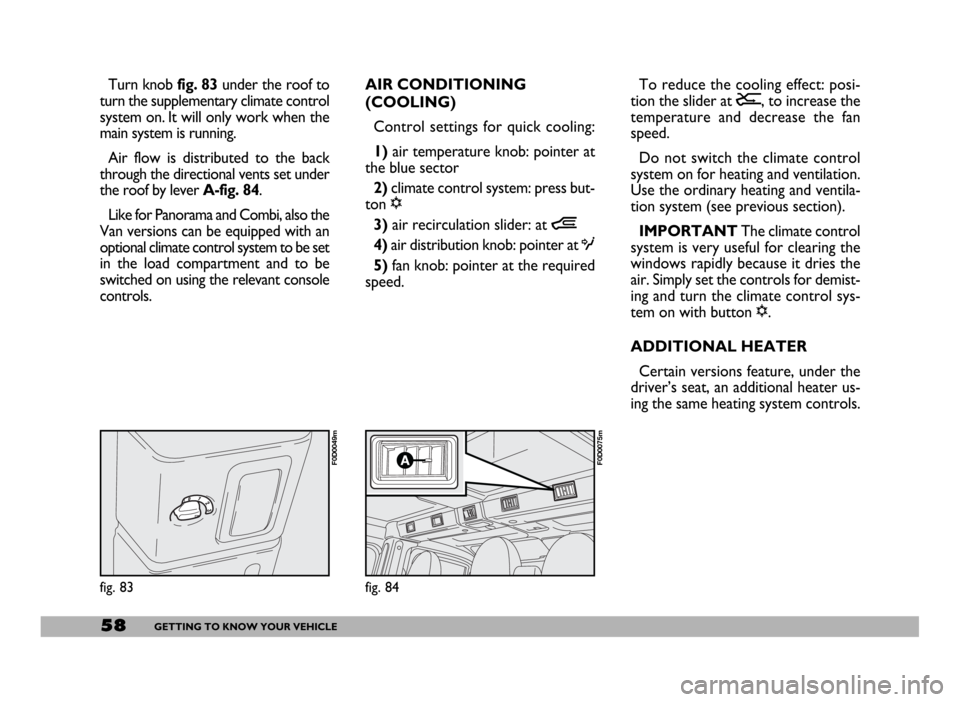
Turn knob fig. 83 under the roof to
turn the supplementary climate control
system on. It will only work when the
main system is running.
Air flow is distributed to the back
through the directional vents set under
the roof by lever A-fig. 84.
Like for Panorama and Combi, also the
Van versions can be equipped with an
optional climate control system to be set
in the load compartment and to be
switched on using the relevant console
controls.AIR CONDITIONING
(COOLING)
Control settings for quick cooling:
1)air temperature knob: pointer at
the blue sector
2)climate control system: press but-
ton √
3)air recirculation slider: at Ò
4) air distribution knob: pointer at O
5)fan knob: pointer at the required
speed.To reduce the cooling effect: posi-
tion the slider at Ú, to increase the
temperature and decrease the fan
speed.
Do not switch the climate control
system on for heating and ventilation.
Use the ordinary heating and ventila-
tion system (see previous section).
IMPORTANT The climate control
system is very useful for clearing the
windows rapidly because it dries the
air. Simply set the controls for demist-
ing and turn the climate control sys-
tem on with button √.
ADDITIONAL HEATER
Certain versions feature, under the
driver’s seat, an additional heater us-
ing the same heating system controls.
fig. 83
F0D0049m
fig. 84
F0D0075m
Page 67 of 258
66GETTING TO KNOW YOUR VEHICLE
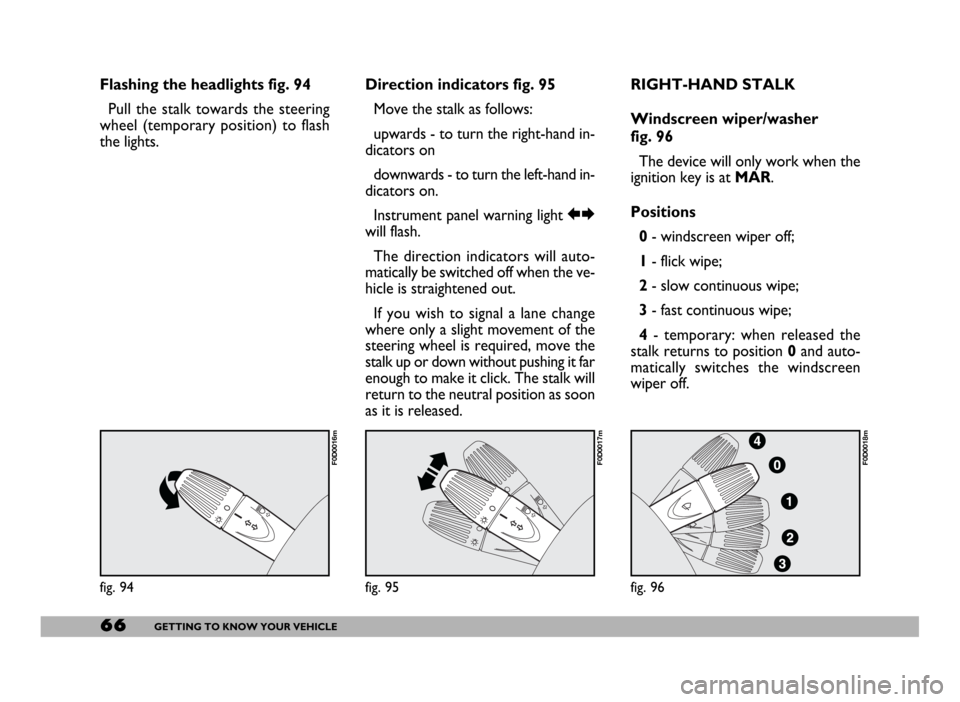
Flashing the headlights fig. 94
Pull the stalk towards the steering
wheel (temporary position) to flash
the lights.Direction indicators fig. 95
Move the stalk as follows:
upwards - to turn the right-hand in-
dicators on
downwards - to turn the left-hand in-
dicators on.
Instrument panel warning light RE
will flash.
The direction indicators will auto-
matically be switched off when the ve-
hicle is straightened out.
If you wish to signal a lane change
where only a slight movement of the
steering wheel is required, move the
stalk up or down without pushing it far
enough to make it click. The stalk will
return to the neutral position as soon
as it is released.RIGHT-HAND STALK
Windscreen wiper/washer
fig. 96
The device will only work when the
ignition key is at MAR.
Positions
0- windscreen wiper off;
1- flick wipe;
2- slow continuous wipe;
3- fast continuous wipe;
4- temporary: when released the
stalk returns to position 0and auto-
matically switches the windscreen
wiper off.
fig. 94
F0D0016m
fig. 95
F0D0017m
fig. 96
F0D0018m
Page 68 of 258
67GETTING TO KNOW YOUR VEHICLE
REARVIEW
CAMERA
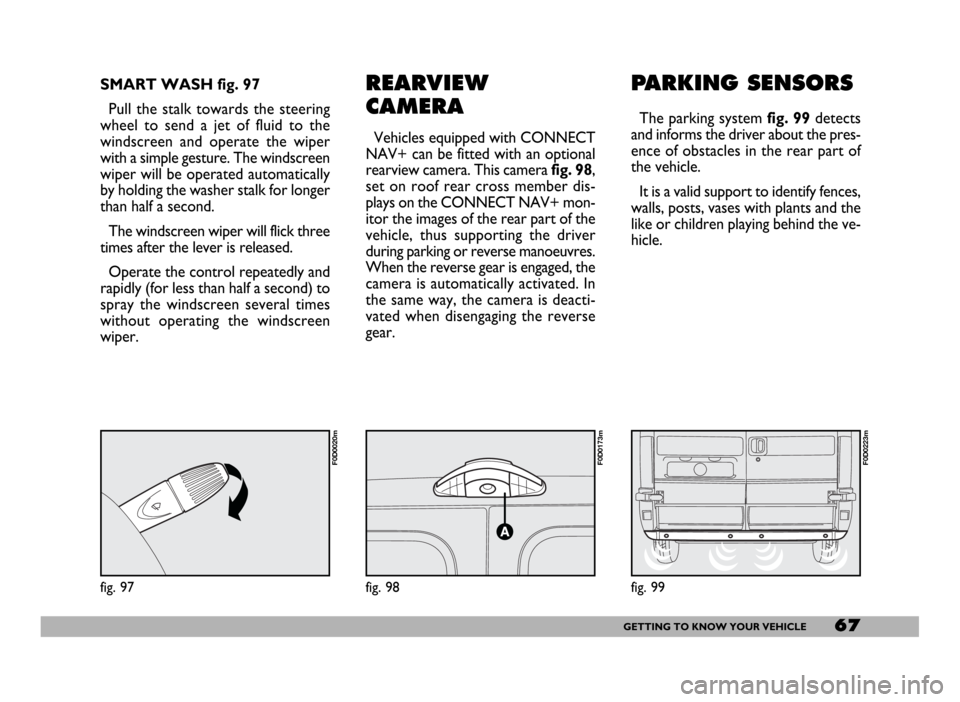
Vehicles equipped with CONNECT
NAV+ can be fitted with an optional
rearview camera. This camerafig. 98,
set on roof rear cross member dis-
plays on the CONNECT NAV+ mon-
itor the images of the rear part of the
vehicle, thus supporting the driver
during parking or reverse manoeuvres.
When the reverse gear is engaged, the
camera is automatically activated. In
the same way, the camera is deacti-
vated when disengaging the reverse
gear.
PARKING SENSORS
The parking system fig. 99detects
and informs the driver about the pres-
ence of obstacles in the rear part of
the vehicle.
It is a valid support to identify fences,
walls, posts, vases with plants and the
like or children playing behind the ve-
hicle.
fig. 98
F0D0173m
SMART WASH fig. 97
Pull the stalk towards the steering
wheel to send a jet of fluid to the
windscreen and operate the wiper
with a simple gesture. The windscreen
wiper will be operated automatically
by holding the washer stalk for longer
than half a second.
The windscreen wiper will flick three
times after the lever is released.
Operate the control repeatedly and
rapidly (for less than half a second) to
spray the windscreen several times
without operating the windscreen
wiper.
fig. 97
F0D0020m
fig. 99
F0D0223m
Page 70 of 258
69GETTING TO KNOW YOUR VEHICLE
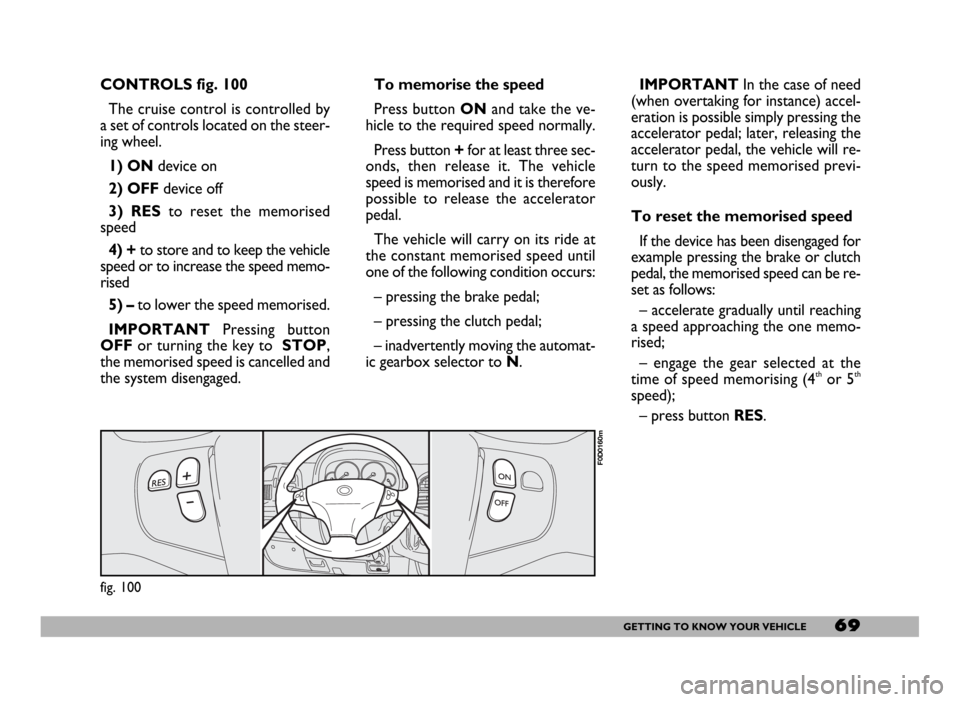
CONTROLS fig. 100
The cruise control is controlled by
a set of controls located on the steer-
ing wheel.
1) ONdevice on
2) OFFdevice off
3) RESto reset the memorised
speed
4) +to store and to keep the vehicle
speed or to increase the speed memo-
rised
5) – to lower the speed memorised.
IMPORTANTPressing button
OFFor turning the key to STOP,
the memorised speed is cancelled and
the system disengaged.IMPORTANTIn the case of need
(when overtaking for instance) accel-
eration is possible simply pressing the
accelerator pedal; later, releasing the
accelerator pedal, the vehicle will re-
turn to the speed memorised previ-
ously.
To reset the memorised speed
If the device has been disengaged for
example pressing the brake or clutch
pedal, the memorised speed can be re-
set as follows:
– accelerate gradually until reaching
a speed approaching the one memo-
rised;
– engage the gear selected at the
time of speed memorising (4
thor 5th
speed);
– press button RES. To memorise the speed
Press button ONand take the ve-
hicle to the required speed normally.
Press button +for at least three sec-
onds, then release it. The vehicle
speed is memorised and it is therefore
possible to release the accelerator
pedal.
The vehicle will carry on its ride at
the constant memorised speed until
one of the following condition occurs:
– pressing the brake pedal;
– pressing the clutch pedal;
– inadvertently moving the automat-
ic gearbox selector to N.
fig. 100
F0D0160m
Page 80 of 258
79GETTING TO KNOW YOUR VEHICLE
IMPORTANT NOTES
Do not use abrasive detergents or
solvents to clean the device. To clean
its external surface, use a wet cloth or
special products for cleaning synthet-
ic materials.
The multimeter is installed and
sealed with lead by authorised per-
sonnel: access to the device and rele-
vant power and recording cables is
forbidden.
The vehicle owner is responsible for
governing the instrument use. The in-
spection must be carried out at least
every two years and will include a test
to confirm correct operation.
After the inspection, check that the
plate is updated with specified data.DRIVER’S CAB DOORS
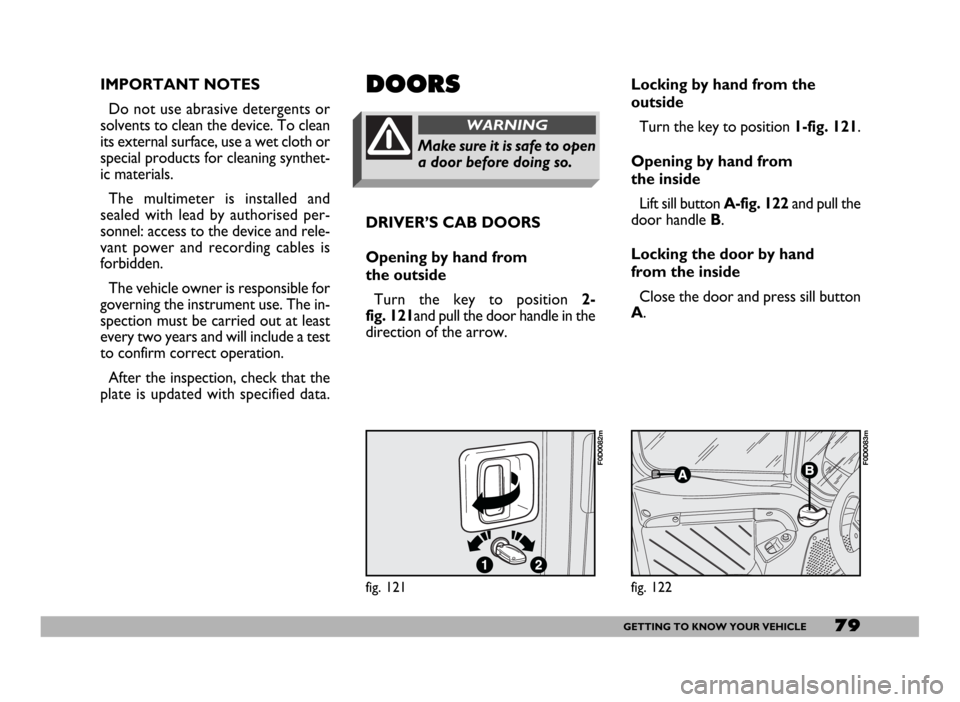
Opening by hand from
the outside
Turn the key to position 2-
fig. 121and pull the door handle in the
direction of the arrow.DOORS
Make sure it is safe to open
a door before doing so.
WARNING
Locking by hand from the
outside
Turn the key to position 1-fig. 121.
Opening by hand from
the inside
Lift sill button A-fig. 122and pull the
door handle B.
Locking the door by hand
from the inside
Close the door and press sill button
A.
fig. 121
F0D0082m
fig. 122
F0D0083m
Page 83 of 258
82GETTING TO KNOW YOUR VEHICLE
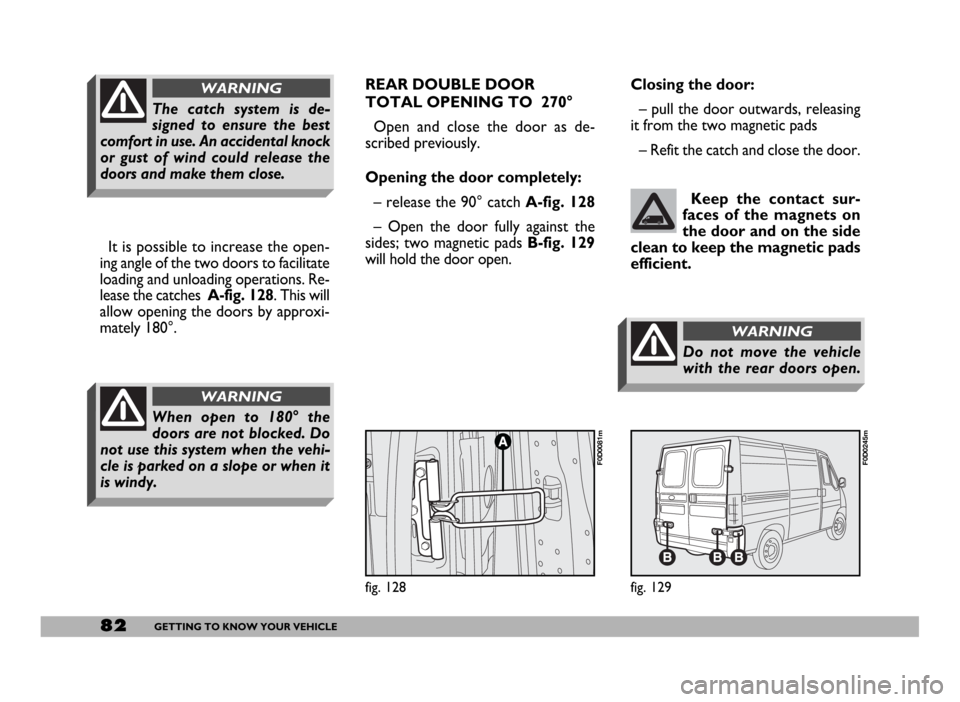
It is possible to increase the open-
ing angle of the two doors to facilitate
loading and unloading operations. Re-
lease the catches A-fig. 128. This will
allow opening the doors by approxi-
mately 180°.
When open to 180° the
doors are not blocked. Do
not use this system when the vehi-
cle is parked on a slope or when it
is windy.
WARNING
The catch system is de-
signed to ensure the best
comfort in use. An accidental knock
or gust of wind could release the
doors and make them close.
WARNINGREAR DOUBLE DOOR
TOTAL OPENING TO 270°
Open and close the door as de-
scribed previously.
Opening the door completely:
– release the 90° catch A-fig. 128
– Open the door fully against the
sides; two magnetic pads B-fig. 129
will hold the door open. Closing the door:
– pull the door outwards, releasing
it from the two magnetic pads
– Refit the catch and close the door.
Keep the contact sur-
faces of the magnets on
the door and on the side
clean to keep the magnetic pads
efficient.
fig. 129
F0D0245m
fig. 128
F0D0081m
Do not move the vehicle
with the rear doors open.
WARNING
Page 85 of 258
84GETTING TO KNOW YOUR VEHICLE
Improper use of the electri-
cal windows can be danger-
ous. Before and during their oper-
ation ensure that any passengers in
the vehicle are not at risk from the
moving glass either by personal ob-
jects getting caught in the mecha-
nism or by being injured by it di-
rectly.
WARNING
Always remove the ignition
key when you get out of the
vehicle to prevent the electric win-
dows being operated accidentally
and constituting a danger to the
people left in the vehicle
WARNING
BONNET
OPENING
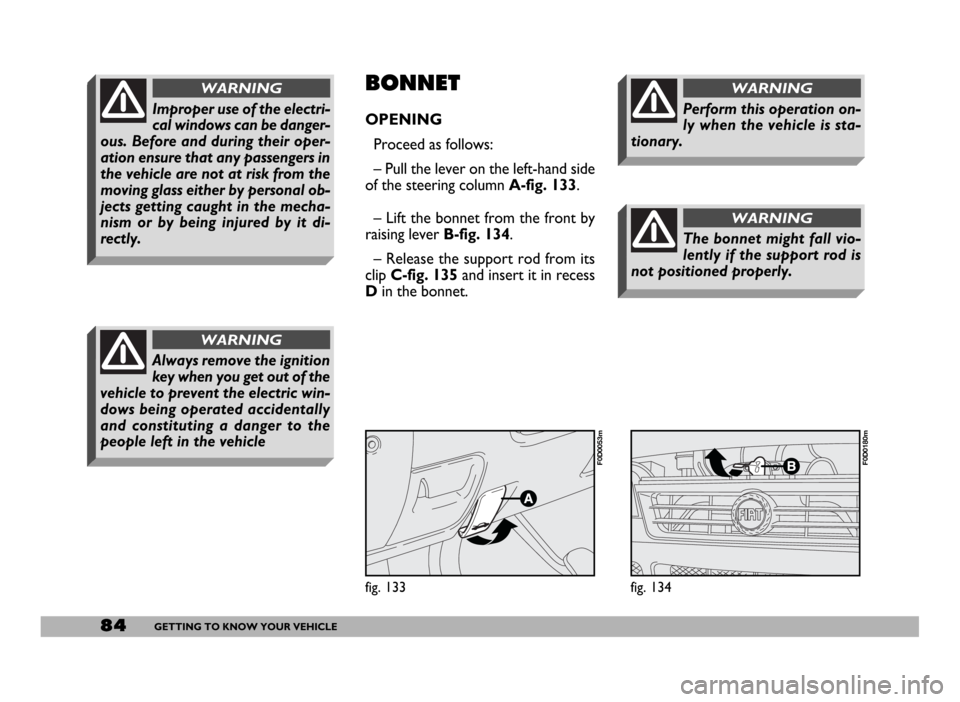
Proceed as follows:
– Pull the lever on the left-hand side
of the steering column A-fig. 133.
– Lift the bonnet from the front by
raising lever B-fig. 134.
– Release the support rod from its
clipC-fig. 135and insert it in recess
Din the bonnet.
fig. 133
F0D0053m
fig. 134
F0D0180m
The bonnet might fall vio-
lently if the support rod is
not positioned properly.
WARNING
Perform this operation on-
ly when the vehicle is sta-
tionary.
WARNING