USB FIAT DUCATO 250 2009 3.G Blue And Me Manual
[x] Cancel search | Manufacturer: FIAT, Model Year: 2009, Model line: DUCATO 250, Model: FIAT DUCATO 250 2009 3.GPages: 82, PDF Size: 0.51 MB
Page 2 of 82
The innovating Windows Mobile™-based Telematic
Solution for the vehicule
CONTENTS
OVERVIEW .............................................................................. 3
The hands-free kit.................................................................... 3
Message reader......................................................................... 5
Media Player ............................................................................. 6
Road safety ............................................................................... 7
DISPLAY AND BUTTONS ON Blue&Me™FRONT
PANEL, SOUND SYSTEM AND STEERING WHEEL ..... 8
HANDS-FREE KIT QUICK REFERENCE GUIDE............. 10
Prepare your mobile phone phonebook ............................ 10
Try out the voice commands ............................................... 11
Pair your mobile phone ......................................................... 11
Make a phone call .................................................................... 12
MESSAGE READER QUICK REFERENCE GUIDE............ 13
MEDIA PLAYER QUICK REFERENCE GUIDE ................ 13
HOW TO USE Blue&Me™ ................................................ 14
Blue&Me™ front panel buttons ....................................... 14
Voice commands ..................................................................... 14Display ....................................................................................... 17
Audio ......................................................................................... 17
Blue&Me™ function menu ................................................. 18
HANDS-FREE KIT FUNCTIONS ......................................... 19
Making a phone call ................................................................. 19
Incoming calls ........................................................................... 23
Managing phone calls .............................................................. 23
Conference call function ........................................................ 24
MESSAGE READER FUNCTIONS ....................................... 25
How to read the last SMS text received............................. 25
Inbox........................................................................................... 26
Managing messages................................................................... 26
Deleting all messages............................................................... 27
Signal types................................................................................. 27
MEDIA PLAYER FUNCTIONS ............................................ 28
How to connect the USB device to Blue&Me™ ............ 28
How to manage the media library ....................................... 28
- Selection by folder ............................................................... 29
- Selection by artist ................................................................. 29
- Selection by genre ................................................................ 30
603_97_223 DUCATO BLUE&ME PACK8.2 GB 1ed 5-08-2009 15:36 Pagina 1
Page 3 of 82
- Selection by album ............................................................... 30
- Selection by playlist .............................................................. 31
Playing audio tracks ................................................................ 31
- Shuffle playback of the whole media library..................... 31
- Now playing (track data) .................................................... 32
- Audio play .............................................................................. 32
- Pause ....................................................................................... 32
- Play ........................................................................................... 32
- Stop ......................................................................................... 32
- Next track .............................................................................. 32
- Previous track ....................................................................... 32
- Changing audio source ........................................................ 33
Media Player settings .............................................................. 33
- Autoplay ................................................................................. 33
- Shuffle ...................................................................................... 34
- Loop ........................................................................................ 34
Exit the settings menu ............................................................ 34
Practical hints for using the Media Player........................... 35
- Scrolling .................................................................................. 35
- Organizing media files .......................................................... 35
- Building the media library on Blue&Me™ .................... 35
- Building playlists for Blue&Me™ .................................... 35
SETTINGS FUNCTIONS....................................................... 36
Pairing a mobile phone ........................................................... 36
Managing user data .................................................................. 39
Advanced options ................................................................... 42
- Accessing the device ID ....................................................... 42
- Changing the GPRS code .................................................... 42
Exit the settings menu ............................................................ 43Blue&Me™ SUPPORTED MOBILE PHONES ............... 44
Mobile phones with Bluetooth®wireless technology...... 44
- “Pull” phones
(phonebook automatically downloaded) ......................... 44
- “Push” phones
(phonebook not automatically downloaded) ................. 44
- Mobile phones with message reader................................. 44
Supported USB memory devices ......................................... 45
- USB memory devices ........................................................... 45
- Management of audio files from iPod devices ................ 45
- Supported digital audio files ............................................... 46
- Supported playlist formats................................................... 47
VOICE COMMANDS (KEYWORDS) - SUMMARY ...... 48
Always available voice commands......................................... 48
Hands-free phone kit voice commands ............................... 49
Message reader voice commands (keywords)................... 51
Media Player voice commands............................................... 52
Settings function voice commands........................................ 55
TROUBLESHOOTING........................................................... 56
Hands-free kit .......................................................................... 56
- General - display screen ...................................................... 56
Message reader......................................................................... 64
Media Player.............................................................................. 66
iPod ............................................................................................ 70
PERSONAL DATA PROTECTION .................................... 72
SYSTEM SOFTWARE USE NOTICE .................................. 73
603_97_223 DUCATO BLUE&ME PACK8.2 GB 1ed 5-08-2009 15:36 Pagina 2
Page 4 of 82
The Blue&Me™system, fully integral
with voice commands, buttons on the
steering wheel, on sound system and
multifunction display messages, gives you
the possibility of interacting with your
Bluetooth
®wireless technology mobile
phone (even if you keep it in your pocket
or bag) without having to take your eyes
off the road or removing your hands from
the steering wheel. To use voice com-
mands you are not required to train the
voice recognition system to recognize
your voice. This implies that the system
is nearly equally performing with different
persons, i.e.: the voice recognition system
is of the “speaker independent” type.
With this system you can also play your
favourite music stored on USB device and
select tracks and playback modes with
both voice commands or buttons on the
steering wheel.THE HANDS-FREE KIT
The basic characteristic of this hands-free
kit is voice recognition with Bluetooth
®
wireless technology. With this system you
can make and receive calls safely and se-
curely using either voice commands or
buttons on the steering wheel under what-
ever driving condition without having to
take your eyes off the road or removing
your hands from the steering wheel, as re-
quired by current law regulations.
Bluetooth
®wireless technology enables
wireless connection between your mobile
phone and the hands-free kit installed on
your vehicle.
Hands-free kit with Bluetooth®wireless technology,
message reader and Media Player
Windows Mobile™-based Fiat Blue&Me™
is a personal telematic system enabling to
use communication and entertainment ap-
plications expressly designed for use in the
vehicle.
The Blue&Me™system installed on your
vehicle is equipped with hands-free kit,
message reader and Media Player, and it is
preset for future installation of additional
services.
Note
Not all mobiles support the voice reading
of SMS or the automatic transfer of the di-
rectory through Bluetooth
®. For further
information, surf the web site www.fiat.com
to find out the list of compatible mobiles.
OVERVIEW
3
603_97_223 DUCATO BLUE&ME PACK8.2 GB 1ed 5-08-2009 15:36 Pagina 3
Page 7 of 82
❒ To read again the messages received
and stored
❒ To call the SMS text sender using the
buttons on the steering wheel or voice
commands
❒ To delete individual messages or the
entire inbox using the buttons on the
steering wheel or voice commands.
The Blue&Me™system can also recog-
nize and read abbreviations, if any (e.g.
“ILUVU” will be read like “I love you”) and
interpret the most usual emoticons (e.g.
:-) will be read like “Smile”), adopted
nowadays to write SMS texts.MEDIA PLAYER
With the Blue&Me™Media Player you
can play, via the vehicle sound system, the
digital audio files stored on a USB device by
simply connecting it to the USB port lo-
cated in the vehicle.
In this way, while you are driving you can
play your favourite personal music collec-
tions.
❒iPodplayer - see dedicated paragraph.
The Media Player enables the following
operations:
❒Digital audio playback- you can play
all your digital audio files (.mp3, .wma,
.wav, .aac) or play a customized playlist
(.m3uor .wplformat).
❒Audio file selection by category-
you can play all audio files of a certain
category, e.g.: album, artist or genre.
❒Playback options- while playing tracks
you can select the following options: Play,
Stop, Next track, Previous track, Shuffle and
Loop track.Note
The Media Player does not support audio
files compressed with other formats and
DRM (Digital Right Management) pro-
tected audio files. Non-supported audio
files that may be present on the USB de-
vice will be ignored.
To use the Media Player, you have to
simply connect (directly or by an exten-
sion lead) your USB device to the vehicle
USB port. Turning the ignition key to
MAR, Blue&Me™will start building
your
media library. Once the operation is
completed, you can browse the whole
library and scroll through the categories
by either using the steering wheel con-
trols, voice controls or the radio controls.
Blue&Me™will then play your selection
via the vehicle sound system.
6
603_97_223 DUCATO BLUE&ME PACK8.2 GB 1ed 5-08-2009 15:36 Pagina 6
Page 9 of 82
8
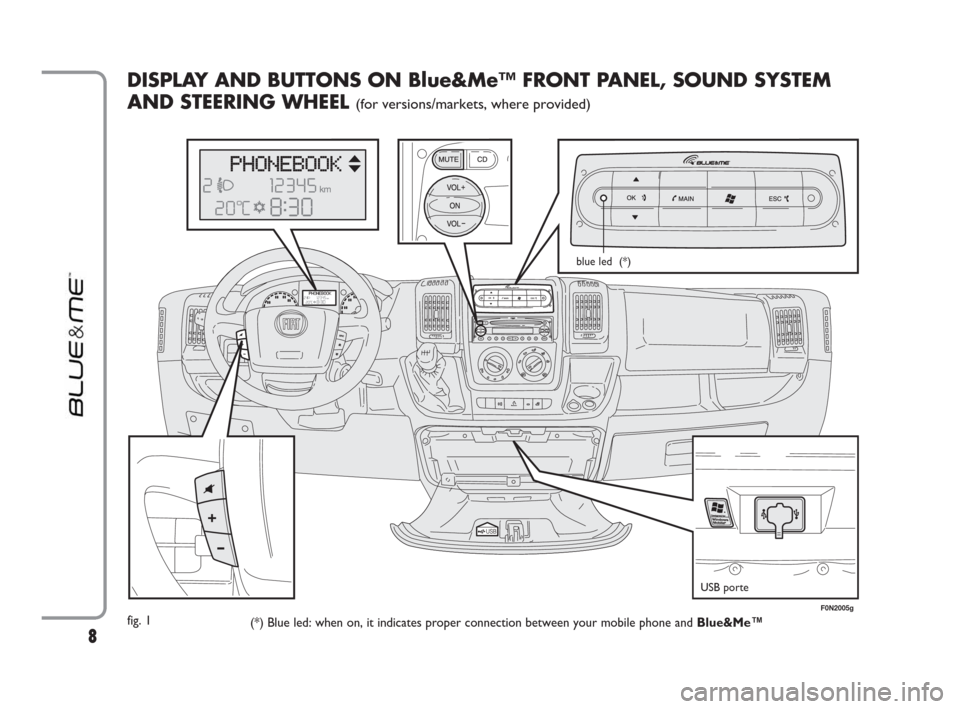
DISPLAY AND BUTTONS ON Blue&Me™ FRONT PANEL, SOUND SYSTEM
AND STEERING WHEEL
(for versions/markets, where provided)
fig. 1
(*) Blue led: when on, it indicates proper connection between your mobile phone and Blue&Me™
USB porte
blue led (*)
F0N2005g
603_97_223 DUCATO BLUE&ME PACK8.2 GB 1ed 5-08-2009 15:36 Pagina 8
Page 14 of 82
MESSAGE READER
QUICK REFERENCE
GUIDE
(with compatible
mobile phones only)
If your mobile phone with Bluetooth®
wireless technology supports the message
reader function, at the arrival of a new
SMS text, Blue&Me™plays a tone and it
will ask if you would like to read it.
❒pronounce “Yes” or press ˜MAINor
OK
ıto read the last message received
❒pronounce “No” or press ESC ˆ, the
system will store the message so you
can read it later
For further details on the message read-
er SMS, refer to section “MESSAGE
READER FUNCTIONS”.
ÂIf you encounter difficulties with any of
the message reader settings, consult sec-
tion “MESSAGE READER – TROUBLE-
SHOOTING”To start playing the digital audio files
stored on your USB device, proceed as
follows:
❒Copy tracks to your USB device
(Blue&Me™recognizes .wma, .mp3
.wav and aacformats for audio files and
.wpland .m3uformats for playlists).
❒USB devices without USB wire: just
connect the USB device (directly or by
an extension lead) to the USB port on
the vehicle (see fig. 1).
❒USB devices with USB wire: use the
wire to connect the USB device to the
USB port on the vehicle (see fig. 1).
❒Turn the ignition key to MAR.
Blue&Me™will start automatically to
play your digital tracks selecting them
from the library built at the moment the
USB device is connected.
❒After Blue&Me™has built the library
containing your digital audio files, you can
select and play tracks, albums, artists and
playlists by interacting manually or ver-
bally with Blue&Me™. Building the li-
brary may require a few minutes if your
USB device contains several files.
❒iPod player - see dedicated paragraph.
❒You can also decide whether to play au-
dio files automatically when connecting
the USB device or to play them upon
your command.
For further details on Media Player, refer
to section MEDIA PLAYER FUNCTIONS.
ÂIf you encounter difficulties with any of
the voice recognition operations, consult
section MEDIA PLAYER - TROU-
BLESHOOTING.
MEDIA PLAYER QUICK REFERENCE GUIDE
13
603_97_223 DUCATO BLUE&ME PACK8.2 GB 1ed 5-08-2009 15:36 Pagina 13
Page 29 of 82

28
The MEDIA PLAYERmenu enables the
following:
❒to display tracks stored on your USB
device
❒to play audio files stored on your USB
device.
Note
Before using the player, read the section
on COMPATIBLE USB STORAGE DE-
VICES or on using an iPod to check that
your USB memory device is compatible
with Blue&Me™.
MEDIA PLAYER FUNCTIONS
HOW TO CONNECT THE USB
DEVICE TO Blue&Me™
To connect your USB device to
Blue&Me™, proceed as follows:
❒Copy the tracks on your USB device.
For further information, see “TECH-
NOLOGIES COMPATIBLE WITH
Blue&Me™”.
❒USB devices without USB wire: just
connect the USB device (directly or by
an extension lead) to the USB port on
the vehicle (see fig. 1).
❒USB devices with USB wire: use the
wire to connect the USB device to the
USB port on the vehicle (see fig. 1).
❒Turn the ignition key to MAR.
Blue&Me™will start automatically to
play your digital tracks selecting them
from the library built at the moment
the USB device is connected.
❒If AUTOPLAYis set to“ON”,
Blue&Me™will start playback auto-
matically.
ÂFor further information read chapter
SETTINGS FUNCTION - MEDIA PLAYER.
When building the media library is over, it
will be possible to use Blue&Me™to to
select and play tracks.HOW TO MANAGE
THE MEDIA LIBRARY
With the Media Player you can select the
audio files stored on your USB device, us-
ing voice commands or the buttons on the
front panel.
You can scroll audio files by folder, artist,
genre, album or playlist and then select the
required category using voice commands.
After selecting the required category, se-
lect the required file using manual con-
trols.
Enter track data (e.g.: title, artist, album,
genre) for surfing your media library
friendly.
Note
Not all formats require to enter media in-
fo. Formats .mp3and .wma, .aacrecog-
nized by Blue&Me™require media info
whereas .wavnot. If no media info is en-
tered, audio files can only be selected by
folder.
ÂFor further details, refer to section
PRACTICAL HINTS FOR USING THE
MEDIA PLAYER.
603_97_223 DUCATO BLUE&ME PACK8.2 GB 1ed 5-08-2009 15:36 Pagina 28
Page 30 of 82

29
Selection by folder
Track folders on your USB device are dis-
played in the FOLDERSmenu.
?
To select tracks through manual in-
teraction, proceed as follows:
Launch the Main Menu and select
MEDIA PLAYER, then press
OK
ıor ˜MAIN.
Select FOLDERS, then press OK
ıor ˜MAIN.
Scroll folders. To play all folders,
select PLAY ALLand then press
OK
ıor ˜MAIN. To display fold-
er tracks, press OK
ıor ˜MAIN.
Scroll the selected folder tracks. To
play the required track, select the ti-
tle and then press OK
ıor
˜MAIN.
}
Or, using voice interaction:
Press
‘and pronounce “Fold-
ers”.
Scroll folders. To play all folder, se-
lect PLAY ALLand then press
OK
ıor ˜MAIN. To display fold-
er tracks, press OK
ıor ˜MAIN.
Scroll the selected folder tracks. To
play the required track, select the
title and then press OK
ıor
˜MAIN.
For further details on FOLDERS,
menu customization, see section
PRACTICAL HINTS FOR USING
THE MEDIA PLAYER.Selection by artist
?
To select the tracks of a special
artist using manual interaction, pro-
ceed as follows:
Launch the Main Menu, select
MEDIA PLAYER, and then press
OK
ıor ˜MAIN.
Select ARTISTSand then press
OK
ıor ˜MAIN.
Scroll artists. To select the required
artist, press OK
ıor ˜MAIN.
Scroll the artist’s albums. To play all
the albums of the required artist, se-
lect PLAY ALLand press OK
ıor
˜MAIN.
To play an album, select the re-
quired album and then press OK
ıor ˜MAIN.
To play a track, select the title and
then press OK
ıor ˜MAIN.
603_97_223 DUCATO BLUE&ME PACK8.2 GB 1ed 5-08-2009 15:36 Pagina 29
Page 31 of 82

}
Or, using voice interaction:
Press
‘and pronounce “Artists”.
Scroll the artist’s albums. To play all
the albums of the required artist, se-
lect PLAY ALLand then press
OK
ıor ˜MAIN. To play an al-
bum, select the required album and
then press OK
ıor ˜MAIN.
To play a track, select the title and
then press OK
ıor ˜MAIN.
Note
If your USB device contains many audio
files, the ARTISTSmenu can be subdi-
vided into alphabetical sub-menus. Alpha-
betical sub-menu can display just the first
letter of the tracks it contains (e.g.: A-F),
or it can display the first two letters (e.g.:
Aa-Ar).Selection by genre
?
To select the tracks of a special
genre using manual interaction, pro-
ceed as follows:
Launch the Main Menu, select
MEDIA PLAYER, and then press
OK
ıor ˜MAIN.
Select GENRESand then press
OK
ıor ˜MAIN.
Scroll genres. To play all the tracks
of the displayed genre, press OK
ıor ˜MAIN.
}
Or, using voice interaction:
Press
‘and pronounce “Genres”.
Scroll genres. To play all the tracks
of the displayed genre, press OK
ıor ˜MAIN.
Note
If your USB device contains many audio
files, the GENRESmenu can be subdivid-
ed into alphabetical sub-menus. Alphabet-
ical sub-menu can display just the first let-
ter of the tracks it contains (e.g.: A-F), or
it can display the first two letters (e.g.: Aa-
Ar).Selection by album
?
To select an album using manual in-
teraction, proceed as follows:
Launch the Main Menu, select MEDIA
PLAYER, and then press OK
ıor
˜MAIN.
Select ALBUMSand then press
OK
ıor ˜MAIN.
Scroll albums. To select the dis-
played album, press OK
ıor
˜MAIN.
Scroll the album tracks. To play all
the tracks in the album, select
PLAY ALLand press OK
ıor
˜MAIN. To play an album, select
it and then press OK
ıor ˜MAIN.
To play just one track, select the
track title and press OK
ıor
˜MAIN.
30
603_97_223 DUCATO BLUE&ME PACK8.2 GB 1ed 5-08-2009 15:36 Pagina 30
Page 32 of 82
}
Or, using voice interaction:
Press
‘and pronounce “Al-
bums”.
Scroll albums. To select the displayed
album, press OK
ıor ˜MAIN.
Scroll the album tracks. To play all the
tracks in the album, select PLAY
ALLand press OK
ıor ˜MAIN.
To play just one track, select the track
title and press OK
ıor ˜MAIN.
Note
If your USB device contains many audio
files, the ALBUMSmenu can be subdi-
vided into alphabetical sub-menus. Alpha-
betical sub-menu can display just the first
letter of the tracks it contains (e.g.: A-F),
or it can display the first two letters (e.g.:
Aa-Ar).Selection by playlist
Playlists stored in your USB device can be
displayed with the PLAYLISTSmenu.
?
To select a playlist using manual in-
teraction, proceed as follows:
Launch the Main Menu, select MEDIA
PLAYER, and then press OK
ıor
˜MAIN.
Select PLAYLISTSand press OK
ıor ˜MAIN.
Scroll playlists. To play the displayed
playlist, press OK
ıor ˜MAIN.
}
Or, using voice interaction:
Press
‘and pronounce “Playlists”.
Scroll playlists. To play the displayed
playlist, press OK
ıor ˜MAIN.
For further details on how to build
playlists, refer to section PRACTICAL
HINTS.PLAYING AUDIO TRACKS
Shuffle playback of the whole
media library
Option “PLAY ANYTHING” shall be
used to play quickly the whole content of
your media library at random.
?
To start “PLAY ANYTHING” us-
ing manual interaction, proceed as
follows:
Launch the Main Menu, select MEDIA
PLAYER, and then press OK
ıor
˜MAIN.
Select PLAY ANYTHINGand
press OK
ıor ˜MAIN.
}
Or, using voice interaction:
Press
‘and pronounce “Play
anything”.
For further details on digital audio
files playback, refer to section “DIG-
ITAL AUDIO SELECTION”.
31
603_97_223 DUCATO BLUE&ME PACK8.2 GB 1ed 5-08-2009 15:36 Pagina 31