Din FIAT FREEMONT 2012 Owner handbook (in English)
[x] Cancel search | Manufacturer: FIAT, Model Year: 2012, Model line: FREEMONT, Model: FIAT FREEMONT 2012Pages: 332, PDF Size: 5.61 MB
Page 5 of 332
Dear Customer,
Thank you for choosing Fiat and congratulations on your choice of a Fiat Freemont.
We have written this handbook to help you get to know all your car and use it in the best possible way.
You should read it right through before taking to the road for the first time.
You will find information, tips and important warnings regarding the driving of your car to help you get the most from the
technological features of your Fiat.
Carefully read the warnings and indications marked with the following symbols:
personal safety;car safety;environmental protection.
The enclosed Warranty Booklet lists the services that Fiat offers to its customers:
• the Warranty Certificate with terms and conditions for maintaining its validity
• the range of additional services available to Fiat customers.
Enjoy the read. Happy motoring!
This Owner Handbook describes all versions of the Fiat Freemont;
please consider only the information relevant to your version, engine and configuration.
Page 9 of 332

changes to your vehicle that do not comply with the
manufacturers specifications.
Original parts and accessories and other products
approved by the manufacturer, including qualified ad-
vice, are available at your authorized dealer.
When it comes to service, remember that your autho-
rized dealer knows your vehicle best, has the factory-
trained technicians and genuine parts, and is interested
in your satisfaction.
Copyright© 2011 FIAT Group Automobiles S.p.A.
3
KNOWING
YOURVEHICLESAFETY
STARTING ANDDRIVING
WARNING LIGHTSAND
MESSAGES
IN AN
EMERGENCY
SERVICING AND
CARETECHNICAL
SPECIFICATIONSCONTENTS
Page 13 of 332
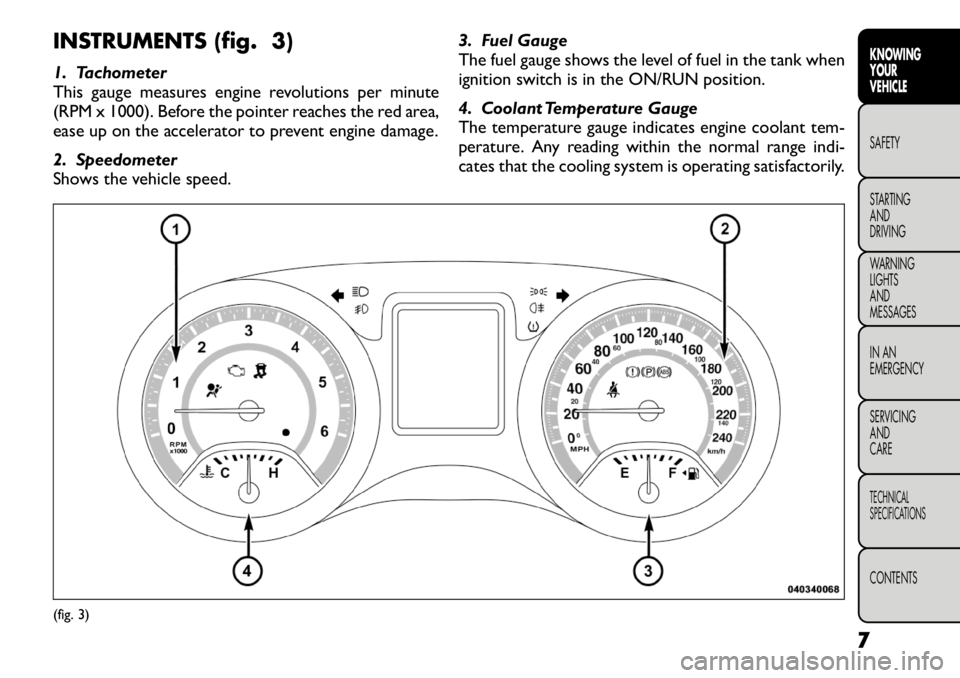
INSTRUMENTS (fig. 3)
1. Tachometer
This gauge measures engine revolutions per minute
(RPM x 1000). Before the pointer reaches the red area,
ease up on the accelerator to prevent engine damage.
2. Speedometer
Shows the vehicle speed.3. Fuel Gauge
The fuel gauge shows the level of fuel in the tank when
ignition switch is in the ON/RUN position.
4. Coolant Temperature Gauge
The temperature gauge indicates engine coolant tem-
perature. Any reading within the normal range indi-
cates that the cooling system is operating satisfactorily.(fig. 3)
7
KNOWING
YOURVEHICLESAFETY
STARTING ANDDRIVING
WARNING LIGHTSAND
MESSAGES
IN AN
EMERGENCY
SERVICING AND
CARETECHNICAL
SPECIFICATIONSCONTENTS
Page 18 of 332
NOTE:When having the Sentry Key
®Immobilizer
system serviced, bring all vehicle Key Fobs with you to
the authorized dealer.
CUSTOMER KEY PROGRAMMING
Programming Key Fobs or RKE transmitters may be
performed at an authorized dealer.
GENERAL INFORMATION
The Sentry Key
®Immobilizer system will be used in
the following European countries, which apply Direc-
tive 1999/5/EC: Austria, Belgium, Czech Republic,
Denmark, Finland, France, Germany, Greece, Hungary,
Ireland, Italy, Luxembourg, Netherlands, Norway, Po-
land, Portugal, Romania, Russian Federation, Slovenia,
Spain, Sweden, Switzerland, Yugoslavia, and UnitedKingdom.
Operation is subject to the following conditions:
• This device may not cause harmful interference.
• This device must accept any interference that may be received, including interference that may cause un-
desired operation. REMOTE KEYLESS ENTRY (RKE)
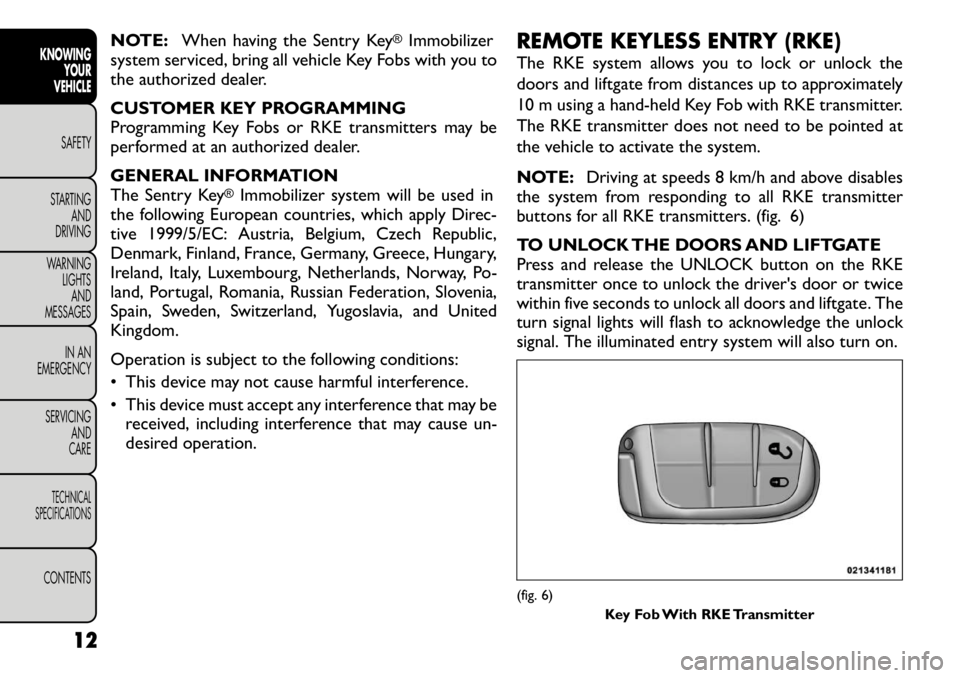
The RKE system allows you to lock or unlock the
doors and liftgate from distances up to approximately
10 m using a hand-held Key Fob with RKE transmitter.
The RKE transmitter does not need to be pointed at
the vehicle to activate the system.
NOTE:
Driving at speeds 8 km/h and above disables
the system from responding to all RKE transmitter
buttons for all RKE transmitters. (fig. 6)
TO UNLOCK THE DOORS AND LIFTGATE
Press and release the UNLOCK button on the RKE
transmitter once to unlock the driver's door or twice
within five seconds to unlock all doors and liftgate. The
turn signal lights will flash to acknowledge the unlock
signal. The illuminated entry system will also turn on.
(fig. 6)
Key Fob With RKE Transmitter
12
KNOWING YOUR
VEHICLE
SAFETY
STARTING AND
DRIVING
WARNING LIGHTSAND
MESSAGES
IN AN
EMERGENCY
SERVICING AND
CARETECHNICAL
SPECIFICATIONSCONTENTS
Page 19 of 332

If the vehicle is equipped with Passive Entry, refer to
“Keyless Enter-N-Go (for versions/markets, where
provided)” under “Knowing Your Vehicle” for further
information.
Remote Key Unlock, Driver Door/All Doors
1st Press
This feature lets you program the system to unlock
either the driver's door or all doors on the first press of
the UNLOCK button on the RKE transmitter. To
change the current setting, refer to “Uconnect
Touch™ Settings” in “Knowing Your Vehicle” for fur-
ther information.
Flash Headlights With Lock
This feature will cause the turn signal lights to flash
when the doors are locked or unlocked with the RKE
transmitter. This feature can be turned on or turned
off. To change the current setting, refer to “Uconnect
Touch™ Settings” in “Knowing Your Vehicle” for fur-
ther information.
Turn Headlights On With Remote Key Unlock
This feature activates the headlights for up to 90 sec-
onds when the doors are unlocked with the RKE
transmitter. The time for this feature is programmable
on vehicles equipped through Uconnect Touch™. To
change the current setting, refer to “Uconnect
Touch™ Settings” in “Knowing Your Vehicle” for fur-
ther information.TO LOCK THE DOORS AND LIFTGATE
Press and release the LOCK button on the RKE trans-
mitter to lock all doors and liftgate. The turn signal
lights will flash to acknowledge the signal.
If the vehicle is equipped with Passive Entry, refer to
“Keyless Enter-N-Go (for versions/markets, where
provided)” under “Knowing Your Vehicle” for further
information.
PROGRAMMING ADDITIONAL TRANSMITTERS
Programming Key Fobs or RKE transmitters may be
performed at an authorized dealer.
TRANSMITTER BATTERY REPLACEMENT
The recommended replacement battery is one
CR2032 battery.
NOTE:
• Perchlorate Material — special handling may apply.
Batteries could contain dangerous materials. Please
dispose of them according to respect for environment
and local laws.
• Used batteries are harmful to the environment. You
can dispose of them either in the correct containers as
specified by law or by taking them to a FIAT Dealership,
which will deal with their disposal.
• Do not touch the battery terminals that are on the
back housing or the printed circuit board.
13
KNOWING
YOURVEHICLESAFETY
STARTING ANDDRIVING
WARNING LIGHTSAND
MESSAGES
IN AN
EMERGENCY
SERVICING AND
CARETECHNICAL
SPECIFICATIONSCONTENTS
Page 20 of 332
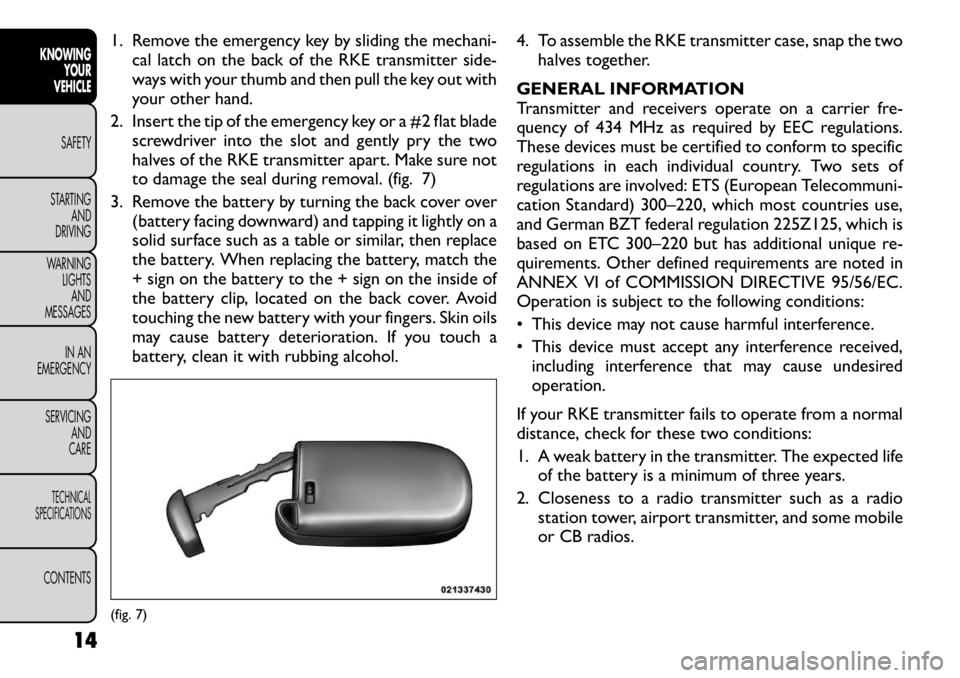
1. Remove the emergency key by sliding the mechani-cal latch on the back of the RKE transmitter side-
ways with your thumb and then pull the key out with
your other hand.
2. Insert the tip of the emergency key or a #2 flat blade screwdriver into the slot and gently pry the two
halves of the RKE transmitter apart. Make sure not
to damage the seal during removal. (fig. 7)
3. Remove the battery by turning the back cover over (battery facing downward) and tapping it lightly on a
solid surface such as a table or similar, then replace
the battery. When replacing the battery, match the
+ sign on the battery to the + sign on the inside of
the battery clip, located on the back cover. Avoid
touching the new battery with your fingers. Skin oils
may cause battery deterioration. If you touch a
battery, clean it with rubbing alcohol. 4. To assemble the RKE transmitter case, snap the two
halves together.
GENERAL INFORMATION
Transmitter and receivers operate on a carrier fre-
quency of 434 MHz as required by EEC regulations.
These devices must be certified to conform to specific
regulations in each individual country. Two sets of
regulations are involved: ETS (European Telecommuni-
cation Standard) 300–220, which most countries use,
and German BZT federal regulation 225Z125, which is
based on ETC 300–220 but has additional unique re-
quirements. Other defined requirements are noted in
ANNEX VI of COMMISSION DIRECTIVE 95/56/EC.
Operation is subject to the following conditions:
• This device may not cause harmful interference.
• This device must accept any interference received, including interference that may cause undesired operation.
If your RKE transmitter fails to operate from a normal
distance, check for these two conditions:
1. A weak battery in the transmitter. The expected life of the battery is a minimum of three years.
2. Closeness to a radio transmitter such as a radio station tower, airport transmitter, and some mobile
or CB radios.(fig. 7)
14
KNOWING YOUR
VEHICLE
SAFETY
STARTING AND
DRIVING
WARNING LIGHTSAND
MESSAGES
IN AN
EMERGENCY
SERVICING AND
CARETECHNICAL
SPECIFICATIONSCONTENTS
Page 26 of 332
DOWN ButtonPress and release the DOWN button to
scroll downward through the main menus
and sub-menus.
SELECT Button Press and release the SELECT button for
access to main menus or sub-menus. Press
and hold the SELECT button for two seconds
to reset features.
BACK Button Press the BACK button to scroll back to a
previous menu or sub-menu.
ELECTRONIC VEHICLE INFORMATION
CENTER (EVIC) DISPLAYS
When the appropriate conditions exist, the EVIC dis-
plays the following messages:
• Turn Signal On (with a continuous warning chime if the vehicle is driven more than 1.6 km with either
turn signal on)
• Left Front Turn Signal Light Out (with a single chime)
• Left Rear Turn Signal Light Out (with a single chime)
• Right Front Turn Signal Light Out (with a single chime)
• Right Rear Turn Signal Light Out (with a single chime)
• RKE Battery Low (with a single chime) • Personal Settings Not Available – Vehicle Not in
PARK (for versions/markets, where provided)
• Left/Right Front Door Ajar (one or more doors open, with a single chime if speed is above 1.6 km/h)
• Left/Right Rear Door Ajar (one or more doors open, with a single chime if speed is above 1.6 km/h)
• Door(s) Ajar (with a single chime if vehicle is in motion)
• Liftgate Ajar (with a single chime)
• Low Washer Fluid (with a single chime)
• Ignition or Accessory On
• Vehicle Not in Park
• Key Left Vehicle
• Key Not Detected
• Low Tire Pressure (with a single chime). Refer to information on “Tire Pressure” and “Tire Pressure
Monitor” in “Starting And Operating”.
• Service TPM System (with a single chime). Refer to information on “Tire Pressure Monitor” in “Starting
And Operating”.
• Check Gascap (refer to “Adding Fuel” in “Technical Specifications”)
• Oil Change Required (with a single chime)
• Check Gascap (refer to “Adding Fuel” in “Starting And Operating”)
• Oil Change Due (with a single chime)
20
KNOWING YOUR
VEHICLE
SAFETY
STARTING AND
DRIVING
WARNING LIGHTSAND
MESSAGES
IN AN
EMERGENCY
SERVICING AND
CARETECHNICAL
SPECIFICATIONSCONTENTS
Page 29 of 332
Further overheating will cause the temperature gauge
to passH,the indicator will continuously flash and a
continuous chime will occur until the engine is allowed
to cool.
If the light turns on while driving, safely pull over and
stop the vehicle. If the A/C system is on, turn it off.
Also, shift the transmission into NEUTRAL and idle the
vehicle. If the temperature reading does not return to
normal, turn the engine off immediately and call for
service.
Transmission Temperature Warning Light This light indicates that the transmission fluid
temperature is running hot. This may occur
with severe usage, such as trailer towing. If
this light turns on, safely pull over and stop
the vehicle. Then, shift the transmission into NEU-
TRAL and run the engine at idle or faster until the light
turns off.
Continuous driving with the Transmission
Temperature Warning Light illuminated
will eventually cause severe transmission
damage or transmission failure.
WARNING!
If the Transmission Temperature Warning
Light is illuminated and you continue
operating the vehicle, in some circumstances you
could cause the fluid to boil over, come in contact
with hot engine or exhaust components and
cause a fire.
OIL CHANGE DUE
Your vehicle is equipped with an engine oil change
indicator system. The “Oil Change Due” message will
flash in the EVIC display for approximately 10 seconds
after a single chime has sounded to indicate the next
scheduled oil change interval. The engine oil change
indicator system is duty cycle based, which means the
engine oil change interval may fluctuate dependent
upon your personal driving style.
Unless reset, this message will continue to display each
time you cycle the ignition to the ON/RUN position.
To turn off the message temporarily, press and release
the BACK button. To reset the oil change indicator
system please refer to a Fiat Dealership.
FUEL ECONOMY
Press and release the UP or DOWN button until “Fuel
Economy” displays highlighted in the EVIC and press
the SELECT button. The following Fuel Economy func-
tions will display in the EVIC:
23KNOWING
YOURVEHICLESAFETY
STARTING ANDDRIVING
WARNING LIGHTSAND
MESSAGES
IN AN
EMERGENCY
SERVICING AND
CARETECHNICAL
SPECIFICATIONSCONTENTS
Page 30 of 332
• Average Fuel Economy
• Distance To Empty (DTE)
• 100L/Km
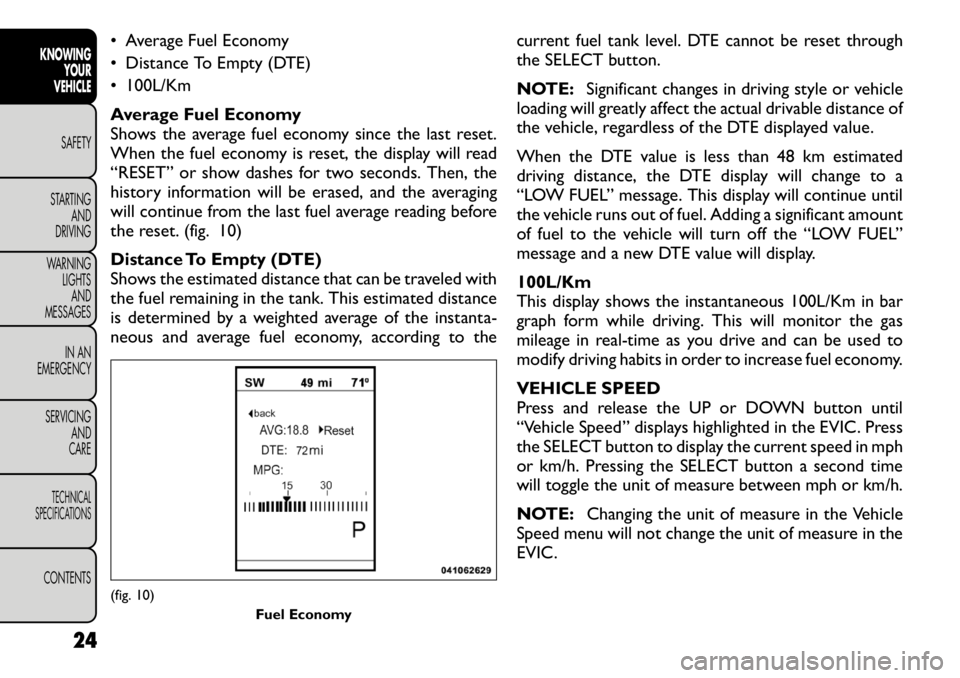
Average Fuel Economy
Shows the average fuel economy since the last reset.
When the fuel economy is reset, the display will read
“RESET” or show dashes for two seconds. Then, the
history information will be erased, and the averaging
will continue from the last fuel average reading before
the reset. (fig. 10)
Distance To Empty (DTE)
Shows the estimated distance that can be traveled with
the fuel remaining in the tank. This estimated distance
is determined by a weighted average of the instanta-
neous and average fuel economy, according to thecurrent fuel tank level. DTE cannot be reset through
the SELECT button.
NOTE:
Significant changes in driving style or vehicle
loading will greatly affect the actual drivable distance of
the vehicle, regardless of the DTE displayed value.
When the DTE value is less than 48 km estimated
driving distance, the DTE display will change to a
“LOW FUEL” message. This display will continue until
the vehicle runs out of fuel. Adding a significant amount
of fuel to the vehicle will turn off the “LOW FUEL”
message and a new DTE value will display. 100L/Km
This display shows the instantaneous 100L/Km in bar
graph form while driving. This will monitor the gas
mileage in real-time as you drive and can be used to
modify driving habits in order to increase fuel economy.
VEHICLE SPEED
Press and release the UP or DOWN button until
“Vehicle Speed” displays highlighted in the EVIC. Press
the SELECT button to display the current speed in mph
or km/h. Pressing the SELECT button a second time
will toggle the unit of measure between mph or km/h.
NOTE: Changing the unit of measure in the Vehicle
Speed menu will not change the unit of measure in the
EVIC.(fig. 10)
Fuel Economy
24
KNOWING YOUR
VEHICLE
SAFETY
STARTING AND
DRIVING
WARNING LIGHTSAND
MESSAGES
IN AN
EMERGENCY
SERVICING AND
CARETECHNICAL
SPECIFICATIONSCONTENTS
Page 33 of 332
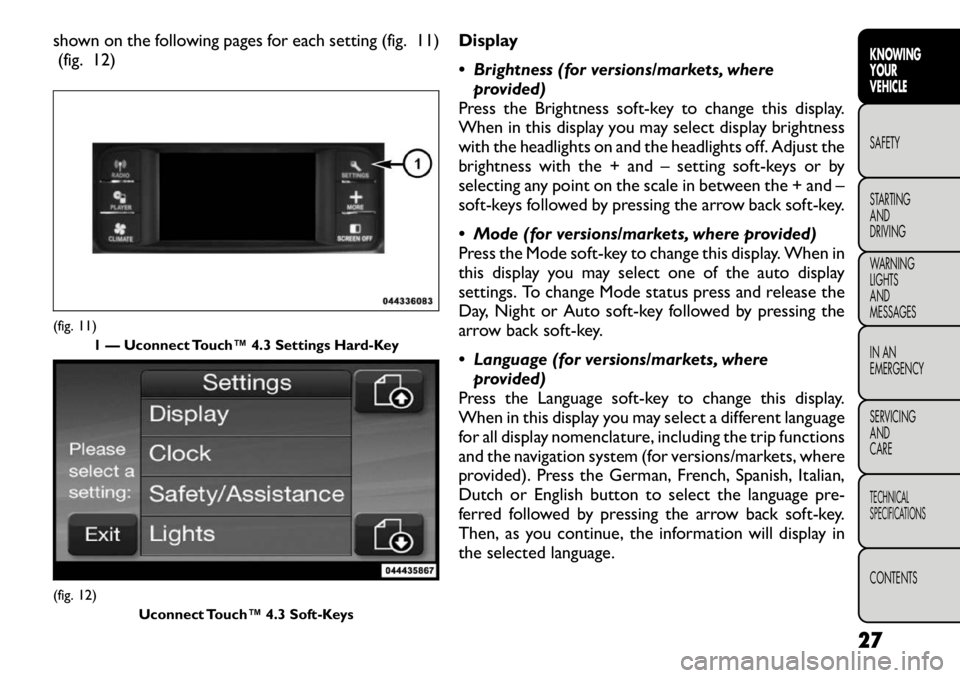
shown on the following pages for each setting (fig. 11)(fig. 12) Display
Brightness (for versions/markets, where
provided)
Press the Brightness soft-key to change this display.
When in this display you may select display brightness
with the headlights on and the headlights off. Adjust the
brightness with the + and – setting soft-keys or by
selecting any point on the scale in between the + and –
soft-keys followed by pressing the arrow back soft-key.
Mode (for versions/markets, where provided)
Press the Mode soft-key to change this display. When in
this display you may select one of the auto display
settings. To change Mode status press and release the
Day, Night or Auto soft-key followed by pressing the
arrow back soft-key.
Language (for versions/markets, where provided)
Press the Language soft-key to change this display.
When in this display you may select a different language
for all display nomenclature, including the trip functions
and the navigation system (for versions/markets, where
provided). Press the German, French, Spanish, Italian,
Dutch or English button to select the language pre-
ferred followed by pressing the arrow back soft-key.
Then, as you continue, the information will display in
the selected language.(fig. 11) 1 — Uconnect Touch™ 4.3 Settings Hard-Key(fig. 12)
Uconnect Touch™ 4.3 Soft-Keys
27
KNOWING
YOURVEHICLESAFETY
STARTING ANDDRIVING
WARNING LIGHTSAND
MESSAGES
IN AN
EMERGENCY
SERVICING AND
CARETECHNICAL
SPECIFICATIONSCONTENTS