headlights FIAT FREEMONT 2014 1.G User Guide
[x] Cancel search | Manufacturer: FIAT, Model Year: 2014, Model line: FREEMONT, Model: FIAT FREEMONT 2014 1.GPages: 388, PDF Size: 4.13 MB
Page 48 of 388
• 1st Press of Key Fob Unlocks (for versions/
markets, where provided)
WhenUnlock Driver Door Only On 1st Press is
selected, only the driver's door will unlock on the first
press of the RKE transmitter UNLOCK button. When
Driver Door 1st Press is selected, you must press the
RKE transmitter UNLOCK button twice to unlock the
passenger's doors. When Unlock All Doors On 1st
Press is selected, all of the doors will unlock on the
first press of the RKE transmitter UNLOCK button.
NOTE: If the vehicle is equipped with Keyless Enter-
N-Go™ (Passive Entry) and the EVIC is programmed
to Unlock All Doors 1st Press, all doors will unlock no
matter which Passive Entry equipped door handle is
grasped. If Driver Door 1st Press is programmed, only
the driver’s door will unlock when the driver’s door is
grasped. With Passive Entry, if Driver Door 1st Press is
programmed touching the handle more than once will
only result in the driver’s door opening. If driver door
first is selected, once the driver door is opened, the
interior door lock/unlock switch can be used to unlock
all doors (or use RKE transmitter).
• Passive Entry (for versions/markets, where
provided)
This feature allows you to lock and unlock the vehicle’s
door(s) without having to press the RKE transmitter
lock or unlock buttons. To make your selection, press the Passive Entry soft-key, select ON or OFF followed
by pressing the arrow back soft-key. Refer to “Keyless
Enter-N-Go™” in “Knowing Your Vehicle”.
Engine Off Options
• Engine Off Power Delay
When this feature is selected, the power window
switches, radio, Uconnect® phone system (for versions/
markets, where provided), DVD video system (for
versions/markets, where provided), power sunroof (for
versions/markets, where provided), and power outlets
will remain active for up to 10 minutes after the ignition
is cycled OFF. Opening either front vehicle door will
cancel this feature. To change the Engine Off Power
Delay status press the 0 seconds, 45 seconds, 5 minutes
or 10 minutes soft-key followed by pressing the arrow
back soft-key.
• Headlight Off Delay (for versions/markets,
where provided)
When this feature is selected, the driver can choose to
have the headlights remain on for 0, 30, 60, or 90 sec-
onds when exiting the vehicle. To change the Headlight
Off Delay status press the 0, 30, 60 or 90 soft-key
followed by pressing the arrow back soft-key.
42
KNOWING
YOUR
VEHICLE
SAFETY
STARTING AND
DRIVING
W
ARNING LIGHTS AND
MESSAGES
IN AN
EMERGENCY
SERVICING AND CARE
TECHNICAL
SPECIFICATIONS
CONTENTS
Page 92 of 388
LIGHTS
HEADLIGHT SWITCHThe headlight switch is located on the left side of
the instrument panel. This switch controls the
operation of the headlights, parking lights, in-
strument panel lights, instrument panel light dimming,
interior lights and fog lights.
(fig. 62)
Rotate the headlight switch clockwise to the first
detent for parking light and instrument panel light
operation. Rotate the headlight switch to the second
detent for headlight, parking light and instrument panel
light operation. AUTOMATIC HEADLIGHTS
(for versions/markets, where provided)
This system automatically turns the headlights on or off
according to ambient light levels. To turn the system
on, rotate the headlight switch counterclockwise to
the AUTO position. When the system is on, the
headlight time delay feature is also on. This means the
headlights will stay on for up to 90 seconds after you
turn the ignition switch OFF. To turn the automatic
system off, move the headlight switch out of the AUTO
position.
NOTE:
The engine must be running before the head-
lights will come on in the automatic mode.
HEADLIGHTS ON WITH WIPERS
(AVAILABLE WITH AUTOMATIC
HEADLIGHTS ONLY)
When this feature is active, the headlights will turn on
approximately 10 seconds after the wipers are turned
on if the headlight switch is placed in the AUTO
position. In addition, the headlights will turn off when
the wipers are turned off if they were turned on by this
feature.
NOTE: The Headlights On with Wipers feature can be
turned on and off using the Uconnect® System, refer
to “Uconnect® Settings” in “Knowing Your Vehicle”
for further information.
(fig. 62)
Headlight Switch
86
KNOWINGYOUR
VEHICLE
SAFETY
STARTING AND
DRIVING
W
ARNING LIGHTS AND
MESSAGES
IN AN
EMERGENCY
SERVICING AND CARE
TECHNICAL
SPECIFICATIONS
CONTENTS
Page 93 of 388
HEADLIGHT TIME DELAY
This feature provides the safety of headlight illumina-
tion for up to 90 seconds when leaving your vehicle in
an unlit area.
To activate the delay feature, turn OFF the ignition
switch while the headlights are still on. Then, turn off
the headlights within 45 seconds. The delay interval
begins when the headlight switch is turned off.
NOTE:
The lights must be turned off within 45 seconds
of turning the ignition OFF to activate this feature.
If you turn the headlights, park lights or ignition switch
ON again, the system will cancel the delay.
If you turn the headlights off before the ignition, they
will turn off in the normal manner.
NOTE:
The Headlight Time Delay is programmable
using the Uconnect® System, refer to “Uconnect® Set-
tings” in “Knowing Your Vehicle” for further information.
LIGHTS-ON REMINDER
If the headlights or parking lights are on after the
ignition is turned OFF, a chime will sound to alert the
driver when the driver's door is opened.
FRONT AND REAR FOG LIGHTS
(for versions/markets, where provided)
The front and rear fog light switch is built into the
headlight switch.
(fig. 63)
The front and rear fog lights may be operated as desired when visibility is poor due to fog. The fog
lights will activate in the following order: Press
the headlight switch once and the front fog lights
come on. Press the switch a second time and the
rear fog lights will come on (front fog lights stay on).
Press the switch a third time and the rear fog lights turn
off (front fog stays on). Press the switch a fourth times
and the front fog turns off. For vehicles without front fog,
rear fog will activate on the first press.
An indicator light in the instrument cluster illuminates
when the fog lights are turned on.
(fig. 63)
Fog Light Switch
87
KNOWING
YOUR
VEHICLE
SAFETY
STARTING
AND
DRIVING
W
ARNING
LIGHTS
AND
MESSAGES
IN AN
EMERGENCY
SERVICING
AND CARE
TECHNICAL
SPECIFICATIONS
CONTENTS
Page 94 of 388
MULTIFUNCTION LEVER
The multifunction lever controls the operation of the
turn signals, headlight beam selection and passing lights.
The multifunction lever is located on the left side of the
steering column.
(fig. 64)
TURN SIGNALS
Move the multifunction lever up or down and the
arrows on each side of the instrument cluster flash to
show proper operation of the front and rear turn signal
lights.NOTE:
• If either light remains on and does not flash, or there
is a very fast flash rate, check for a defective outside
light bulb. If an indicator fails to light when the lever
is moved, it would suggest that the indicator bulb is
defective.
• A “Turn Signal On” message will appear in the EVIC (for versions/markets, where provided) and a con-
tinuous chime will sound if the vehicle is driven more
than 1.6 km with either turn signal on.
LANE CHANGE ASSIST
Tap the lever up or down once, without moving beyond
the detent, and the turn signal (right or left) will flash
three times then automatically turn off.
HIGH/LOW BEAM SWITCH
Push the multifunction lever away from you to switch
the headlights to high beam. Pull the multifunction lever
toward you to switch the headlights back to low beam.
(fig. 64) Multifunction Lever
88
KNOWINGYOUR
VEHICLE
SAFETY
STARTING AND
DRIVING
W
ARNING LIGHTS AND
MESSAGES
IN AN
EMERGENCY
SERVICING AND CARE
TECHNICAL
SPECIFICATIONS
CONTENTS
Page 95 of 388
FLASH-TO-PASS
You can signal another vehicle with your headlights by
lightly pulling the multifunction lever toward you. This
will turn on the high beams headlights until the lever is
released.
INTERIOR LIGHTS
The interior lights come on when a door is opened.
To protect the battery, the interior lights will turn off
automatically 10 minutes after the ignition switch is
moved to the LOCK position. This will occur if the
interior lights were switched on manually or are on
because a door is open. This includes the glove box
light, but not the trunk light. To restore interior light
operation, either turn the ignition switch ON or cycle
the light switch.DIMMER CONTROLS
The dimmer control is part of the headlight switch and
is located on the left side of the instrument panel.
(fig. 65)
Rotating the left dimmer control upward with the
parking lights or headlights on will increase the bright-
ness of the instrument panel lights.
(fig. 65)
Dimmer Controls
89
KNOWING
YOUR
VEHICLE
SAFETY
STARTING
AND
DRIVING
W
ARNING
LIGHTS
AND
MESSAGES
IN AN
EMERGENCY
SERVICING
AND CARE
TECHNICAL
SPECIFICATIONS
CONTENTS
Page 100 of 388
HEADLIGHT WASHERS
(for versions/markets, where
provided)
The Headlight Washers are recessed into the top of
the fascia, centrally located below each headlight.
The windshield wiper/washer control lever operates
the headlight washers when the ignition switch is in the
ON position and the headlights are ON. The lever is
located on the left side of the steering column.
To use the headlight washers, push the washer knob,
located on the end of the multifunction lever, inward to
the second detent to activate the windshield washers
and release it. When this is done, the two stationary
washer nozzles at each headlight spray one timed
high-pressure spray of washer fluid onto each headlight
lens. In addition, the windshield washers will spray the
windshield and the windshield wipers will cycle.
NOTE:After turning the ignition switch and head-
lights ON, the headlight washers will operate on the
first spray of the windshield washer and then every
eleventh spray after that.
REAR WINDOW FEATURES
REAR WINDOW WIPER/WASHER
The rear window wiper/washer control is located on
the right side of the steering column.
(fig. 69)
Rotate the switch upward to the first detent
position for rear wiper operation.
NOTE: The rear wiper operates in an intermittent
mode only.
(fig. 69)
Rear Wiper/Washer
94
KNOWINGYOUR
VEHICLE
SAFETY
STARTING AND
DRIVING
W
ARNING LIGHTS AND
MESSAGES
IN AN
EMERGENCY
SERVICING AND CARE
TECHNICAL
SPECIFICATIONS
CONTENTS
Page 271 of 388
3. Electronic Stability Control (ESC) Activation/
Malfunction Indicator Light (for versions/markets,
where provided)The “ESC Activation/Malfunction Indicator
Light” in the instrument cluster will come on
when the ignition switch is turned to the
ON/RUN position. It should go out with the
engine running. If the “ESC Activation/Malfunction In-
dicator Light” comes on continuously with the engine
running, a malfunction has been detected in the ESC
system. If this light remains on after several ignition
cycles, and the vehicle has been driven several kilome-
ters at speeds greater than 48 km/h, see your autho-
rized dealer as soon as possible to have the problem
diagnosed and corrected.
NOTE:
The “ESC Off Indicator Light” and the “ESC Activation/
Malfunction Indicator Light” come on momentarily each
time the ignition switch is turned to ON/RUN.
Each time the ignition is turned to ON/RUN, the ESC
system will be ON, even if it was turned off previously.
The ESC system will make buzzing or clicking sounds
when it is active. This is normal; the sounds will stop
when ESC becomes inactive following the maneuver
that caused the ESC activation. 4. Turn Signal Indicator Light
The left or right arrow will flash in unison
with the corresponding front and rear turn
signal lights when the turn signal switch is
operated. (Refer to “Lights” in “Knowing
Your Vehicle” for further information).
NOTE:
A chime will sound if the vehicle is driven more than
1.6 km with either turn signal on.
Check for an inoperative outside light bulb if either
indicator flashes at a rapid rate.
5. High Beam Indicator This light shows that the high beam headlights
are on. Pull the multifunction lever on the left
side of the steering column toward you to switch to
low beam. (Refer to “Lights” in “Knowing Your Vehicle”
for further information).
6. Front Fog Light Indicator (for versions/markets,
where provided) This indicator will illuminate when the front fog
lights are on. (Refer to “Lights” in “Knowing
Your Vehicle” for further information).
265
KNOWING
YOUR
VEHICLE
SAFETY
STARTING
AND
DRIVING
WARNING
LIGHTS
AND
MESSAGES
IN AN
EMERGENCY
SERVICING
AND CARE
TECHNICAL
SPECIFICATIONS
CONTENTS
Page 272 of 388
7. Odometer Display / Electronic Vehicle
Information Center (EVIC) Display
Odometer
The odometer display shows the total distance the
vehicle has been driven.
Electronic Vehicle Information Center (EVIC)
Display
The Electronic Vehicle Information Center (EVIC) fea-
tures a driver-interactive display that is located in the
instrument cluster. For further information, refer to
“Electronic Vehicle Information Center (EVIC)” in
“Knowing Your Vehicle”.
8. Park/Headlight ON IndicatorThis indicator will illuminate when the park
lights or headlights are turned on. (Refer to
“Lights” in “Knowing Your Vehicle” for fur-
ther information). 9. Tire Pressure Monitoring Telltale Light
Each tire, including the spare (if provided),
should be checked monthly when cold and
inflated to the inflation pressure recom-
mended by the vehicle manufacturer on the
vehicle placard or tire inflation pressure label.
As an added safety feature, your vehicle has been
equipped with a tire pressure monitoring system
(TPMS) that illuminates a low tire pressure telltale
when one or more of your tires is significantly under-
inflated. Accordingly, when the low tire pressure tell-
tale light illuminates, you should stop and check your
tires as soon as possible, and inflate them to the proper
pressure. Driving on a significantly under-inflated tire
causes the tire to overheat and can lead to tire failure.
Under-inflation also reduces fuel efficiency and tire
tread life, and may affect the vehicle’s handling and
stopping ability.
266
KNOWING YOUR
VEHICLE
SAFETY
STARTING AND
DRIVING
WARNING LIGHTSAND
MESSAGES
IN AN
EMERGENCY
SERVICING AND CARE
TECHNICAL
SPECIFICATIONS
CONTENTS
Page 320 of 388
Periodic Checks
Every1,000 km or before long journeys, check and, if
necessary, restore:
• engine coolant;
• brake fluid;
• power steering fluid;
• windshield washer fluid level;
• power steering fluid;
• tire inflation pressure and condition;
• operation of lighting system (headlights, direction indicators, hazard warning lights, etc.);
• operation of windshield washer/wiper system and positioning/wear of windshield/rear window wiper
blades.
Every 3,000 km, check and top up, if required, the
engine oil level and automatic transmission fluid level
(four-speed automatic only). Heavy-Duty Use Of The Car
If the car is used mainly under one of the following
conditions:
• towing a trailer or caravan;
• dusty roads;
• short, repeated journeys (less than 7-8 km) at sub-
zero outside temperatures;
• engine often idling or driving long distances at low speeds or long periods of idleness.
You should perform the following inspections more
frequently than shown on the Scheduled Servicing Plan:
• check front disc brake pad conditions and wear;
• check cleanliness of hood and trunk locks, cleanli- ness and lubrication of linkage;
• visually inspect conditions of: engine, transmission, pipes and hoses (exhaust - fuel system - brakes) and
rubber elements (boots - sleeves - bushes - etc.);
• check battery charge and battery fluid level (electro- lyte);
•
visually inspect condition of the accessory drive belts;
• check and, if necessary, change engine oil and replace oil filter;
• check and, if necessary, replace pollen filter;
• check and, if necessary, replace air cleaner.
314
KNOWING YOUR
VEHICLE
SAFETY
STARTING AND
DRIVING
WARNING LIGHTSAND
MESSAGES
IN AN
EMERGENCY
SERVICING AND CARE
TECHNICAL
SPECIFICATIONS
CONTENTS
Page 322 of 388
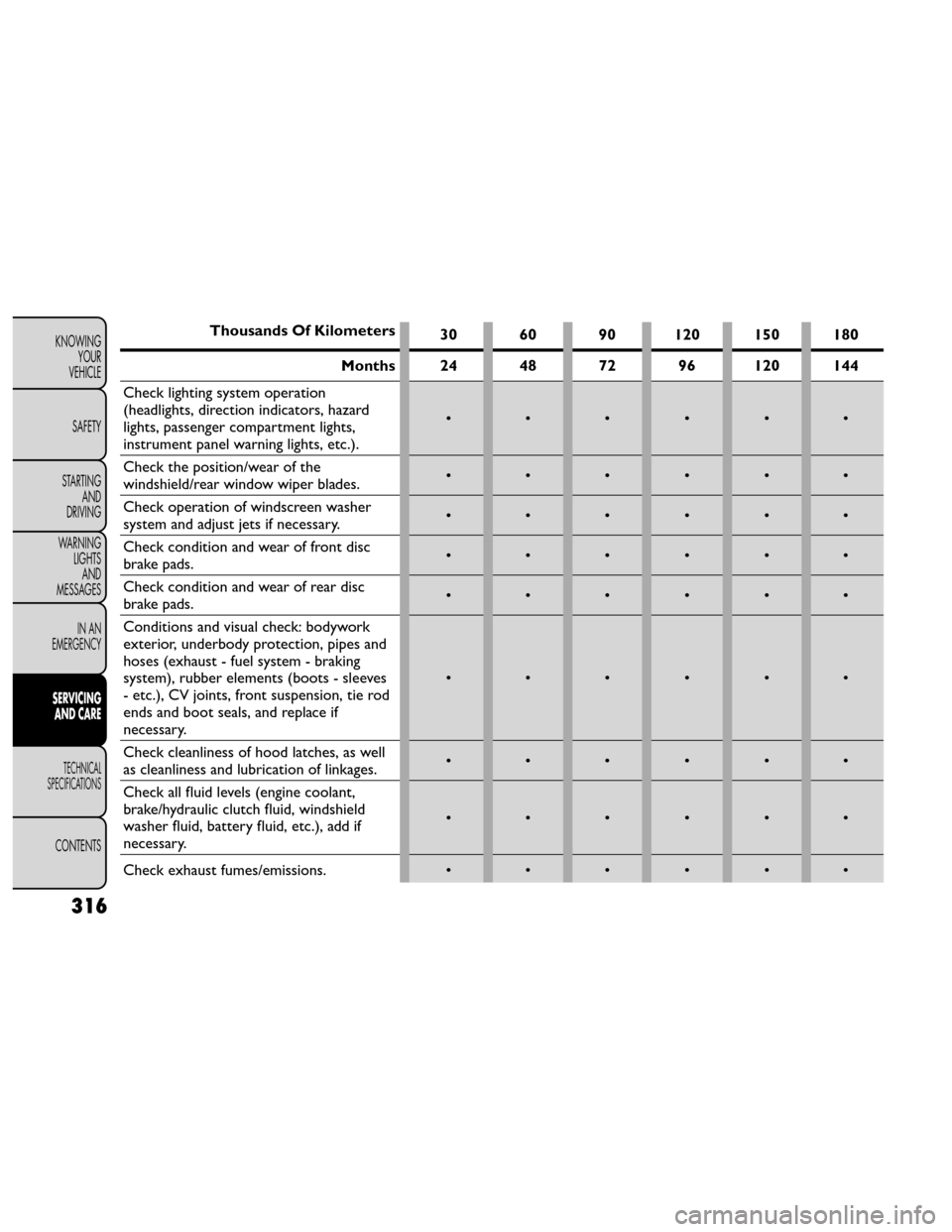
Thousands Of Kilometers30 60 90 120 150 180
Months 24 48 72 96 120 144
Check lighting system operation
(headlights, direction indicators, hazard
lights, passenger compartment lights,
instrument panel warning lights, etc.). ••••••
Check the position/wear of the
windshield/rear window wiper blades. ••••••
Check operation of windscreen washer
system and adjust jets if necessary. ••••••
Check condition and wear of front disc
brake pads. ••••••
Check condition and wear of rear disc
brake pads. ••••••
Conditions and visual check: bodywork
exterior, underbody protection, pipes and
hoses (exhaust - fuel system - braking
system), rubber elements (boots - sleeves
- etc.), CV joints, front suspension, tie rod
ends and boot seals, and replace if
necessary. ••••••
Check cleanliness of hood latches, as well
as cleanliness and lubrication of linkages. ••••••
Check all fluid levels (engine coolant,
brake/hydraulic clutch fluid, windshield
washer fluid, battery fluid, etc.), add if
necessary. ••••••
Check exhaust fumes/emissions. • • • • • •
316
KNOWING
YOUR
VEHICLE
SAFETY
STARTING AND
DRIVING
WARNING LIGHTSAND
MESSAGES
IN AN
EMERGENCY
SERVICING AND CARE
TECHNICAL
SPECIFICATIONS
CONTENTS