remote start FIAT FREEMONT 2014 1.G User Guide
[x] Cancel search | Manufacturer: FIAT, Model Year: 2014, Model line: FREEMONT, Model: FIAT FREEMONT 2014 1.GPages: 388, PDF Size: 4.13 MB
Page 105 of 388
COURTESY/READING LIGHTS
The overhead console has two courtesy lights. The
lights turn on when a door or the liftgate is opened.
If your vehicle is equipped with Remote Keyless Entry
(RKE) the lights will also turn on when the UNLOCK
button on the RKE transmitter is pressed. The cour-
tesy lights also function as reading lights. Press in on
each lens to turn these lights on while inside the
vehicle. Press the lens a second time to turn each light
off. You may adjust the direction of these lights by
pressing the outside ring, which is identified with four
directional arrows.
(fig. 73)
SUNGLASSES STORAGE
To access the storage compartment, press on the
raised bars on the compartment door in the center of
the console and release and the door will swing down-
ward.
(fig. 74)
(fig. 73)Courtesy/Reading Light(fig. 74)Sunglasses Storage Compartment
99
KNOWING
YOUR
VEHICLE
SAFETY
STARTING
AND
DRIVING
W
ARNING
LIGHTS
AND
MESSAGES
IN AN
EMERGENCY
SERVICING
AND CARE
TECHNICAL
SPECIFICATIONS
CONTENTS
Page 124 of 388
KEYLESS ENTER-N-GO™
The Passive Entry system is an enhancement to the
vehicle’s Remote Keyless Entry (RKE) system and a
feature of Keyless Enter-N-Go™. This feature allows
you to lock and unlock the vehicle’s door(s) without
having to press the RKE transmitter lock or unlock
buttons.
NOTE:
• Passive Entry may be programmed ON/OFF; refer to“Uconnect® Settings” in “Knowing Your Vehicle” for
further information.
• If wearing gloves on your hands, or if it has been raining on the Passive Entry door handle, the unlock
sensitivity can be affected, resulting in a slower re-
sponse time.
• If the vehicle is unlocked by the RKE transmitter or Passive Entry and no door goes ajar within 60 sec-
onds, the vehicle will re-lock and will arm the theft
alarm. To Unlock From The Driver's Side:
With a valid Passive Entry RKE transmitter within
1.5 m of the driver's door handle, grab the driver's
front door handle to unlock the driver's door auto-
matically. The interior door panel lock knob will raise
when the door is unlocked.
(fig. 99)
NOTE:
If “Unlock All Doors 1st Press” is pro-
grammed all doors will unlock when you grab hold of
the driver’s front door handle. To select between
“Unlock Driver Door 1st Press” and “Unlock All
Doors 1st Press”, refer to “Electronic Vehicle Informa-
tion Center (EVIC)/Personal Settings (Customer-
Programmable Features)” in “Knowing Your Vehicle”
for further information.
(fig. 99)
Grabbing The Driver's Door Handle
118
KNOWINGYOUR
VEHICLE
SAFETY
STARTING AND
DRIVING
W
ARNING LIGHTS AND
MESSAGES
IN AN
EMERGENCY
SERVICING AND CARE
TECHNICAL
SPECIFICATIONS
CONTENTS
Page 167 of 388
SOUND SYSTEMS
Refer to your Uconnect® User Manual.
STEERING WHEEL AUDIO
CONTROLS
The remote sound system controls are located on the
rear surface of the steering wheel. The left and right-
hand controls are rocker-type switches with a pushbut-
ton in the center of each switch. Reach behind the
steering wheel to access the switches.
(fig. 120)
(fig. 120)Remote Sound Controls (Back View Of Steering Wheel)
161
KNOWING
YOUR
VEHICLE
SAFETY
STARTING
AND
DRIVING
W
ARNING
LIGHTS
AND
MESSAGES
IN AN
EMERGENCY
SERVICING
AND CARE
TECHNICAL
SPECIFICATIONS
CONTENTS
Page 170 of 388
Video Screen
NOTE:Typically there are two different ways to
operate the features of the Video Entertainment Sys-
tem (VES™).
• The Remote Control
• The Touch-Screen Radio (for versions/markets, where provided)
Play Video Games
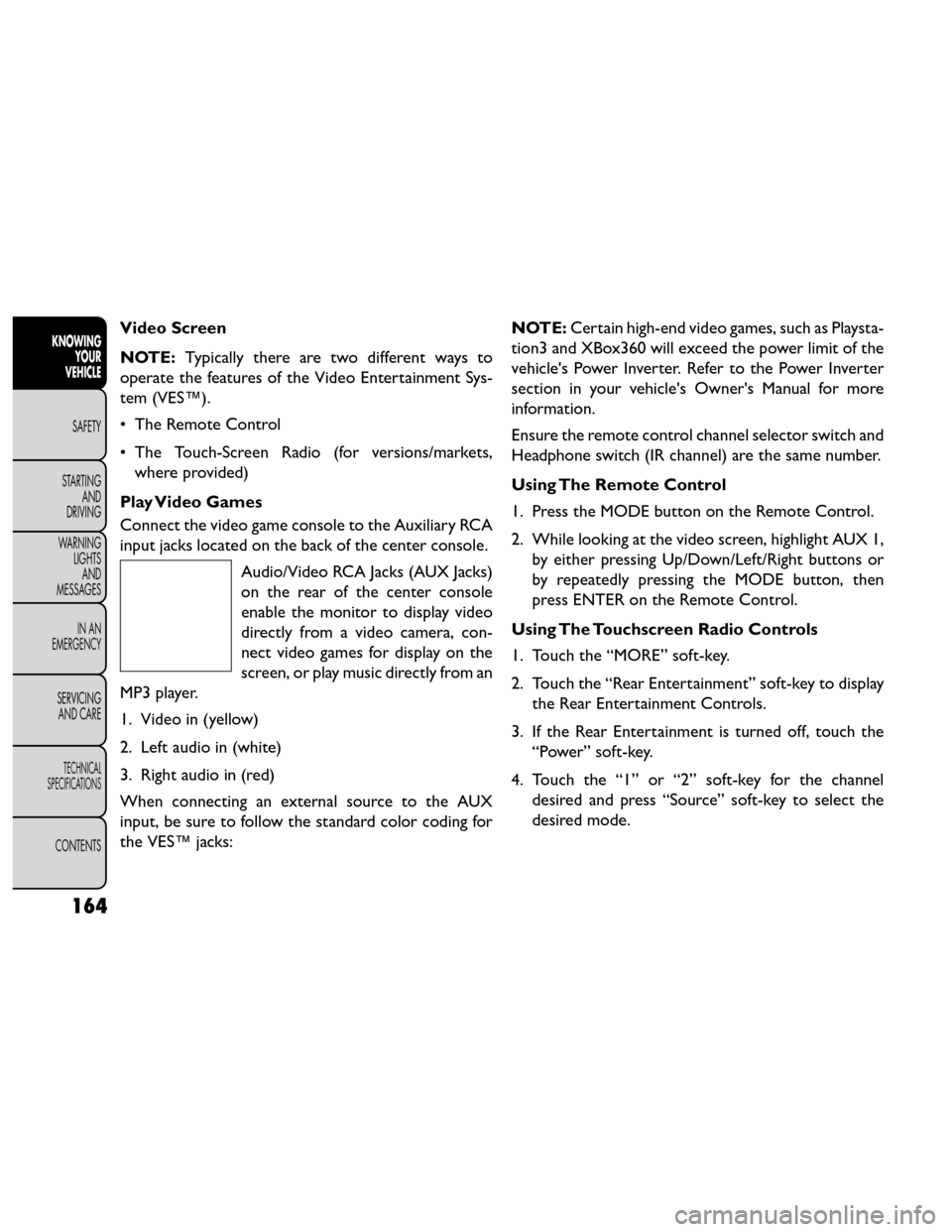
Connect the video game console to the Auxiliary RCA
input jacks located on the back of the center console. Audio/Video RCA Jacks (AUX Jacks)
on the rear of the center console
enable the monitor to display video
directly from a video camera, con-
nect video games for display on the
screen, or play music directly from an
MP3 player.
1. Video in (yellow)
2. Left audio in (white)
3. Right audio in (red)
When connecting an external source to the AUX
input, be sure to follow the standard color coding for
the VES™ jacks: NOTE:
Certain high-end video games, such as Playsta-
tion3 and XBox360 will exceed the power limit of the
vehicle's Power Inverter. Refer to the Power Inverter
section in your vehicle's Owner's Manual for more
information.
Ensure the remote control channel selector switch and
Headphone switch (IR channel) are the same number.
Using The Remote Control
1. Press the MODE button on the Remote Control.
2. While looking at the video screen, highlight AUX 1, by either pressing Up/Down/Left/Right buttons or
by repeatedly pressing the MODE button, then
press ENTER on the Remote Control.
Using The Touchscreen Radio Controls
1. Touch the “MORE” soft-key.
2. Touch the “Rear Entertainment” soft-key to display the Rear Entertainment Controls.
3. If the Rear Entertainment is turned off, touch the “Power” soft-key.
4. Touch the “1” or “2” soft-key for the channel desired and press “Source” soft-key to select the
desired mode.
164
KNOWING YOUR
VEHICLE
SAFETY
STARTING AND
DRIVING
W
ARNING LIGHTS AND
MESSAGES
IN AN
EMERGENCY
SERVICING AND CARE
TECHNICAL
SPECIFICATIONS
CONTENTS
Page 171 of 388
Listen To An Audio Source On Channel 2
While A Video Is Playing On Channel 1
Ensure the Remote Control and Headphone switch is
on Channel 2.
Using The Remote Control
1. Press the MODE button on the Remote Controland the Mode Select Screen will display, unless a
video is playing then only a small banner will appear
on the bottom of the screen.
2. While looking at the video screen, either press Up/ Down/Left/Right on the Remote Control to
highlight the desired audio source or repeatedly
press the MODE button on the remote until the
desired audio source appears on the screen.
Using The Touch-Screen Radio Controls
1. Touch the “MORE” soft-key.
2. Touch the “Rear Entertainment” soft-key to display the Rear Entertainment Controls.
3. If the Rear Entertainment is turned off, touch the “Power” soft-key.
4. Touch the “1” or “2” soft-key for the channel desired then press the “SOURCE” soft key to select
the desired mode. Important Notes For Single Video Screen
System
• VES™ is able to transmit two channels of stereo
audio simultaneously.
• In split screen mode the left side equates to Chan- nel 1 and right side equates to Channel 2.
• If a video source is selected on Channel 1, then Channel 2 is for audio only.
• When selecting a video source on Channel 1, the video will display on the screen and the audio will be
heard on Channel 1 in the headphones.
• Audio can be heard through the headphones even when the Video Screen is closed.
Play A DVD Using The Touchscreen Radio
1. Insert the DVD with the label facing up. The radio automatically selects the appropriate mode after
the disc is recognized and displays the menu screen
or starts playing the first track.
165
KNOWING
YOUR
VEHICLE
SAFETY
STARTING
AND
DRIVING
W
ARNING
LIGHTS
AND
MESSAGES
IN AN
EMERGENCY
SERVICING
AND CARE
TECHNICAL
SPECIFICATIONS
CONTENTS
Page 172 of 388
Using The Remote Control
1. Press the MODE button on the Remote Control.
2. While looking at the Video Screen, highlight DISCby either pressing Up/Down/Left/Right buttons or
by repeatedly pressing the MODE button, then
press ENTER.
NOTE:
• The VES™ system will retain the last setting when turned off.
• Viewing a DVD on the Touchscreen radio screen is not available in some regions or locations, the vehicle
must be stopped, and the shift lever must be in the
PARK position for vehicles with automatic transmis-
sion. In vehicles with manual transmission the park-
ing brake must be engaged even when the vehicle is
parked. Refer to local and state laws.
• Touching the screen on a Touchscreen radio while a DVD is playing brings up basic remote control func-
tions for DVD play such as scene selection, Play,
Pause, FF, RW, and Stop. Pressing the X in the upper
corner will turn off the remote control screen func-
tions. Using The Touch-Screen Radio Controls
1. Touch the “MORE” soft-key.
2. Touch the “Rear Entertainment” soft-key to display
the Rear Entertainment Controls.
3. If the Rear Entertainment is turned off, touch the “Power” soft-key.
4. Touch the “1” or “2” Source soft-key based on the channel you want to change and touch the “Disc”
soft-key. To exit touch the “X” at the top right of
the screen.
NOTE: Touching the screen on a Touch-Screen radio
while a DVD is playing full screen brings up basic
control functions for DVD play such as DVD Menu,
Seek Up/Down, Navigating through the menus, Exit.
The basic control functions screen will time out and
disappear from the screen.
166
KNOWING YOUR
VEHICLE
SAFETY
STARTING AND
DRIVING
W
ARNING LIGHTS AND
MESSAGES
IN AN
EMERGENCY
SERVICING AND CARE
TECHNICAL
SPECIFICATIONS
CONTENTS
Page 173 of 388
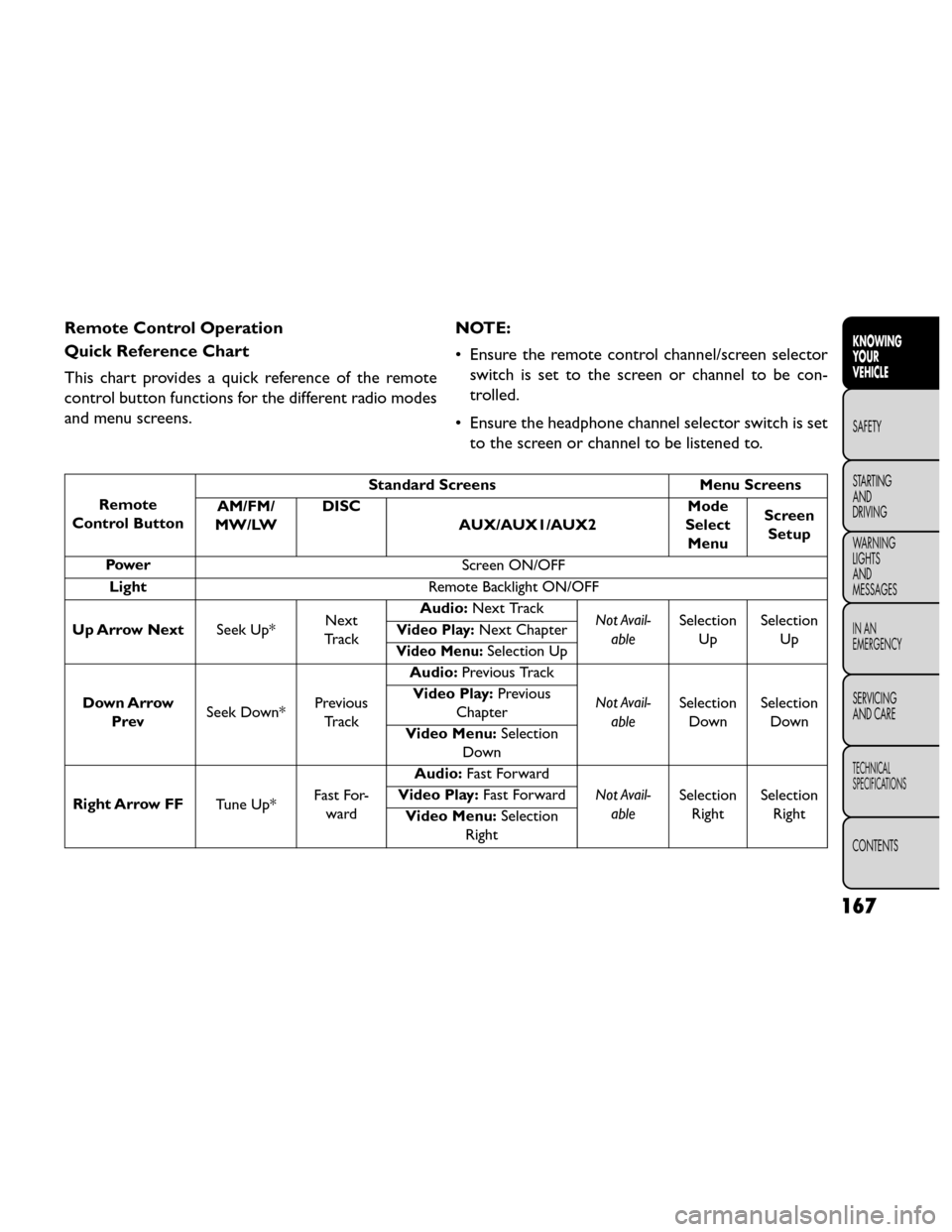
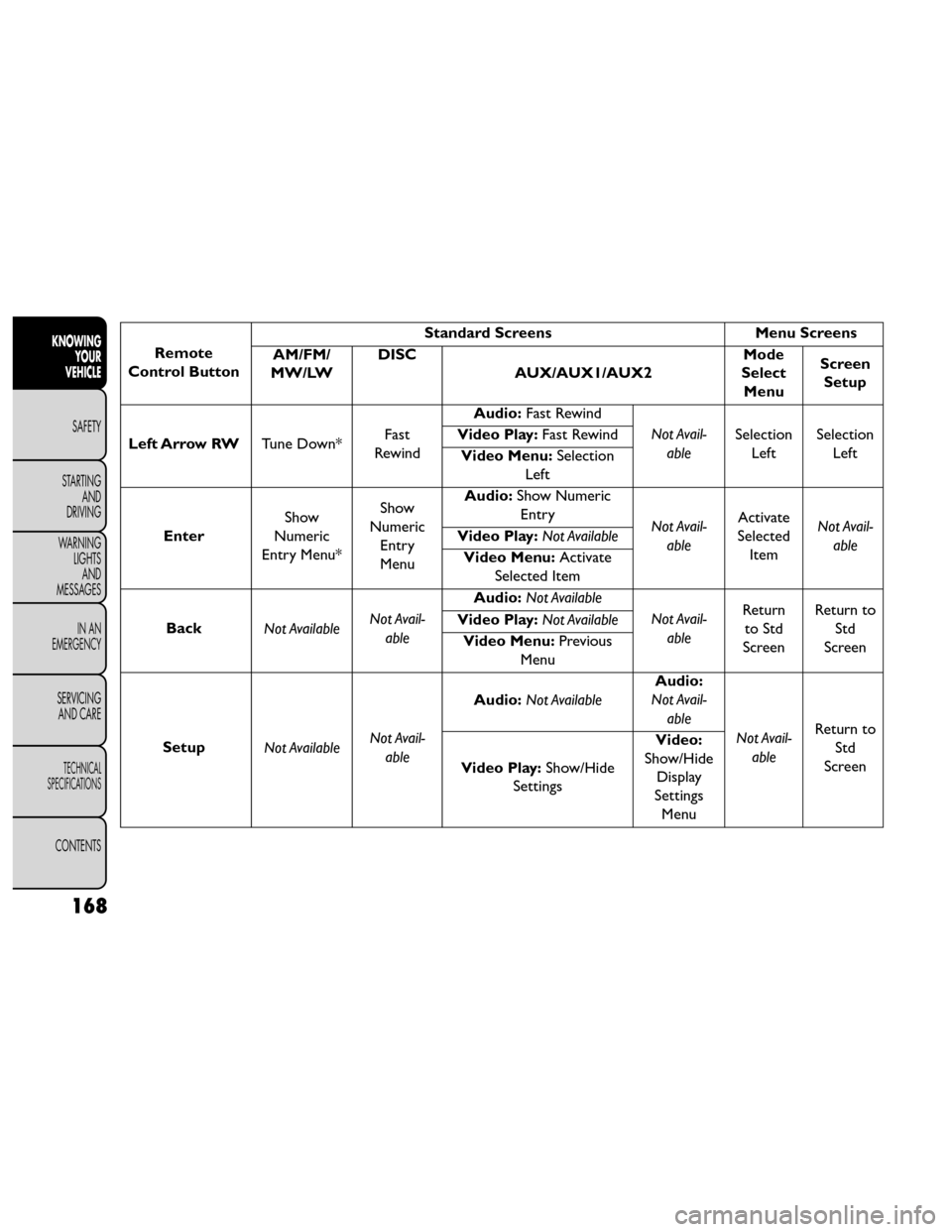
Remote Control Operation
Quick Reference Chart
This chart provides a quick reference of the remote
control button functions for the different radio modes
and menu screens.NOTE:
• Ensure the remote control channel/screen selector
switch is set to the screen or channel to be con-
trolled.
• Ensure the headphone channel selector switch is set to the screen or channel to be listened to.
Remote
Control Button Standard Screens
Menu Screens
AM/FM/
MW/LW DISC
AUX/AUX1/AUX2 Mode
Select Menu Screen
Setup
Power Screen ON/OFF
Light Remote Backlight ON/OFF
Up Arrow Next Seek Up*Next
Tr a c k Audio:
Next Track
Not Avail-
able Selection
Up Selection
Up
Video Play:Next Chapter
Video Menu:Selection Up
Down Arrow Prev Seek Down* Previous
Tr a c k Audio:
Previous Track
Not Avail-able Selection
Down Selection
Down
Video Play:
Previous
Chapter
Video Menu: Selection
Down
Right Arrow FF Tune Up*Fast For-
ward Audio:
Fast Forward
Not Avail-able Selection
Right Selection
Right
Video Play:
Fast Forward
Video Menu: Selection
Right
167
KNOWING
YOUR
VEHICLE
SAFETY
STARTING
AND
DRIVING
W
ARNING
LIGHTS
AND
MESSAGES
IN AN
EMERGENCY
SERVICING
AND CARE
TECHNICAL
SPECIFICATIONS
CONTENTS
Page 174 of 388
Remote
Control Button Standard Screens
Menu Screens
AM/FM/
MW/LW DISC
AUX/AUX1/AUX2 Mode
Select Menu Screen
Setup
Left Arrow RW Tune Down*Fast
Rewind Audio:
Fast Rewind
Not Avail-able Selection
Left Selection
Left
Video Play:
Fast Rewind
Video Menu: Selection
Left
Enter Show
Numeric
Entry Menu* Show
Numeric Entry
Menu Audio:
Show Numeric
Entry Not Avail-
able Activate
Selected Item Not Avail-
able
Video Play:
Not Available
Video Menu: Activate
Selected Item
Back Not Available Not Avail-
able Audio:
Not Available
Not Avail-able Return
to Std
Screen Return to
Std
Screen
Video Play:
Not Available
Video Menu: Previous
Menu
Setup Not Available Not Avail-
able Audio:
Not Available Audio:
Not Avail-
able
Not Avail-able Return to
Std
Screen
Video Play: Show/Hide
Settings Video:
Show/Hide Display
Settings Menu
168
KNOWING YOUR
VEHICLE
SAFETY
STARTING AND
DRIVING
W
ARNING LIGHTS AND
MESSAGES
IN AN
EMERGENCY
SERVICING AND CARE
TECHNICAL
SPECIFICATIONS
CONTENTS
Page 175 of 388
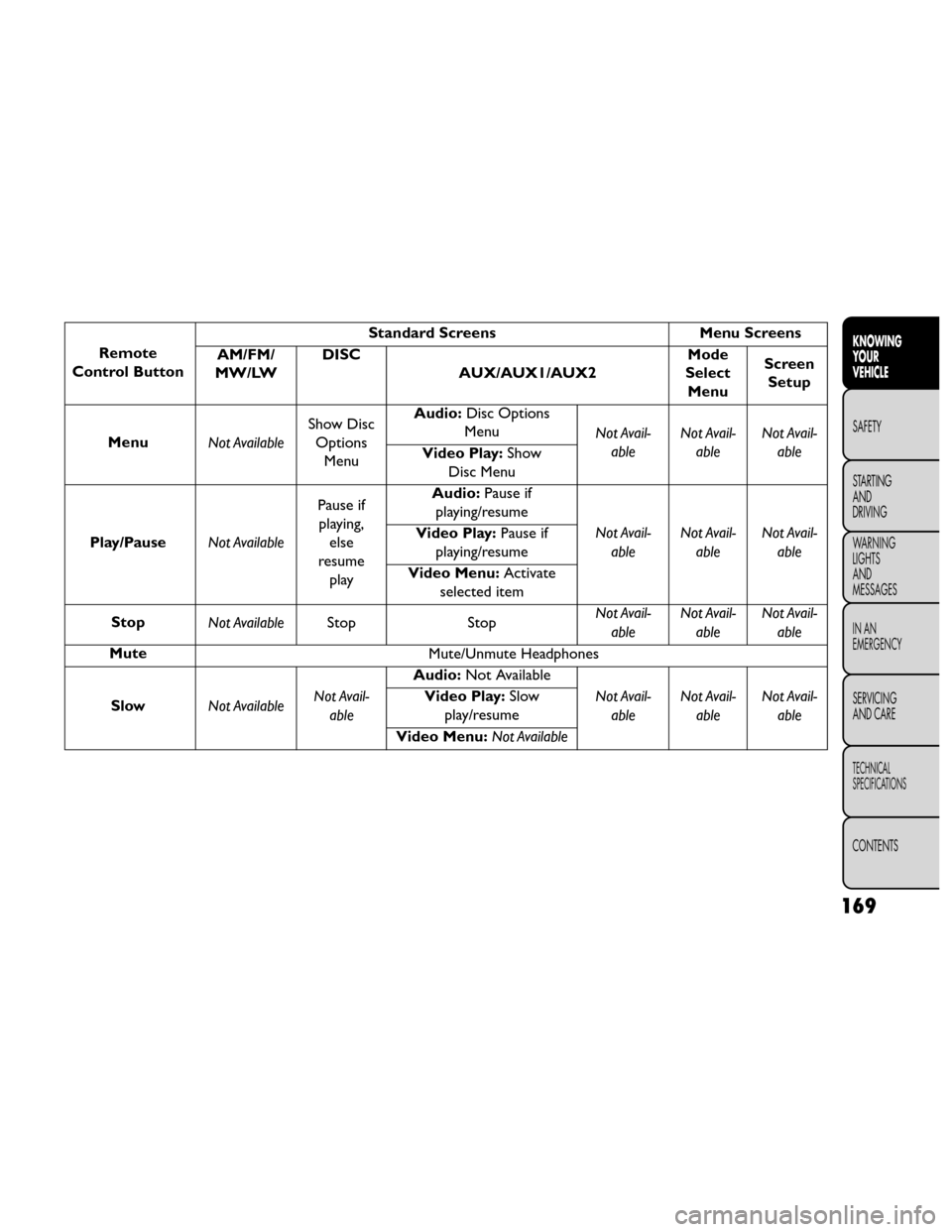
Remote
Control Button Standard Screens
Menu Screens
AM/FM/
MW/LW DISC
AUX/AUX1/AUX2 Mode
Select Menu Screen
Setup
Menu Not AvailableShow Disc
Options Menu Audio:
Disc Options
Menu Not Avail-
able Not Avail-
able Not Avail-
able
Video Play: Show
Disc Menu
Play/Pause Not AvailablePause if
playing, else
resume play Audio:
Pause if
playing/resume
Not Avail-able Not Avail-
able Not Avail-
able
Video Play:
Pause if
playing/resume
Video Menu: Activate
selected item
Stop Not Available Stop StopNot Avail-
able Not Avail-
able Not Avail-
able
Mute Mute/Unmute Headphones
Slow Not Available Not Avail-
able Audio:
Not Available
Not Avail-able Not Avail-
able Not Avail-
able
Video Play:
Slow
play/resume
Video Menu: Not Available
169
KNOWING
YOUR
VEHICLE
SAFETY
STARTING
AND
DRIVING
W
ARNING
LIGHTS
AND
MESSAGES
IN AN
EMERGENCY
SERVICING
AND CARE
TECHNICAL
SPECIFICATIONS
CONTENTS
Page 176 of 388
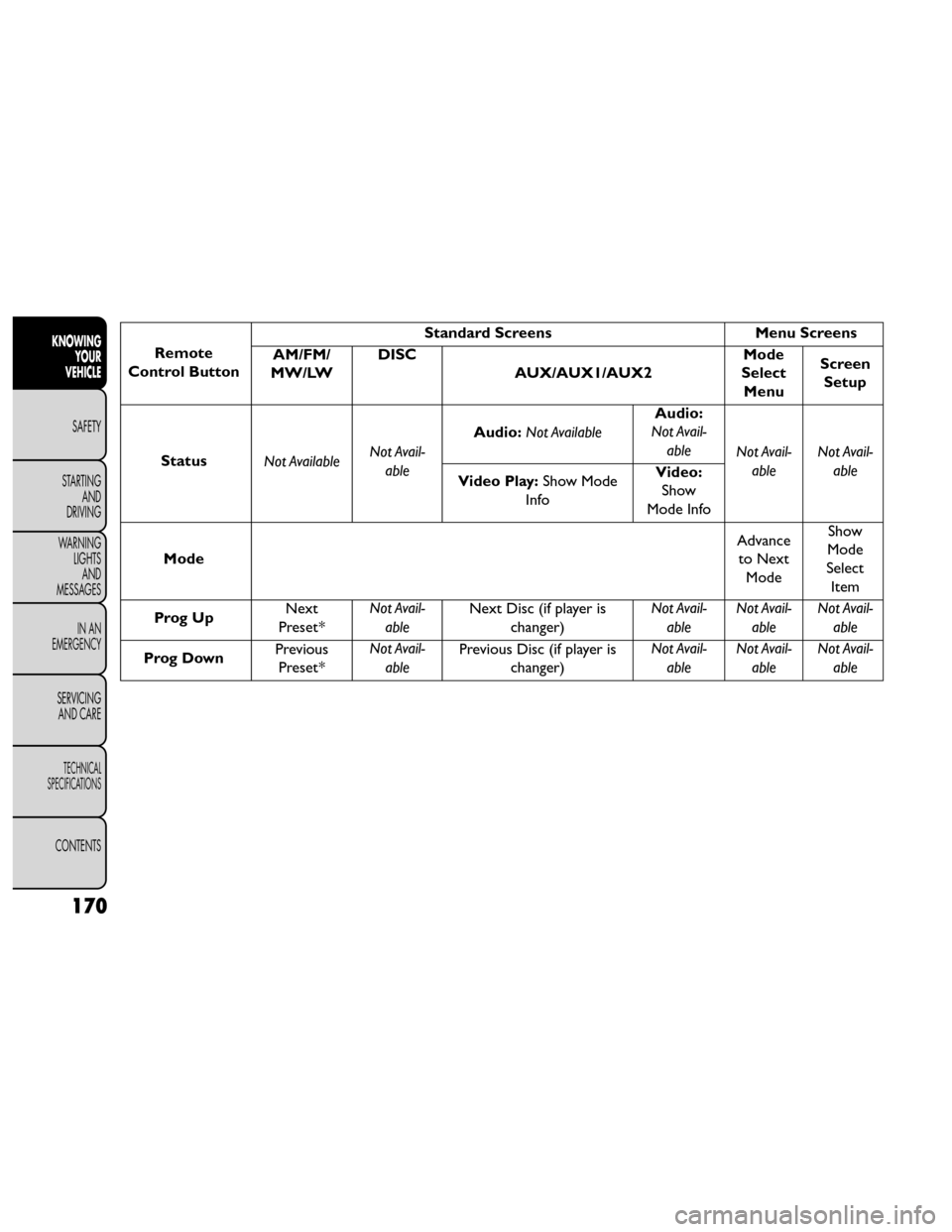
Remote
Control Button Standard Screens
Menu Screens
AM/FM/
MW/LW DISC
AUX/AUX1/AUX2 Mode
Select Menu Screen
Setup
Status Not Available Not Avail-
able Audio:
Not Available Audio:
Not Avail-
able Not Avail-
able Not Avail-
able
Video Play: Show Mode
Info Video:
Show
Mode Info
Mode Advance
to Next Mode Show
Mode
Select Item
Prog Up Next
Preset* Not Avail-
able Next Disc (if player is
changer) Not Avail-
able Not Avail-
able Not Avail-
able
Prog Down Previous
Preset* Not Avail-
able Previous Disc (if player is
changer) Not Avail-
able Not Avail-
able Not Avail-
able
170
KNOWING YOUR
VEHICLE
SAFETY
STARTING AND
DRIVING
W
ARNING LIGHTS AND
MESSAGES
IN AN
EMERGENCY
SERVICING AND CARE
TECHNICAL
SPECIFICATIONS
CONTENTS