reset FIAT FREEMONT 2014 1.G User Guide
[x] Cancel search | Manufacturer: FIAT, Model Year: 2014, Model line: FREEMONT, Model: FIAT FREEMONT 2014 1.GPages: 388, PDF Size: 4.13 MB
Page 176 of 388
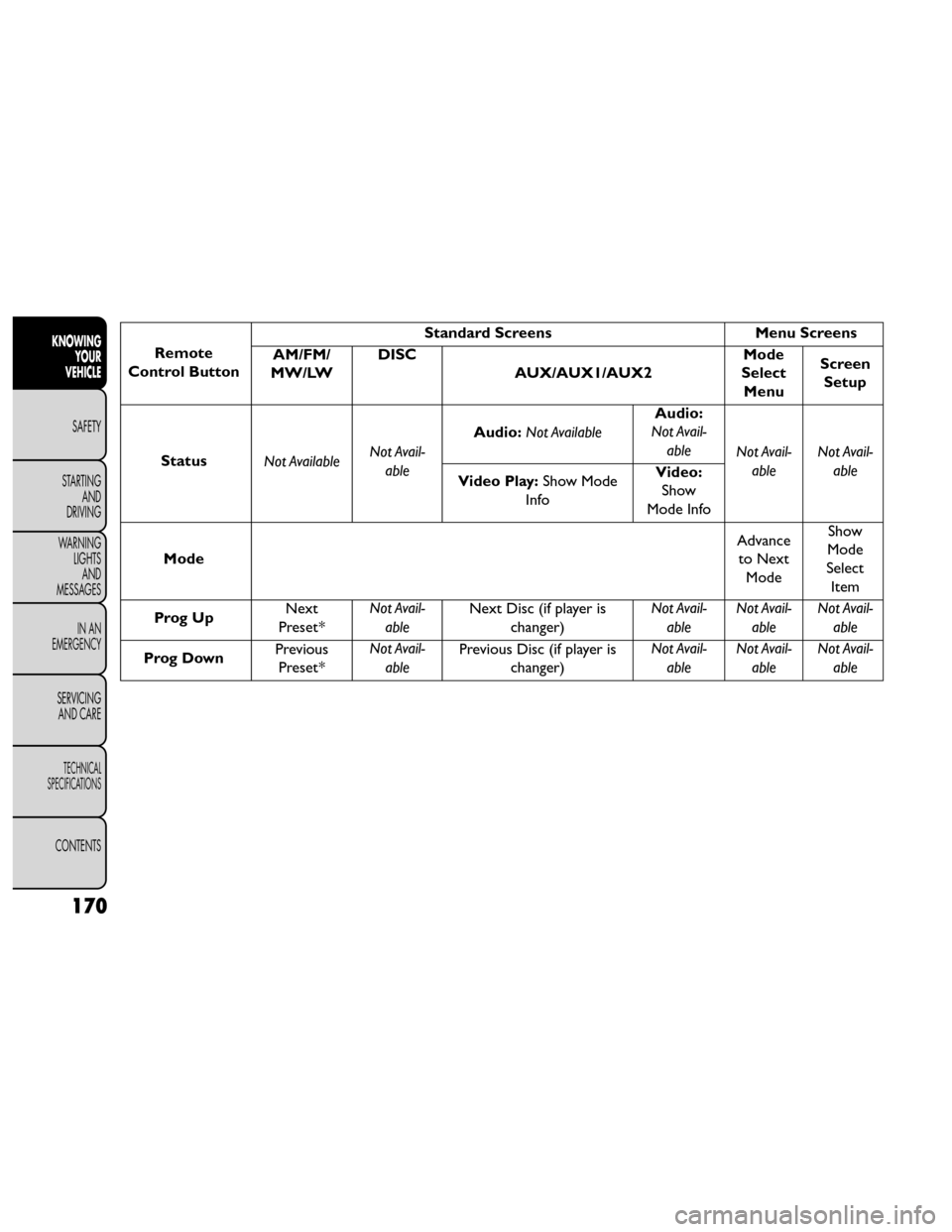
Remote
Control Button Standard Screens
Menu Screens
AM/FM/
MW/LW DISC
AUX/AUX1/AUX2 Mode
Select Menu Screen
Setup
Status Not Available Not Avail-
able Audio:
Not Available Audio:
Not Avail-
able Not Avail-
able Not Avail-
able
Video Play: Show Mode
Info Video:
Show
Mode Info
Mode Advance
to Next Mode Show
Mode
Select Item
Prog Up Next
Preset* Not Avail-
able Next Disc (if player is
changer) Not Avail-
able Not Avail-
able Not Avail-
able
Prog Down Previous
Preset* Not Avail-
able Previous Disc (if player is
changer) Not Avail-
able Not Avail-
able Not Avail-
able
170
KNOWING YOUR
VEHICLE
SAFETY
STARTING AND
DRIVING
W
ARNING LIGHTS AND
MESSAGES
IN AN
EMERGENCY
SERVICING AND CARE
TECHNICAL
SPECIFICATIONS
CONTENTS
Page 178 of 388
10. PROG Up/Down – When listening to a radiomode, pressing PROG Up selects the next preset
and pressing PROG Down selects the previous
preset stored in the radio. When listening to com-
pressed audio on a data disc, PROG Up selects the
next directory and PROG Down selects the pre-
vious directory. When listening to a disc in a radio
with a multiple-disc changer, PROG Up selects the
next disc and PROG Down selects the previous
disc.
11. MUTE – Press to mute the headphone audio out- put for the selected channel.
12. SLOW – Press to slow playback of a DVD disc. Press play (▸) to resume normal play.
13. STATUS – Press to display the current status while in a video mode display.
14. MODE – Press to change the mode of the selected channel. See the Mode Selection section of this
manual for details on changing modes.
15. SETUP – When in a video mode, press the SETUP button to access the display settings (see the
display settings section) to access the DVD setup menu, select the menu button on the radio. When
a disc is loaded in the DVD player (for versions/
markets, where provided) and the VES™ mode is
selected and the disc is stopped, press the SETUP
button to access the DVD Setup menu. (see the
DVD Setup Menu of this manual.)
16. BACK – When navigating in menu mode, press to return to the previous screen. When navigating a
DVDs disc menu, the operation depends on the
disc’s contents.
17. ◂◂– In radio modes, press to seek to the previous
tunable station. In disc modes, press and hold to
fast rewind through the current audio track or
video chapter. In menu modes use to navigate in
the menu.
18. ENTER – Press to select the highlighted option in a menu.
19. ▴/ NEXT – In radio modes, press to select to the
next station. In disc modes, press to advance to
the next audio track or video chapter. In menu
modes, use to navigate in the menu.
172
KNOWING YOUR
VEHICLE
SAFETY
STARTING AND
DRIVING
W
ARNING LIGHTS AND
MESSAGES
IN AN
EMERGENCY
SERVICING AND CARE
TECHNICAL
SPECIFICATIONS
CONTENTS
Page 183 of 388
In a two-screen system, the video for Channel 1 is
displayed on the first rear seat screen and the video for
Channel 2 is displayed on the second rear seat screen.
Information Mode is displayed in split screen, the left
side of the screen (Channel 1) shows the status/mode
of the first rear seat screen and the right side of the
screen (Channel 2) shows the status/mode of the
second rear seat screen.
When Channel 1 is in a video mode, the image is
displayed on the first rear seat screen as a full screen
image. A popup banner at the bottom of the screen is
displayed momentarily over the video image showing
any change in status of Channel 2.
When Channel 2 is in video mode, the image is dis-
played on the second rear seat screen as a full screen
image. A popup banner at the bottom of the screen is
displayed momentarily over the video image showing
any change in status of Channel 1.
System Information
Information Mode Display
When information mode is active, the current mode
setting for both audio channels is displayed. In addition
to the items called out by number, the remaining
information displays the current status of the source
(such as station frequency, name, preset or track num-
ber, song title, artist name, album name, etc.).• Channel 1 Mode – Displays the current source for
Channel 1.
• Channel 1 Audio Only/Mute — Audio: The audio only icon is not used on Channel 1, in a single screen
system. Mute: when the Mute icon is displayed, the
audio for Channel 1 has been muted using the re-
mote control’s MUTE button.
• Channel 2 Audio Only/Mute — Audio: Only in a single screen system: The audio only icon is displayed
on Channel 2 when Channel 1 is in a video mode.
Mute: when the Mute icon is displayed, the audio for
Channel 2 has been muted using the remote con-
trol’s MUTE button.
• Channel 2 Mode — Displays the current source for Channel 2.
• Channel 2 ENTER Button Action — When the ENTER button on the remote control is pressed
with the "INPUT FILE #" button visible on the
screen, the screen shows a numeric entry keypad
which allows you to enter a specific track number on
data discs and HDD (see Numeric Keypad Menu
section of this manual). Also, Enter Button Action –
“INPUT TRK #” to enter a specific track number on
audio discs.
• Remote Locked Out — When the icon is displayed, the remote control functions are disabled.
177
KNOWING
YOUR
VEHICLE
SAFETY
STARTING
AND
DRIVING
W
ARNING
LIGHTS
AND
MESSAGES
IN AN
EMERGENCY
SERVICING
AND CARE
TECHNICAL
SPECIFICATIONS
CONTENTS
Page 185 of 388
Options Menu
(fig. 127)
When watching a video source (DVD Video with the
disc in Play mode, Aux Video, etc.), pressing the “Op-
tions” soft-key activates the Options Settings menu.
From this menu you can adjust Audio, Subtitles, Angle
and Title.Display Settings
When watching a video source (DVD Video with the
disc in Play mode, Aux Video, etc.), pressing the re-
mote control’s SETUP button activates the Display
Settings menu. These settings control the appearance
of the video on the screen. The factory default settings
are already set for optimum viewing, so there is no
need to change these settings under normal circum-
stances.
To change the settings, press the remote control’s
navigation buttons to select an item, then press the
remote control’s navigation buttons to change the
value for the currently selected item. To reset all values
back to the original settings, select the Default Settings
menu option and press the remote control’s ENTER
button.
(fig. 127)
179
KNOWING
YOUR
VEHICLE
SAFETY
STARTING
AND
DRIVING
W
ARNING
LIGHTS
AND
MESSAGES
IN AN
EMERGENCY
SERVICING
AND CARE
TECHNICAL
SPECIFICATIONS
CONTENTS
Page 200 of 388
Resetting Active Head Restraints (AHR)
If the Active Head Restraints are triggered in a collision,
you must reset the head restraint on the driver’s and
front passenger seat. You can recognize when the
Active Head Restraint has been triggered by the fact
that they have moved forward (as shown in step three
of the resetting procedure).
1. Grasp the deployed AHR from the rear seat.(fig. 134)
2. Position the hands on the top of the deployed AHR at a comfortable position. 3. Pull
downthenrearward towards the rear of the
vehicle then downto engage the locking mecha-
nism. (fig. 135) (fig. 136)
(fig. 134)
Hand Positioning Points On AHR
(fig. 135)
1 — Downward Movement
2 — Rearward Movement
194
KNOWINGYOUR
VEHICLE
SAFETY
STARTING AND
DRIVING
WARNING LIGHTSAND
MESSAGES
IN AN
EMERGENCY
SERVICING AND CARE
TECHNICAL
SPECIFICATIONS
CONTENTS
Page 201 of 388
4. The AHR front soft foam and trim half should lockinto the back decorative plastic half. (fig. 137)
NOTE:
• If you have difficulties or problems resetting the Active Head Restraints, see an authorized dealer.
• For safety reasons, have the Active Head Restraints checked by a qualified specialist at an authorized
dealer. ACTIVE HOOD SYSTEM (for versions/
markets, where provided)
The Active Hood system is intended to enhance pe-
destrian protection by elevating the vehicle’s hood
upon an impact with a pedestrian or other object. The
system is automatically activated when the vehicle is
moving within a specified vehicle speed range. In order
to detect a range of pedestrians, other objects that are
impacted may result in an Active Hood deployment.
Deployment Sensors And Controls
The Electronic Pedestrian Protection Module (EPPM)
determines if deployment of the actuators in a frontal
impact is required. Based on the impact sensors signals,
the EPPM determines when to deploy the actuators.
(fig. 136)
3 — Final Downward Movement To Engage Locking
Mechanism
(fig. 137)
AHR In Reset Position
195
KNOWING
YOUR
VEHICLE
SAFETY
STARTING
AND
DRIVING
WARNING
LIGHTS
AND
MESSAGES
IN AN
EMERGENCY
SERVICING
AND CARE
TECHNICAL
SPECIFICATIONS
CONTENTS
Page 202 of 388
The impact sensors are located within the front bum-
per area.
The EPPM monitors the readiness of the electronic
parts of the Active Hood system whenever the ignition
switch is in the START or ON/RUN position. If the key
is in the LOCK position, in the ACC position, or not in
the ignition, the Active Hood system is not on and the
Active Hood will not deploy.
The EPPM contains a backup power supply system that
may deploy the actuators even if the battery loses
power or it becomes disconnected prior to deploy-
ment.
Service Active Hood System
If the EPPM has deployed the Active Hood, or if it
detects a malfunction in any part of the system, it turns
on the Air Bag Warning Light and it will display the
“SERVICE ACTIVE HOOD” message in the Electronic
Vehicle Information Center (EVIC), for versions/
markets, where provided. A single chime will sound if
the Air Bag Warning Light comes on again after initial
startup. It also includes diagnostics that will illuminate
the Air Bag Warning Light if a malfunction is noted that
could affect the Active Hood system. The diagnostics
also record the nature of the malfunction. If the Air Bag
Warning Light is illuminated, or if “SERVICE ACTIVE
HOOD” appears in the EVIC, see your authorized
dealer.In the event of an Active Hood deployment, the vehicle
should be serviced by an authorized dealer. The hood
hinges must be serviced and the actuator assemblies
replaced to restore system functionality.
Following an Active Hood deployment, the hood posi-
tion can be temporarily reset by pushing down at the
rear edge over the hood hinges as the internal pressure
of each actuator is relieved. The temporary hood reset
position is intended to improve forward driving visibil-
ity over the hood until the vehicle can be serviced. The
temporary hood reset position will leave the hood
approximately 5 mm above the fender surface.
(fig. 138)
(fig. 138)
Temporary Hood Reset Position
196
KNOWINGYOUR
VEHICLE
SAFETY
STARTING AND
DRIVING
WARNING LIGHTSAND
MESSAGES
IN AN
EMERGENCY
SERVICING AND CARE
TECHNICAL
SPECIFICATIONS
CONTENTS
Page 203 of 388
The front bumper assembly may affect proper opera-
tion of the Active Hood system. The front bumper
components should be inspected for damage and re-
placed if necessary in the event of a frontal impact, even
if it occurs at a low rate of speed.
NOTE:After any Active Hood deployment, the ve-
hicle should be taken to an authorized dealer immedi-
ately.
To prevent possible damage, do not slam
the rear of the hood to reset it . Press the
rear of the hood down until an audible
and tactile detent is detected (approximately 5 mm
above the fender). This should secure both hood
hinge reset mechanisms.
WARNING!
•
Ignoring the Air Bag Warning Light in
your instrument panel or the “SERVICE
ACTIVE HOOD” message in the EVIC could mean
you won’t have the Active Hood to enhance pedes-
trian protection. If the light does not come on as a
bulb check when the ignition is first turned on,
stays on after you start the vehicle, or if it comes
on as you drive, see your authorized dealer.
(Continued) (Continued)
• Modifications to any part of the Active Hood
system could cause it to fail when you need it . Do
not modify the components or wiring. Do not
modify the front bumper, vehicle body structure,
or add an aftermarket front bumper or cover.
• It is dangerous to try to repair any part of the
Active Hood system yourself. Be sure to tell any-
one who works on your vehicle that it has an
Active Hood system.
• Do not attempt to modify any part of your
Active Hood system.The Active Hood may deploy
accidentally or may not function properly if
modifications are made. Take your vehicle to an
authorized dealer for any hood service.
• Drivers must be aware of pedestrians. Always
be sure to check for pedestrians, animals, other
vehicles, and obstructions.You are responsible for
safety and must continue to pay attention to
your surroundings. Failure to do so can result in
serious injury or death.
197
KNOWING
YOUR
VEHICLE
SAFETY
STARTING
AND
DRIVING
WARNING
LIGHTS
AND
MESSAGES
IN AN
EMERGENCY
SERVICING
AND CARE
TECHNICAL
SPECIFICATIONS
CONTENTS
Page 229 of 388
Front And Side Impact Sensors
In front and side impacts, impact sensors can aid the ORC
in determining appropriate response to impact events.
Enhanced Accident Response System
In the event of an impact causing air bag deployment, if
the communication network remains intact, and the
power remains intact, depending on the nature of the
event the ORC will determine whether to have the
Enhanced Accident Response System perform the fol-
lowing functions:
• Cut off fuel to the engine.
• Flash hazard lights as long as the battery has poweror until the ignition is cycled off.
• Turn on the interior lights, which remain on as long as the battery has power or until the ignition key is
removed.
• Unlock the doors automatically.
In order to reset the Enhanced Accident Response
System functions after an event, the ignition switch
must be changed from IGN ON to IGN OFF.
If A Deployment Occurs
The Advanced Front Air Bags are designed to deflate
immediately after deployment. NOTE:
Front and/or side air bags will not deploy in all
collisions. This does not mean something is wrong with
the air bag system.
If you do have a collision which deploys the air bags, any
or all of the following may occur:
• The nylon air bag material may sometimes cause abrasions and/or skin reddening to the driver and
front passenger as the air bags deploy and unfold.
The abrasions are similar to friction rope burns or
those you might get sliding along a carpet or gymna-
sium floor. They are not caused by contact with
chemicals. They are not permanent and normally
heal quickly. However, if you haven't healed signifi-
cantly within a few days, or if you have any blistering,
see your doctor immediately.
• As the air bags deflate, you may see some smoke-like particles. The particles are a normal by-product of
the process that generates the non-toxic gas used for
air bag inflation. These airborne particles may irritate
the skin, eyes, nose, or throat. If you have skin or eye
irritation, rinse the area with cool water. For nose or
throat irritation, move to fresh air. If the irritation
continues, see your doctor. If these particles settle
on your clothing, follow the garment manufacturer's
instructions for cleaning.
223
KNOWING
YOUR
VEHICLE
SAFETY
STARTING
AND
DRIVING
WARNING
LIGHTS
AND
MESSAGES
IN AN
EMERGENCY
SERVICING
AND CARE
TECHNICAL
SPECIFICATIONS
CONTENTS
Page 250 of 388
During cold temperatures, transmission operation may
be modified depending on engine and transmission
temperature as well as vehicle speed. This feature
improves warm up time of the engine and transmission
to achieve maximum efficiency. Engagement of the
torque converter clutch is inhibited until the transmis-
sion fluid is warm (refer to the “Note” under “Torque
Converter Clutch” in this section). During extremely
cold temperatures -27°C or below, operation may
briefly be limited to only second gear (for four-speed
transmission) or third gear (for six-speed transmis-
sion). Normal operation will resume once the trans-
mission temperature has risen to a suitable level.
Transmission Limp Home Mode
Transmission function is monitored electronically for
abnormal conditions. If a condition is detected that
could result in transmission damage, Transmission
Limp Home Mode is activated. In this mode, the trans-
mission remains in second gear (for four-speed trans-
mission) or third gear (for six-speed transmission)
regardless of which forward gear is selected. PARK,
REVERSE, and NEUTRAL will continue to operate.
The Malfunction Indicator Light (MIL) may be illumi-
nated. Limp Home Mode allows the vehicle to be
driven to an authorized dealer for service without
damaging the transmission.In the event of a momentary problem, the transmission
can be reset to regain all forward gears by performing
the following steps:
1. Stop the vehicle.
2. Shift the transmission into PARK.
3. Turn the ignition switch to the LOCK/OFF position.
4. Wait approximately 10 seconds.
5. Restart the engine.
6. Shift into the desired gear range. If the problem is no
longer detected, the transmission will return to
normal operation.
NOTE: Even if the transmission can be reset, we
recommend that you visit your authorized dealer at
your earliest possible convenience. Your authorized
dealer has diagnostic equipment to determine if the
problem could recur.
If the transmission cannot be reset, authorized dealer
service is required.
Overdrive Operation
The automatic transmission includes an electronically
controlled Overdrive (top gear). The transmission will
automatically shift into Overdrive if the following con-
ditions are present:
• The shift lever is in the DRIVE position.
244
KNOWING YOUR
VEHICLE
SAFETY
STARTING AND
DRIVING
WARNING LIGHTSAND
MESSAGES
IN AN
EMERGENCY
SERVICING AND CARE
TECHNICAL
SPECIFICATIONS
CONTENTS