key FIAT FREEMONT 2014 1.G Workshop Manual
[x] Cancel search | Manufacturer: FIAT, Model Year: 2014, Model line: FREEMONT, Model: FIAT FREEMONT 2014 1.GPages: 388, PDF Size: 4.13 MB
Page 119 of 388
SUNROOF MAINTENANCE
Use only a nonabrasive cleaner and a soft cloth to clean
the glass panel.
IGNITION OFF OPERATION
For versions/markets, where provided without
the ElectronicVehicle Information Center (EVIC)
The power sunroof switch will remain active for 45 sec-
onds after the ignition switch is turned to the LOCK
position. Opening either front door will cancel this
feature.
For versions/markets, where provided with the
EVIC
The power sunroof switch will remain active for up to
10 minutes after the ignition switch is turned to the
LOCK position. Opening either front door will cancel
this feature.
NOTE:The delay time is programmable using the
Uconnect® system. Refer to “Uconnect® Settings” for
further information.
DOOR LOCKS
MANUAL DOOR LOCKS
To lock each door, push the door lock knob on each
door trim panel downward. To unlock the front doors,
pull the inside door handle to the first detent. To
unlock the rear doors, pull the door lock knob on the
door trim panel upward.
(fig. 94)
If the door lock knob is down when you shut the door,
the door will lock. Therefore, make sure the Key Fob is
not inside the vehicle before closing the door.
NOTE: The manual door locks will not lock or unlock
the liftgate.
(fig. 94)
Manual Door Lock Knob
113
KNOWING
YOUR
VEHICLE
SAFETY
STARTING
AND
DRIVING
W
ARNING
LIGHTS
AND
MESSAGES
IN AN
EMERGENCY
SERVICING
AND CARE
TECHNICAL
SPECIFICATIONS
CONTENTS
Page 120 of 388
WARNING!
• For personal security and safety in the
ev en
t of a collision, lock the vehicle
doors before you drive as well as when you park
and leave the vehicle.
• When leaving the vehicle, always remove the
Key Fob from the vehicle and lock your vehicle.
Unsupervised use of vehicle equipment may
cause severe personal injuries or death.
• Never leave children alone in a vehicle, or with
access to an unlocked vehicle. Allowing children
to be in a vehicle unattended is dangerous for a
number of reasons. A child or others could be
seriously or fatally injured. Children should be
warned not to touch the parking brake, brake
pedal or the shift lever.
• DonotleavetheKeyFobinornearthevehicle,
or in a location accessible to children, and do not
leave the ignition of a vehicle equipped with
Keyless Enter-N-Go™ in the ACC or ON/RUN
mode. A child could operate power windows,
other controls, or move the vehicle. POWER DOOR LOCKS
A power door lock switch is on each front door trim
panel. Use this switch to lock or unlock the doors and
liftgate.
(fig. 95)
If you press the power door lock switch while the
ignition is in the ACC or ON/RUN position, and any
front door is open, the power locks will not operate.
This prevents you from accidentally locking the Key
Fob in the vehicle. Cycling the ignition to the OFF
position or closing the door will allow the locks to
operate. If a door is open, and the ignition is in the
ACC or ON/RUN position, a chime will sound as a
reminder to turn the ignition OFF.
(fig. 95)
Power Door Lock Switch Location
114
KNOWINGYOUR
VEHICLE
SAFETY
STARTING AND
DRIVING
W
ARNING LIGHTS AND
MESSAGES
IN AN
EMERGENCY
SERVICING AND CARE
TECHNICAL
SPECIFICATIONS
CONTENTS
Page 122 of 388
CHILD-PROTECTION DOOR LOCK
SYSTEM — REAR DOORS
To provide a safer environment for small children riding
in the rear seats, the rear doors are equipped with a
Child-Protection Door Lock system.
To Engage The Child-Protection Door Lock
System
1. Open the rear door.
2. Insert the tip of the emergency key (or alike) intothe child lock control and rotate it to the LOCK
position. (fig. 96) (fig. 97) 3. Repeat Steps 1 and 2 for the opposite rear door.
NOTE:
When the Child-Protection Door Lock sys-
tem is engaged, the door can be opened only by using
the outside door handle even though the inside door
lock is in the unlocked position.
WARNING!
Avoid trapping anyone in a vehicle in a
collision. R
emember that the rear doors
can only be opened from the outside when the
Child-Protection locks are engaged. Failure to
follow this warning may result in serious injury or
death.
(fig. 96)
Child-Protection Door Lock Location(fig. 97)Child-Protection Door Lock Function
116
KNOWINGYOUR
VEHICLE
SAFETY
STARTING AND
DRIVING
W
ARNING LIGHTS AND
MESSAGES
IN AN
EMERGENCY
SERVICING AND CARE
TECHNICAL
SPECIFICATIONS
CONTENTS
Page 123 of 388
NOTE:
• After engaging the Child-Protection Door Lock sys-tem, always test the door from the inside to make
certain it is in the desired position.
• For emergency exit with the system engaged, move the lock knob up to the UNLOCK position, roll
down the window, and open the door with the
outside door handle. To Disengage The Child-Protection Door Lock
System
1. Open the rear door.
2. Insert the tip of the emergency key (or alike) into
the child lock control and rotate it to the UNLOCK
position. (fig. 98)
3. Repeat Steps 1 and 2 for the opposite rear door.
NOTE: After disengaging the Child-Protection Door
Lock system, always test the door from the inside to
make certain it is in the desired position.
(fig. 98)
Child-Protection Door Lock Function
117
KNOWING
YOUR
VEHICLE
SAFETY
STARTING
AND
DRIVING
W
ARNING
LIGHTS
AND
MESSAGES
IN AN
EMERGENCY
SERVICING
AND CARE
TECHNICAL
SPECIFICATIONS
CONTENTS
Page 124 of 388
KEYLESS ENTER-N-GO™
The Passive Entry system is an enhancement to the
vehicle’s Remote Keyless Entry (RKE) system and a
feature of Keyless Enter-N-Go™. This feature allows
you to lock and unlock the vehicle’s door(s) without
having to press the RKE transmitter lock or unlock
buttons.
NOTE:
• Passive Entry may be programmed ON/OFF; refer to“Uconnect® Settings” in “Knowing Your Vehicle” for
further information.
• If wearing gloves on your hands, or if it has been raining on the Passive Entry door handle, the unlock
sensitivity can be affected, resulting in a slower re-
sponse time.
• If the vehicle is unlocked by the RKE transmitter or Passive Entry and no door goes ajar within 60 sec-
onds, the vehicle will re-lock and will arm the theft
alarm. To Unlock From The Driver's Side:
With a valid Passive Entry RKE transmitter within
1.5 m of the driver's door handle, grab the driver's
front door handle to unlock the driver's door auto-
matically. The interior door panel lock knob will raise
when the door is unlocked.
(fig. 99)
NOTE:
If “Unlock All Doors 1st Press” is pro-
grammed all doors will unlock when you grab hold of
the driver’s front door handle. To select between
“Unlock Driver Door 1st Press” and “Unlock All
Doors 1st Press”, refer to “Electronic Vehicle Informa-
tion Center (EVIC)/Personal Settings (Customer-
Programmable Features)” in “Knowing Your Vehicle”
for further information.
(fig. 99)
Grabbing The Driver's Door Handle
118
KNOWINGYOUR
VEHICLE
SAFETY
STARTING AND
DRIVING
W
ARNING LIGHTS AND
MESSAGES
IN AN
EMERGENCY
SERVICING AND CARE
TECHNICAL
SPECIFICATIONS
CONTENTS
Page 127 of 388
Do NOT grab the door handle, when pressing the door
handle lock button. This could unlock the door(s).
(fig. 102)
NOTE:
• After pressing the door handle LOCK button, youmust wait two seconds before you can lock or unlock
the doors, using either Passive Entry door handle.
This is done to allow you to check if the vehicle is
locked by pulling the door handle, without the ve-
hicle reacting and unlocking.
• If Passive Entry is disabled using Uconnect® System, the key protection described in "Preventing Inadver-
tent Locking of Passive Entry RKE Transmitter in
Vehicle" remains active/functional.
• The Passive Entry system will not operate if the RKE transmitter battery is dead.
The vehicle doors can also be locked by using the RKE
transmitter lock button or the lock button located on
the vehicle’s interior door panel.
(fig. 102) Do NOT Grab The Door Handle When Locking
121
KNOWING
YOUR
VEHICLE
SAFETY
STARTING
AND
DRIVING
W
ARNING
LIGHTS
AND
MESSAGES
IN AN
EMERGENCY
SERVICING
AND CARE
TECHNICAL
SPECIFICATIONS
CONTENTS
Page 128 of 388
WINDOWS
Power Windows
The window controls on the driver's door trim panel
control all of the door windows.
(fig. 103)
There are single window controls on each passenger
door trim panel, which operate the passenger door
windows. The window controls will operate when the
ignition is in the ON/RUN or ACC position.NOTE:
For vehicles equipped with the Uconnect®,
the power window switches will remain active for up to
10 minutes after the ignition is cycled to the LOCK/
OFF position. Opening either front door will cancel
this feature. The time is programmable. Refer to
“Uconnect® Settings” in “Knowing Your Vehicle” for
further information.
WARNING!
Never leave children unattended in a
vehicle .
Do not leave the key fob in or
near the vehicle or in a location accessible to
children, and do not leave the ignition of a vehicle
equipped with Keyless Enter-N-Go™ in the ACC
or ON/RUN mode. Occupants, particularly un-
attended children, can become entrapped by the
windows while operating the power window
switches. Such entrapment may result in serious
injury or death.
(fig. 103)
Power Window Switches
122
KNOWINGYOUR
VEHICLE
SAFETY
STARTING AND
DRIVING
W
ARNING LIGHTS AND
MESSAGES
IN AN
EMERGENCY
SERVICING AND CARE
TECHNICAL
SPECIFICATIONS
CONTENTS
Page 131 of 388
LIFTGATE
The liftgate can be unlocked or locked with the Re-
mote Keyless Entry (RKE) transmitter, the Keyless
Enter-N-Go™ (Passive Entry) or by activating the
power door lock switch located on either front door
trim panel.
For further information on Keyless Enter-N-Go™
(Passive Entry), refer to “Keyless Enter-N-Go™” in
“Starting And Driving”.
NOTE:The liftgate cannot be unlocked or locked with
the manual door lock plungers on the door trim panels
or the door lock cylinder on the driver's door.
To open the unlocked liftgate, squeeze the handle and
pull the liftgate toward you. Gas props will raise and
support the liftgate in the open position.
(fig. 105)
NOTE: Because the gas pressure drops with tempera-
ture, it may be necessary to assist the props when
opening the liftgate in cold weather.
WARNING!
• Driving with the liftgate open can al-
low poison
ous exhaust gases into your
vehicle. These fumes could injure you and your
passengers. Keep the liftgate closed when you are
operating the vehicle.
• If you are required to drive with the liftgate
open, make sure that all windows are closed, and
the blower switch on the climate control is set at
high speed. Do not use the recirculation mode.
(fig. 105)
Liftgate Unlock/Lock Button
125
KNOWING
YOUR
VEHICLE
SAFETY
STARTING
AND
DRIVING
W
ARNING
LIGHTS
AND
MESSAGES
IN AN
EMERGENCY
SERVICING
AND CARE
TECHNICAL
SPECIFICATIONS
CONTENTS
Page 140 of 388
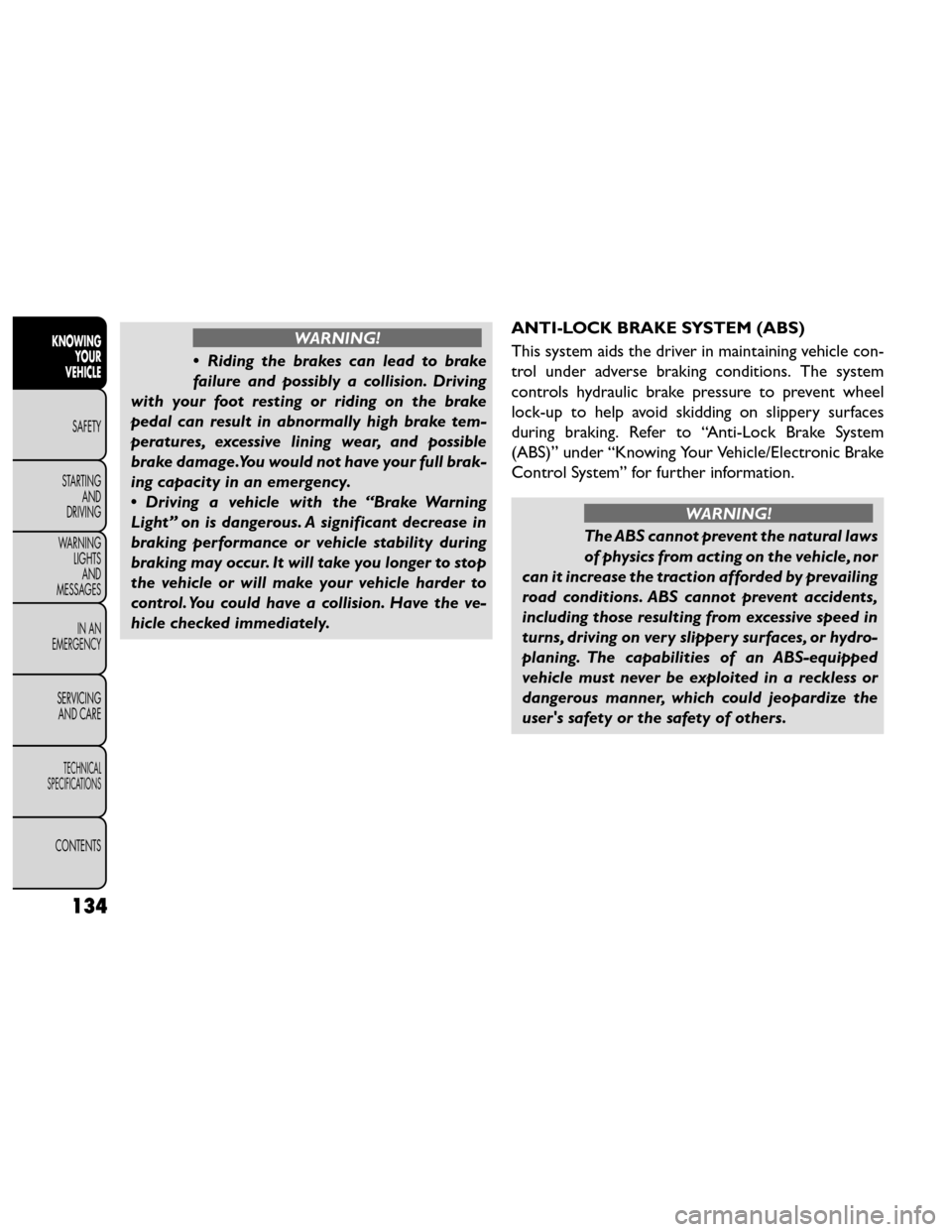
WARNING!
• Riding the brakes can lead to brake
failure an
d possibly a collision. Driving
with your foot resting or riding on the brake
pedal can result in abnormally high brake tem-
peratures, excessive lining wear, and possible
brake damage.You would not have your full brak-
ing capacity in an emergency.
• Driving a vehicle with the “Brake Warning
Light” on is dangerous. A significant decrease in
braking performance or vehicle stability during
brakingmayoccur.Itwilltakeyoulongertostop
the vehicle or will make your vehicle harder to
control. You could have a collision. Have the ve-
hicle checked immediately. ANTI-LOCK BRAKE SYSTEM (ABS)
This system aids the driver in maintaining vehicle con-
trol under adverse braking conditions. The system
controls hydraulic brake pressure to prevent wheel
lock-up to help avoid skidding on slippery surfaces
during braking. Refer to “Anti-Lock Brake System
(ABS)” under “Knowing Your Vehicle/Electronic Brake
Control System” for further information.
WARNING!
The ABS cannot prevent the natural laws
of physi cs
from acting on the vehicle, nor
can it increase the traction afforded by prevailing
road conditions. ABS cannot prevent accidents,
including those resulting from excessive speed in
turns, driving on very slippery surfaces, or hydro-
planing. The capabilities of an ABS-equipped
vehicle must never be exploited in a reckless or
dangerous manner, which could jeopardize the
user's safety or the safety of others.
134
KNOWING YOUR
VEHICLE
SAFETY
STARTING AND
DRIVING
W
ARNING LIGHTS AND
MESSAGES
IN AN
EMERGENCY
SERVICING AND CARE
TECHNICAL
SPECIFICATIONS
CONTENTS
Page 162 of 388
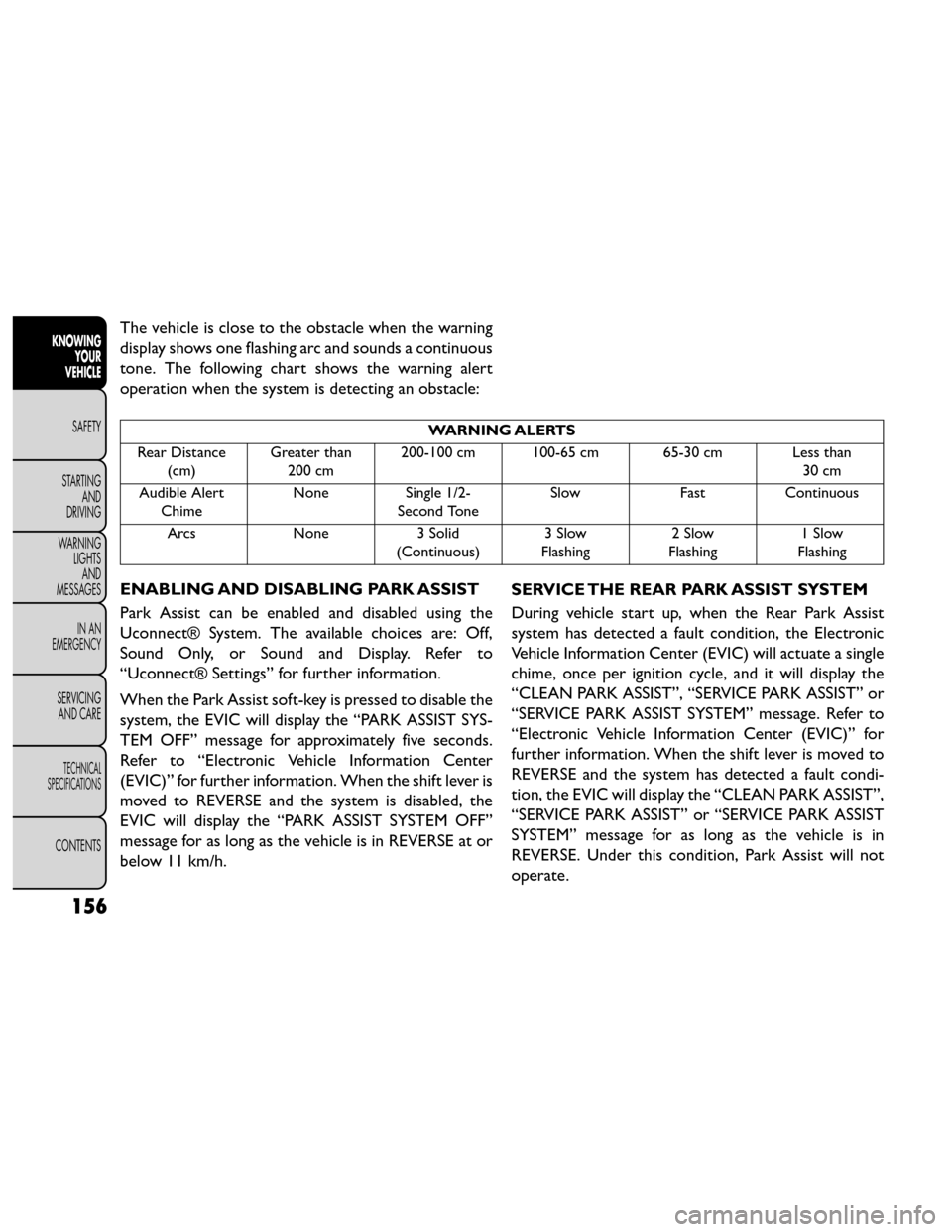
The vehicle is close to the obstacle when the warning
display shows one flashing arc and sounds a continuous
tone. The following chart shows the warning alert
operation when the system is detecting an obstacle:
WARNING ALERTS
Rear Distance (cm) Greater than
200 cm 200-100 cm 100-65 cm 65-30 cm Less than
30 cm
Audible Alert Chime None Single 1/2-
Second Tone Slow
FastContinuous
Arcs None3 Solid
(Continuous) 3 Slow
Flashing 2 Slow
Flashing 1 Slow
Flashing
ENABLING AND DISABLING PARK ASSIST
Park Assist can be enabled and disabled using the
Uconnect® System. The available choices are: Off,
Sound Only, or Sound and Display. Refer to
“Uconnect® Settings” for further information.
When the Park Assist soft-key is pressed to disable the
system, the EVIC will display the “PARK ASSIST SYS-
TEM OFF” message for approximately five seconds.
Refer to “Electronic Vehicle Information Center
(EVIC)” for further information. When the shift lever is
moved to REVERSE and the system is disabled, the
EVIC will display the “PARK ASSIST SYSTEM OFF”
message for as long as the vehicle is in REVERSE at or
below 11 km/h. SERVICE THE REAR PARK ASSIST SYSTEM
During vehicle start up, when the Rear Park Assist
system has detected a fault condition, the Electronic
Vehicle Information Center (EVIC) will actuate a single
chime, once per ignition cycle, and it will display the
“CLEAN PARK ASSIST”, “SERVICE PARK ASSIST” or
“SERVICE PARK ASSIST SYSTEM” message. Refer to
“Electronic Vehicle Information Center (EVIC)” for
further information. When the shift lever is moved to
REVERSE and the system has detected a fault condi-
tion, the EVIC will display the “CLEAN PARK ASSIST”,
“SERVICE PARK ASSIST” or “SERVICE PARK ASSIST
SYSTEM” message for as long as the vehicle is in
REVERSE. Under this condition, Park Assist will not
operate.
156
KNOWING
YOUR
VEHICLE
SAFETY
STARTING AND
DRIVING
W
ARNING LIGHTS AND
MESSAGES
IN AN
EMERGENCY
SERVICING AND CARE
TECHNICAL
SPECIFICATIONS
CONTENTS