AUX FIAT FREEMONT 2014 1.G Owners Manual
[x] Cancel search | Manufacturer: FIAT, Model Year: 2014, Model line: FREEMONT, Model: FIAT FREEMONT 2014 1.GPages: 388, PDF Size: 4.13 MB
Page 170 of 388
Video Screen
NOTE:Typically there are two different ways to
operate the features of the Video Entertainment Sys-
tem (VES™).
• The Remote Control
• The Touch-Screen Radio (for versions/markets, where provided)
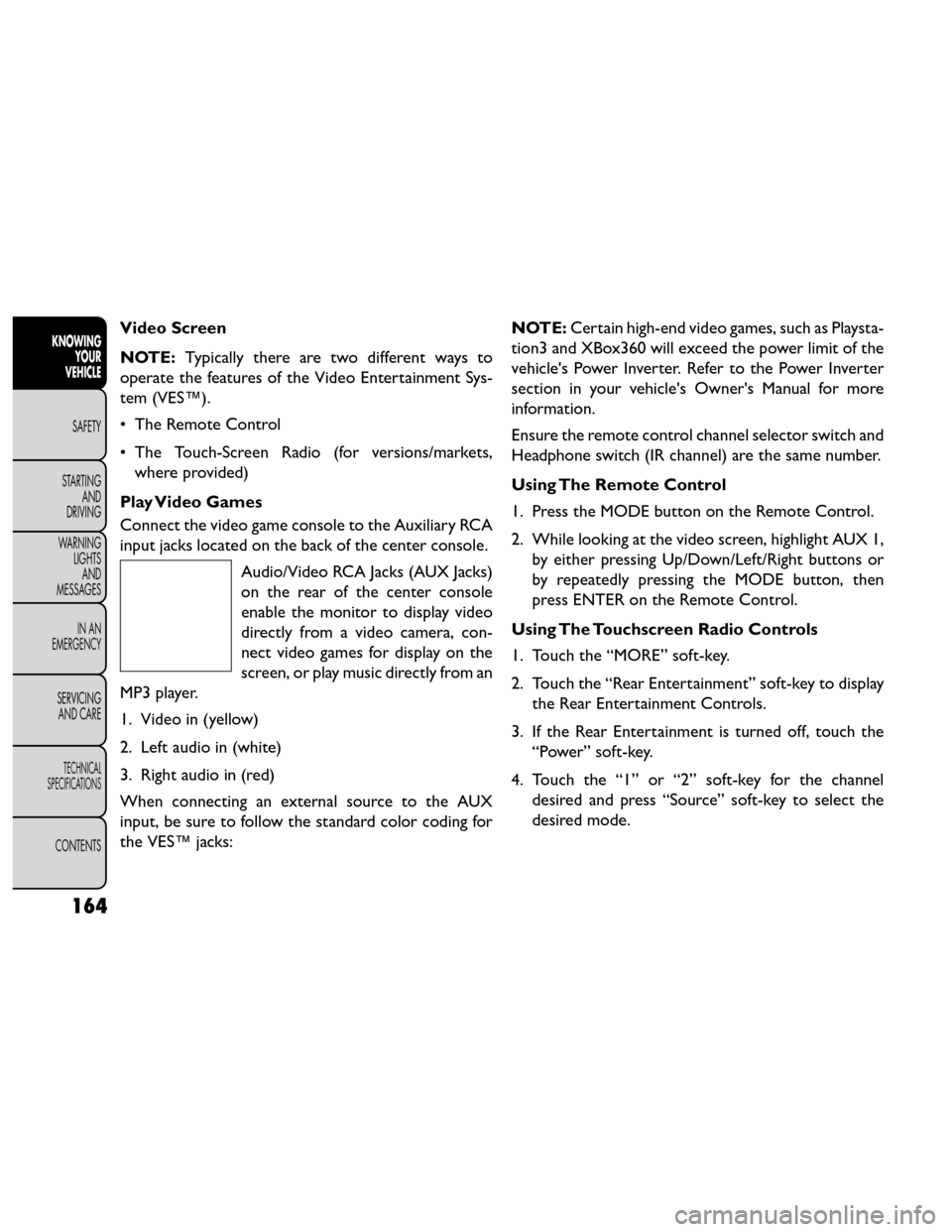
Play Video Games
Connect the video game console to the Auxiliary RCA
input jacks located on the back of the center console. Audio/Video RCA Jacks (AUX Jacks)
on the rear of the center console
enable the monitor to display video
directly from a video camera, con-
nect video games for display on the
screen, or play music directly from an
MP3 player.
1. Video in (yellow)
2. Left audio in (white)
3. Right audio in (red)
When connecting an external source to the AUX
input, be sure to follow the standard color coding for
the VES™ jacks: NOTE:
Certain high-end video games, such as Playsta-
tion3 and XBox360 will exceed the power limit of the
vehicle's Power Inverter. Refer to the Power Inverter
section in your vehicle's Owner's Manual for more
information.
Ensure the remote control channel selector switch and
Headphone switch (IR channel) are the same number.
Using The Remote Control
1. Press the MODE button on the Remote Control.
2. While looking at the video screen, highlight AUX 1, by either pressing Up/Down/Left/Right buttons or
by repeatedly pressing the MODE button, then
press ENTER on the Remote Control.
Using The Touchscreen Radio Controls
1. Touch the “MORE” soft-key.
2. Touch the “Rear Entertainment” soft-key to display the Rear Entertainment Controls.
3. If the Rear Entertainment is turned off, touch the “Power” soft-key.
4. Touch the “1” or “2” soft-key for the channel desired and press “Source” soft-key to select the
desired mode.
164
KNOWING YOUR
VEHICLE
SAFETY
STARTING AND
DRIVING
W
ARNING LIGHTS AND
MESSAGES
IN AN
EMERGENCY
SERVICING AND CARE
TECHNICAL
SPECIFICATIONS
CONTENTS
Page 173 of 388
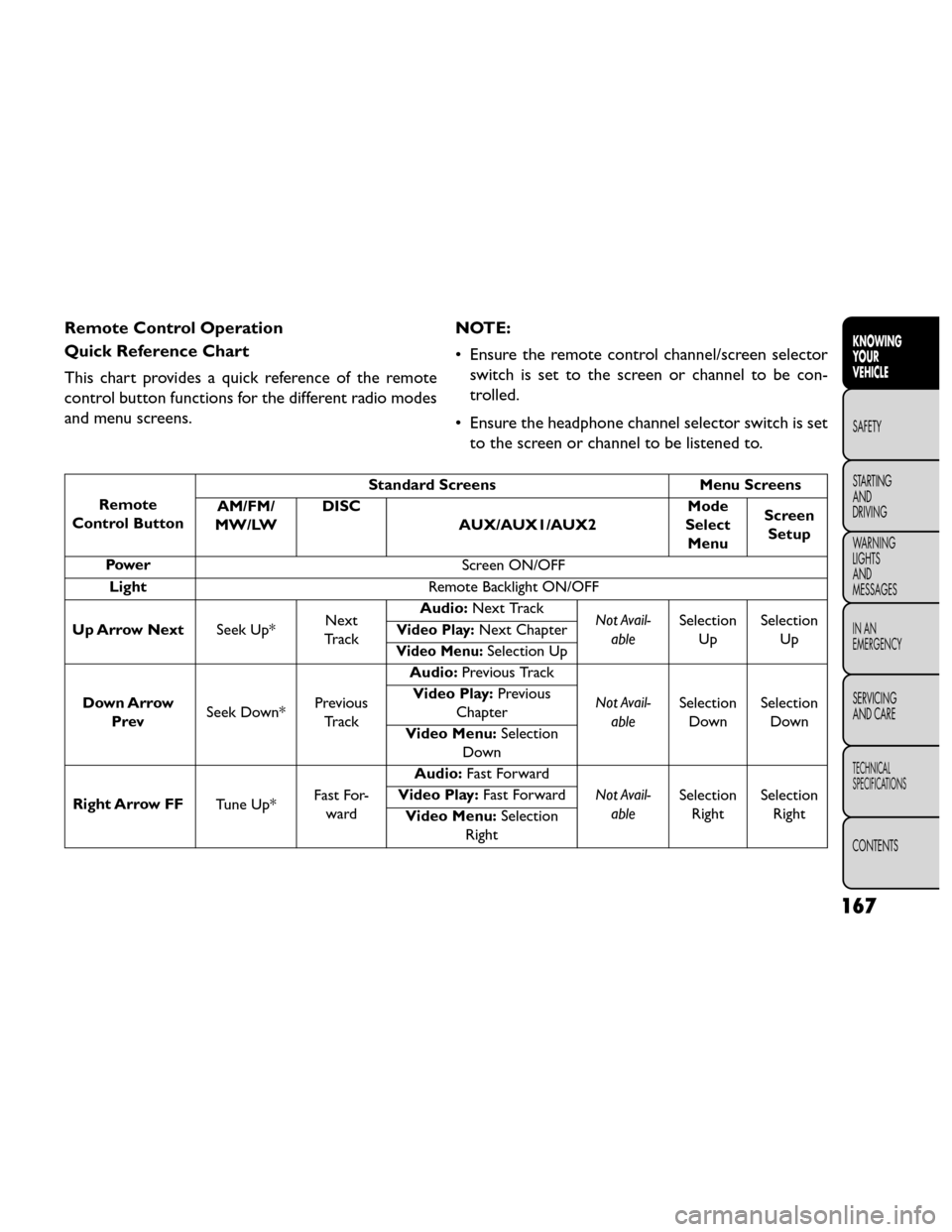
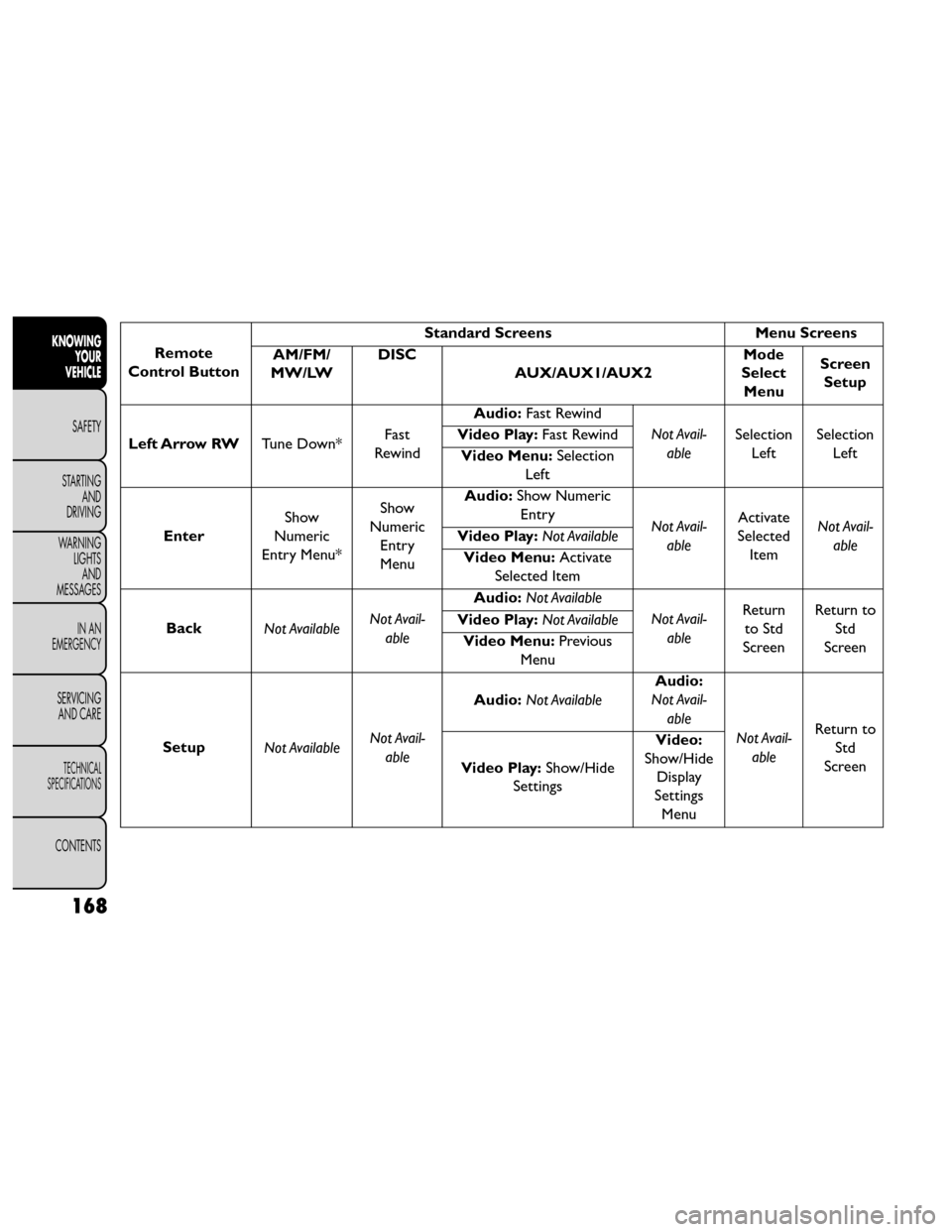
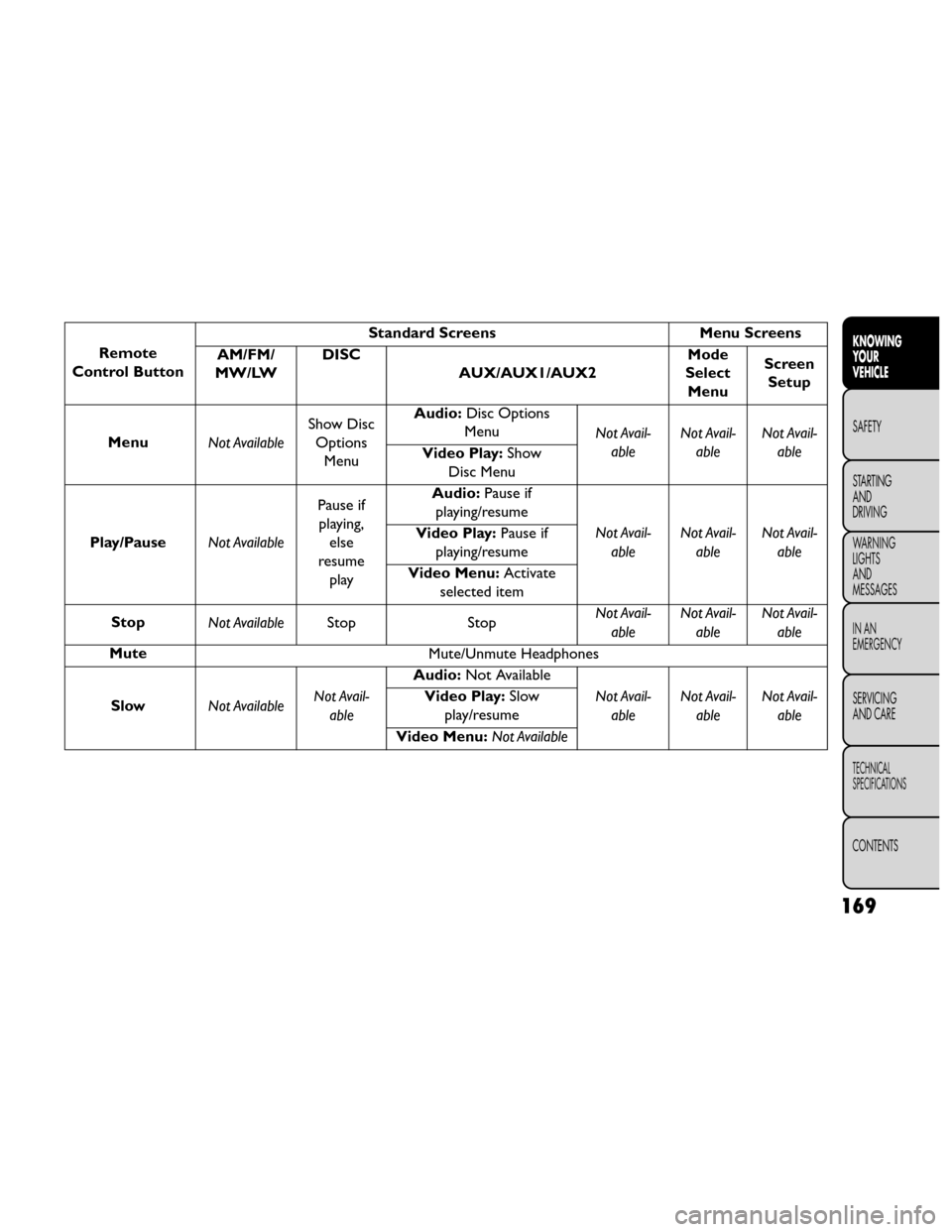
Remote Control Operation
Quick Reference Chart
This chart provides a quick reference of the remote
control button functions for the different radio modes
and menu screens.NOTE:
• Ensure the remote control channel/screen selector
switch is set to the screen or channel to be con-
trolled.
• Ensure the headphone channel selector switch is set to the screen or channel to be listened to.
Remote
Control Button Standard Screens
Menu Screens
AM/FM/
MW/LW DISC
AUX/AUX1/AUX2 Mode
Select Menu Screen
Setup
Power Screen ON/OFF
Light Remote Backlight ON/OFF
Up Arrow Next Seek Up*Next
Tr a c k Audio:
Next Track
Not Avail-
able Selection
Up Selection
Up
Video Play:Next Chapter
Video Menu:Selection Up
Down Arrow Prev Seek Down* Previous
Tr a c k Audio:
Previous Track
Not Avail-able Selection
Down Selection
Down
Video Play:
Previous
Chapter
Video Menu: Selection
Down
Right Arrow FF Tune Up*Fast For-
ward Audio:
Fast Forward
Not Avail-able Selection
Right Selection
Right
Video Play:
Fast Forward
Video Menu: Selection
Right
167
KNOWING
YOUR
VEHICLE
SAFETY
STARTING
AND
DRIVING
W
ARNING
LIGHTS
AND
MESSAGES
IN AN
EMERGENCY
SERVICING
AND CARE
TECHNICAL
SPECIFICATIONS
CONTENTS
Page 174 of 388
Remote
Control Button Standard Screens
Menu Screens
AM/FM/
MW/LW DISC
AUX/AUX1/AUX2 Mode
Select Menu Screen
Setup
Left Arrow RW Tune Down*Fast
Rewind Audio:
Fast Rewind
Not Avail-able Selection
Left Selection
Left
Video Play:
Fast Rewind
Video Menu: Selection
Left
Enter Show
Numeric
Entry Menu* Show
Numeric Entry
Menu Audio:
Show Numeric
Entry Not Avail-
able Activate
Selected Item Not Avail-
able
Video Play:
Not Available
Video Menu: Activate
Selected Item
Back Not Available Not Avail-
able Audio:
Not Available
Not Avail-able Return
to Std
Screen Return to
Std
Screen
Video Play:
Not Available
Video Menu: Previous
Menu
Setup Not Available Not Avail-
able Audio:
Not Available Audio:
Not Avail-
able
Not Avail-able Return to
Std
Screen
Video Play: Show/Hide
Settings Video:
Show/Hide Display
Settings Menu
168
KNOWING YOUR
VEHICLE
SAFETY
STARTING AND
DRIVING
W
ARNING LIGHTS AND
MESSAGES
IN AN
EMERGENCY
SERVICING AND CARE
TECHNICAL
SPECIFICATIONS
CONTENTS
Page 175 of 388
Remote
Control Button Standard Screens
Menu Screens
AM/FM/
MW/LW DISC
AUX/AUX1/AUX2 Mode
Select Menu Screen
Setup
Menu Not AvailableShow Disc
Options Menu Audio:
Disc Options
Menu Not Avail-
able Not Avail-
able Not Avail-
able
Video Play: Show
Disc Menu
Play/Pause Not AvailablePause if
playing, else
resume play Audio:
Pause if
playing/resume
Not Avail-able Not Avail-
able Not Avail-
able
Video Play:
Pause if
playing/resume
Video Menu: Activate
selected item
Stop Not Available Stop StopNot Avail-
able Not Avail-
able Not Avail-
able
Mute Mute/Unmute Headphones
Slow Not Available Not Avail-
able Audio:
Not Available
Not Avail-able Not Avail-
able Not Avail-
able
Video Play:
Slow
play/resume
Video Menu: Not Available
169
KNOWING
YOUR
VEHICLE
SAFETY
STARTING
AND
DRIVING
W
ARNING
LIGHTS
AND
MESSAGES
IN AN
EMERGENCY
SERVICING
AND CARE
TECHNICAL
SPECIFICATIONS
CONTENTS
Page 176 of 388
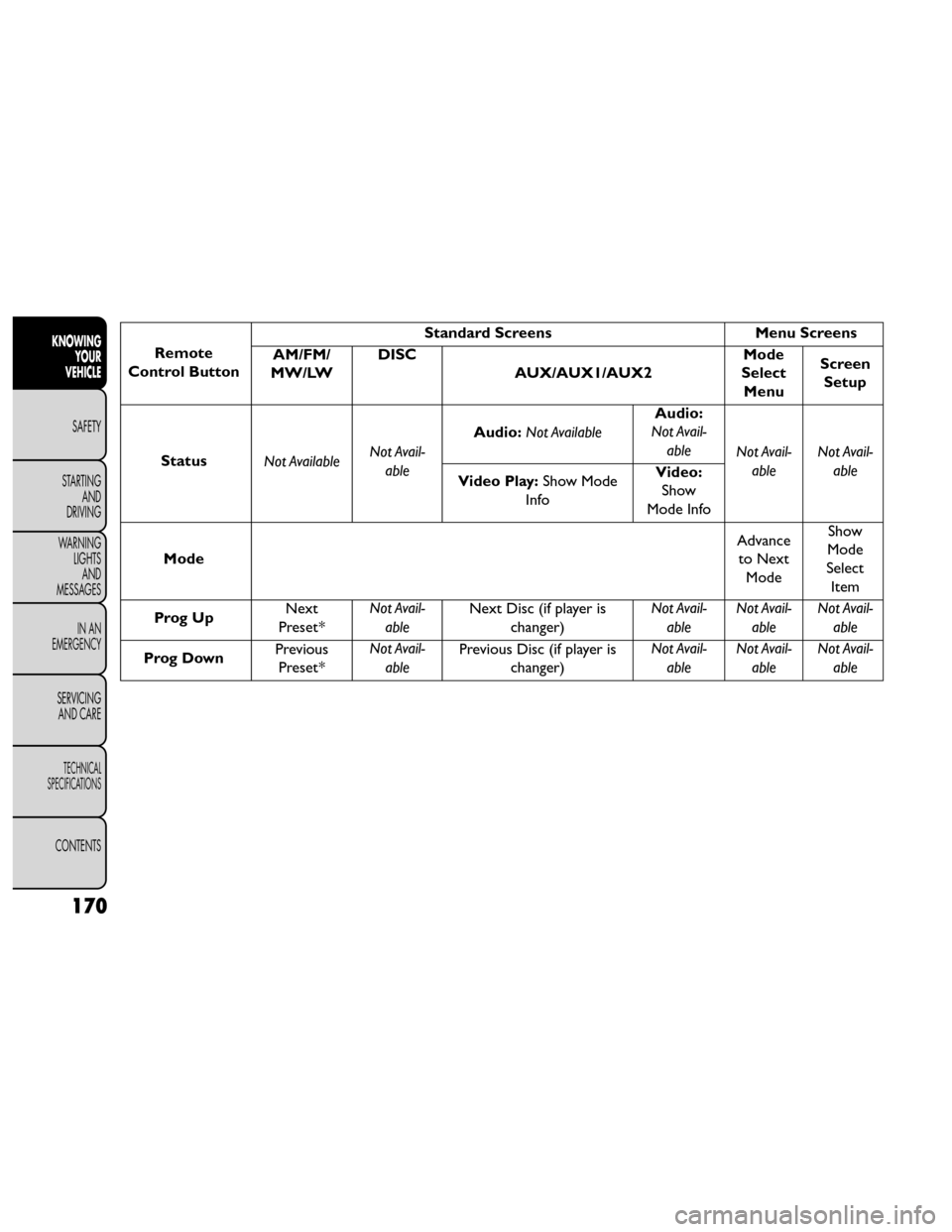
Remote
Control Button Standard Screens
Menu Screens
AM/FM/
MW/LW DISC
AUX/AUX1/AUX2 Mode
Select Menu Screen
Setup
Status Not Available Not Avail-
able Audio:
Not Available Audio:
Not Avail-
able Not Avail-
able Not Avail-
able
Video Play: Show Mode
Info Video:
Show
Mode Info
Mode Advance
to Next Mode Show
Mode
Select Item
Prog Up Next
Preset* Not Avail-
able Next Disc (if player is
changer) Not Avail-
able Not Avail-
able Not Avail-
able
Prog Down Previous
Preset* Not Avail-
able Previous Disc (if player is
changer) Not Avail-
able Not Avail-
able Not Avail-
able
170
KNOWING YOUR
VEHICLE
SAFETY
STARTING AND
DRIVING
W
ARNING LIGHTS AND
MESSAGES
IN AN
EMERGENCY
SERVICING AND CARE
TECHNICAL
SPECIFICATIONS
CONTENTS
Page 182 of 388
exclusion or limitation of incidental or consequential
damages, so the above limitation may not apply to you.
This warranty gives you specific legal rights. You may
also have other rights, which vary from jurisdiction to
jurisdiction.
What Will Unwired® Do?Unwired®, at its option,
will repair or replace any defective Product. Unwired®
reserves the right to replace any discontinued Product
with a comparable model. THIS WARRANTY IS THE
SOLE WARRANTY FOR THIS PRODUCT, SETS
FORTH YOUR EXCLUSIVE REMEDY REGARDING
DEFECTIVE PRODUCTS, AND IS IN LIEU OF ALL
OTHER WARRANTIES (EXPRESS OR IMPLIED), IN-
CLUDING ANY WARRANTY OR MERCHANTABIL-
ITY OR FITNESS FOR A PARTICULAR PURPOSE.
Displaying Video
The video screen has two different operating modes, a
video mode (when displaying video such as DVD video,
Aux video, etc.) and an information mode as shown in
Figure 116. Because the VES™ is a dual channel system,
Information Mode is displayed in a split screen format.
When in Information Mode, the left side of the screen
is referred to as Channel 1 and the right side of the
screen is referred to as Channel 2. Only Channel 1 displays video images. When in video
mode the image is displayed on the full screen, however
Channel 2’s functionality is still available. A popup
banner at the bottom of the screen is displayed mo-
mentarily over the video image. While in video mode
and Channel 2 is selected on the remote control
selector switch, the first remote control key press will
activate the popup banner indicating Channel 2’s sta-
tus. While the banner is still visible, any subsequent
remote control key press for Channel 2 shall initiate
the requested remote control command.
(fig. 125)
(fig. 125)
Popup Banner
176
KNOWINGYOUR
VEHICLE
SAFETY
STARTING AND
DRIVING
W
ARNING LIGHTS AND
MESSAGES
IN AN
EMERGENCY
SERVICING AND CARE
TECHNICAL
SPECIFICATIONS
CONTENTS
Page 185 of 388
Options Menu
(fig. 127)
When watching a video source (DVD Video with the
disc in Play mode, Aux Video, etc.), pressing the “Op-
tions” soft-key activates the Options Settings menu.
From this menu you can adjust Audio, Subtitles, Angle
and Title.Display Settings
When watching a video source (DVD Video with the
disc in Play mode, Aux Video, etc.), pressing the re-
mote control’s SETUP button activates the Display
Settings menu. These settings control the appearance
of the video on the screen. The factory default settings
are already set for optimum viewing, so there is no
need to change these settings under normal circum-
stances.
To change the settings, press the remote control’s
navigation buttons to select an item, then press the
remote control’s navigation buttons to change the
value for the currently selected item. To reset all values
back to the original settings, select the Default Settings
menu option and press the remote control’s ENTER
button.
(fig. 127)
179
KNOWING
YOUR
VEHICLE
SAFETY
STARTING
AND
DRIVING
W
ARNING
LIGHTS
AND
MESSAGES
IN AN
EMERGENCY
SERVICING
AND CARE
TECHNICAL
SPECIFICATIONS
CONTENTS
Page 323 of 388
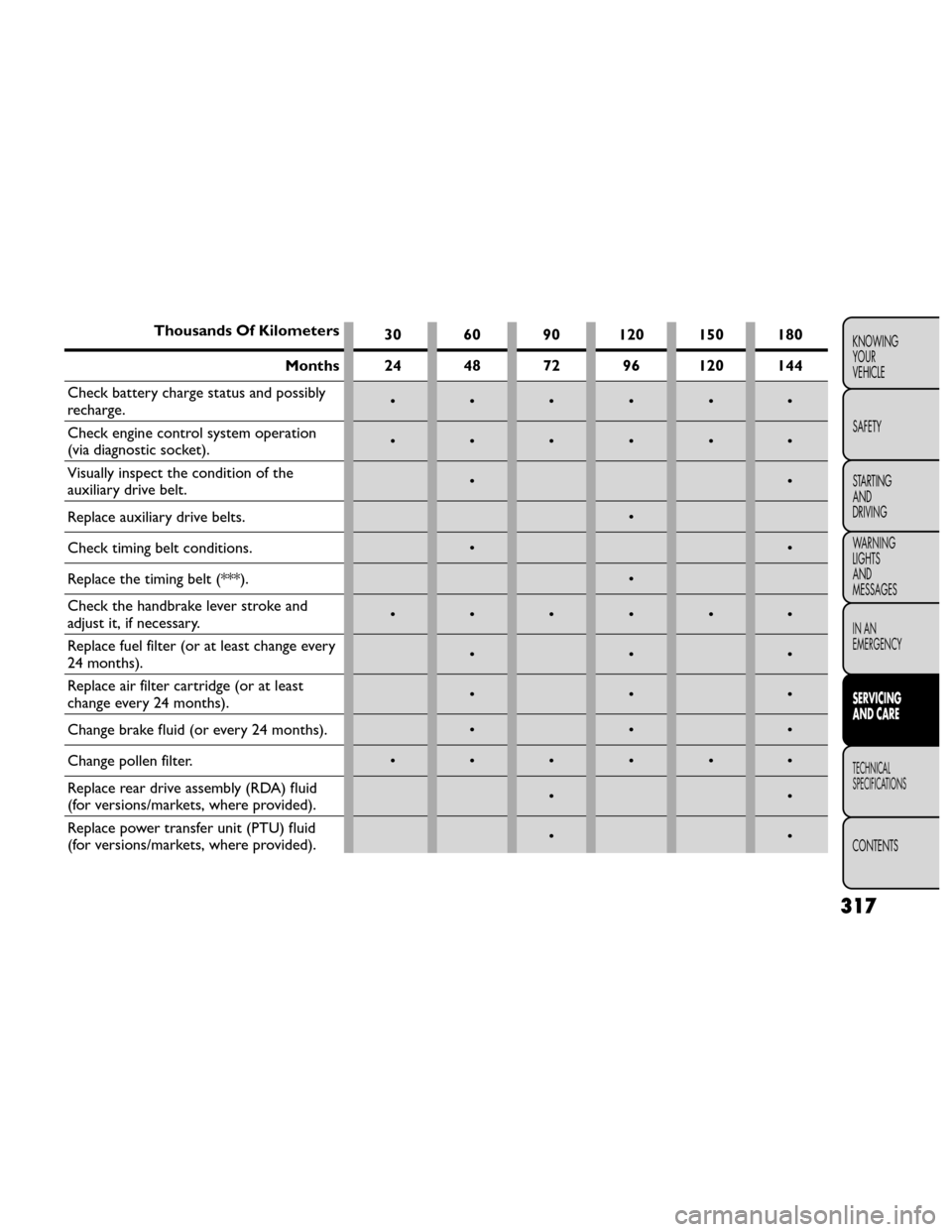
Thousands Of Kilometers30 60 90 120 150 180
Months 24 48 72 96 120 144
Check battery charge status and possibly
recharge. ••••••
Check engine control system operation
(via diagnostic socket). ••••••
Visually inspect the condition of the
auxiliary drive belt. ••
Replace auxiliary drive belts. •
Check timing belt conditions. ••
Replace the timing belt (***). •
Check the handbrake lever stroke and
adjust it, if necessary. ••••••
Replace fuel filter (or at least change every
24 months). •••
Replace air filter cartridge (or at least
change every 24 months). •••
Change brake fluid (or every 24 months). •••
Change pollen filter. • • • • • •
Replace rear drive assembly (RDA) fluid
(for versions/markets, where provided). ••
Replace power transfer unit (PTU) fluid
(for versions/markets, where provided). ••
317
KNOWING
YOUR
VEHICLE
SAFETY
STARTING
AND
DRIVING
WARNING
LIGHTS
AND
MESSAGES
IN AN
EMERGENCY
SERVICING
AND CARE
TECHNICAL
SPECIFICATIONS
CONTENTS
Page 374 of 388
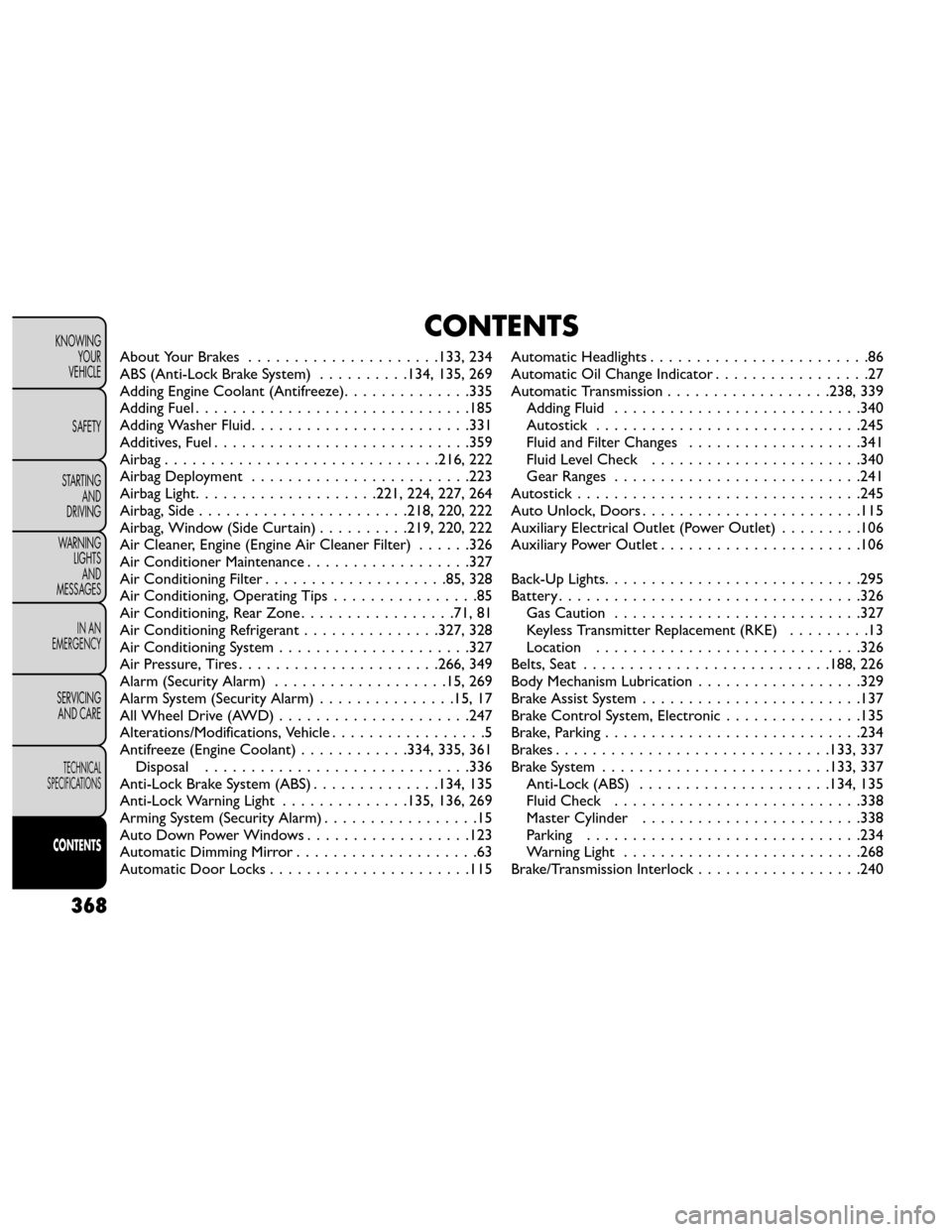
CONTENTS
About Your Brakes..................... 133, 234
ABS (Anti-Lock Brake System) ..........134, 135, 269
Adding Engine Coolant (Antifreeze) ..............335
Adding Fuel ..............................185
Adding Washer Fluid ........................331
Additives, Fuel ............................359
Airbag .............................. 216, 222
Airbag Deployment ........................223
Airbag Light ....................221, 224, 227, 264
Airbag, Side ....................... 218, 220, 222
Airbag, Window (Side Curtain) ..........219, 220, 222
Air Cleaner, Engine (Engine Air Cleaner Filter) ......326
Air Conditioner Maintenance ..................327
Air Conditioning Filter ....................85, 328
Air Conditioning, Operating Tips ................85
Air Conditioning, Rear Zone .................71,81
Air Conditioning Refrigerant ...............327, 328
Air Conditioning System .....................327
Air Pressure, Tires ......................266, 349
Alarm (Security Alarm) ...................15, 269
Alarm System (Security Alarm) ...............15, 17
All Wheel Drive (AWD) .....................247
Alterations/Modifications, Vehicle .................5
Antifreeze (Engine Coolant) ............334, 335, 361
Disposal .............................336
Anti-Lock Brake System (ABS) ..............134, 135
Anti-Lock Warning Light ..............135, 136, 269
Arming System (Security Alarm) .................15
Auto Down Power Windows ..................123
Automatic Dimming Mirror ....................63
Automatic Door Locks ......................115 Automatic Headlights
........................86
Automatic Oil Change Indicator .................27
Automatic Transmission .................. 238, 339
Adding Fluid ...........................340
Autostick .............................245
Fluid and Filter Changes ...................341
Fluid Level Check .......................340
Gear Ranges ...........................241
Autostick ..............................
.245
Auto Unlock, Doors ........................115
Auxiliary Electrical Outlet (Power Outlet) .........106
Auxiliary Power Outlet ......................106
Back-Up Lights ............................295
Battery .................................326
Gas Caution ...........................327
Keyless Transmitter Replacement (RKE) .........13
Location .............................326
Belts, Seat ........................... 188, 226
Body Mechanism Lubrication ..................329
Brake Assist System ........................137
Brake Control System, Electronic ...............135
Brake, Parking ............................234
Brakes ..............................133, 337
Brake System ......................... 133, 337
Anti-Lock (ABS) .....................134, 135
Fluid Check ...........................338
Master Cylinder ........................338
Parking ..............................234
Warning Light ..........................268
Brake/Transmission Interlock ..................240
368
KNOWING
YOUR
VEHICLE
SAFETY
STARTING AND
DRIVING
WARNING LIGHTSAND
MESSAGES
IN AN
EMERGENCY
SERVICING AND CARE
TECHNICAL
SPECIFICATIONS
CONTENTS
Page 376 of 388
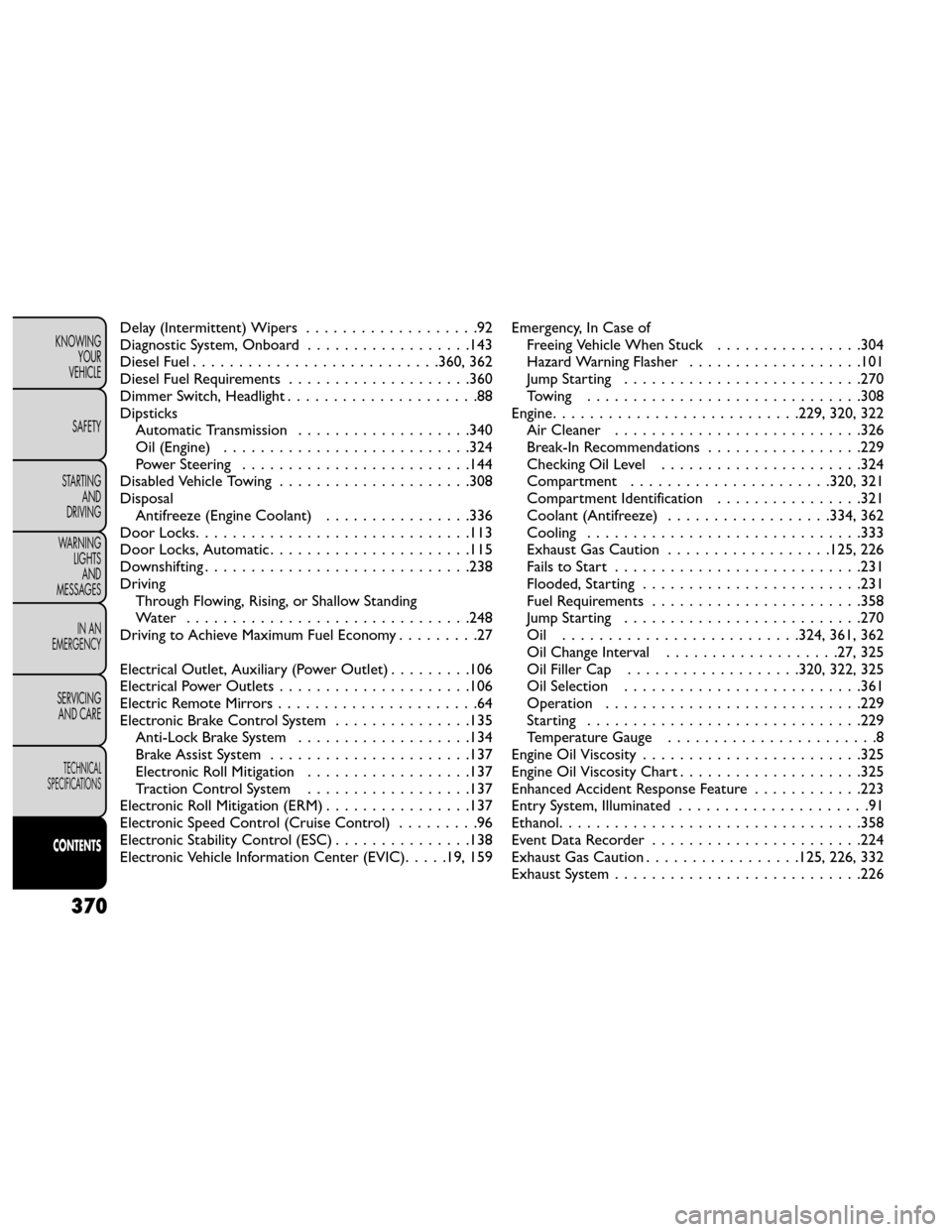
Delay (Intermittent) Wipers...................92
Diagnostic System, Onboard ..................143
Diesel Fuel ...........................360, 362
Diesel Fuel Requirements ....................360
Dimmer Switch, Headlight .....................88
Dipsticks Automatic Transmission ...................340
Oil (Engine) ...........................324
Power Steering .........................144
Disabled Vehicle Towing .....................308
Disposal Antifreeze (Engine Coolant) ................336
Door Locks ..............................113
Door Locks, Automatic ......................115
Downshifting .............................238
Driving Through Flowing, Rising, or Shallow Standing
Water ...............................248
Driving to Achieve Maximum Fuel Economy .........27
Electrical Outlet, Auxiliary (Power Outlet) .........106
Electrical Power Outlets .....................106
Electric Remote Mirrors ......................64
Electronic Brake Control System ...............135
Anti-Lock Brake System ...................134
Brake Assist System ......................137
Electronic Roll Mitigation ..................137
Traction Control System ..................137
Electronic Roll Mitigation (ERM) ................137
Electronic Speed Control (Cruise Control) .........96
Electronic Stability Control (ESC) ...............138
Electronic Vehicle Information Center (EVIC) .....19, 159Emergency, In Case of
Freeing Vehicle When Stuck ................304
Hazard Warning Flasher ...................101
Jump Starting ..........................270
Towing ..............................308
Engine ...........................229, 320, 322
Air Cleaner ...........................326
Break-In Recommendations .................229
Checking Oil Level ......................324
Compartment ......................320, 321
Compartment Identification ................321
Coolant (Antifreeze) .................. 334, 362
Cooling ..............................33 3
Exhaust
Gas Caution .................. 125, 226
Fails to Start ...........................231
Flooded, Starting ........................231
Fuel Requirements .......................358
Jump Starting ..........................270
Oil ..........................324, 361, 362
Oil Change Interval ...................27, 325
Oil Filler Cap ................... 320, 322, 325
Oil Selection ..........................361
Operation ............................229
Starting ..............................229
Temperature Gauge .......................8
Engine Oil Viscosity ........................325
Engine Oil Viscosity Chart ....................325
Enhanced Accident Response Feature ............223
Entry System, Illuminated .....................91
Ethanol .................................358
Event Data Recorder .......................224
Exhaust Gas Caution .................125, 226, 332
Exhaust System ...........................226
370
KNOWING
YOUR
VEHICLE
SAFETY
STARTING AND
DRIVING
WARNING LIGHTSAND
MESSAGES
IN AN
EMERGENCY
SERVICING AND CARE
TECHNICAL
SPECIFICATIONS
CONTENTS