buttons FIAT FREEMONT 2015 1.G User Guide
[x] Cancel search | Manufacturer: FIAT, Model Year: 2015, Model line: FREEMONT, Model: FIAT FREEMONT 2015 1.GPages: 412, PDF Size: 3.37 MB
Page 51 of 412
NOTE:If the vehicle is equipped with Keyless Enter-
N-Go™ (Passive Entry) and the EVIC is programmed
to Unlock All Doors 1st Press, all doors will unlock no
matter which Passive Entry equipped door handle is
grasped. If Driver Door 1st Press is programmed, only
the driver’s door will unlock when the driver’s door is
grasped. With Passive Entry, if Driver Door 1st Press is
programmed pressing the handle more than once will
only result in the driver’s door opening. If driver door
first is selected, once the driver door is opened, the
interior door lock/unlock switch can be used to unlock
all doors (or use RKE transmitter).
• Passive Entry (for versions/markets, where pro-
vided)
This feature allows you to lock and unlock the vehicle’s
door(s) without having to press the RKE transmitter
lock or unlock buttons. To make your selection, press
the Passive Entry button on the touchscreen, select
ON or OFF followed by pressing the arrow back
button on the touchscreen. Refer to “Keyless Enter-N-
Go™” in “Knowing Your Vehicle”. Engine Off Options
• Engine Off Power Delay
When this feature is selected, the power window
switches, radio, Uconnect® phone system (for
versions/markets, where provided), DVD video system
(for versions/markets, where provided), power sunroof
(for versions/markets, where provided), and power
outlets will remain active for up to 10 minutes after the
ignition is cycled OFF. Opening either front vehicle
door will cancel this feature. To change the Engine Off
Power Delay status press the 0 seconds, 45 seconds, 5
minutes or 10 minutes button on the touchscreen
followed by pressing the arrow back button on the
touchscreen.
• Headlight Off Delay (for versions/markets,
where provided)
When this feature is selected, the driver can choose to
have the headlights remain on for 0, 30, 60, or 90
seconds when exiting the vehicle. To change the Head-
light Off Delay status press the 0, 30, 60 or 90 button
on the touchscreen followed by pressing the arrow
back button on the touchscreen.
45
KNOWING
YOUR
VEHICLE
SAFETY
STAR
TING
AND
DRIVING
WARNING
LIGHTS
AND
MESSAGES
IN AN
EMERGENCY
SERVICING
AND CARE
TECHNICAL
SPECIFICATIONS
CONTENTS
Page 53 of 412
• Perform Compass Calibration (for versions/
markets, where provided)
Press the Calibration button to change this setting.
This compass is self-calibrating, which eliminates the
need to manually reset the compass. When the vehicle
is new, the compass may appear erratic and the EVIC
will display CAL until the compass is calibrated. You
may also calibrate the compass by pressing the ON
button on the touchscreen and completing one or
more 360–degree turns (in an area free from large
metal or metallic objects) until the CAL indicator
displayed in the EVIC turns off. The compass will now
function normally.
Audio
• Balance/Fade (for versions/markets, where pro-
vided)
When in this display you may adjust the Balance and
Fade settings.
• Equalizer (for versions/markets, where provided)
When in this display you may adjust the Bass, Mid and
Treble settings. Adjust the settings with the + and –
setting buttons on the touchscreen or by selecting any
point on the scale in between the + and – buttons on
the touchscreen followed by pressing the arrow back
button on the touchscreen.NOTE:
Bass/mid/treble allow the you to simply slide
your finger up/down to change the setting as well as
press directly on the desired setting.
• Speed Adjusted Volume (for versions/markets,
where provided)
Decreases volume relative to vehicle speed. To change
the Speed Adjusted Volume press the Off, 1, 2 or 3
button on the touchscreen followed by pressing the
arrow back button on the touchscreen.
• Music Info Cleanup (for versions/markets, where
provided)
This feature helps organize music files for optimized
music navigation. To make your selection, press the
Music Info Cleanup button on the touchscreen, select
On or Off followed by pressing the arrow back button
on the touchscreen.
Phone/Bluetooth®
• Paired Devices
This feature shows which phones are paired to the
Phone/Bluetooth® system. For further information,
refer to the Uconnect® Supplement.
47
KNOWING
YOUR
VEHICLE
SAFETY
STAR
TING
AND
DRIVING
WARNING
LIGHTS
AND
MESSAGES
IN AN
EMERGENCY
SERVICING
AND CARE
TECHNICAL
SPECIFICATIONS
CONTENTS
Page 56 of 412
HEATED SEATS (for versions/markets, where
provided)
The front heated seats control buttons are located
within the Uconnect® system. You can gain access to
the control buttons through the climate screen or the
controls screen.
• Press the heated seat button
once to turn the
High setting ON.
• Press the heated seat button
a second time to
turn the Low setting ON.
• Press the heated seat button
a third time to turn
the heating elements OFF.
If the HI-level setting is selected, the system will auto-
matically switch to LO-level after approximately 60
minutes of continuous operation. At that time, the
display will change from HI to LO, indicating the
change. The LO-level setting will turn OFF automati-
cally after approximately 45 minutes. NOTE:
The engine must be running for the heated
seats to operate.
WARNING!
• Persons who are unable to feel pain to
t h
e skin because of advanced age,
chronic illness, diabetes, spinal cord injury, medi-
cation, alcohol use, exhaustion or other physical
condition must exercise care when using the seat
heater. It may cause burns even at low tempera-
tures, especially if used for long periods of time.
• Do not place anything on the seat or seatback
that insulates against heat , such as a blanket or
cushion. This may cause the seat heater to over-
heat . Sitting in a seat that has been overheated
could cause serious burns due to the increased
surface temperature of the seat .
50
KNOWING YOUR
VEHICLE
SAFETY
STAR
TINGAND
DRIVING
WARNING LIGHTSAND
MESSAGES
IN AN
EMERGENCY
SERVICINGAND CARE
TECHNICAL
SPECIFICATIONS
CONTENTS
Page 73 of 412
NOTE:The passenger side convex outside mirror will
give a much wider view to the rear, and especially of the
lane next to your vehicle.
WARNING!
Vehicles and other objects seen in the
passenger si
de convex mirror will look
smaller and farther away than they really are.
Relying too much on your passenger side convex
mirror could cause you to collide with another
vehicle or other object . Use your inside mirror
when judging the size or distance of a vehicle
seen in the passenger side convex mirror.
POWER MIRRORS
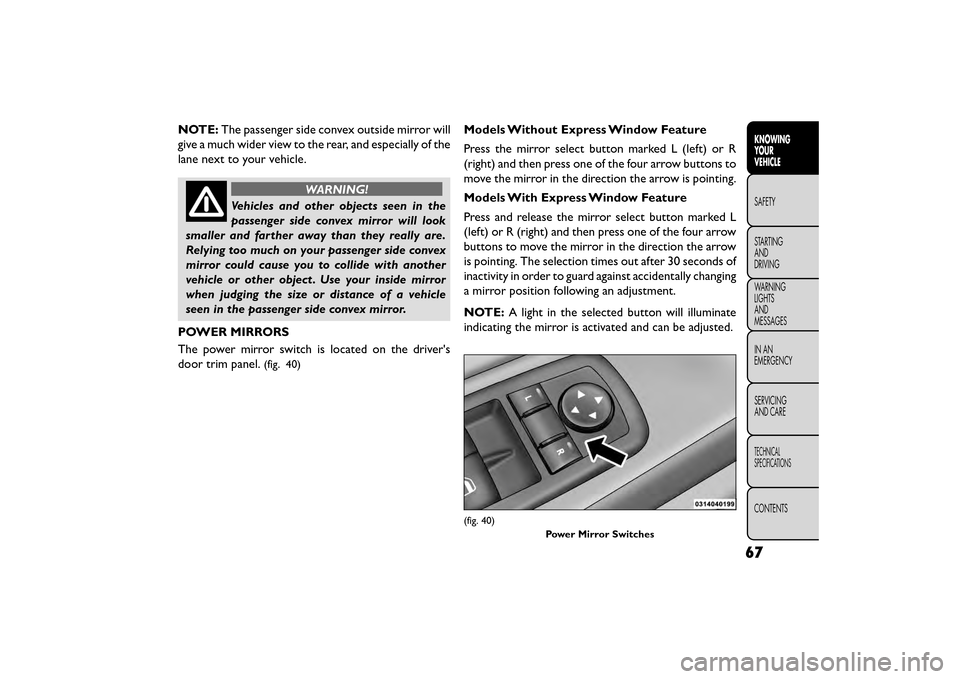
The power mirror switch is located on the driver's
door trim panel.
(fig. 40)
Models Without Express Window Feature
Press the mirror select button marked L (left) or R
(right) and then press one of the four arrow buttons to
move the mirror in the direction the arrow is pointing.
Models With Express Window Feature
Press and release the mirror select button marked L
(left) or R (right) and then press one of the four arrow
buttons to move the mirror in the direction the arrow
is pointing. The selection times out after 30 seconds of
inactivity in order to guard against accidentally changing
a mirror position following an adjustment.
NOTE: A light in the selected button will illuminate
indicating the mirror is activated and can be adjusted.
(fig. 40)
Power Mirror Switches
67
KNOWING
YOUR
VEHICLE
SAFETY
STAR
TING
AND
DRIVING
WARNING
LIGHTS
AND
MESSAGES
IN AN
EMERGENCY
SERVICING
AND CARE
TECHNICAL
SPECIFICATIONS
CONTENTS
Page 76 of 412
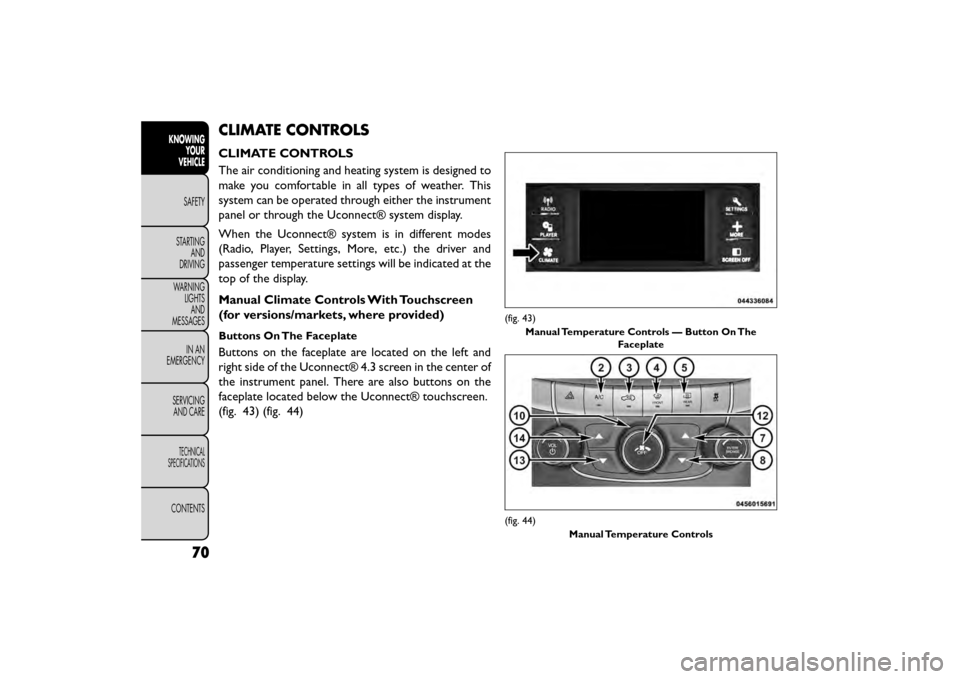
CLIMATE CONTROLS
CLIMATE CONTROLS
The air conditioning and heating system is designed to
make you comfortable in all types of weather. This
system can be operated through either the instrument
panel or through the Uconnect® system display.
When the Uconnect® system is in different modes
(Radio, Player, Settings, More, etc.) the driver and
passenger temperature settings will be indicated at the
top of the display.
Manual Climate Controls With Touchscreen
(for versions/markets, where provided)
Buttons On The Faceplate
Buttons on the faceplate are located on the left and
right side of the Uconnect® 4.3 screen in the center of
the instrument panel. There are also buttons on the
faceplate located below the Uconnect® touchscreen.
(fig. 43) (fig. 44)
(fig. 43)Manual Temperature Controls — Button On The Faceplate
(fig. 44)
Manual Temperature Controls
70
KNOWINGYOUR
VEHICLE
SAFETY
STAR
TINGAND
DRIVING
WARNING LIGHTSAND
MESSAGES
IN AN
EMERGENCY
SERVICINGAND CARE
TECHNICAL
SPECIFICATIONS
CONTENTS
Page 77 of 412
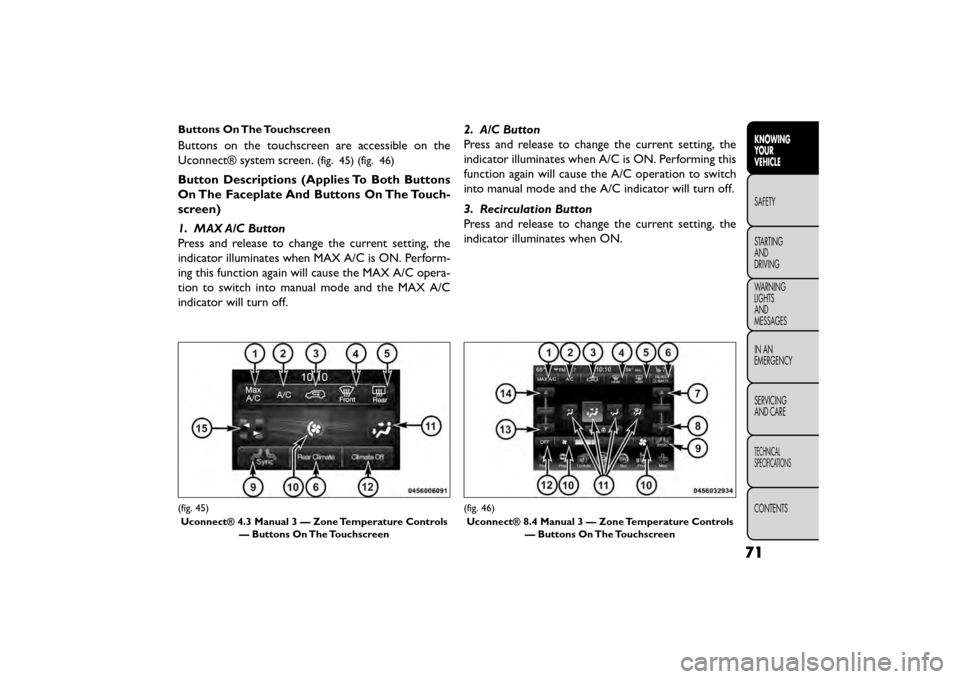
Buttons On The Touchscreen
Buttons on the touchscreen are accessible on the
Uconnect® system screen.
(fig. 45) (fig. 46)
Button Descriptions (Applies To Both Buttons
On The Faceplate And Buttons On The Touch-
screen)
1. MAX A/C Button
Press and release to change the current setting, the
indicator illuminates when MAX A/C is ON. Perform-
ing this function again will cause the MAX A/C opera-
tion to switch into manual mode and the MAX A/C
indicator will turn off.2. A/C Button
Press and release to change the current setting, the
indicator illuminates when A/C is ON. Performing this
function again will cause the A/C operation to switch
into manual mode and the A/C indicator will turn off.
3. Recirculation Button
Press and release to change the current setting, the
indicator illuminates when ON.
(fig. 45)
Uconnect® 4.3 Manual 3 — Zone Temperature Controls — Buttons On The Touchscreen(fig. 46)
Uconnect® 8.4 Manual 3 — Zone Temperature Controls — Buttons On The Touchscreen
71
KNOWING
YOUR
VEHICLE
SAFETY
STAR
TING
AND
DRIVING
WARNING
LIGHTS
AND
MESSAGES
IN AN
EMERGENCY
SERVICING
AND CARE
TECHNICAL
SPECIFICATIONS
CONTENTS
Page 79 of 412
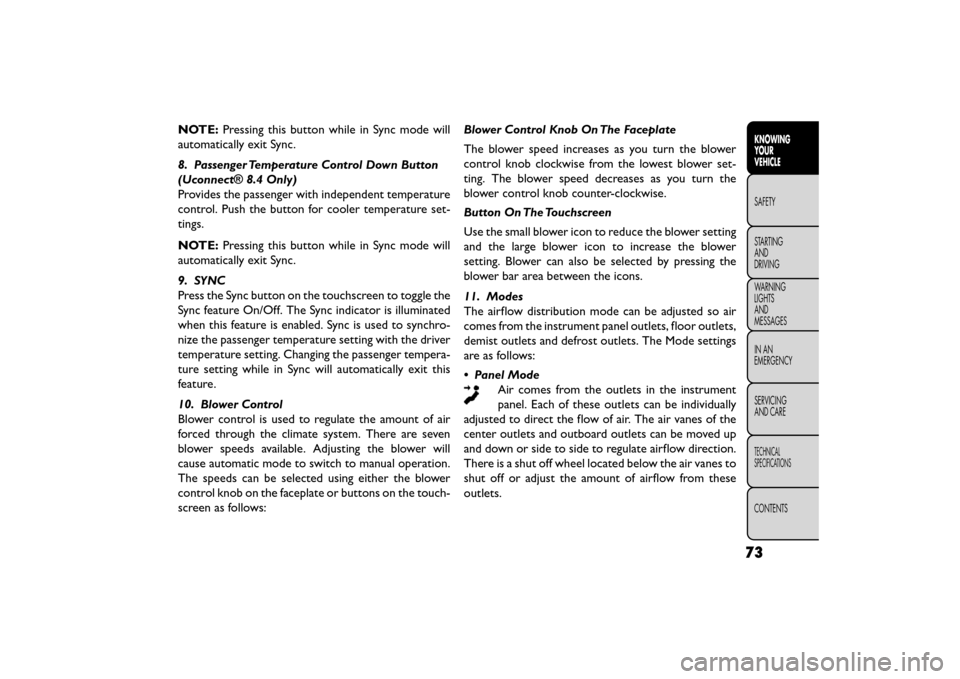
NOTE:Pressing this button while in Sync mode will
automatically exit Sync.
8. Passenger Temperature Control Down Button
(Uconnect® 8.4 Only)
Provides the passenger with independent temperature
control. Push the button for cooler temperature set-
tings.
NOTE: Pressing this button while in Sync mode will
automatically exit Sync.
9. SYNC
Press the Sync button on the touchscreen to toggle the
Sync feature On/Off. The Sync indicator is illuminated
when this feature is enabled. Sync is used to synchro-
nize the passenger temperature setting with the driver
temperature setting. Changing the passenger tempera-
ture setting while in Sync will automatically exit this
feature.
10. Blower Control
Blower control is used to regulate the amount of air
forced through the climate system. There are seven
blower speeds available. Adjusting the blower will
cause automatic mode to switch to manual operation.
The speeds can be selected using either the blower
control knob on the faceplate or buttons on the touch-
screen as follows: Blower Control Knob On The Faceplate
The blower speed increases as you turn the blower
control knob clockwise from the lowest blower set-
ting. The blower speed decreases as you turn the
blower control knob counter-clockwise.
Button On The Touchscreen
Use the small blower icon to reduce the blower setting
and the large blower icon to increase the blower
setting. Blower can also be selected by pressing the
blower bar area between the icons.
11. Modes
The airflow distribution mode can be adjusted so air
comes from the instrument panel outlets, floor outlets,
demist outlets and defrost outlets. The Mode settings
are as follows:
• Panel Mode
Air comes from the outlets in the instrument
panel. Each of these outlets can be individually
adjusted to direct the flow of air. The air vanes of the
center outlets and outboard outlets can be moved up
and down or side to side to regulate airflow direction.
There is a shut off wheel located below the air vanes to
shut off or adjust the amount of airflow from these
outlets.
73
KNOWING
YOUR
VEHICLE
SAFETY
STAR
TING
AND
DRIVING
WARNING
LIGHTS
AND
MESSAGES
IN AN
EMERGENCY
SERVICING
AND CARE
TECHNICAL
SPECIFICATIONS
CONTENTS
Page 82 of 412
NOTE:In cold weather, use of Recirculation mode
may lead to excessive window fogging. The recircula-
tion feature may be unavailable (soft button greyed
out). Recirculation mode is not allowed in Defrost
mode to improve window clearing operation. Recircu-
lation will be disabled automatically if this mode is
selected. Attempting to use Recirculation while in this
mode will cause the LED in the control button to blink
and then turn off.
Rear Manual Temperature Control (MTC) (for
versions/markets, where provided)
The rear MTC system has floor air outlets at the rear
right side of the 3rd Row seats and overhead outlets at
each outboard rear seating position. The system pro-
vides heated air through the floor outlets or cool,
dehumidified air through the headliner outlets.
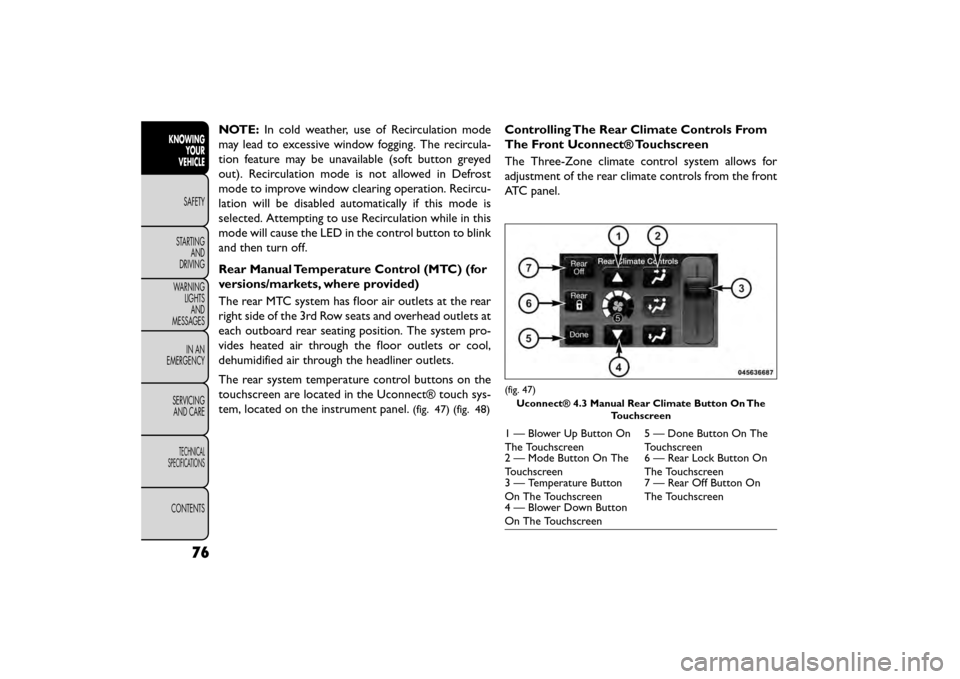
The rear system temperature control buttons on the
touchscreen are located in the Uconnect® touch sys-
tem, located on the instrument panel.
(fig. 47) (fig. 48)
Controlling The Rear Climate Controls From
The Front Uconnect® Touchscreen
The Three-Zone climate control system allows for
adjustment of the rear climate controls from the front
ATC panel.
(fig. 47)
Uconnect® 4.3 Manual Rear Climate Button On The Touchscreen
1 — Blower Up Button On
The Touchscreen 5 — Done Button On The
Touchscreen
2 — Mode Button On The
Touchscreen 6 — Rear Lock Button On
The Touchscreen
3 — Temperature Button
On The Touchscreen 7 — Rear Off Button On
The Touchscreen
4 — Blower Down Button
On The Touchscreen
76
KNOWING
YOUR
VEHICLE
SAFETY
STAR
TINGAND
DRIVING
WARNING LIGHTSAND
MESSAGES
IN AN
EMERGENCY
SERVICINGAND CARE
TECHNICAL
SPECIFICATIONS
CONTENTS
Page 85 of 412
Rear Mode Control
• Headliner ModeAir comes from the outlets in the headliner.
Each of these outlets can be individually adjusted
to direct the flow of air. Moving the air vanes of the
outlets to one side will shut off the airflow.
• Bi-Level Mode Air comes from both the headliner outlets and
the floor outlets.
NOTE: In many temperature positions, the Bi-Level
mode is designed to provide cooler air out of the
headliner outlets and warmer air from the floor out-
lets.
• Floor Mode Air comes from the floor outlets.
Automatic Temperature Control (ATC) With
Touchscreen (for versions/markets, where
provided)
Buttons On The Faceplate
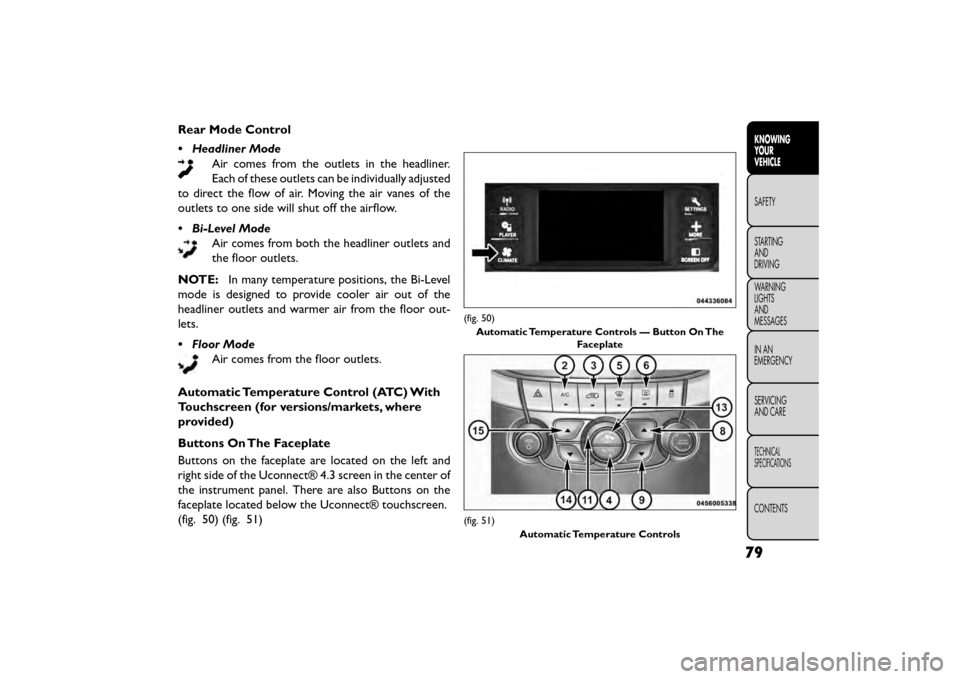
Buttons on the faceplate are located on the left and
right side of the Uconnect® 4.3 screen in the center of
the instrument panel. There are also Buttons on the
faceplate located below the Uconnect® touchscreen.
(fig. 50) (fig. 51)
(fig. 50) Automatic Temperature Controls — Button On The Faceplate
(fig. 51)
Automatic Temperature Controls
79
KNOWING
YOUR
VEHICLE
SAFETY
STAR
TING
AND
DRIVING
WARNING
LIGHTS
AND
MESSAGES
IN AN
EMERGENCY
SERVICING
AND CARE
TECHNICAL
SPECIFICATIONS
CONTENTS
Page 86 of 412
Buttons On The Touchscreen
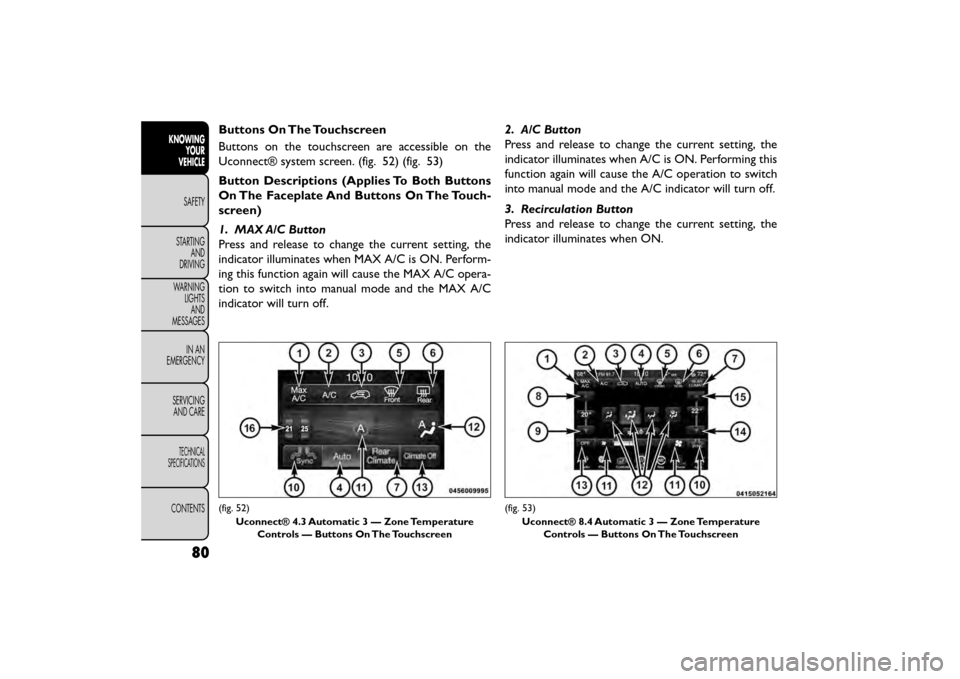
Buttons on the touchscreen are accessible on the
Uconnect® system screen. (fig. 52) (fig. 53)
Button Descriptions (Applies To Both Buttons
On The Faceplate And Buttons On The Touch-
screen)
1. MAX A/C Button
Press and release to change the current setting, the
indicator illuminates when MAX A/C is ON. Perform-
ing this function again will cause the MAX A/C opera-
tion to switch into manual mode and the MAX A/C
indicator will turn off.2. A/C Button
Press and release to change the current setting, the
indicator illuminates when A/C is ON. Performing this
function again will cause the A/C operation to switch
into manual mode and the A/C indicator will turn off.
3. Recirculation Button
Press and release to change the current setting, the
indicator illuminates when ON.
(fig. 52)
Uconnect® 4.3 Automatic 3 — Zone Temperature Controls — Buttons On The Touchscreen(fig. 53)
Uconnect® 8.4 Automatic 3 — Zone Temperature Controls — Buttons On The Touchscreen
80
KNOWING YOUR
VEHICLE
SAFETY
STAR
TINGAND
DRIVING
WARNING LIGHTSAND
MESSAGES
IN AN
EMERGENCY
SERVICINGAND CARE
TECHNICAL
SPECIFICATIONS
CONTENTS