dvd FIAT FREEMONT 2015 1.G Owners Manual
[x] Cancel search | Manufacturer: FIAT, Model Year: 2015, Model line: FREEMONT, Model: FIAT FREEMONT 2015 1.GPages: 412, PDF Size: 3.37 MB
Page 12 of 412
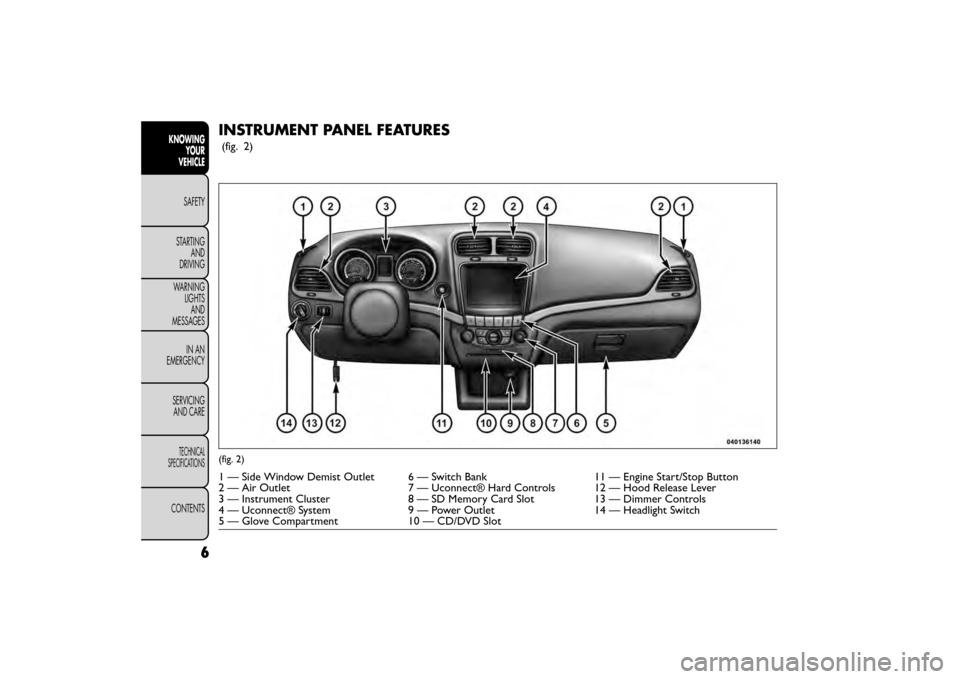
INSTRUMENT PANEL FEATURES
(fig. 2)
(fig. 2)
1 — Side Window Demist Outlet 6 — Switch Bank11 — Engine Start/Stop Button
2 — Air Outlet 7 — Uconnect® Hard Controls 12 — Hood Release Lever
3 — Instrument Cluster 8 — SD Memory Card Slot13 — Dimmer Controls
4 — Uconnect® System 9 — Power Outlet14 — Headlight Switch
5 — Glove Compartment 10 — CD/DVD Slot
6
KNOWING
YOUR
VEHICLE
SAFETY
STAR
TINGAND
DRIVING
WARNING LIGHTSAND
MESSAGES
IN AN
EMERGENCY
SERVICINGAND CARE
TECHNICAL
SPECIFICATIONS
CONTENTS
Page 43 of 412
• Passive Entry (Keyless Enter-N-Go™) (for
versions/markets, where provided)
Press the Passive Entry button on the touchscreen to
change this display. This feature allows you to lock and
unlock the vehicle’s door(s) without having to press the
RKE transmitter lock or unlock buttons. To make your
selection, press the Passive Entry button on the touch-
screen, select ON or OFF followed by pressing the
arrow back button on the touchscreen. Refer to “Key-
less Enter-N-Go™” in “Knowing Your Vehicle”.
Heated Seats (for versions/markets, where
provided)
• Auto Heated Seats (for versions/markets, where
provided)
Press the Auto Heated Seats button on the touch-
screen to change this display. When this feature is
selected the driver's heated seat will automatically turn
on when temperatures are below 4.4° C. To make your
selection, press the Auto Heated Seats button on the
touchscreen, select On or Off followed by pressing the
arrow back button on the touchscreen.Engine Off Options
• Headlight Off Delay
Press the Headlight Off Delay button on the touch-
screen to change this display. When this feature is
selected, the driver can choose to have the headlights
remain on for 0, 30, 60, or 90 seconds when exiting the
vehicle. To change the Headlight Off Delay status press
the 0, 30, 60 or 90 button on the touchscreen followed
by pressing the arrow back button on the touchscreen.
• Engine Off Power Delay (for versions/markets,
where provided)
Press the Engine Off Power Delay button on the
touchscreen to change this display. When this feature is
selected, the power window switches, radio,
Uconnect® phone system (for versions/markets,
where provided), DVD video system (for versions/
markets, where provided), power sunroof (for
versions/markets, where provided), and power outlets
will remain active for up to 10 minutes after the ignition
is cycled to OFF. Opening either front vehicle door will
cancel this feature. To change the Engine Off Power
Delay status press the 0 seconds, 45 seconds, 5 min-
utes or 10 minutes button on the touchscreen followed
by pressing the arrow back button on the touchscreen.
37
KNOWING
YOUR
VEHICLE
SAFETY
STAR
TING
AND
DRIVING
WARNING
LIGHTS
AND
MESSAGES
IN AN
EMERGENCY
SERVICING
AND CARE
TECHNICAL
SPECIFICATIONS
CONTENTS
Page 51 of 412
NOTE:If the vehicle is equipped with Keyless Enter-
N-Go™ (Passive Entry) and the EVIC is programmed
to Unlock All Doors 1st Press, all doors will unlock no
matter which Passive Entry equipped door handle is
grasped. If Driver Door 1st Press is programmed, only
the driver’s door will unlock when the driver’s door is
grasped. With Passive Entry, if Driver Door 1st Press is
programmed pressing the handle more than once will
only result in the driver’s door opening. If driver door
first is selected, once the driver door is opened, the
interior door lock/unlock switch can be used to unlock
all doors (or use RKE transmitter).
• Passive Entry (for versions/markets, where pro-
vided)
This feature allows you to lock and unlock the vehicle’s
door(s) without having to press the RKE transmitter
lock or unlock buttons. To make your selection, press
the Passive Entry button on the touchscreen, select
ON or OFF followed by pressing the arrow back
button on the touchscreen. Refer to “Keyless Enter-N-
Go™” in “Knowing Your Vehicle”. Engine Off Options
• Engine Off Power Delay
When this feature is selected, the power window
switches, radio, Uconnect® phone system (for
versions/markets, where provided), DVD video system
(for versions/markets, where provided), power sunroof
(for versions/markets, where provided), and power
outlets will remain active for up to 10 minutes after the
ignition is cycled OFF. Opening either front vehicle
door will cancel this feature. To change the Engine Off
Power Delay status press the 0 seconds, 45 seconds, 5
minutes or 10 minutes button on the touchscreen
followed by pressing the arrow back button on the
touchscreen.
• Headlight Off Delay (for versions/markets,
where provided)
When this feature is selected, the driver can choose to
have the headlights remain on for 0, 30, 60, or 90
seconds when exiting the vehicle. To change the Head-
light Off Delay status press the 0, 30, 60 or 90 button
on the touchscreen followed by pressing the arrow
back button on the touchscreen.
45
KNOWING
YOUR
VEHICLE
SAFETY
STAR
TING
AND
DRIVING
WARNING
LIGHTS
AND
MESSAGES
IN AN
EMERGENCY
SERVICING
AND CARE
TECHNICAL
SPECIFICATIONS
CONTENTS
Page 62 of 412
WARNING!
• Do not place items over the top of the
A ct
ive Head Restraint , such as coats,
seat covers or portable DVD players.These items
may interfere with the operation of the Active
Head Restraint in the event of a collision and
could result in serious injury or death.
• Active Head Restraints may be deployed if they
are struck by an object such as a hand, foot or
loose cargo. To avoid accidental deployment of
the Active Head Restraint ensure that all cargo is
secured, as loose cargo could contact the Active
Head Restraint during sudden stops. Failure to
follow this warning could cause personal injury if
the Active Head Restraint is deployed.
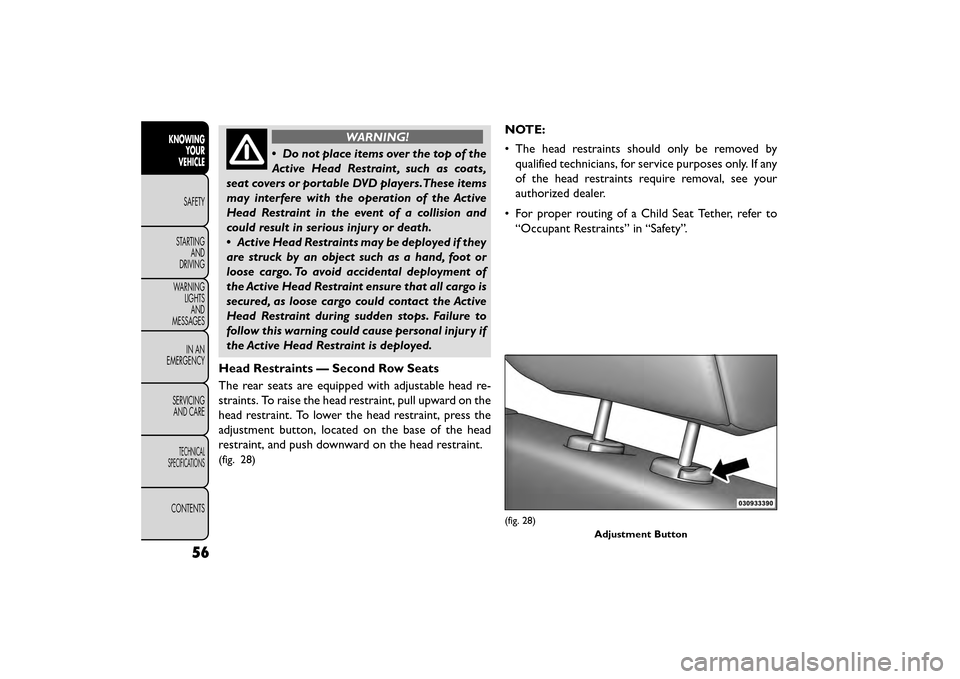
Head Restraints — Second Row Seats
The rear seats are equipped with adjustable head re-
straints. To raise the head restraint, pull upward on the
head restraint. To lower the head restraint, press the
adjustment button, located on the base of the head
restraint, and push downward on the head restraint.
(fig. 28)
NOTE:
• The head restraints should only be removed by qualified technicians, for service purposes only. If any
of the head restraints require removal, see your
authorized dealer.
• For proper routing of a Child Seat Tether, refer to “Occupant Restraints” in “Safety”.
(fig. 28)
Adjustment Button
56
KNOWINGYOUR
VEHICLE
SAFETY
STAR
TINGAND
DRIVING
WARNING LIGHTSAND
MESSAGES
IN AN
EMERGENCY
SERVICINGAND CARE
TECHNICAL
SPECIFICATIONS
CONTENTS
Page 174 of 412
LEFT-HAND SWITCH FUNCTIONS FOR
RADIO OPERATION
• Push the top of the switch to SEEK the next listen-able station up from the current setting.
• Push the bottom of the switch to SEEK the next listenable station down from the current setting.
• Push the button in the center of the switch to tune to the next preset that you have programmed.
LEFT-HAND SWITCH FUNCTIONS FOR
MEDIA (I.E., CD) OPERATION
• Push the top of the switch once to listen to the next track.
• Push the bottom of the switch once, either to listen to the beginning of the current track or to listen to
the beginning of the previous track, if it is within eight
seconds after the current track begins to play.
• Pushing the switch up will request the system to start playing the next track in the current play se-
quence with wrap around to the beginning of the play
sequence. If you are currently playing track 5, push
the switch up twice to begin playing track 7 (if
available).
• The button in the center of the left-hand switch has no function in this mode.UCONNECT® MULTIMEDIA VIDEO
ENTERTAINMENT SYSTEM (VES™)
(for versions/markets, where
provided)
Your rear seat Video Entertainment System (VES™) is
designed to give your family years of enjoyment. You
can play your favorite CDs or DVDs, listen to audio
over the wireless headphones, or plug and play a variety
of standard video games or audio devices. Please re-
view this Owner's Manual to become familiar with its
features and operation.
Getting Started
•Screen located in the overhead console:
Unfold
the overhead LCD screen by pushing the button on
the overhead console behind the screen.
(fig. 119)
• With the ignition switch in the ON or ACC position, turn the radio on by pushing the ON/OFF Volume
Control knob.
• When the Video Screen is open and a DVD is inserted into the radio, the screen turns on auto-
matically, the headphone transmitters turn on and
playback begins.
168
KNOWING YOUR
VEHICLE
SAFETY
STAR
TINGAND
DRIVING
WARNING LIGHTSAND
MESSAGES
IN AN
EMERGENCY
SERVICINGAND CARE
TECHNICAL
SPECIFICATIONS
CONTENTS
Page 177 of 412
Important Notes For Single Video Screen
System
• VES™ is able to transmit two channels of stereoaudio simultaneously.
• In split screen mode the left side equates to Channel 1 and right side equates to Channel 2.
• If a video source is selected on Channel 1, then Channel 2 is for audio only.
• When selecting a video source on Channel 1, the video will display on the screen and the audio will be
heard on Channel 1 in the headphones.
• Audio can be heard through the headphones even when the Video Screen is closed.
Play A DVD Using The Touchscreen Radio
1. Insert the DVD with the label facing up. The radio automatically selects the appropriate mode after
the disc is recognized and displays the menu screen
or starts playing the first track. Using The Remote Control
1. Push the MODE button on the Remote Control.
2. While looking at the Video Screen, highlight DISC
by either pushing Up/Down/Left/Right buttons or
by repeatedly pushing the MODE button, then push
ENTER.
NOTE:
• The VES™ system will retain the last setting when turned off.
• Viewing a DVD on the Touchscreen radio screen is not available in some regions or locations, the vehicle
must be stopped, and the shift lever must be in the
PARK position for vehicles with automatic transmis-
sion. In vehicles with manual transmission the park-
ing brake must be engaged even when the vehicle is
parked. Refer to local and state laws.
171
KNOWING
YOUR
VEHICLE
SAFETY
STAR
TING
AND
DRIVING
WARNING
LIGHTS
AND
MESSAGES
IN AN
EMERGENCY
SERVICING
AND CARE
TECHNICAL
SPECIFICATIONS
CONTENTS
Page 178 of 412
Using The Touchscreen Radio Controls
1. Press the “Player” button on the touchscreen.
2. Press the “Rear Entertainment” button on thetouchscreen to display the Rear Entertainment
Controls.
3. If the Rear Entertainment is turned off, press the “Power” button on the touchscreen.
4. Press the “1” or “2” Source button on the touch- screen based on the channel you want to change and
press the “Disc” button on the touchscreen. To exit
Press the “X” at the top right of the screen.
NOTE: Pressing the screen on a Touchscreen radio
while a DVD is playing full screen brings up basic
control functions for DVD play such as DVD Menu,
Seek Up/Down, Navigating through the menus, Exit.
The basic control functions screen will time out and
disappear from the screen. Remote Control Operation
Quick Reference Chart
This chart provides a quick reference of the remote
control button functions for the different radio modes
and menu screens.
NOTE:
• Ensure the remote control channel/screen selector
switch is set to the screen or channel to be con-
trolled.
• Ensure the headphone channel selector switch is set to the screen or channel to be listened to.
172
KNOWING YOUR
VEHICLE
SAFETY
STAR
TINGAND
DRIVING
WARNING LIGHTSAND
MESSAGES
IN AN
EMERGENCY
SERVICINGAND CARE
TECHNICAL
SPECIFICATIONS
CONTENTS
Page 183 of 412
5.▸▸ – In radio modes, press to seek the next tunable
station. In disc modes, press and hold to fast for-
ward through the current audio track or video
chapter. In menu modes use to navigate in the menu.
6. ▾/ Prev – In radio modes, press to select to the
previous station. In disc modes, press to advance to
the start of the current or previous audio track or
video chapter. In menu modes, use to navigate in the
menu.
7. MENU – Press to return to the main menu of a DVD disc, or to select playback modes (RANDOM for a
CD).
8. ▸/||
(Play/Pause) – Begin/resume or pause disc play.
9. ▪(Stop) – Stops disc play
10. PROG Up/Down – When listening to a radio mode, pressing PROG Up selects the next preset
and pressing PROG Down selects the previous
preset stored in the radio. When listening to com-
pressed audio on a data disc, PROG Up selects the
next directory and PROG Down selects the pre-
vious directory. When listening to a disc in a radio
with a multiple-disc changer, PROG Up selects the
next disc and PROG Down selects the previous
disc.
11. MUTE – Press to mute the headphone audio out- put for the selected channel. 12. SLOW – Press to slow playback of a DVD disc.
Press play (▸) to resume normal play.
13. STATUS – Press to display the current status while in a video mode display.
14. MODE – Press to change the mode of the selected channel. See the Mode Selection section of this
manual for details on changing modes.
15. SETUP – When in a video mode, press the SETUP button to access the display settings (see the
display settings section) to access the DVD setup
menu, select the menu button on the radio. When
a disc is loaded in the DVD player (for versions/
markets, where provided) and the VES™ mode is
selected and the disc is stopped, press the SETUP
button to access the DVD Setup menu. (see the
DVD Setup Menu of this manual.)
16. BACK – When navigating in menu mode, press to return to the previous screen. When navigating a
DVDs disc menu, the operation depends on the
disc’s contents.
17. ◂◂– In radio modes, press to seek to the previous
tunable station. In disc modes, press and hold to
fast rewind through the current audio track or
video chapter. In menu modes use to navigate in
the menu.
177
KNOWING
YOUR
VEHICLE
SAFETY
STAR
TING
AND
DRIVING
WARNING
LIGHTS
AND
MESSAGES
IN AN
EMERGENCY
SERVICING
AND CARE
TECHNICAL
SPECIFICATIONS
CONTENTS
Page 184 of 412
18. ENTER – Press to select the highlighted option ina menu.
19. ▴/ NEXT – In radio modes, press to select to the
next station. In disc modes, press to advance to
the next audio track or video chapter. In menu
modes, use to navigate in the menu.
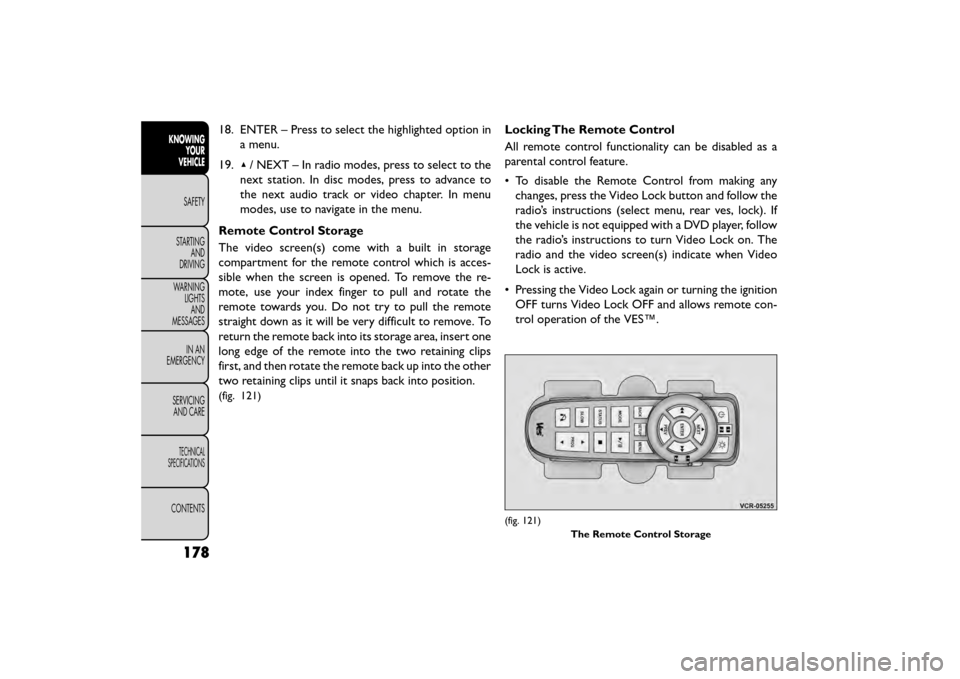
Remote Control Storage
The video screen(s) come with a built in storage
compartment for the remote control which is acces-
sible when the screen is opened. To remove the re-
mote, use your index finger to pull and rotate the
remote towards you. Do not try to pull the remote
straight down as it will be very difficult to remove. To
return the remote back into its storage area, insert one
long edge of the remote into the two retaining clips
first, and then rotate the remote back up into the other
two retaining clips until it snaps back into position.
(fig. 121)
Locking The Remote Control
All remote control functionality can be disabled as a
parental control feature.
• To disable the Remote Control from making any changes, press the Video Lock button and follow the
radio’s instructions (select menu, rear ves, lock). If
the vehicle is not equipped with a DVD player, follow
the radio’s instructions to turn Video Lock on. The
radio and the video screen(s) indicate when Video
Lock is active.
• Pressing the Video Lock again or turning the ignition OFF turns Video Lock OFF and allows remote con-
trol operation of the VES™.
(fig. 121)
The Remote Control Storage
178
KNOWINGYOUR
VEHICLE
SAFETY
STAR
TINGAND
DRIVING
WARNING LIGHTSAND
MESSAGES
IN AN
EMERGENCY
SERVICINGAND CARE
TECHNICAL
SPECIFICATIONS
CONTENTS
Page 186 of 412
Changing The Audio Mode For Headphones
1. Ensure the Remote Control channel/screen selec-tor switch is in the same position as the headphone
selector switch.
NOTE:
• When both switches are on Channel 1, the Remote is controlling Channel 1 and the headphones are
tuned to the audio of the VES™ Channel 1.
• When both switches are on Channel 2, the Remote is controlling Channel 2 and the headphones are
tuned to the audio of the VES™ Channel 2.
2. Push the MODE button on the remote control.
3. If the video screen is displaying a video source (such as a DVD Video), pushing STATUS shows the status
on a popup banner at the bottom of the screen.
Pushing the MODE button will advance to the next
mode. When the mode is in an audio only source
(such as FM), the Mode Selection menu appears on
screen.
4. When the Mode Selection menu appears on screen, use the cursor buttons on the remote control to
navigate to the available modes and push the EN-
TER button to select the new mode.
5. To cancel out of the Mode Selection menu, push the BACK button on the remote control. Replacing The Headphone Batteries
Each set of headphones requires two AAA batteries for
operation. To replace the batteries:
• Locate the battery compartment on the left ear cup
of the headphones, and then slide the battery cover
downward.
• Replace the batteries, making sure to orient them according to the polarity diagram shown.
• Replace the battery compartment cover.
Unwired® Stereo Headphone Lifetime
Limited Warranty
Who Does This Warranty Cover? This warranty
covers the initial user or purchaser ("you" or "your") of
this particular Unwired Technology LLC ("Unwired")
wireless headphone ("Product"). The warranty is not
transferable.
How Long Does The Coverage Last? This war-
ranty lasts as long as you own the Product.
What DoesThis Warranty Cover? Except as speci-
fied below, this warranty covers any Product that in
normal use is defective in workmanship or materials.
180
KNOWING YOUR
VEHICLE
SAFETY
STAR
TINGAND
DRIVING
WARNING LIGHTSAND
MESSAGES
IN AN
EMERGENCY
SERVICINGAND CARE
TECHNICAL
SPECIFICATIONS
CONTENTS