dvd FIAT FREEMONT 2015 1.G User Guide
[x] Cancel search | Manufacturer: FIAT, Model Year: 2015, Model line: FREEMONT, Model: FIAT FREEMONT 2015 1.GPages: 412, PDF Size: 3.37 MB
Page 187 of 412
What Does This Warranty Not Cover?This war-
ranty does not cover any damage or defect that results
from misuse, abuse or modification of the Product
other than by Unwired. Foam earpieces, which will
wear over time through normal use, are specifically not
covered (replacement foam is available for a nominal
charge). UNWIRED TECHNOLOGY IS NOT LIABLE
FOR ANY INJURIES OR DAMAGES TO PERSONS
OR PROPERTY RESULTING FROM THE USE OF, OR
ANY FAILURE OR DEFECT IN, THE PRODUCT,
NOR IS UNWIRED LIABLE FOR ANY GENERAL,
SPECIAL, DIRECT, INDIRECT, INCIDENTAL, CON-
SEQUENTIAL, EXEMPLARY, PUNITIVE OR OTHER
DAMAGES OF ANY KIND OR NATURE WHATSO-
EVER. Some states and jurisdictions may not allow the
exclusion or limitation of incidental or consequential
damages, so the above limitation may not apply to you.
This warranty gives you specific legal rights. You may
also have other rights, which vary from jurisdiction to
jurisdiction. What Will Unwired® Do?
Unwired®, at its option,
will repair or replace any defective Product. Unwired®
reserves the right to replace any discontinued Product
with a comparable model. THIS WARRANTY IS THE
SOLE WARRANTY FOR THIS PRODUCT, SETS
FORTH YOUR EXCLUSIVE REMEDY REGARDING
DEFECTIVE PRODUCTS, AND IS IN LIEU OF ALL
OTHER WARRANTIES (EXPRESS OR IMPLIED), IN-
CLUDING ANY WARRANTY OR MERCHANTABIL-
ITY OR FITNESS FOR A PARTICULAR PURPOSE.
Displaying Video
The video screen has two different operating modes, a
video mode (when displaying video such as DVD video,
Aux video, etc.) and an information mode as shown in
Figure 123. Because the VES™ is a dual channel system,
Information Mode is displayed in a split screen format.
When in Information Mode, the left side of the screen
is referred to as Channel 1 and the right side of the
screen is referred to as Channel 2.
181
KNOWING
YOUR
VEHICLE
SAFETY
STAR
TING
AND
DRIVING
WARNING
LIGHTS
AND
MESSAGES
IN AN
EMERGENCY
SERVICING
AND CARE
TECHNICAL
SPECIFICATIONS
CONTENTS
Page 190 of 412
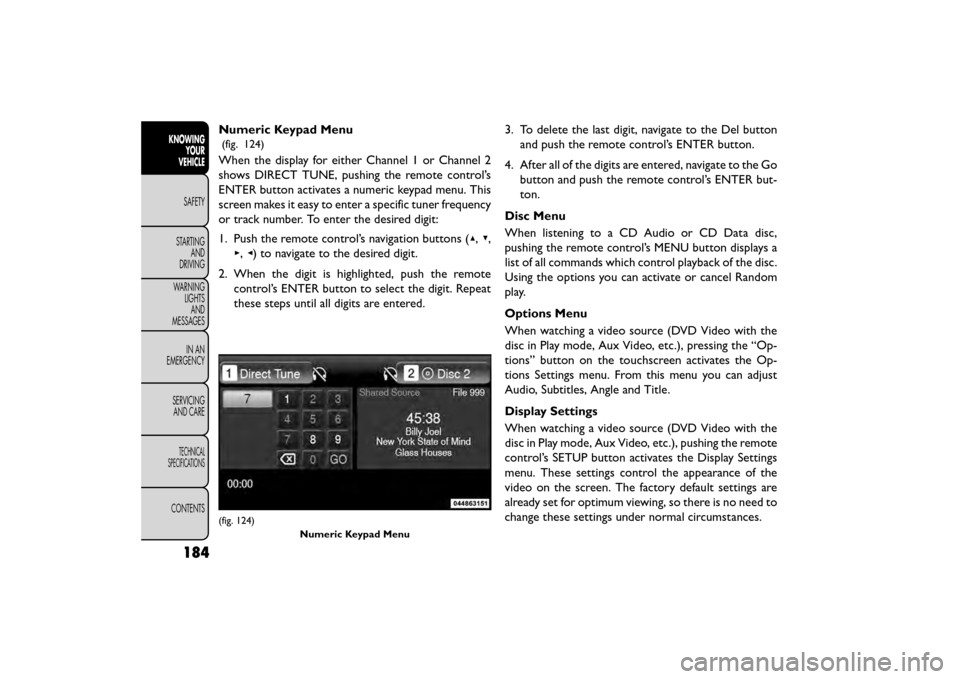
Numeric Keypad Menu
(fig. 124)
When the display for either Channel 1 or Channel 2
shows DIRECT TUNE, pushing the remote control’s
ENTER button activates a numeric keypad menu. This
screen makes it easy to enter a specific tuner frequency
or track number. To enter the desired digit:
1. Push the remote control’s navigation buttons (▴,▾,
▸, ◂) to navigate to the desired digit.
2. When the digit is highlighted, push the remote control’s ENTER button to select the digit. Repeat
these steps until all digits are entered. 3. To delete the last digit, navigate to the Del button
and push the remote control’s ENTER button.
4. After all of the digits are entered, navigate to the Go button and push the remote control’s ENTER but-
ton.
Disc Menu
When listening to a CD Audio or CD Data disc,
pushing the remote control’s MENU button displays a
list of all commands which control playback of the disc.
Using the options you can activate or cancel Random
play.
Options Menu
When watching a video source (DVD Video with the
disc in Play mode, Aux Video, etc.), pressing the “Op-
tions” button on the touchscreen activates the Op-
tions Settings menu. From this menu you can adjust
Audio, Subtitles, Angle and Title.
Display Settings
When watching a video source (DVD Video with the
disc in Play mode, Aux Video, etc.), pushing the remote
control’s SETUP button activates the Display Settings
menu. These settings control the appearance of the
video on the screen. The factory default settings are
already set for optimum viewing, so there is no need to
change these settings under normal circumstances.
(fig. 124) Numeric Keypad Menu
184
KNOWINGYOUR
VEHICLE
SAFETY
STAR
TINGAND
DRIVING
WARNING LIGHTSAND
MESSAGES
IN AN
EMERGENCY
SERVICINGAND CARE
TECHNICAL
SPECIFICATIONS
CONTENTS
Page 191 of 412
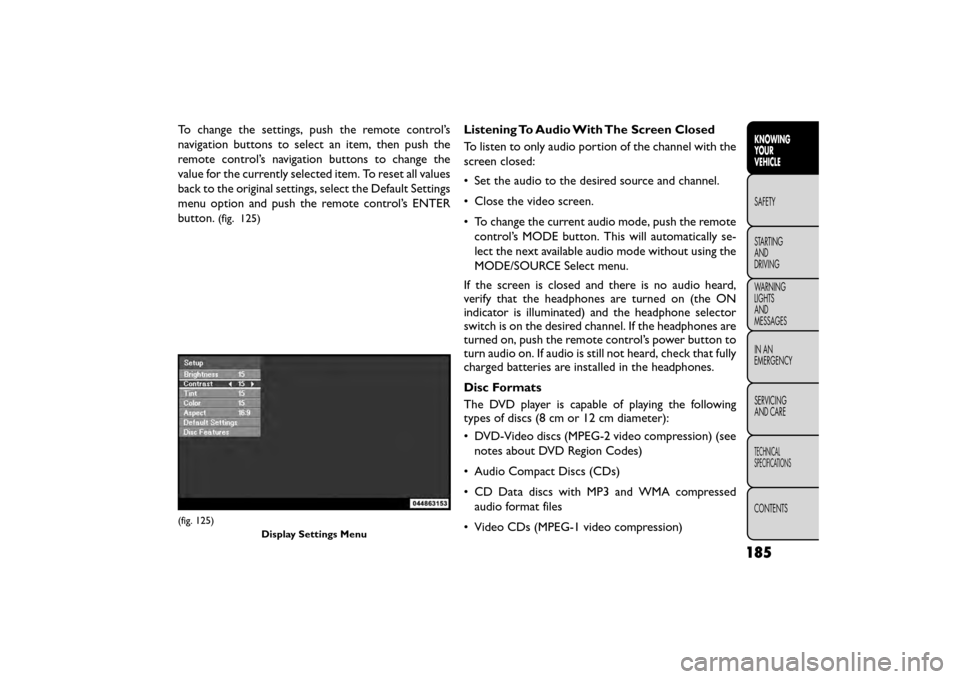
To change the settings, push the remote control’s
navigation buttons to select an item, then push the
remote control’s navigation buttons to change the
value for the currently selected item. To reset all values
back to the original settings, select the Default Settings
menu option and push the remote control’s ENTER
button.
(fig. 125)
Listening To Audio With The Screen Closed
To listen to only audio portion of the channel with the
screen closed:
• Set the audio to the desired source and channel.
• Close the video screen.
• To change the current audio mode, push the remotecontrol’s MODE button. This will automatically se-
lect the next available audio mode without using the
MODE/SOURCE Select menu.
If the screen is closed and there is no audio heard,
verify that the headphones are turned on (the ON
indicator is illuminated) and the headphone selector
switch is on the desired channel. If the headphones are
turned on, push the remote control’s power button to
turn audio on. If audio is still not heard, check that fully
charged batteries are installed in the headphones.
Disc Formats
The DVD player is capable of playing the following
types of discs (8 cm or 12 cm diameter):
• DVD-Video discs (MPEG-2 video compression) (see notes about DVD Region Codes)
• Audio Compact Discs (CDs)
• CD Data discs with MP3 and WMA compressed audio format files
• Video CDs (MPEG-1 video compression)
(fig. 125) Display Settings Menu
185
KNOWING
YOUR
VEHICLE
SAFETY
STAR
TING
AND
DRIVING
WARNING
LIGHTS
AND
MESSAGES
IN AN
EMERGENCY
SERVICING
AND CARE
TECHNICAL
SPECIFICATIONS
CONTENTS
Page 192 of 412
DVD Region Codes
The DVD player and many DVD discs are coded by
geographic region. These region codes must match in
order for the disc to play. If the region code for the
DVD disc does not match the region code for the
player, the disc will stop playing and a warning will be
displayed.
DVD Audio Support
When a DVD-Audio disc is inserted in the DVD player,
the DVD-Audio title on the disc is played by default
(most DVD-Audio discs also have a Video title, but the
Video title is ignored). All multi-channel program ma-
terial is automatically mixed down to two channels,
which may result in a lowered apparent volume level. If
you increase the volume level to account for this
change in level, remember to lower the volume before
changing the disc or to another mode.
Recorded Discs
The DVD player will play CD-R and CD-RW discs
recorded in CD-Audio or Video-CD format, or as a
CD-ROM containing MP3 or WMA files. The player
will also play DVD-Video content recorded to a
DVD-R, DVD-RW and DVD-ROM discs.
If you record a disc using a personal computer, there
may be cases where the DVD player may not be able to
play some or the entire disc, even if it is recorded in acompatible format and is playable on other players. To
help avoid playback problems, use the following guide-
lines when recording discs.
• Open sessions are ignored. Only sessions that are
closed are playable.
• For multi-session CDs that contain only multiple CD-Audio sessions, the player will renumber the
tracks so each track number is unique.
• For CD Data (or CD-ROM) discs, always use the ISO-9660 (Level 1 or Level 2), Joliet, or UDF format.
CD-DA may also be used for PCM Audio contained
on CD-Based Data.
• The player recognizes a maximum of 512 files and 99 folders per CD-R and CD-RW disc.
• Mixed media recordable DVD formats will only play the Video_TS portion of the disc.
If you are still having trouble writing a disc that is
playable in the DVD player, check with the disc record-
ing software publisher for more information about
burning playable discs.
The recommended method for labeling recordable
discs (CD-R, CD-RW, DVD-R and DVD-RW) is with a
permanent marker. Do not use adhesive labels as they
may separate from the disc, become stuck, and cause
permanent damage to the DVD player.
186
KNOWING YOUR
VEHICLE
SAFETY
STAR
TINGAND
DRIVING
WARNING LIGHTSAND
MESSAGES
IN AN
EMERGENCY
SERVICINGAND CARE
TECHNICAL
SPECIFICATIONS
CONTENTS
Page 193 of 412
Compressed Audio Files (MP3, WMA AND
ACC)
The DVD player is capable of playing MP3 (MPEG-1
Audio Layer 3 with data bitrates from 32 to 320 kbit/s,
including variable bit rates), WMA (All Standard 8.x,
9.x Windows Media Audio) and ACC (MPEG-4 audio;
sampling frequencies 8 to 48 kHz; mono and stereo)
audio files with the from a CD Data disc (usually a
CD-R or CD-RW).
• The DVD player always uses the file extension todetermine the audio format, so MP3 files must always
end with the extension ".mp3" or ".MP3", WMA files
must always end with the extension ".wma" or
"WMA", and ACC files must end with the extensions
“.acc” or “.m4a”. To prevent incorrect playback, do
not use these extensions for any other types of files.
• For MP3 files, ID3 tag data v1, v1.1, v2 and v2.4 (such as artist name, track title, album, etc.) are supported.
• Any file that is copy protected (such as those down- loaded from many online music stores) will not play.
The DVD player will automatically skip the file and
begin playing the next available file.
• Other compression formats such as AAC, MP3 Pro, Ogg Vorbis, and ATRAC3 will not play. The DVD
player will automatically skip the file and begin playing
the next available file. •If you are creating your own files, the recommended
fixed bit rate for MP3 files is between 96 and 192Kbps
and the recommended fixed bit rate for WMA files is
between 64 and 192Kbps. Variable bit rates are also
supported. For both formats, the recommended
sample rate is either 44.1kHz or 48kHz.
• To change the current file, use the remote control’s
or DVD player’s ▴button to advance to the next file,
or the ▾button to return to the start of the current
or previous file.
• To change the current directory, use the remote control’s PROG UP and Down buttons or Rewind/
skip back and fast fwd/skip forward.
Disc Errors
If the DVD player is unable to read the disc, a "Disc
Error" message is displayed on the Radio display and
the disc is automatically ejected. A dirty, damaged, or
incompatible disc format are all potential causes for a
"Disc Error" message.
If a disc has a damaged track which results in audible or
visible errors that persists for 2.0 seconds, the DVD
player will attempt to continue playing the disc by
skipping forward 1.0 to 3.0 seconds at a time. If the end
of the disc is reached, the DVD player will return to the
beginning of the disc and attempt to play the start of
the first track.
187
KNOWING
YOUR
VEHICLE
SAFETY
STAR
TING
AND
DRIVING
WARNING
LIGHTS
AND
MESSAGES
IN AN
EMERGENCY
SERVICING
AND CARE
TECHNICAL
SPECIFICATIONS
CONTENTS
Page 194 of 412
The DVD player may shut down during extremely hot
conditions, such as when the vehicle’s interior tem-
perature is above 49°C. When this occurs, the DVD
player will display "High Temp" and will shut off the
display until a safe temperature is reached. This shut-
down is necessary to protect the optics of the DVD
player.
Product Agreement
This product incorporates copyright protection tech-
nology that is protected by U.S. patents and other
intellectual property rights. Use of this copyright pro-
tection technology must be authorized by Macrovision,and is intended for home or other limited viewing uses
otherwise authorized by Macrovision. Reverse engi-
neering or disassembly is prohibited.
Dolby® Digital and MLP Lossless Manufactured
under license from Dolby Laboratories. "Dolby," "MLP
Lossless," and the double-D symbol are trademarks of
Dolby Laboratories. Confidential unpublished works.
Copyright 1992-1997 Dolby Laboratories. All rights
reserved.
188
KNOWING YOUR
VEHICLE
SAFETY
STAR
TINGAND
DRIVING
WARNING LIGHTSAND
MESSAGES
IN AN
EMERGENCY
SERVICINGAND CARE
TECHNICAL
SPECIFICATIONS
CONTENTS
Page 195 of 412
iPod®/USB/MP3 CONTROL (for
versions/markets, where
provided)
This feature allows an iPod® or external USB device to
be plugged into the USB port.
iPod® control supports Mini, 4G, Photo, Nano, 5G
iPod® and iPhone® devices. Some iPod® software
versions may not fully support the iPod® control
features. Please visit Apple’s website for software up-
dates.
For further information, refer to the Uconnect® User’s
Manual.
CD/DVD DISC MAINTENANCE
To keep a CD/DVD in good condition, take the follow-
ing precautions:
1. Handle the disc by its edge; avoid touching thesurface.
2. If the disc is stained, clean the surface with a soft cloth, wiping from center to edge.
3. Do not apply paper or tape to the disc; avoid scratching the disc.
4. Do not use solvents such as benzene, thinner, clean- ers, or anti-static sprays.
5. Store the disc in its case after playing.
6. Do not expose the disc to direct sunlight.
7. Do not store the disc where temperatures may become too high.
NOTE: If you experience difficulty in playing a particu-
lar disc, it may be damaged (e.g., scratched, reflective
coating removed, a hair, moisture or dew on the disc)
oversized, or have protection encoding. Try a known
good disc before considering disc player service.
189
KNOWING
YOUR
VEHICLE
SAFETY
STAR
TING
AND
DRIVING
WARNING
LIGHTS
AND
MESSAGES
IN AN
EMERGENCY
SERVICING
AND CARE
TECHNICAL
SPECIFICATIONS
CONTENTS
Page 315 of 412
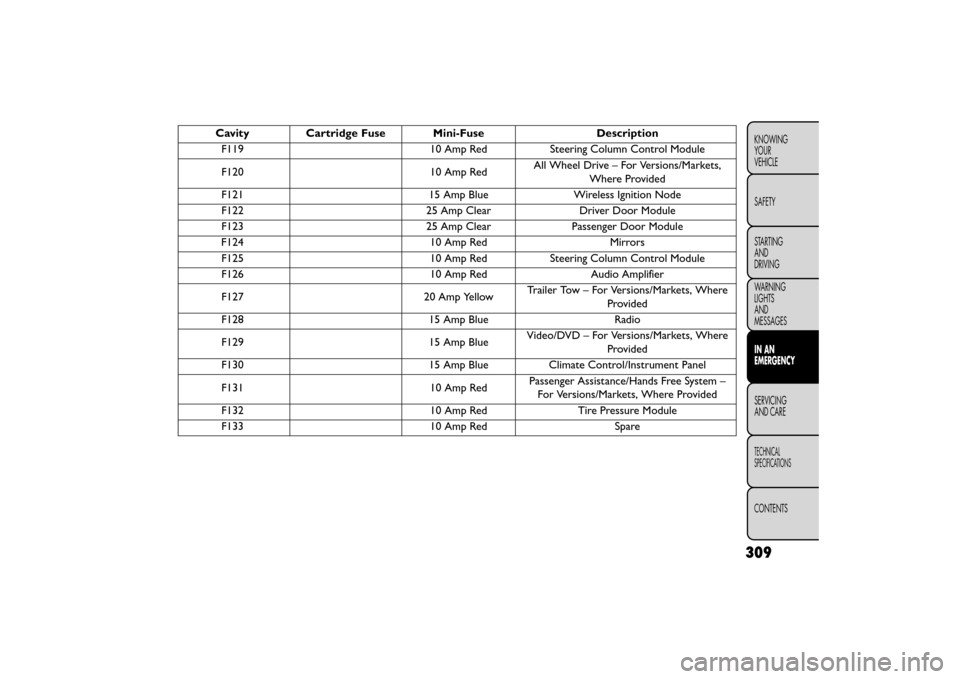
CavityCartridge Fuse Mini-Fuse Description
F119 10 Amp RedSteering Column Control Module
F120 10 Amp RedAll Wheel Drive – For Versions/Markets,
Where Provided
F121 15 Amp BlueWireless Ignition Node
F122 25 Amp ClearDriver Door Module
F123 25 Amp ClearPassenger Door Module
F124 10 Amp RedMirrors
F125 10 Amp RedSteering Column Control Module
F126 10 Amp RedAudio Amplifier
F127 20 Amp YellowTrailer Tow – For Versions/Markets, Where
Provided
F128 15 Amp BlueRadio
F129 15 Amp BlueVideo/DVD – For Versions/Markets, Where
Provided
F130 15 Amp BlueClimate Control/Instrument Panel
F131 10 Amp RedPassenger Assistance/Hands Free System –
For Versions/Markets, Where Provided
F132 10 Amp RedTire Pressure Module
F133 10 Amp RedSpare
309
KNOWING
YOUR
VEHICLE
SAFETY
STARTING
AND
DRIVING
WARNING
LIGHTS
AND
MESSAGES
IN AN
EMERGENCY
SERVICING
AND
CARE
TECHNICAL
SPECIFICATIONS
CONTENTS
Page 399 of 412
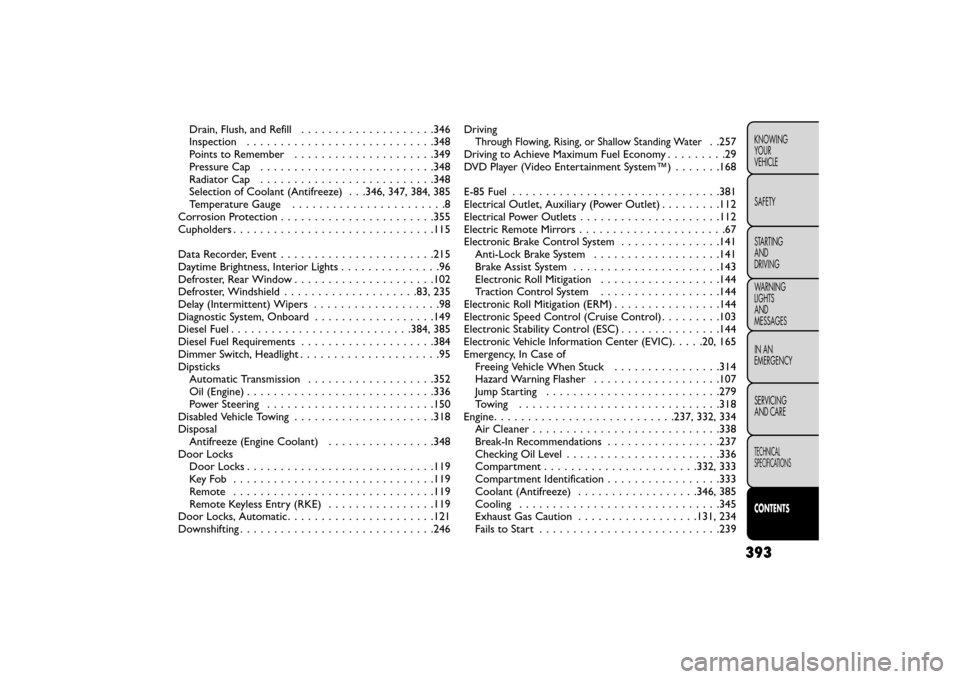
Drain, Flush, and Refill . . . . . . . .............346
Inspection ........................... .348
Points to Remember . . . . . . . . . ............349
Pressure Cap . . . . . . . . . . . . . . . ...........348
Radiator Cap ......................... .348
Selection of Coolant (Antifreeze) . . .346, 347, 384, 385
Temperature Gauge . ......................8
Corrosion Protection . . . ................... .355
Cupholders ............................. .115
Data Recorder, Event ...................... .215
Daytime Brightness, Interior Lights . ..............96
Defroster, Rear Window . . . . .................102
Defroster, Windshield ................... .83, 235
Delay (Intermittent) Wipers . . . . . ..............98
Diagnostic System, Onboard ..................149
Diesel Fuel . . . . . . . . .................. .384, 385
Diesel Fuel Requirements . . . . . . . . . ...........384
Dimmer Switch, Headlight .....................95
Dipsticks Automatic Transmission . . . ................352
Oil (Engine) . . . . . . . . . .................. .336
Power Steering . . . . . . . ..................150
Disabled Vehicle Towing . ................... .318
Disposal Antifreeze (Engine Coolant) . . . . . ...........348
Door Locks Door Locks ........................... .119
KeyFob ............................. .119
Remote . . . . . . . . . . . . . . . ...............119
Remote Keyless Entry (RKE) ................119
Door Locks, Automatic . . . . . . . . . . ............121
Downshifting . . . ......................... .246Driving
Through Flowing, Rising, or Shallow Standing Water. .257
Driving to Achieve Maximum Fuel Economy .........29
DVD Player (Video Entertainment System™) .......168
E-85 Fuel .............................. .381
Electrical Outlet, Auxiliary (Power Outlet) .........112
Electrical Power Outlets .................... .112
Electric Remote Mirrors ......................67
Electronic Brake Control System ...............141
Anti-Lock Brake System .................. .141
Brake Assist System ..................... .143
Electronic Roll Mitigation ..................144
Traction Control System ..................144
Electronic Roll Mitigation (ERM) ................144
Electronic Speed Control (Cruise Control) .........103
Electronic Stability Control (ESC) ...............144
Electronic Vehicle Information Center (EVIC) .....20, 165
Emergency, In Case of Freeing Vehicle When Stuck ................314
Hazard Warning Flasher .................. .107
Jump Starting ......................... .279
Towing ............................. .318
Engine .......................... .237, 332, 334
Air Cleaner ........................... .338
Break-In Recommendations .................237
Checking Oil Level ...................... .336
Compartment ...................... .332, 333
Compartment Identification .................333
Coolant (Antifreeze) ................. .346, 385
Cooling ............................. .345
Exhaust Gas Caution ................. .131, 234
Fails to Start .......................... .239
393
KNOWING
YOUR
VEHICLE
SAFETY
STARTING
AND
DRIVING
WARNING
LIGHTS
AND
MESSAGES
IN AN
EMERGENCY
SERVICING
AND CARE
TECHNICAL
SPECIFICATIONS
CONTENTS