ECO mode FIAT FREEMONT 2016 1.G User Guide
[x] Cancel search | Manufacturer: FIAT, Model Year: 2016, Model line: FREEMONT, Model: FIAT FREEMONT 2016 1.GPages: 412, PDF Size: 3.36 MB
Page 90 of 412
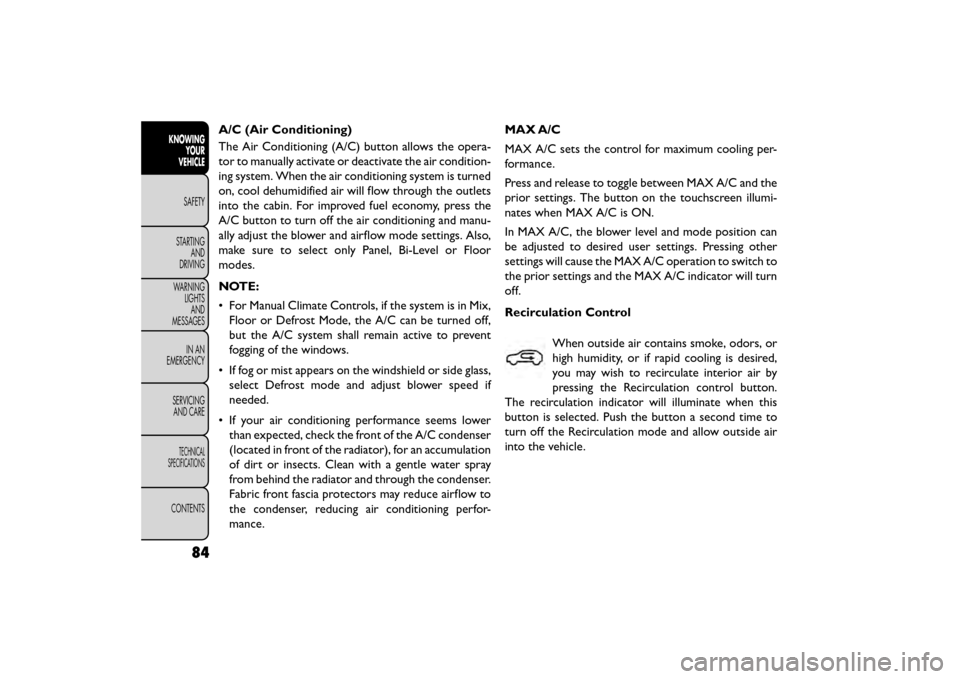
A/C (Air Conditioning)
The Air Conditioning (A/C) button allows the opera-
tor to manually activate or deactivate the air condition-
ing system. When the air conditioning system is turned
on, cool dehumidified air will flow through the outlets
into the cabin. For improved fuel economy, press the
A/C button to turn off the air conditioning and manu-
ally adjust the blower and airflow mode settings. Also,
make sure to select only Panel, Bi-Level or Floor
modes.
NOTE:
• For Manual Climate Controls, if the system is in Mix,Floor or Defrost Mode, the A/C can be turned off,
but the A/C system shall remain active to prevent
fogging of the windows.
• If fog or mist appears on the windshield or side glass, select Defrost mode and adjust blower speed if
needed.
• If your air conditioning performance seems lower than expected, check the front of the A/C condenser
(located in front of the radiator), for an accumulation
of dirt or insects. Clean with a gentle water spray
from behind the radiator and through the condenser.
Fabric front fascia protectors may reduce airflow to
the condenser, reducing air conditioning perfor-
mance. MAX A/C
MAX A/C sets the control for maximum cooling per-
formance.
Press and release to toggle between MAX A/C and the
prior settings. The button on the touchscreen illumi-
nates when MAX A/C is ON.
In MAX A/C, the blower level and mode position can
be adjusted to desired user settings. Pressing other
settings will cause the MAX A/C operation to switch to
the prior settings and the MAX A/C indicator will turn
off.
Recirculation Control
When outside air contains smoke, odors, or
high humidity, or if rapid cooling is desired,
you may wish to recirculate interior air by
pressing the Recirculation control button.
The recirculation indicator will illuminate when this
button is selected. Push the button a second time to
turn off the Recirculation mode and allow outside air
into the vehicle.
84
KNOWING YOUR
VEHICLE
SAFETY
STAR
TINGAND
DRIVING
WARNING LIGHTSAND
MESSAGES
IN AN
EMERGENCY
SERVICINGAND CARE
TECHNICAL
SPECIFICATIONS
CONTENTS
Page 92 of 412
The operator can also select the direction of the
airflow by selecting one of the available mode settings.
A/C operation and Recirculation control can also be
manually selected in Manual operation.
NOTE:Each of these features operates independently
from each other. If any feature is controlled manually,
temperature control will continue to operate auto-
matically.
Rear Automatic Temperature Control (ATC)
(for versions/markets, where provided)
The rear ATC system has floor air outlets at the rear
right side of the 3rd Row seats and overhead outlets at
each outboard rear seating position. The system pro-
vides heated air through the floor outlets or cool,
dehumidified air through the headliner outlets.
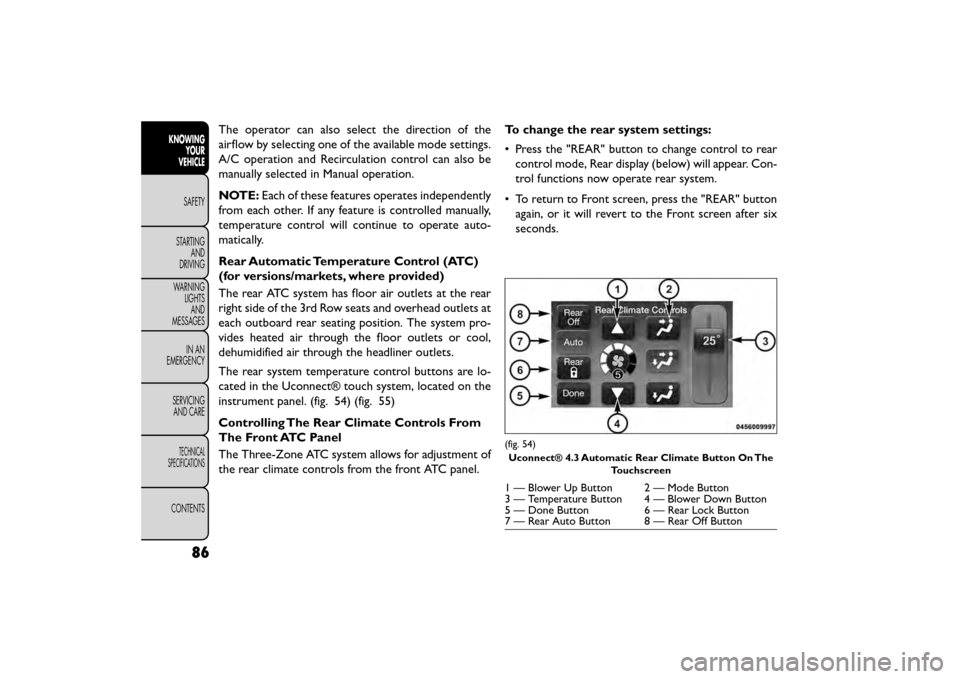
The rear system temperature control buttons are lo-
cated in the Uconnect® touch system, located on the
instrument panel. (fig. 54) (fig. 55)
Controlling The Rear Climate Controls From
The Front ATC Panel
The Three-Zone ATC system allows for adjustment of
the rear climate controls from the front ATC panel. To change the rear system settings:
• Press the "REAR" button to change control to rear
control mode, Rear display (below) will appear. Con-
trol functions now operate rear system.
• To return to Front screen, press the "REAR" button again, or it will revert to the Front screen after six
seconds.
(fig. 54)
Uconnect® 4.3 Automatic Rear Climate Button On The Touchscreen
1 — Blower Up Button 2 — Mode Button
3 — Temperature Button 4 — Blower Down Button
5 — Done Button 6 — Rear Lock Button
7 — Rear Auto Button 8 — Rear Off Button
86
KNOWINGYOUR
VEHICLE
SAFETY
STAR
TINGAND
DRIVING
WARNING LIGHTSAND
MESSAGES
IN AN
EMERGENCY
SERVICINGAND CARE
TECHNICAL
SPECIFICATIONS
CONTENTS
Page 93 of 412
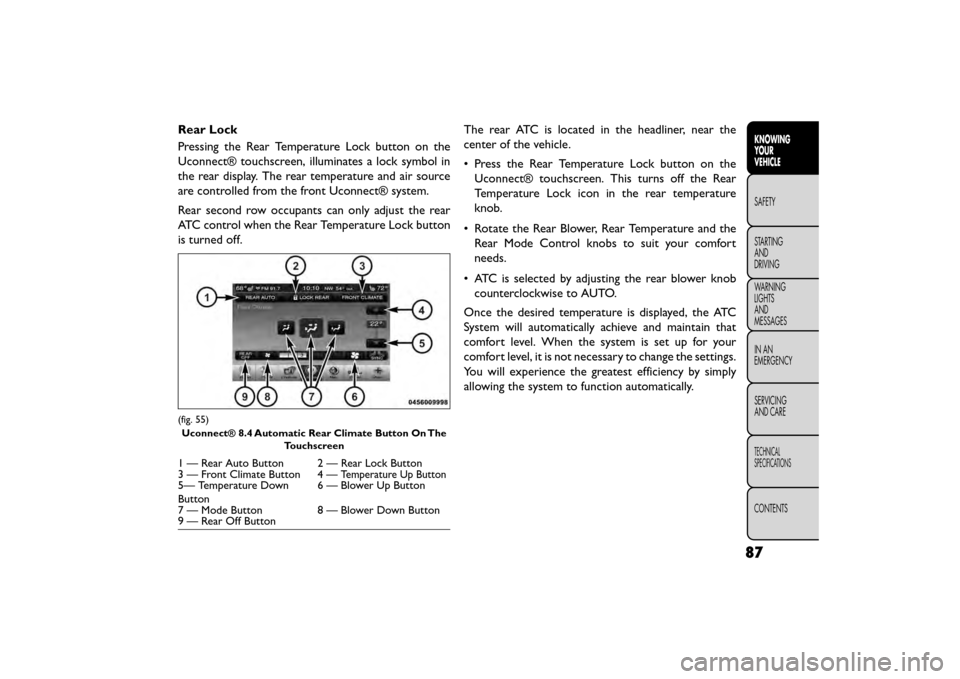
Rear Lock
Pressing the Rear Temperature Lock button on the
Uconnect® touchscreen, illuminates a lock symbol in
the rear display. The rear temperature and air source
are controlled from the front Uconnect® system.
Rear second row occupants can only adjust the rear
ATC control when the Rear Temperature Lock button
is turned off.The rear ATC is located in the headliner, near the
center of the vehicle.
• Press the Rear Temperature Lock button on the
Uconnect® touchscreen. This turns off the Rear
Temperature Lock icon in the rear temperature
knob.
• Rotate the Rear Blower, Rear Temperature and the Rear Mode Control knobs to suit your comfort
needs.
• ATC is selected by adjusting the rear blower knob counterclockwise to AUTO.
Once the desired temperature is displayed, the ATC
System will automatically achieve and maintain that
comfort level. When the system is set up for your
comfort level, it is not necessary to change the settings.
You will experience the greatest efficiency by simply
allowing the system to function automatically.
(fig. 55) Uconnect® 8.4 Automatic Rear Climate Button On The Touchscreen
1 — Rear Auto Button 2 — Rear Lock Button
3 — Front Climate Button 4 —Temperature Up Button5— Temperature Down
Button 6 — Blower Up Button
7 — Mode Button 8 — Blower Down Button
9 — Rear Off Button
87
KNOWING
YOUR
VEHICLE
SAFETY
STAR
TING
AND
DRIVING
WARNING
LIGHTS
AND
MESSAGES
IN AN
EMERGENCY
SERVICING
AND CARE
TECHNICAL
SPECIFICATIONS
CONTENTS
Page 95 of 412
Rear Mode Control
• Auto Mode
The rear system automatically maintains the correct
mode and comfort level desired by the rear seat occu-
pants.
• Headliner ModeAir comes from the outlets in the headliner.
Each of these outlets can be individually adjusted
to direct the flow of air. Moving the air vanes of the
outlets to one side will shut off the airflow.
• Bi-Level Mode Air comes from both the headliner outlets and
the floor outlets.
NOTE: In many temperature positions, the BI-LEVEL
mode is designed to provide cooler air out of the
headliner outlets and warmer air from the floor out-
lets.
• Floor Mode Air comes from the floor outlets. Operating Tips
NOTE:
Refer to the chart at the end of this section for
suggested control settings for various weather condi-
tions.
Summer Operation
The engine cooling system must be protected with a
high-quality antifreeze coolant to provide proper cor-
rosion protection and to protect against engine over-
heating. A solution of 50% OAT (Organic Additive
Technology) coolant that meets the requirements of
Fiat Classification 9.55522 and 50% water is recom-
mended. Refer to “Maintenance Procedures” in “Ser-
vice and Care” for proper coolant selection.
Winter Operation
Use of the air Recirculation mode during winter
months is not recommended because it may cause
window fogging.
Vacation Storage
Any time you store your vehicle or keep it out of
service (i.e., vacation) for two weeks or more, run the
air conditioning system at idle for about five minutes in
the fresh air and high blower setting. This will ensure
adequate system lubrication to minimize the possibility
of compressor damage when the system is started
again.
89
KNOWING
YOUR
VEHICLE
SAFETY
STAR
TING
AND
DRIVING
WARNING
LIGHTS
AND
MESSAGES
IN AN
EMERGENCY
SERVICING
AND CARE
TECHNICAL
SPECIFICATIONS
CONTENTS
Page 96 of 412
Window Fogging
Interior fogging on the windshield can be quickly re-
moved by turning the mode selector to Defrost. The
Defrost/Floor mode can be used to maintain a clear
windshield and provide sufficient heating. If side win-
dow fogging becomes a problem, increase the blower
speed. Vehicle windows tend to fog on the inside in
mild but rainy or humid weather.
NOTE:
• Recirculation mode without A/C should not be usedfor long periods, as fogging may occur.
• Automatic Temperature Controls (ATC) will auto- matically adjust the climate control settings to re-
duce or eliminate window fogging on the front wind-
shield. When this occurs, recirculation will be
unavailable.
Outside Air Intake
Make sure the air intake, located directly in front of the
windshield, is free of obstructions such as leaves.
Leaves collected in the air intake may reduce airflow,
and if they enter the plenum, they could plug the water
drains. In winter months, make sure the air intake is
clear of ice, slush, and snow.
A/C Air Filter
The climate control system filters outside air contain-
ing dust, pollen and some odors. Strong odors cannot
be totally filtered out. Refer to “Maintenance Proce-
dures” in “Servicing and Care” for filter replacement
instructions.
90
KNOWING YOUR
VEHICLE
SAFETY
STAR
TINGAND
DRIVING
WARNING LIGHTSAND
MESSAGES
IN AN
EMERGENCY
SERVICINGAND CARE
TECHNICAL
SPECIFICATIONS
CONTENTS
Page 98 of 412
LIGHTS
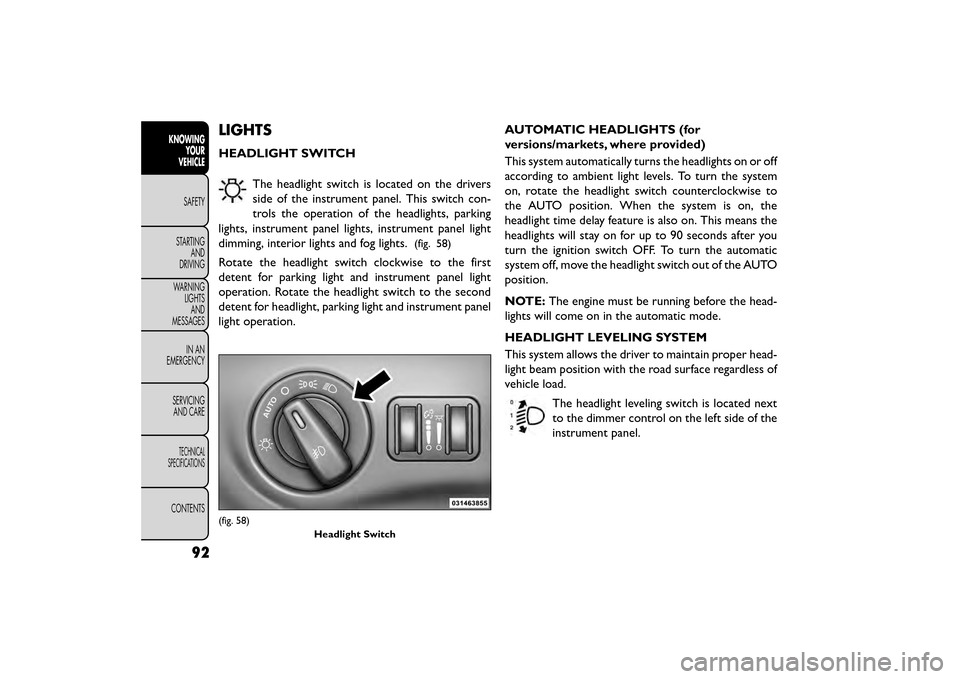
HEADLIGHT SWITCHThe headlight switch is located on the drivers
side of the instrument panel. This switch con-
trols the operation of the headlights, parking
lights, instrument panel lights, instrument panel light
dimming, interior lights and fog lights.
(fig. 58)
Rotate the headlight switch clockwise to the first
detent for parking light and instrument panel light
operation. Rotate the headlight switch to the second
detent for headlight, parking light and instrument panel
light operation. AUTOMATIC HEADLIGHTS (for
versions/markets, where provided)
This system automatically turns the headlights on or off
according to ambient light levels. To turn the system
on, rotate the headlight switch counterclockwise to
the AUTO position. When the system is on, the
headlight time delay feature is also on. This means the
headlights will stay on for up to 90 seconds after you
turn the ignition switch OFF. To turn the automatic
system off, move the headlight switch out of the AUTO
position.
NOTE:
The engine must be running before the head-
lights will come on in the automatic mode.
HEADLIGHT LEVELING SYSTEM
This system allows the driver to maintain proper head-
light beam position with the road surface regardless of
vehicle load.
The headlight leveling switch is located next
to the dimmer control on the left side of the
instrument panel.
(fig. 58) Headlight Switch
92
KNOWINGYOUR
VEHICLE
SAFETY
STAR
TINGAND
DRIVING
WARNING LIGHTSAND
MESSAGES
IN AN
EMERGENCY
SERVICINGAND CARE
TECHNICAL
SPECIFICATIONS
CONTENTS
Page 102 of 412
INTERIOR LIGHTS
The interior lights come on when a door is opened.
To protect the battery, the interior lights will turn off
automatically 10 minutes after the ignition switch is
moved to the LOCK position. This will occur if the
interior lights were switched on manually or are on
because a door is open. This includes the glove box
light, but not the trunk light. To restore interior light
operation, either turn the ignition switch ON or cycle
the light switch.
DIMMER CONTROLS
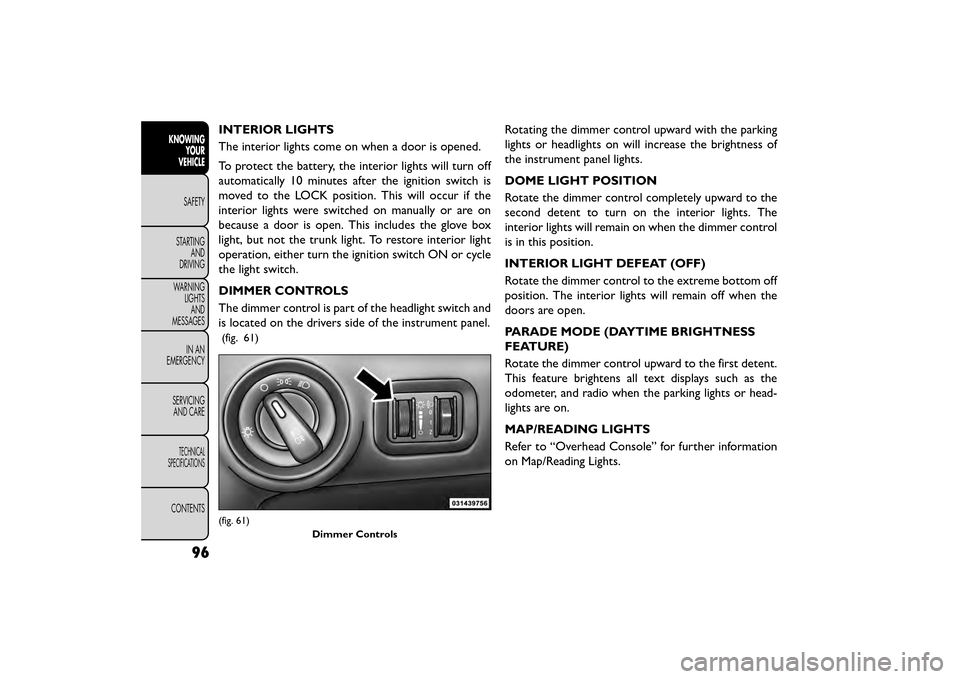
The dimmer control is part of the headlight switch and
is located on the drivers side of the instrument panel.
(fig. 61)
Rotating the dimmer control upward with the parking
lights or headlights on will increase the brightness of
the instrument panel lights.
DOME LIGHT POSITION
Rotate the dimmer control completely upward to the
second detent to turn on the interior lights. The
interior lights will remain on when the dimmer control
is in this position.
INTERIOR LIGHT DEFEAT (OFF)
Rotate the dimmer control to the extreme bottom off
position. The interior lights will remain off when the
doors are open.
PARADE MODE (DAYTIME BRIGHTNESS
FEATURE)
Rotate the dimmer control upward to the first detent.
This feature brightens all text displays such as the
odometer, and radio when the parking lights or head-
lights are on.
MAP/READING LIGHTS
Refer to “Overhead Console” for further information
on Map/Reading Lights.
(fig. 61)Dimmer Controls
96
KNOWINGYOUR
VEHICLE
SAFETY
STAR
TINGAND
DRIVING
WARNING LIGHTSAND
MESSAGES
IN AN
EMERGENCY
SERVICINGAND CARE
TECHNICAL
SPECIFICATIONS
CONTENTS
Page 123 of 412
POWER SUNROOF (for
versions/markets, where
provided)
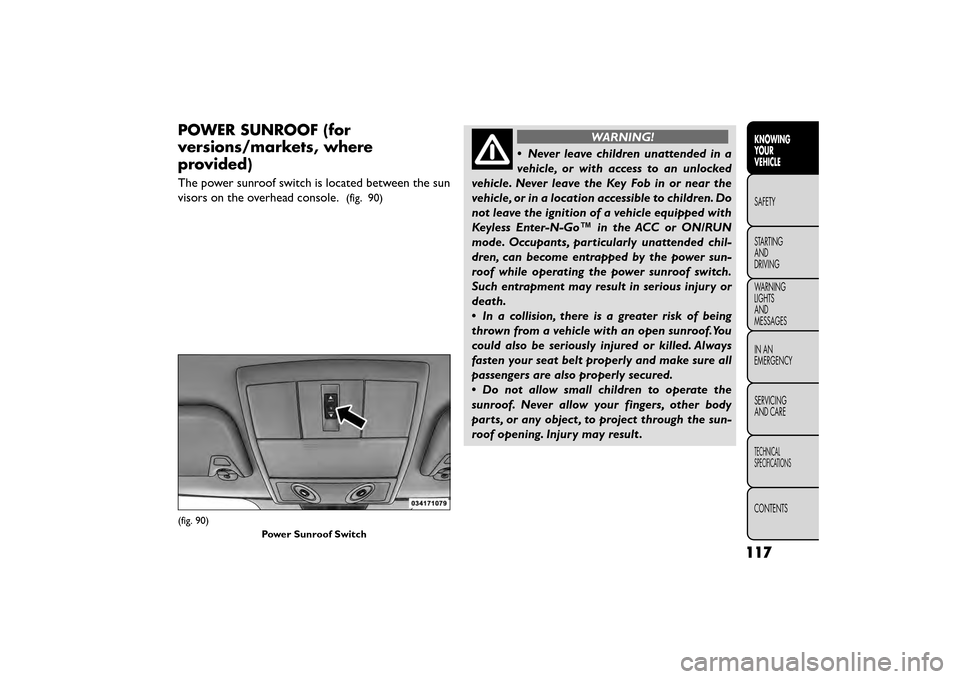
The power sunroof switch is located between the sun
visors on the overhead console.
(fig. 90)
WARNING!
• Never leave children unattended in a
v ehi
cle, or with access to an unlocked
vehicle. Never leave the Key Fob in or near the
vehicle, or in a location accessible to children. Do
not leave the ignition of a vehicle equipped with
Keyless Enter-N-Go™ in the ACC or ON/RUN
mode. Occupants, particularly unattended chil-
dren, can become entrapped by the power sun-
roof while operating the power sunroof switch.
Such entrapment may result in serious injury or
death.
• In a collision, there is a greater risk of being
thrown from a vehicle with an open sunroof.You
could also be seriously injured or killed. Always
fasten your seat belt properly and make sure all
passengers are also properly secured.
• Do not allow small children to operate the
sunroof. Never allow your fingers, other body
parts, or any object , to project through the sun-
roof opening. Injury may result .
(fig. 90)
Power Sunroof Switch
117
KNOWING
YOUR
VEHICLE
SAFETY
STAR
TING
AND
DRIVING
WARNING
LIGHTS
AND
MESSAGES
IN AN
EMERGENCY
SERVICING
AND CARE
TECHNICAL
SPECIFICATIONS
CONTENTS
Page 124 of 412
OPENING SUNROOF — EXPRESS
Press the switch rearward and release it within one-half
second and the sunroof will open automatically from
any position. The sunroof will open fully and stop
automatically. This is called “Express Open”. During
Express Open operation, any movement of the sunroof
switch will stop the sunroof.
OPENING SUNROOF — MANUAL MODE
To open the sunroof, press and hold the switch rear-
ward to full open. Any release of the switch will stop
the movement and the sunroof will remain in a partially
opened condition until the switch is pushed and held
rearward again.
CLOSING SUNROOF — EXPRESS
Press the switch forward and release it within one-half
second and the sunroof will close automatically from
any position. The sunroof will close fully and stop
automatically. This is called “Express Close”. During
Express Close operation, any movement of the switch
will stop the sunroof.
CLOSING SUNROOF — MANUAL MODE
To close the sunroof, press and hold the switch in the
forward position. Any release of the switch will stop
the movement and the sunroof will remain in a partially
closed condition until the switch is pushed and held
forward again.PINCH PROTECT FEATURE
This feature will detect an obstruction in the opening
of the sunroof during Express Close operation. If an
obstruction in the path of the sunroof is detected, the
sunroof will automatically retract. Remove the ob-
struction if this occurs. Next, press the switch forward
and release to Express Close.
VENTING SUNROOF — EXPRESS
Press and release the Vent button within one half
second and the sunroof will open to the vent position.
This is called “Express Vent” and it will occur regardless
of sunroof position. During Express Vent operation,
any movement of the switch will stop the sunroof.
SUNSHADE OPERATION
The sunshade can be opened manually. However, the
sunshade will open automatically as the sunroof opens.
NOTE:
The sunshade cannot be closed if the sunroof
is open.
WIND BUFFETING
Wind buffeting can be described as the perception of
pressure on the ears or a helicopter-type sound in the
ears. Your vehicle may exhibit wind buffeting with the
windows down, or the sunroof (for versions/markets,
where provided) in certain open or partially open
positions. This is a normal occurrence and can be
118
KNOWING YOUR
VEHICLE
SAFETY
STAR
TINGAND
DRIVING
WARNING LIGHTSAND
MESSAGES
IN AN
EMERGENCY
SERVICINGAND CARE
TECHNICAL
SPECIFICATIONS
CONTENTS
Page 133 of 412
WINDOWS
POWER WINDOWS
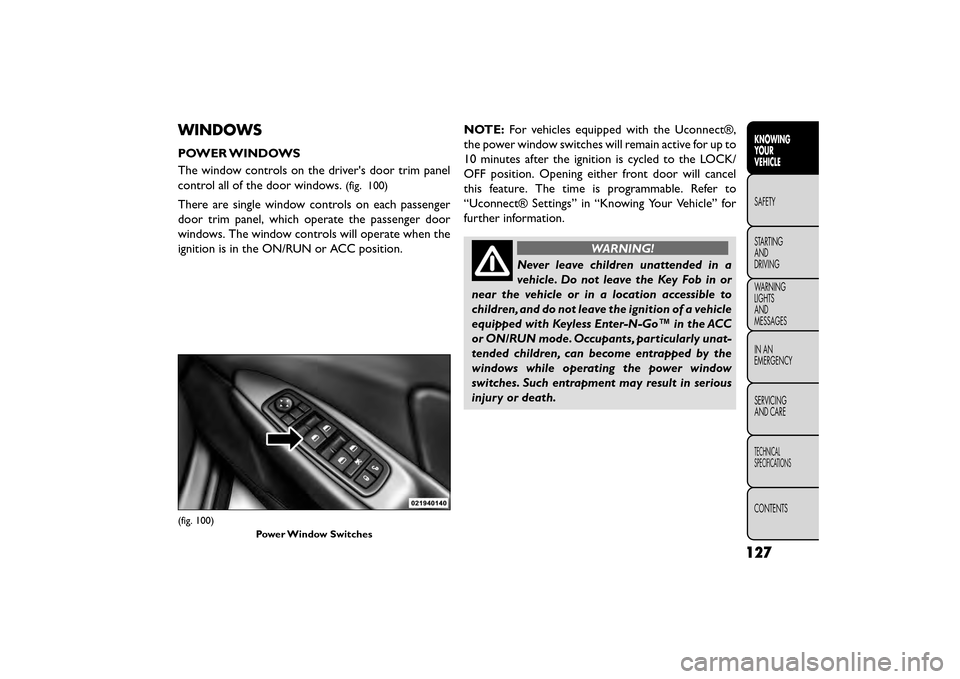
The window controls on the driver's door trim panel
control all of the door windows.
(fig. 100)
There are single window controls on each passenger
door trim panel, which operate the passenger door
windows. The window controls will operate when the
ignition is in the ON/RUN or ACC position.NOTE:
For vehicles equipped with the Uconnect®,
the power window switches will remain active for up to
10 minutes after the ignition is cycled to the LOCK/
OFF position. Opening either front door will cancel
this feature. The time is programmable. Refer to
“Uconnect® Settings” in “Knowing Your Vehicle” for
further information.
WARNING!
Never leave children unattended in a
vehi cle
. Do not leave the Key Fob in or
near the vehicle or in a location accessible to
children, and do not leave the ignition of a vehicle
equipped with Keyless Enter-N-Go™ in the ACC
or ON/RUN mode. Occupants, particularly unat-
tended children, can become entrapped by the
windows while operating the power window
switches. Such entrapment may result in serious
injury or death.
(fig. 100)
Power Window Switches
127
KNOWING
YOUR
VEHICLE
SAFETY
STAR
TING
AND
DRIVING
WARNING
LIGHTS
AND
MESSAGES
IN AN
EMERGENCY
SERVICING
AND CARE
TECHNICAL
SPECIFICATIONS
CONTENTS