radio FIAT FREEMONT 2016 1.G User Guide
[x] Cancel search | Manufacturer: FIAT, Model Year: 2016, Model line: FREEMONT, Model: FIAT FREEMONT 2016 1.GPages: 412, PDF Size: 3.36 MB
Page 102 of 412
INTERIOR LIGHTS
The interior lights come on when a door is opened.
To protect the battery, the interior lights will turn off
automatically 10 minutes after the ignition switch is
moved to the LOCK position. This will occur if the
interior lights were switched on manually or are on
because a door is open. This includes the glove box
light, but not the trunk light. To restore interior light
operation, either turn the ignition switch ON or cycle
the light switch.
DIMMER CONTROLS
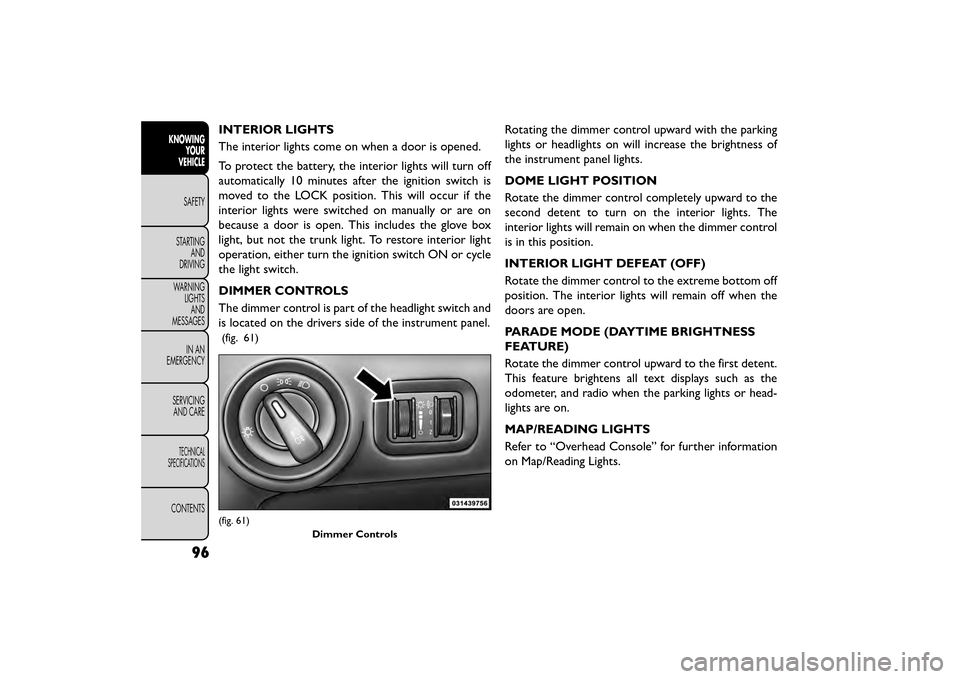
The dimmer control is part of the headlight switch and
is located on the drivers side of the instrument panel.
(fig. 61)
Rotating the dimmer control upward with the parking
lights or headlights on will increase the brightness of
the instrument panel lights.
DOME LIGHT POSITION
Rotate the dimmer control completely upward to the
second detent to turn on the interior lights. The
interior lights will remain on when the dimmer control
is in this position.
INTERIOR LIGHT DEFEAT (OFF)
Rotate the dimmer control to the extreme bottom off
position. The interior lights will remain off when the
doors are open.
PARADE MODE (DAYTIME BRIGHTNESS
FEATURE)
Rotate the dimmer control upward to the first detent.
This feature brightens all text displays such as the
odometer, and radio when the parking lights or head-
lights are on.
MAP/READING LIGHTS
Refer to “Overhead Console” for further information
on Map/Reading Lights.
(fig. 61)Dimmer Controls
96
KNOWINGYOUR
VEHICLE
SAFETY
STAR
TINGAND
DRIVING
WARNING LIGHTSAND
MESSAGES
IN AN
EMERGENCY
SERVICINGAND CARE
TECHNICAL
SPECIFICATIONS
CONTENTS
Page 118 of 412
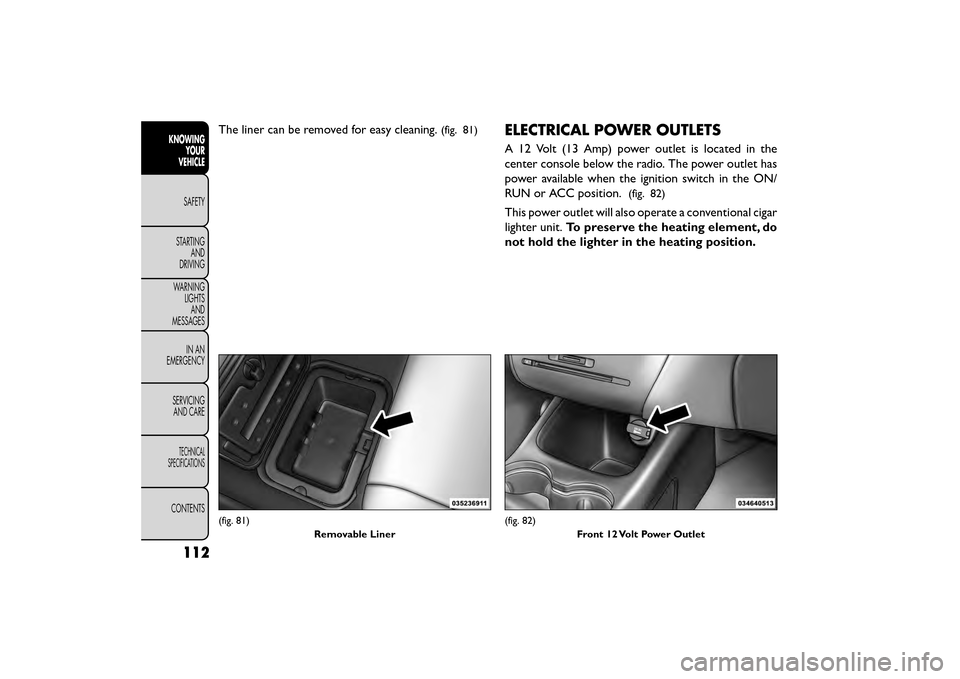
The liner can be removed for easy cleaning.(fig. 81)ELECTRICAL POWER OUTLETS
A 12 Volt (13 Amp) power outlet is located in the
center console below the radio. The power outlet has
power available when the ignition switch in the ON/
RUN or ACC position.
(fig. 82)
This power outlet will also operate a conventional cigar
lighter unit.To preserve the heating element, do
not hold the lighter in the heating position.
(fig. 81)
Removable Liner(fig. 82)Front 12 Volt Power Outlet
112
KNOWINGYOUR
VEHICLE
SAFETY
STAR
TINGAND
DRIVING
WARNING LIGHTSAND
MESSAGES
IN AN
EMERGENCY
SERVICINGAND CARE
TECHNICAL
SPECIFICATIONS
CONTENTS
Page 148 of 412
ABS is activated during braking under certain road or
stopping conditions. ABS-inducing conditions can in-
clude ice, snow, gravel, bumps, railroad tracks, loose
debris, or panic stops.
You also may experience the following when the brake
system goes into Anti-lock:
• The ABS motor running (it may continue to run for ashort time after the stop)
• The clicking sound of solenoid valves
• Brake pedal pulsations
• A slight drop or fall away of the brake pedal at the end of the stop
These are all normal characteristics of ABS.
WARNING!
• The ABS contains sophisticated elec-
t roni
c equipment that may be suscep-
tible to interference caused by improperly in-
stalled or high output radio transmitting
equipment . This interference can cause possible
loss of anti-lock braking capability. Installation
of such equipment should be performed by quali-
fied professionals.
(Continued)
WARNING! (Continued)
• Pumping of the Anti-Lock Brakes will diminish
their effectiveness and may lead to an accident .
Pumping makes the stopping distance longer. Just
press firmly on your brake pedal when you need
toslowdownorstop.
• The ABS cannot prevent the natural laws of
physics from acting on the vehicle, nor can it
increase braking or steering efficiency beyond
that afforded by the condition of the vehicle
brakes and tires or the traction afforded.
• The ABS cannot prevent accidents, including
those resulting from excessive speed in turns,
following another vehicle too closely, or hydro-
planing.
• The capabilities of an ABS equipped vehicle
must never be exploited in a reckless or danger-
ous manner, which could jeopardize the user's
safety or the safety of others.
All vehicle wheels and tires must be the same size and
type and tires must be properly inflated to produce
accurate signals for the computer.
142
KNOWING YOUR
VEHICLE
SAFETY
STAR
TINGAND
DRIVING
WARNING LIGHTSAND
MESSAGES
IN AN
EMERGENCY
SERVICINGAND CARE
TECHNICAL
SPECIFICATIONS
CONTENTS
Page 160 of 412
NOTE:When filling warm tires, the tire pressure may
need to be increased to an additional 0.3 BAR above
the recommended cold placard pressure in order to
turn the Tire Pressure Monitoring Telltale Light off.
Once the system receives the updated tire pressures,
the system will automatically update and the Tire
Pressure Monitoring Telltale Light will turn off. The
vehicle may need to be driven for up to 20 minutes
above 25 km/h in order for the TPMS to receive this
information.
Service TPMS Warning
When a system fault is detected, the Tire Pressure
Monitoring Telltale Light will flash on and off for 75
seconds and then remain on solid. The system fault will
also sound a chime. If the ignition switch is cycled, this
sequence will repeat, providing the system fault still
exists. The Tire Pressure Monitoring Telltale Light will
turn off when the fault condition no longer exists. A
system fault can occur due to any of the following:
1. Jamming due to electronic devices or driving next to facilities emitting the same Radio Frequencies as the
TPMS sensors.
2. Installing some form of aftermarket window tinting that affects radio wave signals. 3. Lots of snow or ice around the wheels or wheel
housings.
4. Using tire chains on the vehicle.
5. Using wheels/tires not equipped with TPMS sen- sors.
NOTE:
1. The compact spare tire does not have a tire pres- sure monitoring sensor. Therefore, the TPMS will
not monitor the pressure in the compact spare tire.
2. If you install the compact spare tire in place of a road tire that has a pressure below the low-pressure
warning limit, a chime will sound and the TPMS
Telltale Light will turn on upon the next ignition
switch cycle.
3. After driving the vehicle for up to 20 minutes above 25 km/h, the TPMS Telltale Light will flash on and off
for 75 seconds and then remain on solid.
4. For each subsequent ignition switch cycle, a chime will sound and the TPMS Telltale Light will flash on
and off for 75 seconds and then remain on solid.
154
KNOWING YOUR
VEHICLE
SAFETY
STAR
TINGAND
DRIVING
WARNING LIGHTSAND
MESSAGES
IN AN
EMERGENCY
SERVICINGAND CARE
TECHNICAL
SPECIFICATIONS
CONTENTS
Page 162 of 412
Tire Pressure Monitoring Low Pressure
WarningsThe Tire Pressure Monitoring Telltale Light will
illuminate in the instrument cluster and a chime
will sound when tire pressure is low in one or more of
the four active road tires. In addition, the Electronic
Vehicle Information Center (EVIC) will display a
graphic showing the pressure values of each tire with
the low tire pressure values in a different color. An
"Inflate Tire to XXX" message will also be displayed.
Should this occur, you should stop as soon as possible
and inflate the tires with low pressure (those displayed
in a different color in the EVIC graphic) to the vehicle’s
recommended cold placard pressure value as shown in
the "Inflate Tire to XXX" message.
NOTE: When filling warm tires, the tire pressure may
need to be increased to an additional 0.3 BAR above
the recommended cold placard pressure in order to
turn the Tire Pressure Monitoring Telltale Light off.
Once the system receives the updated tire pressures,
the system will automatically update, the graphic dis-
play in the EVIC will return to the original color, and
the Tire Pressure Monitoring Telltale Light will turn off.
The vehicle may need to be driven for up to 20 minutes
above 25 km/h in order for the TPMS to receive this
information. ServiceTPMS Warning
When a system fault is detected, the Tire Pressure
Monitoring Telltale Light will flash on and off for 75
seconds and then remain on solid. The system fault will
also sound a chime. In addition, the EVIC will display a
"SERVICE TPM SYSTEM" message for a minimum of
five seconds and then display dashes (- -) in place of the
pressure value to indicate which sensor is not being
received.
If the ignition switch is cycled, this sequence will repeat,
providing the system fault still exists. If the system fault
no longer exists, the Tire Pressure Monitoring Telltale
Light will no longer flash, and the "SERVICE TPM
SYSTEM" message will no longer display, and a pressure
value will display in place of the dashes. A system fault
can occur due to any of the following:
1. Jamming due to electronic devices or driving next to
facilities emitting the same radio frequencies as the
TPMS sensors.
2. Installing some form of aftermarket window tinting that affects radio wave signals.
3. Lots of snow or ice around the wheels or wheel housings.
4. Using tire chains on the vehicle.
5.
Using wheels/tires not equipped with TPMS sensors.
156
KNOWING YOUR
VEHICLE
SAFETY
STAR
TINGAND
DRIVING
WARNING LIGHTSAND
MESSAGES
IN AN
EMERGENCY
SERVICINGAND CARE
TECHNICAL
SPECIFICATIONS
CONTENTS
Page 174 of 412
LEFT-HAND SWITCH FUNCTIONS FOR
RADIO OPERATION
• Push the top of the switch to SEEK the next listen-able station up from the current setting.
• Push the bottom of the switch to SEEK the next listenable station down from the current setting.
• Push the button in the center of the switch to tune to the next preset that you have programmed.
LEFT-HAND SWITCH FUNCTIONS FOR
MEDIA (I.E., CD) OPERATION
• Push the top of the switch once to listen to the next track.
• Push the bottom of the switch once, either to listen to the beginning of the current track or to listen to
the beginning of the previous track, if it is within eight
seconds after the current track begins to play.
• Pushing the switch up will request the system to start playing the next track in the current play se-
quence with wrap around to the beginning of the play
sequence. If you are currently playing track 5, push
the switch up twice to begin playing track 7 (if
available).
• The button in the center of the left-hand switch has no function in this mode.UCONNECT® MULTIMEDIA VIDEO
ENTERTAINMENT SYSTEM (VES™)
(for versions/markets, where
provided)
Your rear seat Video Entertainment System (VES™) is
designed to give your family years of enjoyment. You
can play your favorite CDs or DVDs, listen to audio
over the wireless headphones, or plug and play a variety
of standard video games or audio devices. Please re-
view this Owner's Manual to become familiar with its
features and operation.
Getting Started
•Screen located in the overhead console:
Unfold
the overhead LCD screen by pushing the button on
the overhead console behind the screen.
(fig. 119)
• With the ignition switch in the ON or ACC position, turn the radio on by pushing the ON/OFF Volume
Control knob.
• When the Video Screen is open and a DVD is inserted into the radio, the screen turns on auto-
matically, the headphone transmitters turn on and
playback begins.
168
KNOWING YOUR
VEHICLE
SAFETY
STAR
TINGAND
DRIVING
WARNING LIGHTSAND
MESSAGES
IN AN
EMERGENCY
SERVICINGAND CARE
TECHNICAL
SPECIFICATIONS
CONTENTS
Page 175 of 412
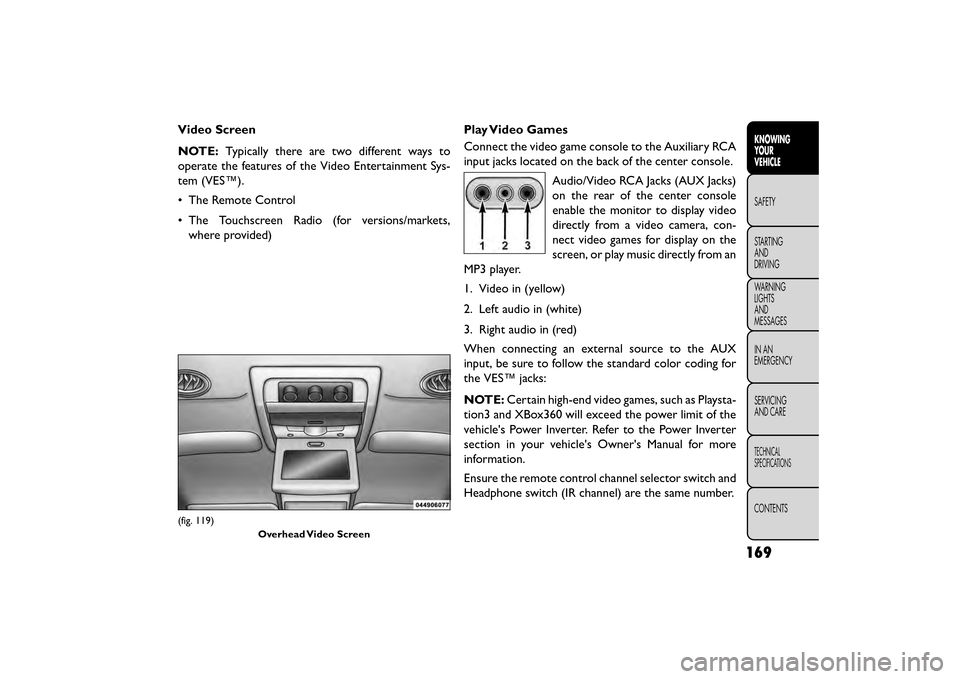
Video Screen
NOTE:Typically there are two different ways to
operate the features of the Video Entertainment Sys-
tem (VES™).
• The Remote Control
• The Touchscreen Radio (for versions/markets, where provided) Play Video Games
Connect the video game console to the Auxiliary RCA
input jacks located on the back of the center console.
Audio/Video RCA Jacks (AUX Jacks)
on the rear of the center console
enable the monitor to display video
directly from a video camera, con-
nect video games for display on the
screen, or play music directly from an
MP3 player.
1. Video in (yellow)
2. Left audio in (white)
3. Right audio in (red)
When connecting an external source to the AUX
input, be sure to follow the standard color coding for
the VES™ jacks:
NOTE: Certain high-end video games, such as Playsta-
tion3 and XBox360 will exceed the power limit of the
vehicle's Power Inverter. Refer to the Power Inverter
section in your vehicle's Owner's Manual for more
information.
Ensure the remote control channel selector switch and
Headphone switch (IR channel) are the same number.
(fig. 119)
Overhead Video Screen
169
KNOWING
YOUR
VEHICLE
SAFETY
STAR
TING
AND
DRIVING
WARNING
LIGHTS
AND
MESSAGES
IN AN
EMERGENCY
SERVICING
AND CARE
TECHNICAL
SPECIFICATIONS
CONTENTS
Page 176 of 412
Using The Remote Control
1. Push the MODE button on the Remote Control.
2. While looking at the video screen, highlight AUX 1,by either pushing Up/Down/Left/Right buttons or
by repeatedly pushing the MODE button, then push
ENTER on the Remote Control.
Using The Touchscreen Radio Controls
1. Press the “Player” button on the touchscreen.
2. Press the “Rear Entertainment” button on the touchscreen to display the Rear Entertainment
Controls.
3. If the Rear Entertainment is turned off, press the “Power” button on the touchscreen.
4. Press the “1” or “2” button on the touchscreen for the channel desired and press the Source button on
the touchscreen to select the desired mode.
Listen To An Audio Source On Channel 2
While A Video Is Playing On Channel 1
Ensure the Remote Control and Headphone switch is
on Channel 2. Using The Remote Control
1. Push the MODE button on the Remote Control and
the Mode Select Screen will display, unless a video is
playing then only a small banner will appear on the
bottom of the screen.
2. While looking at the video screen, either press Up/Down/Left/Right on the Remote Control to
highlight the desired audio source or repeatedly
push the MODE button on the remote until the
desired audio source appears on the screen.
Using The Touchscreen Radio Controls
1. Press the “Player” button on the touchscreen.
2. Press the “Rear Entertainment” button on the touchscreen to display the Rear Entertainment
Controls.
3. If the Rear Entertainment is turned off, press the “Power” button on the touchscreen.
4. Press the “1” or “2” button on the touchscreen for the channel desired then press the SOURCE button
on the touchscreen to select the desired mode.
170
KNOWING YOUR
VEHICLE
SAFETY
STAR
TINGAND
DRIVING
WARNING LIGHTSAND
MESSAGES
IN AN
EMERGENCY
SERVICINGAND CARE
TECHNICAL
SPECIFICATIONS
CONTENTS
Page 177 of 412
Important Notes For Single Video Screen
System
• VES™ is able to transmit two channels of stereoaudio simultaneously.
• In split screen mode the left side equates to Channel 1 and right side equates to Channel 2.
• If a video source is selected on Channel 1, then Channel 2 is for audio only.
• When selecting a video source on Channel 1, the video will display on the screen and the audio will be
heard on Channel 1 in the headphones.
• Audio can be heard through the headphones even when the Video Screen is closed.
Play A DVD Using The Touchscreen Radio
1. Insert the DVD with the label facing up. The radio automatically selects the appropriate mode after
the disc is recognized and displays the menu screen
or starts playing the first track. Using The Remote Control
1. Push the MODE button on the Remote Control.
2. While looking at the Video Screen, highlight DISC
by either pushing Up/Down/Left/Right buttons or
by repeatedly pushing the MODE button, then push
ENTER.
NOTE:
• The VES™ system will retain the last setting when turned off.
• Viewing a DVD on the Touchscreen radio screen is not available in some regions or locations, the vehicle
must be stopped, and the shift lever must be in the
PARK position for vehicles with automatic transmis-
sion. In vehicles with manual transmission the park-
ing brake must be engaged even when the vehicle is
parked. Refer to local and state laws.
171
KNOWING
YOUR
VEHICLE
SAFETY
STAR
TING
AND
DRIVING
WARNING
LIGHTS
AND
MESSAGES
IN AN
EMERGENCY
SERVICING
AND CARE
TECHNICAL
SPECIFICATIONS
CONTENTS
Page 178 of 412
Using The Touchscreen Radio Controls
1. Press the “Player” button on the touchscreen.
2. Press the “Rear Entertainment” button on thetouchscreen to display the Rear Entertainment
Controls.
3. If the Rear Entertainment is turned off, press the “Power” button on the touchscreen.
4. Press the “1” or “2” Source button on the touch- screen based on the channel you want to change and
press the “Disc” button on the touchscreen. To exit
Press the “X” at the top right of the screen.
NOTE: Pressing the screen on a Touchscreen radio
while a DVD is playing full screen brings up basic
control functions for DVD play such as DVD Menu,
Seek Up/Down, Navigating through the menus, Exit.
The basic control functions screen will time out and
disappear from the screen. Remote Control Operation
Quick Reference Chart
This chart provides a quick reference of the remote
control button functions for the different radio modes
and menu screens.
NOTE:
• Ensure the remote control channel/screen selector
switch is set to the screen or channel to be con-
trolled.
• Ensure the headphone channel selector switch is set to the screen or channel to be listened to.
172
KNOWING YOUR
VEHICLE
SAFETY
STAR
TINGAND
DRIVING
WARNING LIGHTSAND
MESSAGES
IN AN
EMERGENCY
SERVICINGAND CARE
TECHNICAL
SPECIFICATIONS
CONTENTS