radio FIAT FREEMONT 2016 1.G Owner's Manual
[x] Cancel search | Manufacturer: FIAT, Model Year: 2016, Model line: FREEMONT, Model: FIAT FREEMONT 2016 1.GPages: 412, PDF Size: 3.36 MB
Page 183 of 412
5.▸▸ – In radio modes, press to seek the next tunable
station. In disc modes, press and hold to fast for-
ward through the current audio track or video
chapter. In menu modes use to navigate in the menu.
6. ▾/ Prev – In radio modes, press to select to the
previous station. In disc modes, press to advance to
the start of the current or previous audio track or
video chapter. In menu modes, use to navigate in the
menu.
7. MENU – Press to return to the main menu of a DVD disc, or to select playback modes (RANDOM for a
CD).
8. ▸/||
(Play/Pause) – Begin/resume or pause disc play.
9. ▪(Stop) – Stops disc play
10. PROG Up/Down – When listening to a radio mode, pressing PROG Up selects the next preset
and pressing PROG Down selects the previous
preset stored in the radio. When listening to com-
pressed audio on a data disc, PROG Up selects the
next directory and PROG Down selects the pre-
vious directory. When listening to a disc in a radio
with a multiple-disc changer, PROG Up selects the
next disc and PROG Down selects the previous
disc.
11. MUTE – Press to mute the headphone audio out- put for the selected channel. 12. SLOW – Press to slow playback of a DVD disc.
Press play (▸) to resume normal play.
13. STATUS – Press to display the current status while in a video mode display.
14. MODE – Press to change the mode of the selected channel. See the Mode Selection section of this
manual for details on changing modes.
15. SETUP – When in a video mode, press the SETUP button to access the display settings (see the
display settings section) to access the DVD setup
menu, select the menu button on the radio. When
a disc is loaded in the DVD player (for versions/
markets, where provided) and the VES™ mode is
selected and the disc is stopped, press the SETUP
button to access the DVD Setup menu. (see the
DVD Setup Menu of this manual.)
16. BACK – When navigating in menu mode, press to return to the previous screen. When navigating a
DVDs disc menu, the operation depends on the
disc’s contents.
17. ◂◂– In radio modes, press to seek to the previous
tunable station. In disc modes, press and hold to
fast rewind through the current audio track or
video chapter. In menu modes use to navigate in
the menu.
177
KNOWING
YOUR
VEHICLE
SAFETY
STAR
TING
AND
DRIVING
WARNING
LIGHTS
AND
MESSAGES
IN AN
EMERGENCY
SERVICING
AND CARE
TECHNICAL
SPECIFICATIONS
CONTENTS
Page 184 of 412
18. ENTER – Press to select the highlighted option ina menu.
19. ▴/ NEXT – In radio modes, press to select to the
next station. In disc modes, press to advance to
the next audio track or video chapter. In menu
modes, use to navigate in the menu.
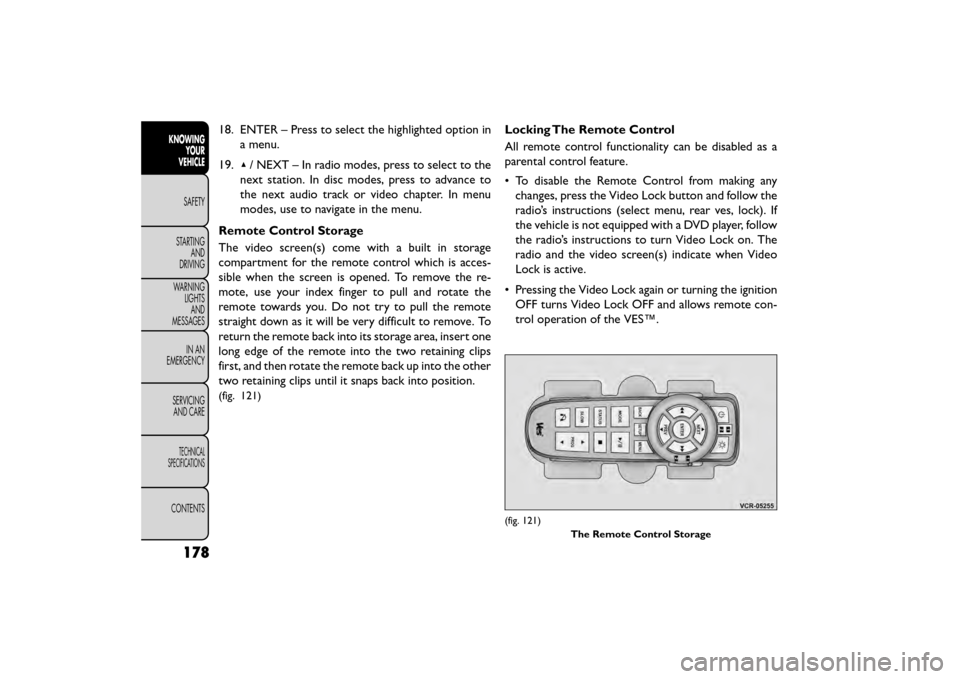
Remote Control Storage
The video screen(s) come with a built in storage
compartment for the remote control which is acces-
sible when the screen is opened. To remove the re-
mote, use your index finger to pull and rotate the
remote towards you. Do not try to pull the remote
straight down as it will be very difficult to remove. To
return the remote back into its storage area, insert one
long edge of the remote into the two retaining clips
first, and then rotate the remote back up into the other
two retaining clips until it snaps back into position.
(fig. 121)
Locking The Remote Control
All remote control functionality can be disabled as a
parental control feature.
• To disable the Remote Control from making any changes, press the Video Lock button and follow the
radio’s instructions (select menu, rear ves, lock). If
the vehicle is not equipped with a DVD player, follow
the radio’s instructions to turn Video Lock on. The
radio and the video screen(s) indicate when Video
Lock is active.
• Pressing the Video Lock again or turning the ignition OFF turns Video Lock OFF and allows remote con-
trol operation of the VES™.
(fig. 121)
The Remote Control Storage
178
KNOWINGYOUR
VEHICLE
SAFETY
STAR
TINGAND
DRIVING
WARNING LIGHTSAND
MESSAGES
IN AN
EMERGENCY
SERVICINGAND CARE
TECHNICAL
SPECIFICATIONS
CONTENTS
Page 189 of 412
System Information
Information Mode Display
When information mode is active, the current mode
setting for both audio channels is displayed. In addition
to the items called out by number, the remaining
information displays the current status of the source
(such as station frequency, name, preset or track num-
ber, song title, artist name, album name, etc.).
• Channel 1 Mode – Displays the current source forChannel 1.
• Channel 1 Audio Only/Mute — Audio: The audio only icon is not used on Channel 1, in a single screen
system. Mute: when the Mute icon is displayed, the
audio for Channel 1 has been muted using the re-
mote control’s MUTE button.
• Channel 2 Audio Only/Mute — Audio: Only in a single screen system: The audio only icon is displayed
on Channel 2 when Channel 1 is in a video mode.
Mute: when the Mute icon is displayed, the audio for
Channel 2 has been muted using the remote con-
trol’s MUTE button. • Channel 2 Mode — Displays the current source for
Channel 2.
• Channel 2 ENTER Button Action — When the ENTER button on the remote control is pressed
with the "INPUT FILE #" button visible on the
screen, the screen shows a numeric entry keypad
which allows you to enter a specific track number on
data discs and HDD (see Numeric Keypad Menu
section of this manual). Also, Enter Button Action –
“INPUT TRK #” to enter a specific track number on
audio discs.
• Remote Locked Out — When the icon is displayed, the remote control functions are disabled.
• Clock — Displays the time.
• Channel 1 Shared Status — When the icon is dis- played, the audio for Channel 1 is also shared with
the radio and playing through the cabin speakers.
183
KNOWING
YOUR
VEHICLE
SAFETY
STAR
TING
AND
DRIVING
WARNING
LIGHTS
AND
MESSAGES
IN AN
EMERGENCY
SERVICING
AND CARE
TECHNICAL
SPECIFICATIONS
CONTENTS
Page 193 of 412
Compressed Audio Files (MP3, WMA AND
ACC)
The DVD player is capable of playing MP3 (MPEG-1
Audio Layer 3 with data bitrates from 32 to 320 kbit/s,
including variable bit rates), WMA (All Standard 8.x,
9.x Windows Media Audio) and ACC (MPEG-4 audio;
sampling frequencies 8 to 48 kHz; mono and stereo)
audio files with the from a CD Data disc (usually a
CD-R or CD-RW).
• The DVD player always uses the file extension todetermine the audio format, so MP3 files must always
end with the extension ".mp3" or ".MP3", WMA files
must always end with the extension ".wma" or
"WMA", and ACC files must end with the extensions
“.acc” or “.m4a”. To prevent incorrect playback, do
not use these extensions for any other types of files.
• For MP3 files, ID3 tag data v1, v1.1, v2 and v2.4 (such as artist name, track title, album, etc.) are supported.
• Any file that is copy protected (such as those down- loaded from many online music stores) will not play.
The DVD player will automatically skip the file and
begin playing the next available file.
• Other compression formats such as AAC, MP3 Pro, Ogg Vorbis, and ATRAC3 will not play. The DVD
player will automatically skip the file and begin playing
the next available file. •If you are creating your own files, the recommended
fixed bit rate for MP3 files is between 96 and 192Kbps
and the recommended fixed bit rate for WMA files is
between 64 and 192Kbps. Variable bit rates are also
supported. For both formats, the recommended
sample rate is either 44.1kHz or 48kHz.
• To change the current file, use the remote control’s
or DVD player’s ▴button to advance to the next file,
or the ▾button to return to the start of the current
or previous file.
• To change the current directory, use the remote control’s PROG UP and Down buttons or Rewind/
skip back and fast fwd/skip forward.
Disc Errors
If the DVD player is unable to read the disc, a "Disc
Error" message is displayed on the Radio display and
the disc is automatically ejected. A dirty, damaged, or
incompatible disc format are all potential causes for a
"Disc Error" message.
If a disc has a damaged track which results in audible or
visible errors that persists for 2.0 seconds, the DVD
player will attempt to continue playing the disc by
skipping forward 1.0 to 3.0 seconds at a time. If the end
of the disc is reached, the DVD player will return to the
beginning of the disc and attempt to play the start of
the first track.
187
KNOWING
YOUR
VEHICLE
SAFETY
STAR
TING
AND
DRIVING
WARNING
LIGHTS
AND
MESSAGES
IN AN
EMERGENCY
SERVICING
AND CARE
TECHNICAL
SPECIFICATIONS
CONTENTS
Page 196 of 412
RADIO OPERATION AND MOBILE
PHONES
Under certain conditions, the mobile phone being on in
your vehicle can cause erratic or noisy performance
from your radio. This condition may be lessened or
eliminated by relocating the mobile phone antenna.
This condition is not harmful to the radio. If your radio
performance does not satisfactorily “clear” by the
repositioning of the antenna, it is recommended that
the radio volume be turned down or off during mobile
phone operation.
ADDING FUEL
FUEL FILLER CAP (GAS CAP)
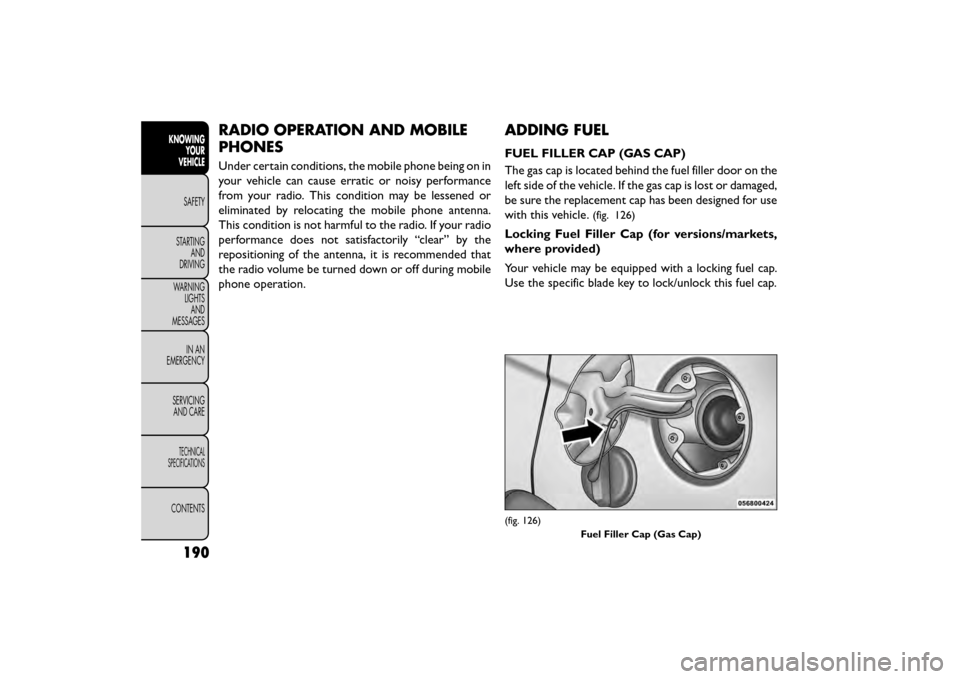
The gas cap is located behind the fuel filler door on the
left side of the vehicle. If the gas cap is lost or damaged,
be sure the replacement cap has been designed for use
with this vehicle.
(fig. 126)
Locking Fuel Filler Cap (for versions/markets,
where provided)
Your vehicle may be equipped with a locking fuel cap.
Use the specific blade key to lock/unlock this fuel cap.
(fig. 126)Fuel Filler Cap (Gas Cap)
190
KNOWINGYOUR
VEHICLE
SAFETY
STAR
TINGAND
DRIVING
WARNING LIGHTSAND
MESSAGES
IN AN
EMERGENCY
SERVICINGAND CARE
TECHNICAL
SPECIFICATIONS
CONTENTS
Page 213 of 412
ADVANCED FRONT AIR BAG OPERATION
Advanced Front Air Bags are designed to provide
additional protection by supplementing the seat belts.
Advanced Front Air Bags are not expected to reduce
the risk of injury in rear, side, or rollover collisions. The
Advanced Front Air Bags will not deploy in all frontal
collisions, including some that may produce substantial
vehicle damage — for example, some pole collisions,
truck underrides, and angle offset collisions.
On the other hand, depending on the type and location
of impact, Advanced Front Air Bags may deploy in
crashes with little vehicle front-end damage but that
produce a severe initial deceleration.
Because air bag sensors measure vehicle deceleration
over time, vehicle speed and damage by themselves are
not good indicators of whether or not an air bag should
have deployed.
Seat belts are necessary for your protection in all
collisions, and also are needed to help keep you in
position, away from an inflating air bag.
When the ORC detects a collision requiring the Ad-
vanced Front Air Bags, it signals the inflator units. A
large quantity of non-toxic gas is generated to inflate
the Advanced Front Air Bags.The steering wheel hub trim cover and the upper right
side of the instrument panel separate and fold out of
the way as the air bags inflate to their full size. The
Advanced Front Air Bags fully inflate in less time than it
takes to blink your eyes. The air bags then quickly
deflate while helping to restrain the driver and front
passenger.
KNEE IMPACT BOLSTERS
The Knee Impact Bolsters help protect the knees of
the driver and front passenger, and position the front
occupants for improved interaction with the Advanced
Front Air Bags.
WARNING!
• Do not drill, cut , or tamper with the
kn ee
impact bolsters in any way.
• Do not mount any accessories to the knee
impact bolsters such as alarm lights, stereos,
citizen band radios, etc .
207
KNOWING
YOUR
VEHICLE
SAFETY
STARTING
AND
DRIVING
WARNING
LIGHTS
AND
MESSAGES
IN
AN
EMERGENCY
SERVICING
AND CARE
TECHNICAL
SPECIFICATIONS
CONTENTS
Page 286 of 412
WARNING!
• Take care to avoid the radiator cooling
f an
whenever the hood is raised. It can
start anytime the ignition switch is ON.You can
be injured by moving fan blades.
• Remove any metal jewelry such as rings, watch
bands and bracelets that could make an inadver-
tent electrical contact . You could be seriously
injured.
• Batteries contain sulfuric acid that can burn
your skin or eyes and generate hydrogen gas
which is flammable and explosive. Keep open
flames or sparks away from the battery.
1. Set the parking brake, shift the automatic transmis- sion into PARK and the manual transmission into
gear and turn the ignition to LOCK.
2. Turn off the heater, radio, and all unnecessary elec- trical accessories.
3. Remove the protective cover over the remote posi- tive (+)battery post. To remove the cover, press
the locking tab and pull upward on the cover.
4. If using another vehicle to jump-start the battery, park the vehicle within the jumper cables reach, set
the parking brake and make sure the ignition is OFF.
WARNING!
Do not allow vehicles to touch each
oth er
as this could establish a ground
connection and personal injury could result .
JUMP-STARTING PROCEDURE
WARNING!
Failure to follow this jump-starting pro-
cedure c
ould result in personal injury or
property damage due to battery explosion.
Failure to follow these procedures could
result in damage to the charging system
of the booster vehicle or the discharged
vehicle.
Connecting The Jumper Cables
1. Connect the positive (+)end of the jumper cable to
the remote positive (+)post of the discharged
vehicle.
2. Connect the opposite end of the positive (+)
jumper cable to the positive (+)post of the booster
battery.
3. Connect the negative end (-)of the jumper cable to
the negative (-)post of the booster battery.
280
KNOWING
YOUR
VEHICLE
SAFETY
STARTING AND
DRIVING
WARNING LIGHTSAND
MESSAGES
IN AN
EMERGENCY
SER VICING
AND
CARE
TECHNICAL
SPECIFICATIONS
CONTENTS
Page 315 of 412
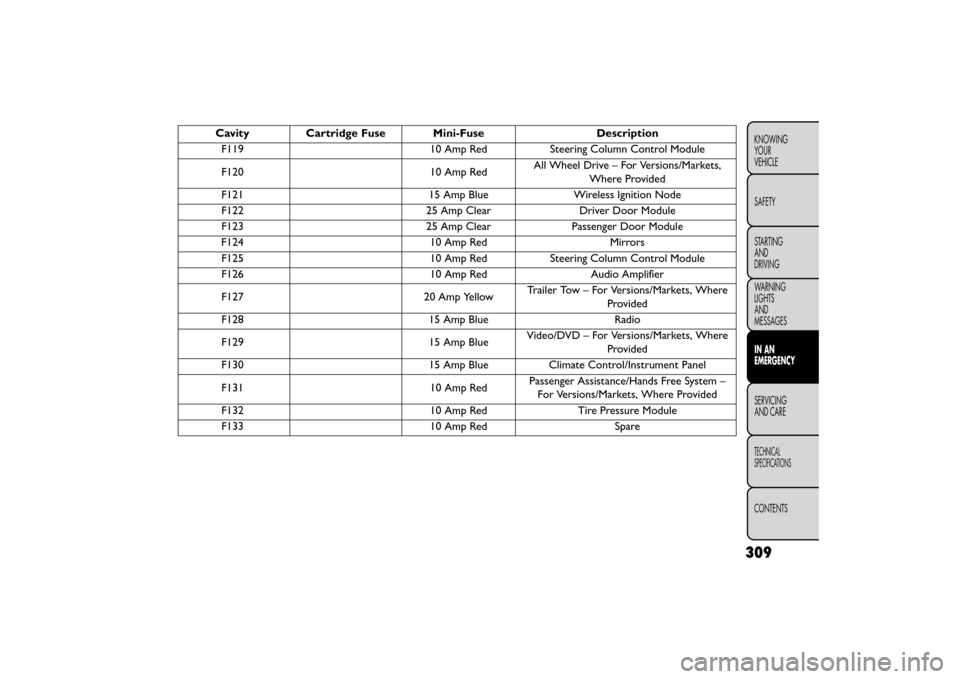
CavityCartridge Fuse Mini-Fuse Description
F119 10 Amp RedSteering Column Control Module
F120 10 Amp RedAll Wheel Drive – For Versions/Markets,
Where Provided
F121 15 Amp BlueWireless Ignition Node
F122 25 Amp ClearDriver Door Module
F123 25 Amp ClearPassenger Door Module
F124 10 Amp RedMirrors
F125 10 Amp RedSteering Column Control Module
F126 10 Amp RedAudio Amplifier
F127 20 Amp YellowTrailer Tow – For Versions/Markets, Where
Provided
F128 15 Amp BlueRadio
F129 15 Amp BlueVideo/DVD – For Versions/Markets, Where
Provided
F130 15 Amp BlueClimate Control/Instrument Panel
F131 10 Amp RedPassenger Assistance/Hands Free System –
For Versions/Markets, Where Provided
F132 10 Amp RedTire Pressure Module
F133 10 Amp RedSpare
309
KNOWING
YOUR
VEHICLE
SAFETY
STARTING
AND
DRIVING
WARNING
LIGHTS
AND
MESSAGES
IN AN
EMERGENCY
SERVICING
AND
CARE
TECHNICAL
SPECIFICATIONS
CONTENTS
Page 404 of 412
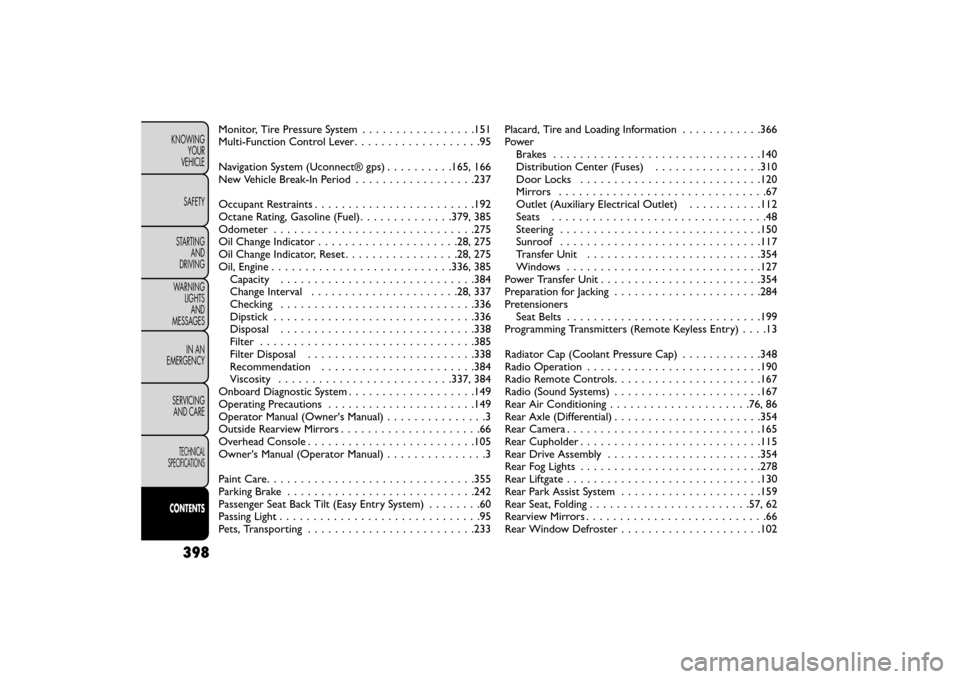
Monitor, Tire Pressure System.................151
Multi-Function Control Lever ...................95
Navigation System (Uconnect® gps) ..........165, 166
New Vehicle Break-In Period ..................237
Occupant Restraints ....................... .192
Octane Rating, Gasoline (Fuel) ..............379, 385
Odometer . . . .......................... .275
Oil Change Indicator . . . . . . . ..............28, 275
Oil Change Indicator, Reset . . . ..............28, 275
Oil, Engine . . . . . . . . . . . . . ..............336, 385
Capacity . . . . . ....................... .384
Change Interval ..................... .28, 337
Checking ............................ .336
Dipstick . . . . . . . . ..................... .336
Disposal ............................ .338
Filter ............................... .385
Filter Disposal . . . . . ................... .338
Recommendation . . . . . ..................384
Viscosity . . . . . . . . . . . . . .............337, 384
Onboard Diagnostic System ...................149
Operating Precautions . . . . . .................149
Operator Manual (Owner's Manual) ...............3
Outside Rearview Mirrors . . . ..................66
Overhead Console ........................ .105
Owner's Manual (Operator Manual) ...............3
Paint Care. . . . . . . . . . . . ...................355
Parking Brake . .......................... .242
Passenger Seat Back Tilt (Easy Entry System) ........60
Passing Light . . . ...........................95
Pets, Transporting . . . . .................... .233Placard, Tire and Loading Information
............366
Power Brakes .............................. .140
Distribution Center (Fuses) ................310
Door Locks .......................... .120
Mirrors ...............................67
Outlet (Auxiliary Electrical Outlet) ...........112
Seats ................................48
Steering ............................. .150
Sunroof ............................. .117
T
ransfer Unit ......................... .354
Windows ............................ .127
Power Transfer Unit ....................... .354
Preparation for Jacking ..................... .284
Pretensioners Seat Belts ............................ .199
Programming Transmitters (Remote Keyless Entry) ....13
Radiator Cap (Coolant Pressure Cap) ............348
Radio Operation ......................... .190
Radio Remote Controls ..................... .167
Radio (Sound Systems) ..................... .167
Rear Air Conditioning .................... .76, 86
Rear Axle (Differential) ..................... .354
Rear Camera ............................ .165
Rear Cupholder .......................... .115
Rear Drive Assembly ...................... .354
Rear Fog Lights .......................... .278
RearLiftgate............................ .130
Rear Park Assist System .................... .159
Rear Seat, Folding ....................... .57, 62
RearviewMirrors...........................66
Rear Window Defroster .................... .102
398
KNOWING
YOUR
VEHICLE
SAFETY
STARTING AND
DRIVING
WARNING LIGHTSAND
MESSAGES
IN AN
EMERGENCY
SERVICINGAND CARE
TECHNICAL
SPECIFICATIONS
CONTENTS
Page 405 of 412
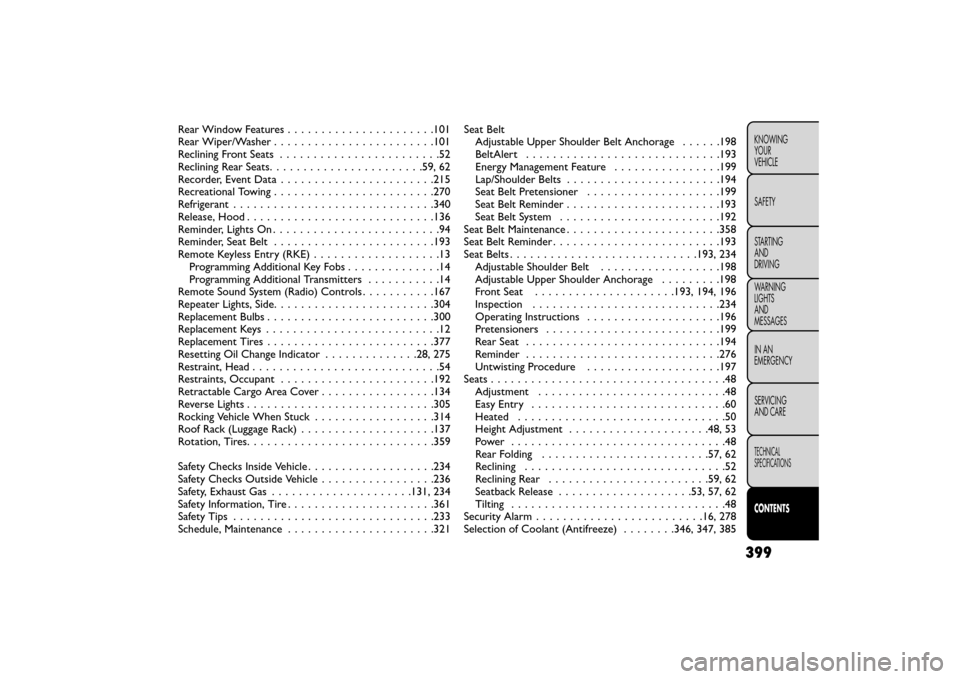
Rear Window Features . . . . . . . ...............101
Rear Wiper/Washer . . . . . . . . . . . . . ...........101
Reclining Front Seats . . . .....................52
Reclining Rear Seats ...................... .59, 62
Recorder, Event Data ...................... .215
Recreational Towing . . . . . . . . . ...............270
Refrigerant . . . .......................... .340
Release, Hood ........................... .136
Reminder, Lights On .........................94
Reminder, Seat Belt ....................... .193
Remote Keyless Entry (RKE) . . . . . . .............13
Programming Additional Key Fobs ..............14
Programming Additional Transmitters ...........14
Remote Sound System (Radio) Controls ...........167
Repeater Lights, Side ....................... .304
Replacement Bulbs ........................ .300
Replacement Keys . . . . ......................12
Replacement Tires ........................ .377
Resetting Oil Change Indicator . . . ...........28, 275
Restraint, Head . . ..........................54
Restraints, Occupant . . . ................... .192
Retractable Cargo Area Cover . . . . . . ...........134
Reverse Lights ........................... .305
Rocking Vehicle When Stuck . . . . . .............314
Roof Rack (Luggage Rack) . . . . ................137
Rotation, Tires. . . . ....................... .359
Safety Checks Inside Vehicle . . . . . . . ............234
Safety Checks Outside Vehicle .................236
Safety, Exhaust Gas . . . . . . . . .............131, 234
Safety Information, Tire . . ................... .361
Safety Tips . . . . . ........................ .233
Schedule, Maintenance . .................... .321Seat Belt
Adjustable Upper Shoulder Belt Anchorage ......198
BeltAlert ............................ .193
Energy Management Feature ................199
Lap/Shoulder Belts .......................194
Seat Belt Pr
etensioner ................... .199
Seat Belt Reminder ...................... .193
Seat Belt System ....................... .192
Seat Belt Maintenance ...................... .358
Seat Belt Reminder ........................ .193
Seat Belts ........................... .193, 234
Adjustable Shoulder Belt ..................198
Adjustable Upper Shoulder Anchorage .........198
Front Seat .................... .193, 194, 196
Inspection ........................... .234
Operating Instructions ................... .196
Pretensioners ......................... .199
Rear Seat ............................ .194
Reminder ............................ .276
Untwisting Procedure ................... .197
Seats ...................................48
Adjustment ............................48
Easy Entry .............................60
Heated ...............................50
Height Adjustment . . .................. .48, 53
Power ................................48
Rear Folding ........................ .57, 62
Reclining ..............................52
Reclining Rear ....................... .59, 62
Seatback Release ................... .53, 57, 62
Tilting ................................48
Security Alarm ........................ .16, 278
Selection of Coolant (Antifreeze) ........346, 347, 385
399
KNOWING
YOUR
VEHICLE
SAFETY
STARTING
AND
DRIVING
WARNING
LIGHTS
AND
MESSAGES
IN AN
EMERGENCY
SERVICING
AND CARE
TECHNICAL
SPECIFICATIONS
CONTENTS