steering FIAT FREEMONT 2016 1.G User Guide
[x] Cancel search | Manufacturer: FIAT, Model Year: 2016, Model line: FREEMONT, Model: FIAT FREEMONT 2016 1.GPages: 412, PDF Size: 3.36 MB
Page 148 of 412
ABS is activated during braking under certain road or
stopping conditions. ABS-inducing conditions can in-
clude ice, snow, gravel, bumps, railroad tracks, loose
debris, or panic stops.
You also may experience the following when the brake
system goes into Anti-lock:
• The ABS motor running (it may continue to run for ashort time after the stop)
• The clicking sound of solenoid valves
• Brake pedal pulsations
• A slight drop or fall away of the brake pedal at the end of the stop
These are all normal characteristics of ABS.
WARNING!
• The ABS contains sophisticated elec-
t roni
c equipment that may be suscep-
tible to interference caused by improperly in-
stalled or high output radio transmitting
equipment . This interference can cause possible
loss of anti-lock braking capability. Installation
of such equipment should be performed by quali-
fied professionals.
(Continued)
WARNING! (Continued)
• Pumping of the Anti-Lock Brakes will diminish
their effectiveness and may lead to an accident .
Pumping makes the stopping distance longer. Just
press firmly on your brake pedal when you need
toslowdownorstop.
• The ABS cannot prevent the natural laws of
physics from acting on the vehicle, nor can it
increase braking or steering efficiency beyond
that afforded by the condition of the vehicle
brakes and tires or the traction afforded.
• The ABS cannot prevent accidents, including
those resulting from excessive speed in turns,
following another vehicle too closely, or hydro-
planing.
• The capabilities of an ABS equipped vehicle
must never be exploited in a reckless or danger-
ous manner, which could jeopardize the user's
safety or the safety of others.
All vehicle wheels and tires must be the same size and
type and tires must be properly inflated to produce
accurate signals for the computer.
142
KNOWING YOUR
VEHICLE
SAFETY
STAR
TINGAND
DRIVING
WARNING LIGHTSAND
MESSAGES
IN AN
EMERGENCY
SERVICINGAND CARE
TECHNICAL
SPECIFICATIONS
CONTENTS
Page 150 of 412
TRACTION CONTROL SYSTEM (TCS)
This system monitors the amount of wheel spin of each
of the driven wheels. If wheel spin is detected, brake
pressure is applied to the slipping wheel(s) and engine
power is reduced to provide enhanced acceleration
and stability. A feature of the TCS system, Brake Lim-
ited Differential (BLD), functions similar to a limited
slip differential and controls the wheel spin across a
driven axle. If one wheel on a driven axle is spinning
faster than the other, the system will apply the brake of
the spinning wheel. This will allow more engine torque
to be applied to the wheel that is not spinning. This
feature remains active even if TCS and ESC are in the
“Partial Off ” mode. Refer to “Electronic Stability Con-
trol (ESC)” for further information.
ELECTRONIC ROLL MITIGATION (ERM)
This system anticipates the potential for wheel lift by
monitoring the driver’s steering wheel input and the
speed of the vehicle. When ERM determines that the
rate of change of the steering wheel angle and vehicle's
speed are sufficient to potentially cause wheel lift, it
then applies the appropriate brake and may also reduce
engine power to lessen the chance that wheel lift will
occur. ERM will only intervene during very severe or
evasive driving maneuvers. ERM can only reduce the
chance of wheel lift occurring during severe or evasive
driving maneuvers. It cannot prevent wheel lift due toother factors, such as road conditions, leaving the
roadway, or striking objects or other vehicles.
WARNING!
Many factors, such as vehicle loading,
road c on
ditions, and driving conditions,
influence the chance that wheel lift or rollover
may occur. ERM cannot prevent all wheel lift or
rollovers, especially those that involve leaving the
roadway or striking objects or other vehicles.The
capabilities of an ERM-equipped vehicle must
never be exploited in a reckless or dangerous
manner, which could jeopardize the user's safety
or the safety of others.
ELECTRONIC STABILITY CONTROL (ESC)
This system enhances directional control and stability
of the vehicle under various driving conditions. ESC
corrects for over-steering and under-steering the ve-
hicle by applying the brake of the appropriate wheel.
Engine power may also be reduced to help the vehicle
maintain the desired path.
The ESC uses sensors in the vehicle to determine the
path that the driver intends to steer the vehicle and
compares it to the actual path of the vehicle. When the
actual path does not match the intended path, the ESC
144
KNOWING YOUR
VEHICLE
SAFETY
STAR
TINGAND
DRIVING
WARNING LIGHTSAND
MESSAGES
IN AN
EMERGENCY
SERVICINGAND CARE
TECHNICAL
SPECIFICATIONS
CONTENTS
Page 151 of 412
applies the brake of the appropriate wheel to assist in
counteracting the condition of over-steer or under-
steer.
• Over-steer - when the vehicle is turning more thanappropriate for the steering wheel position.
• Under-steer - when the vehicle is turning less than appropriate for the steering wheel position.
WARNING!
• Electronic Stability Control (ESC)
cann ot
prevent the natural laws of phys-
ics from acting on the vehicle, nor can it increase
the traction afforded by prevailing road condi-
tions.
• ESC cannot prevent collisions, including those
resulting from excessive speed in turns, driving on
very slippery surfaces, or hydroplaning. ESC also
cannot prevent collisions resulting from the loss
of vehicle control due to inappropriate driver
input for the conditions. Only a safe, attentive,
and skillfull driver can prevent collisions.
• The capabilities of an ESC equipped vehicle
must never be explained in a reckless or danger-
ous manner which could jeopardize the user's
safety or the safety of others. ESC Operating Modes
The ESC system has two available operating modes.
Full On
This is the normal operating mode for ESC. Whenever
the vehicle is started the system will be in this mode.
This mode should be used for most driving situations.
ESC should only be turned to “Partial Off ” for specific
reasons as noted. Refer to “Partial Off ” for additional
information.
145
KNOWING
YOUR
VEHICLE
SAFETY
STAR
TING
AND
DRIVING
WARNING
LIGHTS
AND
MESSAGES
IN AN
EMERGENCY
SERVICING
AND CARE
TECHNICAL
SPECIFICATIONS
CONTENTS
Page 156 of 412
POWER STEERING
The standard power steering system will give you good
vehicle response and increased ease of maneuverability
in tight spaces. The system will provide mechanical
steering capability if power assist is lost.
If for some reason the power assist is interrupted, it
will still be possible to steer your vehicle. Under these
conditions, you will observe a substantial increase in
steering effort, especially at very low vehicle speeds
and during parking maneuvers.
NOTE:
• Increased noise levels at the end of the steeringwheel travel are considered normal and do not
indicate that there is a problem with the power
steering system.
• Upon initial start-up in cold weather, the power steering pump may make noise for a short amount of
time. This is due to the cold, thick fluid in the
steering system. This noise should be considered
normal, and it does not in any way damage the
steering system.
Prolonged operation of the steering sys-
tem at the end of the steering wheel
travel will increase the steering fluid tem-
perature and it should be avoided when possible.
Damage to the power steering pump may occur.
POWER STEERING FLUID CHECK
Checking the power steering fluid level at a defined
service interval is not required. The fluid should only be
checked if a leak is suspected, abnormal noises are
apparent, and/or the system is not functioning as an-
ticipated. Coordinate inspection efforts through an
authorized dealer.
150
KNOWING YOUR
VEHICLE
SAFETY
STAR
TINGAND
DRIVING
WARNING LIGHTSAND
MESSAGES
IN AN
EMERGENCY
SERVICINGAND CARE
TECHNICAL
SPECIFICATIONS
CONTENTS
Page 157 of 412
Do not use chemical flushes in your
power steering system as the chemicals
can damage your power steering compo-
nents. Such damage is not covered by the New
Vehicle Limited Warranty.
WARNING!
Fluid level should be checked on a level
surf a
ce and with the engine off to pre-
vent injury from moving parts and to ensure
accurate fluid level reading. Do not overfill. Use
only manufacturer's recommended power steer-
ing fluid.
If necessary, add fluid to restore to the proper indi-
cated level. With a clean cloth, wipe any spilled fluid
from all surfaces.
TIRE PRESSURE MONITOR SYSTEM
(TPMS)
The Tire Pressure Monitor System (TPMS) will warn
the driver of a low tire pressure based on the vehicle
recommended cold placard pressure.
The tire pressure will vary with temperature by about
0.07 BAR for every 7°C. This means that when the
outside temperature decreases, the tire pressure will
decrease. Tire pressure should always be set based on
cold inflation tire pressure. This is defined as the tire
pressure after the vehicle has not been driven for at
least three hours, or driven less than 1.6 km after a
three hour period. The cold tire inflation pressure
must not exceed the maximum inflation pressure
molded into the tire sidewall. Refer to “Tires – General
Information” in “Technical Specifications” for informa-
tion on how to properly inflate the vehicle’s tires. The
tire pressure will also increase as the vehicle is driven.
This is normal and there should be no adjustment for
this increased pressure.
151
KNOWING
YOUR
VEHICLE
SAFETY
STAR
TING
AND
DRIVING
WARNING
LIGHTS
AND
MESSAGES
IN AN
EMERGENCY
SERVICING
AND CARE
TECHNICAL
SPECIFICATIONS
CONTENTS
Page 173 of 412
SOUND SYSTEMS
Refer to your Uconnect® User Manual.
STEERING WHEEL AUDIO
CONTROLS
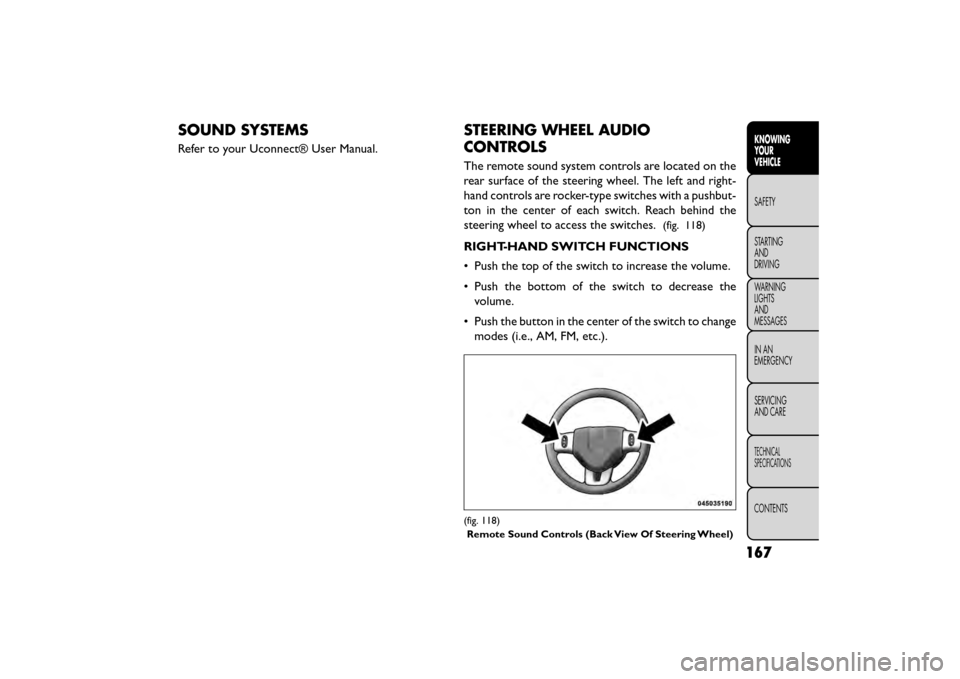
The remote sound system controls are located on the
rear surface of the steering wheel. The left and right-
hand controls are rocker-type switches with a pushbut-
ton in the center of each switch. Reach behind the
steering wheel to access the switches.
(fig. 118)
RIGHT-HAND SWITCH FUNCTIONS
• Push the top of the switch to increase the volume.
• Push the bottom of the switch to decrease thevolume.
• Push the button in the center of the switch to change modes (i.e., AM, FM, etc.).
(fig. 118)
Remote Sound Controls (Back View Of Steering Wheel)
167
KNOWING
YOUR
VEHICLE
SAFETY
STAR
TING
AND
DRIVING
WARNING
LIGHTS
AND
MESSAGES
IN AN
EMERGENCY
SERVICING
AND CARE
TECHNICAL
SPECIFICATIONS
CONTENTS
Page 211 of 412
SUPPLEMENTAL RESTRAINT SYSTEM
(SRS)
AIR BAG SYSTEM COMPONENTS
Your vehicle may be equipped with the following air bag
system components:
• Occupant Restraint Controller (ORC)
• Air Bag Warning Light
• Steering Wheel and Column
• Instrument Panel
• Knee Impact Bolsters
• Advanced Front Air Bags
• Supplemental Side Air Bags
• Front and Side Impact Sensors
• Seat Belt Pretensioners
• Seat Belt Buckle SwitchADVANCED FRONT AIR BAGS
This vehicle has Advanced Front Air Bags for both the
driver and front passenger as a supplement to the seat
belt restraint systems. The driver’s Advanced Front Air
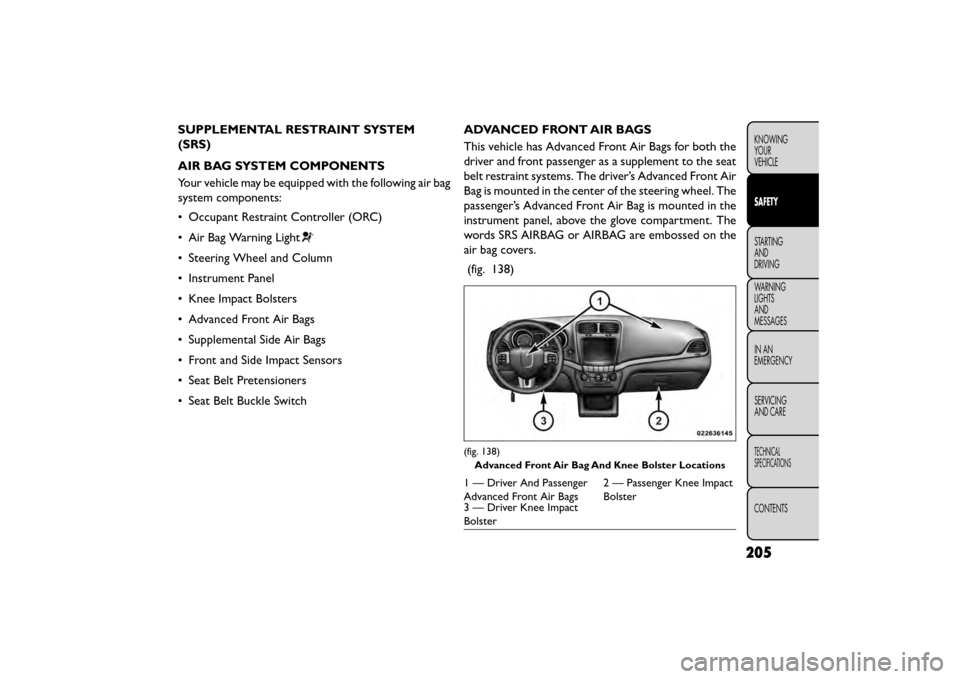
Bag is mounted in the center of the steering wheel. The
passenger’s Advanced Front Air Bag is mounted in the
instrument panel, above the glove compartment. The
words SRS AIRBAG or AIRBAG are embossed on the
air bag covers.
(fig. 138)
(fig. 138) Advanced Front Air Bag And Knee Bolster Locations
1 — Driver And Passenger
Advanced Front Air Bags 2 — Passenger Knee Impact
Bolster
3 — Driver Knee Impact
Bolster
205
KNOWING
YOUR
VEHICLE
SAFETY
STARTING
AND
DRIVING
WARNING
LIGHTS
AND
MESSAGES
IN
AN
EMERGENCY
SERVICING
AND CARE
TECHNICAL
SPECIFICATIONS
CONTENTS
Page 212 of 412
WARNING!
• Being too close to the steering wheel
or ins
trument panel during Advanced
Front Air Bag deployment could cause serious
injury, including death. Air bags need room to
inflate. Sit back, comfortably extending your
arms to reach the steering wheel or instrument
panel.
• Never place a rear-facing child restraint in
front of an air bag. A deploying Passenger Ad-
vanced Front Air Bag can cause death or serious
injury to a child 12 years or younger, including a
child in a rear-facing child restraint .
• Only use a rear-facing child restraint in a ve-
hicle with a rear seat .
ADVANCED FRONT AIR BAG FEATURES
The Advanced Front Air Bag system has multistage
driver and front passenger air bags. This system pro-
vides output appropriate to the severity and type of
collision as determined by the Occupant Restraint
Controller (ORC), which may receive information
from the front impact sensors or other system com-
ponents.
The first stage inflator is triggered immediately during
an impact that requires air bag deployment. A low energy output is used in less severe collisions. A higher
energy output is used for more severe collisions.
This vehicle may be equipped with a driver and/or front
passenger seat belt buckle switch that detects whether
the driver or front passenger seat belt is buckled. The
seat belt buckle switch may adjust the inflation rate of
the Advanced Front Air Bags.
WARNING!
• No objects should be placed over or
n ear
the air bag on the instrument panel
or steering wheel, because any such objects could
cause harm if the vehicle is in a collision severe
enough to cause the air bags to inflate.
• Do not put anything on or around the air bag
covers or attempt to open them manually. You
may damage the air bags and you could be
injured because the air bags may no longer be
functional. The protective covers for the air bag
cushions are designed to open only when the air
bags are inflating.
• Relying on the air bags alone could lead to
more severe injuries in a collision. The air bags
work with your seat belt to restrain you properly.
In some collisions, air bags won’t deploy at all.
Always wear your seat belts even though you
have air bags.
206
KNOWING YOUR
VEHICLE
SAFETY
STARTING AND
DRIVING
WARNING LIGHTSAND
MESSAGES
IN
AN
EMERGENCY
SERVICINGAND CARE
TECHNICAL
SPECIFICATIONS
CONTENTS
Page 213 of 412
ADVANCED FRONT AIR BAG OPERATION
Advanced Front Air Bags are designed to provide
additional protection by supplementing the seat belts.
Advanced Front Air Bags are not expected to reduce
the risk of injury in rear, side, or rollover collisions. The
Advanced Front Air Bags will not deploy in all frontal
collisions, including some that may produce substantial
vehicle damage — for example, some pole collisions,
truck underrides, and angle offset collisions.
On the other hand, depending on the type and location
of impact, Advanced Front Air Bags may deploy in
crashes with little vehicle front-end damage but that
produce a severe initial deceleration.
Because air bag sensors measure vehicle deceleration
over time, vehicle speed and damage by themselves are
not good indicators of whether or not an air bag should
have deployed.
Seat belts are necessary for your protection in all
collisions, and also are needed to help keep you in
position, away from an inflating air bag.
When the ORC detects a collision requiring the Ad-
vanced Front Air Bags, it signals the inflator units. A
large quantity of non-toxic gas is generated to inflate
the Advanced Front Air Bags.The steering wheel hub trim cover and the upper right
side of the instrument panel separate and fold out of
the way as the air bags inflate to their full size. The
Advanced Front Air Bags fully inflate in less time than it
takes to blink your eyes. The air bags then quickly
deflate while helping to restrain the driver and front
passenger.
KNEE IMPACT BOLSTERS
The Knee Impact Bolsters help protect the knees of
the driver and front passenger, and position the front
occupants for improved interaction with the Advanced
Front Air Bags.
WARNING!
• Do not drill, cut , or tamper with the
kn ee
impact bolsters in any way.
• Do not mount any accessories to the knee
impact bolsters such as alarm lights, stereos,
citizen band radios, etc .
207
KNOWING
YOUR
VEHICLE
SAFETY
STARTING
AND
DRIVING
WARNING
LIGHTS
AND
MESSAGES
IN
AN
EMERGENCY
SERVICING
AND CARE
TECHNICAL
SPECIFICATIONS
CONTENTS
Page 220 of 412
WARNING!
Ignoring the Air Bag Warning Light in
your ins
trument panel could mean you
won’t have the air bags to protect you in a
collision. If the light does not come on as a bulb
check when the ignition is first turned on, stays
on after you start the vehicle, or if it comes on as
you drive, have an authorized dealer service the
air bag system immediately.
MAINTAINING YOUR AIR BAG SYSTEM
WARNING!
• Modifications to any part of the air
bag sys
tem could cause it to fail when
you need it . You could be injured if the air bag
system is not there to protect you. Do not modify
the components or wiring, including adding any
kind of badges or stickers to the steering wheel
hub trim cover or the upper right side of the
instrument panel. Do not modify the front bum-
per, vehicle body structure, or add aftermarket
side steps or running boards.
(Continued)
WARNING! (Continued)
• It is dangerous to try to repair any part of the
air bag system yourself. Be sure to tell anyone
who works on your vehicle that it has an air bag
system.
• Do not attempt to modify any part of your air
bag system.The air bag may inflate accidentally
or may not function properly if modifications are
made.Take your vehicle to an authorized dealer
for any air bag system service. If your seat , includ-
ing your trim cover and cushion, needs to be
serviced in any way (including removal or
loosening/tightening of seat attachment bolts),
take the vehicle to your authorized dealer. Only
manufacturer approved seat accessories may be
used. If it is necessary to modify the air bag
system for persons with disabilities, contact your
authorized dealer.
214
KNOWING YOUR
VEHICLE
SAFETY
STARTING AND
DRIVING
WARNING LIGHTSAND
MESSAGES
IN
AN
EMERGENCY
SERVICINGAND CARE
TECHNICAL
SPECIFICATIONS
CONTENTS