lock FIAT FREEMONT 2016 1.G Owner's Manual
[x] Cancel search | Manufacturer: FIAT, Model Year: 2016, Model line: FREEMONT, Model: FIAT FREEMONT 2016 1.GPages: 412, PDF Size: 3.36 MB
Page 49 of 412
• Hill Start Assist (for versions/markets, where
provided)
When this feature is selected, the Hill Start Assist
(HSA) system is active. Refer to “Electronic Brake
Control System” in “Starting And Driving” for system
function and operating information. To make your
selection, press the Hill Start Assist button on the
touchscreen, select On or Off followed by pressing the
arrow back button on the touchscreen.
Lights
• Headlight Off Delay
When this feature is selected, the driver can choose to
have the headlights remain on for 0, 30, 60, or 90
seconds when exiting the vehicle. To change the Head-
light Off Delay status press the 0, 30, 60 or 90 button
on the touchscreen followed by pressing the arrow
back button on the touchscreen.
• Headlight Illumination on Approach (for
versions/markets, where provided)
When this feature is selected, the headlights will acti-
vate and remain on for 0, 30, 60, or 90 seconds when
the doors are unlocked with the RKE transmitter. To
change the Illuminated Approach status press the 0, 30,
60 or 90 button on the touchscreen followed by
pressing the arrow back button on the touchscreen.• Headlights with Wipers (for versions/markets,
where provided)
When this feature is selected, and the headlight switch
is in the AUTO position, the headlights will turn on
approximately 10 seconds after the wipers are turned
on. The headlights will also turn off when the wipers
are turned off if they were turned on by this feature. To
make your selection, press the Headlights with Wipers
button on the touchscreen, select On or Off followed
by pressing the arrow back button on the touchscreen.
• Auto Dim High Beams “SmartBeam™” (for
versions/markets, where provided)
When this feature is selected, the high beam headlights
will deactivate automatically under certain conditions.
To make your selection, press the Auto High Beams
button on the touchscreen, select ON or OFF fol-
lowed by pressing the arrow back button on the touch-
screen. Refer to “Lights/SmartBeam™ (for versions/
markets, where provided)” in “Knowing Your Vehicle”
for further information.
• Headlight Dipped Beam (Traffic Changeover)
(for versions/markets, where provided)
Low beam headlights have more control of upward
light and direct most of their light downward and either
to the left for right hand drive countries or to the right
for left hand drive countries to provide safe forward
visibility without excessive glare.
43
KNOWING
YOUR
VEHICLE
SAFETY
STAR
TING
AND
DRIVING
WARNING
LIGHTS
AND
MESSAGES
IN AN
EMERGENCY
SERVICING
AND CARE
TECHNICAL
SPECIFICATIONS
CONTENTS
Page 50 of 412
• Flash Headlights With Lock (for versions/
markets, where provided)
When this feature is selected, the front and rear turn
signals will flash when the doors are locked or unlocked
with the RKE transmitter. To make your selection,
press the Flash Headlights with Lock button on the
touchscreen, select On or Off followed by pressing the
arrow back button on the touchscreen.
Doors & Locks
• Auto Lock (for versions/markets, where pro-
vided)
When this feature is selected, all doors will lock auto-
matically when the vehicle reaches a speed of 24 km/h.
To make your selection, press the “Auto Lock” button
on the touchscreen, until a check-mark appears next to
setting, indicating that the setting has been selected.
Press the back arrow button on the touchscreen to
return to the previous menu.
• Auto Unlock on Exit (for versions/markets,
where provided)
When this feature is selected, all doors will unlock
when the vehicle is stopped and the transmission is in
the PARK (for versions/markets, where provided) or
NEUTRAL position and the driver's door is opened. To
make your selection, press the Auto Unlock on Exit
button on the touchscreen, select On or Off followed
by pressing the arrow back button on the touchscreen.• Flash Headlight with Lock (for versions/markets,
where provided)
When this feature is selected, the front and rear turn
signals will flash when the doors are locked or unlocked
with the RKE transmitter. To make your selection,
press the Flash Lights with Lock button on the touch-
screen, select On or Off followed by pressing the
arrow back button on the touchscreen.
• 1st Press of Key Fob Unlocks (for versions/
markets, where provided)
When
Unlock Driver Door Only On 1st Press is
selected, only the driver's door will unlock on the first
press of the RKE transmitter UNLOCK button. When
Driver Door 1st Press is selected, you must press the
RKE transmitter UNLOCK button twice to unlock the
passenger's doors. When Unlock All Doors On 1st
Press is selected, all of the doors will unlock on the
first press of the RKE transmitter UNLOCK button.
44
KNOWING YOUR
VEHICLE
SAFETY
STAR
TINGAND
DRIVING
WARNING LIGHTSAND
MESSAGES
IN AN
EMERGENCY
SERVICINGAND CARE
TECHNICAL
SPECIFICATIONS
CONTENTS
Page 51 of 412
NOTE:If the vehicle is equipped with Keyless Enter-
N-Go™ (Passive Entry) and the EVIC is programmed
to Unlock All Doors 1st Press, all doors will unlock no
matter which Passive Entry equipped door handle is
grasped. If Driver Door 1st Press is programmed, only
the driver’s door will unlock when the driver’s door is
grasped. With Passive Entry, if Driver Door 1st Press is
programmed pressing the handle more than once will
only result in the driver’s door opening. If driver door
first is selected, once the driver door is opened, the
interior door lock/unlock switch can be used to unlock
all doors (or use RKE transmitter).
• Passive Entry (for versions/markets, where pro-
vided)
This feature allows you to lock and unlock the vehicle’s
door(s) without having to press the RKE transmitter
lock or unlock buttons. To make your selection, press
the Passive Entry button on the touchscreen, select
ON or OFF followed by pressing the arrow back
button on the touchscreen. Refer to “Keyless Enter-N-
Go™” in “Knowing Your Vehicle”. Engine Off Options
• Engine Off Power Delay
When this feature is selected, the power window
switches, radio, Uconnect® phone system (for
versions/markets, where provided), DVD video system
(for versions/markets, where provided), power sunroof
(for versions/markets, where provided), and power
outlets will remain active for up to 10 minutes after the
ignition is cycled OFF. Opening either front vehicle
door will cancel this feature. To change the Engine Off
Power Delay status press the 0 seconds, 45 seconds, 5
minutes or 10 minutes button on the touchscreen
followed by pressing the arrow back button on the
touchscreen.
• Headlight Off Delay (for versions/markets,
where provided)
When this feature is selected, the driver can choose to
have the headlights remain on for 0, 30, 60, or 90
seconds when exiting the vehicle. To change the Head-
light Off Delay status press the 0, 30, 60 or 90 button
on the touchscreen followed by pressing the arrow
back button on the touchscreen.
45
KNOWING
YOUR
VEHICLE
SAFETY
STAR
TING
AND
DRIVING
WARNING
LIGHTS
AND
MESSAGES
IN AN
EMERGENCY
SERVICING
AND CARE
TECHNICAL
SPECIFICATIONS
CONTENTS
Page 63 of 412
WARNING!
Driving a vehicle with the head re-
st r
aints removed or improperly adjusted
could cause serious injury or death in the event of
a collision.The head restraints should be checked
prior to operating the vehicle and never adjusted
while the vehicle is in motion.
THIRD ROW PASSENGER SEATS (Seven
Passenger Models)
These head restraints are non-adjustable and non-
removable. However, you can fold them forward when
they are not in use by passengers.
WARNING!
Do not allow a passenger to sit in a third
row s
eat without having the head re-
straint unfolded and locked in place. Failure to
follow this warning may result in personal injury
to the passenger in the event of a collision. 60/40 SPLIT SECOND-ROW PASSENGER
SEATS
To provide additional storage area, each second-row
passenger seat can be folded flat. This allows for ex-
tended cargo space and still maintains some seating
room if needed.
NOTE:
Prior to folding the second-row passenger
seat, make sure the front seatback is not in a reclined
position. This will allow the second-row seat to fold
easily.
WARNING!
• It is extremely dangerous to ride in a
carg o
area, inside or outside of a vehicle.
In a collision, people riding in these areas are
more likely to be seriously injured or killed.
• Do not allow people to ride in any area of your
vehicle that is not equipped with seats and seat
belts.
• Be sure everyone in your vehicle is in a seat and
using a seat belt properly.
• On seven passenger models, do not allow a
passenger to sit in a third row seat with the
second row seatback(s) folded flat . In a collision,
the passenger could slide underneath the seat
belt and be seriously or even fatally injured.
57
KNOWING
YOUR
VEHICLE
SAFETY
STAR
TING
AND
DRIVING
WARNING
LIGHTS
AND
MESSAGES
IN AN
EMERGENCY
SERVICING
AND CARE
TECHNICAL
SPECIFICATIONS
CONTENTS
Page 64 of 412
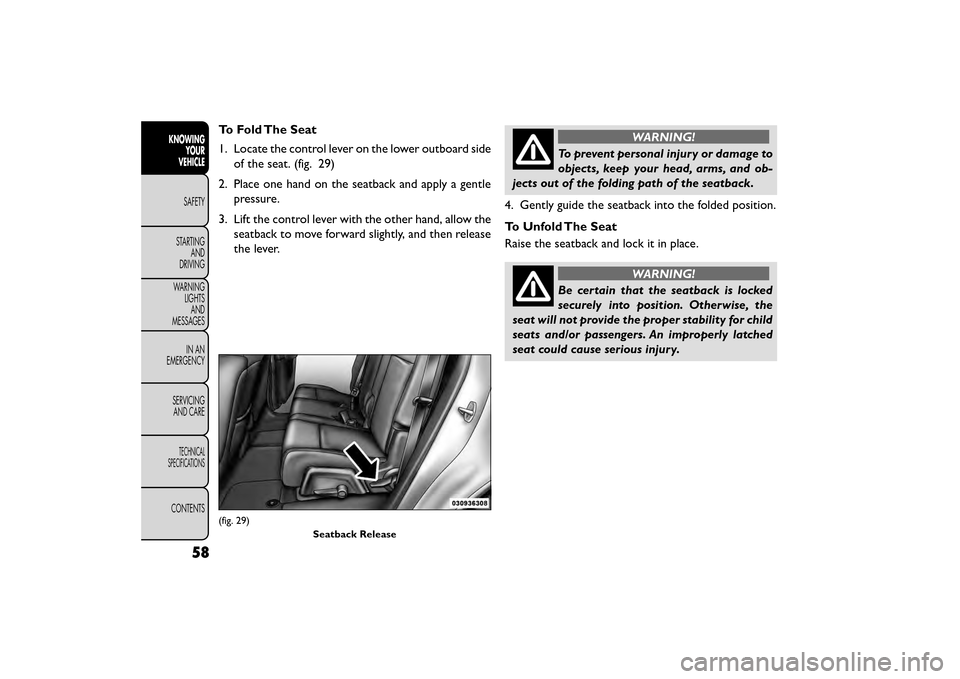
To Fold The Seat
1. Locate the control lever on the lower outboard sideof the seat. (fig. 29)
2. Place one hand on the seatback and apply a gentle pressure.
3. Lift the control lever with the other hand, allow the seatback to move forward slightly, and then release
the lever.WARNING!
To prevent personal injury or damage to
object s
, keep your head, arms, and ob-
jects out of the folding path of the seatback.
4. Gently guide the seatback into the folded position.
To Unfold The Seat
Raise the seatback and lock it in place.
WARNING!
Be certain that the seatback is locked
securely in
to position. Otherwise, the
seat will not provide the proper stability for child
seats and/or passengers. An improperly latched
seat could cause serious injury.
(fig. 29)
Seatback Release
58
KNOWINGYOUR
VEHICLE
SAFETY
STAR
TINGAND
DRIVING
WARNING LIGHTSAND
MESSAGES
IN AN
EMERGENCY
SERVICINGAND CARE
TECHNICAL
SPECIFICATIONS
CONTENTS
Page 66 of 412
WARNING!
• Adjusting a seat while the vehicle is
m o
ving is dangerous. The sudden move-
ment of the seat could cause you to lose control.
The seat belt might not be adjusted properly and
you could be injured. Adjust the seat only while
the vehicle is parked.
• Do not ride with the seatback reclined so that
the shoulder belt is no longer resting against your
chest . In a collision you could slide under the seat
belt and be seriously or even fatally injured. Use
the recliner only when the vehicle is parked.
Seatback/Armrest — Second Row Passenger
Seat
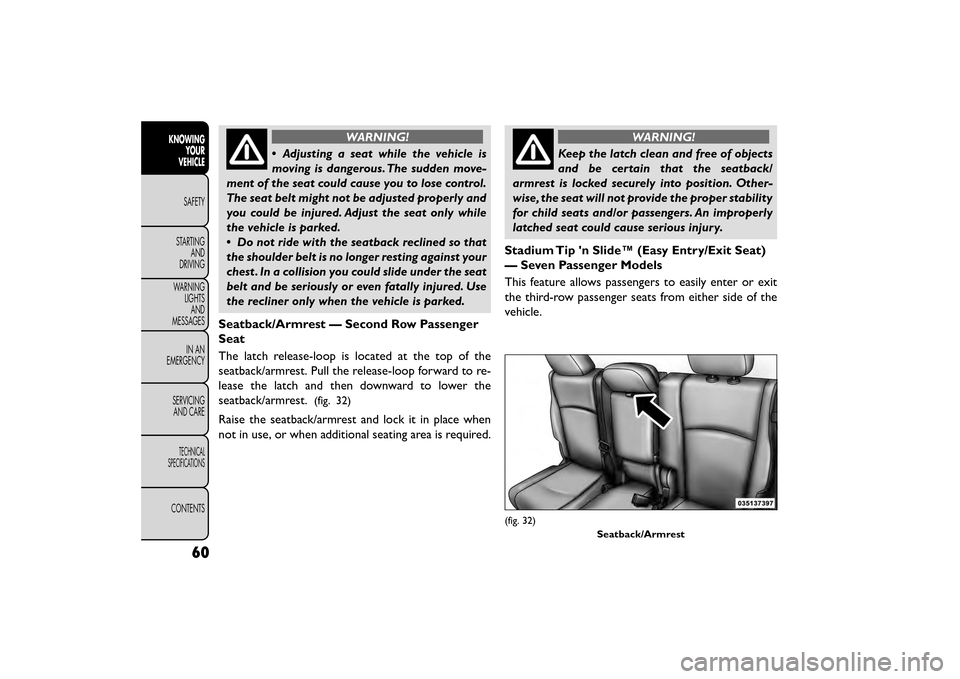
The latch release-loop is located at the top of the
seatback/armrest. Pull the release-loop forward to re-
lease the latch and then downward to lower the
seatback/armrest.
(fig. 32)
Raise the seatback/armrest and lock it in place when
not in use, or when additional seating area is required.
WARNING!
Keep the latch clean and free of objects
and be
certain that the seatback/
armrest is locked securely into position. Other-
wise, the seat will not provide the proper stability
for child seats and/or passengers. An improperly
latched seat could cause serious injury.
Stadium Tip 'n Slide™ (Easy Entry/Exit Seat)
— Seven Passenger Models
This feature allows passengers to easily enter or exit
the third-row passenger seats from either side of the
vehicle.
(fig. 32) Seatback/Armrest
60
KNOWINGYOUR
VEHICLE
SAFETY
STAR
TINGAND
DRIVING
WARNING LIGHTSAND
MESSAGES
IN AN
EMERGENCY
SERVICINGAND CARE
TECHNICAL
SPECIFICATIONS
CONTENTS
Page 68 of 412
To Unfold And Move The Second-Row Passen-
ger Seat Rearward
Move the seatback rearward until it locks in place and
then continue sliding the seat rearward on its tracks
until it locks in place.
Push the seat cushion downward to lock it in place.
Adjust the seat track position as desired. Using body
pressure, move forward and rearward on the seat to be
sure that the seat adjusters have latched.
WARNING!
Be certain that the seatback and seat
are lock ed
securely into position. Other-
wise, the seat will not provide the proper stability
for child seats and/or passengers. An improperly
latched seat could cause serious injury.
50/50 SPLIT THIRD-ROW PASSENGER
SEATS WITH FOLD-FLAT FEATURE (Seven
Passenger Models)
To provide additional storage area, each third-row
passenger seatback can be folded flat. This allows for
extended cargo space and still maintains some rear
seating room if needed. NOTE:
Prior to folding the third-row passenger seat-
back, make sure the second-row passenger seatback is
not in a reclined position. This will allow the seatback
to fold easily.
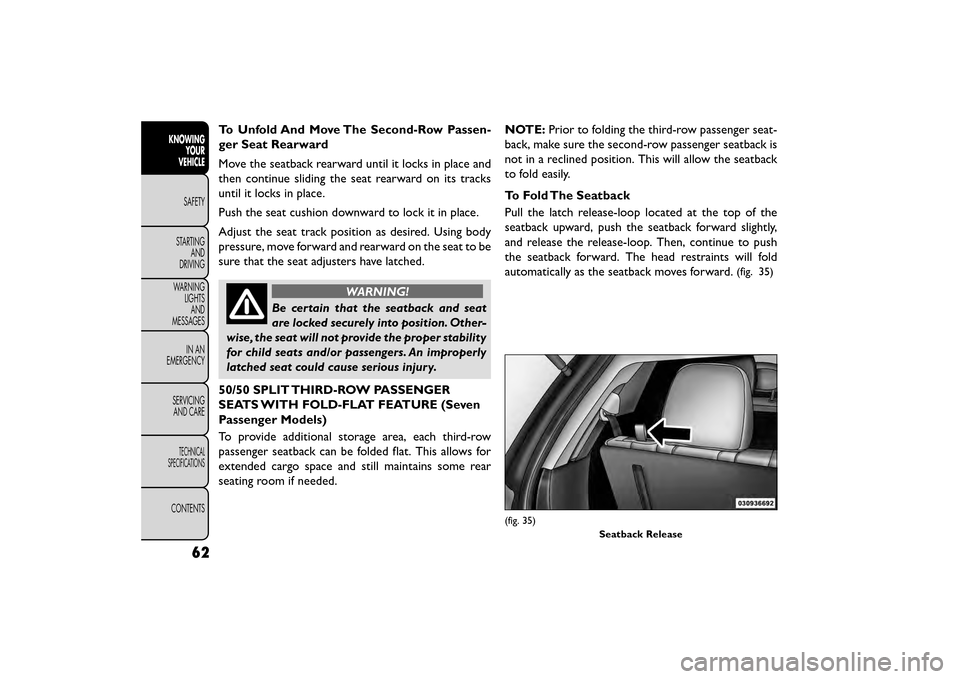
To Fold The Seatback
Pull the latch release-loop located at the top of the
seatback upward, push the seatback forward slightly,
and release the release-loop. Then, continue to push
the seatback forward. The head restraints will fold
automatically as the seatback moves forward.
(fig. 35)
(fig. 35)
Seatback Release
62
KNOWINGYOUR
VEHICLE
SAFETY
STAR
TINGAND
DRIVING
WARNING LIGHTSAND
MESSAGES
IN AN
EMERGENCY
SERVICINGAND CARE
TECHNICAL
SPECIFICATIONS
CONTENTS
Page 69 of 412
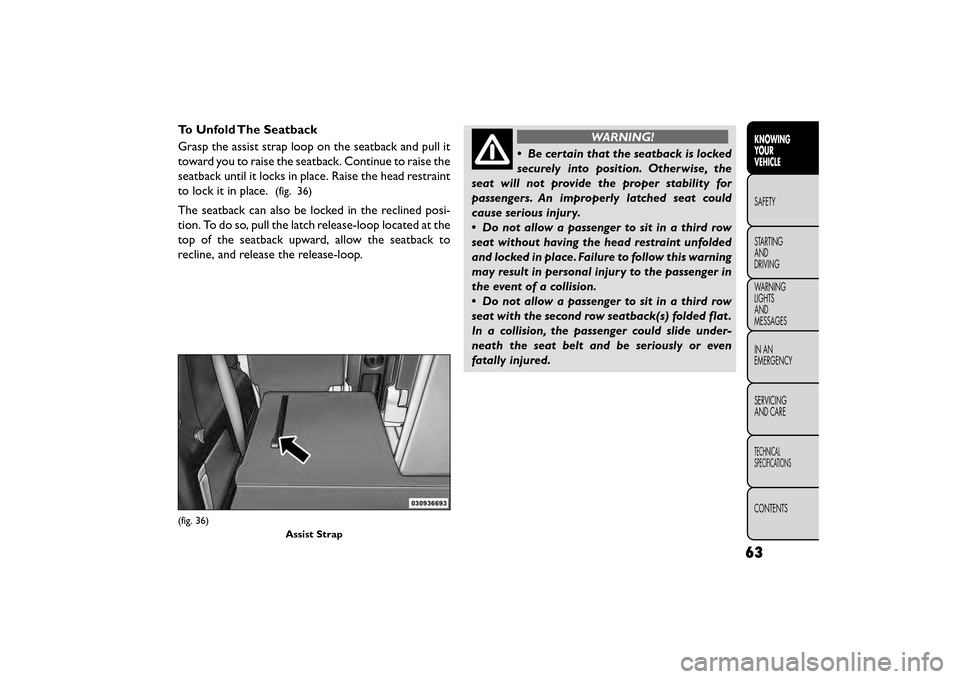
To Unfold The Seatback
Grasp the assist strap loop on the seatback and pull it
toward you to raise the seatback. Continue to raise the
seatback until it locks in place. Raise the head restraint
to lock it in place.
(fig. 36)
The seatback can also be locked in the reclined posi-
tion. To do so, pull the latch release-loop located at the
top of the seatback upward, allow the seatback to
recline, and release the release-loop.
WARNING!
• Be certain that the seatback is locked
sec urely
into position. Otherwise, the
seat will not provide the proper stability for
passengers. An improperly latched seat could
cause serious injury.
• Do not allow a passenger to sit in a third row
seat without having the head restraint unfolded
and locked in place. Failure to follow this warning
may result in personal injury to the passenger in
the event of a collision.
• Do not allow a passenger to sit in a third row
seat with the second row seatback(s) folded flat .
In a collision, the passenger could slide under-
neath the seat belt and be seriously or even
fatally injured.
(fig. 36)
Assist Strap
63
KNOWING
YOUR
VEHICLE
SAFETY
STAR
TING
AND
DRIVING
WARNING
LIGHTS
AND
MESSAGES
IN AN
EMERGENCY
SERVICING
AND CARE
TECHNICAL
SPECIFICATIONS
CONTENTS
Page 70 of 412
TILT/TELESCOPING STEERING
COLUMN
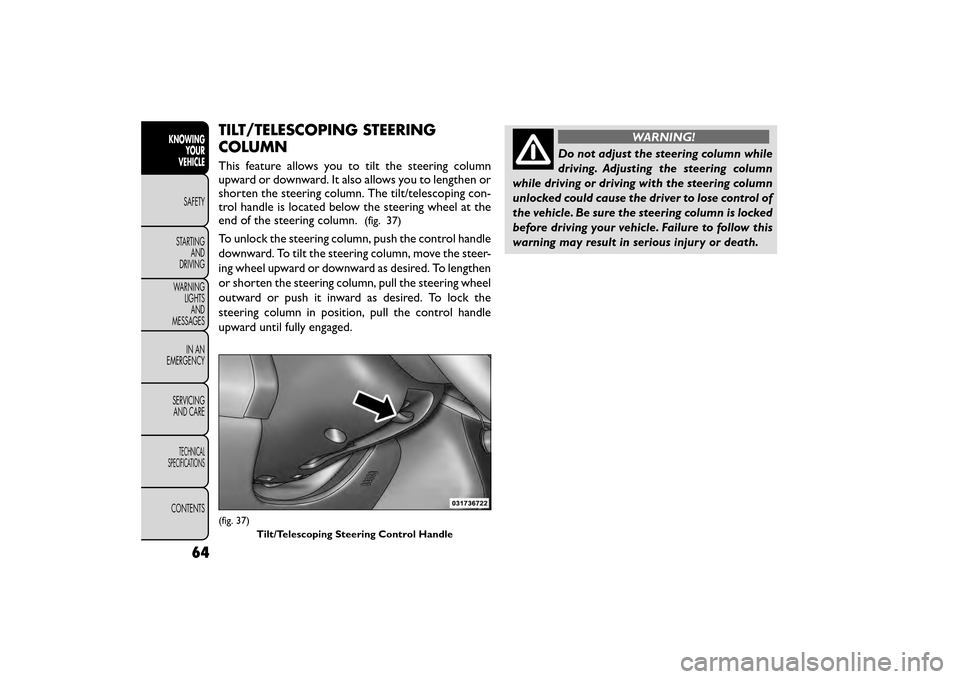
This feature allows you to tilt the steering column
upward or downward. It also allows you to lengthen or
shorten the steering column. The tilt/telescoping con-
trol handle is located below the steering wheel at the
end of the steering column.
(fig. 37)
To unlock the steering column, push the control handle
downward. To tilt the steering column, move the steer-
ing wheel upward or downward as desired. To lengthen
or shorten the steering column, pull the steering wheel
outward or push it inward as desired. To lock the
steering column in position, pull the control handle
upward until fully engaged.
WARNING!
Do not adjust the steering column while
drivin g.
Adjusting the steering column
while driving or driving with the steering column
unlocked could cause the driver to lose control of
the vehicle. Be sure the steering column is locked
before driving your vehicle. Failure to follow this
warning may result in serious injury or death.
(fig. 37)
Tilt/Telescoping Steering Control Handle
64
KNOWINGYOUR
VEHICLE
SAFETY
STAR
TINGAND
DRIVING
WARNING LIGHTSAND
MESSAGES
IN AN
EMERGENCY
SERVICINGAND CARE
TECHNICAL
SPECIFICATIONS
CONTENTS
Page 74 of 412
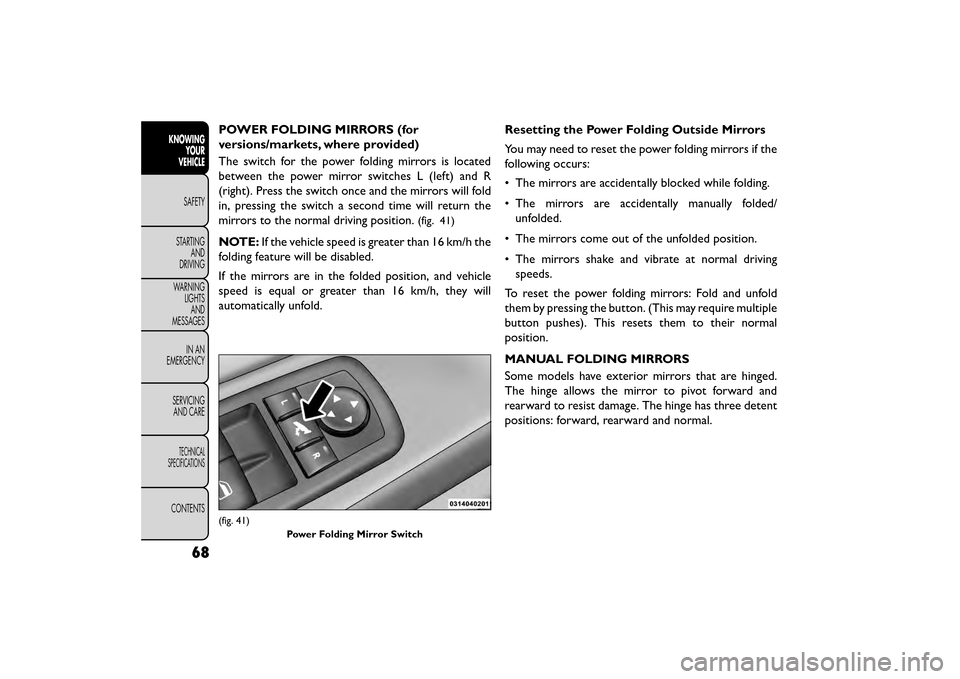
POWER FOLDING MIRRORS (for
versions/markets, where provided)
The switch for the power folding mirrors is located
between the power mirror switches L (left) and R
(right). Press the switch once and the mirrors will fold
in, pressing the switch a second time will return the
mirrors to the normal driving position.
(fig. 41)
NOTE:If the vehicle speed is greater than 16 km/h the
folding feature will be disabled.
If the mirrors are in the folded position, and vehicle
speed is equal or greater than 16 km/h, they will
automatically unfold. Resetting the Power Folding Outside Mirrors
You may need to reset the power folding mirrors if the
following occurs:
• The mirrors are accidentally blocked while folding.
• The mirrors are accidentally manually folded/
unfolded.
• The mirrors come out of the unfolded position.
• The mirrors shake and vibrate at normal driving speeds.
To reset the power folding mirrors: Fold and unfold
them by pressing the button. (This may require multiple
button pushes). This resets them to their normal
position.
MANUAL FOLDING MIRRORS
Some models have exterior mirrors that are hinged.
The hinge allows the mirror to pivot forward and
rearward to resist damage. The hinge has three detent
positions: forward, rearward and normal.
(fig. 41) Power Folding Mirror Switch
68
KNOWINGYOUR
VEHICLE
SAFETY
STAR
TINGAND
DRIVING
WARNING LIGHTSAND
MESSAGES
IN AN
EMERGENCY
SERVICINGAND CARE
TECHNICAL
SPECIFICATIONS
CONTENTS