lock FIAT FREEMONT 2016 1.G Owner's Guide
[x] Cancel search | Manufacturer: FIAT, Model Year: 2016, Model line: FREEMONT, Model: FIAT FREEMONT 2016 1.GPages: 412, PDF Size: 3.36 MB
Page 75 of 412
HEATED MIRRORS (for versions/markets,
where provided)These mirrors are heated to melt frost or ice.
This feature is activated whenever you turn on
the rear window defroster. Refer to “Rear Window
Features” for further information.
ILLUMINATED VANITY MIRRORS (for
versions/markets, where provided)
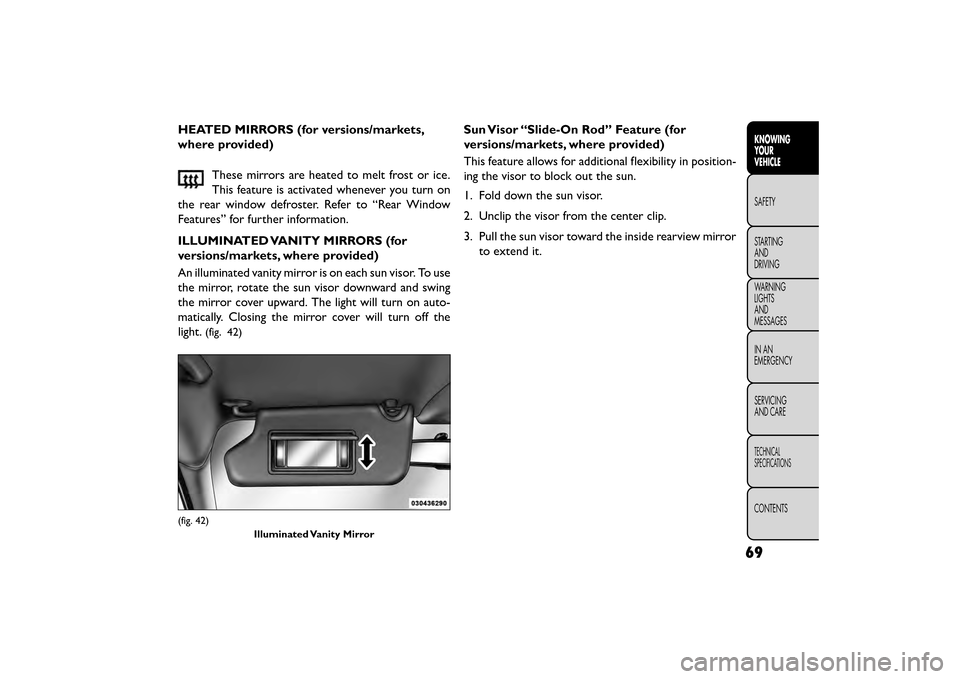
An illuminated vanity mirror is on each sun visor. To use
the mirror, rotate the sun visor downward and swing
the mirror cover upward. The light will turn on auto-
matically. Closing the mirror cover will turn off the
light.
(fig. 42)
Sun Visor “Slide-On Rod” Feature (for
versions/markets, where provided)
This feature allows for additional flexibility in position-
ing the visor to block out the sun.
1. Fold down the sun visor.
2. Unclip the visor from the center clip.
3. Pull the sun visor toward the inside rearview mirror to extend it.
(fig. 42)
Illuminated Vanity Mirror
69
KNOWING
YOUR
VEHICLE
SAFETY
STAR
TING
AND
DRIVING
WARNING
LIGHTS
AND
MESSAGES
IN AN
EMERGENCY
SERVICING
AND CARE
TECHNICAL
SPECIFICATIONS
CONTENTS
Page 79 of 412
NOTE:Pressing this button while in Sync mode will
automatically exit Sync.
8. Passenger Temperature Control Down Button
(Uconnect® 8.4 Only)
Provides the passenger with independent temperature
control. Push the button for cooler temperature set-
tings.
NOTE: Pressing this button while in Sync mode will
automatically exit Sync.
9. SYNC
Press the Sync button on the touchscreen to toggle the
Sync feature On/Off. The Sync indicator is illuminated
when this feature is enabled. Sync is used to synchro-
nize the passenger temperature setting with the driver
temperature setting. Changing the passenger tempera-
ture setting while in Sync will automatically exit this
feature.
10. Blower Control
Blower control is used to regulate the amount of air
forced through the climate system. There are seven
blower speeds available. Adjusting the blower will
cause automatic mode to switch to manual operation.
The speeds can be selected using either the blower
control knob on the faceplate or buttons on the touch-
screen as follows: Blower Control Knob On The Faceplate
The blower speed increases as you turn the blower
control knob clockwise from the lowest blower set-
ting. The blower speed decreases as you turn the
blower control knob counter-clockwise.
Button On The Touchscreen
Use the small blower icon to reduce the blower setting
and the large blower icon to increase the blower
setting. Blower can also be selected by pressing the
blower bar area between the icons.
11. Modes
The airflow distribution mode can be adjusted so air
comes from the instrument panel outlets, floor outlets,
demist outlets and defrost outlets. The Mode settings
are as follows:
• Panel Mode
Air comes from the outlets in the instrument
panel. Each of these outlets can be individually
adjusted to direct the flow of air. The air vanes of the
center outlets and outboard outlets can be moved up
and down or side to side to regulate airflow direction.
There is a shut off wheel located below the air vanes to
shut off or adjust the amount of airflow from these
outlets.
73
KNOWING
YOUR
VEHICLE
SAFETY
STAR
TING
AND
DRIVING
WARNING
LIGHTS
AND
MESSAGES
IN AN
EMERGENCY
SERVICING
AND CARE
TECHNICAL
SPECIFICATIONS
CONTENTS
Page 82 of 412
NOTE:In cold weather, use of Recirculation mode
may lead to excessive window fogging. The recircula-
tion feature may be unavailable (soft button greyed
out). Recirculation mode is not allowed in Defrost
mode to improve window clearing operation. Recircu-
lation will be disabled automatically if this mode is
selected. Attempting to use Recirculation while in this
mode will cause the LED in the control button to blink
and then turn off.
Rear Manual Temperature Control (MTC) (for
versions/markets, where provided)
The rear MTC system has floor air outlets at the rear
right side of the 3rd Row seats and overhead outlets at
each outboard rear seating position. The system pro-
vides heated air through the floor outlets or cool,
dehumidified air through the headliner outlets.
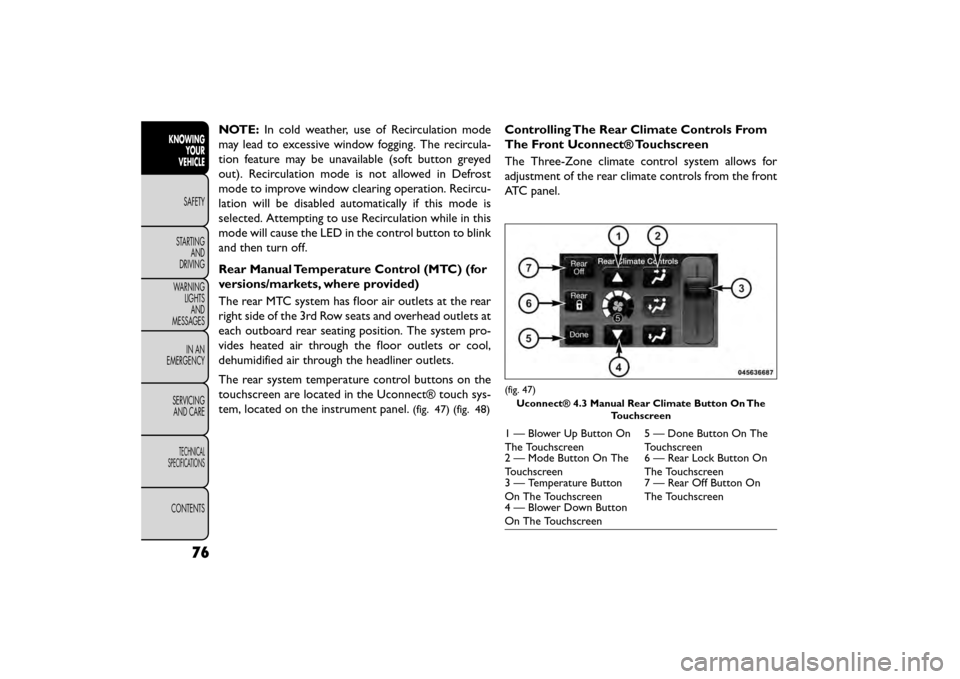
The rear system temperature control buttons on the
touchscreen are located in the Uconnect® touch sys-
tem, located on the instrument panel.
(fig. 47) (fig. 48)
Controlling The Rear Climate Controls From
The Front Uconnect® Touchscreen
The Three-Zone climate control system allows for
adjustment of the rear climate controls from the front
ATC panel.
(fig. 47)
Uconnect® 4.3 Manual Rear Climate Button On The Touchscreen
1 — Blower Up Button On
The Touchscreen 5 — Done Button On The
Touchscreen
2 — Mode Button On The
Touchscreen 6 — Rear Lock Button On
The Touchscreen
3 — Temperature Button
On The Touchscreen 7 — Rear Off Button On
The Touchscreen
4 — Blower Down Button
On The Touchscreen
76
KNOWING
YOUR
VEHICLE
SAFETY
STAR
TINGAND
DRIVING
WARNING LIGHTSAND
MESSAGES
IN AN
EMERGENCY
SERVICINGAND CARE
TECHNICAL
SPECIFICATIONS
CONTENTS
Page 83 of 412
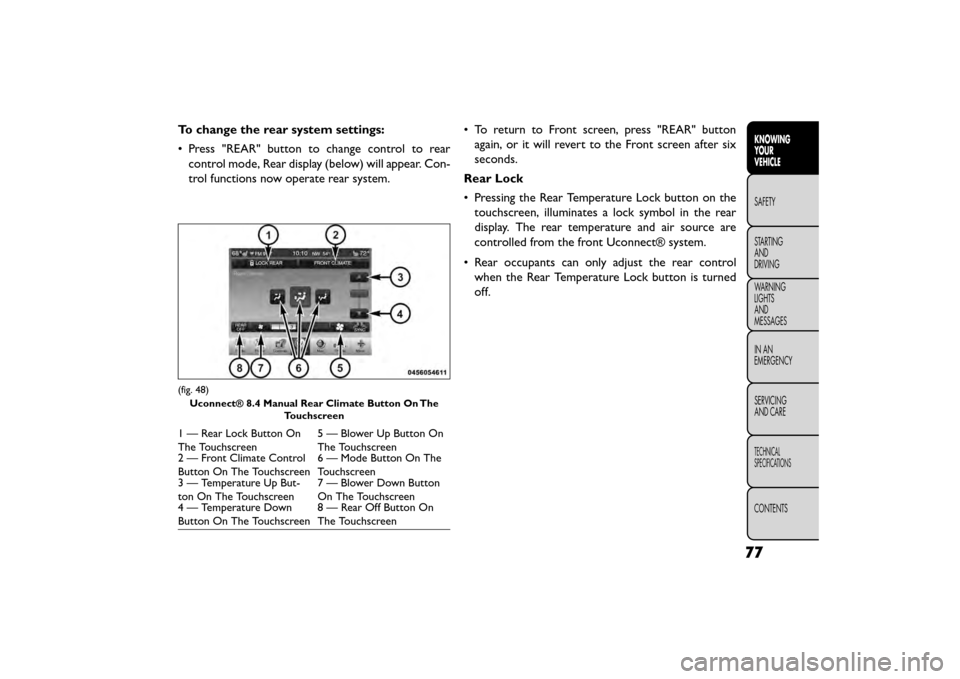
To change the rear system settings:
• Press "REAR" button to change control to rearcontrol mode, Rear display (below) will appear. Con-
trol functions now operate rear system. • To return to Front screen, press "REAR" button
again, or it will revert to the Front screen after six
seconds.
Rear Lock
• Pressing the Rear Temperature Lock button on the touchscreen, illuminates a lock symbol in the rear
display. The rear temperature and air source are
controlled from the front Uconnect® system.
• Rear occupants can only adjust the rear control when the Rear Temperature Lock button is turned
off.
(fig. 48)
Uconnect® 8.4 Manual Rear Climate Button On The Touchscreen
1 — Rear Lock Button On
The Touchscreen 5 — Blower Up Button On
The Touchscreen
2 — Front Climate Control
Button On The Touchscreen 6 — Mode Button On The
Touchscreen
3 — Temperature Up But-
ton On The Touchscreen 7 — Blower Down Button
On The Touchscreen
4 — Temperature Down
Button On The Touchscreen 8 — Rear Off Button On
The Touchscreen
77
KNOWING
YOUR
VEHICLE
SAFETY
STAR
TING
AND
DRIVING
WARNING
LIGHTS
AND
MESSAGES
IN AN
EMERGENCY
SERVICING
AND CARE
TECHNICAL
SPECIFICATIONS
CONTENTS
Page 84 of 412
Rear Blower Control
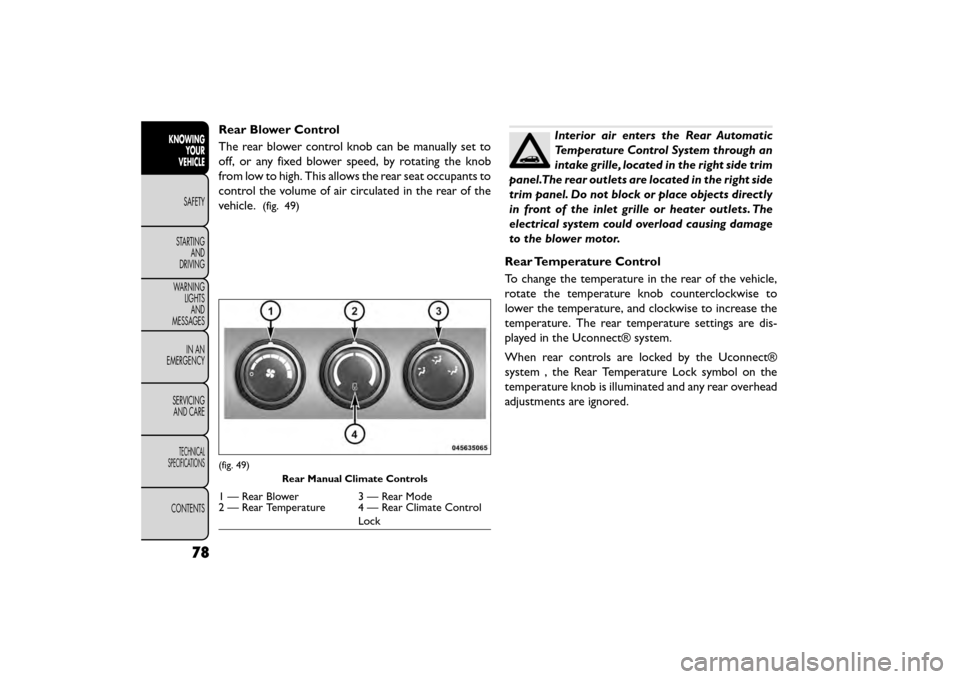
The rear blower control knob can be manually set to
off, or any fixed blower speed, by rotating the knob
from low to high. This allows the rear seat occupants to
control the volume of air circulated in the rear of the
vehicle.
(fig. 49)
Interior air enters the Rear Automatic
Temperature Control System through an
intake grille, located in the right side trim
panel.The rear outlets are located in the right side
trim panel. Do not block or place objects directly
in front of the inlet grille or heater outlets. The
electrical system could overload causing damage
to the blower motor.
Rear Temperature Control
To change the temperature in the rear of the vehicle,
rotate the temperature knob counterclockwise to
lower the temperature, and clockwise to increase the
temperature. The rear temperature settings are dis-
played in the Uconnect® system.
When rear controls are locked by the Uconnect®
system , the Rear Temperature Lock symbol on the
temperature knob is illuminated and any rear overhead
adjustments are ignored.
(fig. 49) Rear Manual Climate Controls
1 — Rear Blower 3 — Rear Mode
2 — Rear Temperature 4 — Rear Climate Control
Lock
78
KNOWINGYOUR
VEHICLE
SAFETY
STAR
TINGAND
DRIVING
WARNING LIGHTSAND
MESSAGES
IN AN
EMERGENCY
SERVICINGAND CARE
TECHNICAL
SPECIFICATIONS
CONTENTS
Page 88 of 412
8. Passenger Temperature Control Up Button
Provides the passenger with independent temperature
control. Push the button for warmer temperature
settings.
NOTE:Pressing this button while in Sync mode will
automatically exit Sync.
9. Passenger Temperature Control Down Button
Provides the passenger with independent temperature
control. Push the button for cooler temperature set-
tings.
NOTE: Pressing this button while in Sync mode will
automatically exit Sync.
10. SYNC
Press the Sync button on the touchscreen to toggle the
Sync feature On/Off. The Sync indicator is illuminated
when this feature is enabled. Sync is used to synchro-
nize the passenger temperature setting with the driver
temperature setting. Changing the passenger tempera-
ture setting while in Sync will automatically exit this
feature.
11. Blower Control
Blower control is used to regulate the amount of air
forced through the climate system. There are seven
blower speeds available. Adjusting the blower will
cause automatic mode to switch to manual operation.
The speeds can be selected using either the blower control knob on the faceplate or buttons on the touch-
screen as follows:
Blower Control Knob On The Faceplate
The blower speed increases as you turn the blower
control knob clockwise from the lowest blower set-
ting. The blower speed decreases as you turn the
blower control knob counter-clockwise.
Button On The Touchscreen
Use the small blower icon to reduce the blower setting
and the large blower icon to increase the blower
setting. Blower can also be selected by pressing the
blower bar area between the icons.
12. Modes
The airflow distribution mode can be adjusted so air
comes from the instrument panel outlets, floor outlets,
and demist outlets and defrost outlets. The Mode
settings are as follows:
• Panel Mode
Air comes from the outlets in the instrument
panel. Each of these outlets can be individually
adjusted to direct the flow of air. The air vanes of the
center outlets and outboard outlets can be moved up
and down or side to side to regulate airflow direction.
There is a shut off wheel located below the air vanes to
shut off or adjust the amount of airflow from these
outlets.
82
KNOWING YOUR
VEHICLE
SAFETY
STAR
TINGAND
DRIVING
WARNING LIGHTSAND
MESSAGES
IN AN
EMERGENCY
SERVICINGAND CARE
TECHNICAL
SPECIFICATIONS
CONTENTS
Page 92 of 412
The operator can also select the direction of the
airflow by selecting one of the available mode settings.
A/C operation and Recirculation control can also be
manually selected in Manual operation.
NOTE:Each of these features operates independently
from each other. If any feature is controlled manually,
temperature control will continue to operate auto-
matically.
Rear Automatic Temperature Control (ATC)
(for versions/markets, where provided)
The rear ATC system has floor air outlets at the rear
right side of the 3rd Row seats and overhead outlets at
each outboard rear seating position. The system pro-
vides heated air through the floor outlets or cool,
dehumidified air through the headliner outlets.
The rear system temperature control buttons are lo-
cated in the Uconnect® touch system, located on the
instrument panel. (fig. 54) (fig. 55)
Controlling The Rear Climate Controls From
The Front ATC Panel
The Three-Zone ATC system allows for adjustment of
the rear climate controls from the front ATC panel. To change the rear system settings:
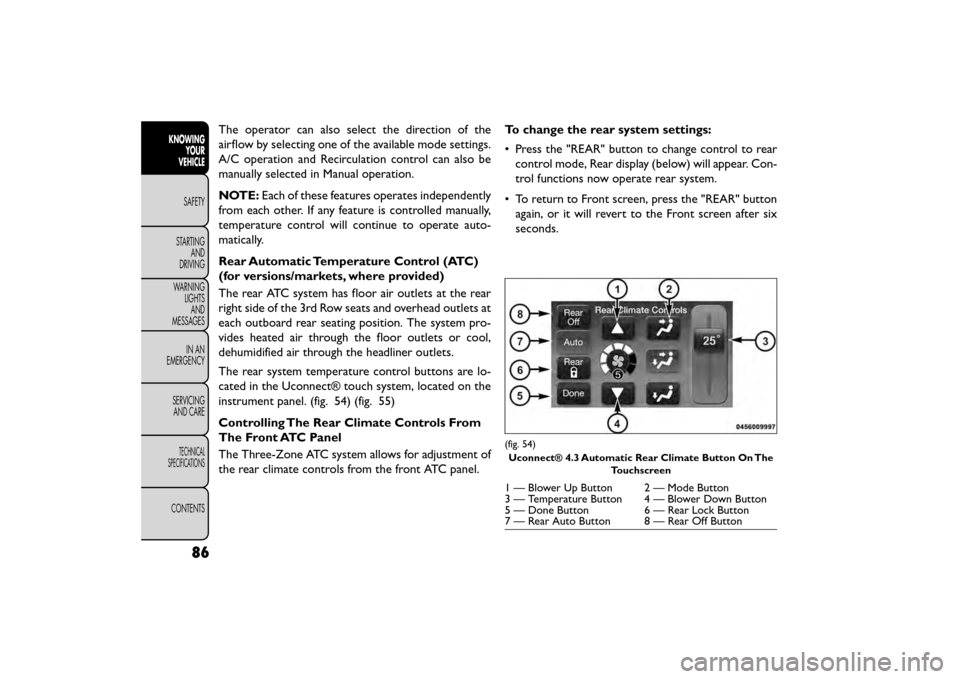
• Press the "REAR" button to change control to rear
control mode, Rear display (below) will appear. Con-
trol functions now operate rear system.
• To return to Front screen, press the "REAR" button again, or it will revert to the Front screen after six
seconds.
(fig. 54)
Uconnect® 4.3 Automatic Rear Climate Button On The Touchscreen
1 — Blower Up Button 2 — Mode Button
3 — Temperature Button 4 — Blower Down Button
5 — Done Button 6 — Rear Lock Button
7 — Rear Auto Button 8 — Rear Off Button
86
KNOWINGYOUR
VEHICLE
SAFETY
STAR
TINGAND
DRIVING
WARNING LIGHTSAND
MESSAGES
IN AN
EMERGENCY
SERVICINGAND CARE
TECHNICAL
SPECIFICATIONS
CONTENTS
Page 93 of 412
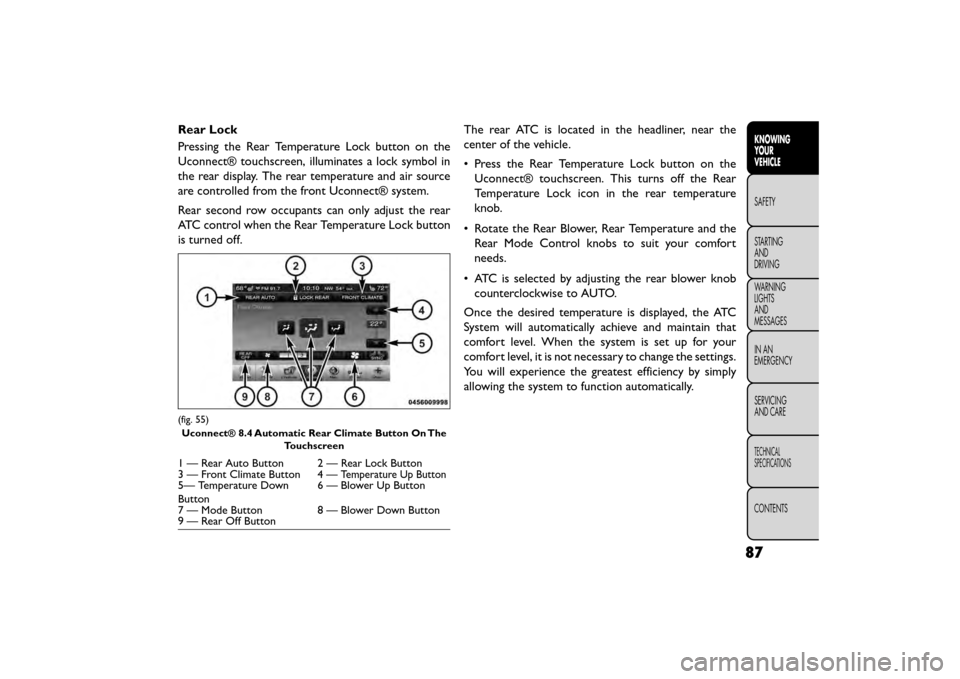
Rear Lock
Pressing the Rear Temperature Lock button on the
Uconnect® touchscreen, illuminates a lock symbol in
the rear display. The rear temperature and air source
are controlled from the front Uconnect® system.
Rear second row occupants can only adjust the rear
ATC control when the Rear Temperature Lock button
is turned off.The rear ATC is located in the headliner, near the
center of the vehicle.
• Press the Rear Temperature Lock button on the
Uconnect® touchscreen. This turns off the Rear
Temperature Lock icon in the rear temperature
knob.
• Rotate the Rear Blower, Rear Temperature and the Rear Mode Control knobs to suit your comfort
needs.
• ATC is selected by adjusting the rear blower knob counterclockwise to AUTO.
Once the desired temperature is displayed, the ATC
System will automatically achieve and maintain that
comfort level. When the system is set up for your
comfort level, it is not necessary to change the settings.
You will experience the greatest efficiency by simply
allowing the system to function automatically.
(fig. 55) Uconnect® 8.4 Automatic Rear Climate Button On The Touchscreen
1 — Rear Auto Button 2 — Rear Lock Button
3 — Front Climate Button 4 —Temperature Up Button5— Temperature Down
Button 6 — Blower Up Button
7 — Mode Button 8 — Blower Down Button
9 — Rear Off Button
87
KNOWING
YOUR
VEHICLE
SAFETY
STAR
TING
AND
DRIVING
WARNING
LIGHTS
AND
MESSAGES
IN AN
EMERGENCY
SERVICING
AND CARE
TECHNICAL
SPECIFICATIONS
CONTENTS
Page 94 of 412
NOTE:It is not necessary to move the temperature
settings for cold or hot vehicles. The system automati-
cally adjusts the temperature, mode and fan speed to
provide comfort as quickly as possible.
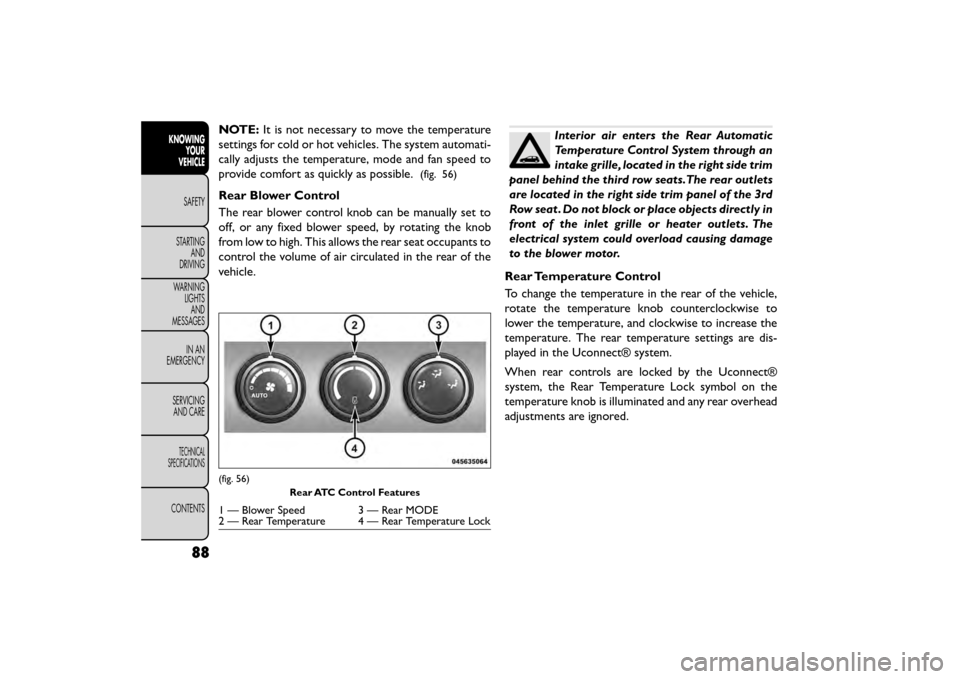
(fig. 56)
Rear Blower Control
The rear blower control knob can be manually set to
off, or any fixed blower speed, by rotating the knob
from low to high. This allows the rear seat occupants to
control the volume of air circulated in the rear of the
vehicle.
Interior air enters the Rear Automatic
Temperature Control System through an
intake grille, located in the right side trim
panel behind the third row seats.The rear outlets
are located in the right side trim panel of the 3rd
Row seat . Do not block or place objects directly in
front of the inlet grille or heater outlets. The
electrical system could overload causing damage
to the blower motor.
Rear Temperature Control
To change the temperature in the rear of the vehicle,
rotate the temperature knob counterclockwise to
lower the temperature, and clockwise to increase the
temperature. The rear temperature settings are dis-
played in the Uconnect® system.
When rear controls are locked by the Uconnect®
system, the Rear Temperature Lock symbol on the
temperature knob is illuminated and any rear overhead
adjustments are ignored.
(fig. 56) Rear ATC Control Features
1 — Blower Speed 3 — Rear MODE
2 — Rear Temperature 4 — Rear Temperature Lock
88
KNOWINGYOUR
VEHICLE
SAFETY
STAR
TINGAND
DRIVING
WARNING LIGHTSAND
MESSAGES
IN AN
EMERGENCY
SERVICINGAND CARE
TECHNICAL
SPECIFICATIONS
CONTENTS
Page 98 of 412
LIGHTS
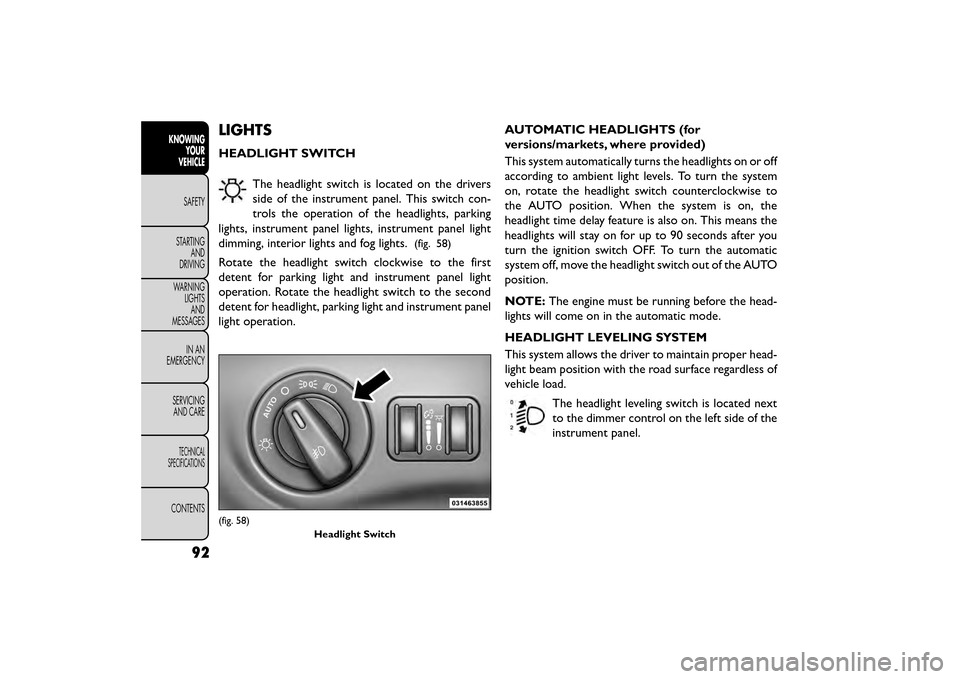
HEADLIGHT SWITCHThe headlight switch is located on the drivers
side of the instrument panel. This switch con-
trols the operation of the headlights, parking
lights, instrument panel lights, instrument panel light
dimming, interior lights and fog lights.
(fig. 58)
Rotate the headlight switch clockwise to the first
detent for parking light and instrument panel light
operation. Rotate the headlight switch to the second
detent for headlight, parking light and instrument panel
light operation. AUTOMATIC HEADLIGHTS (for
versions/markets, where provided)
This system automatically turns the headlights on or off
according to ambient light levels. To turn the system
on, rotate the headlight switch counterclockwise to
the AUTO position. When the system is on, the
headlight time delay feature is also on. This means the
headlights will stay on for up to 90 seconds after you
turn the ignition switch OFF. To turn the automatic
system off, move the headlight switch out of the AUTO
position.
NOTE:
The engine must be running before the head-
lights will come on in the automatic mode.
HEADLIGHT LEVELING SYSTEM
This system allows the driver to maintain proper head-
light beam position with the road surface regardless of
vehicle load.
The headlight leveling switch is located next
to the dimmer control on the left side of the
instrument panel.
(fig. 58) Headlight Switch
92
KNOWINGYOUR
VEHICLE
SAFETY
STAR
TINGAND
DRIVING
WARNING LIGHTSAND
MESSAGES
IN AN
EMERGENCY
SERVICINGAND CARE
TECHNICAL
SPECIFICATIONS
CONTENTS