Side light FIAT FULLBACK 2016 1.G User Guide
[x] Cancel search | Manufacturer: FIAT, Model Year: 2016, Model line: FULLBACK, Model: FIAT FULLBACK 2016 1.GPages: 312, PDF Size: 13.67 MB
Page 92 of 312
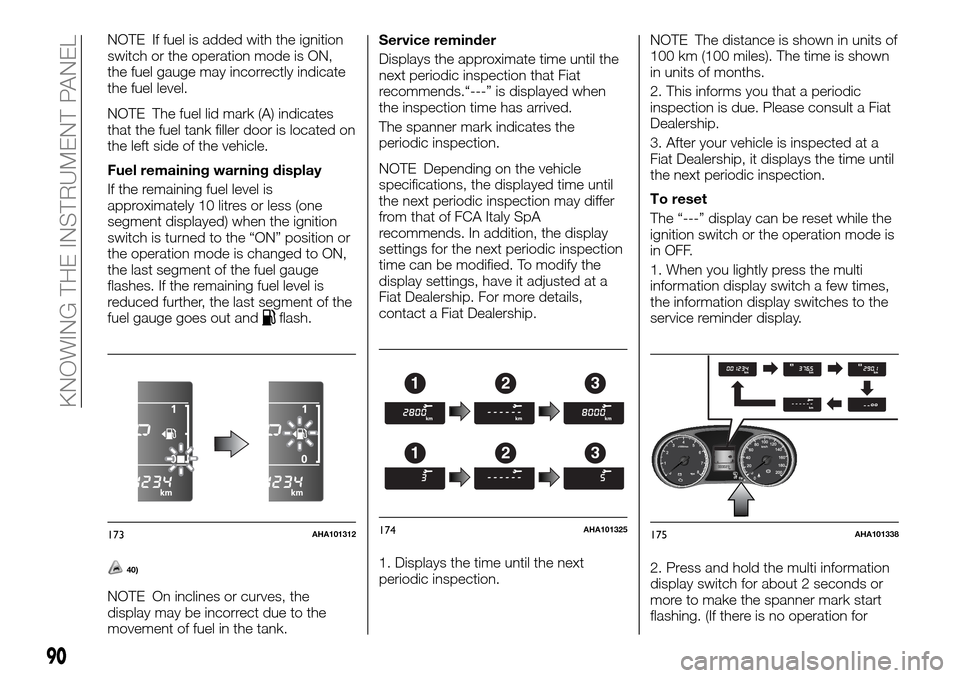
NOTE If fuel is added with the ignition
switch or the operation mode is ON,
the fuel gauge may incorrectly indicate
the fuel level.
NOTE The fuel lid mark (A) indicates
that the fuel tank filler door is located on
the left side of the vehicle.
Fuel remaining warning display
If the remaining fuel level is
approximately 10 litres or less (one
segment displayed) when the ignition
switch is turned to the “ON” position or
the operation mode is changed to ON,
the last segment of the fuel gauge
flashes. If the remaining fuel level is
reduced further, the last segment of the
fuel gauge goes out and
flash.
40)
NOTE On inclines or curves, the
display may be incorrect due to the
movement of fuel in the tank.Service reminder
Displays the approximate time until the
next periodic inspection that Fiat
recommends.“---” is displayed when
the inspection time has arrived.
The spanner mark indicates the
periodic inspection.
NOTE Depending on the vehicle
specifications, the displayed time until
the next periodic inspection may differ
from that of FCA Italy SpA
recommends. In addition, the display
settings for the next periodic inspection
time can be modified. To modify the
display settings, have it adjusted at a
Fiat Dealership. For more details,
contact a Fiat Dealership.
1. Displays the time until the next
periodic inspection.NOTE The distance is shown in units of
100 km (100 miles). The time is shown
in units of months.
2. This informs you that a periodic
inspection is due. Please consult a Fiat
Dealership.
3. After your vehicle is inspected at a
Fiat Dealership, it displays the time until
the next periodic inspection.
To reset
The “---” display can be reset while the
ignition switch or the operation mode is
in OFF.
1. When you lightly press the multi
information display switch a few times,
the information display switches to the
service reminder display.
2. Press and hold the multi information
display switch for about 2 seconds or
more to make the spanner mark start
flashing. (If there is no operation for
173AHA101312
123
123
174AHA101325175AHA101338
90
KNOWING THE INSTRUMENT PANEL
Page 94 of 312
Auto reset modeWhen the average fuel consumption
is being displayed, if you hold down the
multi information display switch, the
average fuel consumption displayed at
that time are reset.
When the engine switch or the
operation mode is in the following
conditions, the average fuel
consumption display is automatically
reset. Except for vehicles equipped with
the keyless operation system: the
ignition switch is in the “ACC” or
“LOCK” position for about 4 hours or
longer. For vehicles equipped with the
keyless operation system: the operation
mode is in ACC or OFF for about
4 hours or longer.
IMPORTANT The average fuel
consumption display can be reset
separately for the auto reset mode and
for the manual reset mode.
IMPORTANT The memory of the
manual reset mode or auto reset mode
for the average fuel consumption
display is erased if the battery is
disconnected.
The initial (default) setting is “Auto reset
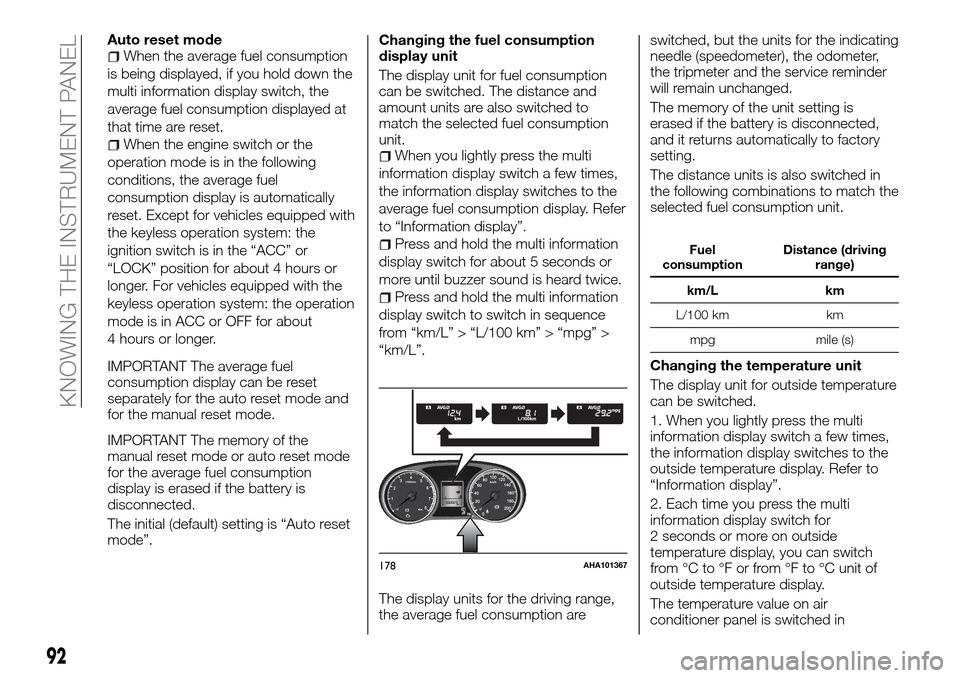
mode”.Changing the fuel consumption
display unit
The display unit for fuel consumption
can be switched. The distance and
amount units are also switched to
match the selected fuel consumption
unit.When you lightly press the multi
information display switch a few times,
the information display switches to the
average fuel consumption display. Refer
to “Information display”.
Press and hold the multi information
display switch for about 5 seconds or
more until buzzer sound is heard twice.
Press and hold the multi information
display switch to switch in sequence
from “km/L” > “L/100 km” > “mpg” >
“km/L”.
The display units for the driving range,
the average fuel consumption areswitched, but the units for the indicating
needle (speedometer), the odometer,
the tripmeter and the service reminder
will remain unchanged.
The memory of the unit setting is
erased if the battery is disconnected,
and it returns automatically to factory
setting.
The distance units is also switched in
the following combinations to match the
selected fuel consumption unit.
Fuel
consumptionDistance (driving
range)
km/L km
L/100 km km
mpg mile (s)
Changing the temperature unit
The display unit for outside temperature
can be switched.
1. When you lightly press the multi
information display switch a few times,
the information display switches to the
outside temperature display. Refer to
“Information display”.
2. Each time you press the multi
information display switch for
2 seconds or more on outside
temperature display, you can switch
from °C to °F or from °F to °C unit of
outside temperature display.
The temperature value on air
conditioner panel is switched in
178AHA101367
92
KNOWING THE INSTRUMENT PANEL
Page 98 of 312
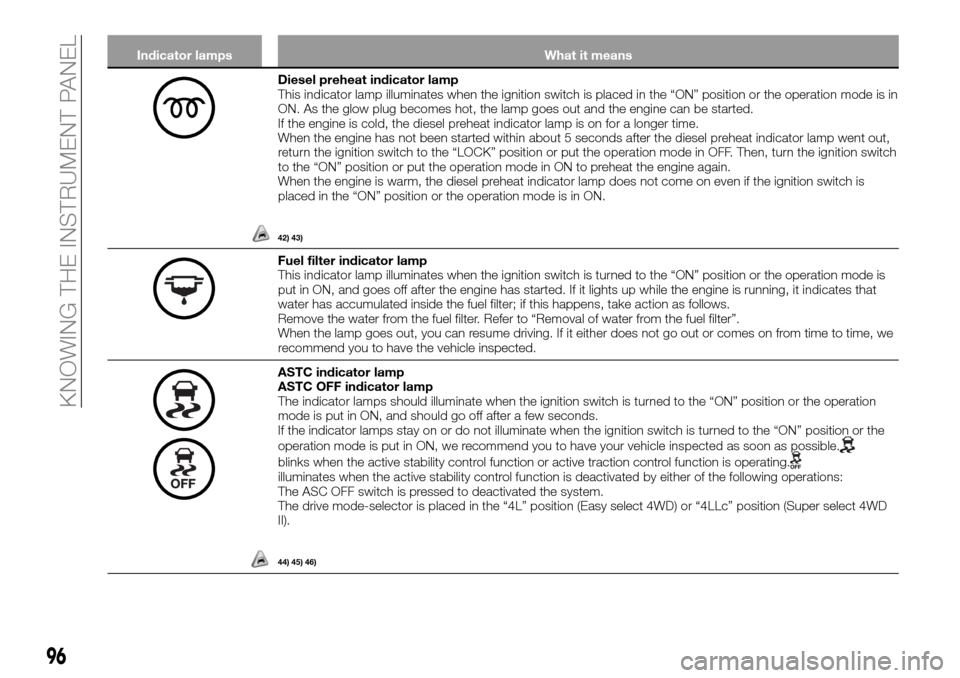
Indicator lamps What it means
Diesel preheat indicator lamp
This indicator lamp illuminates when the ignition switch is placed in the “ON” position or the operation mode is in
ON. As the glow plug becomes hot, the lamp goes out and the engine can be started.
If the engine is cold, the diesel preheat indicator lamp is on for a longer time.
When the engine has not been started within about 5 seconds after the diesel preheat indicator lamp went out,
return the ignition switch to the “LOCK” position or put the operation mode in OFF. Then, turn the ignition switch
to the “ON” position or put the operation mode in ON to preheat the engine again.
When the engine is warm, the diesel preheat indicator lamp does not come on even if the ignition switch is
placed in the “ON” position or the operation mode is in ON.
42) 43)
Fuel filter indicator lamp
This indicator lamp illuminates when the ignition switch is turned to the “ON” position or the operation mode is
put in ON, and goes off after the engine has started. If it lights up while the engine is running, it indicates that
water has accumulated inside the fuel filter; if this happens, take action as follows.
Remove the water from the fuel filter. Refer to “Removal of water from the fuel filter”.
When the lamp goes out, you can resume driving. If it either does not go out or comes on from time to time, we
recommend you to have the vehicle inspected.
ASTC indicator lamp
ASTC OFF indicator lamp
The indicator lamps should illuminate when the ignition switch is turned to the “ON” position or the operation
mode is put in ON, and should go off after a few seconds.
If the indicator lamps stay on or do not illuminate when the ignition switch is turned to the “ON” position or the
operation mode is put in ON, we recommend you to have your vehicle inspected as soon as possible.
blinks when the active stability control function or active traction control function is operating.illuminates when the active stability control function is deactivated by either of the following operations:
The ASC OFF switch is pressed to deactivated the system.
The drive mode-selector is placed in the “4L” position (Easy select 4WD) or “4LLc” position (Super select 4WD
II).
44) 45) 46)
96
KNOWING THE INSTRUMENT PANEL
Page 126 of 312
WARNING
145)Airbags inflate at an extremely rapid
speed. In certain situations, contact with
inflating airbags can result in abrasions,
bruises, light cuts, and the like.
146)IT IS VERY IMPORTANT TO BE
PROPERLY SEATED. A driver or front
passenger too close to the steering wheel
or instrument panel during airbag
deployment can be killed or seriously
injured. Airbags inflate very fast, and with
great force. If the driver and front
passenger are not properly seated and
restrained, the airbags may not protect you
properly, and could cause serious or fatal
injuries when they inflate.
147)Do not sit on the edge of the seat, or
sit with your lower legs too close to the
instrument panel, or lean head or chest
close to the steering wheel or instrument
panel. Do not put feet or legs on or against
the instrument panel.
148)Always drive with your hands on the
rim of the steering wheel so that the airbag
can inflate freely if required. Do not drive
with your body bent forward. Keep your
back straight against the backrest.149)Place all infants and small children in
the rear seat and properly restrained using
an appropriate child restraint system. The
rear seat is the safest for infants and
children.
150)Infants and small children should
never be unrestrained, stand up against
the instrument panel or held in your arms
or on your lap. They could be seriously
injured or killed in a collision, including
when the airbag inflates. They should be
properly seated in an appropriate child
restraint system. See the “Child restraint”
section of this owner’s manual.
151)When there is an active passenger
airbag, DO NOT install rearward facing
child restraint systems on the front seat.
Deployment of the airbag in an accident
could cause fatal injuries to the child
regardless of the severity of the impact.
Therefore, always deactivate the passenger
side airbag when a rearward facing child
restraint system is installed on the front
passenger seat. The front passenger seat
must also be positioned back as far as
possible in order to prevent the child
restraint system from coming into contact
with the dashboard. Immediately reactivate
the passenger airbag as soon as the child
restraint system has been removed.
152)Older children should be seated,
properly wearing the seat belt, with an
appropriate booster seat if needed.
153)Extreme Hazard! NEVER use a
rearward facing child restraint on a seat
protected by an ACTIVE AIRBAG in front of
it, DEATH or SERIOUS INJURY to the
CHILD can occur.154)Do not fit any accessory that makes
the indicator impossible to see, and do not
cover the indicator with a sticker. You
would not be able to verify the status of the
passenger airbag system.
155)To reduce risk of serious or fatal
injury: always turn the ignition switch to the
“LOCK” position or put the operation mode
in OFF, before operating the front
passenger’s airbag ON-OFF switch. Failure
to do so could adversely affect the airbag
performance; Wait at least 60 seconds to
operate the front passenger’s airbag
ON-OFF switch after turning the ignition
switch to the “LOCK” position or putting
the operation mode in OFF. The SRS
airbag system is designed to retain enough
voltage to deploy the airbag; Always
remove the key from the front passenger’s
airbag ON-OFF switch after operating that
switch. Failure to do so could lead to
improper position of the front passenger’s
airbag ON-OFF switch; Do not turn OFF
the front passenger’s airbag ON-OFF
switch except when a child restraint
system is fitted to the front passenger seat;
If the OFF indicator does not come on
when the front passenger’s airbag ONOFF
switch is turned OFF, do not fit a child
restraint system to the front passenger
seat. We recommend you to have the
system inspected by a Fiat Dealership; if
the OFF indicator remains on when the
front passenger’s airbag ON-OFF switch is
turned ON, do not allow anyone to sit on
the front passenger seat. We recommend
you to have the system inspected by a Fiat
Dealership.
124
SAFETY
Page 128 of 312
176)Do not modify your steering wheel,
seat belt retractor or any other SRS
components. For example, replacement of
the steering wheel, or modifications to the
front bumper or body structure can
adversely affect SRS performance and lead
to possible injury.
177)If your vehicle has received any
damage, we recommend you to have the
SRS inspected to ensure it is in proper
working order.
178)On vehicles with the side airbag, do
not modify your front seats, centre pillar
and centre console. It can adversely affect
SRS performance and lead to possible
injury.
179)If you found any tear, scratch, crack
or damage to the portion where the airbag
is stored, you should have the SRS
inspected by a Fiat Dealership.ACTIVE SAFETY
SYSTEMS
Brake assist system (where
provided)
The brake assist system is a device
assisting drivers who cannot depress
the brake pedal firmly such as in
emergency stop situations and provides
greater braking force.
If the brake pedal is depressed
suddenly, the brakes will be applied
with more force than usual.
180)
NOTE Once the brake assist system is
operational, it maintains great braking
force even if the brake pedal is lightly
released. To stop its operation,
completely remove your foot from the
brake pedal.
NOTE When the brake assist system is
in use while driving, you may feel the
brake pedal attempt to resist, the pedal
moves in small motions in conjunction
with the operation noise, or the vehicle
body and the steering wheel vibrate.
This occurs when the brake assist
system is operating normally and does
not indicate faulty operation. Continue
to depress the brake pedal.
NOTE When the active stability &
traction control (ASTC) indicator lamp is
illuminated, the brake assist system
may not function.Anti-lock brake system (ABS)
(where provided)
The anti-lock brake system (ABS) helps
prevent the wheels from locking up
when braking. This helps maintain
vehicle drivability and steering wheel
handling.
Driving hints
Always keep a safe distance from the
vehicle in front of you. Even if your
vehicle is equipped with the ABS, leave
a greater braking distance when:
Driving on gravel or snow-covered
roads.
Driving with tyre chains installed.
Driving on roads where the road
surface is pitted or has other
differences in surface height.
Driving on uneven road surfaces.
Operation of ABS is not restricted
situations where brakes are applied
suddenly. This system may also prevent
the wheels from locking when you drive
over manholes, steel roadwork plates,
road markings, or any uneven road
surface.
When the ABS is in use, you may feel
the brake pedal pulsation and the
vibrations of the vehicle body and
steering wheel. It may also feel as if the
pedal resists being pressed.
In this situation, simply hold the brake
pedal down firmly. Do not pump the
brake, which will result in reduced
braking performance.
126
SAFETY
Page 174 of 312
Turning sharp corners
When turning a sharp corner in “4H” or
“4L” position (Easy select 4WD), “4HLc”
or “4LLc” position (Super select 4WD II)
at low speed, a slight difference in
steering may be experienced similar to
as if the brakes were applied. This is
called tight corner braking and results
from each of the 4 tyres being at a
different distance from the corner.
Crossing a stream
4-wheel drive vehicles are not
necessarily waterproof. If the electrical
circuits become wet, further operation
of the vehicle will be impossible;
therefore, avoid crossing streams
unless absolutely necessary. If crossing
a stream is unavoidable, use the
following procedure:
Check depths of a stream and
geographical features before
attempting to cross a stream and
ford the stream where the water is
as shallow as practicable.Set the
drive mode-selector to “4L”
position (Easy select 4WD), “4LLc”
position (Super select 4WD II).Drive
slowly at a speed of approximately
5 km/h to avoid splashing too
much water.
117) 118)
Inspection and maintenance
following rough road operation
After operating the vehicle in rough road
conditions, be sure to perform the
following inspection and maintenance
procedures:
Check that the vehicle has not been
damaged by rocks, gravel, etc.
Carefully wash the vehicle with water.
Drive the vehicle slowly while lightly
depressing the brake pedal in order to
dry out the brakes. If the brakes still do
not function properly, we recommend
you to have the brakes checked as
soon as possible.
Remove the insects, dried grass, etc.
clogging the radiator core.
After crossing a stream, be sure to have
the following items inspected at a Fiat
Dealership and take the necessary
measures:
Check the brake system and, if
necessary, have it serviced.
Check the engine, transmission,
transfer, and differential oil or grease
level and turbidity. If the oil or grease is
milky, it indicates water contamination.
Replace it with new oil or grease.
Grease the propeller shaft.
Check the inside of the vehicle. If
water is found, dry the carpet etc.
Inspect the headlamps. If the
headlamp bulb is flooded with water,
have the headlamp drained off.
IMPORTANT
113)Selecting “4H” or “4L” position (Easy
select 4WD), “4HLc” or “4LLc” position
(Super select 4WD II) to drive on dry paved
road will increase the fuel consumption with
possible noise generation and early tyre
wear. It may also increase the differential oil
temperature, resulting in possible damage
to the driving system. Further, the drive
train will be subjected to excessive loading,
possibly leading to oil leakage, component
seizure, or other serious faults.
114)Avoid sudden braking, sudden
acceleration, and sharp turning; such
operations could cause skidding and
spinouts.
115)Do not force the vehicle or drive
recklessly on sandy surfaces. In
comparison with normal road surfaces, the
engine and other drive-system components
are put under excessive strain when driving
on such a surface, and this could lead to
accidents.
116)If any of following conditions occur
while the vehicle is being driven,
immediately park your vehicle in a safe
place and follow these procedures: the
needle in the temperature gauge
approaches the overheating zone. Refer to
“Engine overheating”; automatic
transmission fluid temperature warning
lamp comes on. Refer to “When the A/T
(automatic transmission) fluid temperature
warning lamp comes on”.
172
STARTING AND DRIVING
Page 175 of 312
117)Never cross a stream where the water
is deep. Do not change gears while
crossing the stream. Frequent crossing of
streams can adversely affect the life span
of the vehicle; we recommend you to take
the necessary measures to prepare,
inspect, and repair the vehicle.
118)After crossing a stream, apply the
brakes to be sure they are functioning
properly. If the brakes are wet and not
functioning properly, dry them out by
driving slowly while lightly depressing the
brake pedal. Inspect each part of the
vehicle carefully.
WARNING
218)When attempting to rock your vehicle
out of a stuck position, be sure that the
area around the vehicle is clear of people
and physical objects. The rocking motion
may cause the vehicle to suddenly launch
forward or backward, causing injury or
damage to nearby people or objects.
219)Go straight up. Do not try to traverse
across a steep slope.
220)If you begin to lose traction, ease off
the accelerator pedal and gently turn the
steering wheel alternatively left and right to
regain adequate traction again.
221)Avoid snaking down a sharp grade.
Descend the grade as straight as possible.
CAUTIONS ON
HANDLING OF
4 WHEEL DRIVE
VEHICLES
Tyres and wheels
Since the driving torque can be applied
to the 4 wheels, the performance of the
vehicle when operating in 4-wheel drive
is greatly affected by the condition of
the tyres.
Pay close attention to the tyres.
Install specified tyres on all wheels.
Refer to “Tyres and wheels”.
Be sure to the appropriate tyre
inflation pressure according to no cargo
or cargo. Refer to “Tyre inflation
pressures”.
Be sure to fit all 4 tyres and wheels of
the same size and type. When
replacement of any of the tyres or
wheels is necessary, replace all of them.
All tyres should be rotated whenever
the wear difference between the front
and rear tyres is recognizable.
Good vehicle performance cannot be
expected if there is a difference in wear
between tyres. Refer to “Tyre rotation”.
Check the tyre inflation pressure
regularly.
119)
Towing
If towing is necessary, we recommend
you to have it done by a Fiat Dealership
or a commercial tow truck service. In
the following cases, transport the
vehicle using a tow truck.
The engine runs but the vehicle does
not move or abnormal noise is
produced.
Inspection of the vehicle’s underside
reveals that oil or some other fluid is
leaking.
Only when you cannot receive a towing
service from a Fiat Dealership or
commercial tow truck service, tow your
vehicle carefully in accordance with the
instructions given in “Towing”.
173
Page 176 of 312
120)
Jacking up a 4-wheel drive vehicles
222)
Clutch operation
Quick or slight clutch engagement
made while the engine is running at
high speed will cause damage to the
clutch and transmission because the
tractive force is very great. Operate the
pedal slowly and positively.Limited-slip differential
A limited-slip differential is applied for
the rear wheel differential only. The
features of this limited-slip differential
are described below:
Just as with a conventional differential,
the wheel on one side is allowed to turn
at a different speed from the wheel on
the other side when the vehicle is
cornering. The difference between the
limited-slip differential and a
conventional differential is that if the
wheel on one side of the vehicle loses
traction, a greater amount of torque is
applied to the wheel on the other side
to improve traction.
Even if there is a difference in the
amount of traction the wheels can get,
if both of them are spinning, the
limited-slip differential will not be
effective.
121) 122)
IMPORTANT
119)Always use tyres of the same size,
same type, and same brand which have no
wear differences. Using the tyres which
differ in size, type, brands or the degree of
wear or the inappropriate tyre inflation
pressure, will increase the differential oil
temperature and may be impossible to shift
the transfer, resulting in possible damage to
the driving system. Further, the drive train
will be subjected to excessive loading,
possibly leading to oil leakage, component
seizure, or other serious faults.
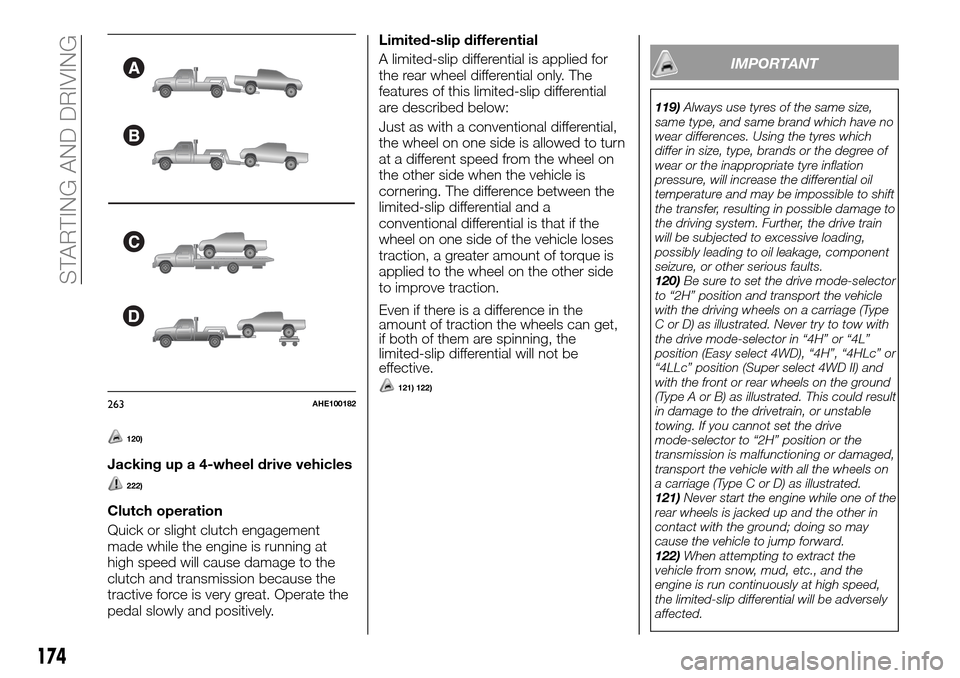
120)Be sure to set the drive mode-selector
to “2H” position and transport the vehicle
with the driving wheels on a carriage (Type
C or D) as illustrated. Never try to tow with
the drive mode-selector in “4H” or “4L”
position (Easy select 4WD), “4H”, “4HLc” or
“4LLc” position (Super select 4WD II) and
with the front or rear wheels on the ground
(Type A or B) as illustrated. This could result
in damage to the drivetrain, or unstable
towing. If you cannot set the drive
mode-selector to “2H” position or the
transmission is malfunctioning or damaged,
transport the vehicle with all the wheels on
a carriage (Type C or D) as illustrated.
121)Never start the engine while one of the
rear wheels is jacked up and the other in
contact with the ground; doing so may
cause the vehicle to jump forward.
122)When attempting to extract the
vehicle from snow, mud, etc., and the
engine is run continuously at high speed,
the limited-slip differential will be adversely
affected.
B
C
D
A
263AHE100182
174
STARTING AND DRIVING
Page 182 of 312
REAR VIEW CAMERA
(where provided)
The rear-view camera is a system that
shows the view behind the vehicle on a
screen of the Communication System
or the DISPLAY AUDIO.
228) 229) 230)
128)
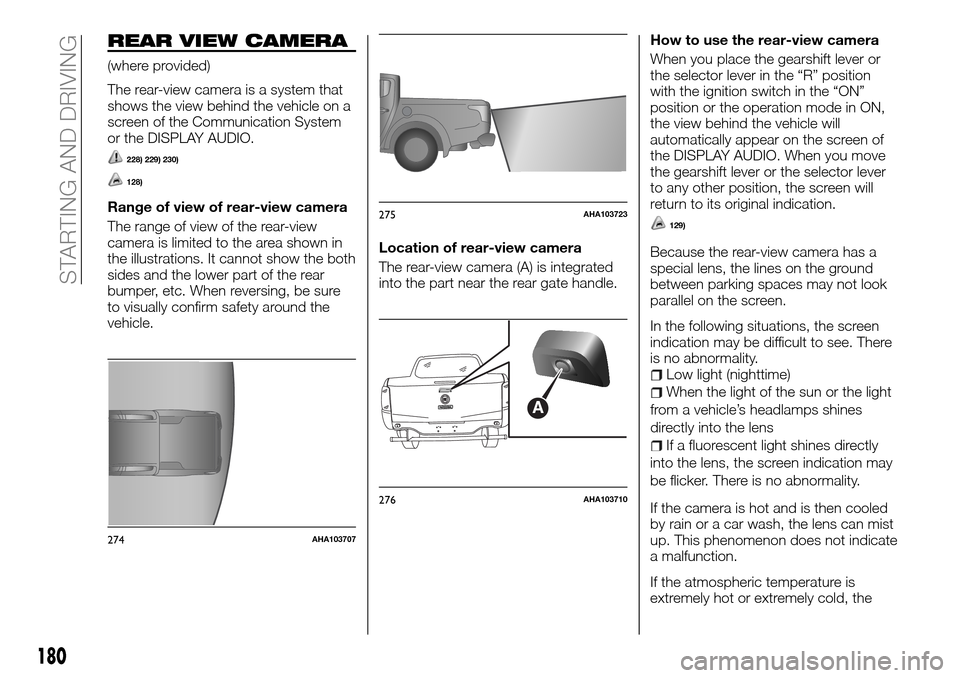
Range of view of rear-view camera
The range of view of the rear-view
camera is limited to the area shown in
the illustrations. It cannot show the both
sides and the lower part of the rear
bumper, etc. When reversing, be sure
to visually confirm safety around the
vehicle.Location of rear-view camera
The rear-view camera (A) is integrated
into the part near the rear gate handle.How to use the rear-view camera
When you place the gearshift lever or
the selector lever in the “R” position
with the ignition switch in the “ON”
position or the operation mode in ON,
the view behind the vehicle will
automatically appear on the screen of
the DISPLAY AUDIO. When you move
the gearshift lever or the selector lever
to any other position, the screen will
return to its original indication.129)
Because the rear-view camera has a
special lens, the lines on the ground
between parking spaces may not look
parallel on the screen.
In the following situations, the screen
indication may be difficult to see. There
is no abnormality.
Low light (nighttime)
When the light of the sun or the light
from a vehicle’s headlamps shines
directly into the lens
If a fluorescent light shines directly
into the lens, the screen indication may
be flicker. There is no abnormality.
If the camera is hot and is then cooled
by rain or a car wash, the lens can mist
up. This phenomenon does not indicate
a malfunction.
If the atmospheric temperature is
extremely hot or extremely cold, the
274AHA103707
275AHA103723
A
276AHA103710
180
STARTING AND DRIVING
Page 213 of 312
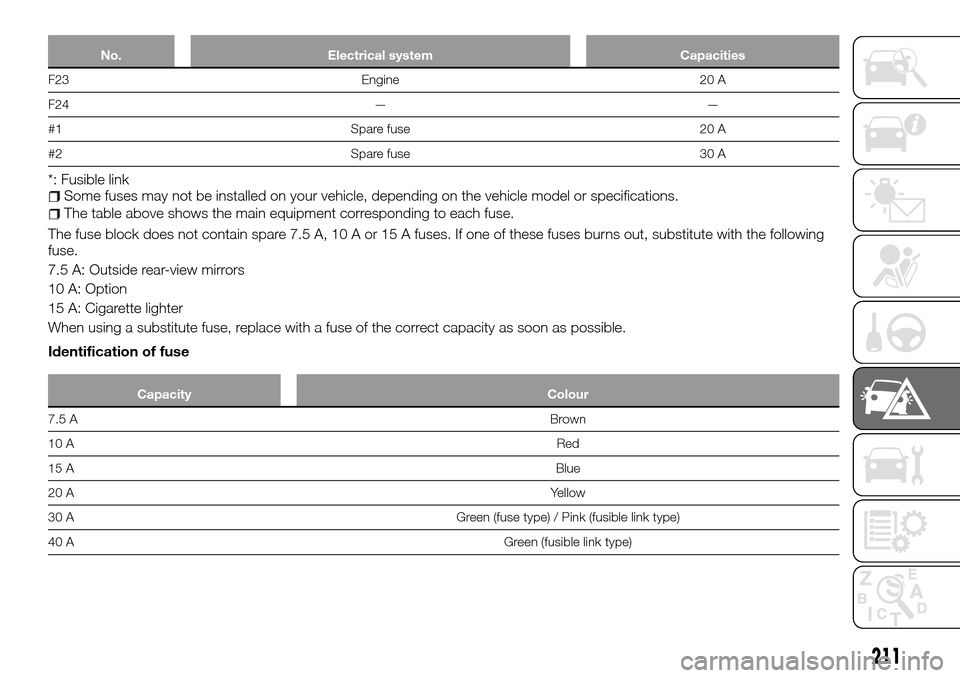
No. Electrical system Capacities
F23 Engine 20 A
F24 — —
#1 Spare fuse 20 A
#2 Spare fuse 30 A
*: Fusible linkSome fuses may not be installed on your vehicle, depending on the vehicle model or specifications.
The table above shows the main equipment corresponding to each fuse.
The fuse block does not contain spare 7.5 A, 10 A or 15 A fuses. If one of these fuses burns out, substitute with the following
fuse.
7.5 A: Outside rear-view mirrors
10 A: Option
15 A: Cigarette lighter
When using a substitute fuse, replace with a fuse of the correct capacity as soon as possible.
Identification of fuse
Capacity Colour
7.5 ABrown
10 ARed
15 ABlue
20 AYellow
30 A Green (fuse type) / Pink (fusible link type)
40 AGreen (fusible link type)
211