change time FIAT FULLBACK 2016 1.G User Guide
[x] Cancel search | Manufacturer: FIAT, Model Year: 2016, Model line: FULLBACK, Model: FIAT FULLBACK 2016 1.GPages: 312, PDF Size: 13.67 MB
Page 66 of 312
Customising the air conditioning
switch
Functions can be changed as desired,
as stated below.
Enable automatic air conditioning
control When the AUTO switch is
pressed, or the temperature control
switch is set to the minimum
temperature, the air conditioning switch
is controlled automatically.
Disable automatic air conditioning
control The air conditioning switch is
not controlled automatically as long as
the air conditioning switch is not
operated.
Setting change method Hold down
the air conditioning switch for about
10 seconds or more.
1. When the setting is changed from
enable to disable 3 sounds are emitted
and the
indicator flashes 3 times.
2. When the setting is changed from
disable to enable 2 sounds are emitted
and the
indicator flashes 3 times.
NOTE The factory setting is “Enable
automatic air conditioning control”.
NOTE When the demister switch is
pressed, in order to prevent misting of
the windows the air conditioner
operates automatically even if “Disable
automatic air conditioning control” is
set.OFF switch
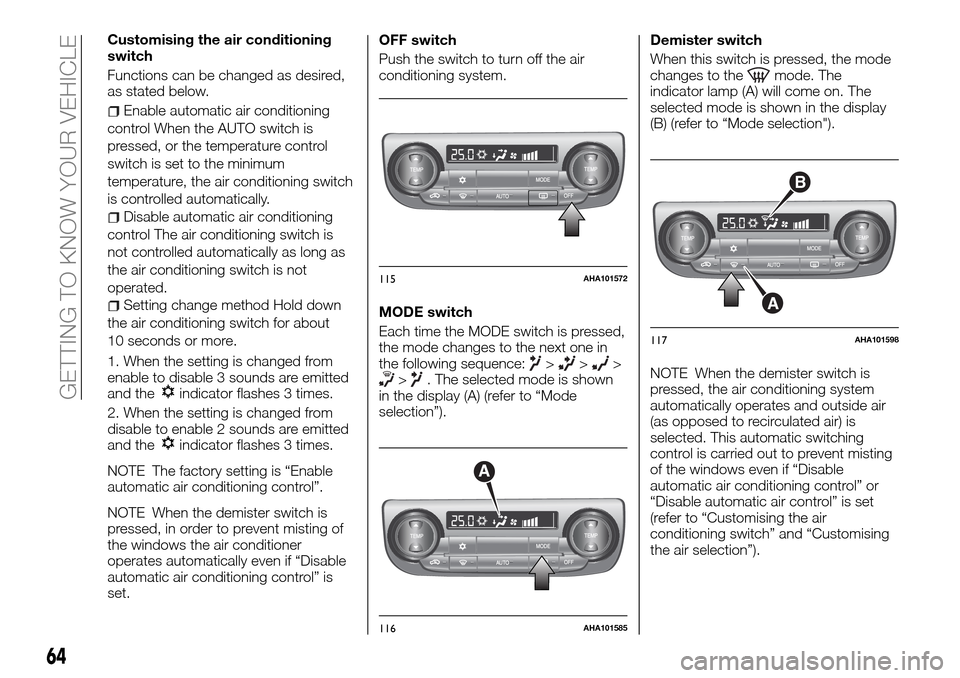
Push the switch to turn off the air
conditioning system.
MODE switch
Each time the MODE switch is pressed,
the mode changes to the next one in
the following sequence:
>>>>. The selected mode is shown
in the display (A) (refer to “Mode
selection”).Demister switch
When this switch is pressed, the mode
changes to the
mode. The
indicator lamp (A) will come on. The
selected mode is shown in the display
(B) (refer to “Mode selection").
NOTE When the demister switch is
pressed, the air conditioning system
automatically operates and outside air
(as opposed to recirculated air) is
selected. This automatic switching
control is carried out to prevent misting
of the windows even if “Disable
automatic air conditioning control” or
“Disable automatic air control” is set
(refer to “Customising the air
conditioning switch” and “Customising
the air selection”).
115AHA101572
A
116AHA101585
B
A
117AHA101598
64
GETTING TO KNOW YOUR VEHICLE
Page 68 of 312
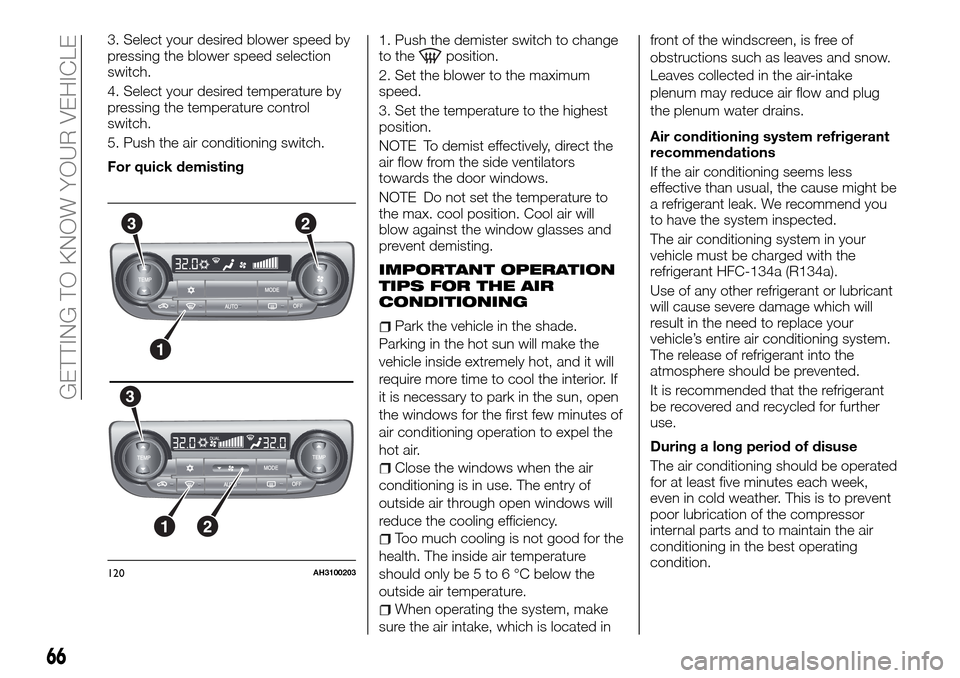
3. Select your desired blower speed by
pressing the blower speed selection
switch.
4. Select your desired temperature by
pressing the temperature control
switch.
5. Push the air conditioning switch.
For quick demisting1. Push the demister switch to change
to theposition.
2. Set the blower to the maximum
speed.
3. Set the temperature to the highest
position.
NOTE To demist effectively, direct the
air flow from the side ventilators
towards the door windows.
NOTE Do not set the temperature to
the max. cool position. Cool air will
blow against the window glasses and
prevent demisting.
IMPORTANT OPERATION
TIPS FOR THE AIR
CONDITIONING
Park the vehicle in the shade.
Parking in the hot sun will make the
vehicle inside extremely hot, and it will
require more time to cool the interior. If
it is necessary to park in the sun, open
the windows for the first few minutes of
air conditioning operation to expel the
hot air.
Close the windows when the air
conditioning is in use. The entry of
outside air through open windows will
reduce the cooling efficiency.
Too much cooling is not good for the
health. The inside air temperature
should only be 5 to 6 °C below the
outside air temperature.
When operating the system, make
sure the air intake, which is located infront of the windscreen, is free of
obstructions such as leaves and snow.
Leaves collected in the air-intake
plenum may reduce air flow and plug
the plenum water drains.
Air conditioning system refrigerant
recommendations
If the air conditioning seems less
effective than usual, the cause might be
a refrigerant leak. We recommend you
to have the system inspected.
The air conditioning system in your
vehicle must be charged with the
refrigerant HFC-134a (R134a).
Use of any other refrigerant or lubricant
will cause severe damage which will
result in the need to replace your
vehicle’s entire air conditioning system.
The release of refrigerant into the
atmosphere should be prevented.
It is recommended that the refrigerant
be recovered and recycled for further
use.
During a long period of disuse
The air conditioning should be operated
for at least five minutes each week,
even in cold weather. This is to prevent
poor lubrication of the compressor
internal parts and to maintain the air
conditioning in the best operating
condition.
3
3
2
1
12
120AH3100203
66
GETTING TO KNOW YOUR VEHICLE
Page 69 of 312
AIR PURIFIER
An air filter has been incorporated into
this air conditioner so that dirt and dust
are cleaned from the air.
Replace the air filter periodically as its
ability to clean the air will be reduced as
it collects pollen and dirt.
NOTE Operation in certain conditions
such as driving on a dusty road and
frequent use of the air conditioner can
lead to reduction of service life of the
filter. When you feel that the airflow is
lower than normal or when the
windscreen or windows start to fog up
easily, replace the air filter. We
recommend you to have it checked.
REAR WINDOW
DEMISTER SWITCH
(where provided)
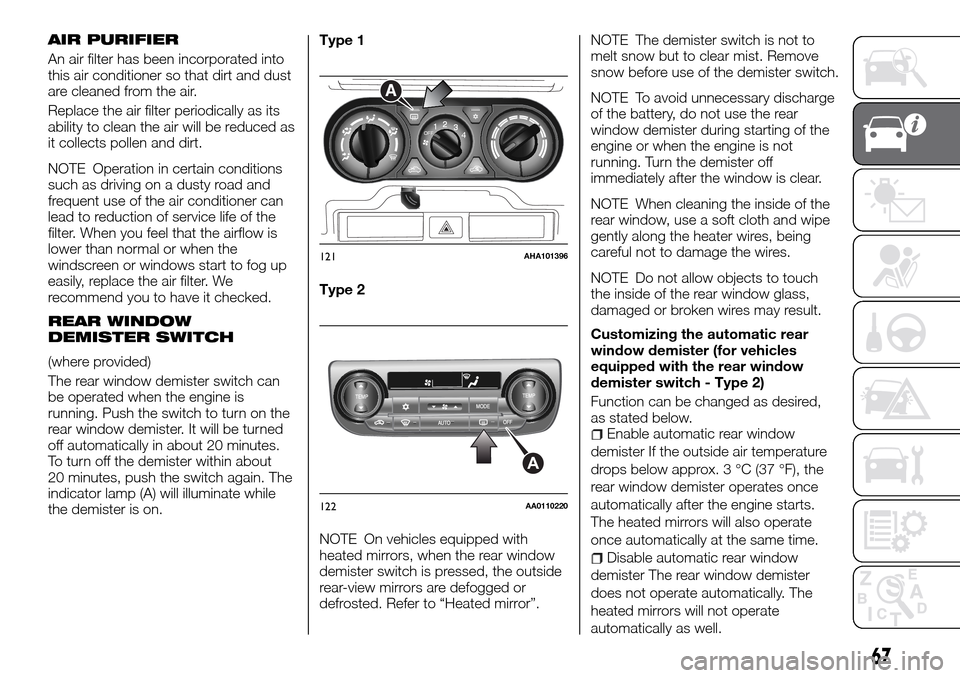
The rear window demister switch can
be operated when the engine is
running. Push the switch to turn on the
rear window demister. It will be turned
off automatically in about 20 minutes.
To turn off the demister within about
20 minutes, push the switch again. The
indicator lamp (A) will illuminate while
the demister is on.Type 1
Type 2
NOTE On vehicles equipped with
heated mirrors, when the rear window
demister switch is pressed, the outside
rear-view mirrors are defogged or
defrosted. Refer to “Heated mirror”.NOTE The demister switch is not to
melt snow but to clear mist. Remove
snow before use of the demister switch.
NOTE To avoid unnecessary discharge
of the battery, do not use the rear
window demister during starting of the
engine or when the engine is not
running. Turn the demister off
immediately after the window is clear.
NOTE When cleaning the inside of the
rear window, use a soft cloth and wipe
gently along the heater wires, being
careful not to damage the wires.
NOTE Do not allow objects to touch
the inside of the rear window glass,
damaged or broken wires may result.
Customizing the automatic rear
window demister (for vehicles
equipped with the rear window
demister switch - Type 2)
Function can be changed as desired,
as stated below.
Enable automatic rear window
demister If the outside air temperature
drops below approx. 3 °C (37 °F), the
rear window demister operates once
automatically after the engine starts.
The heated mirrors will also operate
once automatically at the same time.
Disable automatic rear window
demister The rear window demister
does not operate automatically. The
heated mirrors will not operate
automatically as well.
OFF12
3OFF12
3
4
A
121AHA101396
A
122AA0110220
67
Page 70 of 312
Setting change method Hold down
the rear window demister switch for
about 10 seconds or more. When the
setting is changed from enable to
disable 3 sounds are emitted and the
indicator lamp flashes 3 times. When
the setting is changed from disable to
enable 2 sounds are emitted and the
indicator lamp flashes 3 times.
NOTE The factory setting is “Disable
automatic rear window demister”.
WARNING
60)For safety, make sure you have a clear
view through all windows.
IMPORTANT
18)When using the air conditioning, the
idling speed may slightly increase as the air
conditioning compressor is switched on/off
automatically. While the vehicle with an
automatic transmission is stationary, fully
depress the brake pedal to prevent the
vehicle from creeping.
19)When using the mode selection dial
between the
andpositions, prevent
fogging by moving the air selection lever to
select outside air (refer to “Air selection
lever”).
20)Use of the
(recirculation) position
for extended time may cause the windows
to fog up.21)If the outside air is dusty or otherwise
contaminated, or if high cooling
performance is desired, set air selection
lever to the
(recirculation) position and
the temperature control dial all the way to
the right. Switch to the
(outside)
position periodically to increase ventilation
so that the windows do not become
fogged up.
IMPORTANT
2)The system uses a coolant that is
compatible with the laws in force in the
countries where the vehicle is sold, R134a
or R1234yf (indicated on a specific plate in
the engine compartment). The use of other
coolants affects the efficiency and condition
of the system. Also the compressor
coolants used must be compatible with the
indicated coolant.
WINDOW
MANUAL WINDOW
CONTROL
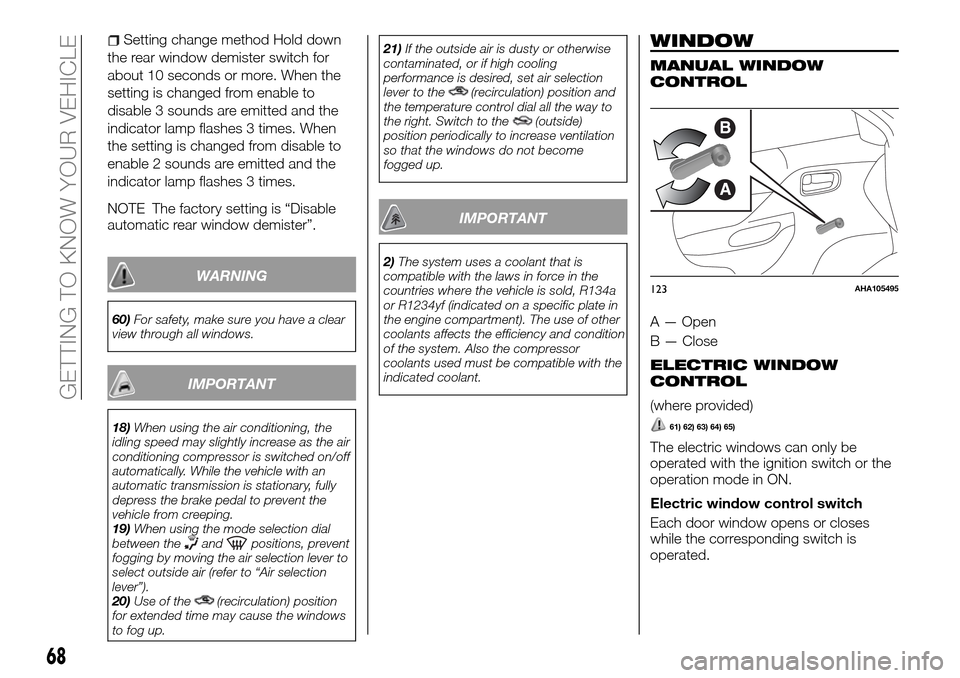
A — Open
B — Close
ELECTRIC WINDOW
CONTROL
(where provided)
61) 62) 63) 64) 65)
The electric windows can only be
operated with the ignition switch or the
operation mode in ON.
Electric window control switch
Each door window opens or closes
while the corresponding switch is
operated.
B
A
123AHA105495
68
GETTING TO KNOW YOUR VEHICLE
Page 90 of 312
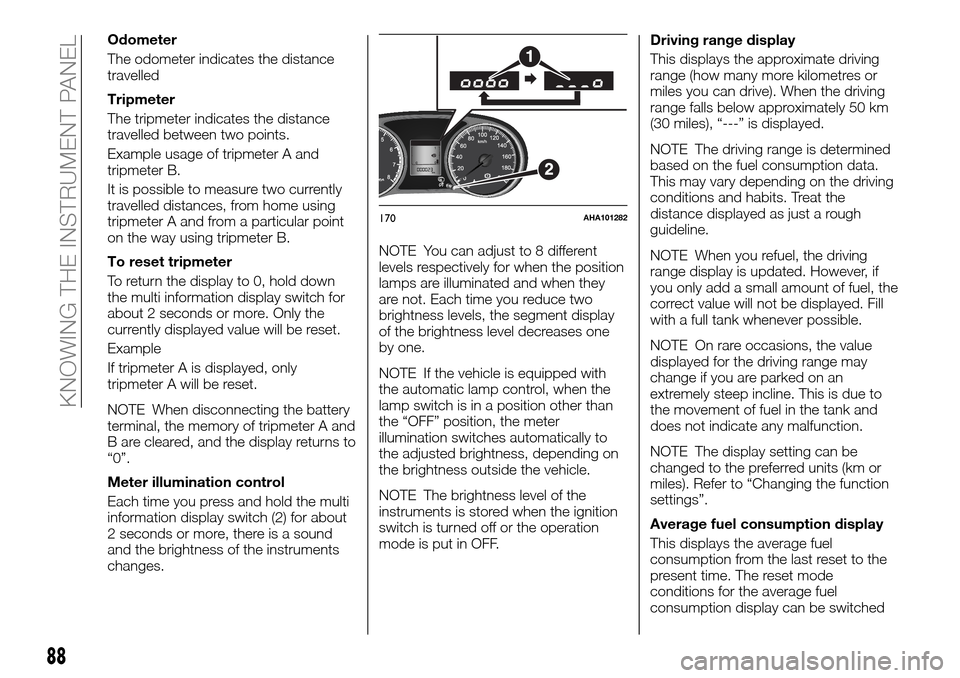
Odometer
The odometer indicates the distance
travelled
Tripmeter
The tripmeter indicates the distance
travelled between two points.
Example usage of tripmeter A and
tripmeter B.
It is possible to measure two currently
travelled distances, from home using
tripmeter A and from a particular point
on the way using tripmeter B.
To reset tripmeter
To return the display to 0, hold down
the multi information display switch for
about 2 seconds or more. Only the
currently displayed value will be reset.
Example
If tripmeter A is displayed, only
tripmeter A will be reset.
NOTE When disconnecting the battery
terminal, the memory of tripmeter A and
B are cleared, and the display returns to
“0”.
Meter illumination control
Each time you press and hold the multi
information display switch (2) for about
2 seconds or more, there is a sound
and the brightness of the instruments
changes.NOTE You can adjust to 8 different
levels respectively for when the position
lamps are illuminated and when they
are not. Each time you reduce two
brightness levels, the segment display
of the brightness level decreases one
by one.
NOTE If the vehicle is equipped with
the automatic lamp control, when the
lamp switch is in a position other than
the “OFF” position, the meter
illumination switches automatically to
the adjusted brightness, depending on
the brightness outside the vehicle.
NOTE The brightness level of the
instruments is stored when the ignition
switch is turned off or the operation
mode is put in OFF.Driving range display
This displays the approximate driving
range (how many more kilometres or
miles you can drive). When the driving
range falls below approximately 50 km
(30 miles), “---” is displayed.
NOTE The driving range is determined
based on the fuel consumption data.
This may vary depending on the driving
conditions and habits. Treat the
distance displayed as just a rough
guideline.
NOTE When you refuel, the driving
range display is updated. However, if
you only add a small amount of fuel, the
correct value will not be displayed. Fill
with a full tank whenever possible.
NOTE On rare occasions, the value
displayed for the driving range may
change if you are parked on an
extremely steep incline. This is due to
the movement of fuel in the tank and
does not indicate any malfunction.
NOTE The display setting can be
changed to the preferred units (km or
miles). Refer to “Changing the function
settings”.
Average fuel consumption display
This displays the average fuel
consumption from the last reset to the
present time. The reset mode
conditions for the average fuel
consumption display can be switched
170AHA101282
88
KNOWING THE INSTRUMENT PANEL
Page 92 of 312
NOTE If fuel is added with the ignition
switch or the operation mode is ON,
the fuel gauge may incorrectly indicate
the fuel level.
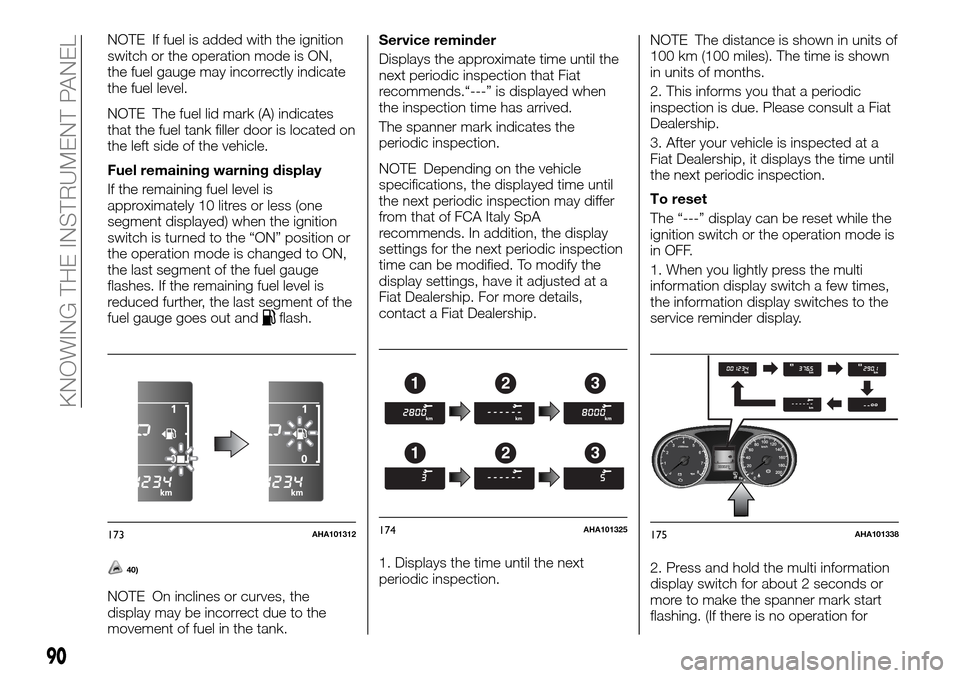
NOTE The fuel lid mark (A) indicates
that the fuel tank filler door is located on
the left side of the vehicle.
Fuel remaining warning display
If the remaining fuel level is
approximately 10 litres or less (one
segment displayed) when the ignition
switch is turned to the “ON” position or
the operation mode is changed to ON,
the last segment of the fuel gauge
flashes. If the remaining fuel level is
reduced further, the last segment of the
fuel gauge goes out and
flash.
40)
NOTE On inclines or curves, the
display may be incorrect due to the
movement of fuel in the tank.Service reminder
Displays the approximate time until the
next periodic inspection that Fiat
recommends.“---” is displayed when
the inspection time has arrived.
The spanner mark indicates the
periodic inspection.
NOTE Depending on the vehicle
specifications, the displayed time until
the next periodic inspection may differ
from that of FCA Italy SpA
recommends. In addition, the display
settings for the next periodic inspection
time can be modified. To modify the
display settings, have it adjusted at a
Fiat Dealership. For more details,
contact a Fiat Dealership.
1. Displays the time until the next
periodic inspection.NOTE The distance is shown in units of
100 km (100 miles). The time is shown
in units of months.
2. This informs you that a periodic
inspection is due. Please consult a Fiat
Dealership.
3. After your vehicle is inspected at a
Fiat Dealership, it displays the time until
the next periodic inspection.
To reset
The “---” display can be reset while the
ignition switch or the operation mode is
in OFF.
1. When you lightly press the multi
information display switch a few times,
the information display switches to the
service reminder display.
2. Press and hold the multi information
display switch for about 2 seconds or
more to make the spanner mark start
flashing. (If there is no operation for
173AHA101312
123
123
174AHA101325175AHA101338
90
KNOWING THE INSTRUMENT PANEL
Page 93 of 312
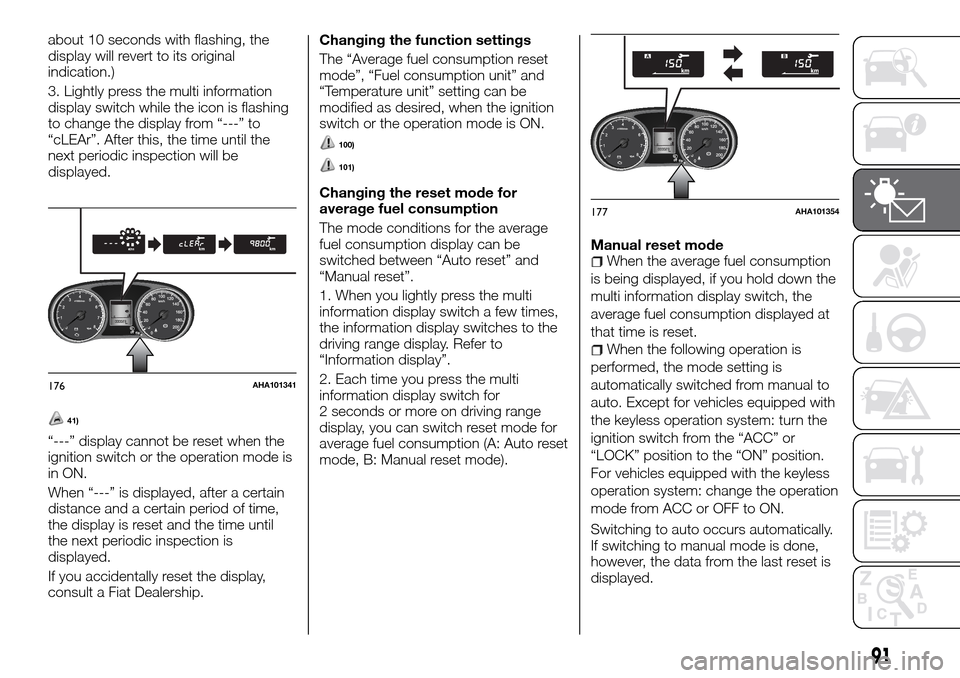
about 10 seconds with flashing, the
display will revert to its original
indication.)
3. Lightly press the multi information
display switch while the icon is flashing
to change the display from “---” to
“cLEAr”. After this, the time until the
next periodic inspection will be
displayed.
41)
“---” display cannot be reset when the
ignition switch or the operation mode is
in ON.
When “---” is displayed, after a certain
distance and a certain period of time,
the display is reset and the time until
the next periodic inspection is
displayed.
If you accidentally reset the display,
consult a Fiat Dealership.Changing the function settings
The “Average fuel consumption reset
mode”, “Fuel consumption unit” and
“Temperature unit” setting can be
modified as desired, when the ignition
switch or the operation mode is ON.
100)
101)
Changing the reset mode for
average fuel consumption
The mode conditions for the average
fuel consumption display can be
switched between “Auto reset” and
“Manual reset”.
1. When you lightly press the multi
information display switch a few times,
the information display switches to the
driving range display. Refer to
“Information display”.
2. Each time you press the multi
information display switch for
2 seconds or more on driving range
display, you can switch reset mode for
average fuel consumption (A: Auto reset
mode, B: Manual reset mode).Manual reset mode
When the average fuel consumption
is being displayed, if you hold down the
multi information display switch, the
average fuel consumption displayed at
that time is reset.
When the following operation is
performed, the mode setting is
automatically switched from manual to
auto. Except for vehicles equipped with
the keyless operation system: turn the
ignition switch from the “ACC” or
“LOCK” position to the “ON” position.
For vehicles equipped with the keyless
operation system: change the operation
mode from ACC or OFF to ON.
Switching to auto occurs automatically.
If switching to manual mode is done,
however, the data from the last reset is
displayed.
176AHA101341
177AHA101354
91
Page 94 of 312
Auto reset modeWhen the average fuel consumption
is being displayed, if you hold down the
multi information display switch, the
average fuel consumption displayed at
that time are reset.
When the engine switch or the
operation mode is in the following
conditions, the average fuel
consumption display is automatically
reset. Except for vehicles equipped with
the keyless operation system: the
ignition switch is in the “ACC” or
“LOCK” position for about 4 hours or
longer. For vehicles equipped with the
keyless operation system: the operation
mode is in ACC or OFF for about
4 hours or longer.
IMPORTANT The average fuel
consumption display can be reset
separately for the auto reset mode and
for the manual reset mode.
IMPORTANT The memory of the
manual reset mode or auto reset mode
for the average fuel consumption
display is erased if the battery is
disconnected.
The initial (default) setting is “Auto reset
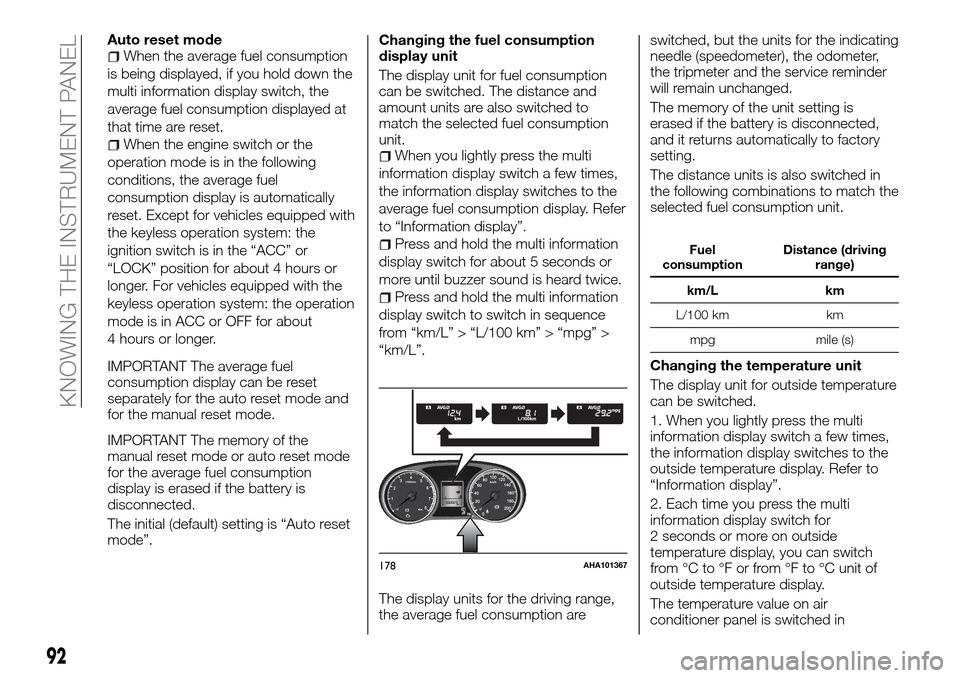
mode”.Changing the fuel consumption
display unit
The display unit for fuel consumption
can be switched. The distance and
amount units are also switched to
match the selected fuel consumption
unit.When you lightly press the multi
information display switch a few times,
the information display switches to the
average fuel consumption display. Refer
to “Information display”.
Press and hold the multi information
display switch for about 5 seconds or
more until buzzer sound is heard twice.
Press and hold the multi information
display switch to switch in sequence
from “km/L” > “L/100 km” > “mpg” >
“km/L”.
The display units for the driving range,
the average fuel consumption areswitched, but the units for the indicating
needle (speedometer), the odometer,
the tripmeter and the service reminder
will remain unchanged.
The memory of the unit setting is
erased if the battery is disconnected,
and it returns automatically to factory
setting.
The distance units is also switched in
the following combinations to match the
selected fuel consumption unit.
Fuel
consumptionDistance (driving
range)
km/L km
L/100 km km
mpg mile (s)
Changing the temperature unit
The display unit for outside temperature
can be switched.
1. When you lightly press the multi
information display switch a few times,
the information display switches to the
outside temperature display. Refer to
“Information display”.
2. Each time you press the multi
information display switch for
2 seconds or more on outside
temperature display, you can switch
from °C to °F or from °F to °C unit of
outside temperature display.
The temperature value on air
conditioner panel is switched in
178AHA101367
92
KNOWING THE INSTRUMENT PANEL
Page 146 of 312
Minor noises may be heard on engine
startup. These will disappear as the
engine warms up.
Stopping the engine
Except for vehicles equipped with
the keyless operation system
1. Bring the vehicle to a complete stop.
2. Fully engage the parking brake while
depressing the brake pedal.
3. For vehicles equipped with M/T, turn
the ignition switch to the “LOCK”
position to stop the engine, and then
move the gearshift lever to the 1st (on a
uphill) or “R” (Reverse) (on a downhill)
position. For vehicles equipped with
A/T, place the selector lever in the “P”
(PARK) position, and stop the engine.
For vehicles equipped with the
keyless operation system
204)
If you have to bring the engine to an
emergency stop while driving, press
and hold the engine switch for
3 seconds or more, or press it quickly
3 times or more. The engine will stop
and the operation mode will go to ACC.
Do not stop the engine with the selector
lever in any position other than the “P”
(PARK) position (A/T). If the engine is
stopped with the selector lever in any
position other than the “P” (PARK)
position, the operation mode will go to
ACC rather than OFF. Put the operationmode in OFF after placing the selector
lever in the “P” (PARK) position.
1. Stop the vehicle
2. Fully engage the parking brake while
depressing the brake pedal.
3. On vehicles with M/T, press the
engine switch to stop the engine, move
the gearshift lever to the 1st (on a uphill)
or “R” (Reverse) (on a downhill) position.
On vehicles with A/T, move the selector
lever to the “P” (PARK) position, press
the engine switch to stop the engine.
Fuel injection amount learning
process
To keep exhaust emissions and engine
noise low, the engine very occasionally
performs a learning process for the fuel
injection amount.
The engine sounds slightly different
from usual while the learning process is
taking place. The change in the engine
sound does not indicate a fault.
If the keyless operation key is not
operating properly
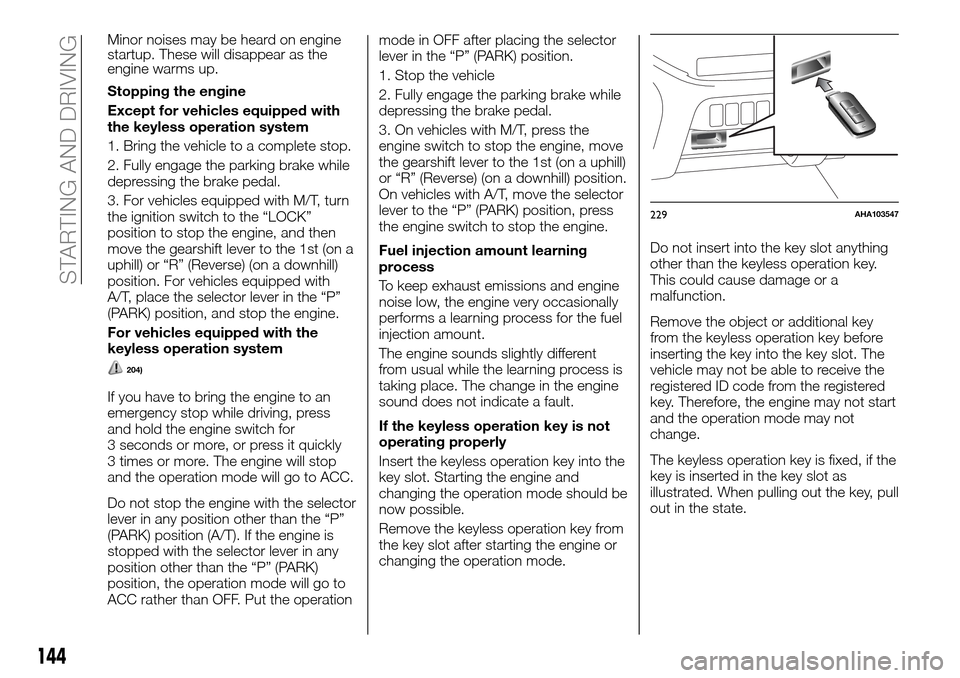
Insert the keyless operation key into the
key slot. Starting the engine and
changing the operation mode should be
now possible.
Remove the keyless operation key from
the key slot after starting the engine or
changing the operation mode.Do not insert into the key slot anything
other than the keyless operation key.
This could cause damage or a
malfunction.
Remove the object or additional key
from the keyless operation key before
inserting the key into the key slot. The
vehicle may not be able to receive the
registered ID code from the registered
key. Therefore, the engine may not start
and the operation mode may not
change.
The keyless operation key is fixed, if the
key is inserted in the key slot as
illustrated. When pulling out the key, pull
out in the state.
229AHA103547
144
STARTING AND DRIVING
Page 153 of 312
Selector lever positions
“P” PARK
This position locks the transmission to
prevent the vehicle from moving. The
engine can be started in this position.
“R” REVERSE
This position is to back up.
93)
“N” NEUTRAL
At this position the transmission is
disengaged. It is the same as the
neutral position on a manual
transmission, and should only be used
when the vehicle is stationary for an
extended length of time during driving,
such as in a traffic jam.
94) 95) 96)
“D” DRIVE
This position is used for most city and
highway driving. The transmission will
automatically change its gear
depending on road and driving
conditions.
97)
Sport mode
Whether the vehicle is stationary or in
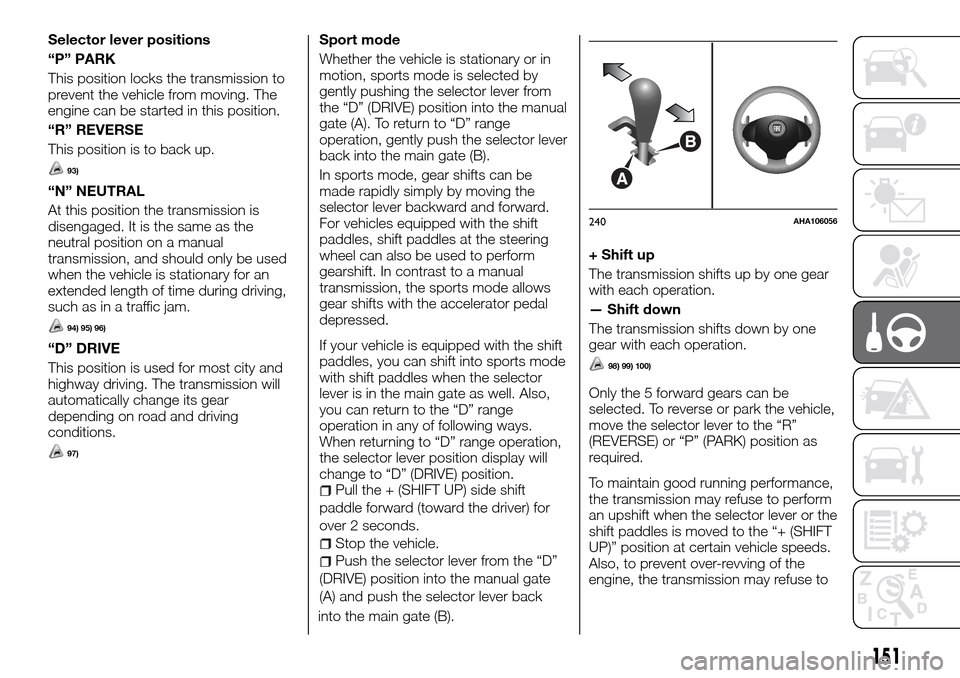
motion, sports mode is selected by
gently pushing the selector lever from
the “D” (DRIVE) position into the manual
gate (A). To return to “D” range
operation, gently push the selector lever
back into the main gate (B).
In sports mode, gear shifts can be
made rapidly simply by moving the
selector lever backward and forward.
For vehicles equipped with the shift
paddles, shift paddles at the steering
wheel can also be used to perform
gearshift. In contrast to a manual
transmission, the sports mode allows
gear shifts with the accelerator pedal
depressed.
If your vehicle is equipped with the shift
paddles, you can shift into sports mode
with shift paddles when the selector
lever is in the main gate as well. Also,
you can return to the “D” range
operation in any of following ways.
When returning to “D” range operation,
the selector lever position display will
change to “D” (DRIVE) position.
Pull the + (SHIFT UP) side shift
paddle forward (toward the driver) for
over 2 seconds.
Stop the vehicle.
Push the selector lever from the “D”
(DRIVE) position into the manual gate
(A) and push the selector lever back
into the main gate (B).
+ Shift up
The transmission shifts up by one gear
with each operation.
— Shift down
The transmission shifts down by one
gear with each operation.
98) 99) 100)
Only the 5 forward gears can be
selected. To reverse or park the vehicle,
move the selector lever to the “R”
(REVERSE) or “P” (PARK) position as
required.
To maintain good running performance,
the transmission may refuse to perform
an upshift when the selector lever or the
shift paddles is moved to the “+ (SHIFT
UP)” position at certain vehicle speeds.
Also, to prevent over-revving of the
engine, the transmission may refuse to
B
A
240AHA106056
151