fuel FIAT FULLBACK 2016 1.G User Guide
[x] Cancel search | Manufacturer: FIAT, Model Year: 2016, Model line: FULLBACK, Model: FIAT FULLBACK 2016 1.GPages: 312, PDF Size: 13.67 MB
Page 90 of 312
Odometer
The odometer indicates the distance
travelled
Tripmeter
The tripmeter indicates the distance
travelled between two points.
Example usage of tripmeter A and
tripmeter B.
It is possible to measure two currently
travelled distances, from home using
tripmeter A and from a particular point
on the way using tripmeter B.
To reset tripmeter
To return the display to 0, hold down
the multi information display switch for
about 2 seconds or more. Only the
currently displayed value will be reset.
Example
If tripmeter A is displayed, only
tripmeter A will be reset.
NOTE When disconnecting the battery
terminal, the memory of tripmeter A and
B are cleared, and the display returns to
“0”.
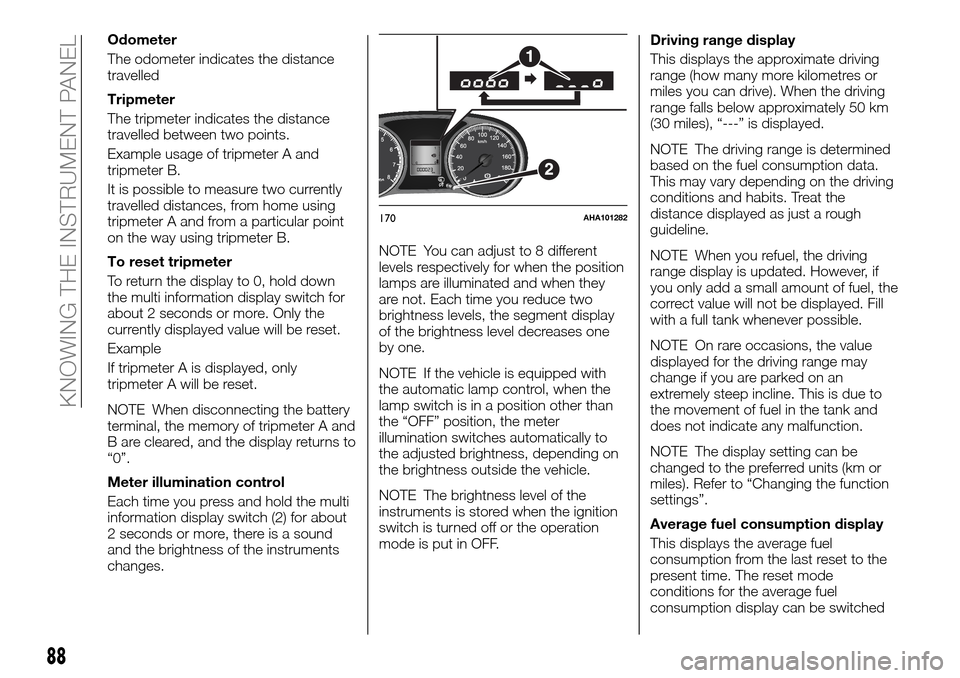
Meter illumination control
Each time you press and hold the multi
information display switch (2) for about
2 seconds or more, there is a sound
and the brightness of the instruments
changes.NOTE You can adjust to 8 different
levels respectively for when the position
lamps are illuminated and when they
are not. Each time you reduce two
brightness levels, the segment display
of the brightness level decreases one
by one.
NOTE If the vehicle is equipped with
the automatic lamp control, when the
lamp switch is in a position other than
the “OFF” position, the meter
illumination switches automatically to
the adjusted brightness, depending on
the brightness outside the vehicle.
NOTE The brightness level of the
instruments is stored when the ignition
switch is turned off or the operation
mode is put in OFF.Driving range display
This displays the approximate driving
range (how many more kilometres or
miles you can drive). When the driving
range falls below approximately 50 km
(30 miles), “---” is displayed.
NOTE The driving range is determined
based on the fuel consumption data.
This may vary depending on the driving
conditions and habits. Treat the
distance displayed as just a rough
guideline.
NOTE When you refuel, the driving
range display is updated. However, if
you only add a small amount of fuel, the
correct value will not be displayed. Fill
with a full tank whenever possible.
NOTE On rare occasions, the value
displayed for the driving range may
change if you are parked on an
extremely steep incline. This is due to
the movement of fuel in the tank and
does not indicate any malfunction.
NOTE The display setting can be
changed to the preferred units (km or
miles). Refer to “Changing the function
settings”.
Average fuel consumption display
This displays the average fuel
consumption from the last reset to the
present time. The reset mode
conditions for the average fuel
consumption display can be switched
170AHA101282
88
KNOWING THE INSTRUMENT PANEL
Page 91 of 312
between “Auto reset” and “Manual
reset”.
For information on how to change the
average fuel consumption display
setting, refer to “Changing the function
settings”.
NOTE The average fuel consumption
display can be reset separately for the
auto reset mode and for the manual
reset mode.
NOTE “---” is displayed when the
average fuel consumption cannot be
measured.
NOTE The initial (default) setting is
“Auto reset mode”.
NOTE The average fuel consumption
will depend on the driving conditions
(road conditions, how you drive, etc.).
The displayed fuel consumption may
vary from the actual fuel consumption.
Treat the fuel consumption displayed as
just a rough guideline.
NOTE The memory of the manual reset
mode or auto reset mode for the
average fuel consumption display is
erased if the battery is disconnected.
NOTE The display setting can be
changed to the preferred units {km/L,
L/100 km, mpg}. Refer to “Changing
the function settings”.Outside temperature display (if so
equipped)
This displays the temperature outside
the vehicle.
NOTE The display setting can be
changed to the preferred units (°C or
°F). Refer to “Changing the function
settings”.
NOTE Depending on factors such as
the driving conditions, the displayed
temperature may vary from the actual
outside temperature.
Frozen road warning (if so
equipped)
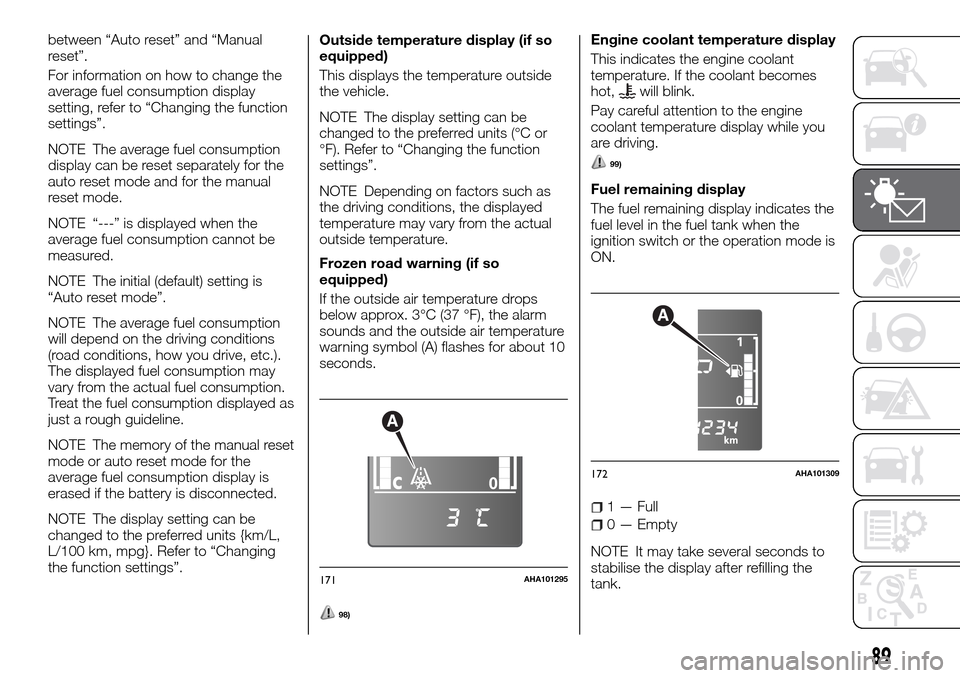
If the outside air temperature drops
below approx. 3°C (37 °F), the alarm
sounds and the outside air temperature
warning symbol (A) flashes for about 10
seconds.
98)
Engine coolant temperature display
This indicates the engine coolant
temperature. If the coolant becomes
hot,
will blink.
Pay careful attention to the engine
coolant temperature display while you
are driving.
99)
Fuel remaining display
The fuel remaining display indicates the
fuel level in the fuel tank when the
ignition switch or the operation mode is
ON.
1 — Full
0 — Empty
NOTE It may take several seconds to
stabilise the display after refilling the
tank.
A
171AHA101295
A
172AHA101309
89
Page 92 of 312
NOTE If fuel is added with the ignition
switch or the operation mode is ON,
the fuel gauge may incorrectly indicate
the fuel level.
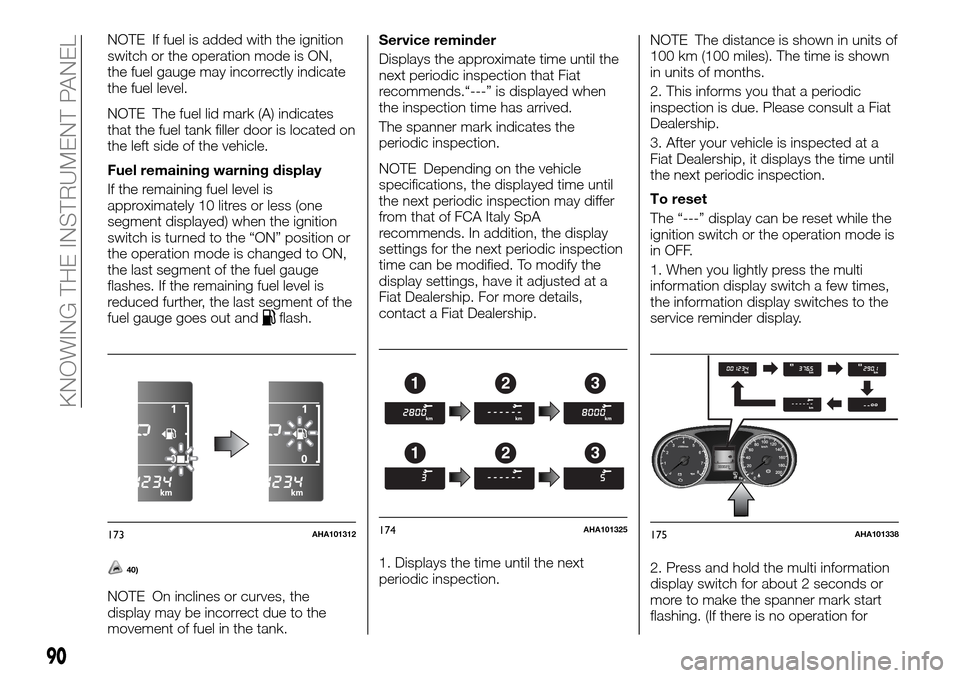
NOTE The fuel lid mark (A) indicates
that the fuel tank filler door is located on
the left side of the vehicle.
Fuel remaining warning display
If the remaining fuel level is
approximately 10 litres or less (one
segment displayed) when the ignition
switch is turned to the “ON” position or
the operation mode is changed to ON,
the last segment of the fuel gauge
flashes. If the remaining fuel level is
reduced further, the last segment of the
fuel gauge goes out and
flash.
40)
NOTE On inclines or curves, the
display may be incorrect due to the
movement of fuel in the tank.Service reminder
Displays the approximate time until the
next periodic inspection that Fiat
recommends.“---” is displayed when
the inspection time has arrived.
The spanner mark indicates the
periodic inspection.
NOTE Depending on the vehicle
specifications, the displayed time until
the next periodic inspection may differ
from that of FCA Italy SpA
recommends. In addition, the display
settings for the next periodic inspection
time can be modified. To modify the
display settings, have it adjusted at a
Fiat Dealership. For more details,
contact a Fiat Dealership.
1. Displays the time until the next
periodic inspection.NOTE The distance is shown in units of
100 km (100 miles). The time is shown
in units of months.
2. This informs you that a periodic
inspection is due. Please consult a Fiat
Dealership.
3. After your vehicle is inspected at a
Fiat Dealership, it displays the time until
the next periodic inspection.
To reset
The “---” display can be reset while the
ignition switch or the operation mode is
in OFF.
1. When you lightly press the multi
information display switch a few times,
the information display switches to the
service reminder display.
2. Press and hold the multi information
display switch for about 2 seconds or
more to make the spanner mark start
flashing. (If there is no operation for
173AHA101312
123
123
174AHA101325175AHA101338
90
KNOWING THE INSTRUMENT PANEL
Page 93 of 312
about 10 seconds with flashing, the
display will revert to its original
indication.)
3. Lightly press the multi information
display switch while the icon is flashing
to change the display from “---” to
“cLEAr”. After this, the time until the
next periodic inspection will be
displayed.
41)
“---” display cannot be reset when the
ignition switch or the operation mode is
in ON.
When “---” is displayed, after a certain
distance and a certain period of time,
the display is reset and the time until
the next periodic inspection is
displayed.
If you accidentally reset the display,
consult a Fiat Dealership.Changing the function settings
The “Average fuel consumption reset
mode”, “Fuel consumption unit” and
“Temperature unit” setting can be
modified as desired, when the ignition
switch or the operation mode is ON.
100)
101)
Changing the reset mode for
average fuel consumption
The mode conditions for the average
fuel consumption display can be
switched between “Auto reset” and
“Manual reset”.
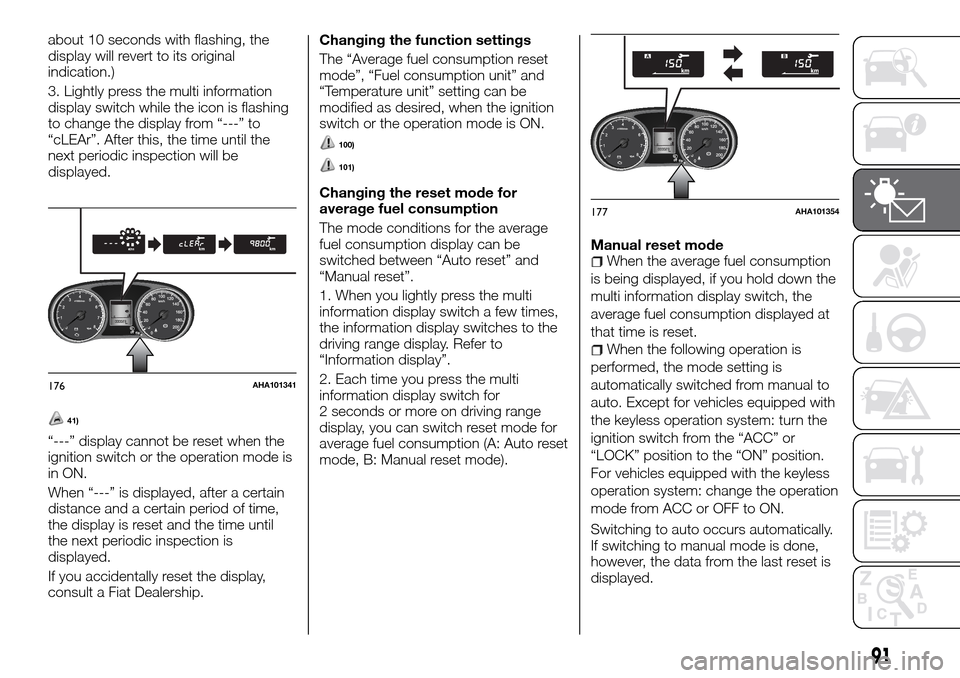
1. When you lightly press the multi
information display switch a few times,
the information display switches to the
driving range display. Refer to
“Information display”.
2. Each time you press the multi
information display switch for
2 seconds or more on driving range
display, you can switch reset mode for
average fuel consumption (A: Auto reset
mode, B: Manual reset mode).Manual reset mode
When the average fuel consumption
is being displayed, if you hold down the
multi information display switch, the
average fuel consumption displayed at
that time is reset.
When the following operation is
performed, the mode setting is
automatically switched from manual to
auto. Except for vehicles equipped with
the keyless operation system: turn the
ignition switch from the “ACC” or
“LOCK” position to the “ON” position.
For vehicles equipped with the keyless
operation system: change the operation
mode from ACC or OFF to ON.
Switching to auto occurs automatically.
If switching to manual mode is done,
however, the data from the last reset is
displayed.
176AHA101341
177AHA101354
91
Page 94 of 312
Auto reset modeWhen the average fuel consumption
is being displayed, if you hold down the
multi information display switch, the
average fuel consumption displayed at
that time are reset.
When the engine switch or the
operation mode is in the following
conditions, the average fuel
consumption display is automatically
reset. Except for vehicles equipped with
the keyless operation system: the
ignition switch is in the “ACC” or
“LOCK” position for about 4 hours or
longer. For vehicles equipped with the
keyless operation system: the operation
mode is in ACC or OFF for about
4 hours or longer.
IMPORTANT The average fuel
consumption display can be reset
separately for the auto reset mode and
for the manual reset mode.
IMPORTANT The memory of the
manual reset mode or auto reset mode
for the average fuel consumption
display is erased if the battery is
disconnected.
The initial (default) setting is “Auto reset
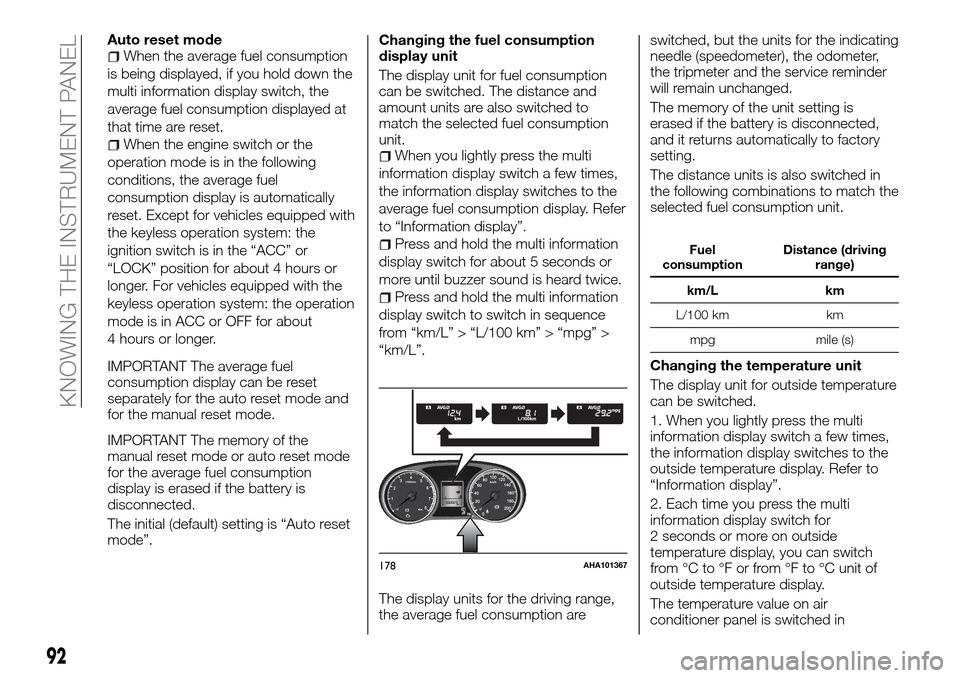
mode”.Changing the fuel consumption
display unit
The display unit for fuel consumption
can be switched. The distance and
amount units are also switched to
match the selected fuel consumption
unit.When you lightly press the multi
information display switch a few times,
the information display switches to the
average fuel consumption display. Refer
to “Information display”.
Press and hold the multi information
display switch for about 5 seconds or
more until buzzer sound is heard twice.
Press and hold the multi information
display switch to switch in sequence
from “km/L” > “L/100 km” > “mpg” >
“km/L”.
The display units for the driving range,
the average fuel consumption areswitched, but the units for the indicating
needle (speedometer), the odometer,
the tripmeter and the service reminder
will remain unchanged.
The memory of the unit setting is
erased if the battery is disconnected,
and it returns automatically to factory
setting.
The distance units is also switched in
the following combinations to match the
selected fuel consumption unit.
Fuel
consumptionDistance (driving
range)
km/L km
L/100 km km
mpg mile (s)
Changing the temperature unit
The display unit for outside temperature
can be switched.
1. When you lightly press the multi
information display switch a few times,
the information display switches to the
outside temperature display. Refer to
“Information display”.
2. Each time you press the multi
information display switch for
2 seconds or more on outside
temperature display, you can switch
from °C to °F or from °F to °C unit of
outside temperature display.
The temperature value on air
conditioner panel is switched in
178AHA101367
92
KNOWING THE INSTRUMENT PANEL
Page 95 of 312
conjunction with outside temperature
display unit of the multi information
display. However, “°C” or “°F” are not
shown to temperature display of an air
conditioner.
WARNING
98)There is a danger the road might be
icy, even when this symbol is not flashing,
so please take care when driving.
99)If the engine is overheating, “
” will
blink. In this case, the bar graph is on the
red zone. Immediately park the vehicle in a
safe place and take the required measures.
Refer to “Engine overheating”.
100)The driver should not operate the
display while the vehicle is in motion.
101)When operating the system, stop the
vehicle in a safe area.
IMPORTANT
40)For petrol-powered vehicles with
catalytic converter and for diesel-powered
vehicles: do not drive with an extremely low
fuel level, running out of fuel could cause
damage to the fuel system.
41)The customer is responsible for making
sure that periodic inspection and
maintenance are performed. Inspections
and maintenance must be performed to
prevent accidents and malfunctions.
93
Page 96 of 312
INDICATOR AND WARNING LAMPS
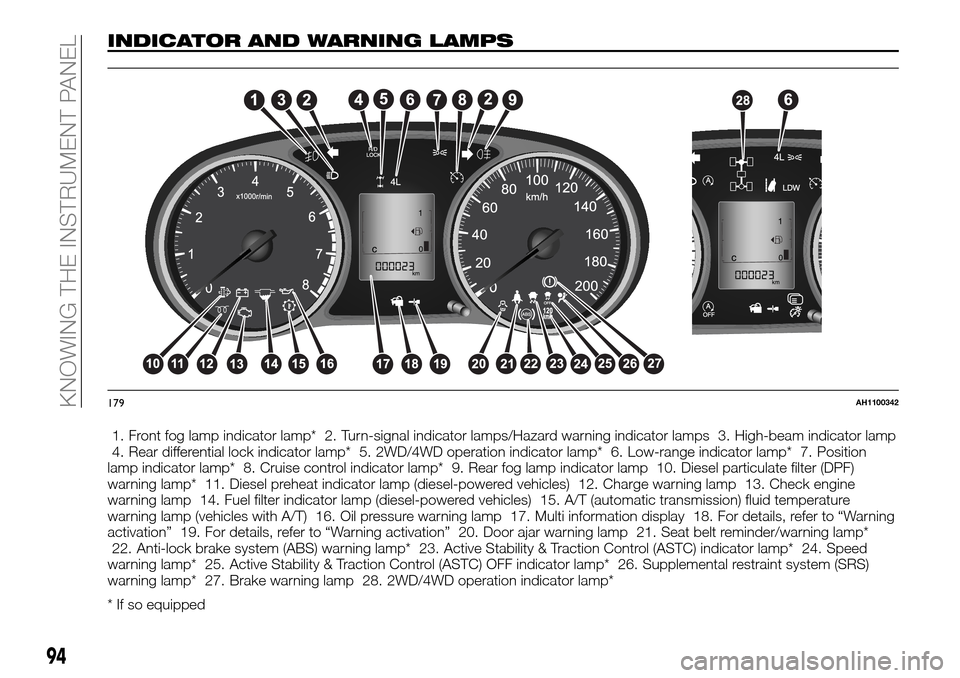
1. Front fog lamp indicator lamp* 2. Turn-signal indicator lamps/Hazard warning indicator lamps 3. High-beam indicator lamp
4. Rear differential lock indicator lamp* 5. 2WD/4WD operation indicator lamp* 6. Low-range indicator lamp* 7. Position
lamp indicator lamp* 8. Cruise control indicator lamp* 9. Rear fog lamp indicator lamp 10. Diesel particulate filter (DPF)
warning lamp* 11. Diesel preheat indicator lamp (diesel-powered vehicles) 12. Charge warning lamp 13. Check engine
warning lamp 14. Fuel filter indicator lamp (diesel-powered vehicles) 15. A/T (automatic transmission) fluid temperature
warning lamp (vehicles with A/T) 16. Oil pressure warning lamp 17. Multi information display 18. For details, refer to “Warning
activation” 19. For details, refer to “Warning activation” 20. Door ajar warning lamp 21. Seat belt reminder/warning lamp*
22. Anti-lock brake system (ABS) warning lamp* 23. Active Stability & Traction Control (ASTC) indicator lamp* 24. Speed
warning lamp* 25. Active Stability & Traction Control (ASTC) OFF indicator lamp* 26. Supplemental restraint system (SRS)
warning lamp* 27. Brake warning lamp 28. 2WD/4WD operation indicator lamp*
* If so equipped
179AH1100342
94
KNOWING THE INSTRUMENT PANEL
Page 98 of 312
Indicator lamps What it means
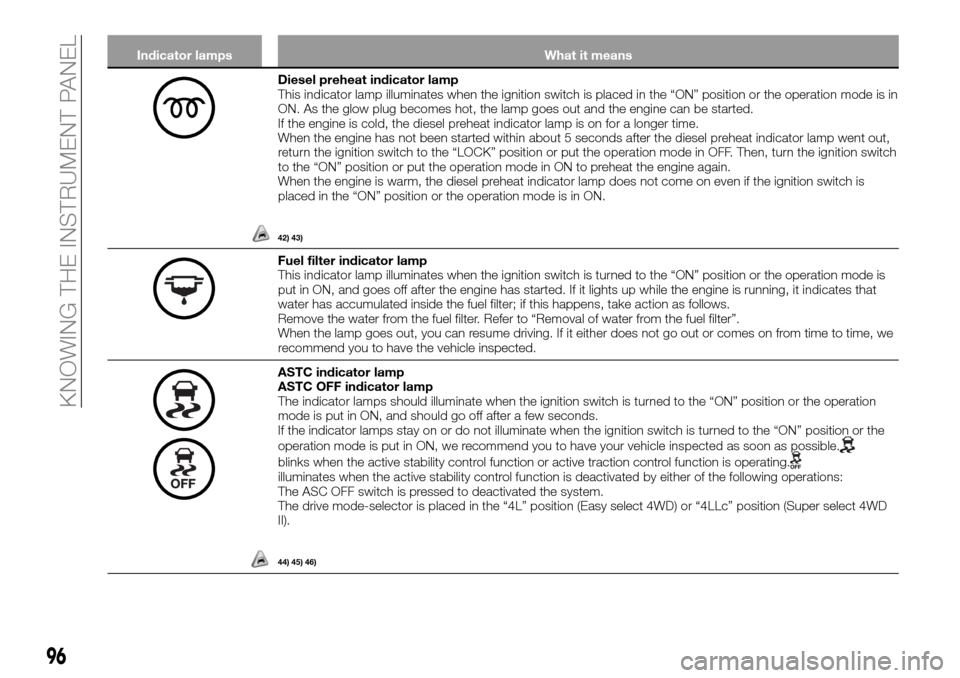
Diesel preheat indicator lamp
This indicator lamp illuminates when the ignition switch is placed in the “ON” position or the operation mode is in
ON. As the glow plug becomes hot, the lamp goes out and the engine can be started.
If the engine is cold, the diesel preheat indicator lamp is on for a longer time.
When the engine has not been started within about 5 seconds after the diesel preheat indicator lamp went out,
return the ignition switch to the “LOCK” position or put the operation mode in OFF. Then, turn the ignition switch
to the “ON” position or put the operation mode in ON to preheat the engine again.
When the engine is warm, the diesel preheat indicator lamp does not come on even if the ignition switch is
placed in the “ON” position or the operation mode is in ON.
42) 43)
Fuel filter indicator lamp
This indicator lamp illuminates when the ignition switch is turned to the “ON” position or the operation mode is
put in ON, and goes off after the engine has started. If it lights up while the engine is running, it indicates that
water has accumulated inside the fuel filter; if this happens, take action as follows.
Remove the water from the fuel filter. Refer to “Removal of water from the fuel filter”.
When the lamp goes out, you can resume driving. If it either does not go out or comes on from time to time, we
recommend you to have the vehicle inspected.
ASTC indicator lamp
ASTC OFF indicator lamp
The indicator lamps should illuminate when the ignition switch is turned to the “ON” position or the operation
mode is put in ON, and should go off after a few seconds.
If the indicator lamps stay on or do not illuminate when the ignition switch is turned to the “ON” position or the
operation mode is put in ON, we recommend you to have your vehicle inspected as soon as possible.
blinks when the active stability control function or active traction control function is operating.illuminates when the active stability control function is deactivated by either of the following operations:
The ASC OFF switch is pressed to deactivated the system.
The drive mode-selector is placed in the “4L” position (Easy select 4WD) or “4LLc” position (Super select 4WD
II).
44) 45) 46)
96
KNOWING THE INSTRUMENT PANEL
Page 102 of 312
WARNING
102)In the following situations, brake
performance may be compromised or the
vehicle may become unstable if brakes are
applied suddenly; consequently, avoid
driving at high speeds or applying the
brakes suddenly. Furthermore, immediately
the vehicle should be brought to a stop in a
safe location and we recommend you to
have it checked. 1 – The brake warning
lamp does not illuminate when the parking
brake is applied or does not turn off when
the parking brake is released.2–The
brake warning lamp and the ABS warning
lamp illuminate at the same time. For
details, refer to “ABS warning lamp”. 3 –
The brake warning lamp remains
illuminated while driving.
103)The vehicle should be brought to a
halt in the following manner when brake
performance has deteriorated. 1 – Depress
the brake pedal harder than usual. Even if
the brake pedal moves down to the very
end of its possible stroke, keep it pressed
down hard. 2 – Should the brakes fail, use
engine braking to reduce your speed and
carefully pull the parking brake lever.
Depress the brake pedal to operate the
stop lamp to alert the vehicles behind you.
IMPORTANT
42)This warning lightwill flash after
starting or during prolonged cranking to
indicate a fault with the glow plug heating
system. If the engine starts, the vehicle can
be used as normal, but a Fiat Dealership
must be contacted as soon as possible.
43)If the diesel preheat indicator lamp
comes on after the engine is started, the
engine speed may not rise above the idling
speed because of fuel freezing. In this case,
keep the engine idling for about
10 minutes, then turn off the ignition switch
or put in OFF the operation mode, and
immediately turn it on or put in ON again to
confirm that the diesel preheat indicator
lamp is off.
44)When the ignition switch is turned to
the “ON” position or the operation mode is
put in ON, the warning lamp does not
come on or it remains on and does not go
off . The warning lamp comes on while
driving.
45)When this indicator lamp blinks, active
stability control function or active traction
control function is operating, which means
that the road is slippery or that your
vehicle’s wheels are beginning to slip. If this
happens, drive slower with less accelerator
input.46)If an abnormal condition occurs in the
system while driving, the
indicator lamp
will illuminate. In these cases, follow these
procedures:1–Ifthetemperature in the
braking system continues to increase due
to continuous brake control on a slippery
road surface, the
indicator lamp will
blink, and operation of the active traction
control function will be suspended to
protect the brake system (the engine
control of the traction control function and
normal brake operation will not be
affected.) Park your vehicle in a safe place.
When the temperature in the braking
system has come down, the indicator lamp
will go off and the active stability control
function and active traction control function
will start operating again.2–Ifthe
indicator lamp does not go out even
through the above procedure is followed,
there could be a problem in the system.
Stop the engine and start the engine again
and check whether the
indicator lamp
goes out. If the indicator lamp goes out,
there is no abnormal condition.3–Ifthe
indicator lamp illuminates even after
your vehicle is driven a short distance after
re-starting the engine, we recommend you
to have your vehicle checked as soon as
possible.
100
KNOWING THE INSTRUMENT PANEL
Page 103 of 312
47)If the vehicle is towed with the ignition
switch in the “ON” position or the operation
mode in ON and only the front wheels or
only the rear wheels raised off the ground,
the ASTC may operate, resulting in an
accident. When towing the vehicle with the
front wheels raised, keep the ignition switch
in the “LOCK” or “ACC” position or the
operation mode in ACC or OFF. When
towing the vehicle with the rear wheels
raised, keep the ignition switch in the
“ACC” position or the operation mode in
ACC. Refer to “Towing”.
48)Prolonged driving with this lamp on
may cause further damage to the emission
control system. It could also affect fuel
economy and drivability.
49)If the lamp does not illuminate when the
ignition switch is turned to the “ON”
position or the operation mode is put in
ON, we recommend you to have the
system checked.
50)If the lamp illuminates while the engine
is running, avoid driving at high speeds and
have the system inspected by a Fiat
Dealership as soon as possible. Accelerator
pedal and brake pedal response may be
negatively influenced under these
conditions.
51)If it illuminates while the engine is
running, there is a problem in the charging
system. Immediately park your vehicle in a
safe place and we recommend you to have
it checked.
52)If this lamp illuminates when the engine
oil level is not low, have it inspected.
53)This warning lamp does not indicate
the amount of oil in the crankcase. This
must be determined by checking the oil
level on the dipstick, while the engine is
switched off.54)If you continue driving with low engine
oil level or with this warning lamp
illuminated, engine seizure may occur.
55)Before moving your vehicle, check that
the warning lamp is OFF.
56)If any of the following conditions occur,
there may be a problem with the SRS
airbags and/or seat belt pre-tensioners,
and they may not function properly in a
collision or may suddenly activate without a
collision: 1 – Even when the ignition switch
or the operation mode is in ON, the SRS
warning lamp does not come on or it
remains on. 2 – The SRS warning lamp
comes on while driving.
57)The SRS airbags and seat belt
pre-tensioners are designed to help reduce
the risk of serious injury or death in certain
collisions. If either of the above conditions
occurs, immediately have your vehicle
checked by a Fiat Dealership.
58)Any of the following indicates that the
ABS is not functioning and only the
standard brake system is working. (The
standard brake system is functioning
normally.) If this happens, take your vehicle
to a Fiat Dealership.
101