media FIAT FULLBACK 2016 1.G Owner's Manual
[x] Cancel search | Manufacturer: FIAT, Model Year: 2016, Model line: FULLBACK, Model: FIAT FULLBACK 2016 1.GPages: 312, PDF Size: 13.67 MB
Page 151 of 312
AUTOMATIC
TRANSMISSION
SPORT MODE 5A/T
(where provided)
During running-in period or immediately
after reconnection of the battery cable,
there may be a case where gear shifts
are not made smoothly. This does not
indicate a faulty transmission. Gear
shifts will become smooth after the
transmission has been shifted several
times by the electronic control system.
Selector lever operation
The transmission has 5 forward gears
and 1 reverse gear.
The individual gears are selected
automatically, depending on the speed
of the vehicle and the position of the
accelerator pedal.
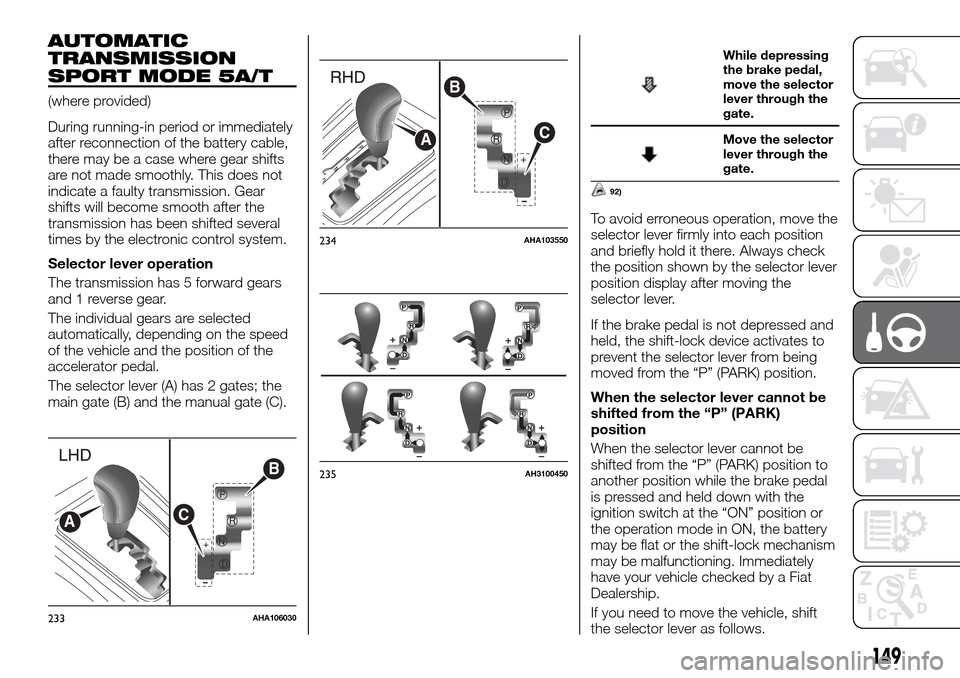
The selector lever (A) has 2 gates; the
main gate (B) and the manual gate (C).
While depressing
the brake pedal,
move the selector
lever through the
gate.
Move the selector
lever through the
gate.
92)
To avoid erroneous operation, move the
selector lever firmly into each position
and briefly hold it there. Always check
the position shown by the selector lever
position display after moving the
selector lever.
If the brake pedal is not depressed and
held, the shift-lock device activates to
prevent the selector lever from being
moved from the “P” (PARK) position.
When the selector lever cannot be
shifted from the “P” (PARK)
position
When the selector lever cannot be
shifted from the “P” (PARK) position to
another position while the brake pedal
is pressed and held down with the
ignition switch at the “ON” position or
the operation mode in ON, the battery
may be flat or the shift-lock mechanism
may be malfunctioning. Immediately
have your vehicle checked by a Fiat
Dealership.
If you need to move the vehicle, shift
the selector lever as follows.
+
P
R
N
D
B
CA
233AHA106030
+
B
C
A
234AHA103550
235AH3100450
149
Page 172 of 312
112)Use the rear differential lock only as an
emergency measure when the vehicle is
stuck and cannot be freed with the drive
mode-selector in “4L” or “4H” position
(Easy select 4WD) or in “4LLc” or “4HLc”
position (Super select 4WD II). Deactivate
the rear differential lock immediately after
using it.4 WHEEL DRIVE
OPERATION
By selecting 4-wheel drive, both axles
of the vehicle are rigidly connected with
each other. This improves the traction
characteristics. When turning sharp
corners or moving forward and
backward repeatedly, however, the
drive line is stressed, which is felt as a
braking effect. A 4-wheel drive vehicle
can accelerate more quickly and
smoothly.
However, note that the braking distance
is not shorter than that of a rear-wheel
drive vehicle.
When using 4-wheel drive on rough
roads (snow, mud, sand, etc.), it is
important to operate the vehicle
correctly.
The driving posture should be more
upright and closer to the wheel than
usual; adjust the seat to a good
position for easy steering and pedal
operation. Be sure to wear the seat belt
After driving on rough roads, check
each part of the vehicle and wash it
thoroughly with water. Refer to the
“Vehicle care” section and “Inspection
and maintenance following rough road
operation”.Driving on dry paved road and
highway
Select “2H” position (Easy select 4WD),
“2H” or “4H” position (Super select
4WD II) to drive on the dry paved road.
Especially on dry highway, never select
the “4H” or “4L” position (Easy select
4WD), “4HLc” or “4LLc” position (Super
select 4WD II).
113)
Driving on snowy or icy roads
Set the drive mode-selector to “4H”
position (Easy select 4WD), “4H” or
“4HLc” position in accordance with the
road conditions (Super select 4WD II)
and then gradually depress the
accelerator pedal for a smooth start.
Keep the pressure on the accelerator
pedal as constant as possible, and
drive at low speed. The use of snow
tyres and/or tyre chains is
recommended.
Maintain a safe distance between
vehicles, avoid sudden braking, and
use engine braking (downshifting).
114)
170
STARTING AND DRIVING
Page 174 of 312
Turning sharp corners
When turning a sharp corner in “4H” or
“4L” position (Easy select 4WD), “4HLc”
or “4LLc” position (Super select 4WD II)
at low speed, a slight difference in
steering may be experienced similar to
as if the brakes were applied. This is
called tight corner braking and results
from each of the 4 tyres being at a
different distance from the corner.
Crossing a stream
4-wheel drive vehicles are not
necessarily waterproof. If the electrical
circuits become wet, further operation
of the vehicle will be impossible;
therefore, avoid crossing streams
unless absolutely necessary. If crossing
a stream is unavoidable, use the
following procedure:
Check depths of a stream and
geographical features before
attempting to cross a stream and
ford the stream where the water is
as shallow as practicable.Set the
drive mode-selector to “4L”
position (Easy select 4WD), “4LLc”
position (Super select 4WD II).Drive
slowly at a speed of approximately
5 km/h to avoid splashing too
much water.
117) 118)
Inspection and maintenance
following rough road operation
After operating the vehicle in rough road
conditions, be sure to perform the
following inspection and maintenance
procedures:
Check that the vehicle has not been
damaged by rocks, gravel, etc.
Carefully wash the vehicle with water.
Drive the vehicle slowly while lightly
depressing the brake pedal in order to
dry out the brakes. If the brakes still do
not function properly, we recommend
you to have the brakes checked as
soon as possible.
Remove the insects, dried grass, etc.
clogging the radiator core.
After crossing a stream, be sure to have
the following items inspected at a Fiat
Dealership and take the necessary
measures:
Check the brake system and, if
necessary, have it serviced.
Check the engine, transmission,
transfer, and differential oil or grease
level and turbidity. If the oil or grease is
milky, it indicates water contamination.
Replace it with new oil or grease.
Grease the propeller shaft.
Check the inside of the vehicle. If
water is found, dry the carpet etc.
Inspect the headlamps. If the
headlamp bulb is flooded with water,
have the headlamp drained off.
IMPORTANT
113)Selecting “4H” or “4L” position (Easy
select 4WD), “4HLc” or “4LLc” position
(Super select 4WD II) to drive on dry paved
road will increase the fuel consumption with
possible noise generation and early tyre
wear. It may also increase the differential oil
temperature, resulting in possible damage
to the driving system. Further, the drive
train will be subjected to excessive loading,
possibly leading to oil leakage, component
seizure, or other serious faults.
114)Avoid sudden braking, sudden
acceleration, and sharp turning; such
operations could cause skidding and
spinouts.
115)Do not force the vehicle or drive
recklessly on sandy surfaces. In
comparison with normal road surfaces, the
engine and other drive-system components
are put under excessive strain when driving
on such a surface, and this could lead to
accidents.
116)If any of following conditions occur
while the vehicle is being driven,
immediately park your vehicle in a safe
place and follow these procedures: the
needle in the temperature gauge
approaches the overheating zone. Refer to
“Engine overheating”; automatic
transmission fluid temperature warning
lamp comes on. Refer to “When the A/T
(automatic transmission) fluid temperature
warning lamp comes on”.
172
STARTING AND DRIVING
Page 177 of 312
WARNING
222)Do not crank the engine while jacking
up the vehicle. The tyre on the ground may
turn and the vehicle may roll off the jack.
BRAKING SYSTEM
All the parts of the brake system are
critical to safety. We recommend you to
have the vehicle checked at regular
intervals.
123)
Brake system
The service brake is divided into two
brake circuits. And your vehicle is
equipped with power brakes. If one
brake circuit fails, the other is available
to stop the vehicle. If your vehicle
should lose the power assist for some
reason, the brakes will still work.
In these situations even if the brake
pedal moves down to the very end of
its possible stroke or resists being
depressed, keep depressing the brake
pedal down harder and further than
usual; stop driving as soon as possible
and have the brake system repaired.
223) 224)
Warning lamp
The brake warning lamp illuminates to
indicate a fault in the braking system.
Refer to “Brake warning lamp”.When brakes are wet
Check the brake system while driving at
a low speed immediately after starting,
especially when the brakes are wet, to
confirm they work normally.
A film of water can be formed on the
brake discs or brake drums and
prevent normal braking after driving in
heavy rain or through large puddles, or
after the vehicle is washed. If this
occurs, dry the brakes out by driving
slowly while lightly depressing the brake
pedal.
When driving downhill
It is important to take advantage of the
engine braking by shifting to a lower
shift position while driving on steep
downhill roads in order to prevent the
brakes from overheating.
225)
Brake pads and linings
Avoid hard braking situations. New
brakes need to be broken-in by
moderate use for the first 200 km.
The disc brakes are provided with a
warning device which emits a shrieking
metallic sound while braking if the brake
pads have reached their wear limit. If
you hear this sound, have the brake
pads replaced.
226)
175
Page 178 of 312
IMPORTANT
123)Avoid driving habits that cause heavy
braking and never “ride” the brakes by
resting your foot on the brake pedal while
driving. It causes brake overheating and
fade.
WARNING
223)Do not turn off the engine while your
vehicle is in motion. If you turn off the
engine while driving, the power assistance
for the braking system will stop working
and your brakes will not work effectively.
224)If the power assist is lost or if either
brake hydraulic system stops working
properly, have your vehicle checked
immediately.
225)Do not leave any objects near the
brake pedal or let a floor mat slide under it;
doing so could prevent the full pedal stroke
that would be necessary in an emergency.
Make sure that the pedal can be operated
freely at all times. Make sure the floor mat
is securely held in place.
226)Driving with worn brake pads will
make it harder to stop, and can cause an
accident.
CRUISE CONTROL
(where provided)
Cruise control is an automatic speed
control system that keeps a set speed.
It can be activated at about 40 km/h or
more.
124) 125) 126)
Cruise control may not be able to keep
your speed on uphills or downhills.
Your speed may decrease on a steep
uphill. You may use the accelerator
pedal if you want to stay at your set
speed.
Your speed may increase to more than
the set speed on a steep downhill. You
have to use the brake to control your
speed. As a result, the set speed
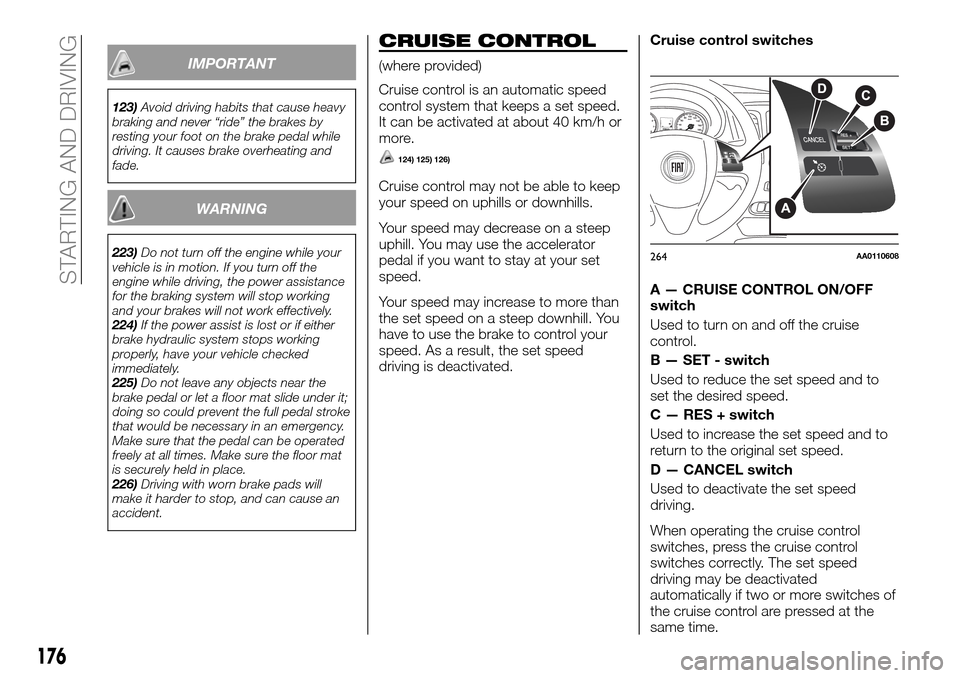
driving is deactivated.Cruise control switches
A — CRUISE CONTROL ON/OFF
switch
Used to turn on and off the cruise
control.
B — SET - switch
Used to reduce the set speed and to
set the desired speed.
C — RES + switch
Used to increase the set speed and to
return to the original set speed.
D — CANCEL switch
Used to deactivate the set speed
driving.
When operating the cruise control
switches, press the cruise control
switches correctly. The set speed
driving may be deactivated
automatically if two or more switches of
the cruise control are pressed at the
same time.
264AA0110608
176
STARTING AND DRIVING
Page 183 of 312
rear view camera images may not be
clear. There is no abnormality.
If a radio set is installed near the
camera, the rear view camera images
may cause electrical system
interference and the system may stop
functioning properly.
It is not possible to fully see obstacles
when the lens is dirty. If the lens
becomes contaminated by water
droplets, snow, mud, or oil, wipe off the
contamination, taking care not to
scratch the lens.
Please observe the following cautions.
Ignoring them could lead to a camera
malfunction.
Do not subject the camera to
physical shook such as striking it
strongly or throwing a thing.
Do not adhere organic substances,
waxes, oil remover, and glass cleaner to
the camera. If adhered to them,
immediately wipe off.
Do not splash the camera with
boiling water.
Never spray or splash water on the
camera or around it.
Do not disconnect, disassemble or
modify the camera.
Do not scratch the camera, as this
may cause damage to the rear view
camera images.
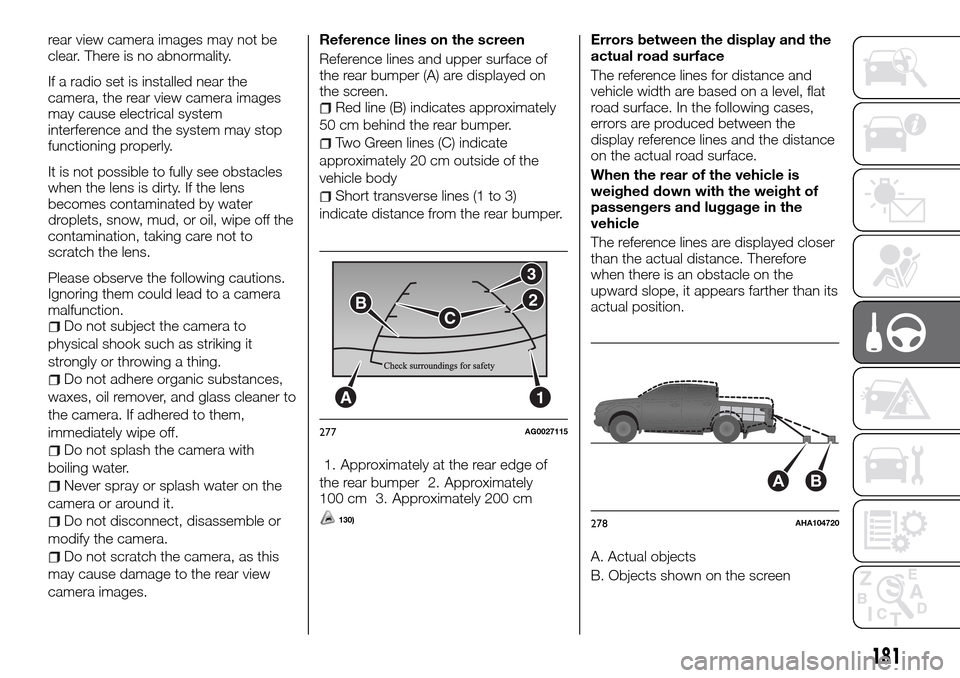
Reference lines on the screen
Reference lines and upper surface of
the rear bumper (A) are displayed on
the screen.
Red line (B) indicates approximately
50 cm behind the rear bumper.
Two Green lines (C) indicate
approximately 20 cm outside of the
vehicle body
Short transverse lines (1 to 3)
indicate distance from the rear bumper.
1. Approximately at the rear edge of
the rear bumper 2. Approximately
100 cm 3. Approximately 200 cm
130)
Errors between the display and the
actual road surface
The reference lines for distance and
vehicle width are based on a level, flat
road surface. In the following cases,
errors are produced between the
display reference lines and the distance
on the actual road surface.
When the rear of the vehicle is
weighed down with the weight of
passengers and luggage in the
vehicle
The reference lines are displayed closer
than the actual distance. Therefore
when there is an obstacle on the
upward slope, it appears farther than its
actual position.
A. Actual objects
B. Objects shown on the screen
A1
CB
3
2
277AG0027115
AB
278AHA104720
181
Page 188 of 312
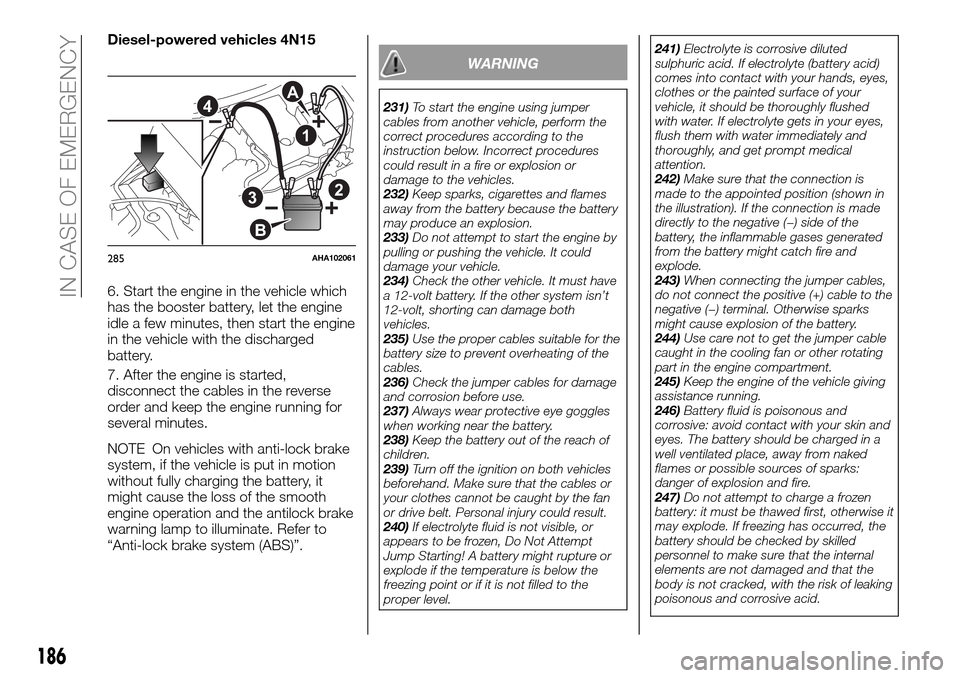
Diesel-powered vehicles 4N15
6. Start the engine in the vehicle which
has the booster battery, let the engine
idle a few minutes, then start the engine
in the vehicle with the discharged
battery.
7. After the engine is started,
disconnect the cables in the reverse
order and keep the engine running for
several minutes.
NOTE On vehicles with anti-lock brake
system, if the vehicle is put in motion
without fully charging the battery, it
might cause the loss of the smooth
engine operation and the antilock brake
warning lamp to illuminate. Refer to
“Anti-lock brake system (ABS)”.
WARNING
231)To start the engine using jumper
cables from another vehicle, perform the
correct procedures according to the
instruction below. Incorrect procedures
could result in a fire or explosion or
damage to the vehicles.
232)Keep sparks, cigarettes and flames
away from the battery because the battery
may produce an explosion.
233)Do not attempt to start the engine by
pulling or pushing the vehicle. It could
damage your vehicle.
234)Check the other vehicle. It must have
a 12-volt battery. If the other system isn’t
12-volt, shorting can damage both
vehicles.
235)Use the proper cables suitable for the
battery size to prevent overheating of the
cables.
236)Check the jumper cables for damage
and corrosion before use.
237)Always wear protective eye goggles
when working near the battery.
238)Keep the battery out of the reach of
children.
239)Turn off the ignition on both vehicles
beforehand. Make sure that the cables or
your clothes cannot be caught by the fan
or drive belt. Personal injury could result.
240)If electrolyte fluid is not visible, or
appears to be frozen, Do Not Attempt
Jump Starting! A battery might rupture or
explode if the temperature is below the
freezing point or if it is not filled to the
proper level.241)Electrolyte is corrosive diluted
sulphuric acid. If electrolyte (battery acid)
comes into contact with your hands, eyes,
clothes or the painted surface of your
vehicle, it should be thoroughly flushed
with water. If electrolyte gets in your eyes,
flush them with water immediately and
thoroughly, and get prompt medical
attention.
242)Make sure that the connection is
made to the appointed position (shown in
the illustration). If the connection is made
directly to the negative (−) side of the
battery, the inflammable gases generated
from the battery might catch fire and
explode.
243)When connecting the jumper cables,
do not connect the positive (+) cable to the
negative (−) terminal. Otherwise sparks
might cause explosion of the battery.
244)Use care not to get the jumper cable
caught in the cooling fan or other rotating
part in the engine compartment.
245)Keep the engine of the vehicle giving
assistance running.
246)Battery fluid is poisonous and
corrosive: avoid contact with your skin and
eyes. The battery should be charged in a
well ventilated place, away from naked
flames or possible sources of sparks:
danger of explosion and fire.
247)Do not attempt to charge a frozen
battery: it must be thawed first, otherwise it
may explode. If freezing has occurred, the
battery should be checked by skilled
personnel to make sure that the internal
elements are not damaged and that the
body is not cracked, with the risk of leaking
poisonous and corrosive acid.A
B
1
4
23
285AHA102061
186
IN CASE OF EMERGENCY
Page 189 of 312
ENGINE
OVERHEATING
When the engine is overheating,will
blink. If this occurs, take the following
corrective measures:
1. Stop the vehicle in a safe place.
2. Check whether steam is coming from
the engine compartment.
If steam does not come from the engine
compartment: with the engine still
running, raise the bonnet to ventilate
the engine compartment.
If steam is coming from the engine
compartment: stop the engine, and
when the steam stops, raise the bonnet
to ventilate the engine compartment.
Restart the engine.
248) 249) 250)
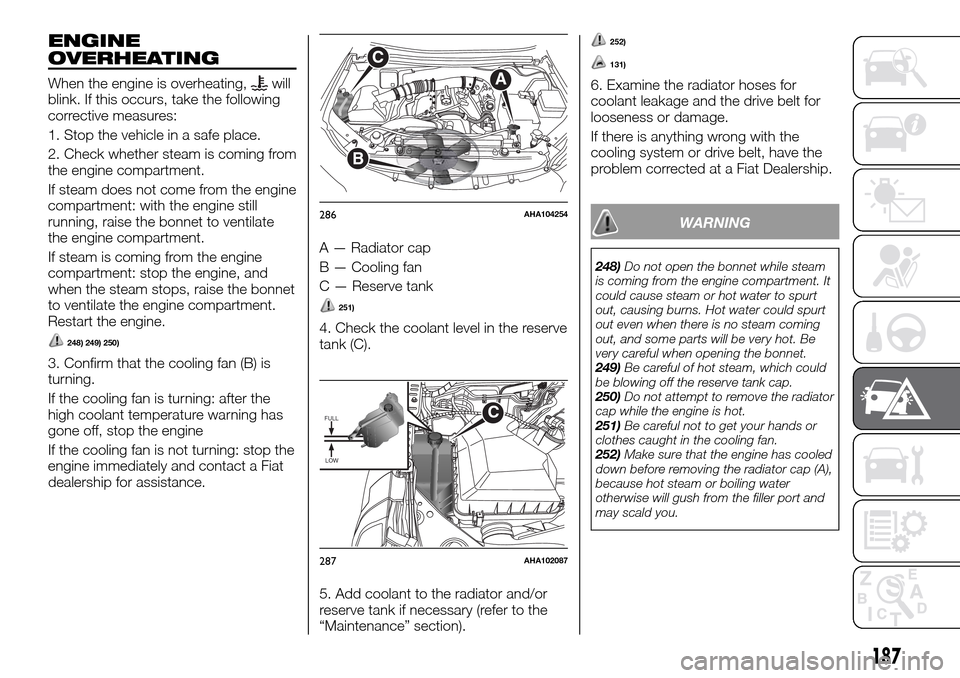
3. Confirm that the cooling fan (B) is
turning.
If the cooling fan is turning: after the
high coolant temperature warning has
gone off, stop the engine
If the cooling fan is not turning: stop the
engine immediately and contact a Fiat
dealership for assistance.A — Radiator cap
B — Cooling fan
C — Reserve tank
251)
4. Check the coolant level in the reserve
tank (C).
5. Add coolant to the radiator and/or
reserve tank if necessary (refer to the
“Maintenance” section).
252)
131)
6. Examine the radiator hoses for
coolant leakage and the drive belt for
looseness or damage.
If there is anything wrong with the
cooling system or drive belt, have the
problem corrected at a Fiat Dealership.
WARNING
248)Do not open the bonnet while steam
is coming from the engine compartment. It
could cause steam or hot water to spurt
out, causing burns. Hot water could spurt
out even when there is no steam coming
out, and some parts will be very hot. Be
very careful when opening the bonnet.
249)Be careful of hot steam, which could
be blowing off the reserve tank cap.
250)Do not attempt to remove the radiator
cap while the engine is hot.
251)Be careful not to get your hands or
clothes caught in the cooling fan.
252)Make sure that the engine has cooled
down before removing the radiator cap (A),
because hot steam or boiling water
otherwise will gush from the filler port and
may scald you.
A
C
B
286AHA104254
FULL
LOW
C
287AHA102087
187
Page 224 of 312
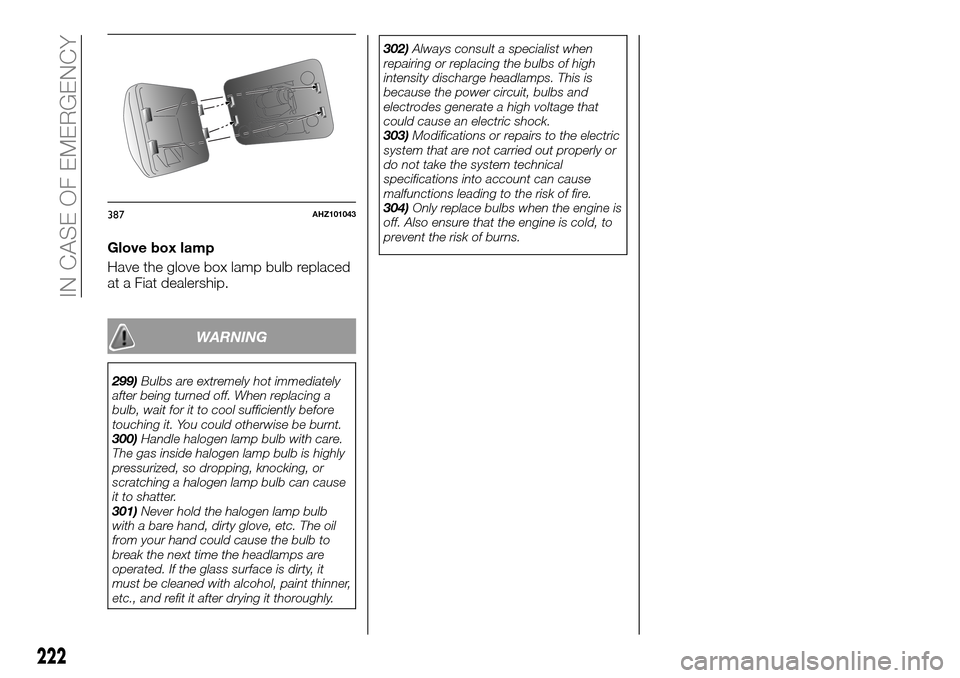
Glove box lamp
Have the glove box lamp bulb replaced
at a Fiat dealership.
WARNING
299)Bulbs are extremely hot immediately
after being turned off. When replacing a
bulb, wait for it to cool sufficiently before
touching it. You could otherwise be burnt.
300)Handle halogen lamp bulb with care.
The gas inside halogen lamp bulb is highly
pressurized, so dropping, knocking, or
scratching a halogen lamp bulb can cause
it to shatter.
301)Never hold the halogen lamp bulb
with a bare hand, dirty glove, etc. The oil
from your hand could cause the bulb to
break the next time the headlamps are
operated. If the glass surface is dirty, it
must be cleaned with alcohol, paint thinner,
etc., and refit it after drying it thoroughly.302)Always consult a specialist when
repairing or replacing the bulbs of high
intensity discharge headlamps. This is
because the power circuit, bulbs and
electrodes generate a high voltage that
could cause an electric shock.
303)Modifications or repairs to the electric
system that are not carried out properly or
do not take the system technical
specifications into account can cause
malfunctions leading to the risk of fire.
304)Only replace bulbs when the engine is
off. Also ensure that the engine is cold, to
prevent the risk of burns.
387AHZ101043
222
IN CASE OF EMERGENCY
Page 252 of 312
Fluid type
Use brake fluid conforming to DOT3 or
DOT4. The brake fluid is hygroscopic.
Too much moisture in the brake fluid will
adversely affect the brake system,
reducing the brake performance.
In addition, the brake fluid reservoir is
equipped with a special cap to prevent
the entrance of air, and this cap should
not be removed.
319) 320) 321) 322)
152) 153) 154)
WARNING
319)Take care in handling brake fluid as it
is harmful to the eyes, may irritate your skin
and also damage to painted surfaces.
320)Use only the specified brake fluid. Do
not mix or add different brand of brake fluid
to prevent chemical reaction. Do not let
any petroleum-based fluid touch, mix with,
or get into the brake fluid. This will damage
the seals.
321)Clean the filler cap before removing
and close the cap securely after
maintenance.
322)Brake fluid is poisonous and highly
corrosive. In the event of accidental
contact, immediately wash the affected
parts with water and mild soap. Then rinse
thoroughly. Call a doctor immediately if
swallowed.
IMPORTANT
152)Keep the reservoir tank cap closed to
prevent the brake fluid from deteriorating
except maintenance.
153)Prevent brake fluid, which is highly
corrosive, from coming into contact with
painted parts. Should it happen,
immediately wash with water.
154)The symbol
, on the brake fluid
container indicates if a brake fluid is
synthetic or mineral-based. Use of mineral
type fluids will damage the special rubber
seals of the braking system beyond repair.
CLUTCH FLUID
To check the fluid level
The clutch fluid in the master cylinder
should be checked when performing
other underhood service. In addition,
the system should be checked for
leakage at the same time.
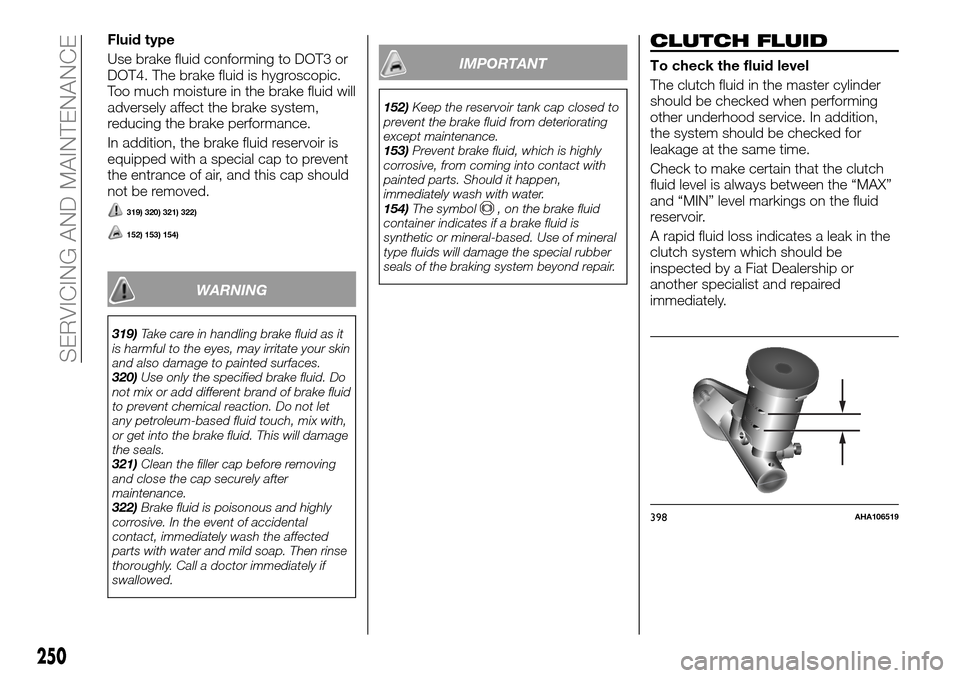
Check to make certain that the clutch
fluid level is always between the “MAX”
and “MIN” level markings on the fluid
reservoir.
A rapid fluid loss indicates a leak in the
clutch system which should be
inspected by a Fiat Dealership or
another specialist and repaired
immediately.
MAX
MIN
398AHA106519
250
SERVICING AND MAINTENANCE