Time FIAT GRANDE PUNTO 2007 199 / 1.G User Guide
[x] Cancel search | Manufacturer: FIAT, Model Year: 2007, Model line: GRANDE PUNTO, Model: FIAT GRANDE PUNTO 2007 199 / 1.GPages: 242, PDF Size: 3.71 MB
Page 31 of 242
30
SAFETY
DEVICES
CORRECT USE
OF THE CAR
WARNING
LIGHTS AND
MESSAGES
IN AN
EMERGENCY
CAR
MAINTENANCE
TECHNICAL
SPECIFICATIONS
INDEX
DASHBOARD
AND CONTROLS
Set date (Set Date)
This function enables to update the date
(day - month - year).
To correct the date proceed as follows:
– briefly press button MENU ESC: “day”
will flash on the display;
– press button +or –for setting;
– briefly press button MENU ESC:
“month” will flash on the display;
– press button +or –for setting;
– briefly press button MENU ESC:
“year” will flash on the display;
– press button +or –for setting.
NoteEvery press on button +or – in-
creases/decreases by 1 unit. Keeping the
button pressed obtains automatic fast in-
crease or decrease. When you are near
the required setting complete adjustment
by single presses.
– briefly press button MENU ESCto go
back to the menu screen or press the but-
ton for long to go back to the standard
screen without storing settings. Set clock (Set time)
This function enables to set the clock
through two sub-menus: “Time” and
“Mode”.
Proceed as follows:
– briefly press button MENU ESC, the
display will show the two sub-menus
“Time” and “Mode”;
– press button +or –to surf the two sub-
menus;
– select the required option and then
press button MENU ESCbriefly;
– if selecting “Time”, briefly press button
MENU ESC, “hours” will flash on the
display;
– press button +or –for setting;
– briefly press button MENU ESC, “min-
utes” will flash on the display;
– press button +or –for setting;
– if selecting “Mode”:briefly press button
MENU ESC , “24h” or “12h” mode will
flash on the display;
– press button +or –to select “24h” or
“12h”.
After setting, briefly press button MENU
ESCto go back to the submenu screen
or press the button for long to go back to
the main menu screen without storing set-
tings.
– Press again button MENU ESCfor long
to go back to the standard screen or to
the main menu according to the current
menu level displayed.First screen (information displayed
in the main screen)
(where provided)
This function enables to select the type of
information displayed in the main screen.
It is possible to display the date or the
pressure of the turbo-compressor.
To select one of the two items, proceed
as follows:
– push the button MENU ESCfor a
short time, “First screen” is displayed;
– press again the button MENU ESCfor
a short time to display the “Date” and
“Engine Info” options;
– press +or –to select the type of infor-
mation to be displayed in the main screen;
– press MENU ESCfor a short time to
store the selection and return to the pre-
vious screen or press the button for a
longer time to return to the standard
screen without storing the selection.
Rotating the ignition key on MAR, the re-
configurable multifunctional display, after
the start-up check, displays the previous-
ly set information using the “First screen”
function of the menu.
001-036 Punto GDX GB 20-07-2007 9:41 Pagina 30
Page 36 of 242
35
SAFETY
DEVICES
CORRECT USE
OF THE CAR
WARNING
LIGHTS AND
MESSAGES
IN AN
EMERGENCY
CAR
MAINTENANCE
TECHNICAL
SPECIFICATIONS
INDEX
DASHBOARD
AND CONTROLS
TRIP COMPUTER
General features
The “Trip computer” displays information
(with ignition key at MAR), relating to the
operating status of the car. This function
comprises two separate and independent
trips: “Trip A” and “Trip B” concerning
the “complete mission” of the car (jour-
ney).
Both functions are resettable (reset - start
of new mission).
“Trip A” shall be used to display the fig-
ures relating to:
– Range
– Trip distance
– Average consumption
– Instant consumption
– Average speed
– Travel time (driving time).“Trip B”, available on multifunction display
only, shall be used to display the figures
relating to:
– Trip distance B
– Average consumption B
– Average speed B
– Travel time B (driving time).
Note“Trip B” function can be excluded
(see paragraph “Trip B On/Off”). “Range”
and “Instant consumption” cannot be re-
set.
Values displayed
Range
This value shows the distance in km (or
mi) that the car can still cover before
needing fuel, assuming that driving condi-
tions are kept unvaried. The display will
show “----” in the following cases:
– value lower than 50 km (or 30 mi)
– car left parked with engine running for
long.
Trip distance
This value shows the distance covered
from the start of the new mission. Exit Menu
This is the last function that closes the cir-
cular setting cycle listed in the initial menu
screen.
Briefly press button MENU ESCto go
back to the standard screen without stor-
ing settings.
Press button –to return to the first menu
option (Speed Beep).
001-036 Punto GDX GB 20-07-2007 9:41 Pagina 35
Page 37 of 242
36
SAFETY
DEVICES
CORRECT USE
OF THE CAR
WARNING
LIGHTS AND
MESSAGES
IN AN
EMERGENCY
CAR
MAINTENANCE
TECHNICAL
SPECIFICATIONS
INDEX
DASHBOARD
AND CONTROLS
Average consumption
This value shows the average consump-
tion from the start of the new mission.
Instant consumption
This value shows instant fuel consumption
(this value is updated second by second).
If parking the car with engine on,
the display will show “----”.
Average speed
This value shows the car average speed as
a function of the overall time elapsed since
the start of the new mission.
Travel time
This value shows the time elapsed since
the start of the new mission.
IMPORTANT Lacking information, Trip
computer values are displayed with “----”.
When normal operating condition is re-
set, calculation of different units will
restart regularly. Values displayed before
the failure will not be reset.
fig. 26F0M0124m
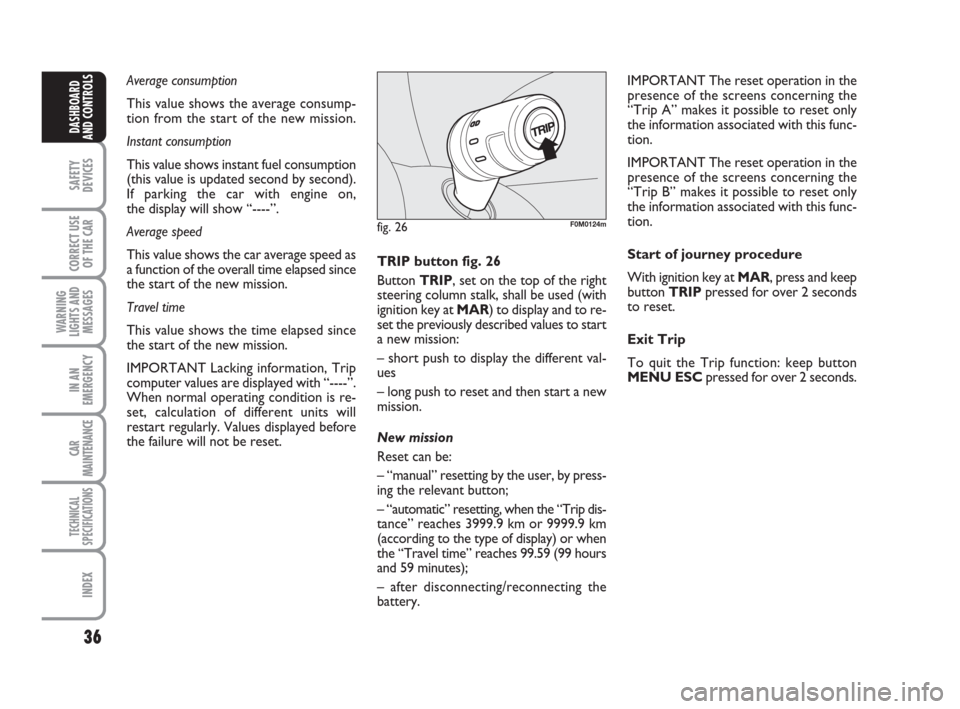
TRIP button fig. 26
Button TRIP, set on the top of the right
steering column stalk, shall be used (with
ignition key at MAR) to display and to re-
set the previously described values to start
a new mission:
– short push to display the different val-
ues
– long push to reset and then start a new
mission.
New mission
Reset can be:
– “manual” resetting by the user, by press-
ing the relevant button;
– “automatic” resetting, when the “Trip dis-
tance” reaches 3999.9 km or 9999.9 km
(according to the type of display) or when
the “Travel time” reaches 99.59 (99 hours
and 59 minutes);
– after disconnecting/reconnecting the
battery.IMPORTANT The reset operation in the
presence of the screens concerning the
“Trip A” makes it possible to reset only
the information associated with this func-
tion.
IMPORTANT The reset operation in the
presence of the screens concerning the
“Trip B” makes it possible to reset only
the information associated with this func-
tion.
Start of journey procedure
With ignition key at MAR, press and keep
button TRIPpressed for over 2 seconds
to reset.
Exit Trip
To quit the Trip function: keep button
MENU ESCpressed for over 2 seconds.
001-036 Punto GDX GB 20-07-2007 9:41 Pagina 36
Page 40 of 242
39
SAFETY
DEVICES
CORRECT USE
OF THE CAR
WARNING
LIGHTS AND
MESSAGES
IIN AN
EMERGENCY
CAR
MAINTENANCE
TECHNICAL
SPECIFICATIONS
INDEX
DASHBOARD
AND CONTROLS
HEAD RESTRAINTS
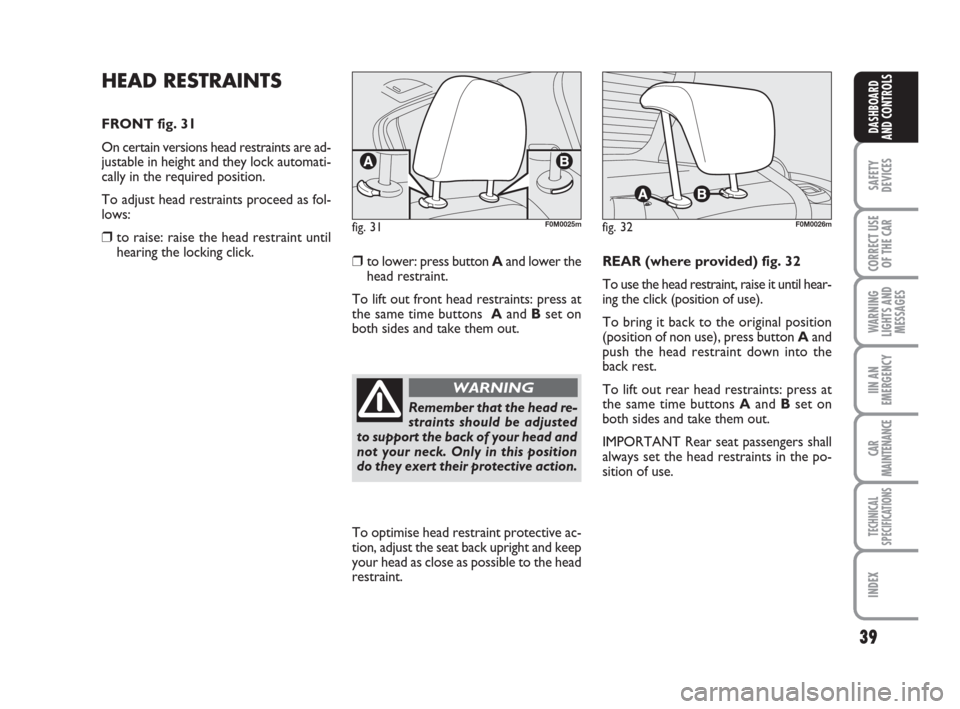
FRONT fig. 31
On certain versions head restraints are ad-
justable in height and they lock automati-
cally in the required position.
To adjust head restraints proceed as fol-
lows:
❒ to raise: raise the head restraint until
hearing the locking click.
❒to lower: press button Aand lower the
head restraint.
To lift out front head restraints: press at
the same time buttons Aand Bset on
both sides and take them out.REAR (where provided) fig. 32
To use the head restraint, raise it until hear-
ing the click (position of use).
To bring it back to the original position
(position of non use), press button Aand
push the head restraint down into the
back rest.
To lift out rear head restraints: press at
the same time buttons Aand Bset on
both sides and take them out.
IMPORTANT Rear seat passengers shall
always set the head restraints in the po-
sition of use.
fig. 31F0M0025mfig. 32F0M0026m
To optimise head restraint protective ac-
tion, adjust the seat back upright and keep
your head as close as possible to the head
restraint.
Remember that the head re-
straints should be adjusted
to support the back of your head and
not your neck. Only in this position
do they exert their protective action.
WARNING
037-088 Punto GDX GB 20-07-2007 9:41 Pagina 39
Page 42 of 242
41
SAFETY
DEVICES
CORRECT USE
OF THE CAR
WARNING
LIGHTS AND
MESSAGES
IIN AN
EMERGENCY
CAR
MAINTENANCE
TECHNICAL
SPECIFICATIONS
INDEX
DASHBOARD
AND CONTROLS
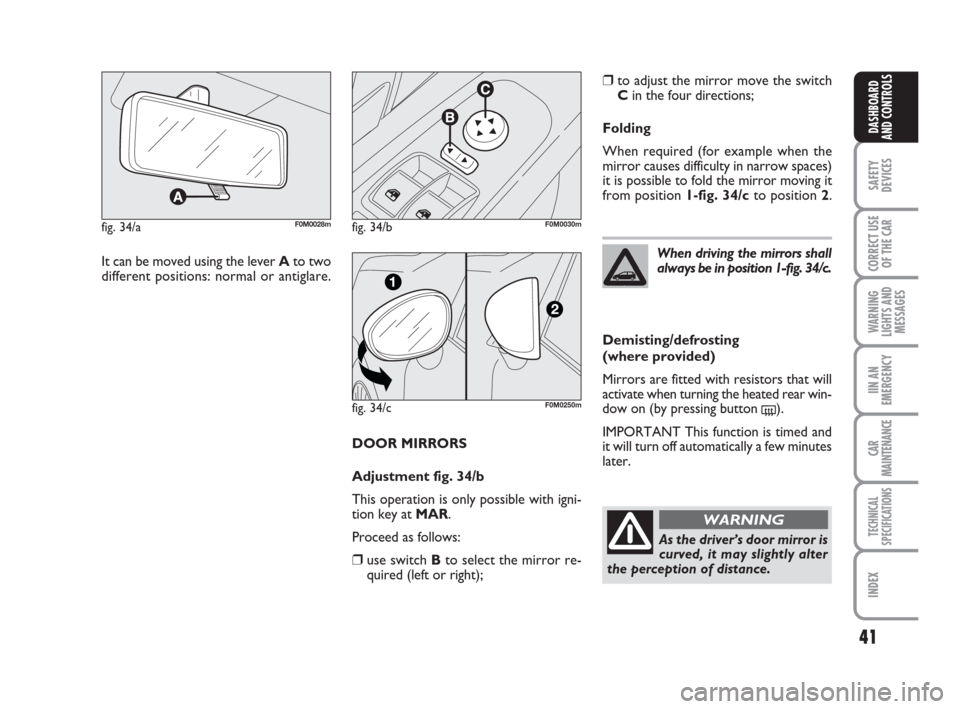
DOOR MIRRORS
Adjustment fig. 34/b
This operation is only possible with igni-
tion key at MAR.
Proceed as follows:
❒use switch Bto select the mirror re-
quired (left or right);
fig. 34/aF0M0028mfig. 34/bF0M0030m
It can be moved using the lever Ato two
different positions: normal or antiglare.
fig. 34/cF0M0250m
❒to adjust the mirror move the switch
Cin the four directions;
Folding
When required (for example when the
mirror causes difficulty in narrow spaces)
it is possible to fold the mirror moving it
from position 1-fig. 34/cto position 2.
When driving the mirrors shall
always be in position 1-fig. 34/c.
As the driver’s door mirror is
curved, it may slightly alter
the perception of distance.
WARNING
Demisting/defrosting
(where provided)
Mirrors are fitted with resistors that will
activate when turning the heated rear win-
dow on (by pressing button
().
IMPORTANT This function is timed and
it will turn off automatically a few minutes
later.
037-088 Punto GDX GB 20-07-2007 9:41 Pagina 41
Page 45 of 242
44
SAFETY
DEVICES
CORRECT USE
OF THE CAR
WARNING
LIGHTS AND
MESSAGES
IN AN
EMERGENCY
CAR
MAINTENANCE
TECHNICAL
SPECIFICATIONS
INDEX
DASHBOARD
AND CONTROLS
Air distribution knob C
¶to convey air to the centre and side
vents;
ßto warm the feet and convey cooler
air to the dashboard vents, in inter-
mediate temperature conditions;
©to heat with outside harsh tempera-
ture: to convey as much air as possi-
ble to the feet;
®to warm the feet and at the same time
demist the windscreen;
-for quick windscreen demisting.
Air recirculation on/off button D
Press the button (button led on) to turn
air recirculation on.
Press the button (button led off) to turn
air recirculation off.FAST HEATING
For fast heating of the passenger com-
partment, proceed as follows:
❒knob Aturned to red section;
❒turn air recirculation on by pressing
button D(button led on);
❒knob Cturned to ©;
❒knob Bturned to 4-(max. fan
speed).
Then use the controls to keep the re-
quired comfort conditions and press but-
ton Dto turn air recirculation off (button
led off) and to prevent misting up.
IMPORTANT With cold engine, you have
to wait for a few minutes to let the sys-
tem fluid reach the operating temperature. VENTILATION
To ventilate the passenger’s compartment
properly proceed as follows:
❒knob Aturned to blue section;
❒turn air recirculation off by pressing
button D(button led off);
❒knob Cturned to ¶;
❒knob Bturned to the required speed.
WARMING THE PASSENGER
COMPARTMENT
Proceed as follows:
❒knob Aturned to red section;
❒knob Cturned to the required posi-
tion;
❒knob Bturned to the required speed.
037-088 Punto GDX GB 20-07-2007 9:41 Pagina 44
Page 46 of 242
45
SAFETY
DEVICES
CORRECT USE
OF THE CAR
WARNING
LIGHTS AND
MESSAGES
IIN AN
EMERGENCY
CAR
MAINTENANCE
TECHNICAL
SPECIFICATIONS
INDEX
DASHBOARD
AND CONTROLS
FRONT WINDOW FAST
DEMISTING/
DEFROSTING (WINDSCREEN
AND SIDE WINDOWS)
Proceed as follows:
❒knob Aturned to red section;
❒turn air recirculation off by pressing
button D(button led off);
❒knob Cturned to -;
❒knob Bturned to 4-(max. fan
speed).
After demisting/defrosting, operate the
controls to restore the required comfort.Window demisting
In the event of considerable outside mois-
ture and/or rain and/or considerable dif-
ferences in temperature inside and outside
the passenger compartment, perform the
following preventive demisting procedure:
❒knob Aturned to red section;
❒turn air recirculation off by pressing
button D(button led off);
❒turn knob Cto -or to ®if the win-
dows do not demist;
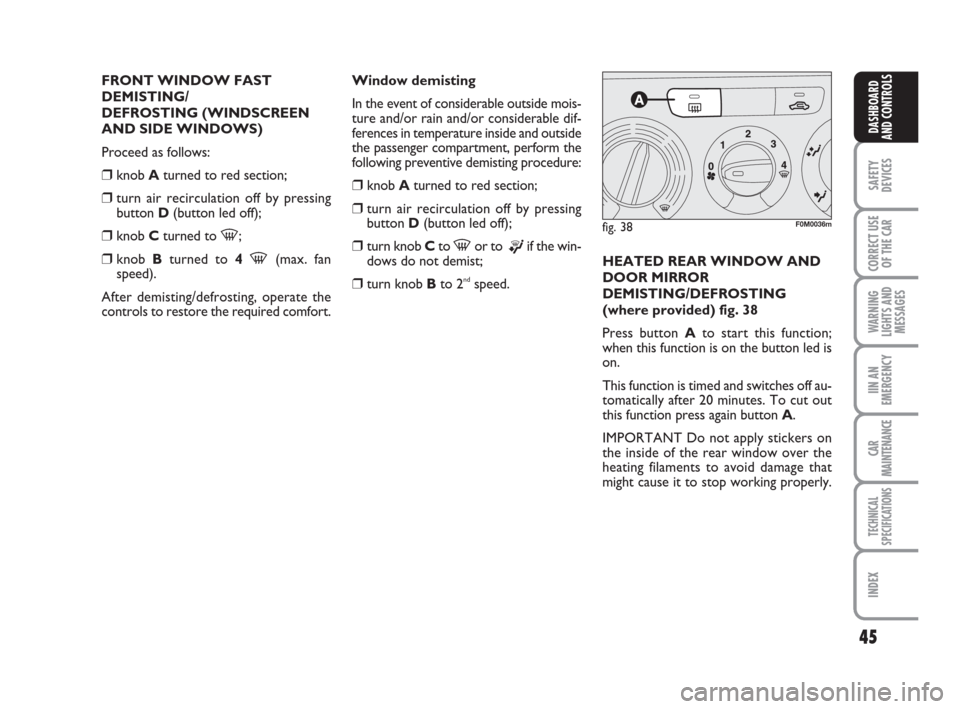
❒turn knob Bto 2ndspeed.HEATED REAR WINDOW AND
DOOR MIRROR
DEMISTING/DEFROSTING
(where provided) fig. 38
Press button Ato start this function;
when this function is on the button led is
on.
This function is timed and switches off au-
tomatically after 20 minutes. To cut out
this function press again button A.
IMPORTANT Do not apply stickers on
the inside of the rear window over the
heating filaments to avoid damage that
might cause it to stop working properly.
fig. 38F0M0036m
037-088 Punto GDX GB 20-07-2007 9:41 Pagina 45
Page 48 of 242
47
SAFETY
DEVICES
CORRECT USE
OF THE CAR
WARNING
LIGHTS AND
MESSAGES
IIN AN
EMERGENCY
CAR
MAINTENANCE
TECHNICAL
SPECIFICATIONS
INDEX
DASHBOARD
AND CONTROLS
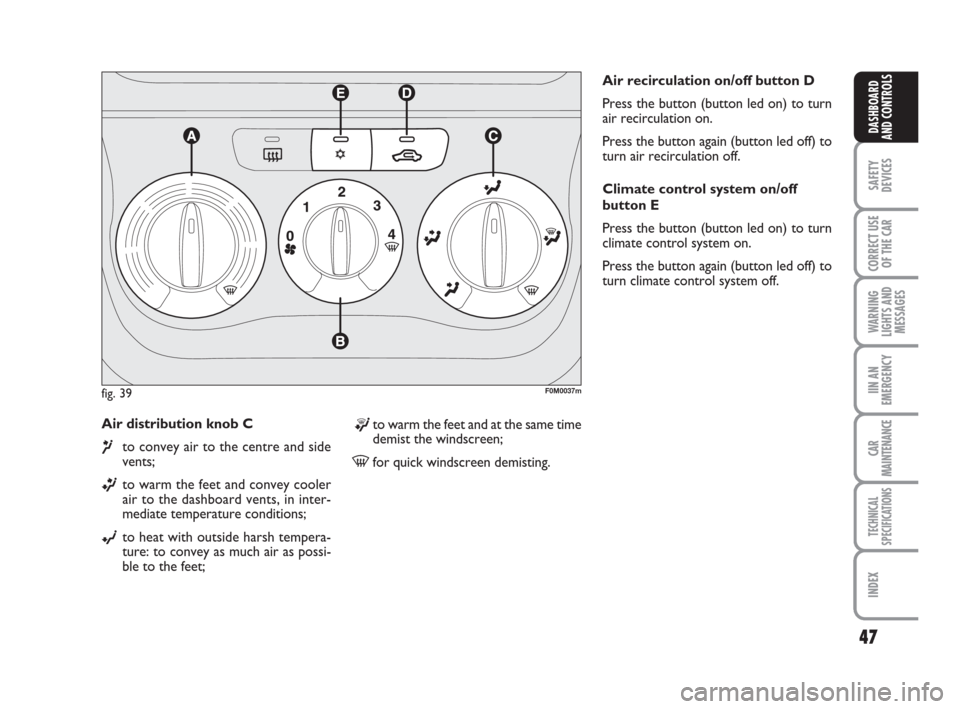
Air distribution knob C
¶to convey air to the centre and side
vents;
ßto warm the feet and convey cooler
air to the dashboard vents, in inter-
mediate temperature conditions;
©to heat with outside harsh tempera-
ture: to convey as much air as possi-
ble to the feet;Air recirculation on/off button D
Press the button (button led on) to turn
air recirculation on.
Press the button again (button led off) to
turn air recirculation off.
Climate control system on/off
button E
Press the button (button led on) to turn
climate control system on.
Press the button again (button led off) to
turn climate control system off.
fig. 39F0M0037m
®to warm the feet and at the same time
demist the windscreen;
-for quick windscreen demisting.
037-088 Punto GDX GB 20-07-2007 9:41 Pagina 47
Page 51 of 242
50
SAFETY
DEVICES
CORRECT USE
OF THE CAR
WARNING
LIGHTS AND
MESSAGES
IN AN
EMERGENCY
CAR
MAINTENANCE
TECHNICAL
SPECIFICATIONS
INDEX
DASHBOARD
AND CONTROLS
Window demisting
In the event of considerable outside mois-
ture and/or rain and/or considerable dif-
ferences in temperature inside and outside
the passenger compartment, perform the
following preventive demisting procedure:
❒knob Aturned to red section;
❒turn air recirculation off by pressing
button D, button led off;
❒turn knob Cto -or to ®if the win-
dows do not demist;
❒turn knob Bto 2ndspeed.
IMPORTANT The climate control system
is very useful to prevent window misting
up in presence of high humidity since it de-
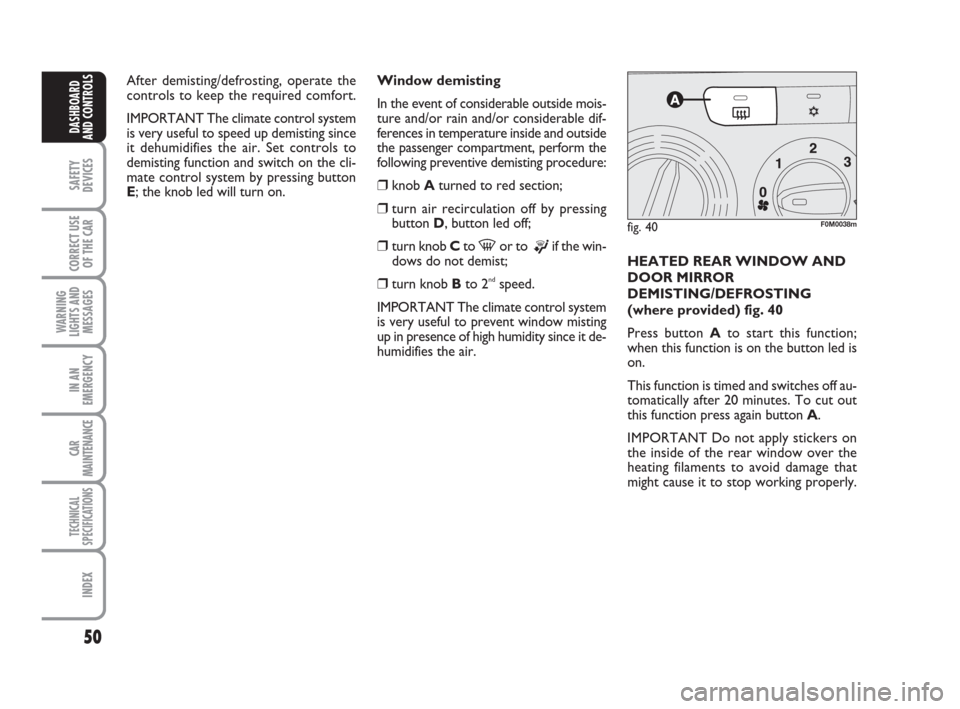
humidifies the air.HEATED REAR WINDOW AND
DOOR MIRROR
DEMISTING/DEFROSTING
(where provided) fig. 40
Press button Ato start this function;
when this function is on the button led is
on.
This function is timed and switches off au-
tomatically after 20 minutes. To cut out
this function press again button A.
IMPORTANT Do not apply stickers on
the inside of the rear window over the
heating filaments to avoid damage that
might cause it to stop working properly.
fig. 40F0M0038m
After demisting/defrosting, operate the
controls to keep the required comfort.
IMPORTANT The climate control system
is very useful to speed up demisting since
it dehumidifies the air. Set controls to
demisting function and switch on the cli-
mate control system by pressing button
E; the knob led will turn on.
037-088 Punto GDX GB 20-07-2007 9:41 Pagina 50
Page 55 of 242
54
SAFETY
DEVICES
CORRECT USE
OF THE CAR
WARNING
LIGHTS AND
MESSAGES
IN AN
EMERGENCY
CAR
MAINTENANCE
TECHNICAL
SPECIFICATIONS
INDEX
DASHBOARD
AND CONTROLS
During fully automatic operation, the on-
ly manual settings required are the fol-
lowing:
❒MONO, to align the air temperature
and distribution set on the passenger’s
side with that on the driver’s side;
❒•air recirculation, to keep it always
on or off;
❒-to speed up demisting/defrosting of
windscreen, side windows, rear window
and door mirrors;
❒
(to demist/defrost heated rear win-
dow and door mirrors.
During full automatic system operation,
you can change at any time set tempera-
tures, air distribution and fan speed by us-
ing the relevant buttons or knobs: the sys-
tem will automatically change its settings
to adjust to the new requirements.During (FULL AUTO) operation, chang-
ing air distribution and/or flow and/or
compressor activation and/or air recircu-
lation will make the FULLwording dis-
appear. In this way the system will keep
on controlling automatically all functions,
excluding those changed manually. Fan
speed is the same for every area of the
passenger compartment.
Air temperature adjusting
knobs H - N
Turning the knobs clockwise or counter-
clockwise, respectively highers or lowers
the temperature of the air required re-
spectively in the front left zone (knob N) or
in the right zone (knob H) of the passenger
compartment. Since the system controls
two zones of the passenger compartment,
it is possible to personalise required tem-
peratures (driver and passenger) with a
maximum difference of 7 °C. The temper-
atures set are shown on the displays near
the relevant knobs. Pressing button A
(MONO) automatically aligns the temper-
ature on the passenger’s side with that on
the driver’s side; you can therefore set the
same temperature for both zones by turn-
ing knob Non driver side. Separate oper-
ation of air temperatures and distribution is
restored by turning knobs Hor pressing
again button A(MONO) when the button
led is on.Turn the knobs fully clockwise or counter-
clockwise to engage respectively HI(max-
imum heating) or LO(maximum cooling).
To deactivate these two functions, just
turn the temperature knob and set the re-
quired temperature.
Front air distribution buttons I-M
Pressing these buttons it is possible to
choose manually one of the seven possi-
ble air distributions to the passenger com-
partment (right or left side):NAir flow to the windscreen and front
side window vents to demist or de-
frost them.
˙Air flow at central and side dashboard
vents to ventilate the chest and the
face during the hot season.
OAir flow towards the front and rear
lower parts of the passenger com-
partment. Due to the natural tenden-
cy of heat to spread upwards, this type
of distribution allows heating of the
passenger compartment in the short-
est time, also giving a prompt feeling
of warmth.
037-088 Punto GDX GB 20-07-2007 9:41 Pagina 54