Time FIAT GRANDE PUNTO 2007 199 / 1.G Owner's Manual
[x] Cancel search | Manufacturer: FIAT, Model Year: 2007, Model line: GRANDE PUNTO, Model: FIAT GRANDE PUNTO 2007 199 / 1.GPages: 242, PDF Size: 3.71 MB
Page 57 of 242
56
SAFETY
DEVICES
CORRECT USE
OF THE CAR
WARNING
LIGHTS AND
MESSAGES
IN AN
EMERGENCY
CAR
MAINTENANCE
TECHNICAL
SPECIFICATIONS
INDEX
DASHBOARD
AND CONTROLS
IMPORTANT Should the system (after
manual settings) be no longer able to guar-
antee the required temperature set in the
passenger compartment, the set tempera-
ture value will start flashing to indicate this
condition, after one minute the AUTO
message will turn off.
To restore system automatic control at
any time, after one or more manual ad-
justments, press button AUTO.
MONO button (to align set
temperatures and air
distribution) A
Pressing button MONOautomatically
aligns the temperature on the passenger
side with that on the driver side, it is
therefore possible to set the same tem-
perature and air distribution between the
two zones by turning the knob on driver
side. This function is provided to simplify
temperature adjustment of the whole pas-
senger compartment when only the dri-
ver is onboard. Separate operation of set
temperature and air distribution is re-
stored by turning knob H(to set tem-
perature on front passenger side) or by
pressing again button MONOwhen the
button led is on.Air recirculation on/off button C
Air recirculation works according to the
following operating logics:
❒automatic switching on, by pressing one
of the AUTObuttons and indicated by
the turning on of the AUTOicon on the
display near the car outline.
❒forced switching on (inside air recircu-
lation always on), indicated by the turn-
ing off of the button led Cand symbol
íon the display;
❒forced switching off (air recirculation
always off with air inlet from the out-
side), indicated by the turning off of the
button led and symbol
êon the dis-
play. Forced recirculation on/off can be
selected through button C.
IMPORTANT The inside air recirculation
system makes it possible to reach the re-
quired heating or cooling conditions faster.
It is however inadvisable to use it on
rainy/cold days as it would considerably
increase the possibility of the windows
misting inside, especially if the climate con-
trol system is off.When outside temperature is cold, recir-
culation is forced to off (outside air inlet)
to prevent window misting up.
In automatic operation inside air recircu-
lation will be controlled automatically by
the system according to outside environ-
mental conditions.
When setting manual recirculation, word-
ings FULLand AUTOdisappear from
the display.
It is inadvisable to use air re-
circulation on rainy/cold
days as it would considerably increase
the possibility of windows misting up
inside.
WARNING
037-088 Punto GDX GB 20-07-2007 9:41 Pagina 56
Page 59 of 242
58
SAFETY
DEVICES
CORRECT USE
OF THE CAR
WARNING
LIGHTS AND
MESSAGES
IN AN
EMERGENCY
CAR
MAINTENANCE
TECHNICAL
SPECIFICATIONS
INDEX
DASHBOARD
AND CONTROLS
Heated rear window and door
mirror demisting/defrosting button
(where provided) G
Press this button to activate heated rear
window demisting/defrosting.
When this function is on, the button led
is on.
This function is timed and switches off au-
tomatically after about 20 minutes or by
pressing again the button or by turning the
engine off. It will not be switched on au-
tomatically when restarting the engine.
IMPORTANT Do not apply stickers on the
inside of the rear window over the heat-
ing filaments to avoid damage that might
cause it to stop working properly.
Switching the climate control
system off (OFF) E
Press button Eto turn the system off.
When turned off the system conditions
are the following:
❒set temperature displays off;
❒air recirculation is on;
❒conditioner compressor off;
❒fan off.
Heated rear window can be turned on or
off also when the system is off.
IMPORTANT The system will store the
temperatures set before turning off and
will resume them when pressing any but-
ton (except heated rear window); if the
function corresponding to the button
pressed is off it will be turned on; if on it
will be kept active.
Press AUTOto turn the system in au-
tomatic mode.ADDITIONAL HEATER
(where provided)
This device shall be used to speed up pas-
senger compartment warming when it is
very cold.
The additional heater turns off automati-
cally after reaching the required comfort
conditions.
Automatic two-zone climate
control system
The additional heater will switch on au-
tomatically after turning the ignition key
to ON.
Manual Heater and Climate
control system
The additional heater will switch on au-
tomatically by turning knob Ato the last
red sector and turning the fan on (knob
B) to the first speed at least.
IMPORTANT Heater works only with
low outside temperature and engine
coolant temperature.
IMPORTANT Heater will not turn on if
the battery voltage is not sufficient.
037-088 Punto GDX GB 20-07-2007 9:41 Pagina 58
Page 60 of 242
59
SAFETY
DEVICES
CORRECT USE
OF THE CAR
WARNING
LIGHTS AND
MESSAGES
IIN AN
EMERGENCY
CAR
MAINTENANCE
TECHNICAL
SPECIFICATIONS
INDEX
DASHBOARD
AND CONTROLS
EXTERNAL LIGHTS
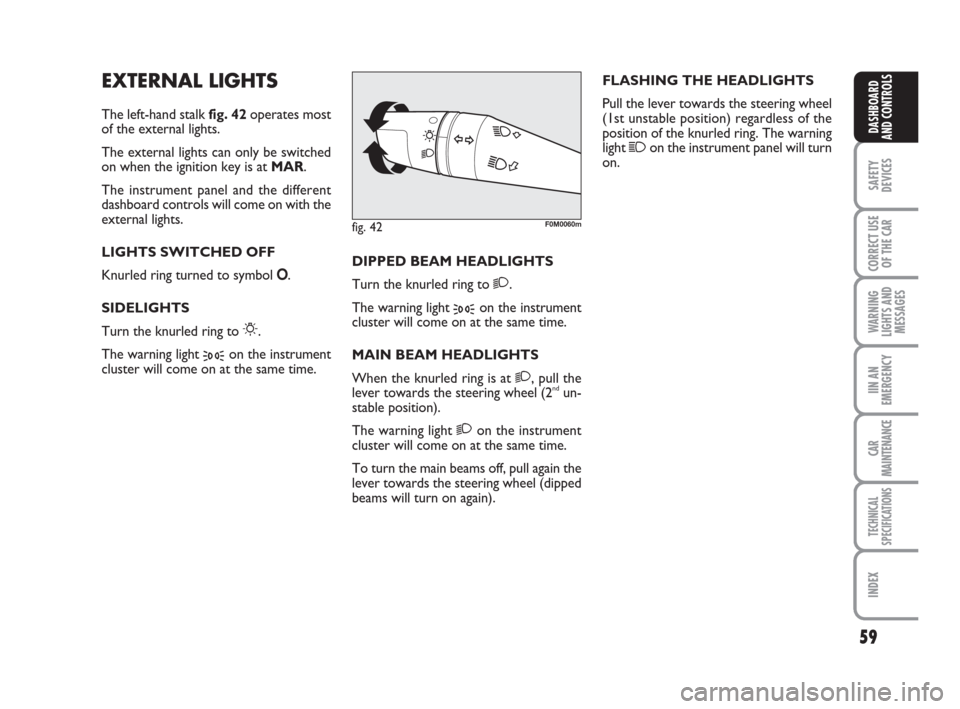
The left-hand stalk fig. 42operates most
of the external lights.
The external lights can only be switched
on when the ignition key is at MAR.
The instrument panel and the different
dashboard controls will come on with the
external lights.
LIGHTS SWITCHED OFF
Knurled ring turned to symbol O.
SIDELIGHTS
Turn the knurled ring to
6.
The warning light
3on the instrument
cluster will come on at the same time.DIPPED BEAM HEADLIGHTS
Turn the knurled ring to
2.
The warning light
3on the instrument
cluster will come on at the same time.
MAIN BEAM HEADLIGHTS
When the knurled ring is at
2, pull the
lever towards the steering wheel (2ndun-
stable position).
The warning light
2on the instrument
cluster will come on at the same time.
To turn the main beams off, pull again the
lever towards the steering wheel (dipped
beams will turn on again).FLASHING THE HEADLIGHTS
Pull the lever towards the steering wheel
(1st unstable position) regardless of the
position of the knurled ring. The warning
light
1on the instrument panel will turn
on.
fig. 42F0M0060m
037-088 Punto GDX GB 20-07-2007 9:41 Pagina 59
Page 61 of 242
60
SAFETY
DEVICES
CORRECT USE
OF THE CAR
WARNING
LIGHTS AND
MESSAGES
IN AN
EMERGENCY
CAR
MAINTENANCE
TECHNICAL
SPECIFICATIONS
INDEX
DASHBOARD
AND CONTROLS
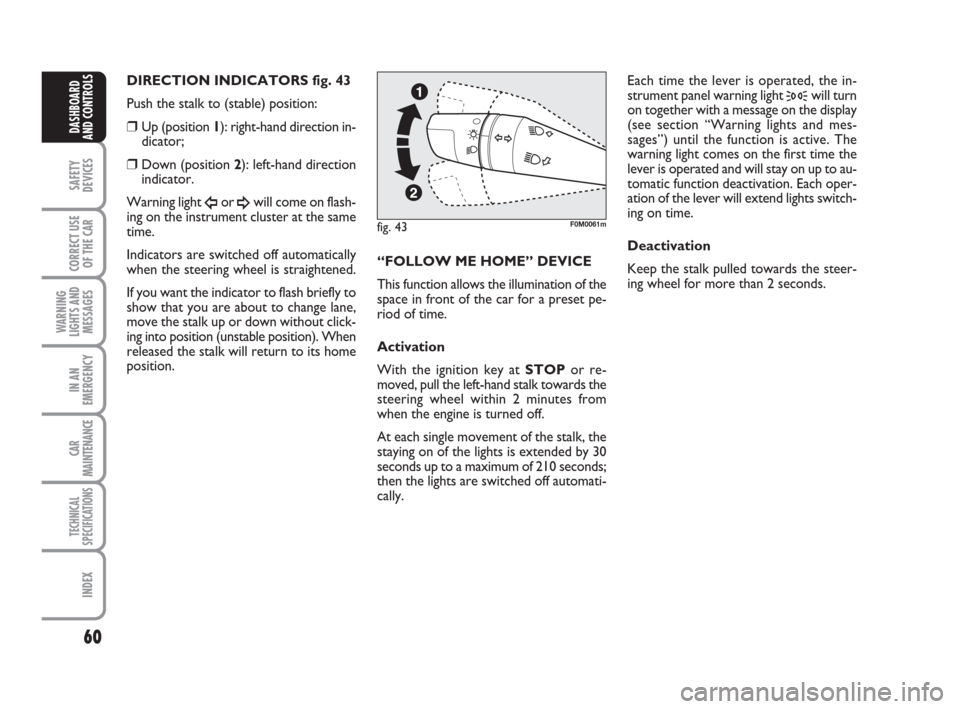
DIRECTION INDICATORS fig. 43
Push the stalk to (stable) position:
❒Up (position 1): right-hand direction in-
dicator;
❒Down (position 2): left-hand direction
indicator.
Warning light
Îor ¥will come on flash-
ing on the instrument cluster at the same
time.
Indicators are switched off automatically
when the steering wheel is straightened.
If you want the indicator to flash briefly to
show that you are about to change lane,
move the stalk up or down without click-
ing into position (unstable position). When
released the stalk will return to its home
position.“FOLLOW ME HOME” DEVICE
This function allows the illumination of the
space in front of the car for a preset pe-
riod of time.
Activation
With the ignition key at STOPor re-
moved, pull the left-hand stalk towards the
steering wheel within 2 minutes from
when the engine is turned off.
At each single movement of the stalk, the
staying on of the lights is extended by 30
seconds up to a maximum of 210 seconds;
then the lights are switched off automati-
cally. Each time the lever is operated, the in-
strument panel warning light
3will turn
on together with a message on the display
(see section “Warning lights and mes-
sages”) until the function is active. The
warning light comes on the first time the
lever is operated and will stay on up to au-
tomatic function deactivation. Each oper-
ation of the lever will extend lights switch-
ing on time.
Deactivation
Keep the stalk pulled towards the steer-
ing wheel for more than 2 seconds.
fig. 43F0M0061m
037-088 Punto GDX GB 20-07-2007 9:41 Pagina 60
Page 62 of 242
61
SAFETY
DEVICES
CORRECT USE
OF THE CAR
WARNING
LIGHTS AND
MESSAGES
IIN AN
EMERGENCY
CAR
MAINTENANCE
TECHNICAL
SPECIFICATIONS
INDEX
DASHBOARD
AND CONTROLS
WINDOW WASHING
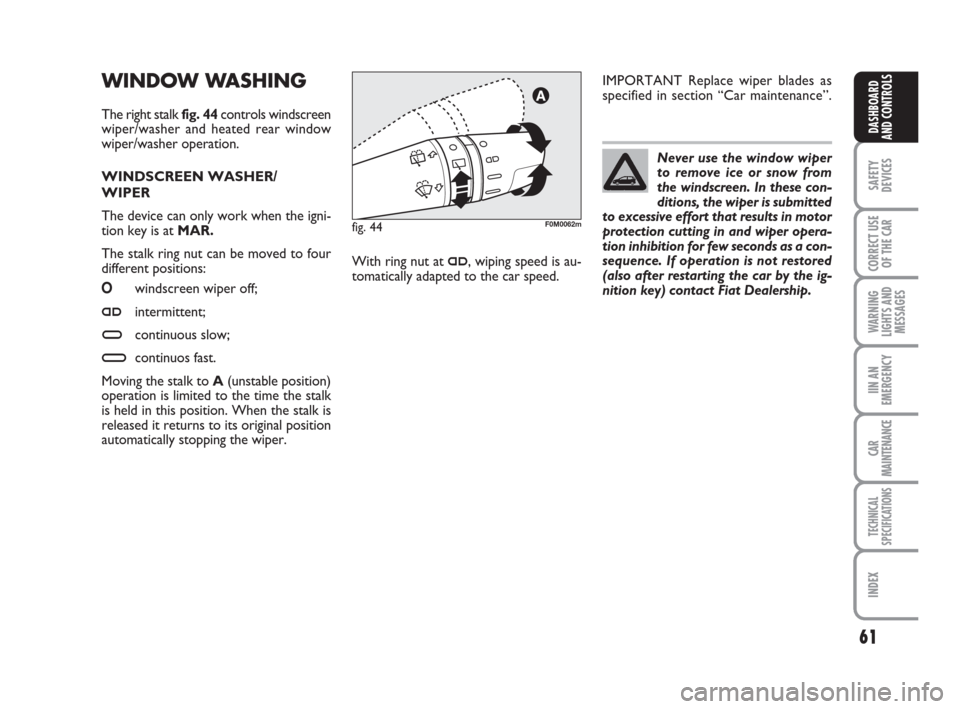
The right stalk fig. 44controls windscreen
wiper/washer and heated rear window
wiper/washer operation.
WINDSCREEN WASHER/
WIPER
The device can only work when the igni-
tion key is atMAR.
The stalk ring nut can be moved to four
different positions:
Owindscreen wiper off;
≤intermittent;
≥continuous slow;
¥continuos fast.
Moving the stalk to A(unstable position)
operation is limited to the time the stalk
is held in this position. When the stalk is
released it returns to its original position
automatically stopping the wiper.Never use the window wiper
to remove ice or snow from
the windscreen. In these con-
ditions, the wiper is submitted
to excessive effort that results in motor
protection cutting in and wiper opera-
tion inhibition for few seconds as a con-
sequence. If operation is not restored
(also after restarting the car by the ig-
nition key) contact Fiat Dealership.
With ring nut at
≤, wiping speed is au-
tomatically adapted to the car speed.IMPORTANT Replace wiper blades as
specified in section “Car maintenance”.
fig. 44F0M0062m
037-088 Punto GDX GB 20-07-2007 9:41 Pagina 61
Page 63 of 242
62
SAFETY
DEVICES
CORRECT USE
OF THE CAR
WARNING
LIGHTS AND
MESSAGES
IN AN
EMERGENCY
CAR
MAINTENANCE
TECHNICAL
SPECIFICATIONS
INDEX
DASHBOARD
AND CONTROLS
RAIN SENSOR (where provided)
The rain sensor is located behind the dri-
ving mirror in contact with the windscreen
and has the purpose of automatically ad-
just, during the intermittent operation, the
frequency of the windscreen wiper
strokes as to the rain intensity.
IMPORTANT Keep clean the glass in the
sensor area.
Activation
Move the right-hand stalk knurled ring to
≤fig. 44.
The activation of the rain sensor is sig-
nalled by a control acquisition “stroke”.
Through the set up menu it is possible to
increase the sensitivity of the rain sensor.
The increase of the sensitivity of the rain
sensor is signalled by a control and acqui-
sition “stroke”.
Operating the windscreen washer with
the rain sensor activated the normal wash-
ing cycle is performed at the end of which
the rain sensor resumes its normal auto-
matic function.Deactivation
Change the stalk knurled ring position
from
≤fig. 44or turn the ignition key
to STOP.
At next engine starting (key at MAR), the
sensor will not be reactivated even if the
knurled ring is still at
≤fig. 44. To ac-
tivate the rain sensor you have to move
the knurled ring from
≤to another po-
sition and then again to
≤.
Rain sensor activation will be indicated by
at least one wiper “stroke” even if the
windscreen is dry.
The rain sensor is able to recognize and
automatically adjust itself in the presence
of the following particular conditions:
❒ impurities on the controlled surface
(salt, dirt, etc.);
❒difference between day and night.
IMPORTANT Streaks of water may cause
unrequired blade moving. “Smart washing” function
Pulling the stalk towards the steering wheel
(unstable position) operates the wind-
screen washer.
Keeping the stalk pulled for more than half
a second, with just one movement it is
possible to operate the washer jet and the
wiper at the same time.
The wiper stops working three strokes af-
ter releasing the stalk.
A further stroke after 6 seconds com-
pletes the wiping operation.
037-088 Punto GDX GB 20-07-2007 9:41 Pagina 62
Page 66 of 242
65
SAFETY
DEVICES
CORRECT USE
OF THE CAR
WARNING
LIGHTS AND
MESSAGES
IIN AN
EMERGENCY
CAR
MAINTENANCE
TECHNICAL
SPECIFICATIONS
INDEX
DASHBOARD
AND CONTROLS
TO RESET THE
MEMORISED SPEED
If the device has been disengaged for ex-
ample pressing the brake or clutch pedal,
the memorised speed can be reset as fol-
lows:
❒accelerate gradually until reaching a
speed approaching the one memorised;
❒engage the gear selected at the time of
speed memorising;
❒press button RES B-fig. 47.
TO INCREASE THE
MEMORISED SPEED
The speed memorised can be increased in
two ways:
❒pressing the accelerator and then mem-
orising the new speed reached;
or
❒moving the stalk upwards (+).
Each operation of the stalk will corre-
spond to a slight increase in speed (about
1 km/h), while keeping the stalk upwards
will correspond to a continuous speed in-
crease. TO REDUCE
MEMORISED SPEED
The speed memorised can be increased in
two ways:
❒disengaging the device and then mem-
orising the new speed;
or
❒moving the stalk downwards (–) until
reaching the new speed which will be
memorised automatically.
Each operation of the stalk will corre-
spond to a slight reduction in speed (about
1 km/h), while keeping the stalk down-
wards will correspond to a continuous
speed reduction.
DEVICE DISENGAGEMENT
The device can be disengaged in the fol-
lowing ways:
❒turn knob Ato OFF;
❒turning the engine off;
❒pressing the brake pedal;
❒pressing the clutch pedal;
❒pressing the accelerator pedal; in this
case the system is not really disengaged
but the request for acceleration takes
priority over the system. The cruise
control is however active and it will not
be necessary to press button RES B-
fig. 47to resume previous conditions
after ending acceleration.
The device is automatically deactivated in
one of the following cases:
❒ABSor ESPsystem cut-in;
❒ with car speed below the preset limit;
❒system failure.
When travelling with the de-
vice on, never set the
gearshift lever to neutral.
WARNING
In the event of device mal-
function or failure, turn knob
A to OFF and contact a Fiat Dealer-
ship.
WARNING
037-088 Punto GDX GB 20-07-2007 9:41 Pagina 65
Page 68 of 242
67
SAFETY
DEVICES
CORRECT USE
OF THE CAR
WARNING
LIGHTS AND
MESSAGES
IIN AN
EMERGENCY
CAR
MAINTENANCE
TECHNICAL
SPECIFICATIONS
INDEX
DASHBOARD
AND CONTROLS
Ceiling light timing
On certain versions to facilitate getting
in/out of the car at night or with poor
lighting, 2 different timed switching on
modes have been provided.
LIGHT TIMING WHEN GETTING INTO THE CAR
Lights will turn on as follows:
❒for about 10 seconds when opening
front doors;
❒for about 3 minutes when opening one
of the side doors;
❒for about 10 seconds when closing the
doors.
Timing will stop when turning the ignition
key to MAR.
LIGHT TIMING WHEN GETTING OUT OF THE CAR
After removing the key from the ignition
switch, the ceiling lights will turn on as fol-
lows:
❒within 2 minutes from turning the en-
gine off for about 10 seconds;
❒when opening one of the side doors for
about 3 minutes;
❒when closing one of the doors for
about 10 seconds.
Timing will stop automatically when lock-
ing the doors.REAR CEILING LIGHT WITH
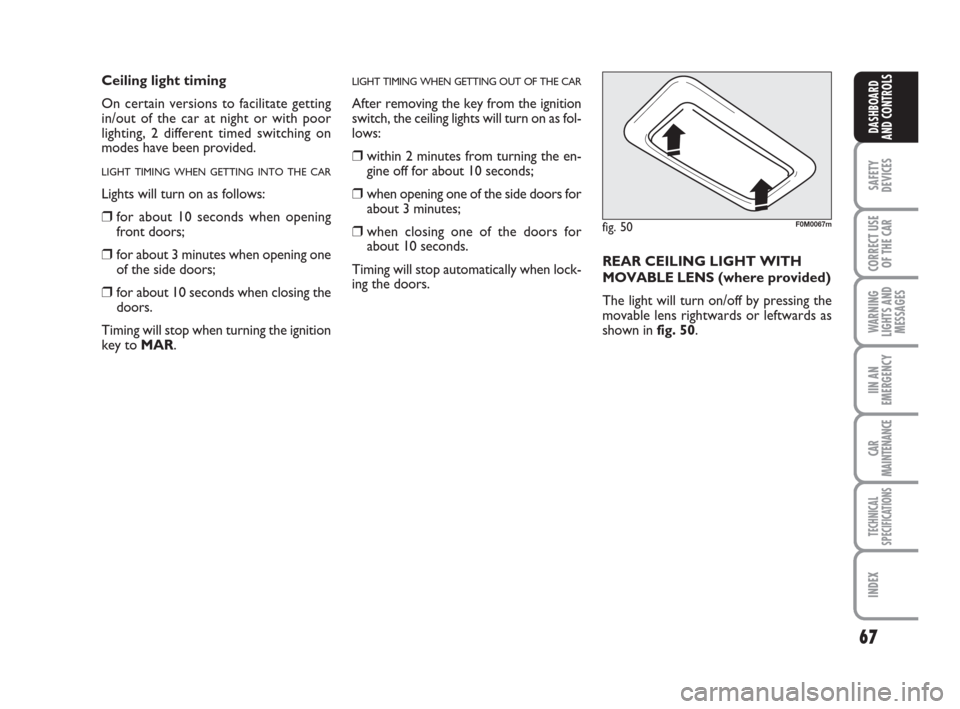
MOVABLE LENS(where provided)
The light will turn on/off by pressing the
movable lens rightwards or leftwards as
shown in fig. 50.fig. 50F0M0067m
037-088 Punto GDX GB 20-07-2007 9:41 Pagina 67
Page 71 of 242
70
SAFETY
DEVICES
CORRECT USE
OF THE CAR
WARNING
LIGHTS AND
MESSAGES
IN AN
EMERGENCY
CAR
MAINTENANCE
TECHNICAL
SPECIFICATIONS
INDEX
DASHBOARD
AND CONTROLS
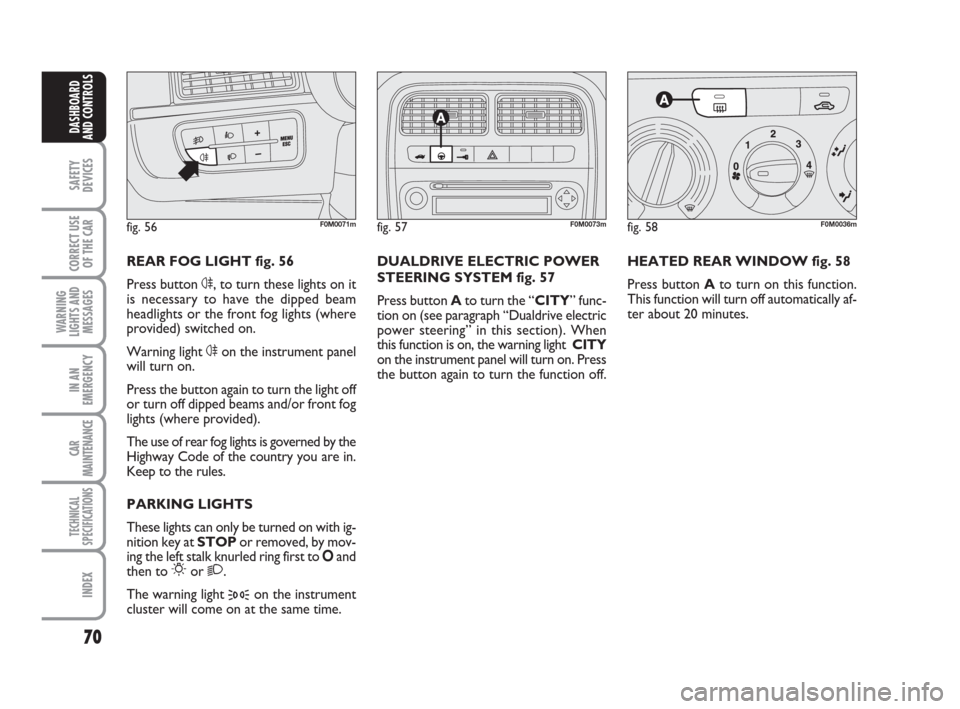
HEATED REAR WINDOW fig. 58
Press button Ato turn on this function.
This function will turn off automatically af-
ter about 20 minutes.
fig. 58F0M0036m
DUALDRIVE ELECTRIC POWER
STEERING SYSTEM fig. 57
Press button Ato turn the “CITY” func-
tion on (see paragraph “Dualdrive electric
power steering” in this section). When
this function is on, the warning light CITY
on the instrument panel will turn on. Press
the button again to turn the function off.
fig. 57F0M0073m
REAR FOG LIGHT fig. 56
Press button 4, to turn these lights on it
is necessary to have the dipped beam
headlights or the front fog lights (where
provided) switched on.
Warning light 4on the instrument panel
will turn on.
Press the button again to turn the light off
or turn off dipped beams and/or front fog
lights (where provided).
The use of rear fog lights is governed by the
Highway Code of the country you are in.
Keep to the rules.
PARKING LIGHTS
These lights can only be turned on with ig-
nition key at STOP or removed, by mov-
ing the left stalk knurled ring first to Oand
then to
6or 2.
The warning light
3on the instrument
cluster will come on at the same time.
fig. 56F0M0071m
037-088 Punto GDX GB 20-07-2007 9:41 Pagina 70
Page 72 of 242
71
SAFETY
DEVICES
CORRECT USE
OF THE CAR
WARNING
LIGHTS AND
MESSAGES
IIN AN
EMERGENCY
CAR
MAINTENANCE
TECHNICAL
SPECIFICATIONS
INDEX
DASHBOARD
AND CONTROLS
Door unlocking in the event
of a crash
In the event of a crash that triggers the fu-
el cut-off switch, the doors will unlock au-
tomatically to enable getting into the car
and at the same time the passenger’s com-
partment lights will turn on. It is howev-
er always possible to open the doors from
the passenger’s compartment by means of
the internal door handles.
If, after a crash no fuel leaks are found and
the car can be started again, reset the fu-
el cut-off switch as specified in the fol-
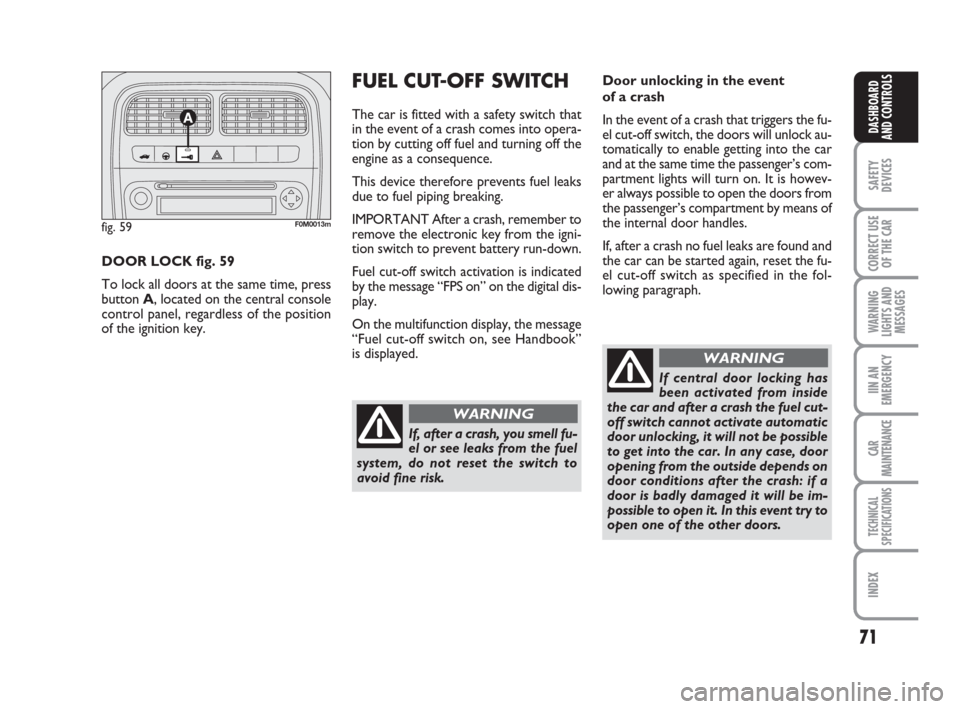
lowing paragraph. DOOR LOCK fig. 59
To lock all doors at the same time, press
button A, located on the central console
control panel, regardless of the position
of the ignition key.FUEL CUT-OFF SWITCH
The car is fitted with a safety switch that
in the event of a crash comes into opera-
tion by cutting off fuel and turning off the
engine as a consequence.
This device therefore prevents fuel leaks
due to fuel piping breaking.
IMPORTANT After a crash, remember to
remove the electronic key from the igni-
tion switch to prevent battery run-down.
Fuel cut-off switch activation is indicated
by the message “FPS on” on the digital dis-
play.
On the multifunction display, the message
“Fuel cut-off switch on, see Handbook”
is displayed.
fig. 59F0M0013m
If, after a crash, you smell fu-
el or see leaks from the fuel
system, do not reset the switch to
avoid fine risk.
WARNING
If central door locking has
been activated from inside
the car and after a crash the fuel cut-
off switch cannot activate automatic
door unlocking, it will not be possible
to get into the car. In any case, door
opening from the outside depends on
door conditions after the crash: if a
door is badly damaged it will be im-
possible to open it. In this event try to
open one of the other doors.
WARNING
037-088 Punto GDX GB 20-07-2007 9:41 Pagina 71