key FIAT IDEA 2008 1.G Connect NavPlus Manual
[x] Cancel search | Manufacturer: FIAT, Model Year: 2008, Model line: IDEA, Model: FIAT IDEA 2008 1.GPages: 165
Page 74 of 165
74
CONNECT NAV+
“Delete voice command”: allows
deletion of a previously recorded
voice sample; proceed as follows:
– rotate the knob 15-fig. 1, select
the icon key and then press the knob
to confirm;
– rotate the knob 15-fig. 1, select
“OK” and then press the knob to con-
firm, the voice sample will be deleted
from the directory.
IMPORTANTThis icon key is ac-
tive only if the concerned entry, in the
directory, is associated to a voice sam-
ple as described previously.“Listen to voice command”: repro-
duces a previously recorded voice
sample; proceed as follows:
– rotate the knob 15-fig. 1, select
the icon key and then press the knob
to confirm; the system will reproduce
the selected voice sample.
IMPORTANTThis icon key is ac-
tive only if the concerned entry, in the
directory, is associated to a voice sam-
ple as described previously.
“OK”: confirm changes and stores
them in the directory.
IMPORTANTIf the user after end-
ing these operations doesn’t select
“OK” and confirm by pressing the
knob 15-fig. 1new settings will not
be stored in the directory. “Hear voice phonebook”
icon key
This graphic key (“Listening to the
voice diary) makes it possible to re-
produce all the voice samples previ-
ously recorded; proceed as follows:
– rotate the knob 15-fig. 1, select
the icon key and then press the knob
to confirm; the system will reproduce
stored samples.
Press “ESC” 14-fig. 1 to stop as sug-
gested on the display.
060-091 Connect IDEA GB 17-01-2008 13:33 Pagina 74
Page 75 of 165
75
CONNECT NAV+
Center number Enter Dial
Messages
fig. 59
F0H4072g
“Delete voice phonebook”
icon key
This icon key (Delete voice directo-
ry) allows to clear off previously
recorded voice samples; proceed as
follows:
– rotate the knob 15-fig. 1, select
the icon key and then press the knob
to confirm; the display will show the
following string: “Press “ENTER” to
confirm, “ESCAPE” to cancel”.
– pressing the knob 15-fig. 1clears
off voice samples, during deletion the
display will show “Please wait…”.
– pressing “ESC” 14-fig. 1deletion
is not performed and previous screen
is displayed.“Messages” FUNCTION
(SMS - Short Message Service)
“Messages” key allows reading and
sending short messages (maximum
length is 160 characters) by GSM
phone.
Read and sent messages are stored
into two separate boxes, which how-
ever share a common memory sec-
tion; so the sum of sent and read
stored messages must not exceed the
maximum number of allowed SMSs (it
depends on the SIM card).
Telephone module stops input of
new messages when the buffer is full
and the “Enter” key is disabled.In this case the display shows a string
with the following warning message:
“Further SMS messages cannot be
stored or received”.
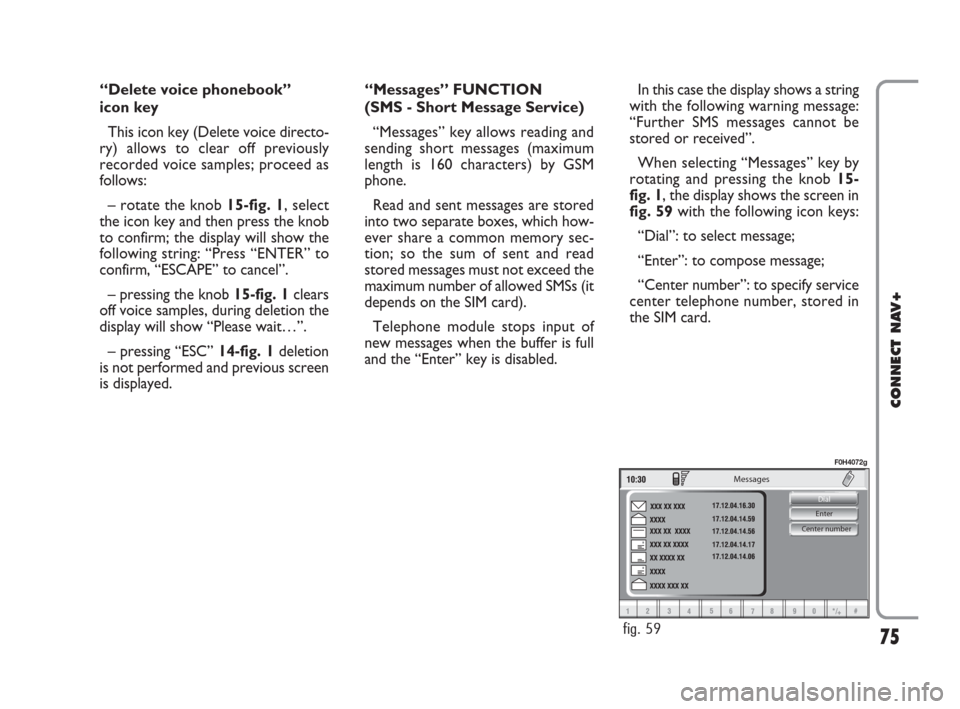
When selecting “Messages” key by
rotating and pressing the knob 15-
fig. 1, the display shows the screen in
fig. 59with the following icon keys:
“Dial”: to select message;
“Enter”: to compose message;
“Center number”: to specify service
center telephone number, stored in
the SIM card.
060-091 Connect IDEA GB 17-01-2008 13:33 Pagina 75
Page 78 of 165
78
CONNECT NAV+
Enter
IMPORTANTThe “Dial” graphic
key can only be selected if enough
storing space is available in the SIM
card message memory. Otherwise,
one or several messages need be
cleared in order to make space avail-
able in the message memory.
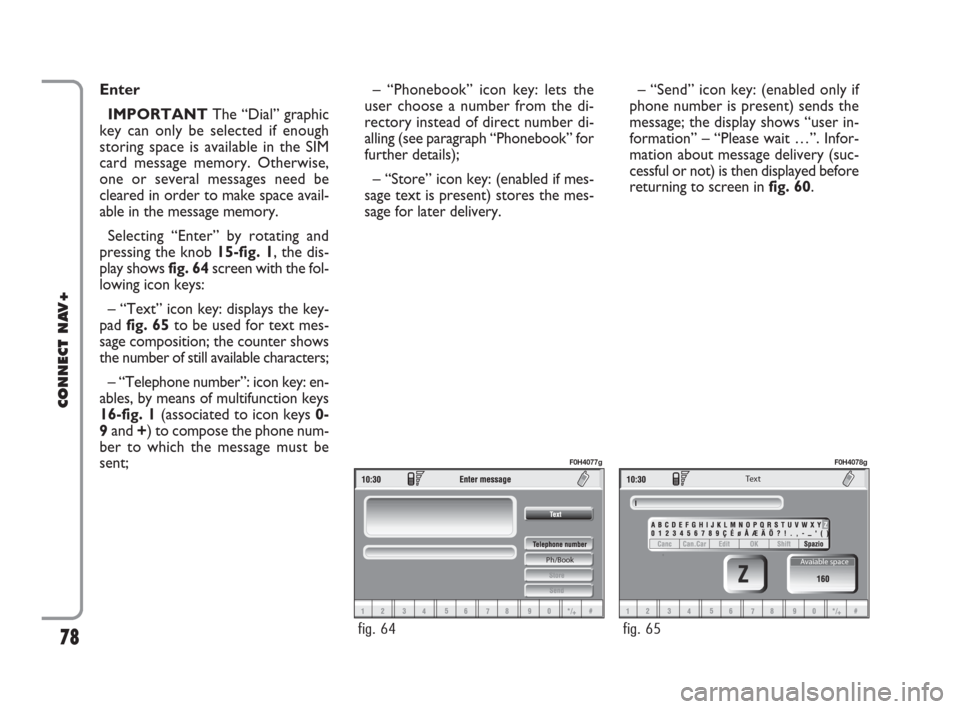
Selecting “Enter” by rotating and
pressing the knob 15-fig. 1, the dis-
play shows fig. 64screen with the fol-
lowing icon keys:
– “Text” icon key: displays the key-
pad fig. 65to be used for text mes-
sage composition; the counter shows
the number of still available characters;
– “Telephone number”: icon key: en-
ables, by means of multifunction keys
16-fig. 1(associated to icon keys 0-
9and +) to compose the phone num-
ber to which the message must be
sent;– “Phonebook” icon key: lets the
user choose a number from the di-
rectory instead of direct number di-
alling (see paragraph “Phonebook” for
further details);
– “Store” icon key: (enabled if mes-
sage text is present) stores the mes-
sage for later delivery. – “Send” icon key: (enabled only if
phone number is present) sends the
message; the display shows “user in-
formation” – “Please wait …”. Infor-
mation about message delivery (suc-
cessful or not) is then displayed before
returning to screen in fig. 60.
Ph/Book
fig. 64
F0H4077g
Te x t
Avaiable space
fig. 65
F0H4078g
060-091 Connect IDEA GB 17-01-2008 13:34 Pagina 78
Page 79 of 165
79
CONNECT NAV+
Messages
Selected
Dial
Center number
fig. 66
F0H4079g
fig. 67
F0H4044g
Last number received
Name
Number
Call
Store
fig. 68
F0H4045g
Center number
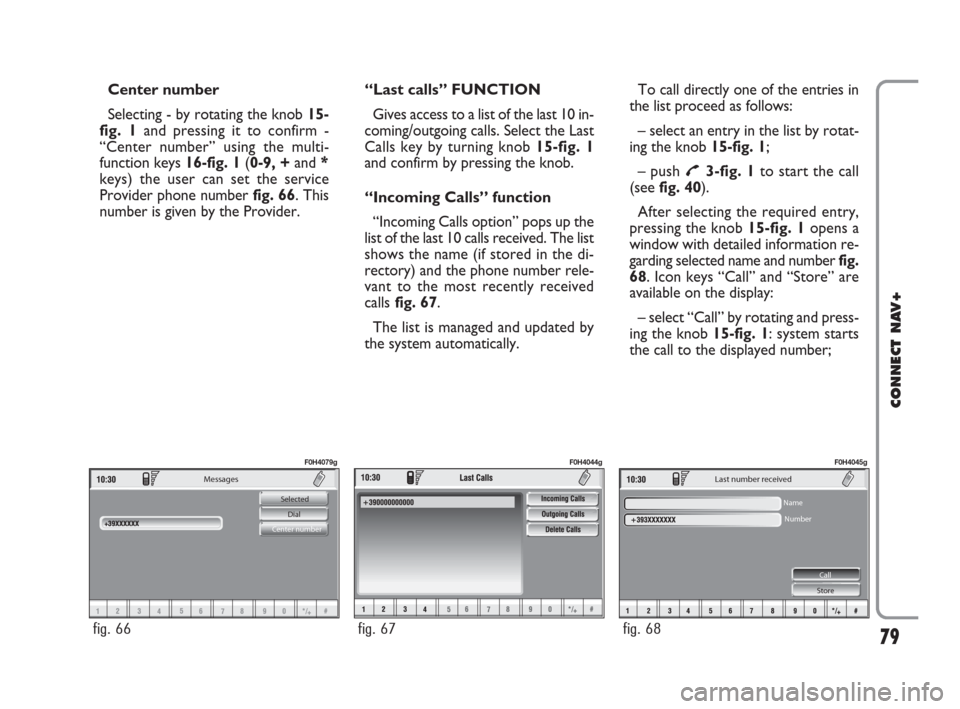
Selecting - by rotating the knob 15-
fig. 1and pressing it to confirm -
“Center number” using the multi-
function keys 16-fig. 1(0-9, +and *
keys) the user can set the service
Provider phone number fig. 66. This
number is given by the Provider.“Last calls” FUNCTION
Gives access to a list of the last 10 in-
coming/outgoing calls. Select the Last
Calls key by turning knob 15-fig. 1
and confirm by pressing the knob.
“Incoming Calls” function
“Incoming Calls option” pops up the
list of the last 10 calls received. The list
shows the name (if stored in the di-
rectory) and the phone number rele-
vant to the most recently received
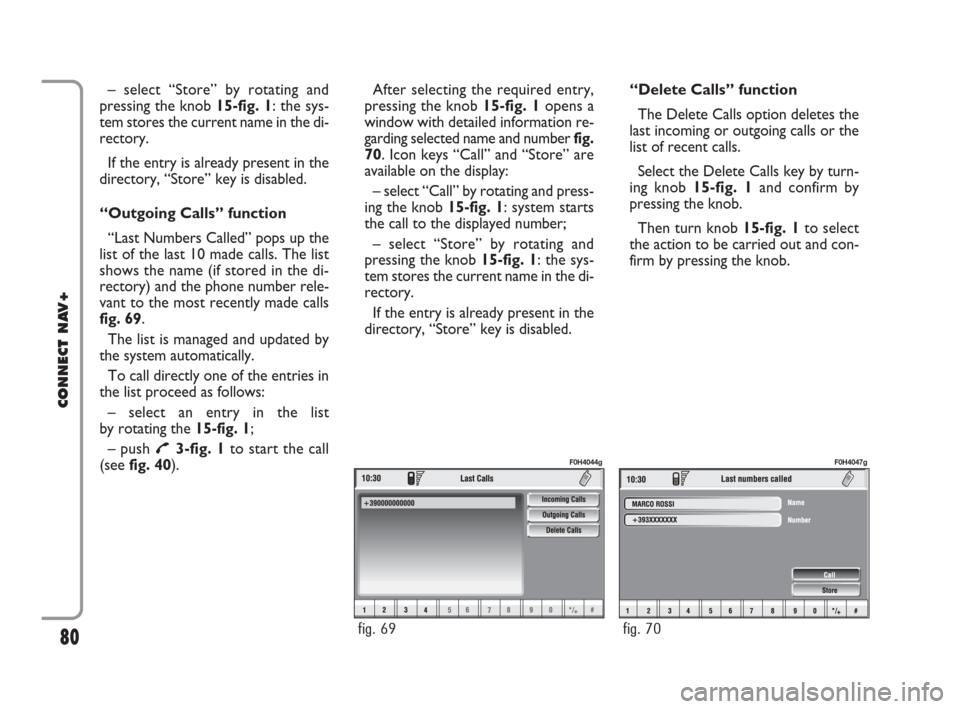
callsfig. 67.
The list is managed and updated by
the system automatically.To call directly one of the entries in
the list proceed as follows:
– select an entry in the list by rotat-
ing the knob 15-fig. 1;
– push
£3-fig. 1to start the call
(seefig. 40).
After selecting the required entry,
pressing the knob 15-fig. 1 opens a
window with detailed information re-
garding selected name and numberfig.
68. Icon keys “Call” and “Store” are
available on the display:
– select “Call” by rotating and press-
ing the knob 15-fig. 1: system starts
the call to the displayed number;
060-091 Connect IDEA GB 17-01-2008 13:34 Pagina 79
Page 80 of 165
– select “Store” by rotating and
pressing the knob 15-fig. 1: the sys-
tem stores the current name in the di-
rectory.
If the entry is already present in the
directory, “Store” key is disabled.
“Outgoing Calls” function
“Last Numbers Called” pops up the
list of the last 10 made calls. The list
shows the name (if stored in the di-
rectory) and the phone number rele-
vant to the most recently made calls
fig. 69.
The list is managed and updated by
the system automatically.
To call directly one of the entries in
the list proceed as follows:
– select an entry in the list
by rotating the 15-fig. 1;
– push
£3-fig. 1to start the call
(see fig. 40).After selecting the required entry,
pressing the knob 15-fig. 1opens a
window with detailed information re-
garding selected name and number fig.
70. Icon keys “Call” and “Store” are
available on the display:
– select “Call” by rotating and press-
ing the knob 15-fig. 1: system starts
the call to the displayed number;
– select “Store” by rotating and
pressing the knob 15-fig. 1: the sys-
tem stores the current name in the di-
rectory.
If the entry is already present in the
directory, “Store” key is disabled.“Delete Calls” function
The Delete Calls option deletes the
last incoming or outgoing calls or the
list of recent calls.
Select the Delete Calls key by turn-
ing knob 15-fig. 1and confirm by
pressing the knob.
Then turn knob 15-fig. 1to select
the action to be carried out and con-
firm by pressing the knob.
80
CONNECT NAV+
fig. 69
F0H4044g
fig. 70
F0H4047g
060-091 Connect IDEA GB 17-01-2008 13:34 Pagina 80
Page 81 of 165
81
CONNECT NAV+
Go Interrupt
fig. 71
F0H4068g
Delete
Voice memo management
fig. 72
F0H4069g
Delete
Voice meno management
Voice box memory occupation: Voice message number
fig. 73
F0H4070g
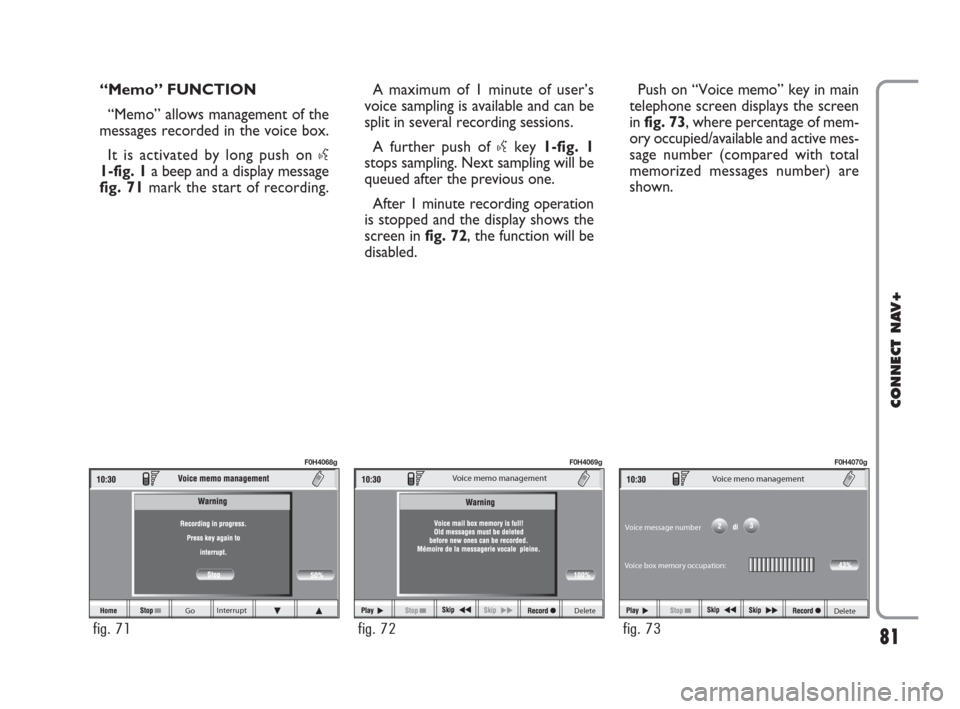
“Memo” FUNCTION
“Memo” allows management of the
messages recorded in the voice box.
It is activated by long push on
}
1-fig. 1a beep and a display message
fig. 71mark the start of recording.A maximum of 1 minute of user’s
voice sampling is available and can be
split in several recording sessions.
A further push of
}key 1-fig. 1
stops sampling. Next sampling will be
queued after the previous one.
After 1 minute recording operation
is stopped and the display shows the
screen in fig. 72, the function will be
disabled.Push on “Voice memo” key in main
telephone screen displays the screen
in fig. 73, where percentage of mem-
ory occupied/available and active mes-
sage number (compared with total
memorized messages number) are
shown.
060-091 Connect IDEA GB 17-01-2008 13:34 Pagina 81
Page 82 of 165
The icon keys at the bottom of the
display can be activated by the corre-
sponding multifunction keys on the
keypad 17-fig. 1. Options are the fol-
lowing:
Play
˙plays active message;
Stop
■stops message playback
or recording;
Skip
¯¯skips to previous mes-
sage;
Skip
˙˙skips to next message;
Record
çstarts recording;
Deletedeletes all recorded mes-
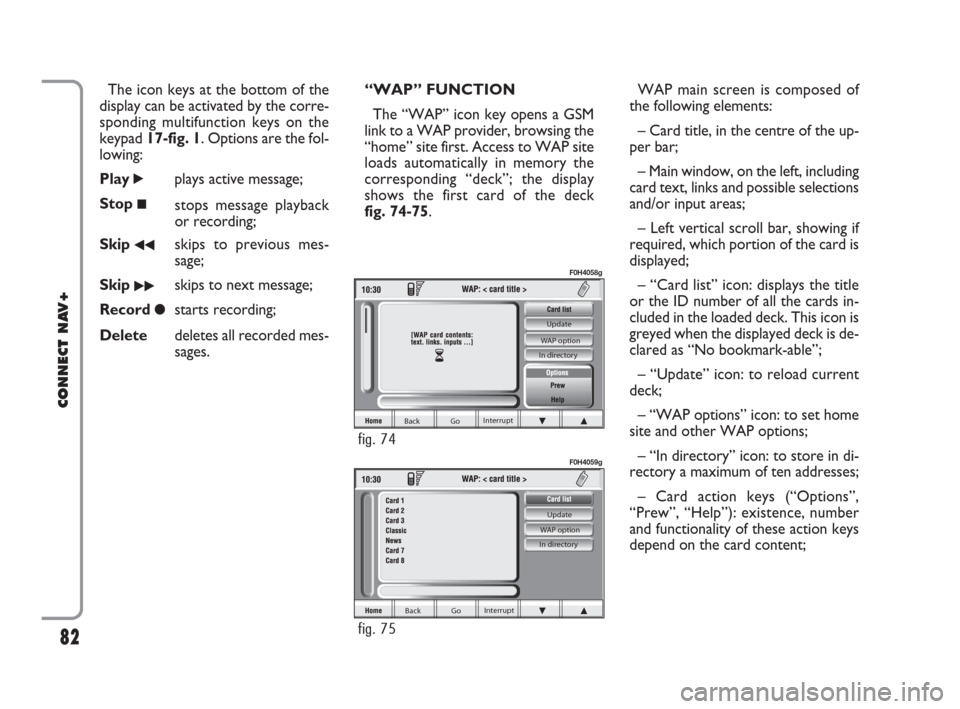
sages.“WAP” FUNCTION
The “WAP” icon key opens a GSM
link to a WAP provider, browsing the
“home” site first. Access to WAP site
loads automatically in memory the
corresponding “deck”; the display
shows the first card of the deck
fig. 74-75.WAP main screen is composed of
the following elements:
– Card title, in the centre of the up-
per bar;
– Main window, on the left, including
card text, links and possible selections
and/or input areas;
– Left vertical scroll bar, showing if
required, which portion of the card is
displayed;
– “Card list” icon: displays the title
or the ID number of all the cards in-
cluded in the loaded deck. This icon is
greyed when the displayed deck is de-
clared as “No bookmark-able”;
– “Update” icon: to reload current
deck;
– “WAP options” icon: to set home
site and other WAP options;
– “In directory” icon: to store in di-
rectory a maximum of ten addresses;
– Card action keys (“Options”,
“Prew”, “Help”): existence, number
and functionality of these action keys
depend on the card content;
82
CONNECT NAV+
Back Go Interrupt Update
WAP option
In directory
fig. 75
F0H4059g
Back Go Interrupt Update
WAP option
In directory
fig. 74
F0H4058g
060-091 Connect IDEA GB 17-01-2008 13:34 Pagina 82
Page 83 of 165
– Lower horizontal bar icon keys, en-
abled or disabled according to the
case:
“Home”: makes access to the ad-
dress defined as Home.
“Back”: displays previously shown
card.
“Go”: goes to input address screen
(direct access or “bookmark” recall);
“Interrupt”: stops current deck load-
ing;
“
N”, “O”: scrolls up/down when card
cannot be entirely displayed.
During loading operations, an hour-
glass is displayed on the current page.Low bar and right icon keys are ac-
tive only when they are necessary and
they are greyed when not consistent;
for example “
N” and “O” keys are ac-
tive only when window size is not
enough to show the entire card.
Rotate the knob 15-fig. 1to select
card action key; after selecting the re-
quired key press the knob 15-fig. 1to
confirm; the relevant screen will be
displayed.
Press “ESC” 14-fig. 1and confirm to
quit the WAP mode, the display will
return to the main telephone screen
(TEL).
“Go” low bar icon key
This graphic key fig. 74-75, which
is selected by pressing the corre-
sponding key 16-fig. 1, below the
writing, makes it possible to get con-
nected to the specified Web address
(if allowed for by the provider).Proceed as follows:
– rotate the knob 15-fig. 1, select
“Address” fig. 76and then press the
knob to confirm; the display will show
a keypad for typing in the required net
address;
or, if address is already stored in the
directory:
– rotate the knob 15-fig. 1, select
“Site directory” fig. 76and then press
the knob to confirm; the display will
show the stored site directory;
– rotate the knob 15-fig. 1to se-
lect the required address and then
press the knob to confirm.
During these operations “
N”, “O”,
“Home”, “Back” and “Interrupt” are
disabled.
83
CONNECT NAV+
060-091 Connect IDEA GB 17-01-2008 13:34 Pagina 83
Page 84 of 165
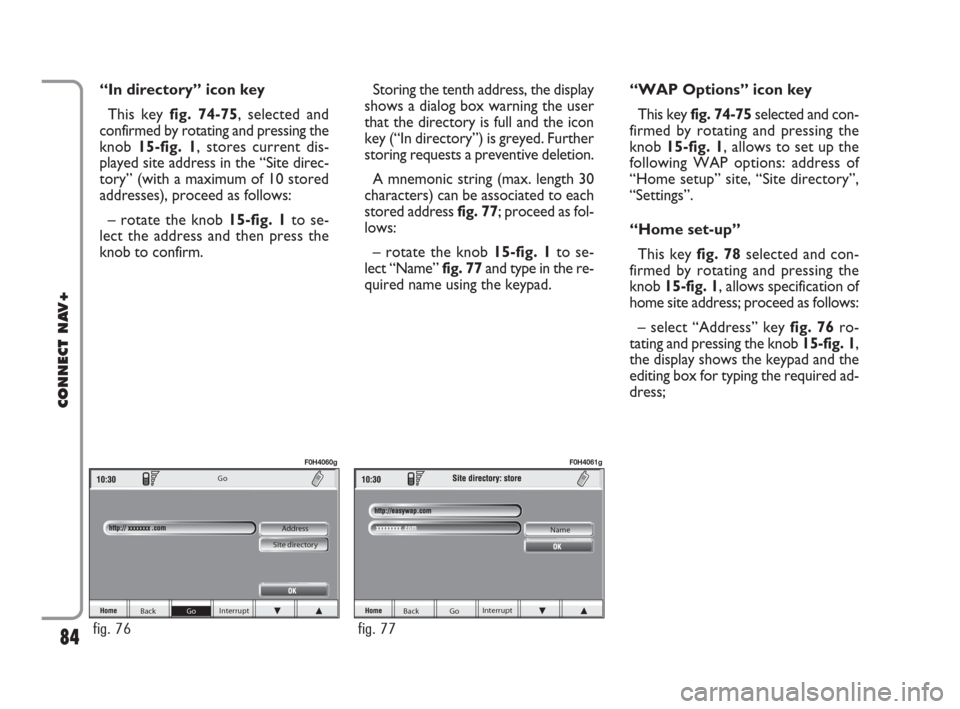
“In directory” icon key
This key fig. 74-75, selected and
confirmed by rotating and pressing the
knob 15-fig. 1, stores current dis-
played site address in the “Site direc-
tory” (with a maximum of 10 stored
addresses), proceed as follows:
– rotate the knob15-fig. 1to se-
lect the address and then press the
knob to confirm.Storing the tenth address, the display
shows a dialog box warning the user
that the directory is full and the icon
key (“In directory”) is greyed. Further
storing requests a preventive deletion.
A mnemonic string (max. length 30
characters) can be associated to each
stored address fig. 77; proceed as fol-
lows:
– rotate the knob 15-fig. 1to se-
lect “Name” fig. 77and type in the re-
quired name using the keypad.“WAP Options” icon key
This key fig. 74-75selected and con-
firmed by rotating and pressing the
knob 15-fig. 1, allows to set up the
following WAP options: address of
“Home setup” site, “Site directory”,
“Settings”.
“Home set-up”
This keyfig. 78selected and con-
firmed by rotating and pressing the
knob 15-fig. 1, allows specification of
home site address; proceed as follows:
– select “Address” key fig. 76ro-
tating and pressing the knob 15-fig. 1,
the display shows the keypad and the
editing box for typing the required ad-
dress;
84
CONNECT NAV+
Back Go Interrupt Go
Address
Site directory
fig. 76
F0H4060g
Back Go Interrupt Name
fig. 77
F0H4061g
060-091 Connect IDEA GB 17-01-2008 13:34 Pagina 84
Page 85 of 165
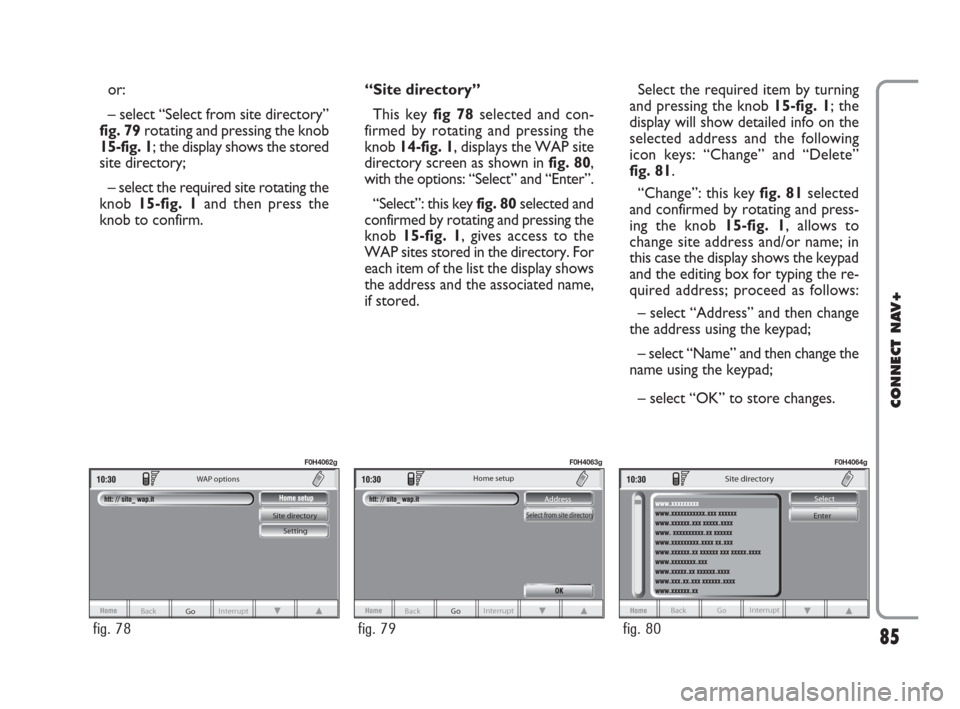
or:
– select “Select from site directory”
fig. 79rotating and pressing the knob
15-fig. 1; the display shows the stored
site directory;
– select the required site rotating the
knob 15-fig. 1and then press the
knob to confirm.“Site directory”
This key fig 78selected and con-
firmed by rotating and pressing the
knob 14-fig. 1, displays the WAP site
directory screen as shown in fig. 80,
with the options: “Select” and “Enter”.
“Select”: this key fig. 80selected and
confirmed by rotating and pressing the
knob 15-fig. 1, gives access to the
WAP sites stored in the directory. For
each item of the list the display shows
the address and the associated name,
if stored.Select the required item by turning
and pressing the knob 15-fig. 1; the
display will show detailed info on the
selected address and the following
icon keys: “Change” and “Delete”
fig. 81.
“Change”: this key fig. 81selected
and confirmed by rotating and press-
ing the knob 15-fig. 1, allows to
change site address and/or name; in
this case the display shows the keypad
and the editing box for typing the re-
quired address; proceed as follows:
– select “Address” and then change
the address using the keypad;
– select “Name” and then change the
name using the keypad;
– select “OK” to store changes.
85
CONNECT NAV+
Go Interrupt
Back Site directory
Setting WAP options
fig. 78
F0H4062g
Back Go Interrupt Address
Select from site directory
Home setup
fig. 79
F0H4063g
Back Go Interrupt
Site directory
Select
Enter
fig. 80
F0H4064g
060-091 Connect IDEA GB 17-01-2008 13:34 Pagina 85