change time FIAT IDEA 2012 1.G Owners Manual
[x] Cancel search | Manufacturer: FIAT, Model Year: 2012, Model line: IDEA, Model: FIAT IDEA 2012 1.GPages: 210, PDF Size: 3.65 MB
Page 10 of 210
9
SAFETY
DEVICES
CORRECT USE
OF THE CAR
WARNING
LIGHTS AND
MESSAGES
IN AN
EMERGENCY
CAR
MAINTENANCE
TECHNICAL
SPECIFICATIONS
INDEX
DASHBOARD
AND CONTROLS
F0H0012mfig. 10
SYMBOLS
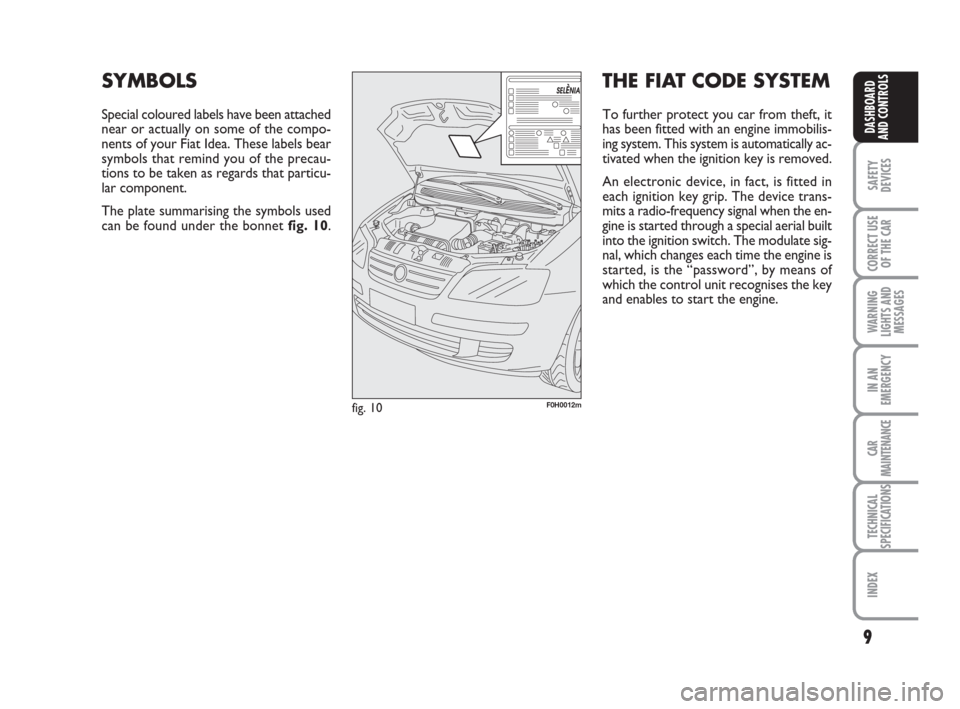
Special coloured labels have been attached
near or actually on some of the compo-
nents of your Fiat Idea. These labels bear
symbols that remind you of the precau-
tions to be taken as regards that particu-
lar component.
The plate summarising the symbols used
can be found under the bonnet fig. 10.
THE FIAT CODE SYSTEM
To further protect you car from theft, it
has been fitted with an engine immobilis-
ing system. This system is automatically ac-
tivated when the ignition key is removed.
An electronic device, in fact, is fitted in
each ignition key grip. The device trans-
mits a radio-frequency signal when the en-
gine is started through a special aerial built
into the ignition switch. The modulate sig-
nal, which changes each time the engine is
started, is the “password”, by means of
which the control unit recognises the key
and enables to start the engine.
001-035 idea GB 1 ed 10-07-2008 8:27 Pagina 9
Page 22 of 210
21
SAFETY
DEVICES
CORRECT USE
OF THE CAR
WARNING
LIGHTS AND
MESSAGES
IN AN
EMERGENCY
CAR
MAINTENANCE
TECHNICAL
SPECIFICATIONS
INDEX
DASHBOARD
AND CONTROLS
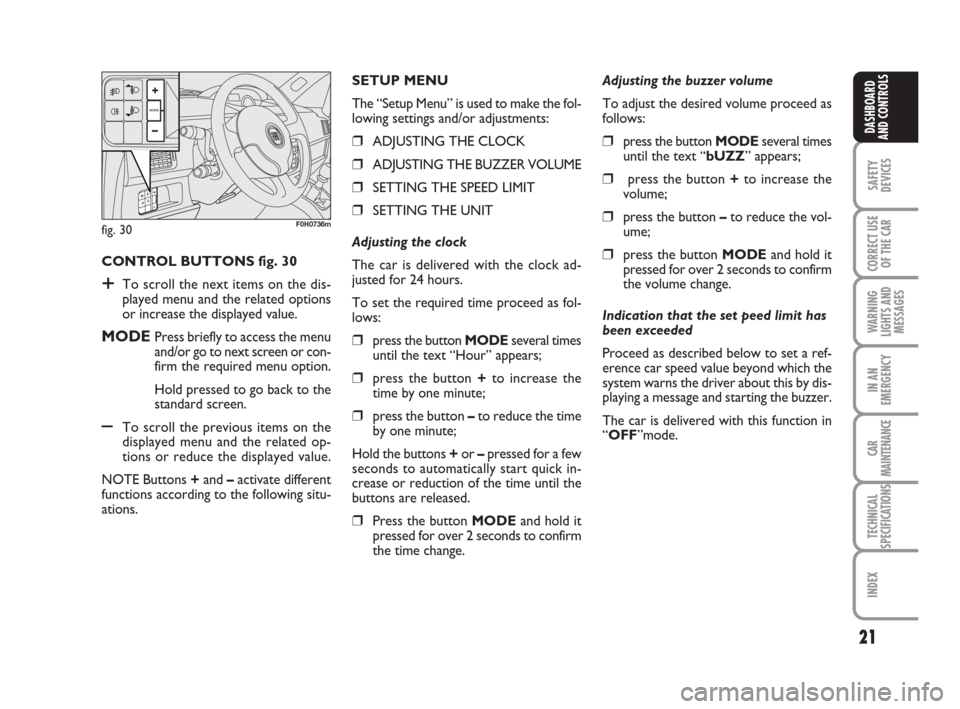
CONTROL BUTTONS fig. 30
+To scroll the next items on the dis-
played menu and the related options
or increase the displayed value.
MODEPress briefly to access the menu
and/or go to next screen or con-
firm the required menu option.
Hold pressed to go back to the
standard screen.
–To scroll the previous items on the
displayed menu and the related op-
tions or reduce the displayed value.
NOTE Buttons +and –activate different
functions according to the following situ-
ations.Adjusting the buzzer volume
To adjust the desired volume proceed as
follows:
❒press the button MODEseveral times
until the text “bUZZ” appears;
❒press the button +to increase the
volume;
❒press the button –to reduce the vol-
ume;
❒press the button MODEand hold it
pressed for over 2 seconds to confirm
the volume change.
Indication that the set peed limit has
been exceeded
Proceed as described below to set a ref-
erence car speed value beyond which the
system warns the driver about this by dis-
playing a message and starting the buzzer.
The car is delivered with this function in
“OFF”mode. SETUP MENU
The “Setup Menu” is used to make the fol-
lowing settings and/or adjustments:
❒ADJUSTING THE CLOCK
❒ADJUSTING THE BUZZER VOLUME
❒SETTING THE SPEED LIMIT
❒SETTING THE UNIT
Adjusting the clock
The car is delivered with the clock ad-
justed for 24 hours.
To set the required time proceed as fol-
lows:
❒press the button MODEseveral times
until the text “Hour” appears;
❒press the button +to increase the
time by one minute;
❒press the button –to reduce the time
by one minute;
Hold the buttons +or –pressed for a few
seconds to automatically start quick in-
crease or reduction of the time until the
buttons are released.
❒Press the button MODEand hold it
pressed for over 2 seconds to confirm
the time change.
fig. 30F0H0736m
001-035 idea GB 1 ed 10-07-2008 8:27 Pagina 21
Page 23 of 210
22
SAFETY
DEVICES
CORRECT USE
OF THE CAR
WARNING
LIGHTS AND
MESSAGES
IN AN
EMERGENCY
CAR
MAINTENANCE
TECHNICAL
SPECIFICATIONS
INDEX
DASHBOARD
AND CONTROLS
Setting the unit
To set the required unit (kilometres or
miles) proceed as follows:
❒press the button MODEseveral times
until the text “Unit” appears;
❒press the button +or –to change the
unit;
❒press the button MODEand hold it
pressed for over 2 seconds to confirm
the unit setting.
Viewing of the fuel cut-off inertial
switch tripping
The screen automatically appears when-
ever the fuel cut-off inertial switch trips af-
ter a significant collision.
This switch stops fuel supply.
See the information provided in the ded-
icated chapter “Fuel cut-off inertial
switch”. Set this function as follows:
❒press the button MODEseveral times
until the text “SPEEd” appears;
❒press the button +to increase the
speed value (max. limit being 250
Km/h);
❒press the button – to reduce the
speed value (min. limit being 30 Km/h
below which the system goes back to
“OFF” mode);
❒press the button MODEand hold it
pressed for over 2 seconds to confirm
the speed setting.
If, after the message
“FPSon” appears, you smell
fuel or see leaks from the fuel supply
system, do not reset the switch to
avoid the risk of starting a fire.
WARNING
001-035 idea GB 1 ed 10-07-2008 8:27 Pagina 22
Page 25 of 210
24
SAFETY
DEVICES
CORRECT USE
OF THE CAR
WARNING
LIGHTS AND
MESSAGES
IN AN
EMERGENCY
CAR
MAINTENANCE
TECHNICAL
SPECIFICATIONS
INDEX
DASHBOARD
AND CONTROLS
Adjustment of headlight aiming
device (only with dipped beam
headlights on)
– when the standard screen is enabled, the
headlight aiming device can be regulated
(refer to paragraph “Headlights” in this
section).
Setup menu
– to scroll the previous and next items in
the menu;
– to increase or decrease values during
setting operations.
SETUP MENU fig. 33
The menu comprises a series of functions
arranged in a cycle which can be selected
through buttons +and –to access the dif-
ferent “select” operations and settings
(setup) described in the following para-
graphs.
The setup menu is activated by pressing
briefly button MODE.
Intermittent pressing of buttons +and –
enables scrolling of the setup menu op-
tions.
Handling modes are different according to
the characteristic of the option selected.Selecting the “Set Date”
and “Set time”
– Briefly press button MODEto select
the first value to be changed (e.g. hours
/minutes or year / month / day).
– Press buttons +and –(by single press-
ing) to select the new setting.
– Briefly press button MODEto store the
new setting and at the same time go to the
next setup menu option. If the processed
option is the last one, the system brings
you back to the previously selected option
of the main menu.
Prolonged pressing of the button
MODE enables:
– exiting the setup menu page and saving
of the changes already stored by the dri-
ver (and confirmed by briefly pressing the
button MODE).
The setup menu page is timed. Only the
changes saved by the user by briefly press-
ing MODEare saved when the menu is
automatically closed. NOTE If the Connect Nav+ system is in-
stalled, only the following functions can be
adjusted/set from the Instrument Panel:
“Brightness”, “Speed Beep”, Light Sen-
sors” (where provided), “Seat belt
Buzzer” and “Passenger’s Airbag”. The
other functions are displayed on the Con-
nect Nav+ system which is used to ad-
just/set them.
Selecting a menu option
– Briefly press button MODEto select
the menu option that needs to be
changed.
– Press buttons +and –(by single press-
ing) to select the new setting.
– Briefly press button MODEto store the
new setting and at the same time go back
to the previously selected menu option.
001-035 idea GB 1 ed 10-07-2008 8:27 Pagina 24
Page 28 of 210
27
SAFETY
DEVICES
CORRECT USE
OF THE CAR
WARNING
LIGHTS AND
MESSAGES
IN AN
EMERGENCY
CAR
MAINTENANCE
TECHNICAL
SPECIFICATIONS
INDEX
DASHBOARD
AND CONTROLS
Adjusting the sensitivity
of the automatic headlight sensor
(Light sensor) (where provided)
This function is used to adjust the dusk
sensor sensitivity according to three lev-
els (level 1 = minimum, level 2 = medium,
level 3 = maximum); the higher the sen-
sitivity, the lower the quantity of exter-
nal light needed to switch the headlights
on. The car is delivered with this function
set to level “2”.
To change this setting:
– briefly press button MODE: the previ-
ously set level flashes on the display;
– press button +or –for selecting the de-
sired level;
– briefly press button MODEto go back
to the menu screen or press the button
for a prolonged time to go back to the
standard screen without storing the set-
tings.Trip B On/Off (Trip B)
Through this option it is possible to acti-
vate (On) or deactivate (Off) the Trip B
(partial trip) display.
For further information see section “Trip
computer”.
For activation / deactivation, proceed as
follows:
– briefly press button MODE: ON or
OFF flashes on the display (according to
previous setting);
– press button +or –for selecting the de-
sired value;
– briefly press button MODEto go back
to the menu screen or press the button
for a prolonged time to go back to the
standard screen without storing the set-
tings.Setting the clock (Set time)
This function enables setting of the clock.
To set the clock proceed as follows:
– briefly press button MODE: the display
shows the “hours” flashing;
– press button +or –to set the clock;
– briefly press button MODE: “min-
utes”starts flashing on the display;
– press button +or –to set the clock.
Note The setting increases or decreases
by one unit each time button +or –is
pressed. Hold the button pressed to au-
tomatically start a quick increase/decrease
of the set value. Complete the setting by
briefly pressing the button when the re-
quired setting is approached.
– briefly press button MODEto go back
to the menu screen or press the button
for a prolonged time to go back to the
standard screen without storing the set-
tings.
001-035 idea GB 1 ed 10-07-2008 8:27 Pagina 27
Page 35 of 210
34
SAFETY
DEVICES
CORRECT USE
OF THE CAR
WARNING
LIGHTS AND
MESSAGES
IN AN
EMERGENCY
CAR
MAINTENANCE
TECHNICAL
SPECIFICATIONS
INDEX
DASHBOARD
AND CONTROLS
New mission
The new mission begins after:
– “manual” resetting by the user, by press-
ing the relevant button;
– “automatic” resetting, when the “Trip
distance” reaches 9999.9 km or when the
“Travel time” reaches 99.59 (99 hours and
59 minutes);
– disconnection/reconnection of the bat-
tery.
IMPORTANT The reset operations per-
formed after the “General Trip” message
appears are used to also reset the “Trip
B”, which, on its turn, is used to reset the
values of the corresponding function. Travel time
This value shows the time elapsed since
the start of a new mission.
IMPORTANT If information is not avail-
able, the message “----” will appear instead
of the Trip Computer values. Displaying
of the values will be resumed regularly
when normal operation is restored with-
out resetting the values displayed before
the failure nor starting a new mission.
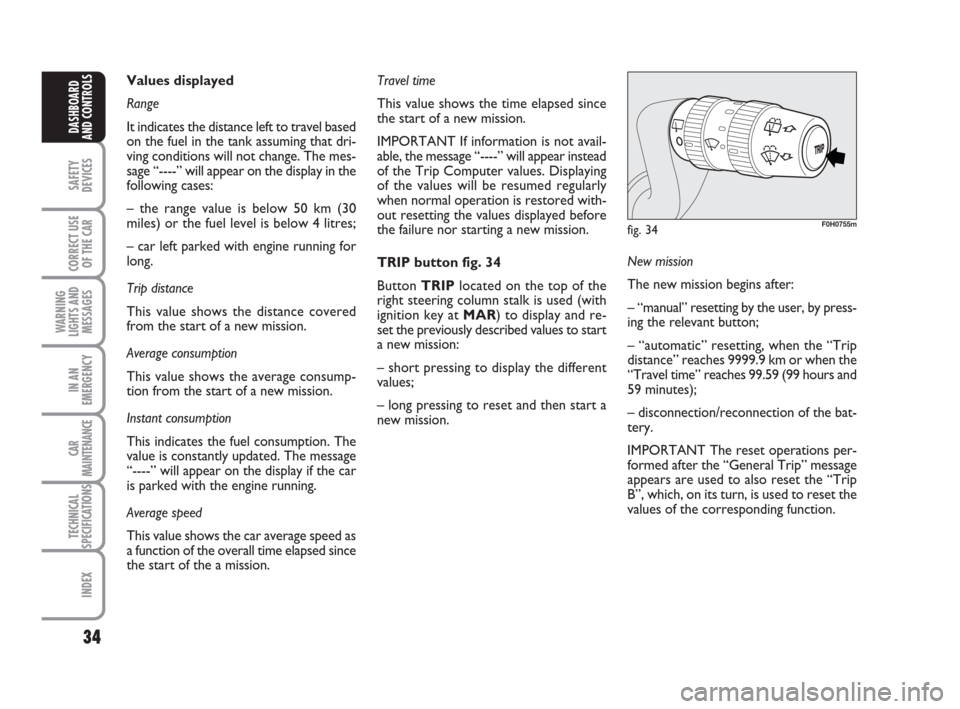
TRIP button fig. 34
Button TRIPlocated on the top of the
right steering column stalk is used (with
ignition key at MAR) to display and re-
set the previously described values to start
a new mission:
– short pressing to display the different
values;
– long pressing to reset and then start a
new mission. Values displayed
Range
It indicates the distance left to travel based
on the fuel in the tank assuming that dri-
ving conditions will not change. The mes-
sage “----” will appear on the display in the
following cases:
– the range value is below 50 km (30
miles) or the fuel level is below 4 litres;
– car left parked with engine running for
long.
Trip distance
This value shows the distance covered
from the start of a new mission.
Average consumption
This value shows the average consump-
tion from the start of a new mission.
Instant consumption
This indicates the fuel consumption. The
value is constantly updated. The message
“----” will appear on the display if the car
is parked with the engine running.
Average speed
This value shows the car average speed as
a function of the overall time elapsed since
the start of the a mission.
fig. 34F0H0755m
001-035 idea GB 1 ed 10-07-2008 8:27 Pagina 34
Page 52 of 210
51
SAFETY
DEVICES
CORRECT USE
OF THE CAR
WARNING
LIGHTS AND
MESSAGES
IN AN
EMERGENCY
CAR
MAINTENANCE
TECHNICAL
SPECIFICATIONS
INDEX
DASHBOARD
AND CONTROLS
AUTOMATIC
TWO-ZONE CLIMATE
CONTROL SYSTEM
(where provided)
GENERAL
The car is fitted with a two-zone climate
control system which makes it possible to
separately adjust the air temperature on
the driver’s side and on the passenger’s
side. Temperature control is based on the
“equivalent temperature” logic, i.e.: the
system continuously works to keep con-
stant the comfort inside the passenger
compartment and to compensate any vari-
ation of the outside climate conditions, in-
cluding sunshine detected by a proper sen-
sor provided for the purpose.
The climate control system automatically
controls and adjusts the following para-
meters and functions:
❒air temperature at driver/front pas-
senger vents;
❒air distribution at driver/front passen-
ger vents;
❒fan speed (continuous air flow varia-
tion);
❒compressor switching on (to cool/de-
humidify air);
❒air recirculation.
All the above functions can be changed
manually at any time, i.e.: you can always
modify one or more function settings. In
this event, the system will no longer im-
plement the automatic control of the func-
tions changed manually (except for safety
reasons, e.g.: risk of window misting).
Manual selections prevail over automatic
ones and remain in storage until the user
decides to resume automatic control, ex-
cept when the system cuts in for particu-
lar safety conditions.
The control of functions not changed man-
ually remains automatic.
The amount of air admitted to the pas-
senger compartment does not depend on
the car speed, since it is electronically con-
trolled by the fan.
In any case, the temperature of the air ad-
mitted to the passenger compartment is
controlled automatically (except when the
system is off) according to the tempera-
tures set on the driver’s and front pas-
senger’s displays or under certain climat-
ic conditions if the compressor is off).The system enables to set or to change
the following parameters and functions
manually:❒air temperatures on driver/front pas-
senger side;
❒fan speed (continuous variation);
❒air distribution on five levels (driver/
front passenger side);
❒climate control compressor on/off en-
able;
❒monozone/two-zone distribution pri-
ority;
❒fast demisting/defrosting;
❒air recirculation;
❒rear heated window;
❒system off;
036-092 idea GB 1 ed 10-07-2008 16:12 Pagina 51
Page 54 of 210
53
SAFETY
DEVICES
CORRECT USE
OF THE CAR
WARNING
LIGHTS AND
MESSAGES
IN AN
EMERGENCY
CAR
MAINTENANCE
TECHNICAL
SPECIFICATIONS
INDEX
DASHBOARD
AND CONTROLS
During fully automatic operation, the on-
ly manual settings required are the fol-
lowing:
❒MONO, to align the air temperature
and distribution set on the passenger’s
side (front or rear) with that on the
driver’s side;
❒…, air recirculation, to keep it al-
ways on or off;
❒-, to speed up demisting/defrosting
of windscreen, front side windows,
rear window and door mirrors;
❒(, to demist/defrost the rear heat-
ed window and the door mirrors.
During completely automatic system op-
eration, the temperatures, air distribution
and the fan speed set can be changed at
any time through the relevant buttons or
knobs: the system will automatically
change its settings to adjust to the new re-
quirements.
During full automatic operation (FULL
AUTO), any change in air distribution
and/or air flow and/or compressor turn-
ing on and/or air recirculation will obtain
FULLdisappearing. In this way functions
will be controlled manually until pressing
the AUTObutton again. The fan speed is
the same for all passenger compartment
areas.With one or more functions engaged man-
ually, the adjustment of the temperature
of the air admitted to the passenger com-
partment continues to be controlled au-
tomatically by the system, except with the
climate control compressor off. In fact, in
this condition, the air admitted to the pas-
senger compartment cannot have a low-
er temperature than the outside air.
CONTROLS
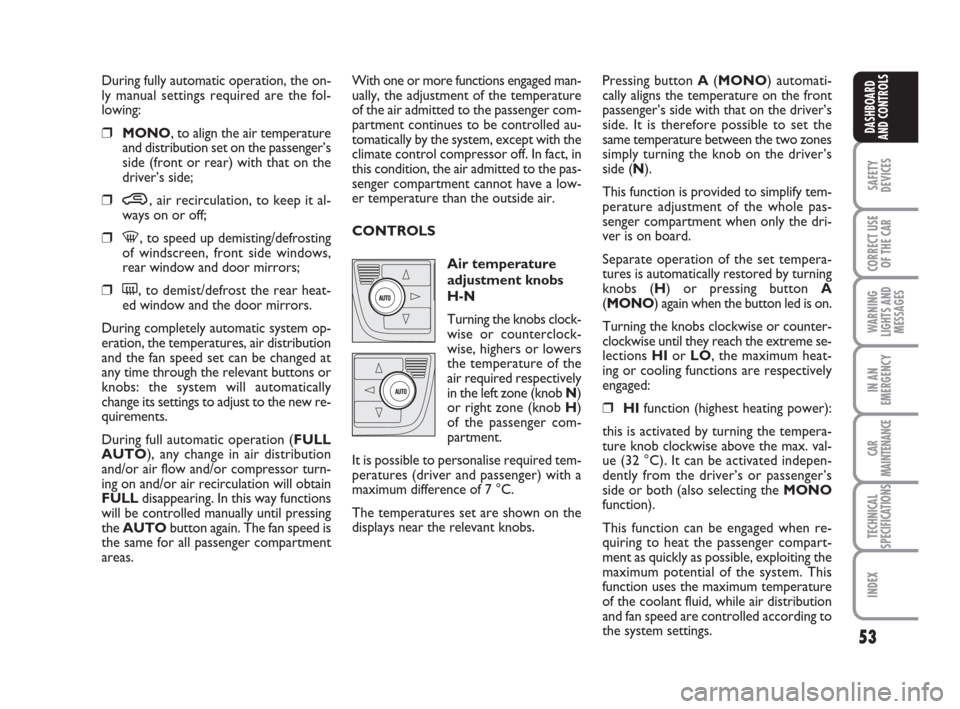
Air temperature
adjustment knobs
H-N
Turning the knobs clock-
wise or counterclock-
wise, highers or lowers
the temperature of the
air required respectively
in the left zone (knob N)
or right zone (knob H)
of the passenger com-
partment.
It is possible to personalise required tem-
peratures (driver and passenger) with a
maximum difference of 7 °C.
The temperatures set are shown on the
displays near the relevant knobs.Pressing button A(MONO) automati-
cally aligns the temperature on the front
passenger’s side with that on the driver’s
side. It is therefore possible to set the
same temperature between the two zones
simply turning the knob on the driver’s
side (N).
This function is provided to simplify tem-
perature adjustment of the whole pas-
senger compartment when only the dri-
ver is on board.
Separate operation of the set tempera-
tures is automatically restored by turning
knobs (H) or pressing button A
(MONO) again when the button led is on.
Turning the knobs clockwise or counter-
clockwise until they reach the extreme se-
lections HIor LO, the maximum heat-
ing or cooling functions are respectively
engaged:
❒HIfunction (highest heating power):
this is activated by turning the tempera-
ture knob clockwise above the max. val-
ue (32 °C). It can be activated indepen-
dently from the driver’s or passenger’s
side or both (also selecting the MONO
function).
This function can be engaged when re-
quiring to heat the passenger compart-
ment as quickly as possible, exploiting the
maximum potential of the system. This
function uses the maximum temperature
of the coolant fluid, while air distribution
and fan speed are controlled according to
the system settings.
036-092 idea GB 1 ed 10-07-2008 16:12 Pagina 53
Page 60 of 210
59
SAFETY
DEVICES
CORRECT USE
OF THE CAR
WARNING
LIGHTS AND
MESSAGES
IN AN
EMERGENCY
CAR
MAINTENANCE
TECHNICAL
SPECIFICATIONS
INDEX
DASHBOARD
AND CONTROLS
fig. 70F0H0071mfig. 71F0H0070mfig. 72F0H0072m
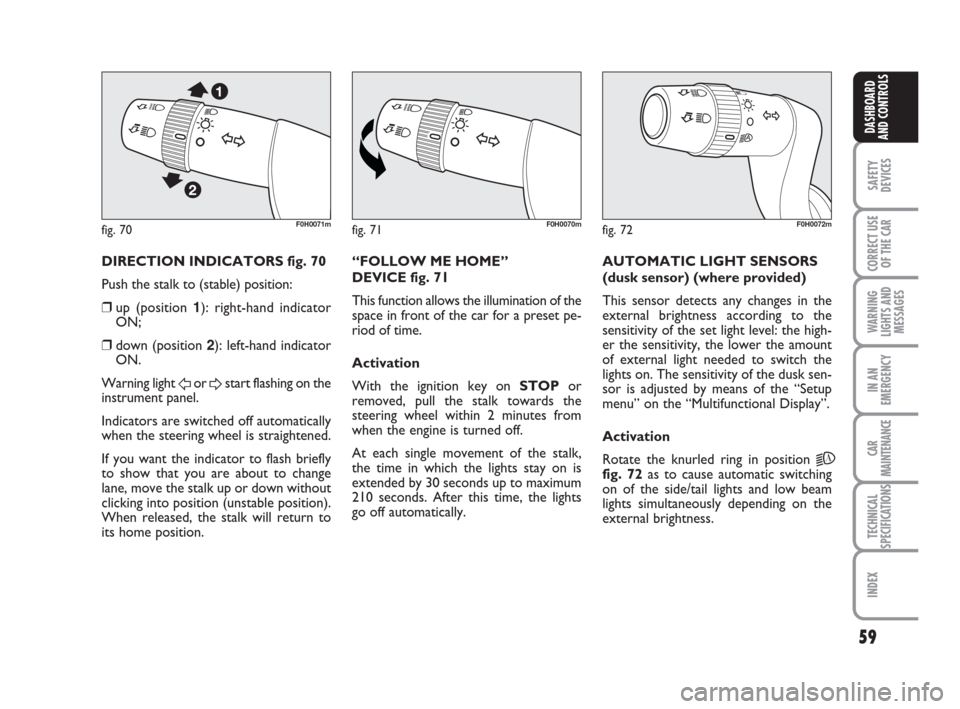
DIRECTION INDICATORS fig. 70
Push the stalk to (stable) position:
❒up (position 1): right-hand indicator
ON;
❒down (position 2): left-hand indicator
ON.
Warning light
For Dstart flashing on the
instrument panel.
Indicators are switched off automatically
when the steering wheel is straightened.
If you want the indicator to flash briefly
to show that you are about to change
lane, move the stalk up or down without
clicking into position (unstable position).
When released, the stalk will return to
its home position.“FOLLOW ME HOME”
DEVICE fig. 71
This function allows the illumination of the
space in front of the car for a preset pe-
riod of time.
Activation
With the ignition key on STOPor
removed, pull the stalk towards the
steering wheel within 2 minutes from
when the engine is turned off.
At each single movement of the stalk,
the time in which the lights stay on is
extended by 30 seconds up to maximum
210 seconds. After this time, the lights
go off automatically. AUTOMATIC LIGHT SENSORS
(dusk sensor) (where provided)
This sensor detects any changes in the
external brightness according to the
sensitivity of the set light level: the high-
er the sensitivity, the lower the amount
of external light needed to switch the
lights on. The sensitivity of the dusk sen-
sor is adjusted by means of the “Setup
menu” on the “Multifunctional Display”.
Activation
Rotate the knurled ring in position
2A
fig. 72as to cause automatic switching
on of the side/tail lights and low beam
lights simultaneously depending on the
external brightness.
036-092 idea GB 1 ed 10-07-2008 16:12 Pagina 59
Page 83 of 210
82
SAFETY
DEVICES
CORRECT USE
OF THE CAR
WARNING
LIGHTS AND
MESSAGES
IN AN
EMERGENCY
CAR
MAINTENANCE
TECHNICAL
SPECIFICATIONS
INDEX
DASHBOARD
AND CONTROLS
HEADLIGHTS
ADJUSTING THE HEADLIGHT
BEAM
Proper adjustment of the headlight beams
is of vital importance for your safety and
comfort and also for the other road users.
To ensure you and other drivers have the
best visibility conditions when travelling
with the headlights on, the headlights must
be set properly. Contact Fiat Dealership
to have the headlights properly adjusted.
Headlight aiming device
The device can be operated with the ig-
nition key at MARand dipped beam head-
lights on. When the car is loaded, it slopes
backwards. This means that the headlight
beam rises. In this case, it is necessary to
return it to the correct position.
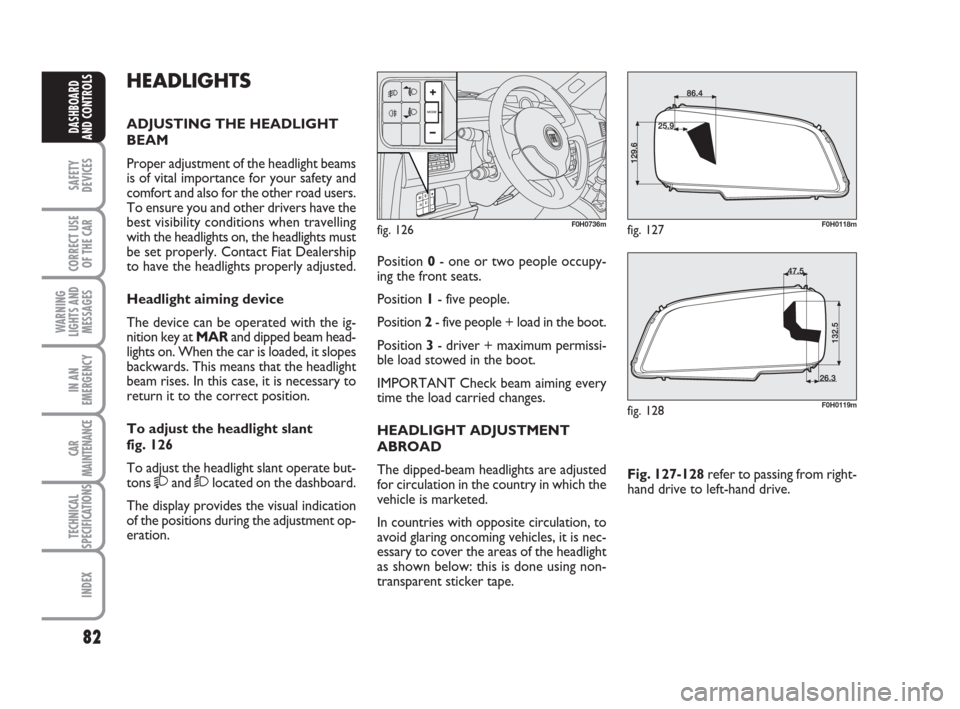
To adjust the headlight slant
fig. 126
To adjust the headlight slant operate but-
tons
and Òlocated on the dashboard.
The display provides the visual indication
of the positions during the adjustment op-
eration.
fig. 126F0H0736m
Position 0- one or two people occupy-
ing the front seats.
Position 1- five people.
Position 2- five people + load in the boot.
Position 3- driver + maximum permissi-
ble load stowed in the boot.
IMPORTANT Check beam aiming every
time the load carried changes.
HEADLIGHT ADJUSTMENT
ABROAD
The dipped-beam headlights are adjusted
for circulation in the country in which the
vehicle is marketed.
In countries with opposite circulation, to
avoid glaring oncoming vehicles, it is nec-
essary to cover the areas of the headlight
as shown below: this is done using non-
transparent sticker tape.Fig. 127-128refer to passing from right-
hand drive to left-hand drive.
fig. 127F0H0118m
fig. 128F0H0119m
036-092 idea GB 1 ed 10-07-2008 16:12 Pagina 82