low beam FIAT IDEA 2012 1.G Owners Manual
[x] Cancel search | Manufacturer: FIAT, Model Year: 2012, Model line: IDEA, Model: FIAT IDEA 2012 1.GPages: 210, PDF Size: 3.65 MB
Page 21 of 210
20
SAFETY
DEVICES
CORRECT USE
OF THE CAR
WARNING
LIGHTS AND
MESSAGES
IN AN
EMERGENCY
CAR
MAINTENANCE
TECHNICAL
SPECIFICATIONS
INDEX
DASHBOARD
AND CONTROLS
This shows the temperature of the engine
coolant fluid and begins working when the
fluid temperature exceeds approx. 50°C.
Under normal conditions, the needle
should hover around the middle of the
scale according to the working conditions.
IMPORTANT If the needle reaches the
low temperature area with warning light
Aon, this means that there is a failure.
Contact a Fiat Dealership.
If the needle reaches the red
area, stop the engine imme-
diately and contact a Fiat
Dealership.MULTIFUNCTIONAL
DISPLAY
(on two-line modal
panel)
The car can be equipped with a multi-
function display that shows useful infor-
mation for car driving according to the
settings made.
fig. 29F0H0027m
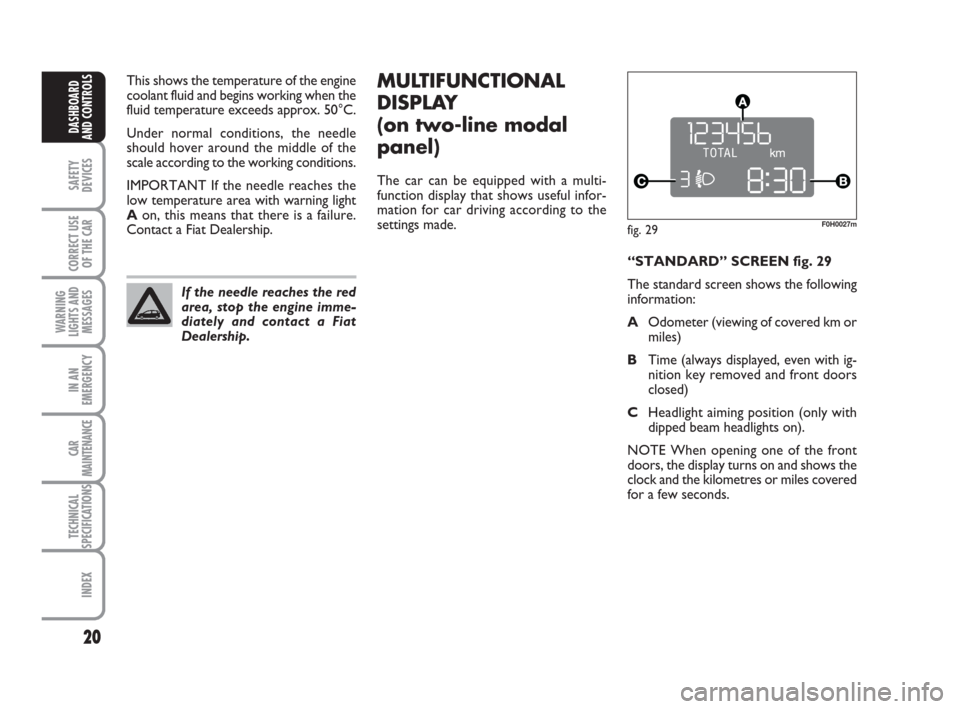
“STANDARD” SCREEN fig. 29
The standard screen shows the following
information:
AOdometer (viewing of covered km or
miles)
BTime (always displayed, even with ig-
nition key removed and front doors
closed)
CHeadlight aiming position (only with
dipped beam headlights on).
NOTE When opening one of the front
doors, the display turns on and shows the
clock and the kilometres or miles covered
for a few seconds.
001-035 idea GB 1 ed 10-07-2008 8:27 Pagina 20
Page 24 of 210
23
SAFETY
DEVICES
CORRECT USE
OF THE CAR
WARNING
LIGHTS AND
MESSAGES
IN AN
EMERGENCY
CAR
MAINTENANCE
TECHNICAL
SPECIFICATIONS
INDEX
DASHBOARD
AND CONTROLS
fig. 31F0H09000m
MULTIFUNCTIONAL
DISPLAY
(on three-line comfort
panel)
The car can be equipped with a multi-
function display that shows useful infor-
mation for car driving according to the
settings made.
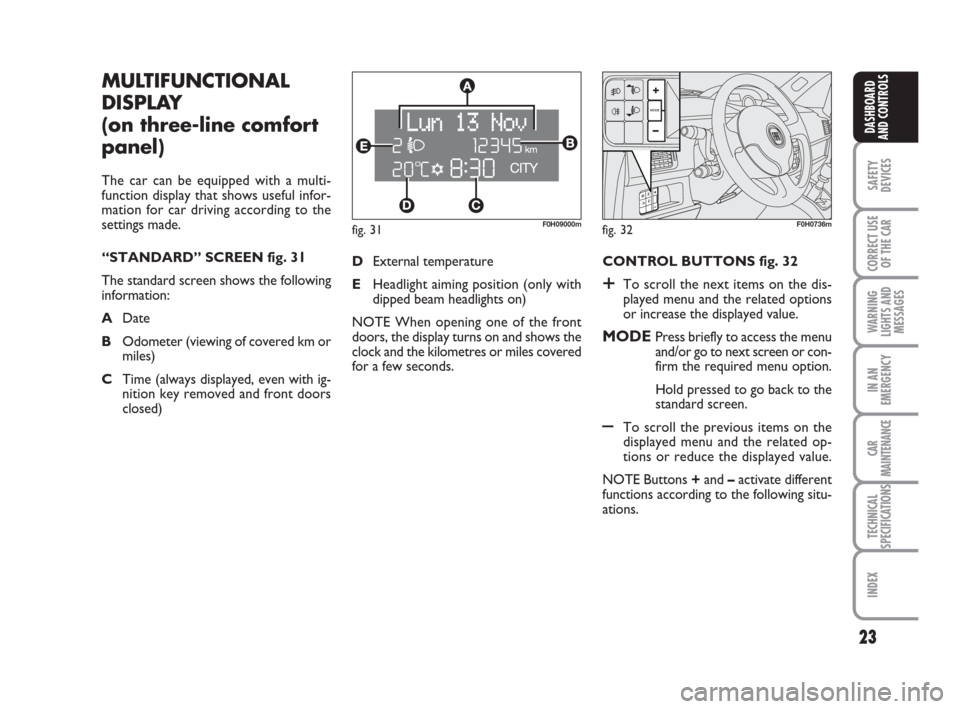
“STANDARD” SCREEN fig. 31
The standard screen shows the following
information:
ADate
BOdometer (viewing of covered km or
miles)
CTime (always displayed, even with ig-
nition key removed and front doors
closed)CONTROL BUTTONS fig. 32
+To scroll the next items on the dis-
played menu and the related options
or increase the displayed value.
MODEPress briefly to access the menu
and/or go to next screen or con-
firm the required menu option.
Hold pressed to go back to the
standard screen.
–To scroll the previous items on the
displayed menu and the related op-
tions or reduce the displayed value.
NOTE Buttons +and –activate different
functions according to the following situ-
ations. DExternal temperature
EHeadlight aiming position (only with
dipped beam headlights on)
NOTE When opening one of the front
doors, the display turns on and shows the
clock and the kilometres or miles covered
for a few seconds.
fig. 32F0H0736m
001-035 idea GB 1 ed 10-07-2008 8:27 Pagina 23
Page 25 of 210
24
SAFETY
DEVICES
CORRECT USE
OF THE CAR
WARNING
LIGHTS AND
MESSAGES
IN AN
EMERGENCY
CAR
MAINTENANCE
TECHNICAL
SPECIFICATIONS
INDEX
DASHBOARD
AND CONTROLS
Adjustment of headlight aiming
device (only with dipped beam
headlights on)
– when the standard screen is enabled, the
headlight aiming device can be regulated
(refer to paragraph “Headlights” in this
section).
Setup menu
– to scroll the previous and next items in
the menu;
– to increase or decrease values during
setting operations.
SETUP MENU fig. 33
The menu comprises a series of functions
arranged in a cycle which can be selected
through buttons +and –to access the dif-
ferent “select” operations and settings
(setup) described in the following para-
graphs.
The setup menu is activated by pressing
briefly button MODE.
Intermittent pressing of buttons +and –
enables scrolling of the setup menu op-
tions.
Handling modes are different according to
the characteristic of the option selected.Selecting the “Set Date”
and “Set time”
– Briefly press button MODEto select
the first value to be changed (e.g. hours
/minutes or year / month / day).
– Press buttons +and –(by single press-
ing) to select the new setting.
– Briefly press button MODEto store the
new setting and at the same time go to the
next setup menu option. If the processed
option is the last one, the system brings
you back to the previously selected option
of the main menu.
Prolonged pressing of the button
MODE enables:
– exiting the setup menu page and saving
of the changes already stored by the dri-
ver (and confirmed by briefly pressing the
button MODE).
The setup menu page is timed. Only the
changes saved by the user by briefly press-
ing MODEare saved when the menu is
automatically closed. NOTE If the Connect Nav+ system is in-
stalled, only the following functions can be
adjusted/set from the Instrument Panel:
“Brightness”, “Speed Beep”, Light Sen-
sors” (where provided), “Seat belt
Buzzer” and “Passenger’s Airbag”. The
other functions are displayed on the Con-
nect Nav+ system which is used to ad-
just/set them.
Selecting a menu option
– Briefly press button MODEto select
the menu option that needs to be
changed.
– Press buttons +and –(by single press-
ing) to select the new setting.
– Briefly press button MODEto store the
new setting and at the same time go back
to the previously selected menu option.
001-035 idea GB 1 ed 10-07-2008 8:27 Pagina 24
Page 60 of 210
59
SAFETY
DEVICES
CORRECT USE
OF THE CAR
WARNING
LIGHTS AND
MESSAGES
IN AN
EMERGENCY
CAR
MAINTENANCE
TECHNICAL
SPECIFICATIONS
INDEX
DASHBOARD
AND CONTROLS
fig. 70F0H0071mfig. 71F0H0070mfig. 72F0H0072m
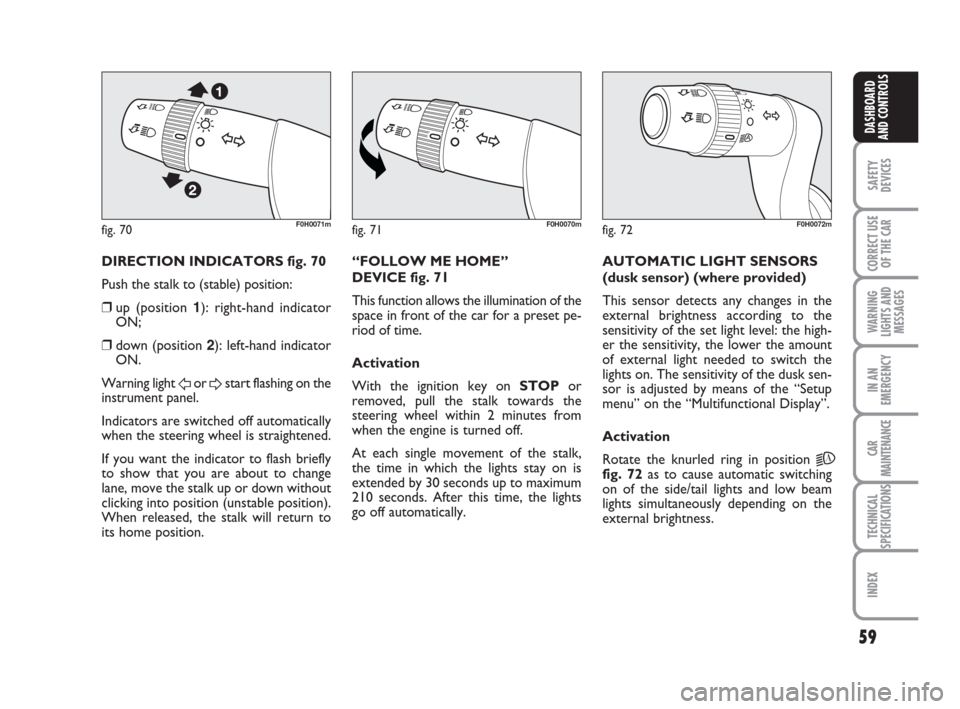
DIRECTION INDICATORS fig. 70
Push the stalk to (stable) position:
❒up (position 1): right-hand indicator
ON;
❒down (position 2): left-hand indicator
ON.
Warning light
For Dstart flashing on the
instrument panel.
Indicators are switched off automatically
when the steering wheel is straightened.
If you want the indicator to flash briefly
to show that you are about to change
lane, move the stalk up or down without
clicking into position (unstable position).
When released, the stalk will return to
its home position.“FOLLOW ME HOME”
DEVICE fig. 71
This function allows the illumination of the
space in front of the car for a preset pe-
riod of time.
Activation
With the ignition key on STOPor
removed, pull the stalk towards the
steering wheel within 2 minutes from
when the engine is turned off.
At each single movement of the stalk,
the time in which the lights stay on is
extended by 30 seconds up to maximum
210 seconds. After this time, the lights
go off automatically. AUTOMATIC LIGHT SENSORS
(dusk sensor) (where provided)
This sensor detects any changes in the
external brightness according to the
sensitivity of the set light level: the high-
er the sensitivity, the lower the amount
of external light needed to switch the
lights on. The sensitivity of the dusk sen-
sor is adjusted by means of the “Setup
menu” on the “Multifunctional Display”.
Activation
Rotate the knurled ring in position
2A
fig. 72as to cause automatic switching
on of the side/tail lights and low beam
lights simultaneously depending on the
external brightness.
036-092 idea GB 1 ed 10-07-2008 16:12 Pagina 59
Page 61 of 210
60
SAFETY
DEVICES
CORRECT USE
OF THE CAR
WARNING
LIGHTS AND
MESSAGES
IN AN
EMERGENCY
CAR
MAINTENANCE
TECHNICAL
SPECIFICATIONS
INDEX
DASHBOARD
AND CONTROLS
WINDOW WASHING
WINDSCREEN
WASHER/WIPER
The device can work only when the igni-
tion key is on MAR.
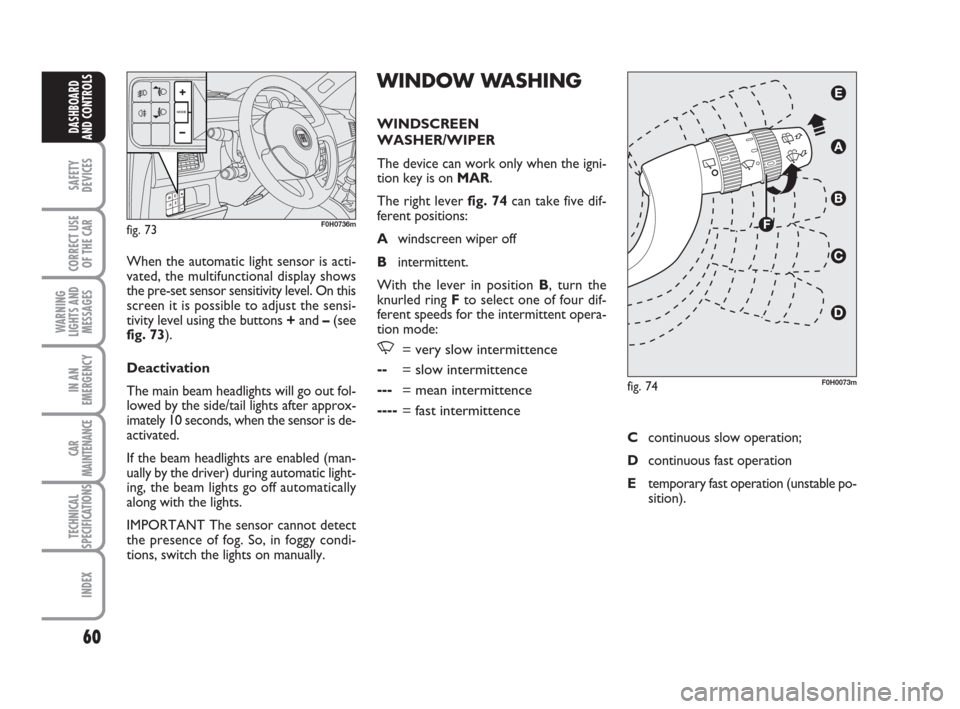
The right lever fig. 74can take five dif-
ferent positions:
Awindscreen wiper off
Bintermittent.
With the lever in position B, turn the
knurled ring Fto select one of four dif-
ferent speeds for the intermittent opera-
tion mode:
,= very slow intermittence
--= slow intermittence
---= mean intermittence
----= fast intermittence
When the automatic light sensor is acti-
vated, the multifunctional display shows
the pre-set sensor sensitivity level. On this
screen it is possible to adjust the sensi-
tivity level using the buttons +and –(see
fig. 73).
Deactivation
The main beam headlights will go out fol-
lowed by the side/tail lights after approx-
imately 10 seconds, when the sensor is de-
activated.
If the beam headlights are enabled (man-
ually by the driver) during automatic light-
ing, the beam lights go off automatically
along with the lights.
IMPORTANT The sensor cannot detect
the presence of fog. So, in foggy condi-
tions, switch the lights on manually.
fig. 73F0H0736m
fig. 74F0H0073m
Ccontinuous slow operation;
Dcontinuous fast operation
Etemporary fast operation (unstable po-
sition).
036-092 idea GB 1 ed 10-07-2008 16:12 Pagina 60
Page 83 of 210
82
SAFETY
DEVICES
CORRECT USE
OF THE CAR
WARNING
LIGHTS AND
MESSAGES
IN AN
EMERGENCY
CAR
MAINTENANCE
TECHNICAL
SPECIFICATIONS
INDEX
DASHBOARD
AND CONTROLS
HEADLIGHTS
ADJUSTING THE HEADLIGHT
BEAM
Proper adjustment of the headlight beams
is of vital importance for your safety and
comfort and also for the other road users.
To ensure you and other drivers have the
best visibility conditions when travelling
with the headlights on, the headlights must
be set properly. Contact Fiat Dealership
to have the headlights properly adjusted.
Headlight aiming device
The device can be operated with the ig-
nition key at MARand dipped beam head-
lights on. When the car is loaded, it slopes
backwards. This means that the headlight
beam rises. In this case, it is necessary to
return it to the correct position.
To adjust the headlight slant
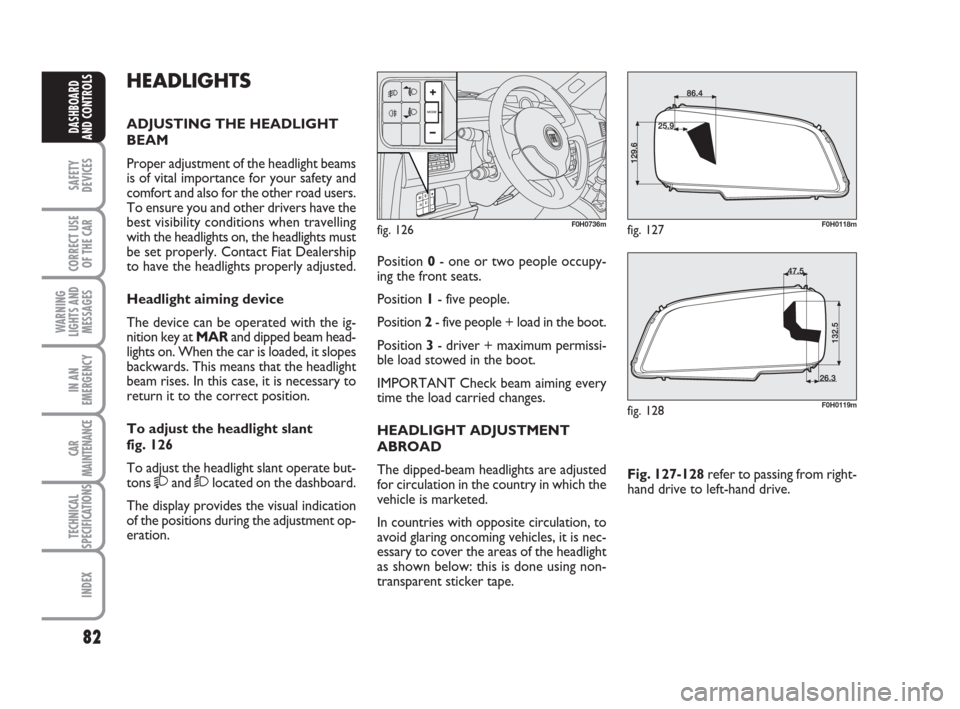
fig. 126
To adjust the headlight slant operate but-
tons
and Òlocated on the dashboard.
The display provides the visual indication
of the positions during the adjustment op-
eration.
fig. 126F0H0736m
Position 0- one or two people occupy-
ing the front seats.
Position 1- five people.
Position 2- five people + load in the boot.
Position 3- driver + maximum permissi-
ble load stowed in the boot.
IMPORTANT Check beam aiming every
time the load carried changes.
HEADLIGHT ADJUSTMENT
ABROAD
The dipped-beam headlights are adjusted
for circulation in the country in which the
vehicle is marketed.
In countries with opposite circulation, to
avoid glaring oncoming vehicles, it is nec-
essary to cover the areas of the headlight
as shown below: this is done using non-
transparent sticker tape.Fig. 127-128refer to passing from right-
hand drive to left-hand drive.
fig. 127F0H0118m
fig. 128F0H0119m
036-092 idea GB 1 ed 10-07-2008 16:12 Pagina 82
Page 124 of 210
123
IN AN
EMERGENCY
CAR
MAINTENANCE
TECHNICAL
SPECIFICATIONS
INDEX
DASHBOARD
AND CONTROLS
SAFETY
DEVICES
CORRECT USE
OF THE CAR
WARNING
LIGHTS AND
MESSAGES
GENERAL WARNINGS ...................................................... 124
LOW BRAKE FLUID LEVEL .............................................. 124
HANDBRAKE ON ............................................................... 124
AIRBAG FAILURE ................................................................. 124
HOT ENGINE COOLANT ................................................ 125
LOW BATTERY CHARGE................................................. 125
LOW ENGINE OIL PRESSURE ......................................... 126
EXHAUSTED OIL ................................................................. 126
“DUALDRIVE” ELECTRIC POWER
STEERING FAILURE............................................................. 126
INCOMPLETE DOOR LOCKING ................................... 126
SEAT BELTS NOT FASTENED ......................................... 126
EBD FAILURE......................................................................... 127
INJECTION SYSTEM FAILURE ......................................... 127
EOBD ENGINE CONTROL SYSTEM FAILURE ........... 127
FRONT PASSENGER AIRBAG DISABLED .................... 128
ABS SYSTEM FAILURE ........................................................ 128
FUEL RESERVE....................................................................... 128
GLOW PLUG HEATING.................................................... 129
GLOW PLUG HEATING FAILURE.................................. 129
WATER IN DIESEL FUEL FILTER ..................................... 129
CAR PROTECTION SYSTEM FAULT - FIAT CODE .. 129
REAR FOG LIGHTS ............................................................. 129
GENERAL FAILURE INDICATION ................................. 130
WW W
A A
R R
N N
I I
N N
G G
L L
I I
G G
H H
T T
S S
A A
N N
D D
M M
E E
S S
S S
A A
G G
E E E
S S
BRAKE PAD WEAR ............................................................. 131
PARTICULATE FILTER CLOGGED................................. 131
SIDE/TAIL LIGHTS AND LOW BEAMS ......................... 131
FOLLOW ME HOME ......................................................... 131
FRONT FOG LIGHTS ......................................................... 131
LEFT-HAND DIRECTION INDICATOR ....................... 132
RIGHT-HAND DIRECTION INDICATOR ................... 132
“DUALDRIVE” ELECTRIC POWER STEERING
ACTIVATION ........................................................................ 132
CRUISE CONTROL SYSTEM ............................................ 132
MAIN BEAMS ......................................................................... 132
POSSIBLE ICE ON ROAD.................................................. 132
LIMITED RANGE .................................................................. 132
123-132 idea GB 1 ed 10-07-2008 8:29 Pagina 123
Page 132 of 210
131
IN AN
EMERGENCY
CAR
MAINTENANCE
TECHNICAL
SPECIFICATIONS
INDEX
DASHBOARD
AND CONTROLS
SAFETY
DEVICES
CORRECT USE
OF THE CAR
WARNING
LIGHTS AND
MESSAGES
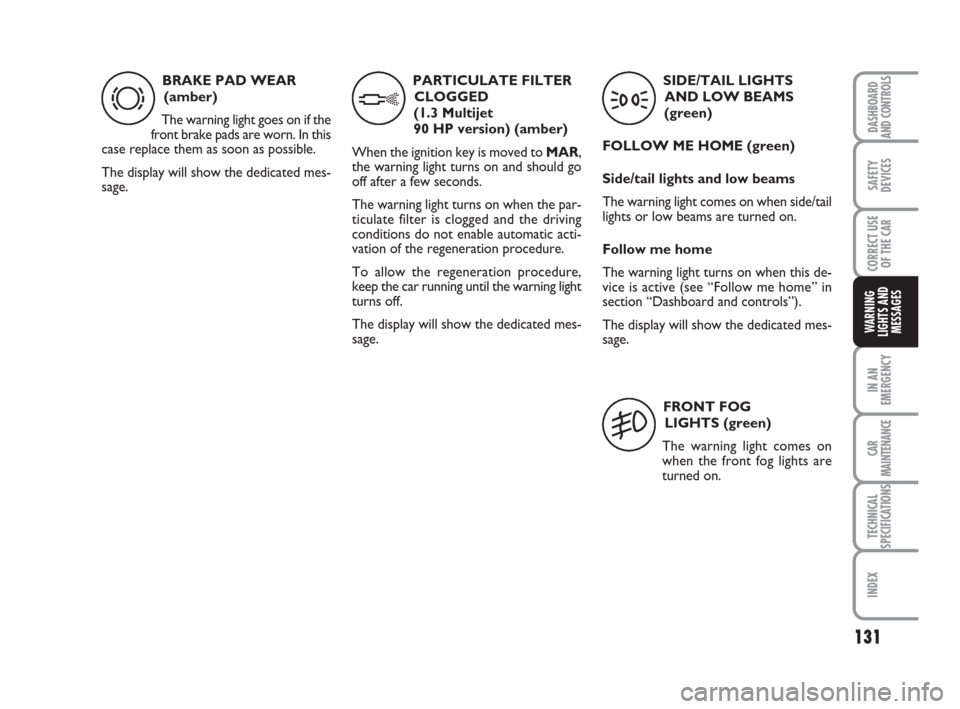
BRAKE PAD WEAR
(amber)
The warning light goes on if the
front brake pads are worn. In this
case replace them as soon as possible.
The display will show the dedicated mes-
sage.
d
PARTICULATE FILTER
CLOGGED
(1.3 Multijet
90 HP version) (amber)
When the ignition key is moved to MAR,
the warning light turns on and should go
off after a few seconds.
The warning light turns on when the par-
ticulate filter is clogged and the driving
conditions do not enable automatic acti-
vation of the regeneration procedure.
To allow the regeneration procedure,
keep the car running until the warning light
turns off.
The display will show the dedicated mes-
sage.
h
SIDE/TAIL LIGHTS
AND LOW BEAMS
(green)
FOLLOW ME HOME (green)
Side/tail lights and low beams
The warning light comes on when side/tail
lights or low beams are turned on.
Follow me home
The warning light turns on when this de-
vice is active (see “Follow me home” in
section “Dashboard and controls”).
The display will show the dedicated mes-
sage.
3
FRONT FOG
LIGHTS (green)
The warning light comes on
when the front fog lights are
turned on.
5
123-132 idea GB 1 ed 10-07-2008 8:29 Pagina 131
Page 133 of 210
132
IN AN
EMERGENCY
CAR
MAINTENANCE
TECHNICAL
SPECIFICATIONS
INDEX
DASHBOARD
AND CONTROLS
SAFETY
DEVICES
CORRECT USE
OF THE CAR
WARNING
LIGHTS AND
MESSAGES
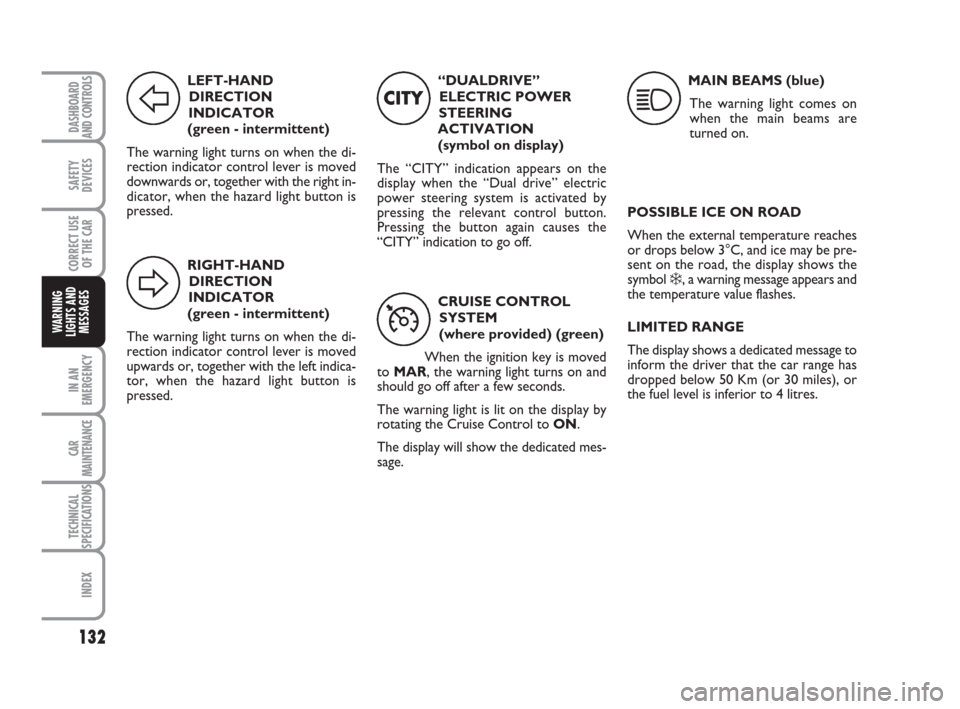
LEFT-HAND
DIRECTION
INDICATOR
(green - intermittent)
The warning light turns on when the di-
rection indicator control lever is moved
downwards or, together with the right in-
dicator, when the hazard light button is
pressed.
F
RIGHT-HAND
DIRECTION
INDICATOR
(green - intermittent)
The warning light turns on when the di-
rection indicator control lever is moved
upwards or, together with the left indica-
tor, when the hazard light button is
pressed.
D
“DUALDRIVE”
ELECTRIC POWER
STEERING
ACTIVATION
(symbol on display)
The “CITY” indication appears on the
display when the “Dual drive” electric
power steering system is activated by
pressing the relevant control button.
Pressing the button again causes the
“CITY” indication to go off.
CITY
CRUISE CONTROL
SYSTEM
(where provided) (green)
When the ignition key is moved
to MAR, the warning light turns on and
should go off after a few seconds.
The warning light is lit on the display by
rotating the Cruise Control to ON.
The display will show the dedicated mes-
sage.
Ü
MAIN BEAMS (blue)
The warning light comes on
when the main beams are
turned on.
1
POSSIBLE ICE ON ROAD
When the external temperature reaches
or drops below 3°C, and ice may be pre-
sent on the road, the display shows the
symbol
❄, a warning message appears and
the temperature value flashes.
LIMITED RANGE
The display shows a dedicated message to
inform the driver that the car range has
dropped below 50 Km (or 30 miles), or
the fuel level is inferior to 4 litres.
123-132 idea GB 1 ed 10-07-2008 8:29 Pagina 132
Page 145 of 210
144
CAR
MAINTENANCE
TECHNICAL
SPECIFICATIONS
INDEX
DASHBOARD
AND CONTROLS
SAFETY
DEVICES
CORRECT USE
OF THE CAR
WARNING
LIGHTS AND
MESSAGES
IN AN
EMERGENCY
WHEN NEEDING TO
CHANGE A BULB
GENERAL INSTRUCTIONS
❒When a light is not working, check
that it has not fused before changing
the bulb. For the location of the fuses,
refer to “If a fuse blows” in this chap-
ter;
❒Before replacing a bulb that does not
work, check that the contacts are not
oxidised;
❒Burnt bulbs must be replaced by oth-
ers of the same type and power;
❒Always check the height of the head-
light beam after changing a bulb. For versions with alloy rims
❒Make sure that hub contact surfaces
are clean;
❒Refit the standard wheel fitting it on
the pins, refit the fastening bolts and
tighten them using the wrench pro-
vided;
❒Lower the car and remove the jack;
❒Using the wrench provided, tighten
the bolts in the sequence shown pre-
viously for the space-saver spare
wheel fig. 16;
❒Refit the snap-fitted wheel hub cap.
When you have finished
❒Stow the spare wheel C-fig. 11in the
space provided in the boot;
❒Insert the jack partially open in its con-
tainer B-fig. 11forcing it lightly to
prevent it from vibrating when trav-
elling;
❒Put the tools back into their places in
the container;
❒Stow the container complete with
tools on the spare wheel and secure
everything with the clamping device
A-fig. 11;
❒Correctly re-position the stiff cover.
Modifications or repairs to
the electrical system carried
out incorrectly and without bearing
the features of the system in mind can
cause malfunctions with the risk of
fire.
WARNING
Halogen bulbs contain pres-
surised gas which, if broken,
may cause small fragments of glass to
be projected outwards.
WARNING
Only touch the metal part
when handling halogen bulbs.
If the transparent bulb is
touched it reduces the intesi-
ty of the light emitted and can also re-
duce the life of the bulb. If you touch
the bulb accidentally, rub it with a
cloth moistened with alcohol and leave
it to dry.
IMPORTANT The headlight inner surface
may be lightly misted over: this is not a
fault but a natural fact due to low tem-
perature and the level of air humidity. It
will disappear as soon the headlights are
turned on. The presence of drops inside
the headlights means water infiltration,
therefore contact Fiat Dealership.
133-160 idea GB 1 ed 10-07-2008 8:30 Pagina 144