instrument panel FIAT LINEA 2008 1.G Owners Manual
[x] Cancel search | Manufacturer: FIAT, Model Year: 2008, Model line: LINEA, Model: FIAT LINEA 2008 1.GPages: 234, PDF Size: 3.41 MB
Page 5 of 234
4
SAFETY
DEVICES
CORRECT USE
OF THE
CAR
WARNING
LIGHTS AND
MESSAGES
IN AN
EMERGENCY
CAR
MAINTENANCE
TECHNICAL
SPECIFICATIONS
INDEX
DASHBOARD
AND CONTROLSDASHBOARD........................................................................ 5
SYMBOLS ............................................................................... 6
THE FIAT CODE SYSTEM.................................................. 6
THE KEYS .............................................................................. 8
ALARM ................................................................................... 11
IGNITION DEVICE.............................................................. 13
INSTRUMENT PANEL ........................................................ 14
INSTRUMENTS..................................................................... 16
DIGITAL DISPLAY ............................................................... 18
MULTIFUNCTION DISPLAY ............................................ 23
RECONFIGURABLE MULTIFUNCTION DISPLAY ....... 32
TRIP COMPUTER ................................................................ 42
FRONT SEATS ..................................................................... 44
REAR SEATS .......................................................................... 45
HEAD RESTRAINTS............................................................. 45
STEERING WHEEL .............................................................. 47
REARVIEW MIRRORS......................................................... 47
HEATING AND VENTILATION...................................... 49
MANUAL CLIMATE CONTROL SYSTEM .................... 53
AUTOMATIC CLIMATE CONTROL SYSTEM ............ 59EXTERNAL LIGHTS ............................................................ 66
WINDOW WASHING....................................................... 68
CRUISE CONTROL ............................................................ 70
CEILING LIGHTS.................................................................. 72
CONTROLS........................................................................... 75
FUEL CUT-OFF SWITCH .................................................. 77
INTERIOR FITTINGS........................................................... 78
DOORS .................................................................................. 82
POWER WINDOWS........................................................... 83
BOOT ...................................................................................... 86
BONNET................................................................................. 88
ROOF RACK/SKI RACK .................................................... 90
HEADLIGHTS........................................................................ 91
ABS SYSTEM ......................................................................... 92
ESP SYSTEM .......................................................................... 93
EOBD SYSTEM ..................................................................... 96
PARKING SENSORS ........................................................... 97
SOUND SYSTEM.................................................................. 99
ACCESSORIES PURCHASED BY THE OWNER .......... 100
AT THE FILLING STATION ............................................. 101
PROTECTING THE ENVIRONMENT............................. 102
DD D
A A
S S
H H
B B
O O
A A
R R
D D
A A
N N
D D
C C
O O
N N
T T
R R
O O
L L
S S
001-031 LINEA 1ed GB 4-09-2008 14:55 Pagina 4
Page 6 of 234
5
SAFETY
DEVICES
CORRECT USE
OF THE
CAR
WARNING
LIGHTS AND
MESSAGES
IN AN
EMERGENCY
CAR
MAINTENANCE
TECHNICAL
SPECIFICATIONS
INDEX
DASHBOARD
AND CONTROLS
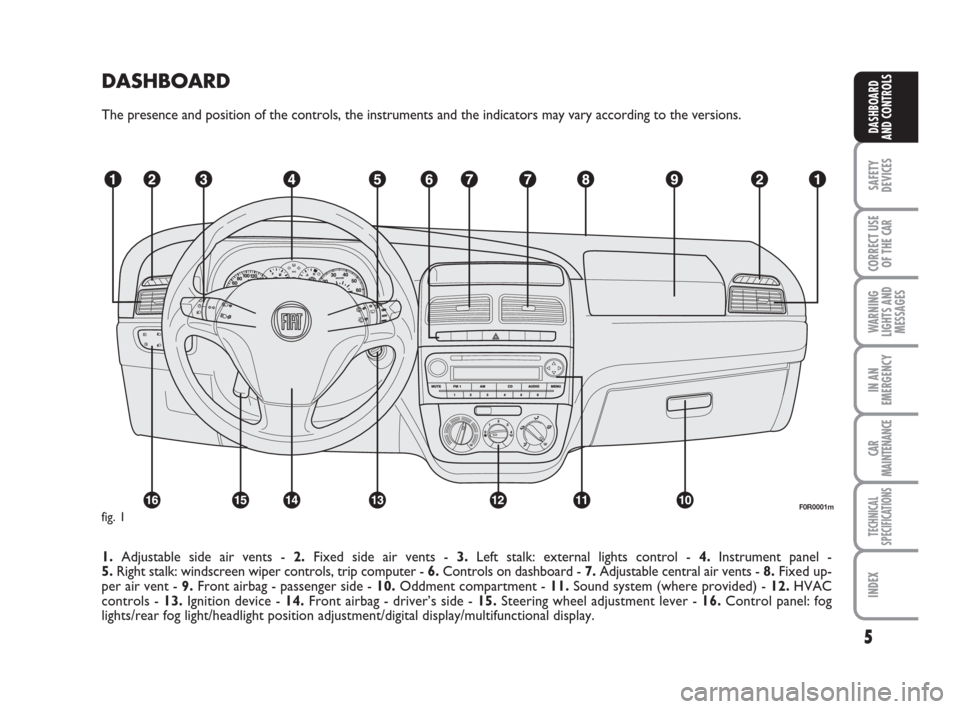
DASHBOARD
The presence and position of the controls, the instruments and the indicators may vary according to the versions.
1.Adjustable side air vents - 2.Fixed side air vents - 3.Left stalk: external lights control - 4.Instrument panel -
5.Right stalk: windscreen wiper controls, trip computer - 6.Controls on dashboard - 7.Adjustable central air vents - 8.Fixed up-
per air vent - 9.Front airbag - passenger side - 10.Oddment compartment - 11.Sound system (where provided) - 12.HVAC
controls - 13.Ignition device - 14.Front airbag - driver’s side - 15. Steering wheel adjustment lever - 16.Control panel: fog
lights/rear fog light/headlight position adjustment/digital display/multifunctional display.
F0R0001mfig. 1
001-031 LINEA 1ed GB 4-09-2008 14:55 Pagina 5
Page 15 of 234
14
SAFETY
DEVICES
CORRECT USE
OF THE
CAR
WARNING
LIGHTS AND
MESSAGES
IN AN
EMERGENCY
CAR
MAINTENANCE
TECHNICAL
SPECIFICATIONS
INDEX
DASHBOARD
AND CONTROLS
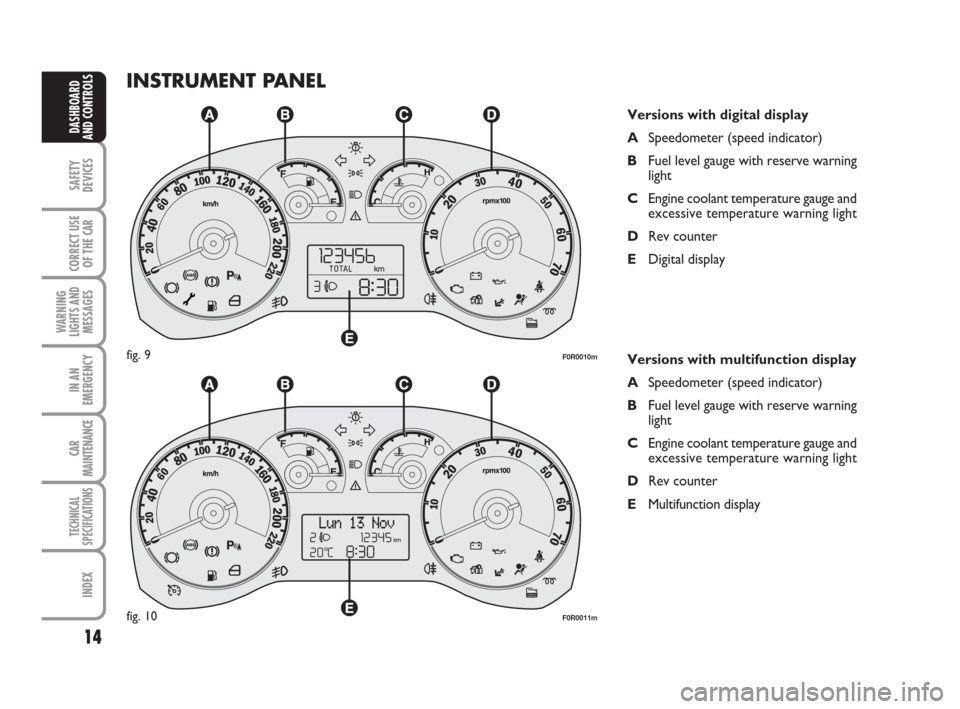
INSTRUMENT PANEL
Versions with digital display
ASpeedometer (speed indicator)
BFuel level gauge with reserve warning
light
CEngine coolant temperature gauge and
excessive temperature warning light
DRev counter
EDigital display
Versions with multifunction display
ASpeedometer (speed indicator)
BFuel level gauge with reserve warning
light
CEngine coolant temperature gauge and
excessive temperature warning light
DRev counter
EMultifunction display
F0R0010mfig. 9
F0R0011mfig. 10
001-031 LINEA 1ed GB 4-09-2008 14:55 Pagina 14
Page 19 of 234
18
SAFETY
DEVICES
CORRECT USE
OF THE
CAR
WARNING
LIGHTS AND
MESSAGES
IN AN
EMERGENCY
CAR
MAINTENANCE
TECHNICAL
SPECIFICATIONS
INDEX
DASHBOARD
AND CONTROLS
DIGITAL DISPLAY
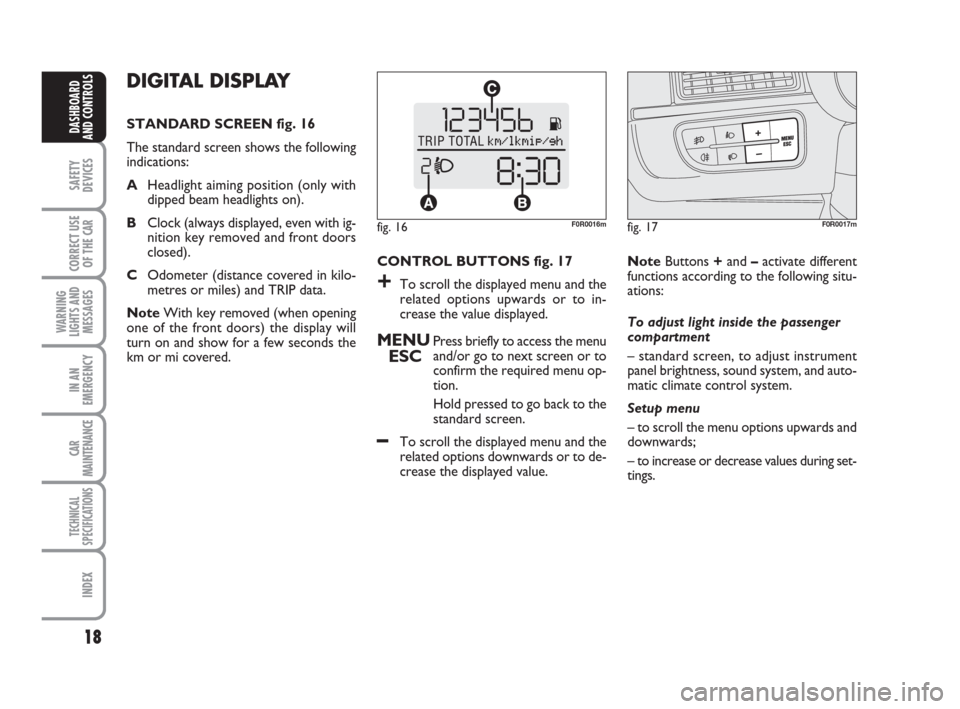
STANDARD SCREEN fig. 16
The standard screen shows the following
indications:
AHeadlight aiming position (only with
dipped beam headlights on).
BClock (always displayed, even with ig-
nition key removed and front doors
closed).
COdometer (distance covered in kilo-
metres or miles) and TRIP data.
NoteWith key removed (when opening
one of the front doors) the display will
turn on and show for a few seconds the
km or mi covered.CONTROL BUTTONS fig. 17
+To scroll the displayed menu and the
related options upwards or to in-
crease the value displayed.
MENU
ESCPress briefly to access the menu
and/or go to next screen or to
confirm the required menu op-
tion.
Hold pressed to go back to the
standard screen.
–To scroll the displayed menu and the
related options downwards or to de-
crease the displayed value. NoteButtons +and –activate different
functions according to the following situ-
ations:
To adjust light inside the passenger
compartment
– standard screen, to adjust instrument
panel brightness, sound system, and auto-
matic climate control system.
Setup menu
– to scroll the menu options upwards and
downwards;
– to increase or decrease values during set-
tings.
fig. 16F0R0016mfig. 17F0R0017m
001-031 LINEA 1ed GB 4-09-2008 14:55 Pagina 18
Page 24 of 234
23
SAFETY
DEVICES
CORRECT USE
OF THE
CAR
WARNING
LIGHTS AND
MESSAGES
IN AN
EMERGENCY
CAR
MAINTENANCE
TECHNICAL
SPECIFICATIONS
INDEX
DASHBOARD
AND CONTROLS
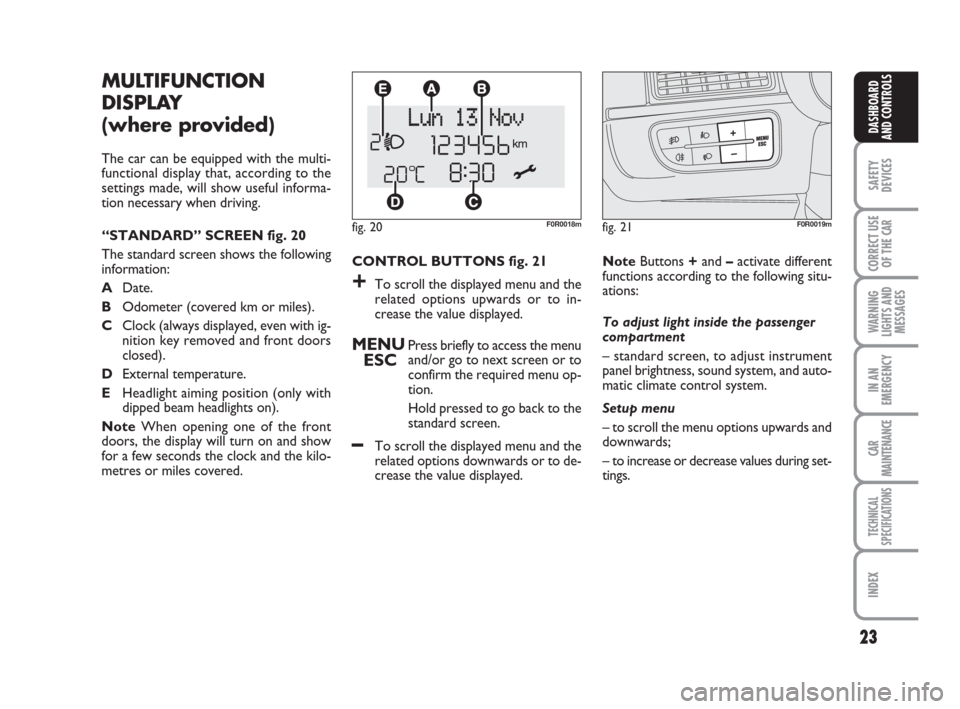
CONTROL BUTTONS fig. 21
+To scroll the displayed menu and the
related options upwards or to in-
crease the value displayed.
MENU
ESCPress briefly to access the menu
and/or go to next screen or to
confirm the required menu op-
tion.
Hold pressed to go back to the
standard screen.
–To scroll the displayed menu and the
related options downwards or to de-
crease the value displayed.
MULTIFUNCTION
DISPLAY
(where provided)
The car can be equipped with the multi-
functional display that, according to the
settings made, will show useful informa-
tion necessary when driving.
“STANDARD” SCREEN fig. 20
The standard screen shows the following
information:
ADate.
BOdometer (covered km or miles).
CClock (always displayed, even with ig-
nition key removed and front doors
closed).
DExternal temperature.
EHeadlight aiming position (only with
dipped beam headlights on).
NoteWhen opening one of the front
doors, the display will turn on and show
for a few seconds the clock and the kilo-
metres or miles covered.
fig. 20F0R0018m
NoteButtons +and –activate different
functions according to the following situ-
ations:
To adjust light inside the passenger
compartment
– standard screen, to adjust instrument
panel brightness, sound system, and auto-
matic climate control system.
Setup menu
– to scroll the menu options upwards and
downwards;
– to increase or decrease values during set-
tings.
fig. 21F0R0019m
001-031 LINEA 1ed GB 4-09-2008 14:55 Pagina 23
Page 67 of 234
66
SAFETY
DEVICES
CORRECT USE
OF THE
CAR
WARNING
LIGHTS AND
MESSAGES
IN AN
EMERGENCY
CAR
MAINTENANCE
TECHNICAL
SPECIFICATIONS
INDEX
DASHBOARD
AND CONTROLS
EXTERNAL LIGHTS
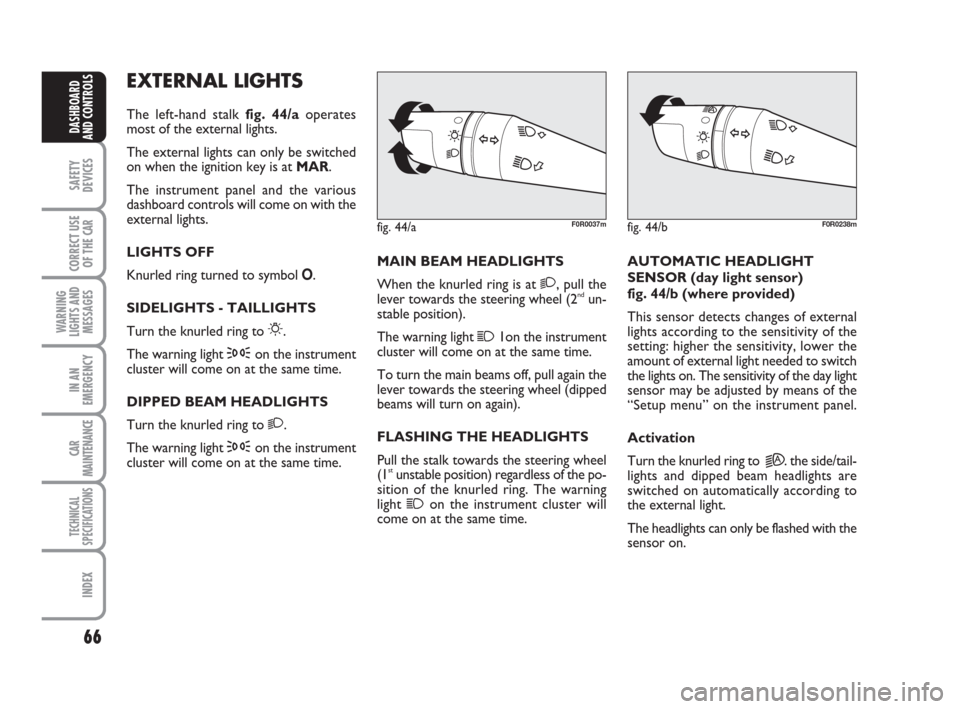
The left-hand stalk fig. 44/aoperates
most of the external lights.
The external lights can only be switched
on when the ignition key is at MAR.
The instrument panel and the various
dashboard controls will come on with the
external lights.
LIGHTS OFF
Knurled ring turned to symbol O.
SIDELIGHTS - TAILLIGHTS
Turn the knurled ring to
6.
The warning light
3on the instrument
cluster will come on at the same time.
DIPPED BEAM HEADLIGHTS
Turn the knurled ring to
2.
The warning light
3on the instrument
cluster will come on at the same time.MAIN BEAM HEADLIGHTS
When the knurled ring is at
2, pull the
lever towards the steering wheel (2ndun-
stable position).
The warning light
11on the instrument
cluster will come on at the same time.
To turn the main beams off, pull again the
lever towards the steering wheel (dipped
beams will turn on again).
FLASHING THE HEADLIGHTS
Pull the stalk towards the steering wheel
(1
stunstable position) regardless of the po-
sition of the knurled ring. The warning
light
1on the instrument cluster will
come on at the same time.AUTOMATIC HEADLIGHT
SENSOR (day light sensor)
fig. 44/b (where provided)
This sensor detects changes of external
lights according to the sensitivity of the
setting: higher the sensitivity, lower the
amount of external light needed to switch
the lights on. The sensitivity of the day light
sensor may be adjusted by means of the
“Setup menu” on the instrument panel.
Activation
Turn the knurled ring to
2A. the side/tail-
lights and dipped beam headlights are
switched on automatically according to
the external light.
The headlights can only be flashed with the
sensor on.
fig. 44/aF0R0037mfig. 44/bF0R0238m
044-090 LINEA 1ed GB 3-09-2008 17:29 Pagina 66
Page 68 of 234
67
SAFETY
DEVICES
CORRECT USE
OF THE
CAR
WARNING
LIGHTS AND
MESSAGES
IN AN
EMERGENCY
CAR
MAINTENANCE
TECHNICAL
SPECIFICATIONS
INDEX
DASHBOARD
AND CONTROLS
Deactivation
The main beam headlights will go out fol-
lowed after approximately 10 seconds by
the side/taillights when the sensor is de-
activated.
The sensor cannot detect the presence of
fog: switch the lights on manually in this
case.
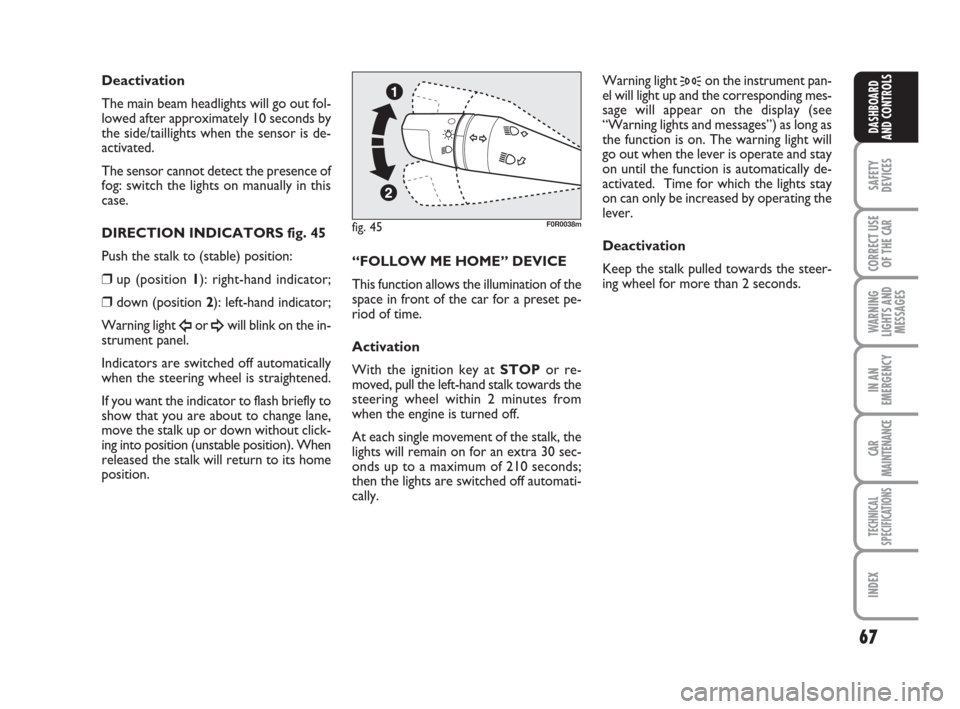
DIRECTION INDICATORS fig. 45
Push the stalk to (stable) position:
❒up (position 1): right-hand indicator;
❒down (position 2): left-hand indicator;
Warning light
Îor ¥will blink on the in-
strument panel.
Indicators are switched off automatically
when the steering wheel is straightened.
If you want the indicator to flash briefly to
show that you are about to change lane,
move the stalk up or down without click-
ing into position (unstable position). When
released the stalk will return to its home
position.“FOLLOW ME HOME” DEVICE
This function allows the illumination of the
space in front of the car for a preset pe-
riod of time.
Activation
With the ignition key at STOPor re-
moved, pull the left-hand stalk towards the
steering wheel within 2 minutes from
when the engine is turned off.
At each single movement of the stalk, the
lights will remain on for an extra 30 sec-
onds up to a maximum of 210 seconds;
then the lights are switched off automati-
cally. Warning light
3on the instrument pan-
el will light up and the corresponding mes-
sage will appear on the display (see
“Warning lights and messages”) as long as
the function is on. The warning light will
go out when the lever is operate and stay
on until the function is automatically de-
activated. Time for which the lights stay
on can only be increased by operating the
lever.
Deactivation
Keep the stalk pulled towards the steer-
ing wheel for more than 2 seconds.
fig. 45F0R0038m
044-090 LINEA 1ed GB 3-09-2008 17:29 Pagina 67
Page 71 of 234
70
SAFETY
DEVICES
CORRECT USE
OF THE
CAR
WARNING
LIGHTS AND
MESSAGES
IN AN
EMERGENCY
CAR
MAINTENANCE
TECHNICAL
SPECIFICATIONS
INDEX
DASHBOARD
AND CONTROLS
CRUISE CONTROL
(constant speed
regulator)
(where provided)
It is a device able to support the driver,
with electronic control, which allows dri-
ving at speed over 30 km/h on long and
straight dry roads (e.g.: motorways), at a
desired speed, without pressing the ac-
celerator pedal. Therefore it is not sug-
gested to use this device on extra-urban
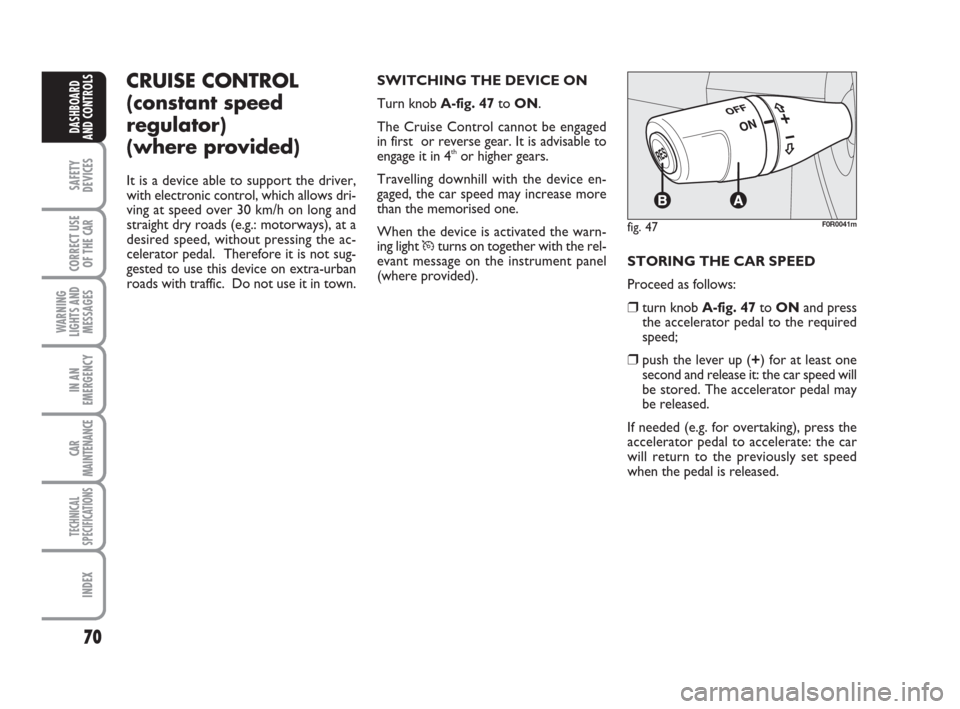
roads with traffic. Do not use it in town.SWITCHING THE DEVICE ON
Turn knob A-fig. 47to ON.
The Cruise Control cannot be engaged
in first or reverse gear. It is advisable to
engage it in 4
thor higher gears.
Travelling downhill with the device en-
gaged, the car speed may increase more
than the memorised one.
When the device is activated the warn-
ing light
Üturns on together with the rel-
evant message on the instrument panel
(where provided).STORING THE CAR SPEED
Proceed as follows:
❒turn knob A-fig. 47to ONand press
the accelerator pedal to the required
speed;
❒push the lever up (+) for at least one
second and release it: the car speed will
be stored. The accelerator pedal may
be released.
If needed (e.g. for overtaking), press the
accelerator pedal to accelerate: the car
will return to the previously set speed
when the pedal is released.
fig. 47F0R0041m
044-090 LINEA 1ed GB 3-09-2008 17:29 Pagina 70
Page 77 of 234
76
SAFETY
DEVICES
CORRECT USE
OF THE
CAR
WARNING
LIGHTS AND
MESSAGES
IN AN
EMERGENCY
CAR
MAINTENANCE
TECHNICAL
SPECIFICATIONS
INDEX
DASHBOARD
AND CONTROLS
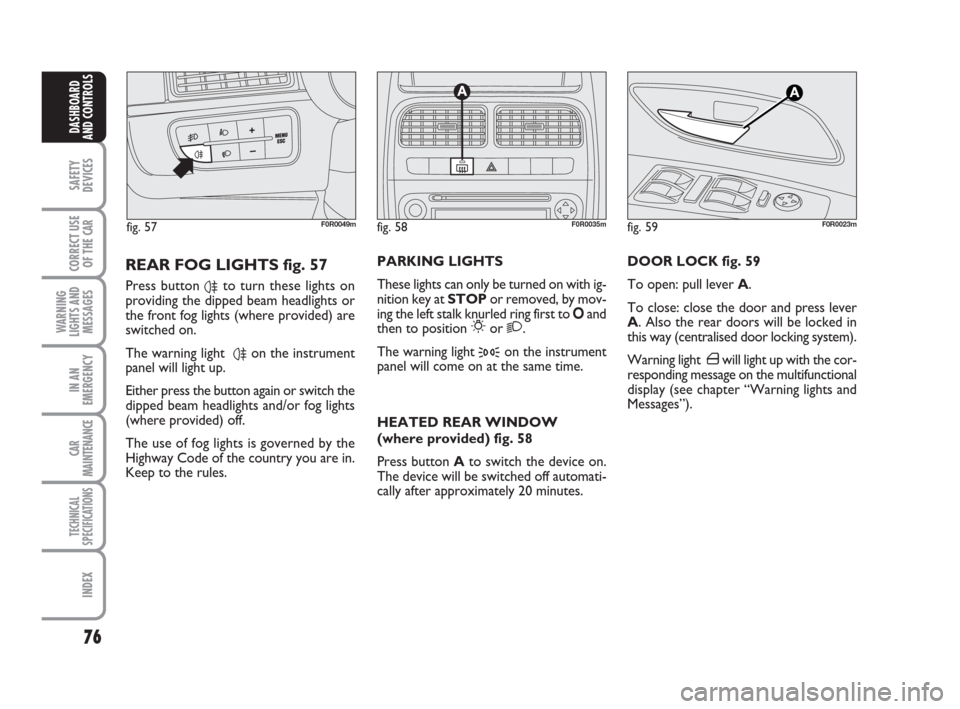
DOOR LOCK fig. 59
To open: pull lever A.
To close: close the door and press lever
A. Also the rear doors will be locked in
this way (centralised door locking system).
Warning light ´will light up with the cor-
responding message on the multifunctional
display (see chapter “Warning lights and
Messages”).
fig. 58F0R0035m
PARKING LIGHTS
These lights can only be turned on with ig-
nition key at STOPor removed, by mov-
ing the left stalk knurled ring first to Oand
then to position
6or 2.
The warning light
3on the instrument
panel will come on at the same time.
HEATED REAR WINDOW
(where provided) fig. 58
Press button Ato switch the device on.
The device will be switched off automati-
cally after approximately 20 minutes.
REAR FOG LIGHTS fig. 57
Press button 4to turn these lights on
providing the dipped beam headlights or
the front fog lights (where provided) are
switched on.
The warning light
4on the instrument
panel will light up.
Either press the button again or switch the
dipped beam headlights and/or fog lights
(where provided) off.
The use of fog lights is governed by the
Highway Code of the country you are in.
Keep to the rules.
fig. 59F0R0023mfig. 57F0R0049m
044-090 LINEA 1ed GB 3-09-2008 17:29 Pagina 76
Page 92 of 234
91
SAFETY
DEVICES
CORRECT USE
OF THE
CAR
WARNING
LIGHTS AND
MESSAGES
IN AN
EMERGENCY
CAR
MAINTENANCE
TECHNICAL
SPECIFICATIONS
INDEX
DASHBOARD
AND CONTROLS
HEADLIGHTS
BEAM DIRECTION
Correction direction of the headlights is
essentially for the comfort and safety of
the driver and the other road users. The
headlights must be correctly directed to
ensure the best visibility conditions when
the headlights are on. Contact Fiat Deal-
ership to have the headlights properly ad-
justed.
HEADLIGHT AIMING DEVICE
This device works with the key at MAR
and the dipped beam headlights on. The
car will slant backwards when it is loaded,
raising the light beam. The beams must
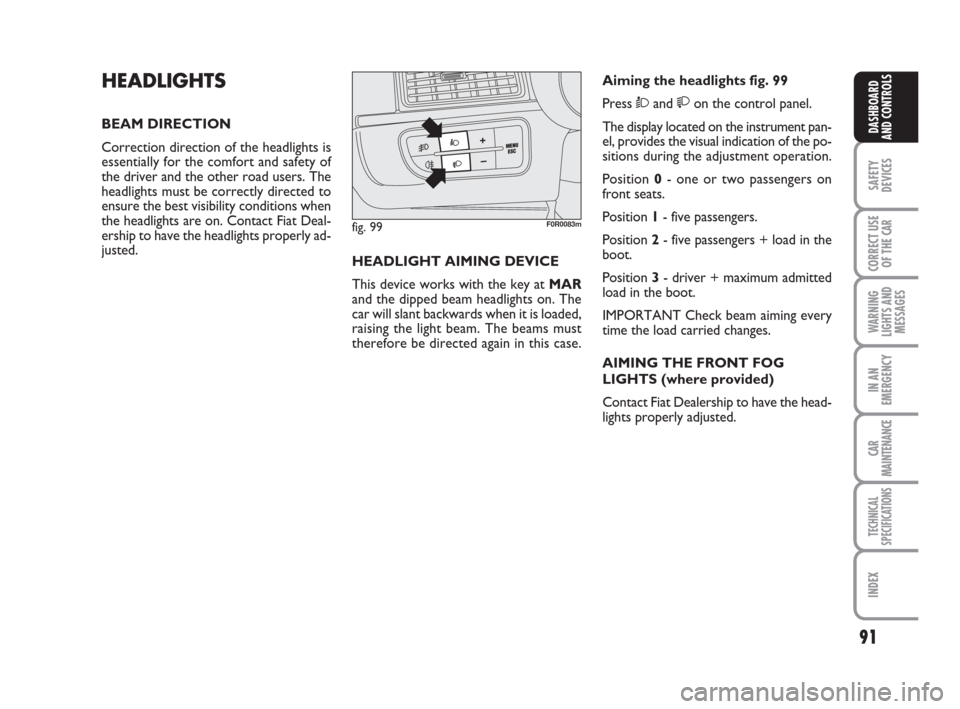
therefore be directed again in this case.Aiming the headlights fig. 99
Press Òand on the control panel.
The display located on the instrument pan-
el, provides the visual indication of the po-
sitions during the adjustment operation.
Position 0- one or two passengers on
front seats.
Position 1- five passengers.
Position 2- five passengers + load in the
boot.
Position 3- driver + maximum admitted
load in the boot.
IMPORTANT Check beam aiming every
time the load carried changes.
AIMING THE FRONT FOG
LIGHTS (where provided)
Contact Fiat Dealership to have the head-
lights properly adjusted.
fig. 99F0R0083m
091-102 LINEA 1ed GB 3-09-2008 17:29 Pagina 91