key FIAT PANDA 2007 169 / 2.G User Guide
[x] Cancel search | Manufacturer: FIAT, Model Year: 2007, Model line: PANDA, Model: FIAT PANDA 2007 169 / 2.GPages: 206, PDF Size: 3.49 MB
Page 21 of 206
20
SAFETY
DEVICES
CORRECT USE
OF THE CAR
WARNING
LIGHTS AND
MESSAGES
IN AN
EMERGENCY
CAR
MAINTENANCE
TECHNICAL
SPECIFICATIONS
INDEX
DASHBOARD
AND CONTROLS
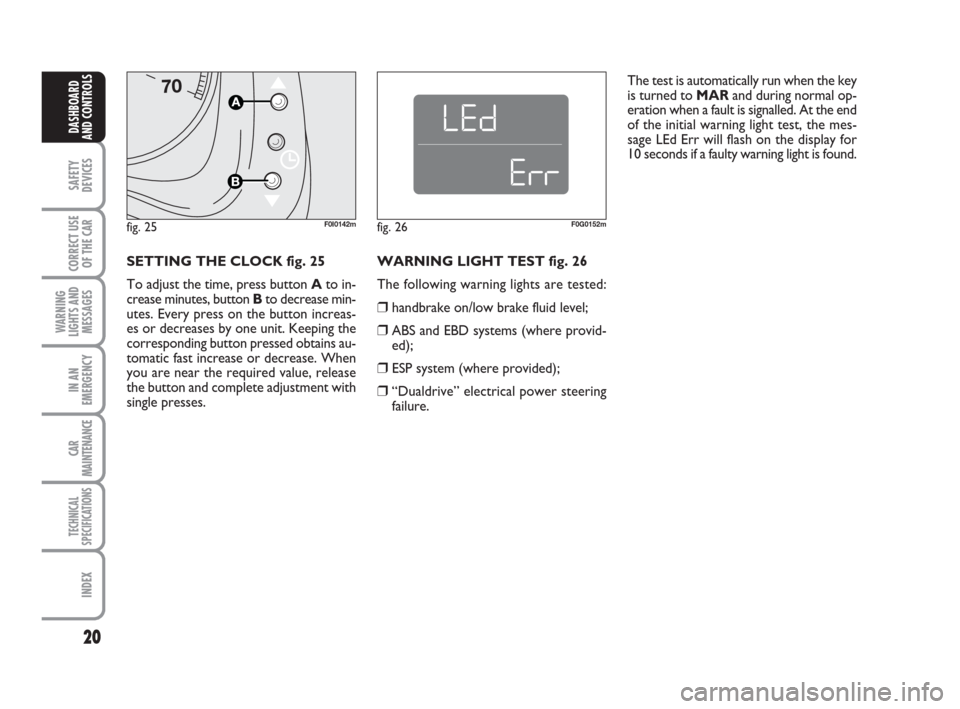
SETTING THE CLOCK fig. 25
To adjust the time, press button Ato in-
crease minutes, button Bto decrease min-
utes. Every press on the button increas-
es or decreases by one unit. Keeping the
corresponding button pressed obtains au-
tomatic fast increase or decrease. When
you are near the required value, release
the button and complete adjustment with
single presses.
fig. 25F0I0142m
WARNING LIGHT TEST fig. 26
The following warning lights are tested:
❒handbrake on/low brake fluid level;
❒ABS and EBD systems (where provid-
ed);
❒ESP system (where provided);
❒“Dualdrive” electrical power steering
failure.
fig. 26F0G0152m
The test is automatically run when the key
is turned to MARand during normal op-
eration when a fault is signalled. At the end
of the initial warning light test, the mes-
sage LEd Err will flash on the display for
10 seconds if a faulty warning light is found.
001-031 Panda New GB 21-06-2007 13:47 Pagina 20
Page 28 of 206
27
SAFETY
DEVICES
CORRECT USE
OF THE CAR
WARNING
LIGHTS AND
MESSAGES
IN AN
EMERGENCY
CAR
MAINTENANCE
TECHNICAL
SPECIFICATIONS
INDEX
DASHBOARD
AND CONTROLS
Adjusting the failure/warning
buzzer volume (Buzzer Volume)
With this function the volume of the
buzzer accompanying any failure/warning
indication can be adjusted according to 8
levels.
To set the required the volume, proceed
as follows:
– briefly press button MODE: the previ-
ously set volume “level” will flash on the
display;
– press button +or –for setting;
– briefly press button MODEto go back
to the menu screen or press the button
for long to go back to the standard screen
without storing settings.Adjusting the button volume
(Vol. key)
With this function the volume of the
roger-beep accompanying the activation
of buttons MODE, +and –can be ad-
justed according to 8 levels.
To set the required the volume, proceed
as follows:
– briefly press button MODE: the previ-
ously set volume “level” will flash on the
display;
– press button +or –for setting;
– briefly press button MODEto go back
to the menu screen or press the button
for long to go back to the standard screen
without storing settings. Selecting the language
(Set Language)
Display messages can be shown in differ-
ent languages: Italian, German, English,
Spanish, French, Portuguese, Polish and
Dutch.
To set the required language proceed as
follows:
– briefly press button MODE: the previ-
ously set “language” will flash on the dis-
play;
– press button +or –for setting;
– briefly press button MODEto go back
to the menu screen or press the button
for long to go back to the standard screen
without storing settings.
001-031 Panda New GB 21-06-2007 13:47 Pagina 27
Page 29 of 206
28
SAFETY
DEVICES
CORRECT USE
OF THE CAR
WARNING
LIGHTS AND
MESSAGES
IN AN
EMERGENCY
CAR
MAINTENANCE
TECHNICAL
SPECIFICATIONS
INDEX
DASHBOARD
AND CONTROLS
NoteThe “Service Schedule includes car
maintenance every 20,000 km (or 12,000
mi); this is shown automatically, with the
ignition key at MAR, starting from 2,000
km (or the equivalent value in miles) from
this deadline and it is shown again every
200 km (or the equivalent value in miles).
Below 200 km servicing indications are
displayed more frequently. Service indica-
tions will be displayed km or mi according
to previous unit setting. When a pro-
grammed maintenance interval (coupon)
is near to come, turning the ignition key
to MAR, the display will show the mes-
sage “Service” followed by the number of
km/mi to go before car servicing. Contact
a Fiat Dealership to carry out any service
operation provided by the “Service sched-
ule” and to reset the display.Exit Menu
This is the last function that closes the cir-
cular setting cycle listed in the initial menu
screen.
Briefly press button MODEto go back to
the standard screen without storing set-
tings.
Press button –to return to the first menu
option (Speed Lim.). Scheduled Servicing (Service)
Through this function it is possible to dis-
play information connected to proper car
servicing.
Proceed as follows:
– briefly press button MODE: service in
km or mi, according to previous setting,
will be displayed (see paragraph “Units”);
– briefly press button MODEto go back
to the menu screen or press the button
for long to go back to the standard screen.
001-031 Panda New GB 21-06-2007 13:47 Pagina 28
Page 30 of 206
29
SAFETY
DEVICES
CORRECT USE
OF THE CAR
WARNING
LIGHTS AND
MESSAGES
IN AN
EMERGENCY
CAR
MAINTENANCE
TECHNICAL
SPECIFICATIONS
INDEX
DASHBOARD
AND CONTROLS
TRIP COMPUTER
(where provided)
General features
The “Trip computer” is provided on cars
fitted with multifunction display or re-
configurable multifunction display. The
“Trip computer” displays information
(with ignition key at MAR) relating to the
operating status of the car. This function
comprises the “General trip” concerning
the “complete mission” of the car (jour-
ney) and “Trip B”, (only available on re-
configurable multifunction display), con-
cerning the partial mission of the car; this
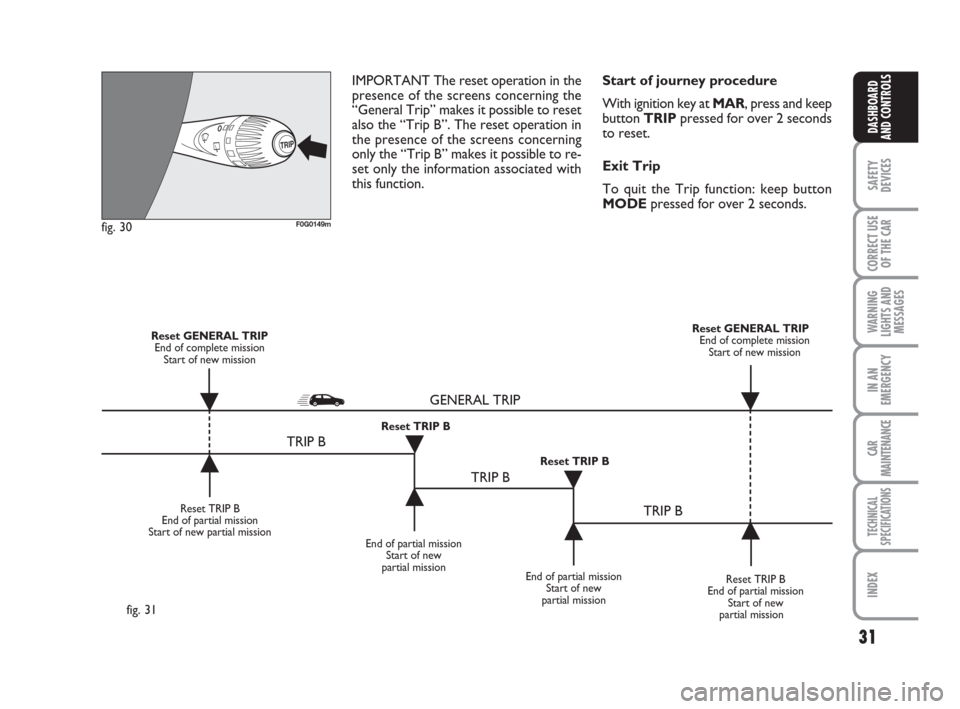
latter function (as shown in fig. 31) is “con-
tained” within the complete mission.Both functions are resettable (reset - start
of new mission).
“General Trip” displays the figures relat-
ing to:
– Range to empty (where provided)
– Trip distance
– Average consumption (where provided)
– Instant consumption (where provided)
– Average speed
– Trip time (driving time).“Trip B” (only available on reconfigurable
multifunction display), displays the figures
relating to:
– Trip distance B
– Average consumption B (where provided)
– Average speed B
– Trip time B (driving time).
NoteThe “Trip B” function can be ex-
cluded (see paragraph “Trip B On/Off”).
“Range to empty” cannot be reset.
001-031 Panda New GB 21-06-2007 13:47 Pagina 29
Page 31 of 206
30
SAFETY
DEVICES
CORRECT USE
OF THE CAR
WARNING
LIGHTS AND
MESSAGES
IN AN
EMERGENCY
CAR
MAINTENANCE
TECHNICAL
SPECIFICATIONS
INDEX
DASHBOARD
AND CONTROLS
Average speed
This value shows the car average speed as
a function of the overall time elapsed since
the start of the new mission.
Trip time
This value shows the time elapsed since
the start of the new mission.
IMPORTANT Lacking information, Trip
computer values are displayed with “----”.
When normal operating condition is re-
set, calculation of different units will
restart regularly. Values displayed before
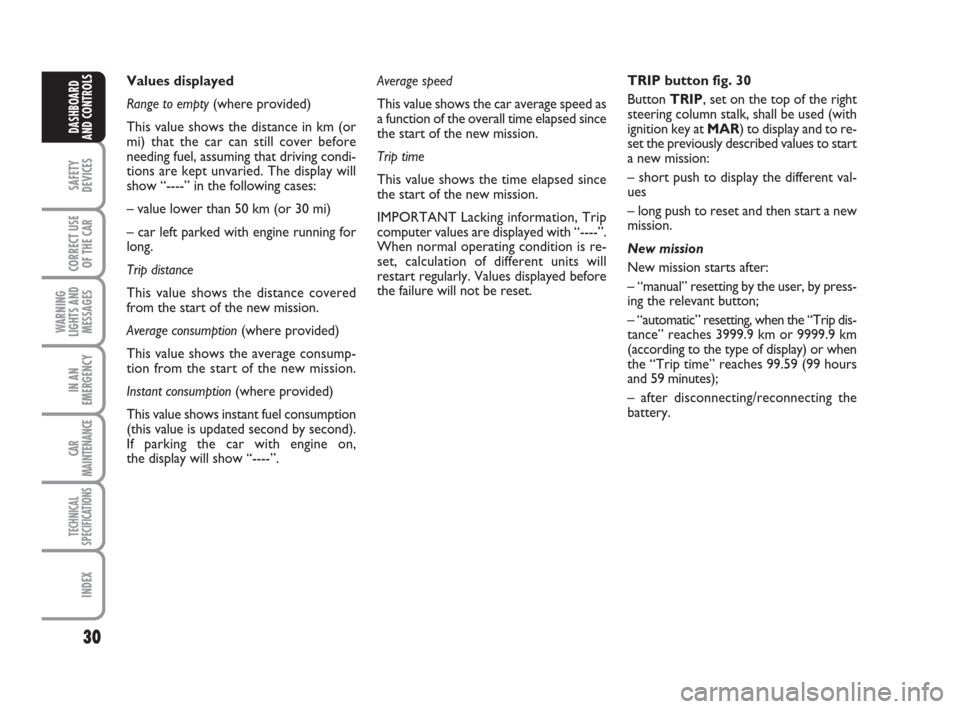
the failure will not be reset.TRIP button fig. 30
Button TRIP, set on the top of the right
steering column stalk, shall be used (with
ignition key at MAR) to display and to re-
set the previously described values to start
a new mission:
– short push to display the different val-
ues
– long push to reset and then start a new
mission.
New mission
New mission starts after:
– “manual” resetting by the user, by press-
ing the relevant button;
– “automatic” resetting, when the “Trip dis-
tance” reaches 3999.9 km or 9999.9 km
(according to the type of display) or when
the “Trip time” reaches 99.59 (99 hours
and 59 minutes);
– after disconnecting/reconnecting the
battery. Values displayed
Range to empty (where provided)
This value shows the distance in km (or
mi) that the car can still cover before
needing fuel, assuming that driving condi-
tions are kept unvaried. The display will
show “----” in the following cases:
– value lower than 50 km (or 30 mi)
– car left parked with engine running for
long.
Trip distance
This value shows the distance covered
from the start of the new mission.
Average consumption (where provided)
This value shows the average consump-
tion from the start of the new mission.
Instant consumption (where provided)
This value shows instant fuel consumption
(this value is updated second by second).
If parking the car with engine on,
the display will show “----”.
001-031 Panda New GB 21-06-2007 13:47 Pagina 30
Page 32 of 206
31
SAFETY
DEVICES
CORRECT USE
OF THE CAR
WARNING
LIGHTS AND
MESSAGES
IN AN
EMERGENCY
CAR
MAINTENANCE
TECHNICAL
SPECIFICATIONS
INDEX
DASHBOARD
AND CONTROLS
Start of journey procedure
With ignition key at MAR, press and keep
button TRIPpressed for over 2 seconds
to reset.
Exit Trip
To quit the Trip function: keep button
MODEpressed for over 2 seconds. IMPORTANT The reset operation in the
presence of the screens concerning the
“General Trip” makes it possible to reset
also the “Trip B”. The reset operation in
the presence of the screens concerning
only the “Trip B” makes it possible to re-
set only the information associated with
this function.
TRIP
F0G0149mfig. 30
Reset TRIP B
End of partial mission
Start of new partial mission
End of partial mission
Start of new
partial mission
Reset TRIP B
End of partial mission
Start of new
partial mission Reset GENERAL TRIP
End of complete mission
Start of new missionReset GENERAL TRIP
End of complete mission
Start of new mission
End of partial mission
Start of new
partial mission Reset TRIP B
Reset TRIP B
TRIP B
TRIP B
TRIP B GENERAL TRIP˙
˙
˙
˙˙
˙
˙ ˙
fig. 31
001-031 Panda New GB 21-06-2007 13:47 Pagina 31
Page 49 of 206
48
SAFETY
DEVICES
CORRECT USE
OF THE CAR
WARNING
LIGHTS AND
MESSAGES
IN AN
EMERGENCY
CAR
MAINTENANCE
TECHNICAL
SPECIFICATIONS
INDEX
DASHBOARD
AND CONTROLS
Pulling the lever towards the steering
wheel again, the main beams are turned
off and the dipped beams on.
FLASHING THE HEADLIGHTS
fig. 51
Pull the lever towards the steering wheel
(unstable position).
The warning light
1on the instrument
cluster will come on.
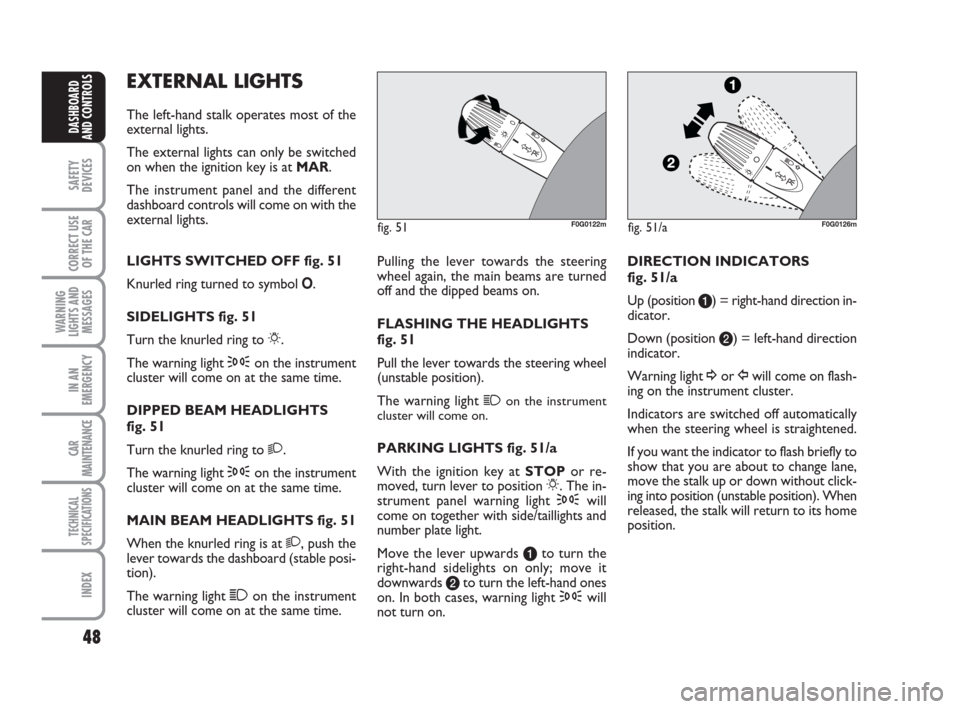
PARKING LIGHTS fig. 51/a
With the ignition key atSTOPor re-
moved, turn lever to position 6. The in-
strument panel warning light 3will
come on together with side/taillights and
number plate light.
Move the lever upwards ato turn the
right-hand sidelights on only; move it
downwards bto turn the left-hand ones
on. In both cases, warning light 3will
not turn on.DIRECTION INDICATORS
fig. 51/a
Up (position a) = right-hand direction in-
dicator.
Down (position b) = left-hand direction
indicator.
Warning light ¥or Îwill come on flash-
ing on the instrument cluster.
Indicators are switched off automatically
when the steering wheel is straightened.
If you want the indicator to flash briefly to
show that you are about to change lane,
move the stalk up or down without click-
ing into position (unstable position). When
released, the stalk will return to its home
position.
EXTERNAL LIGHTS
The left-hand stalk operates most of the
external lights.
The external lights can only be switched
on when the ignition key is at MAR.
The instrument panel and the different
dashboard controls will come on with the
external lights.
LIGHTS SWITCHED OFF fig. 51
Knurled ring turned to symbol O.
SIDELIGHTS fig. 51
Turn the knurled ring to 6.
The warning light 3on the instrument
cluster will come on at the same time.
DIPPED BEAM HEADLIGHTS
fig. 51
Turn the knurled ring to 2.
The warning light 3on the instrument
cluster will come on at the same time.
MAIN BEAM HEADLIGHTS fig. 51
When the knurled ring is at 2, push the
lever towards the dashboard (stable posi-
tion).
The warning light 1on the instrument
cluster will come on at the same time.
F0G0126mfig. 51/aF0G0122mfig. 51
032-059 Panda New GB 21-06-2007 13:48 Pagina 48
Page 50 of 206
49
SAFETY
DEVICES
CORRECT USE
OF THE CAR
WARNING
LIGHTS AND
MESSAGES
IIN AN
EMERGENCY
CAR
MAINTENANCE
TECHNICAL
SPECIFICATIONS
INDEX
DASHBOARD
AND CONTROLS
WINDOW WASHING
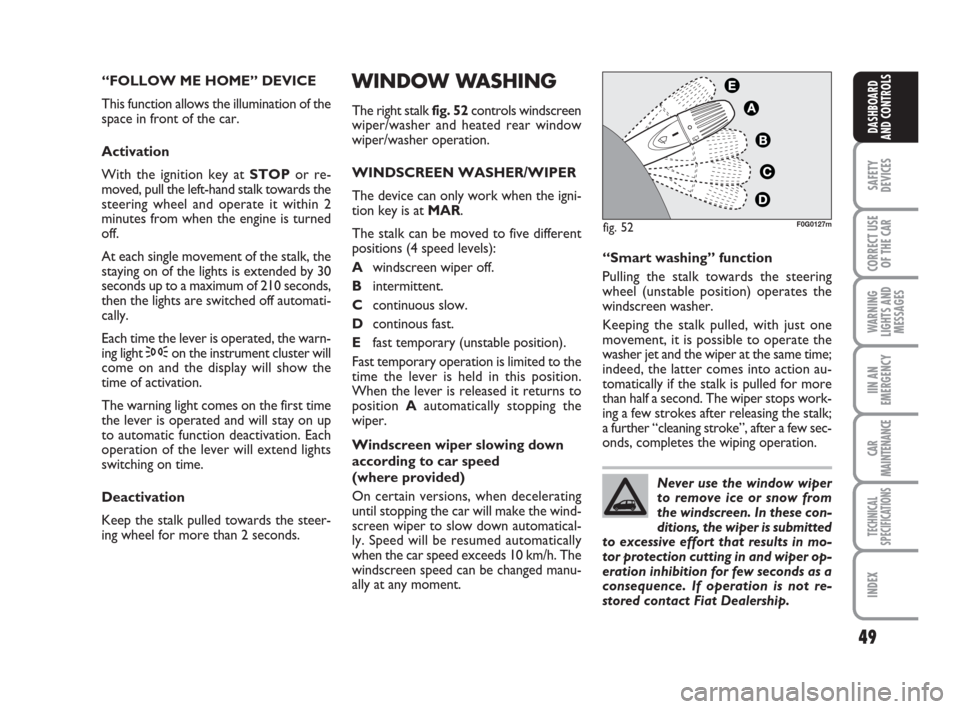
The right stalk fig. 52controls windscreen
wiper/washer and heated rear window
wiper/washer operation.
WINDSCREEN WASHER/WIPER
The device can only work when the igni-
tion key is at MAR.
The stalk can be moved to five different
positions (4 speed levels):
Awindscreen wiper off.
Bintermittent.
Ccontinuous slow.
Dcontinous fast.
Efast temporary (unstable position).
Fast temporary operation is limited to the
time the lever is held in this position.
When the lever is released it returns to
position Aautomatically stopping the
wiper.
Windscreen wiper slowing down
according to car speed
(where provided)
On certain versions, when decelerating
until stopping the car will make the wind-
screen wiper to slow down automatical-
ly. Speed will be resumed automatically
when the car speed exceeds 10 km/h. The
windscreen speed can be changed manu-
ally at any moment.“Smart washing” function
Pulling the stalk towards the steering
wheel (unstable position) operates the
windscreen washer.
Keeping the stalk pulled, with just one
movement, it is possible to operate the
washer jet and the wiper at the same time;
indeed, the latter comes into action au-
tomatically if the stalk is pulled for more
than half a second. The wiper stops work-
ing a few strokes after releasing the stalk;
a further “cleaning stroke”, after a few sec-
onds, completes the wiping operation. “FOLLOW ME HOME” DEVICE
This function allows the illumination of the
space in front of the car.
Activation
With the ignition key atSTOPor re-
moved, pull the left-hand stalk towards the
steering wheel and operate it within 2
minutes from when the engine is turned
off.
At each single movement of the stalk, the
staying on of the lights is extended by 30
seconds up to a maximum of 210 seconds,
then the lights are switched off automati-
cally.
Each time the lever is operated, the warn-
ing light 3on the instrument cluster will
come on and the display will show the
time of activation.
The warning light comes on the first time
the lever is operated and will stay on up
to automatic function deactivation. Each
operation of the lever will extend lights
switching on time.
Deactivation
Keep the stalk pulled towards the steer-
ing wheel for more than 2 seconds.
,
F0G0127mfig. 52
Never use the window wiper
to remove ice or snow from
the windscreen. In these con-
ditions, the wiper is submitted
to excessive effort that results in mo-
tor protection cutting in and wiper op-
eration inhibition for few seconds as a
consequence. If operation is not re-
stored contact Fiat Dealership.
032-059 Panda New GB 21-06-2007 13:48 Pagina 49
Page 51 of 206
50
SAFETY
DEVICES
CORRECT USE
OF THE CAR
WARNING
LIGHTS AND
MESSAGES
IN AN
EMERGENCY
CAR
MAINTENANCE
TECHNICAL
SPECIFICATIONS
INDEX
DASHBOARD
AND CONTROLS
CEILING LIGHT
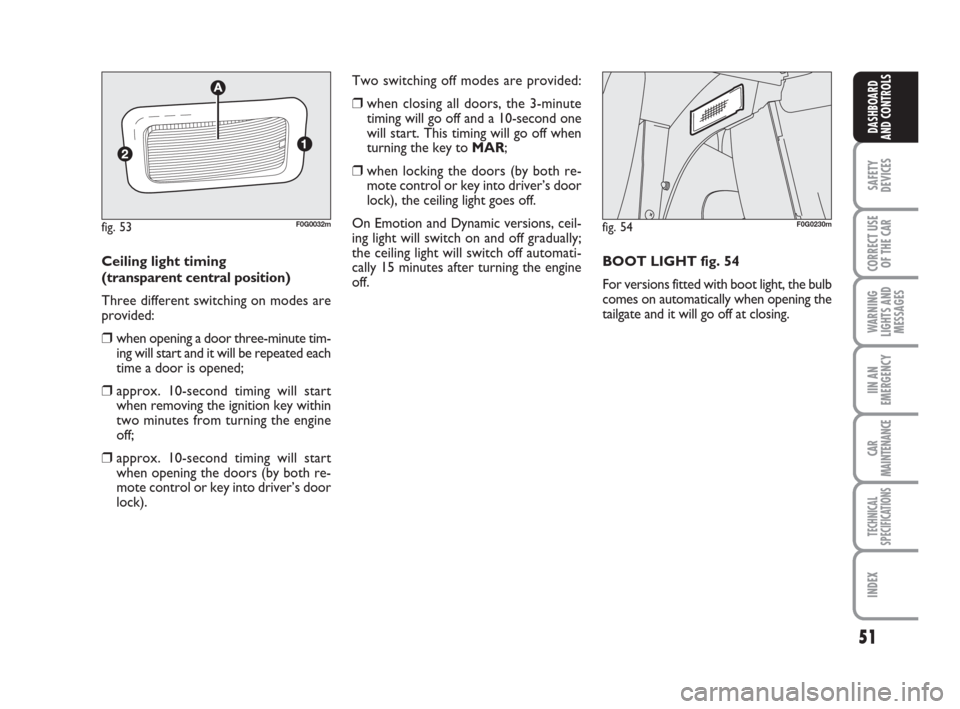
FRONT CEILING LIGHT fig. 53
The transparent Acan have three posi-
tions:
❒side apressed: light always on
❒side bpressed: light always off
❒central position (neutral): the light turns
on and off automatically when the door
is opened or closed.
IMPORTANT Before getting out of the
car, make sure the switch is at central po-
sition: lights off with doors closed in or-
der to avoid draining the battery.
For “Active” versions, automatic switching
on/off takes place only after opening or
closing the driver’s door. “Smart washing” function
Pushing the stalk towards the dashboard
(unstable position) operates the rear win-
dow wiper.
Keeping the stalk pushed, with just one
movement it is possible to operate the
washer jet and the wiper at the same time;
indeed, the latter comes into action au-
tomatically if the stalk is pulled for more
than half a second.
The rear window wiper stops working a
few strokes after releasing the stalk; a fur-
ther “cleaning stroke”, after a few sec-
onds, completes the wiping operation. REAR WINDOW WASHER/
WIPER
The device can only work when the igni-
tion key is at MAR.
Turn the knurled ring to
'to operate the
rear window wiper.
With windscreen wiper on, turning the
knurled ring to ‘ will turn on the rear win-
dow wiper, that in this case will work (in
the different positions) with timing with
the windscreen wiper, but at half speed.
With windscreen wiper on, engaging re-
verse gear will automatically turn the rear
window wiper on, in continuous slow wip-
ing mode.
The rear window wiper will stop when
disengaging reverse.
Never use the rear window
wiper to remove ice or snow
from the rear window. In
these conditions, the wiper is
submitted to excessive effort that re-
sults in motor protection cutting in and
wiper operation inhibition for few sec-
onds as a consequence. If operation is
not restored contact Fiat Dealership.
032-059 Panda New GB 21-06-2007 13:48 Pagina 50
Page 52 of 206
51
SAFETY
DEVICES
CORRECT USE
OF THE CAR
WARNING
LIGHTS AND
MESSAGES
IIN AN
EMERGENCY
CAR
MAINTENANCE
TECHNICAL
SPECIFICATIONS
INDEX
DASHBOARD
AND CONTROLS
Two switching off modes are provided:
❒when closing all doors, the 3-minute
timing will go off and a 10-second one
will start. This timing will go off when
turning the key to MAR;
❒when locking the doors (by both re-
mote control or key into driver’s door
lock), the ceiling light goes off.
On Emotion and Dynamic versions, ceil-
ing light will switch on and off gradually;
the ceiling light will switch off automati-
cally 15 minutes after turning the engine
off.BOOT LIGHT fig. 54
For versions fitted with boot light, the bulb
comes on automatically when opening the
tailgate and it will go off at closing. Ceiling light timing
(transparent central position)
Three different switching on modes are
provided:
❒when opening a door three-minute tim-
ing will start and it will be repeated each
time a door is opened;
❒approx. 10-second timing will start
when removing the ignition key within
two minutes from turning the engine
off;
❒approx. 10-second timing will start
when opening the doors (by both re-
mote control or key into driver’s door
lock).
fig. 54F0G0230mfig. 53F0G0032m
032-059 Panda New GB 21-06-2007 13:48 Pagina 51