lock FIAT PANDA 2007 169 / 2.G User Guide
[x] Cancel search | Manufacturer: FIAT, Model Year: 2007, Model line: PANDA, Model: FIAT PANDA 2007 169 / 2.GPages: 206, PDF Size: 3.49 MB
Page 25 of 206
24
SAFETY
DEVICES
CORRECT USE
OF THE CAR
WARNING
LIGHTS AND
MESSAGES
IN AN
EMERGENCY
CAR
MAINTENANCE
TECHNICAL
SPECIFICATIONS
INDEX
DASHBOARD
AND CONTROLS
– briefly press button MODE en or press
the button for long to go back to the stan-
dard screen without storing settings.
To cancel the setting, proceed as follows:
– briefly press button MODE: (On) will
flash on the display;
– press button –: (Off) will flash on the dis-
play;
– briefly press button MODEto go back
to the menu screen or press the button
for long to go back to the standard screen
without storing settings.
Trip B On/Off (tripB data)
Through this option it is possible to acti-
vate (On) or deactivate (Off) the Trip B
(partial trip).
For further information see “Trip com-
puter”.
For activation / deactivation, proceed as
follows:
– briefly press button MODE: (On) or
(Off) will flash on the display (according to
previous setting);
– press button +or –for setting;
– briefly press button MODEto go back
to the menu screen or press the button
for long to go back to the standard screen
without storing settings. Speed limit (Speed Beep)
With this function it is possible to set the
car speed limit (km/h or mph); when this
limit is exceeded the driver is immediate-
ly alerted (see section “Warning lights and
messages”).
To set the speed limit, proceed as follows:
– briefly press button MODE, the display
will show the wording (Speed Beep);
– press button +or –to select speed lim-
it activation (On) or deactivation (Off);
– if the function has been activated (On),
press buttons +or –to select the re-
quired speed limit and then press MODE
to confirm.
NoteThe possible setting is between 30 and
200 km/h, or between 20 and 125 mph de-
pending on the unit set previously (see para-
graph “Setting the distance unit (Units)”) de-
scribed later. Every press on button +/ –in-
creases/decreases by 5 units. Keeping the
button +/ –pressed obtains the automatic
fast increase or decrease. When you are
near the required setting complete adjust-
ment by single presses.
Set clock (Set time)
This function enables to set the clock
through two sub-menus: “Time” and
“Mode”.
Proceed as follows:
– briefly press button MODE, the display
will show the two sub-menus “Time” and
“Mode”;
– press button +or –to surf the two sub-
menus;
– select the required option and then
press button MODE briefly;
– if selecting “Time”, briefly press button
MODE, “hours” will flash on the display;
– press button +or –for setting;
– briefly press button MODE, “minutes”
will flash on the display;
– press button +or –for setting;
001-031 Panda New GB 21-06-2007 13:47 Pagina 24
Page 27 of 206
26
SAFETY
DEVICES
CORRECT USE
OF THE CAR
WARNING
LIGHTS AND
MESSAGES
IN AN
EMERGENCY
CAR
MAINTENANCE
TECHNICAL
SPECIFICATIONS
INDEX
DASHBOARD
AND CONTROLS
Set unit (Units)
With this function it is possible to set the
units through three sub-menus: “Distances”,
“Consumption” and “Temperature”.
To set the required unit proceed as follows:
– briefly press button MODEto display the
three sub-menus;
– press button +or –to surf the three sub-
menus;
– select the required sub-menu and then
press briefly button MODE;
– if selecting “Distances”: briefly press button
MODE, the display will show “km” or
“mi” (according to previous setting);
– press button +or –for setting;
– if selecting “Consumption”(where provid-
ed): briefly press button MODE, the dis-
play will show “km/l”, “l/100km” or “mpg”
(according to previous setting); Automatic door locking with car
running (Autoclose)
When activated (On), this function locks
automatically the doors when the car
speed exceeds 20 km/h.
To activate (On) or to deactivate (Off) this
function proceed as follows:
– briefly press button MODEto go back
to the sub-menus;
– briefly press button MODE: (On) or
(Off) will flash on the display (according to
previous setting);
– press button +or –for setting;
– briefly press button MODEto go back
to the submenu screen or press the but-
ton for long to go back to the main menu
screen without storing settings;
– press again button MODEfor long to
go back to the standard screen or to the
main menu according to the current menu
level displayed.If the distance unit set is “km” the fuel con-
sumption unit will be displayed in km/l or
l/100km.
If the distance unit set is “mi” the fuel con-
sumption unit will be displayed in “mpg”.
– press button +or –for setting;
– if selecting “Temperature”: briefly press but-
ton MODE, the display will show “°C” or
“°F” (according to previous setting);
– press button +or –for setting;
After setting, briefly press button MODE
to go back to the submenu screen or
press the button for long to go back to the
main menu screen without storing set-
tings.
– Press again button MODEfor long to
go back to the standard screen or to the
main menu according to the current menu
level displayed.
001-031 Panda New GB 21-06-2007 13:47 Pagina 26
Page 33 of 206
32
SAFETY
DEVICES
CORRECT USE
OF THE CAR
WARNING
LIGHTS AND
MESSAGES
IN AN
EMERGENCY
CAR
MAINTENANCE
TECHNICAL
SPECIFICATIONS
INDEX
DASHBOARD
AND CONTROLS
REAR SEATS
To tilt rear seats refer to paragraph “Ex-
tending the boot” in this section.
SEATS
FRONT SEATS
fig. 32F0G0029m
fig. 33F0G0030m
fig. 34F0G0031mMoving the seat backwards
or forwards fig. 32
Lift the lever Aand push the seat forwards
or backwards: in the driving position the
arms should rest on the rim of the steer-
ing wheel.
Back rest angle adjustment fig. 33
Turn the knob B.
Cushion adjustment
(where provided) fig. 34
Use lever Dto raise or lower the back
of the cushion in order to obtain the re-
quired comfortable driving position.
Only make adjustments
when the car is stationary.
WARNING
Once you have released the
lever, check that the seat is
firmly locked in the runners by trying
to move it back and forth. Failure to
lock the seat in place could result in
the seat moving suddenly and the dri-
ver losing control of the car.
WARNING
Upholstery of your car has
been designed to withstand
wear deriving from common
use of the car. You are how-
ever recommended to avoid strong
and/or continuous scratching with
clothing accessories such as metallic
buckles, studs, Velcro fastenings and
the like, since these items cause cir-
cumscribed stress of the cover fabric
that could lead to yarn breaking, and
damage the cover as a consequence.
032-059 Panda New GB 21-06-2007 13:48 Pagina 32
Page 34 of 206
33
SAFETY
DEVICES
CORRECT USE
OF THE CAR
WARNING
LIGHTS AND
MESSAGES
IIN AN
EMERGENCY
CAR
MAINTENANCE
TECHNICAL
SPECIFICATIONS
INDEX
DASHBOARD
AND CONTROLS
HEAD RESTRAINTS
FRONT fig. 37
According to versions front head re-
straints can be fixed or adjustable in height
(where provided); to adjust head re-
straints proceed as follows.
❒ To raise: raise the head restraint until
hearing the locking click.
❒ To lower: press button Aand lower
the head restraint.
fig. 37F0G0033m
Remember that the head re-
straints should be adjusted
to support the back of your head and
not your neck. Only in this position
do they exert their protective action.
WARNING
To optimise head restraint
protective action, adjust the
seat back upright and keep your head
as close as possible to the head re-
straint.
WARNING
Any adjustment of the head
restraints must be carried
out only with the car stationary and
the engine turned off.
WARNING
032-059 Panda New GB 21-06-2007 13:48 Pagina 33
Page 36 of 206
35
SAFETY
DEVICES
CORRECT USE
OF THE CAR
WARNING
LIGHTS AND
MESSAGES
IIN AN
EMERGENCY
CAR
MAINTENANCE
TECHNICAL
SPECIFICATIONS
INDEX
DASHBOARD
AND CONTROLS
REARVIEW MIRRORS
DRIVING MIRROR fig. 40
The mirror is fitted with a safety device
that causes it to be released in the event
of a violent crash.
It can be moved using the lever Ato two
different positions: normal or antiglare.
STEERING WHEEL
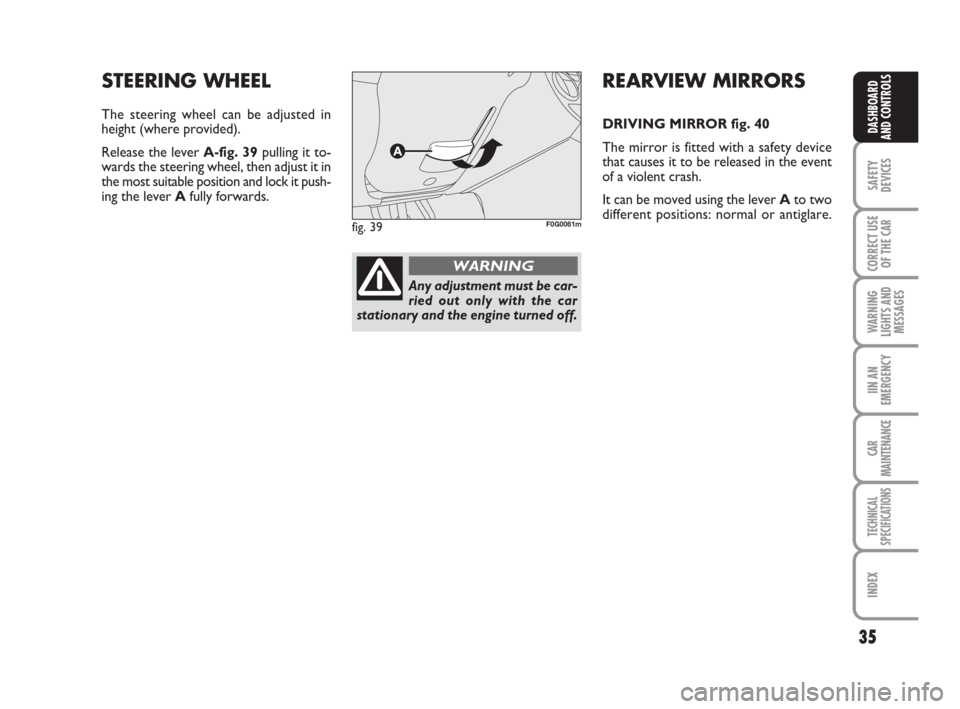
The steering wheel can be adjusted in
height (where provided).
Release the lever A-fig. 39pulling it to-
wards the steering wheel, then adjust it in
the most suitable position and lock it push-
ing the lever Afully forwards.
fig. 39F0G0061m
Any adjustment must be car-
ried out only with the car
stationary and the engine turned off.
WARNING
032-059 Panda New GB 21-06-2007 13:48 Pagina 35
Page 52 of 206
51
SAFETY
DEVICES
CORRECT USE
OF THE CAR
WARNING
LIGHTS AND
MESSAGES
IIN AN
EMERGENCY
CAR
MAINTENANCE
TECHNICAL
SPECIFICATIONS
INDEX
DASHBOARD
AND CONTROLS
Two switching off modes are provided:
❒when closing all doors, the 3-minute
timing will go off and a 10-second one
will start. This timing will go off when
turning the key to MAR;
❒when locking the doors (by both re-
mote control or key into driver’s door
lock), the ceiling light goes off.
On Emotion and Dynamic versions, ceil-
ing light will switch on and off gradually;
the ceiling light will switch off automati-
cally 15 minutes after turning the engine
off.BOOT LIGHT fig. 54
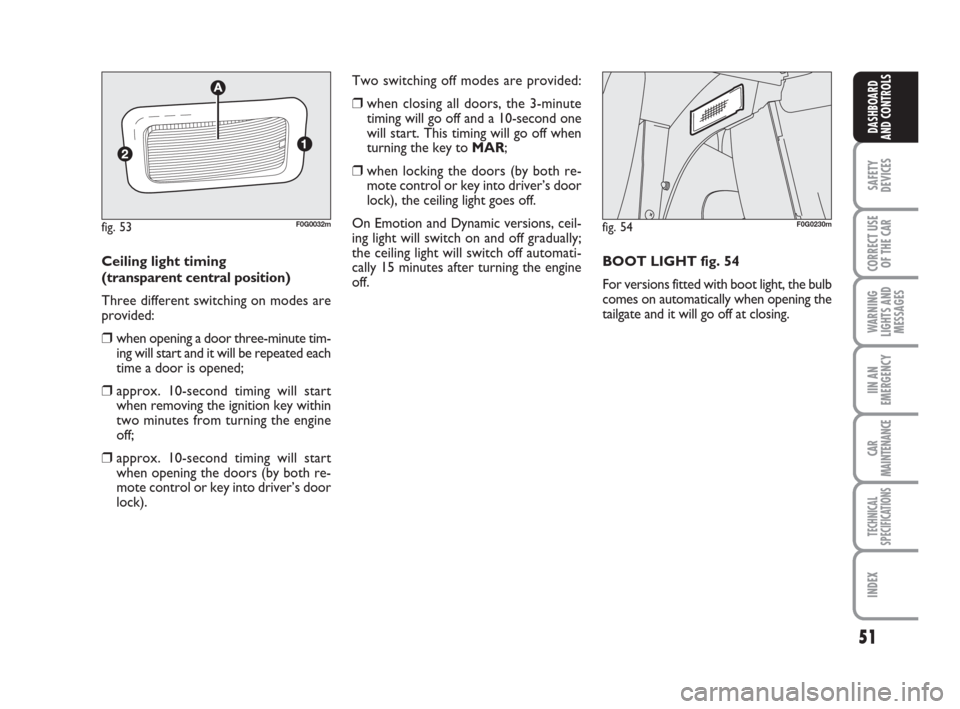
For versions fitted with boot light, the bulb
comes on automatically when opening the
tailgate and it will go off at closing. Ceiling light timing
(transparent central position)
Three different switching on modes are
provided:
❒when opening a door three-minute tim-
ing will start and it will be repeated each
time a door is opened;
❒approx. 10-second timing will start
when removing the ignition key within
two minutes from turning the engine
off;
❒approx. 10-second timing will start
when opening the doors (by both re-
mote control or key into driver’s door
lock).
fig. 54F0G0230mfig. 53F0G0032m
032-059 Panda New GB 21-06-2007 13:48 Pagina 51
Page 53 of 206
52
SAFETY
DEVICES
CORRECT USE
OF THE CAR
WARNING
LIGHTS AND
MESSAGES
IN AN
EMERGENCY
CAR
MAINTENANCE
TECHNICAL
SPECIFICATIONS
INDEX
DASHBOARD
AND CONTROLS
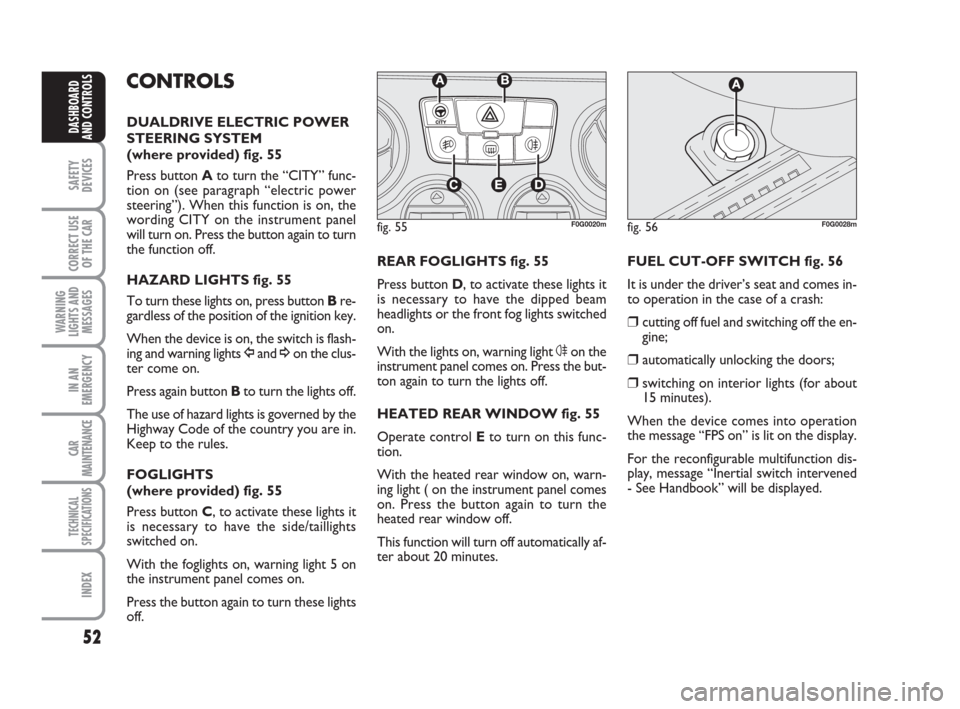
REAR FOGLIGHTS fig. 55
Press button D, to activate these lights it
is necessary to have the dipped beam
headlights or the front fog lights switched
on.
With the lights on, warning light 4on the
instrument panel comes on. Press the but-
ton again to turn the lights off.
HEATED REAR WINDOW fig. 55
Operate control Eto turn on this func-
tion.
With the heated rear window on, warn-
ing light ( on the instrument panel comes
on. Press the button again to turn the
heated rear window off.
This function will turn off automatically af-
ter about 20 minutes.FUEL CUT-OFF SWITCH fig. 56
It is under the driver’s seat and comes in-
to operation in the case of a crash:
❒cutting off fuel and switching off the en-
gine;
❒automatically unlocking the doors;
❒switching on interior lights (for about
15 minutes).
When the device comes into operation
the message “FPS on” is lit on the display.
For the reconfigurable multifunction dis-
play, message “Inertial switch intervened
- See Handbook” will be displayed.
CONTROLS
DUALDRIVE ELECTRIC POWER
STEERING SYSTEM
(where provided) fig. 55
Press button A to turn the “CITY” func-
tion on (see paragraph “electric power
steering”). When this function is on, the
wording CITY on the instrument panel
will turn on. Press the button again to turn
the function off.
HAZARD LIGHTS fig. 55
To turn these lights on, press button Bre-
gardless of the position of the ignition key.
When the device is on, the switch is flash-
ing and warning lights Îand ¥on the clus-
ter come on.
Press again buttonBto turn the lights off.
The use of hazard lights is governed by the
Highway Code of the country you are in.
Keep to the rules.
FOGLIGHTS
(where provided) fig. 55
Press button C, to activate these lights it
is necessary to have the side/taillights
switched on.
With the foglights on, warning light 5 on
the instrument panel comes on.
Press the button again to turn these lights
off.
fig. 56F0G0028mfig. 55F0G0020m
032-059 Panda New GB 21-06-2007 13:48 Pagina 52
Page 55 of 206
54
SAFETY
DEVICES
CORRECT USE
OF THE CAR
WARNING
LIGHTS AND
MESSAGES
IN AN
EMERGENCY
CAR
MAINTENANCE
TECHNICAL
SPECIFICATIONS
INDEX
DASHBOARD
AND CONTROLS
ODDMENT COMPARTMENT
UNDER THE SEAT
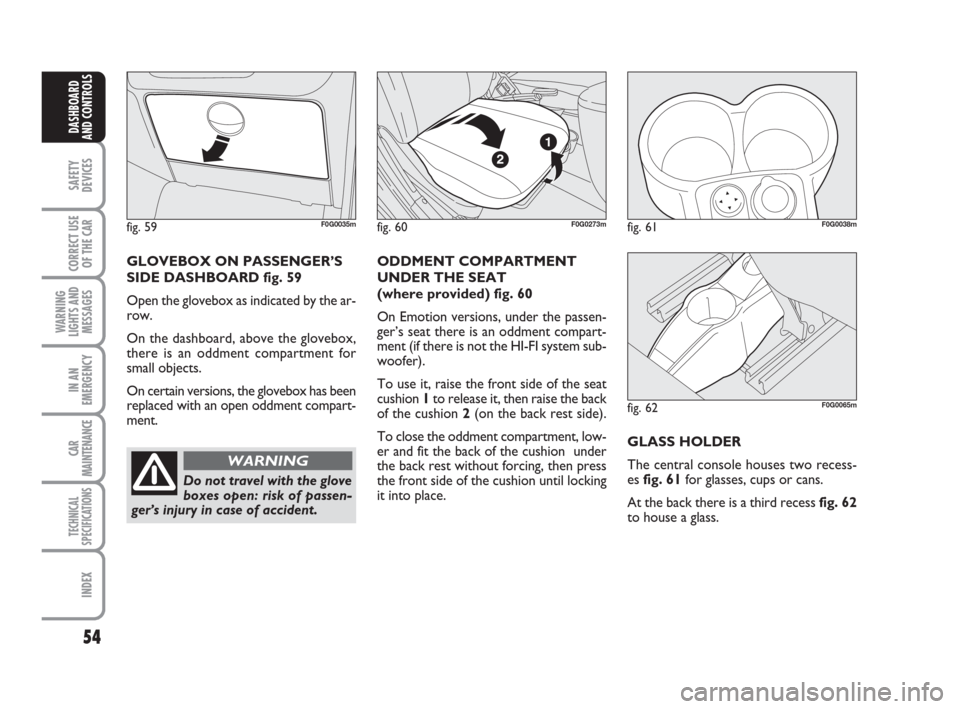
(where provided) fig. 60
On Emotion versions, under the passen-
ger’s seat there is an oddment compart-
ment (if there is not the HI-FI system sub-
woofer).
To use it, raise the front side of the seat
cushion 1to release it, then raise the back
of the cushion 2(on the back rest side).
To close the oddment compartment, low-
er and fit the back of the cushion under
the back rest without forcing, then press
the front side of the cushion until locking
it into place.GLASS HOLDER
The central console houses two recess-
es fig. 61for glasses, cups or cans.
At the back there is a third recess fig. 62
to house a glass. GLOVEBOX ON PASSENGER’S
SIDE DASHBOARD fig. 59
Open the glovebox as indicated by the ar-
row.
On the dashboard, above the glovebox,
there is an oddment compartment for
small objects.
On certain versions, the glovebox has been
replaced with an open oddment compart-
ment.
fig. 59F0G0035mfig. 60F0G0273mfig. 61
˙˙˙˙
F0G0038m
fig. 62F0G0065m
Do not travel with the glove
boxes open: risk of passen-
ger’s injury in case of accident.
WARNING
032-059 Panda New GB 21-06-2007 13:48 Pagina 54
Page 57 of 206
56
SAFETY
DEVICES
CORRECT USE
OF THE CAR
WARNING
LIGHTS AND
MESSAGES
IN AN
EMERGENCY
CAR
MAINTENANCE
TECHNICAL
SPECIFICATIONS
INDEX
DASHBOARD
AND CONTROLS
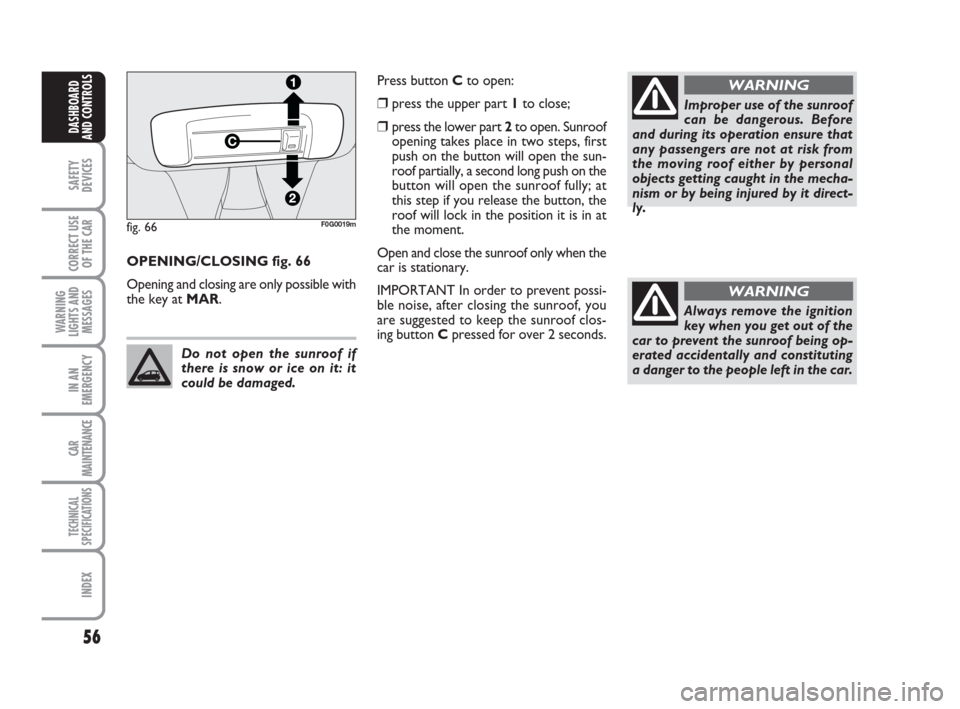
Press button Cto open:
❒press the upper part 1to close;
❒press the lower part 2to open. Sunroof
opening takes place in two steps, first
push on the button will open the sun-
roof partially, a second long push on the
button will open the sunroof fully; at
this step if you release the button, the
roof will lock in the position it is in at
the moment.
Open and close the sunroof only when the
car is stationary.
IMPORTANT In order to prevent possi-
ble noise, after closing the sunroof, you
are suggested to keep the sunroof clos-
ing button Cpressed for over 2 seconds. OPENING/CLOSING fig. 66
Opening and closing are only possible with
the key at MAR.
fig. 66F0G0019m
Do not open the sunroof if
there is snow or ice on it: it
could be damaged.
Improper use of the sunroof
can be dangerous. Before
and during its operation ensure that
any passengers are not at risk from
the moving roof either by personal
objects getting caught in the mecha-
nism or by being injured by it direct-
ly.
WARNING
Always remove the ignition
key when you get out of the
car to prevent the sunroof being op-
erated accidentally and constituting
a danger to the people left in the car.
WARNING
032-059 Panda New GB 21-06-2007 13:48 Pagina 56
Page 58 of 206
57
SAFETY
DEVICES
CORRECT USE
OF THE CAR
WARNING
LIGHTS AND
MESSAGES
IIN AN
EMERGENCY
CAR
MAINTENANCE
TECHNICAL
SPECIFICATIONS
INDEX
DASHBOARD
AND CONTROLS
DOORS
LOCKING/UNLOCKING FROM
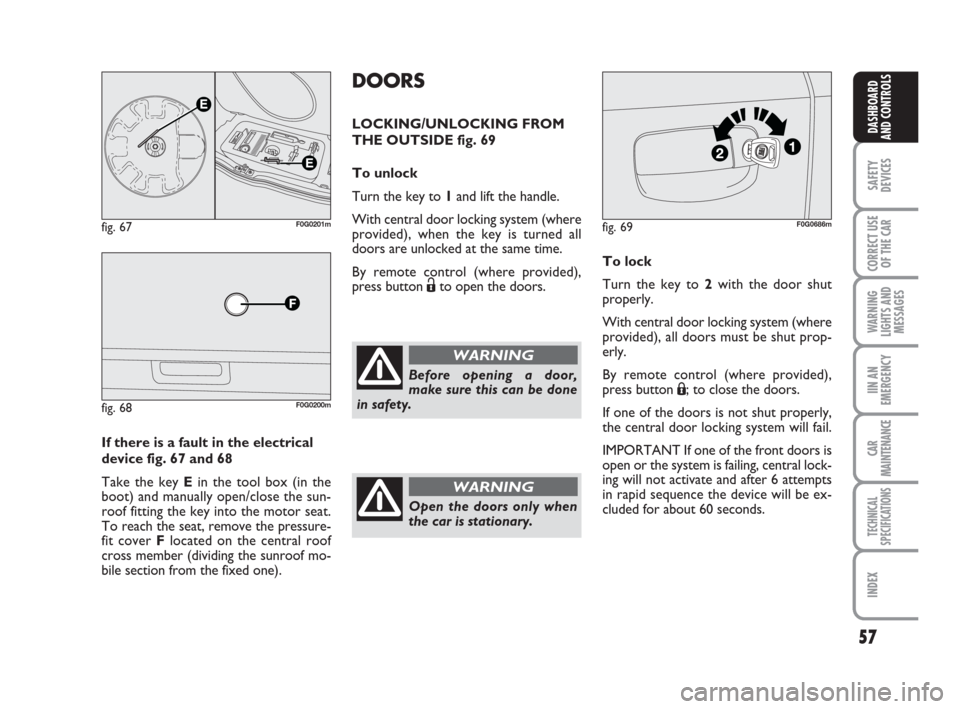
THE OUTSIDE fig. 69
To unlock
Turn the key to 1and lift the handle.
With central door locking system (where
provided), when the key is turned all
doors are unlocked at the same time.
By remote control (where provided),
press button Ëto open the doors.To lock
Turn the key to 2with the door shut
properly.
With central door locking system (where
provided), all doors must be shut prop-
erly.
By remote control (where provided),
press button Á; to close the doors.
If one of the doors is not shut properly,
the central door locking system will fail.
IMPORTANT If one of the front doors is
open or the system is failing, central lock-
ing will not activate and after 6 attempts
in rapid sequence the device will be ex-
cluded for about 60 seconds. If there is a fault in the electrical
device fig. 67 and 68
Take the key Ein the tool box (in the
boot) and manually open/close the sun-
roof fitting the key into the motor seat.
To reach the seat, remove the pressure-
fit cover Flocated on the central roof
cross member (dividing the sunroof mo-
bile section from the fixed one).
fig. 67F0G0201m
fig. 68F0G0200m
fig. 69F0G0686m
Before opening a door,
make sure this can be done
in safety.
WARNING
Open the doors only when
the car is stationary.
WARNING
032-059 Panda New GB 21-06-2007 13:48 Pagina 57