elect FIAT PANDA 2014 319 / 3.G Owners Manual
[x] Cancel search | Manufacturer: FIAT, Model Year: 2014, Model line: PANDA, Model: FIAT PANDA 2014 319 / 3.GPages: 284, PDF Size: 11.54 MB
Page 6 of 284
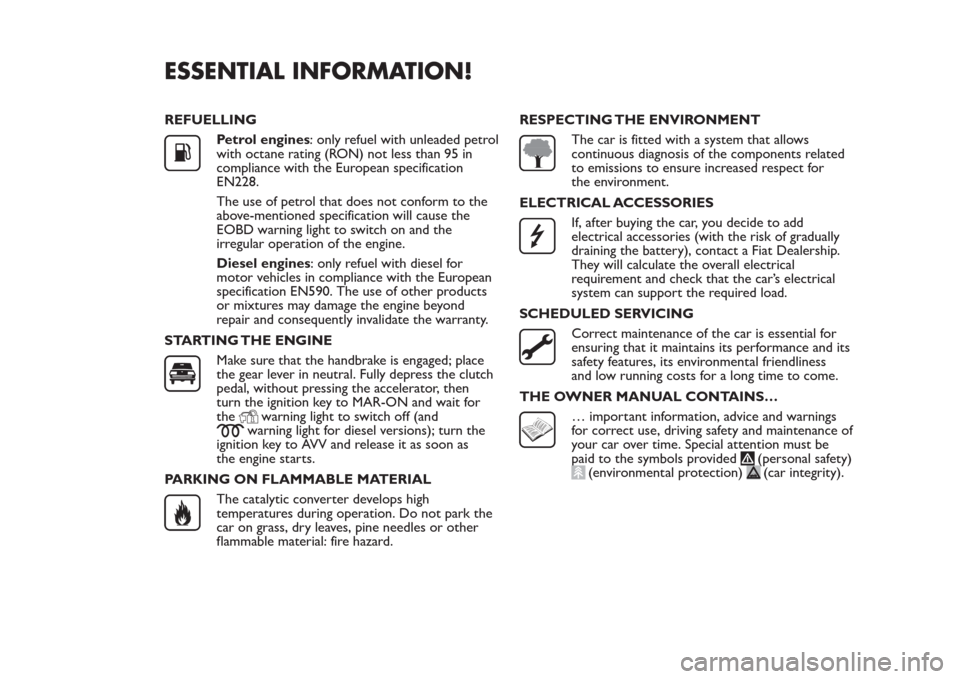
ESSENTIAL INFORMATION!REFUELLING
Petrol engines: only refuel with unleaded petrol
with octane rating (RON) not less than 95 in
compliance with the European specification
EN228.
The use of petrol that does not conform to the
above-mentioned specification will cause the
EOBD warning light to switch on and the
irregular operation of the engine.
Diesel engines: only refuel with diesel for
motor vehicles in compliance with the European
specification EN590. The use of other products
or mixtures may damage the engine beyond
repair and consequently invalidate the warranty.
STARTING THE ENGINEMake sure that the handbrake is engaged; place
the gear lever in neutral. Fully depress the clutch
pedal, without pressing the accelerator, then
turn the ignition key to MAR-ON and wait for
the
warning light to switch off (and
warning light for diesel versions); turn the
ignition key to AVV and release it as soon as
the engine starts.
PARKING ON FLAMMABLE MATERIAL
The catalytic converter develops high
temperatures during operation. Do not park the
car on grass, dry leaves, pine needles or other
flammable material: fire hazard.RESPECTING THE ENVIRONMENT
The car is fitted with a system that allows
continuous diagnosis of the components related
to emissions to ensure increased respect for
the environment.
ELECTRICAL ACCESSORIESIf, after buying the car, you decide to add
electrical accessories (with the risk of gradually
draining the battery), contact a Fiat Dealership.
They will calculate the overall electrical
requirement and check that the car’s electrical
system can support the required load.
SCHEDULED SERVICINGCorrect maintenance of the car is essential for
ensuring that it maintains its performance and its
safety features, its environmental friendliness
and low running costs for a long time to come.
THE OWNER MANUAL CONTAINS…… important information, advice and warnings
for correct use, driving safety and maintenance of
your car over time. Special attention must be
paid to the symbols provided
(personal safety)
(environmental protection)
(car integrity).
Page 7 of 284
GETTING TO KNOW YOUR CAR
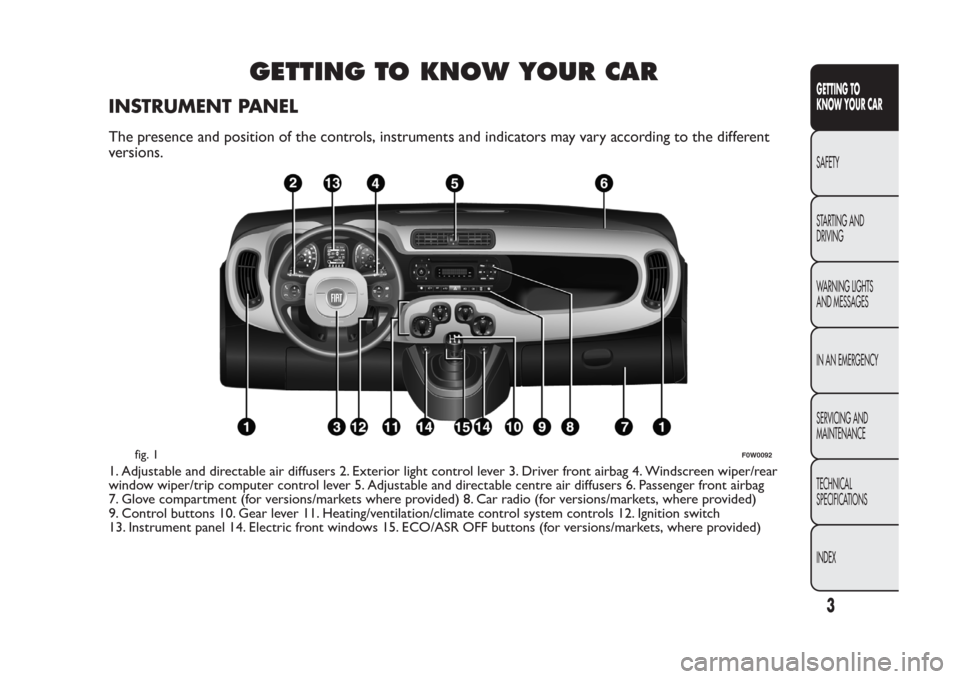
INSTRUMENT PANELThe presence and position of the controls, instruments and indicators may vary according to the different
versions.1. Adjustable and directable air diffusers 2. Exterior light control lever 3. Driver front airbag 4. Windscreen wiper/rear
window wiper/trip computer control lever 5. Adjustable and directable centre air diffusers 6. Passenger front airbag
7. Glove compartment (for versions/markets where provided) 8. Car radio (for versions/markets, where provided)
9. Control buttons 10. Gear lever 11. Heating/ventilation/climate control system controls 12. Ignition switch
13. Instrument panel 14. Electric front windows 15. ECO/ASR OFF buttons (for versions/markets, where provided)
fig. 1
F0W0092
3GETTING TO
KNOW YOUR CARSAFETY
STARTING AND
DRIVING
WARNING LIGHTS
AND MESSAGES
IN AN EMERGENCY
SERVICING AND
MAINTENANCE
TECHNICAL
SPECIFICATIONS
INDEX
Page 11 of 284
DISPLAYWith the ignition key removed, the display shows
three values for a few seconds when a front door is
opened: time, temperature and total milometer
reading (in km or miles).
"STANDARD" SCREEN
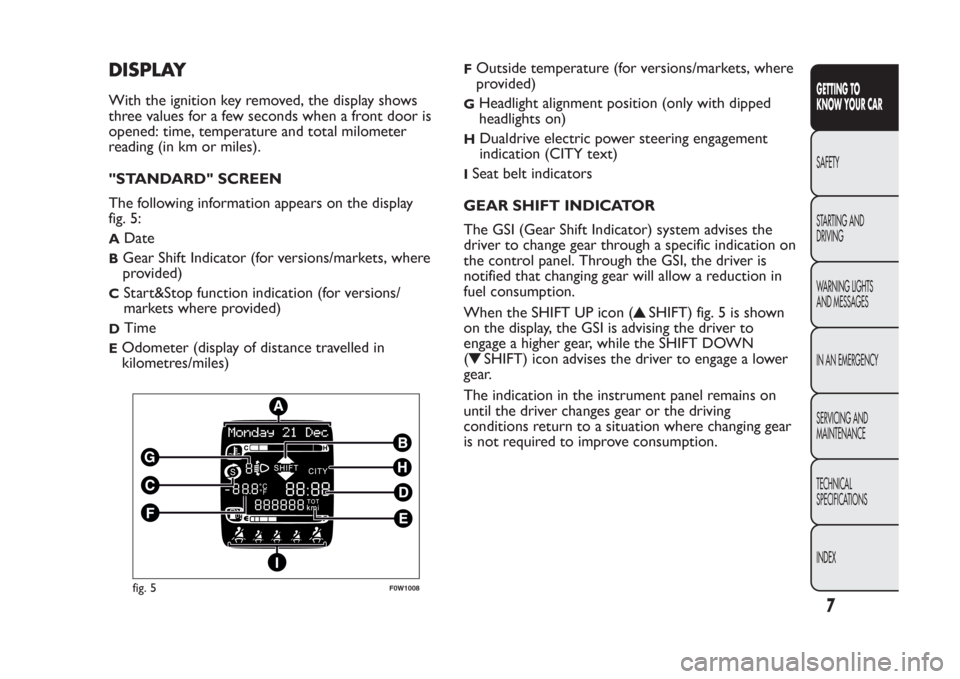
The following information appears on the display
fig. 5:A
Date
B
Gear Shift Indicator (for versions/markets, where
provided)
C
Start&Stop function indication (for versions/
markets where provided)
D
Time
E
Odometer (display of distance travelled in
kilometres/miles)
F
Outside temperature (for versions/markets, where
provided)
G
Headlight alignment position (only with dipped
headlights on)
H
Dualdrive electric power steering engagement
indication (CITY text)
ISeat belt indicators
GEAR SHIFT INDICATOR
The GSI (Gear Shift Indicator) system advises the
driver to change gear through a specific indication on
the control panel. Through the GSI, the driver is
notified that changing gear will allow a reduction in
fuel consumption.
When the SHIFT UP icon (
SHIFT) fig. 5 is shown
on the display, the GSI is advising the driver to
engage a higher gear, while the SHIFT DOWN
(
SHIFT) icon advises the driver to engage a lower
gear.
The indication in the instrument panel remains on
until the driver changes gear or the driving
conditions return to a situation where changing gear
is not required to improve consumption.
fig. 5
F0W1008
7GETTING TO
KNOW YOUR CARSAFETY
STARTING AND
DRIVING
WARNING LIGHTS
AND MESSAGES
IN AN EMERGENCY
SERVICING AND
MAINTENANCE
TECHNICAL
SPECIFICATIONS
INDEX
Page 12 of 284
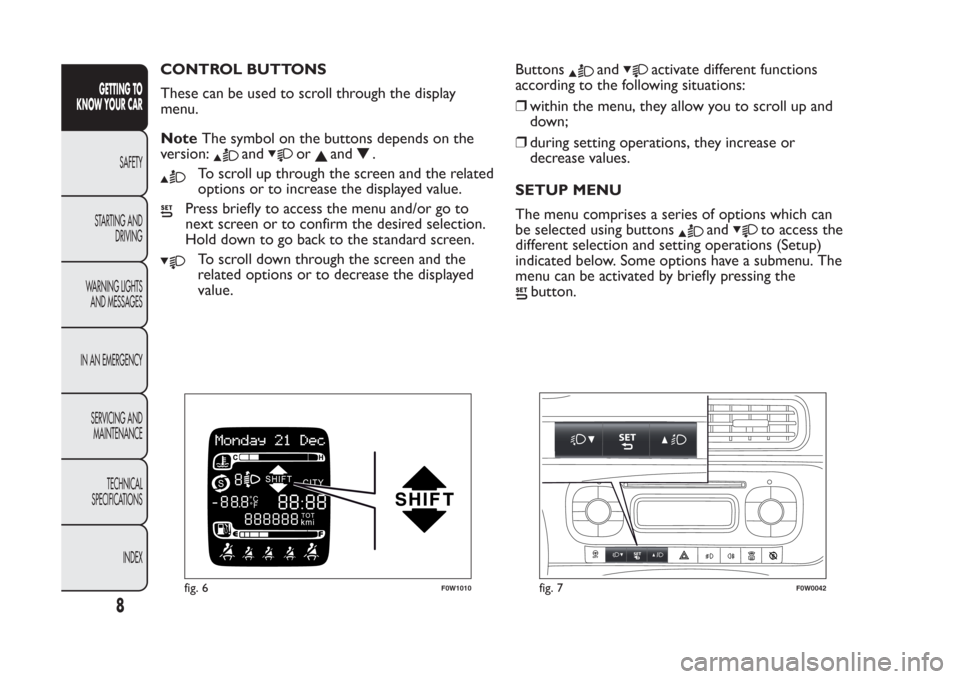
CONTROL BUTTONS
These can be used to scroll through the display
menu.
NoteThe symbol on the buttons depends on the
version:
and
or
and
.
To scroll up through the screen and the related
options or to increase the displayed value.
Press briefly to access the menu and/or go to
next screen or to confirm the desired selection.
Hold down to go back to the standard screen.
To scroll down through the screen and the
related options or to decrease the displayed
value.Buttons
and
activate different functions
according to the following situations:
❒within the menu, they allow you to scroll up and
down;
❒during setting operations, they increase or
decrease values.
SETUP MENU
The menu comprises a series of options which can
be selected using buttons
and
to access the
different selection and setting operations (Setup)
indicated below. Some options have a submenu. The
menu can be activated by briefly pressing the
button.
fig. 6
F0W1010
fig. 7
F0W0042
8
GETTING TO
KNOW YOUR CAR
SAFETY
STARTING AND
DRIVING
WARNING LIGHTS
AND MESSAGES
IN AN EMERGENCY
SERVICING AND
MAINTENANCE
TECHNICAL
SPECIFICATIONS
INDEX
Page 13 of 284
The menu includes the following items:
❒MENU
❒LIGHTING
❒SPEED BEEP
❒TRIP B ACTIVATION/DATA
❒SET TIME
❒SET DATE
❒SEE RADIO
❒AUTOCLOSE
❒MEASUREMENT UNIT
❒LANGUAGE
❒WARNING VOLUME
❒SEAT BELT BUZZER (for versions/markets, where
provided)
❒SERVICE
❒AIRBAG/PASSENGER BAG (for versions/markets,
where provided)
❒CITY BRAKE C./COLLISION MITIGATION (for
versions/markets, where provided)
❒EXIT MENU
Selecting an option from the main menu without a
submenu:
❒briefly press the
button to select the main menu
option to be set;❒press buttons
or
(with single presses) to
select the new setting;
❒briefly press the
button to store the new setting
and to go back to the same main menu option
selected previously.
Selecting an option from the main menu with a
submenu:
❒a short press on the
button will display the first
submenu option;
❒press buttons
or
(with single presses) to
scroll through all the submenu options;
❒briefly press the
button to select the displayed
submenu option and to open the relevant set-up
menu;
❒press buttonsor
(with single presses) to
select the new setting for this submenu option;
❒Briefly press button
to store the new setting
and at the same time go back to the previously
selected menu option.
9GETTING TO
KNOW YOUR CARSAFETY
STARTING AND
DRIVING
WARNING LIGHTS
AND MESSAGES
IN AN EMERGENCY
SERVICING AND
MAINTENANCE
TECHNICAL
SPECIFICATIONS
INDEX
Page 14 of 284
MENU ITEMSMenu
This option allows you to access the Setup Menu.
Press the
or
fig. 7 button to select the
various Menu items. Hold down the
button to
return to the standard screen.
Lighting (Interior car lighting adjustment)
(with side lights on only)
With the side lights on, this function is used to set
the brightness of the instrument panel, radio
controls and automatic climate control system
controls (for versions/markets, where provided) to 8
levels.
To adjust the brightness, proceed as follows:
press the
button briefly: the previously set level
will flash on the display;
press the
or
button to adjust the brightness
level;
press the
button briefly to return to the menu
screen or hold the button down to return to the
standard screen without storing.Speed Beep (Speed limit)
This function is used to set the car speed limit (km/h
or mph); the driver is alerted when this limit is
exceeded.
To set the desired speed limit, proceed as follows:
❒briefly press the
button: the display will show
the text (Speed Beep);
❒press the
or
button to select speed limit
activation (On) or deactivation (Off );
❒if the function is on, press
or
to select the
desired speed limit and then pressto confirm.
NoteSetting is possible between 30 and 200 km/h,
or 20 and 125 mph, according to the previously
set unit. See the "Measurement unit adjustment
(Measurement unit)" paragraph described below. The
setting will increase/decrease by 5 units each time
the
/
button is pressed. Hold down the
/
button to automatically increase/decrease
the setting rapidly. Complete the adjustment with
single presses of the button when you approach the
desired value.
❒press the
button briefly to return to the menu
screen or hold the button down to return to the
standard screen without storing.
To cancel the setting, proceed as follows:
❒press thebutton briefly: "On" will flash on the
display;
10GETTING TO
KNOW YOUR CAR
SAFETY
STARTING AND
DRIVING
WARNING LIGHTS
AND MESSAGES
IN AN EMERGENCY
SERVICING AND
MAINTENANCE
TECHNICAL
SPECIFICATIONS
INDEX
Page 15 of 284
❒press the
button: "Off" will flash on the
display;
❒press the
button briefly to return to the menu
screen or hold the button down to return to the
standard screen without storing.
Activation/Trip B data (Activating Trip B)
With this function it is possible to activate ("On") or
deactivate ("Off") the Trip B display (partial trip).
For more information see the "Trip computer"
paragraph.
For activation/deactivation, proceed as follows:
❒press thebutton briefly to make the display flash
"On" or "Off" according to the previous setting;
❒press the
or
button to make the
adjustment;
❒press the
button briefly to return to the menu
screen or hold the button down to return to the
standard screen without storing.
Time adjustment (Clock adjustment)
This function allows the clock to be set through two
submenus: "Time" and "Format".
To carry out the adjustment, proceed as follows:
❒press thebutton briefly: the display will show
the two submenus "Time" and "Format";
❒press the
or
button to switch between
the two submenus;❒once you have selected the submenu to be
changed, press the
button briefly;
❒when you select "Time", pressing
briefly makes
the "hours" flash on the display. press the
or
button to make the adjustment;
❒press the
button briefly: the "minutes" flash on
the display. Press the
or
button to make
the adjustment;
❒if you select the "Format" submenu, pressing the
button briefly makes the display mode flash on
the display. Press the
or
button to select
"12h" or "24h" mode. When you have carried
out the desired adjustment, press the
button
briefly to return to the submenu screen or hold
the button down to return to the main menu
screen without storing.
Hold down the
button again to return to the
standard screen or to the main menu according to
where you are in the menu.
IMPORTANT The setting will increase or decrease
by one unit each time the
or
button is
pressed. Holding the button down causes an
automatic rapid increase/decrease. Complete the
adjustment with single presses of the button when
you approach the desired value.
11GETTING TO
KNOW YOUR CARSAFETY
STARTING AND
DRIVING
WARNING LIGHTS
AND MESSAGES
IN AN EMERGENCY
SERVICING AND
MAINTENANCE
TECHNICAL
SPECIFICATIONS
INDEX
Page 16 of 284
Set date (Setting the date)
This function can be used to set the date (year -
month - day).
To carry out the adjustment, proceed as follows:
❒briefly press the
button: the "year" will flash on
the display;
❒press the
or
button to make the
adjustment;
❒press the
button briefly: the "month" will flash
on the display;
❒press the
or
button to make the
adjustment;
❒briefly press the
button: the "day" will flash on
the display;
❒press the
or
button to make the
adjustment;
❒press the
button briefly to return to the menu
screen or hold the button down to return to the
standard screen without storing.
IMPORTANT The setting will increase or decrease
by one unit each time the
or
button is
pressed. Holding the button down causes an
automatic rapid increase/decrease. Complete the
adjustment with single presses of the button when
you approach the desired value.
See radio (audio information display)
With this function the display shows information
about the sound system.❒Radio: selected radio station frequency or RDS
message, automatic tuning activation or
AutoSTore;
❒Audio CD, MP3 CDs: track number;
❒CD Changer: CD number and track number.
To show the sound system information on the
display (On) or clear it (Off ), proceed as follows:
❒briefly press
button, ON or OFF flashes on the
display according to the previous setting;
❒press theor
button to select;
❒press the
button briefly to return to the menu
screen or hold the button down to return to the
standard screen without storing.
Autoclose (Automatic central locking with car
in motion)
When activated (On), this function locks the doors
automatically when the vehicle speed exceeds 20
km/h.
To activate or deactivate this function, proceed as
follows:
❒press thebutton briefly to make the display flash
"On" or "Off" according to the previous setting;
❒press the
or
button to select;
12GETTING TO
KNOW YOUR CAR
SAFETY
STARTING AND
DRIVING
WARNING LIGHTS
AND MESSAGES
IN AN EMERGENCY
SERVICING AND
MAINTENANCE
TECHNICAL
SPECIFICATIONS
INDEX
Page 17 of 284
❒press the
button briefly to return to the
submenu screen or hold the button down
to return to the main menu screen without saving;
❒hold thebutton down again to return to the
standard screen or to the main menu according
to where you are in the menu.
Measurement unit (Setting the measurement
unit)
This function can be used to set the units through
three submenus: "Distances", "Consumption" and
"Temperature".
To set the desired unit of measurement, proceed as
follows:
❒briefly press
to display the three submenus;
❒press theor
button to navigate through
the three submenus;
❒once you have selected the submenu to be
changed, press thebutton briefly;
❒if you select "Distances", pressing the button
briefly makes the display show "km" or "mi"
depending on the previous setting;
❒press
or
to select
❒if you select "Consumption", pressing button
briefly makes "km/l", "l/100km" or "mpg" appear
on the display depending on the previous setting;
If the set distance unit is "km", the display enables
setting of the fuel consumption unit (km/l or
l/100km). If the set distance unit is "mi", the display
shows the amount of fuel consumed in "mpg".❒press the
or
button to select;
❒if you select “Temperature”, pressing the
button
briefly makes "°C" or "°F" appear on the display
depending on the previous setting;
❒press the
or
button to select;
❒When you have made the adjustment, press the
button briefly to return to the submenu screen
or hold the button down to return to the main
menu screen without storing.
❒hold the
button down again to return to the
standard screen or to the main menu according
to where you are in the menu.
Language (Language selection)
Display messages can be shown in different
languages: Italian, English, German, Portuguese,
Spanish, French, Dutch, Polish and Turkish.
To set the desired language, proceed as follows:
❒briefly press the
button: the previously set
"language" starts flashing on the display;
❒press the
or
button to select;
❒press the
button briefly to return to the menu
screen or hold the button down to return to the
standard screen without storing.
Warnings volume (Adjusting the failure/
warning acoustic signal volume)
With this function the volume of the buzzer which
accompanies the display of any failure/warning can be
adjusted to 8 levels.
13GETTING TO
KNOW YOUR CARSAFETY
STARTING AND
DRIVING
WARNING LIGHTS
AND MESSAGES
IN AN EMERGENCY
SERVICING AND
MAINTENANCE
TECHNICAL
SPECIFICATIONS
INDEX
Page 18 of 284
To set the desired volume, proceed as follows:
❒press the
button briefly, making the display flash
the previously set volume level;
❒press the
or
button to select;
❒press the
button briefly to return to the menu
screen or hold the button down to return to the
standard screen without storing.
Belt buzzer (Buzzer activation for SBR
indication)(for versions/markets, where provided)
This function can only be displayed after a Fiat
Dealership has deactivated the SBR system (see "SBR
system" in the "Safety" chapter).
Service (Scheduled servicing)
Using this function you can display information about
the mileage or daily intervals for car servicing. With
the Service function it is also possible to view the
interval (in kilometres or miles) before the next
engine oil change is due.
To consult this information, proceed as follows:
❒briefly press the
button, which makes the display
show the service interval in kilometres (km) or
miles (mi) according to the previous setting (see
"Distance measurement units" paragraph);
❒press the
button briefly to return to the menu
screen or hold it down to return to the standard
screen.NoteThe “Scheduled Servicing Plan” requires the
car to be serviced every 30,000 km (or 18,000 miles)
for petrol versions and every 35,000 km (or 21,000
miles) for diesel versions. This message is displayed
automatically when the key is turned to MAR-ON,
starting at 2,000 km (or equivalent value in miles)
from when the next service is due and reappearing
every 200 km (or equivalent value in miles). Below
200 km servicing indications are more frequent. The
display will be in km or mi depending on the
measurement unit settings. When the next
scheduled service is approaching and the key is
turned to MAR, the word “Service” will appear on
the display, followed by the number of kilometres or
miles left before servicing is due. Go to a Fiat
Dealership, where the "Scheduled Servicing Plan"
operations will be performed and the message will
be reset.
Airbag/Passenger bag (Passenger side front
airbag and side bag (chest & pelvis protection
- for versions/markets, where provided)
activation/deactivation)
This function allows the passenger side airbag to be
activated/deactivated.
Proceed as follows:
❒press the
button and, after the message "Bag
pass: Off" (to deactivate) or "Bag pass: On" (to
activate) is displayed by pressing buttons
and
, press the
button again;
❒a confirmation message will appear on the display;
14GETTING TO
KNOW YOUR CAR
SAFETY
STARTING AND
DRIVING
WARNING LIGHTS
AND MESSAGES
IN AN EMERGENCY
SERVICING AND
MAINTENANCE
TECHNICAL
SPECIFICATIONS
INDEX