Eco FIAT PANDA 2017 319 / 3.G Repair Manual
[x] Cancel search | Manufacturer: FIAT, Model Year: 2017, Model line: PANDA, Model: FIAT PANDA 2017 319 / 3.GPages: 216, PDF Size: 19.25 MB
Page 169 of 216
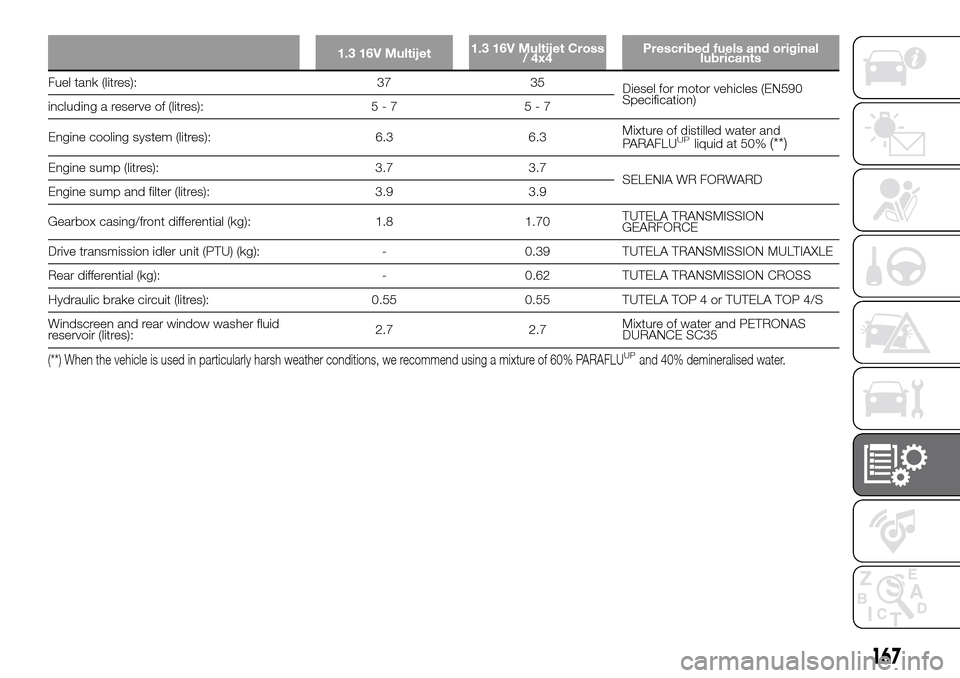
1.3 16V Multijet1.3 16V Multijet Cross
/ 4x4Prescribed fuels and original
lubricants
Fuel tank (litres): 37 35
Diesel for motor vehicles (EN590
Specification)
including a reserve of (litres): 5 - 7 5 - 7
Engine cooling system (litres): 6.3 6.3Mixture of distilled water and
PARAFLU
UPliquid at 50%(**)
Engine sump (litres): 3.7 3.7
SELENIA WR FORWARD
Engine sump and filter (litres): 3.9 3.9
Gearbox casing/front differential (kg): 1.8 1.70TUTELA TRANSMISSION
GEARFORCE
Drive transmission idler unit (PTU) (kg): - 0.39 TUTELA TRANSMISSION MULTIAXLE
Rear differential (kg): - 0.62 TUTELA TRANSMISSION CROSS
Hydraulic brake circuit (litres): 0.55 0.55 TUTELA TOP 4 or TUTELA TOP 4/S
Windscreen and rear window washer fluid
reservoir (litres):2.7 2.7Mixture of water and PETRONAS
DURANCE SC35
(**) When the vehicle is used in particularly harsh weather conditions, we recommend using a mixture of 60% PARAFLUUPand 40% demineralised water.
167
Page 173 of 216
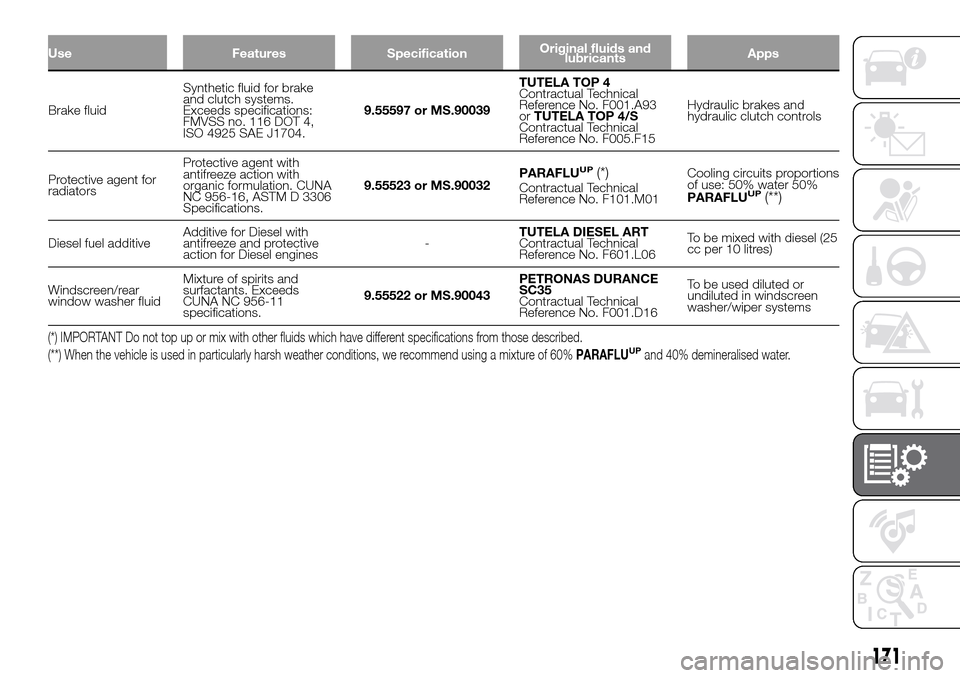
Use Features SpecificationOriginal fluids and
lubricantsApps
Brake fluidSynthetic fluid for brake
and clutch systems.
Exceeds specifications:
FMVSS no. 116 DOT 4,
ISO 4925 SAE J1704.9.55597 or MS.90039TUTELA TOP 4
Contractual Technical
Reference No. F001.A93
orTUTELA TOP 4/S
Contractual Technical
Reference No. F005.F15Hydraulic brakes and
hydraulic clutch controls
Protective agent for
radiatorsProtective agent with
antifreeze action with
organic formulation. CUNA
NC 956-16, ASTM D 3306
Specifications.9.55523 or MS.90032PARAFLU
UP(*)Contractual Technical
Reference No. F101.M01Cooling circuits proportions
of use: 50% water 50%
PARAFLUUP(**)
Diesel fuel additiveAdditive for Diesel with
antifreeze and protective
action for Diesel engines-TUTELA DIESEL ART
Contractual Technical
Reference No. F601.L06To be mixed with diesel (25
cc per 10 litres)
Windscreen/rear
window washer fluidMixture of spirits and
surfactants. Exceeds
CUNA NC 956-11
specifications.9.55522 or MS.90043PETRONAS DURANCE
SC35
Contractual Technical
Reference No. F001.D16To be used diluted or
undiluted in windscreen
washer/wiper systems
(*) IMPORTANT Do not top up or mix with other fluids which have different specifications from those described.
(**) When the vehicle is used in particularly harsh weather conditions, we recommend using a mixture of 60%PARAFLUUPand 40% demineralised water.
171
Page 178 of 216
PRESCRIPTIONS FOR HANDLING THE VEHICLE AT THE END OF
ITS LIFE
(Where provided)
FCA has been committed for many years to safeguarding the environment through the constant improvement of its production
processes and manufacturing products that are increasingly "eco-compatible". To grant customers the best possible service
in terms of respecting environmental laws and in response to European Directive 2000/53/EC governing vehicles at the end of
their life, FCA is offering its customers the chance to hand over their vehicle at the end of its life without incurring any additional
costs. The European Directive sets out that when the vehicle is handed over, the last keeper or owner should not incur any
expenses as a result of it having a zero or negative market value.
To hand your vehicle over at the end of its life without extra cost, contact one of our dealerships if you are purchasing another
vehicle or an FCA-authorised collection and scrapping centre. These centres have been carefully chosen to offer high quality
service for the collection, treatment and recycling of vehicles at their end of life, respecting the surrounding environment.
You can find further information on these collection and scrapping centres either from an FCA dealership or by calling the
number in the Warranty Booklet or by consulting the websites of the various FCA brands.
176
TECHNICAL DATA
Page 180 of 216
RADIO
178) 179) 180) 181) 182) 183)
The radio has been designed according
to the specifications of the passenger
compartment, with a personalised
design matching the style of the
dashboard perfectly.
TIPS
Road safety
Please, learn how to use all different
radio functions (e.g. save stations)
before beginning to drive.
Care and maintenance
Clean the cover with a soft anti-static
cloth only. Cleaning and polishing
products may damage the surface.
ANTITHEFT PROTECTION
The radio is equipped with an anti-theft
protection system based on the
exchange of information between the
radio and the electronic control unit
(Body Computer) present on the
vehicle.
This system guarantees maximum
safety and prevents the secret code
from being entered each time the radio
power supply is disconnected.If the check has a positive outcome, the
radio will start to function, whereas if
the comparison codes are not the
same or if the electronic control unit
(Body Computer) is replaced, the
device will ask the user to enter the
secret code according to the procedure
described in the paragraph below.
Entering the secret code
When the radio is switched on, if the
password is requested, the display will
show "Radio code" for about 2
seconds, followed by four dashes "- - -
-".
The secret code is made up of four
digits from 1 to 6, each corresponding
to one of the dashes.
To enter the first digit of the code, press
the button corresponding to the
pre-selected stations (from 1 to 6).
Enter the other code digits in the same
way.
If the four digits are not entered within
20 seconds, the display shows the text
"Enter code----".Ifthis occurs, it is
not considered an incorrect code entry.
After entering the fourth digit (within
20 seconds), the car radio will work.
If an incorrect code is entered, the radio
will emit a sound and the display
shows the text "Radio blocked/wait" to
notify the user of the need to enter
the correct code.Each time the user enters an incorrect
code, the waiting time will gradually
increase (1 min, 2 min, 4 min, 8 min, 16
min, 30 min,1h, 2h, 4h, 8h, 16h, 24h)
up to a maximum of 24 hours.
The waiting time will be shown on the
display with the text "Radio blocked/
wait". After the text has disappeared it
is possible to start the code entering
procedure again.
Vehicle radio passport
This document certifies the ownership
of the vehicle radio. The radio passport
shows the radio model, serial number
and secret code.
IMPORTANT Keep the radio passport in
a safe place so that you can give the
information to the relevant authorities if
the radio is stolen.
In the case of loss of the vehicle radio
passport, contact the Fiat Dealership,
taking an ID document and the vehicle
ownership documents.
178
MULTIMEDIA
Page 186 of 216
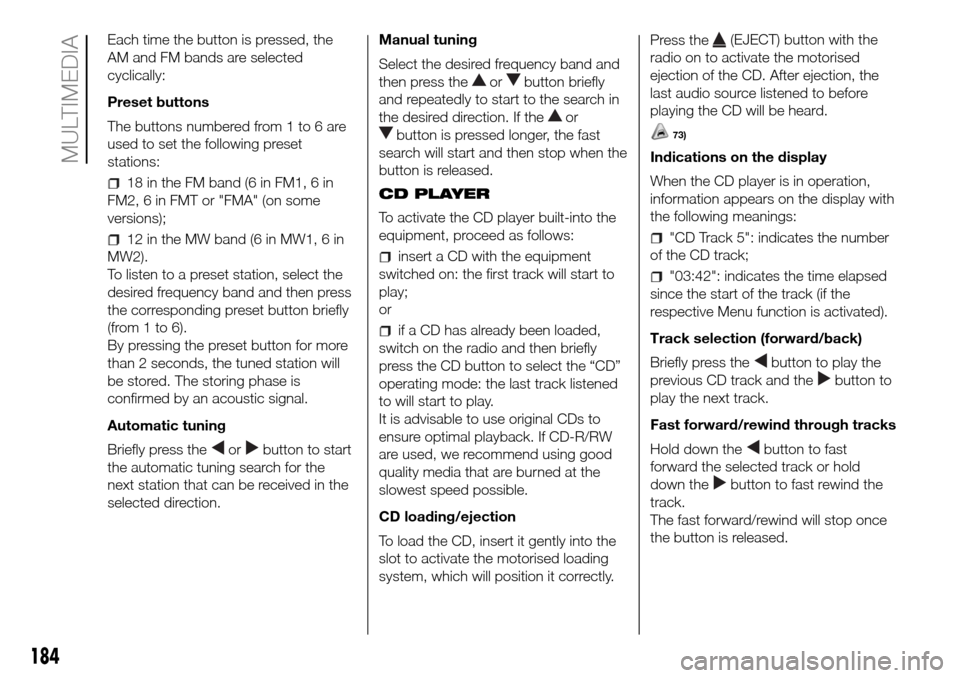
Each time the button is pressed, the
AM and FM bands are selected
cyclically:
Preset buttons
The buttons numbered from 1 to 6 are
used to set the following preset
stations:
18 in the FM band (6 in FM1, 6 in
FM2, 6 in FMT or "FMA" (on some
versions);
12 in the MW band (6 in MW1, 6 in
MW2).
To listen to a preset station, select the
desired frequency band and then press
the corresponding preset button briefly
(from 1 to 6).
By pressing the preset button for more
than 2 seconds, the tuned station will
be stored. The storing phase is
confirmed by an acoustic signal.
Automatic tuning
Briefly press the
orbutton to start
the automatic tuning search for the
next station that can be received in the
selected direction.Manual tuning
Select the desired frequency band and
then press the
orbutton briefly
and repeatedly to start to the search in
the desired direction. If the
or
button is pressed longer, the fast
search will start and then stop when the
button is released.
CD PLAYER
To activate the CD player built-into the
equipment, proceed as follows:
insert a CD with the equipment
switched on: the first track will start to
play;
or
if a CD has already been loaded,
switch on the radio and then briefly
press the CD button to select the “CD”
operating mode: the last track listened
to will start to play.
It is advisable to use original CDs to
ensure optimal playback. If CD-R/RW
are used, we recommend using good
quality media that are burned at the
slowest speed possible.
CD loading/ejection
To load the CD, insert it gently into the
slot to activate the motorised loading
system, which will position it correctly.Press the
(EJECT) button with the
radio on to activate the motorised
ejection of the CD. After ejection, the
last audio source listened to before
playing the CD will be heard.
73)
Indications on the display
When the CD player is in operation,
information appears on the display with
the following meanings:
"CD Track 5": indicates the number
of the CD track;
"03:42": indicates the time elapsed
since the start of the track (if the
respective Menu function is activated).
Track selection (forward/back)
Briefly press the
button to play the
previous CD track and the
button to
play the next track.
Fast forward/rewind through tracks
Hold down the
button to fast
forward the selected track or hold
down the
button to fast rewind the
track.
The fast forward/rewind will stop once
the button is released.
184
MULTIMEDIA
Page 187 of 216
"Pause" function
To pause the CD player, press the
button. The words "CD Pause" will
appear on the display.
To resume listening to the track, press
the
button again. If another audio
source is selected, the pause function
is deactivated.
CD MP3 PLAYER
In addition to playing normal audio
CDs, the car radio can also play
CD-ROMs on which MP3 format
compressed audio files are recorded.
The radio operates as described in the
"CD Player" chapter when an ordinary
audio CD is inserted.
Selecting next/previous folder
Press the
button to select one of the
next folders or press the
button to
select a previous folder.
The display will show the number and
the name of the folder (e.g. “DIR 2
XXXXXX”).
If no other folder/track is selected
during the next 2 seconds, the first
track contained in the new folder will be
played.
If the last track in the folder at that
moment selected is played, the next
folder will be played.
WARNING
178)If the volume is too loud this could be
dangerous for the driver and for
passengers when driving in traffic. Always
adjust the volume so that you can still
hear background noises.
179)Multimedia CDs include data tracks in
addition to the audio tracks. Playing this
type of CD can cause hissing at a volume
that may jeopardise road safety as well
as cause damage to the final stages and
the speakers.
180)Using some of the system functions
whilst driving can distract attention away
from the road, risking an accident or other
serious consequences; they should
therefore be used only when driving
conditions allow it and, if necessary, only
with the vehicle stationary.
181)WARNING: Looking at the system
when driving can divert attention from the
road, with the risk of accidents or other
serious consequences. Do not change the
system settings or load data while driving.
Stop the vehicle in a safe and legal manner
before carrying out these operations.
Adopting these precautions is important
since setting or changing some functions
may require the driver to be distracted from
the road and remove their hands from the
steering wheel.182)Looking at the display for a long time:
while driving, do not use any function
that requires looking at the display for a
long time. Pull over in a safe and legal
manner before attempting to access a
function of the system that requires
prolonged attention. Even occasional short
glances at the display may be hazardous
if your attention is diverted from driving at a
critical moment.
183)Setting the volume: do not turn the
volume up too high. Keep the volume at a
level where you can still hear outside traffic
and emergency signals while driving.
Driving while unable to hear these sounds
may cause an accident.
WARNING
73)Do not press the eject button
accidentally when inserting a CD.
185
Page 188 of 216
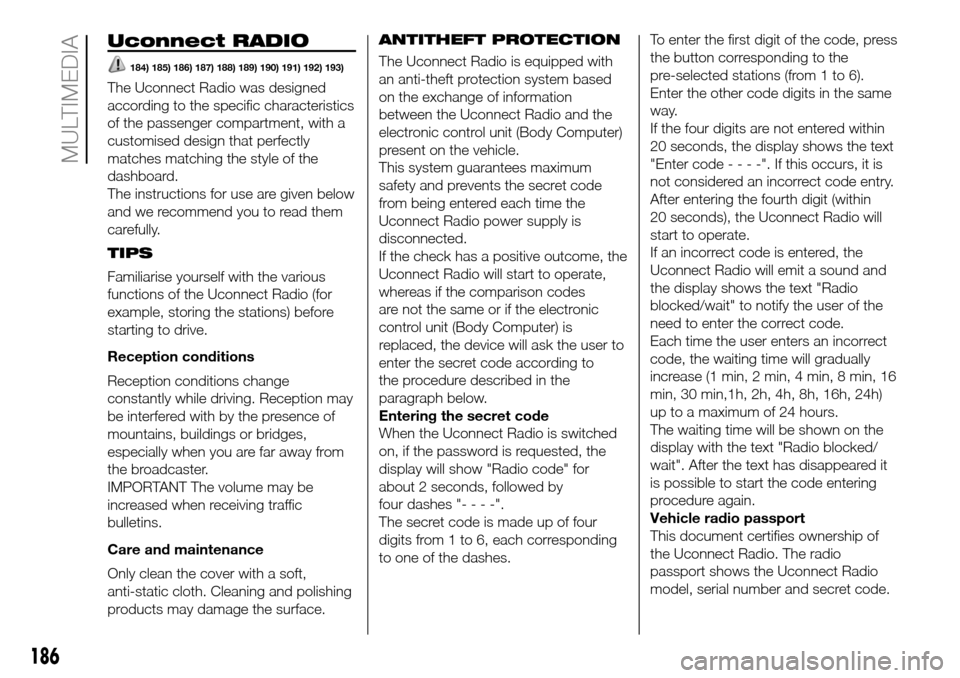
Uconnect RADIO
184) 185) 186) 187) 188) 189) 190) 191) 192) 193)
The Uconnect Radio was designed
according to the specific characteristics
of the passenger compartment, with a
customised design that perfectly
matches matching the style of the
dashboard.
The instructions for use are given below
and we recommend you to read them
carefully.
TIPS
Familiarise yourself with the various
functions of the Uconnect Radio (for
example, storing the stations) before
starting to drive.
Reception conditions
Reception conditions change
constantly while driving. Reception may
be interfered with by the presence of
mountains, buildings or bridges,
especially when you are far away from
the broadcaster.
IMPORTANT The volume may be
increased when receiving traffic
bulletins.
Care and maintenance
Only clean the cover with a soft,
anti-static cloth. Cleaning and polishing
products may damage the surface.ANTITHEFT PROTECTION
The Uconnect Radio is equipped with
an anti-theft protection system based
on the exchange of information
between the Uconnect Radio and the
electronic control unit (Body Computer)
present on the vehicle.
This system guarantees maximum
safety and prevents the secret code
from being entered each time the
Uconnect Radio power supply is
disconnected.
If the check has a positive outcome, the
Uconnect Radio will start to operate,
whereas if the comparison codes
are not the same or if the electronic
control unit (Body Computer) is
replaced, the device will ask the user to
enter the secret code according to
the procedure described in the
paragraph below.
Entering the secret code
When the Uconnect Radio is switched
on, if the password is requested, the
display will show "Radio code" for
about 2 seconds, followed by
four dashes "----".
The secret code is made up of four
digits from 1 to 6, each corresponding
to one of the dashes.To enter the first digit of the code, press
the button corresponding to the
pre-selected stations (from 1 to 6).
Enter the other code digits in the same
way.
If the four digits are not entered within
20 seconds, the display shows the text
"Enter code----".Ifthis occurs, it is
not considered an incorrect code entry.
After entering the fourth digit (within
20 seconds), the Uconnect Radio will
start to operate.
If an incorrect code is entered, the
Uconnect Radio will emit a sound and
the display shows the text "Radio
blocked/wait" to notify the user of the
need to enter the correct code.
Each time the user enters an incorrect
code, the waiting time will gradually
increase (1 min, 2 min, 4 min, 8 min, 16
min, 30 min,1h, 2h, 4h, 8h, 16h, 24h)
up to a maximum of 24 hours.
The waiting time will be shown on the
display with the text "Radio blocked/
wait". After the text has disappeared it
is possible to start the code entering
procedure again.
Vehicle radio passport
This document certifies ownership of
the Uconnect Radio. The radio
passport shows the Uconnect Radio
model, serial number and secret code.
186
MULTIMEDIA
Page 194 of 216
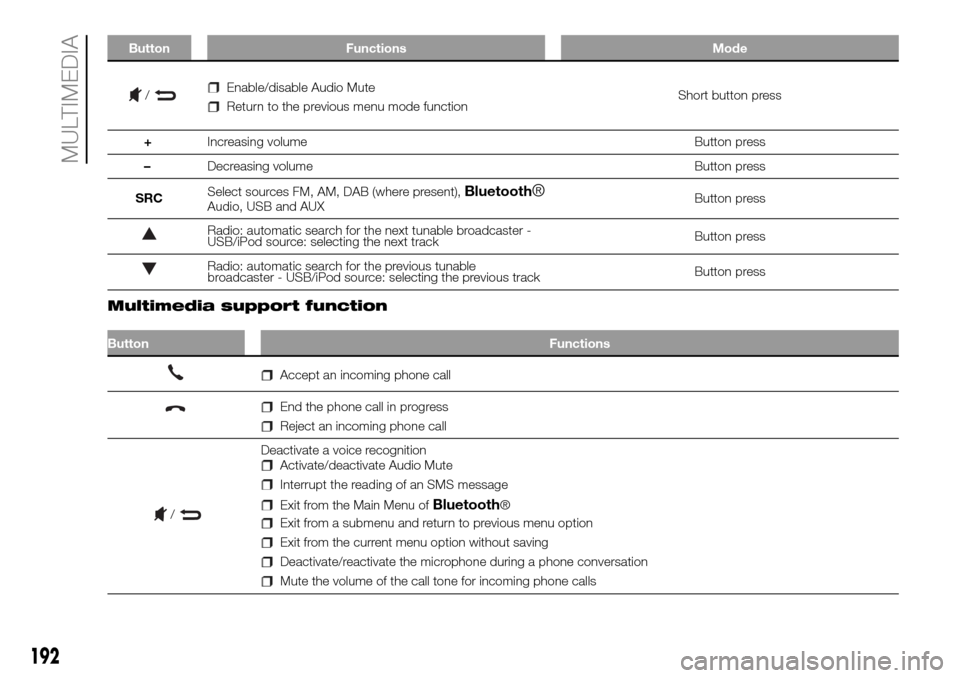
Button Functions Mode
/Enable/disable Audio Mute
Return to the previous menu mode functionShort button press
+Increasing volume Button press
–Decreasing volume Button press
SRCSelect sources FM, AM, DAB (where present),
Bluetooth®Audio, USB and AUXButton press
Radio: automatic search for the next tunable broadcaster -
USB/iPod source: selecting the next trackButton press
Radio: automatic search for the previous tunable
broadcaster - USB/iPod source: selecting the previous trackButton press
.
Multimedia support function
Button Functions
Accept an incoming phone call
End the phone call in progress
Reject an incoming phone call
Deactivate a voice recognition
Activate/deactivate Audio Mute
Interrupt the reading of an SMS message
Exit from the Main Menu ofBluetooth®
Exit from a submenu and return to previous menu option
Exit from the current menu option without saving
Deactivate/reactivate the microphone during a phone conversation
Mute the volume of the call tone for incoming phone calls
192
MULTIMEDIA
/
Page 195 of 216
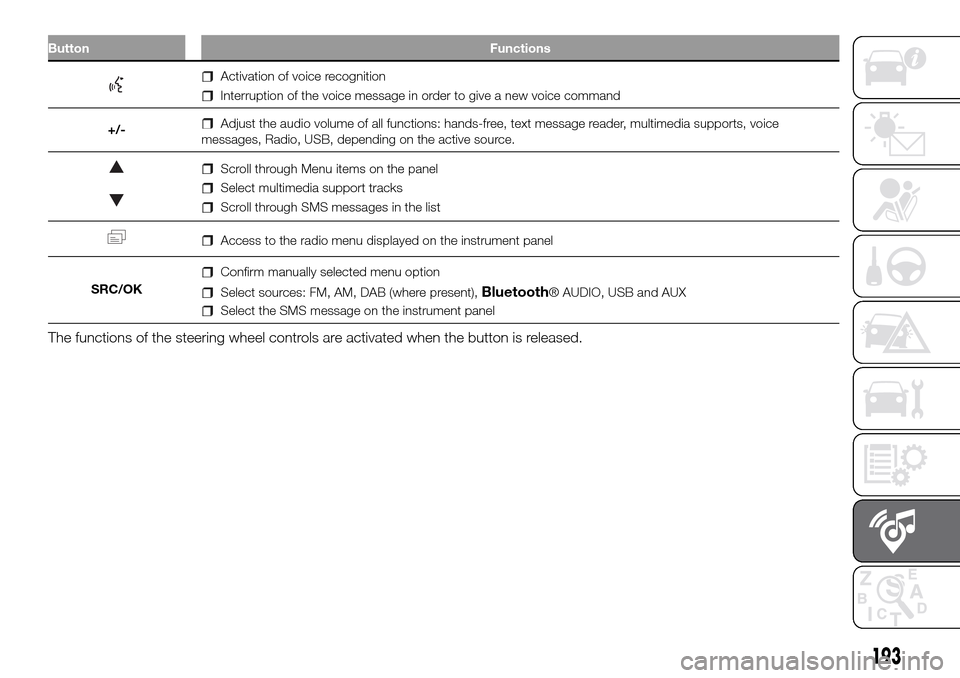
Button Functions
Activation of voice recognition
Interruption of the voice message in order to give a new voice command
+/-
Adjust the audio volume of all functions: hands-free, text message reader, multimedia supports, voice
messages, Radio, USB, depending on the active source.
Scroll through Menu items on the panel
Select multimedia support tracks
Scroll through SMS messages in the list
Access to the radio menu displayed on the instrument panel
SRC/OK
Confirm manually selected menu option
Select sources: FM, AM, DAB (where present),Bluetooth® AUDIO, USB and AUX
Select the SMS message on the instrument panel
The functions of the steering wheel controls are activated when the button is released.
193
Page 198 of 216
To listen to a preset station, select the
desired frequency band with the RADIO
button, briefly press ABC button to
select the preset band (A, B or C), and
then briefly press the corresponding
preset button (from 1 to 6).
By pressing the preset button for more
than 2 seconds, the tuned station will
be stored. The storing phase is
confirmed by an acoustic signal.
Automatic tuning
Briefly press the
orbutton to start
the automatic tuning search for the
next station that can be received in the
selected direction.
Manual tuning
Select the desired frequency band and
then press the
orbutton briefly
and repeatedly to start to the search in
the desired direction. If the
or
button is pressed longer, the fast
search will start and then stop when the
button is released.
USB/iPod MODE
To activate USB/iPod mode, insert the
respective device (USB stick or other
device) in the USB port located in
the glove compartment.
If a USB/iPod device is inserted with
the system on, this starts playing the
tracks present on the device.AUX MODE
To activate the AUX source, press the
MEDIA button or the SRC control
on the steering wheel repeatedly until
the corresponding source is displayed.
BLUETOOTH®
Bluetooth® technology allows you to
use your mobile phone through the
car's hands-free system, without the
need for wires.
To use the hands-free function it is
necessary to have a mobile phone with
Bluetooth® technology. To consult the
list of compatible phones, see the site:
www.mopar.eu/owner.
The hands-free function allows the
following operations to be performed:
Calling a telephone number by voice
command: you can dial a telephone
number by stating the numbers out
loud.
Calling someone in the phonebook
using voice commands: you can call
someone in your mobile phonebook
using your voice. You can also call
someone in your phonebook by
selecting from the contacts that appear
on the display of the instrument panel.
(This function requires your phone
directory to have been copied onto the
vehicle hands-free system).
Accepting a call: you can accept an
incoming call by pressing the
button
on the steering wheel.
Rejecting a call: you can reject a call
with a long press of the
button on
the steering wheel.
SMS message reader
(available only with mobile phones that
support this function)
The SMS message reader makes it
possible to:
Be informed, by means of a
message on the instrument panel
display, of the reception a new SMS
message on your mobile phone with
Bluetooth® technology; the number/
name of the sender is displayed and
the system will also ask whether to read
the message to you.
Manage the list of messages
received on your mobile phone only
during connection with the active
system.
Quick guide to the SMS message
reader
(only for mobile phones that support
this function)
If yourBluetooth® phone supports
this function, when you receive a new
SMS message, the system alerts you
with an acoustic signal and asks you if
you want to read it.
196
MULTIMEDIA