change time FIAT PANDA 2018 Owner handbook (in English)
[x] Cancel search | Manufacturer: FIAT, Model Year: 2018, Model line: PANDA, Model: FIAT PANDA 2018Pages: 228, PDF Size: 17.05 MB
Page 120 of 228
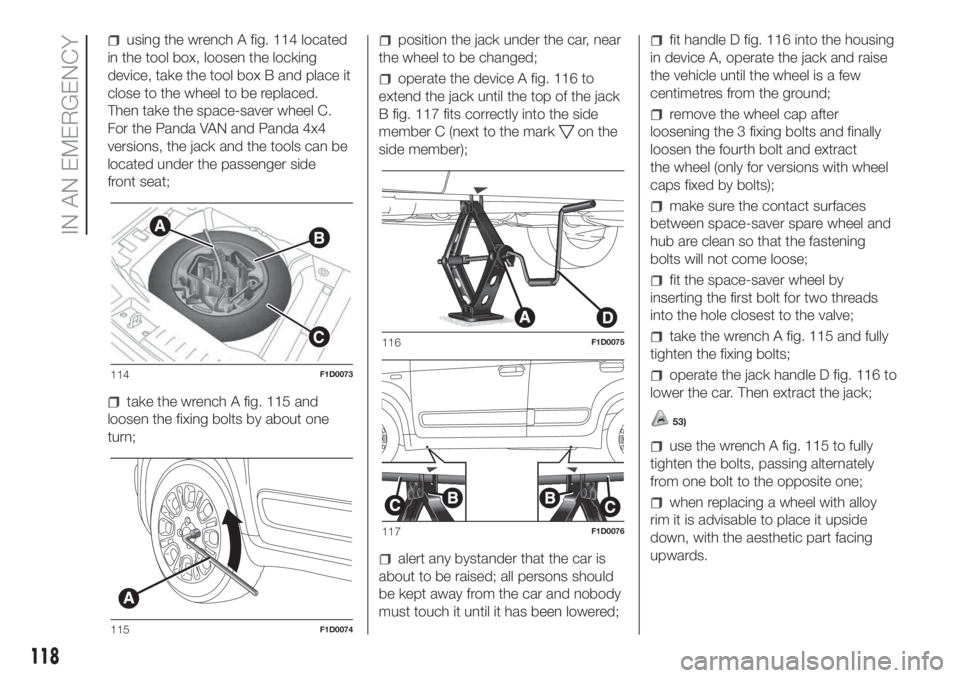
using the wrench A fig. 114 located
in the tool box, loosen the locking
device, take the tool box B and place it
close to the wheel to be replaced.
Then take the space-saver wheel C.
For the Panda VAN and Panda 4x4
versions, the jack and the tools can be
located under the passenger side
front seat;
take the wrench A fig. 115 and
loosen the fixing bolts by about one
turn;
position the jack under the car, near
the wheel to be changed;
operate the device A fig. 116 to
extend the jack until the top of the jack
B fig. 117 fits correctly into the side
member C (next to the mark
on the
side member);
alert any bystander that the car is
about to be raised; all persons should
be kept away from the car and nobody
must touch it until it has been lowered;
fit handle D fig. 116 into the housing
in device A, operate the jack and raise
the vehicle until the wheel is a few
centimetres from the ground;
remove the wheel cap after
loosening the 3 fixing bolts and finally
loosen the fourth bolt and extract
the wheel (only for versions with wheel
caps fixed by bolts);
make sure the contact surfaces
between space-saver spare wheel and
hub are clean so that the fastening
bolts will not come loose;
fit the space-saver wheel by
inserting the first bolt for two threads
into the hole closest to the valve;
take the wrench A fig. 115 and fully
tighten the fixing bolts;
operate the jack handle D fig. 116 to
lower the car. Then extract the jack;
53)
use the wrench A fig. 115 to fully
tighten the bolts, passing alternately
from one bolt to the opposite one;
when replacing a wheel with alloy
rim it is advisable to place it upside
down, with the aesthetic part facing
upwards.
AB
C
114F1D0073
115F1D0074
116F1D0075
117F1D0076
118
IN AN EMERGENCY
Page 122 of 228
146)The vehicle's driving characteristics
will be modified with the space-saver wheel
fitted. Avoid violent acceleration and
braking, abrupt steering and fast cornering.
The overall duration of the space-saver
wheel is of about 3000 km, after which the
relevant tyre must be replaced with another
one of the same type. Never install a
traditional tyre on a rim designed to be
used as a space-saver wheel. Have the
wheel repaired and refitted as soon as
possible. Using two or more space-saver
wheels at the same time is forbidden.
Do not apply grease to the bolt threads
before fitting: they could come unscrewed.
147)The jack is a tool developed and
designed only for changing a wheel, if a
tyre gets punctured or damaged, on the
vehicle with which it is supplied or on other
vehicles of the same model. Any other
use, e.g. to jack up other vehicle models or
different things, is strictly prohibited. Never
use for maintenance or repair activities
under the car or to exchange the
summer/winter wheels and vice versa.
Never go under the raised vehicle. If any
work under the vehicle is necessary,
contact the Fiat Service Network. Incorrect
positioning of the jack may cause the
raised vehicle to fall: use only in the
positions indicated. Do not use the jack for
loads higher than the one shown on its
label. Never start the engine with vehicle
raised. If the vehicle is raised more than
necessary, everything can become more
unstable, with the risk of the vehicle
dropping violently. Thus, lift the vehicle only
as needed in order to access the spare
wheel.148)If the hub cap is not fitted correctly, it
may come off when the car is travelling.
Never tamper with the inflation valve. Never
introduce tools of any kind between rim
and tyre. Check tyre and space-saver
wheel pressures regularly, complying with
the values given in the "Technical
specifications" chapter.
WARNING
53)When turning the jack handle make
sure that it can turn freely without scraping
your hand against the ground. The moving
components of the jack ("worm screw"
and joints) can also cause injuries: avoid
touching them. If you come into contact
with lubricating grease, clean yourself
thoroughly.
54)Contact a Fiat Dealership as soon as
possible to have the correct tightening
of the wheel bolts checked.
Fix&Go KIT
149) 150)
55)
DESCRIPTION
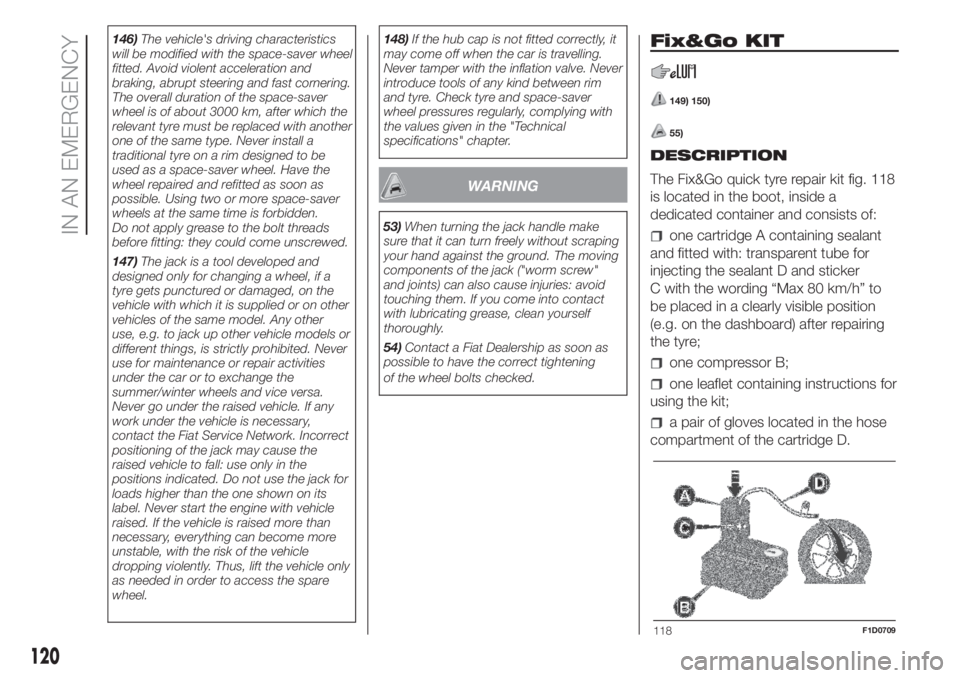
The Fix&Go quick tyre repair kit fig. 118
is located in the boot, inside a
dedicated container and consists of:
one cartridge A containing sealant
and fitted with: transparent tube for
injecting the sealant D and sticker
C with the wording “Max 80 km/h” to
be placed in a clearly visible position
(e.g. on the dashboard) after repairing
the tyre;
one compressor B;
one leaflet containing instructions for
using the kit;
a pair of gloves located in the hose
compartment of the cartridge D.
118F1D0709
120
IN AN EMERGENCY
Page 130 of 228
SCHEDULED
SERVICING
Correct servicing is crucial for
guaranteeing a long life for the car
under the best conditions.
For this reason, Fiat has planned a
series of checks and services at fixed
distance and/or time intervals, as
described in the Service Schedule.
To keep the car’s efficiency in tip-top
condition, in the previous Scheduled
Service plan pages a few additional
checks are listed that should be carried
out more frequently with respect to
the normal coupon redemption
schedule.
Scheduled Servicing is offered by all
Fiat Dealerships according to a set time
schedule. If, during each operation, in
addition to the ones scheduled, the
need arises for further replacements or
repairs, these may be carried out with
the owner's explicit agreement only.
If your car is used frequently for towing,
the interval between one scheduled
servicing operation and the next should
be reduced.IMPORTANT Scheduled Servicing
interventions are set out by the
Manufacturer. Failure to have them
carried out may invalidate the warranty.
It is advisable to inform a Fiat
Dealership of any small operating
irregularities without waiting for the next
service.
PERIODIC CHECKS
Every1,000km or before long
journeys, check and if necessary, top
up: engine coolant level; brake fluid
level; screen washer fluid level; tyre
inflation pressure and condition; lighting
system operation (headlights, direction
indicators, hazard warning lights, etc.);
screen washer/wiper system operation
and positioning/wear of windscreen/
rear window wiper blades.
Every3,000km, check and top up if
required: engine oil level.
For cars with 0.9 TwinAir engines:
every3,000km check the engine oil
level and top it up to the maximum level
if necessary.DEMANDING USE OF THE
CAR
If the car is used under one of the
following conditions: towing a trailer or
motorhome; dusty roads; short (less
than 7-8 km) and repeated journeys
with sub-zero outside temperatures;
engine often idling or driving long
distances at low speed or long periods
of inactivity, the following checks must
be carried out more often than
indicated in the Scheduled Servicing
Plan:
check front disc brake pad condition
and wear;
check the cleanliness of the side,
bonnet and luggage compartment
locks, and the cleanliness and
lubrication of the linkages;
visually inspect conditions of:
engine, gearbox, transmission, pipes
and hoses (exhaust/fuel system/brakes)
and rubber elements (gaiters/sleeves/
bushes, etc.);
check battery charge and battery
fluid level (electrolyte);
visually inspect conditions of the
accessory drive belts;
check and, if necessary, change
engine oil and replace oil filter / pollen
filter / air cleaner.
128
SERVICING AND CARE
Page 189 of 228
Radio
183) 184) 185) 186) 187) 188)
The radio has been designed according
to the specifications of the passenger
compartment, with a personalised
design to match the style of the
dashboard.
TIPS
Road safety
Learn how to use the various radio
functions (for example, by storing
stations) before beginning to drive.
Care and maintenance
Clean the cover with a soft anti-static
cloth only. Cleaning and polishing
products may damage the surface.
ANTITHEFT PROTECTION
The radio is equipped with an anti-theft
protection system based on an
exchange of information between the
radio and the electronic control unit
(Body Computer) on the vehicle.
This system guarantees maximum
safety and prevents the secret code
from being entered each time the radio
power supply is disconnected.If the check has a positive outcome, the
radio will start to operate, whereas if
the comparison codes are not the
same or if the electronic control unit
(Body Computer) is replaced, the
device will ask the user to enter the
secret code according to the procedure
described in the paragraph below.
Entering the secret code
If the password is required when the
radio is switched on, the display will
show "Radio code" for about 2
seconds, followed by four dashes "- - -
-".
The code is made up of four digits from
1 to 6, each corresponding to one of
the dashes.
To enter the first digit, press the
corresponding button of the preset
stations (from 1 to 6). Enter the other
code digits in the same way.
If the four digits are not entered within
20 seconds, the display will show
"Enter code----".Ifthis occurs, it is
not considered an incorrect code entry.
After entering the fourth digit (within
20 seconds), the radio will start to
operate.
If an incorrect code is entered, the radio
will emit a sound and the display will
show "Radio blocked/wait" to notify the
user of the need to enter the correct
code.Each time the user enters an incorrect
code, the waiting time gradually
increases (1 min, 2 min, 4 min, 8 min,
16 min, 30 min, 1h, 2h, 4h, 8h, 16h,
24h) to a maximum of 24 hours.
The waiting time will be shown on the
display with the text "Radio blocked/
wait". After the text has disappeared it
is possible to start the code entering
procedure again.
Vehicle radio passport
This document certifies ownership of
the radio. The radio passport shows the
radio model, serial number and secret
code.
IMPORTANT Keep the radio passport in
a safe place so that you can give the
information to the relevant authorities if
the radio is stolen.
In the case of loss of the vehicle radio
passport, contact the Fiat Dealership,
taking an ID document and the vehicle
ownership documents.
187
Page 193 of 228
GENERAL
The radio has the following functions:
Radio section
PLL tuning with FM/AM/MW
frequency bands;
RDS (Radio Data System) with TA
(traffic alerts) function - TP (traffic
programmes) - EON (Enhanced Other
Network) - REG (regional programmes);
AF: search selection for alternative
frequencies in RDS mode;
provision for emergency alarm;
automatic/manual tuning into
stations;
FM Multipath detector;
manual storing of 30 stations: 18 on
FM band (6 on FM1, 6 on FM2, 6 on
FMT), 12 on MW band (6 on MW1,
6 on MW2);
automatic programming (Autostore
function) of 6 stations on dedicated
FM band
SPEED VOLUME function:
automatic volume adjustment
according to the vehicle speed;
automatic Stereo/Mono selection.
CD section
Direct selection of the disc;
Track selection (forward/back);
Fast advance (forward/back) through
tracks;
CD Display function: display of disc
name and time elapsed since the
start of the track
Playing of audio CDs, CD-Rs and
CD-RWs.
MP3 CD section
MP3-Info function (ID3-TAG);
Folder selection (previous/next);
Track selection (forward/back);
Fast advance (forward/back) through
tracks;
MP3 Display function: display of
name of folder, ID3-TAG information,
time elapsed since the start of the
track, name of the file
Playing of audio or data CD, CD-R
and CD-RW.
Audio section
Mute/Pause function;
Soft-Mute function;
Loudness function
7-band graphic equaliser
Separate bass/treble adjustment
Right/left channel balance.FUNCTIONS AND
ADJUSTMENTS
Turning On the Radio
The radio comes on when the
(ON/OFF) button/knob is pressed
briefly.
When the radio is switched on with the
key extracted from the ignition device,
it turns off automatically after about
20 minutes. After the radio has
switched itself off automatically, it can
be turned on for a further 20 minutes
by pressing the
(ON/OFF) button/
knob.
Turning Off the Radio
Briefly press the
(ON/OFF)
button/knob.
Volume adjustment
Turn the
(ON/OFF) button/knob to
adjust the volume.
If the volume level is changed during
the transmission of traffic news, the
new setting will only be maintained until
the news is finished.
MUTE/Pause function
(muting the volume)
Press the
button briefly to activate
the Mute function. The volume will
gradually decrease and the words
"RADIO Mute" will be displayed (in radio
mode) or "PAUSE" (in CD mode).
191
Page 194 of 228
Press thebutton again to deactivate
the Mute function. The volume will
gradually increase until it reaches the
level set previously.
Audio settings
The functions that can be selected from
the audio menu change depending on
the context: AM/FM/CD.
Press the
button briefly to change
the Audio functions.
After the
button is first pressed, the
display will show the bass level value
for the source activated at that time
(e.g. in FM mode the display will show
the wording "FM Bass +2").
Use the
orbuttons to scroll
through the menu functions. To change
the setting of the function selected
use the
orbuttons. The current
status of the selected function appears
on the display.
The functions managed by the Menu
are:
BASS: adjustment of bass tones;
TREBLE: adjustment of high tones;
BALANCE: right/left balance
adjustment;
FADER: front/back balance
adjustment (where provided).
LOUDNESS: activation/deactivation
of the increase of bass and high tones;
EQUALISER: activation and
selection of factory-set equaliser levels;
USER EQUALIZER: customised
equaliser setting.
MENU
MENU button function
Press the button MENU briefly to
activate the Menu function. The display
will show the first menu item that can
be adjusted (AF) ("AF Switching On" on
the display).
Use the
orbuttons to scroll
through the Menu functions. To change
the setting of the function selected
use the
orbuttons.
The current status of the selected
function appears on the display.
The functions managed by the Menu
are:
AF SWITCHING: automatic
activation/deactivation of the selection
of the station with the strongest signal
that transmits the same programme.
TRAFFIC INFORMATION:
activation/deactivation of traffic
information (only on FM band).
REGIONAL MODE: activation/
deactivation of regional programmes.
MP3 DISPLAY: CD MP3 display
setting.
SPEED VOLUME: speed-dependent
automatic volume control.
RADIO ON VOLUME: maximum
radio volume limit activation/
deactivation.
RADIO OFF: off mode selection.
SYSTEM RESET: reset of factory
settings.
Press the button MENU again to exit
the Menu function.
NOTE The AF SWITCHING, TRAFFIC
INFORMATION and REGIONAL MODE
adjustments are only possible in FM
mode.
RADIO (Tuner)
To select the Radio function when
another audio source is being listened
to, briefly press the FM, AS or AM
buttons, depending on the desired
band.
Once the Radio mode has been
activated, the display will show the
name (only RDS stations) and the
frequency of the selected radio station,
the frequency band selected (e.g.
FM1) and the preselect button number
(e.g. P1).
Frequency band selection
With the Radio mode active, press the
FM, AS or AM button briefly and
repeatedly to select the desired
reception band.
192
MULTIMEDIA
Page 196 of 228
"Pause" function
To pause the CD player, press the
button. The words "CD Pause" will
appear on the display.
To resume listening to the track, press
the
button again. If another audio
source is selected, the pause function
is deactivated.
CD MP3 PLAYER
In addition to playing normal audio
CDs, the radio can also play CD-ROMs
on which MP3 format compressed
audio files are recorded. The radio
operates as described in the "CD
Player" chapter when an ordinary audio
CD is inserted.
Selecting next/previous folder
Press the
button to select one of the
next folders or press the
button to
select a previous folder.
The display will show the number and
the name of the folder (e.g. “DIR 2
XXXXXX”).
If no other folder/track is selected
during the next 2 seconds, the first
track contained in the new folder will be
played.
If the last track in the folder at that
moment selected is played, the next
folder will be played.
WARNING
183)If the volume is too loud this could be
dangerous for the driver and for
passengers when driving in traffic. Always
adjust the volume so that you can still
hear background noises.
184)Multimedia CDs include data tracks in
addition to the audio tracks. Playing this
type of CD can cause hissing at a volume
that may jeopardise road safety as well
as cause damage to the final stages and
the speakers.
185)Using some of the system functions
whilst driving can distract attention away
from the road, risking an accident or other
serious consequences; they should
therefore be used only when driving
conditions allow it and, if necessary, only
with the vehicle stationary.
186)IMPORTANT: Looking at the system
when driving can divert attention from
the road, with the risk of accidents or other
serious consequences. Do not change
the system settings or load data while
driving. Stop the vehicle in a safe and legal
manner before carrying out these
operations. Adopting these precautions is
important since setting or changing some
functions may require the driver to be
distracted from the road and remove their
hands from the steering wheel.187)Looking at the display for a long time:
while driving, do not use any function
that requires looking at the display for a
long time. Pull over in a safe and legal
manner before attempting to access a
function of the system that requires
prolonged attention. Even occasional short
glances at the display may be hazardous
if your attention is diverted from driving at a
critical moment.
188)Setting the volume: do not turn the
volume up too high. Keep the volume at a
level where you can still hear outside traffic
and emergency signals while driving.
Driving while unable to hear these sounds
may cause an accident.
WARNING
72)Do not press the eject button
accidentally when inserting a CD.
194
MULTIMEDIA
Page 197 of 228
Uconnect Mobile –
Uconnect Bluetooth
189) 190) 191) 192) 193) 194) 195) 196) 197) 198)
The Uconnect Mobile and Uconnect
Bluetooth systems were designed
according to the specific characteristics
of the passenger compartment, with a
customised design that perfectly
matches the style of the dashboard.
The instructions for use are given below
and we recommend you to read them
carefully.
TIPS
Familiarise yourself with the various
functions of the Uconnect systems (for
example, by storing the stations) before
starting to drive.
Reception conditions
Reception conditions change
constantly while driving. Reception may
be interfered with by the presence of
mountains, buildings or bridges,
especially when you are far away from
the broadcaster.
IMPORTANT The volume may be
increased when receiving traffic
information and news.Care and maintenance
Only clean the cover with a soft,
anti-static cloth. Cleaning and polishing
products may damage the surface.
ANTITHEFT PROTECTION
The Uconnect systems are equipped
with an anti-theft protection system
based on an exchange of information
between the Uconnect system and the
electronic control unit (Body Computer)
on the car.
This system guarantees maximum
safety and prevents the secret code
from being entered each time the
Uconnect system power supply is
disconnected.
If the check has a positive outcome, the
Uconnect system will start to operate,
whereas if the comparison codes
are not the same, or if the electronic
control unit (Body Computer) is
replaced, the device will ask the user to
enter the secret code according to
the procedure described in the
paragraph below.Entering the secret code
If the password is required when the
Uconnect system is switched on,
the display will show "Radio code" for
about 2 seconds, followed by four
dashes "----".
The code is made up of four digits from
1 to 6, each corresponding to one of
the dashes.
To enter the first digit, press the
corresponding button of the preset
stations (from 1 to 6). Enter the other
code digits in the same way.
If the four digits are not entered within
20 seconds, the display will show
"Enter code----".Ifthis occurs, it is
not considered an incorrect code entry.
After entering the fourth digit (within
20 seconds), the Uconnect system will
start to operate.
If an incorrect code is entered, the
Uconnect system will emit a sound and
the display will show "Radio blocked/
wait" to notify the user of the need
to enter the correct code.
Each time the user enters an incorrect
code, the waiting time gradually
increases (1 min, 2 min, 4 min, 8 min,
16 min, 30 min, 1h, 2h, 4h, 8h, 16h,
24h) to a maximum of 24 hours.
195
Page 205 of 228
GENERAL
The Uconnect systems have the
following functions:
Radio section
PLL tuning with FM/AM/MW
frequency bands (where present);
RDS (Radio Data System) with TA
(traffic alerts) function - TP (traffic
programmes) - EON (Enhanced Other
Network) - REG (regional programmes);
AF: search selection for alternative
frequencies in RDS mode;
automatic/manual tuning into
stations;
FM Multipath detector;
manual storing of 36 or 54 stations:
18 in the FM band (6 in FM-A, 6 in
FM-B and 6 in FM-C) and 18 in AM (6
in AM-A, 6 in AM-B and 6 in AM-C) and
18 in DAB (where present);
SPEED VOLUME function:
automatic volume adjustment
according to the car speed;
automatic Stereo/Mono selection.
Audio section
Mute function;
Soft-Mute function;
Loudness function
7-band graphic equaliser
Separate bass/treble adjustment
Right/left channel balance.Bluetooth®
For theBluetooth® function, see the
description in the dedicated paragraph.
USB/iPod section
For the USB/iPod function, see the
description in the dedicated paragraph.
FUNCTIONS AND
ADJUSTMENTS
Ignition
The Uconnect system comes on when
the
(ON/OFF) button is pressed
briefly.
If the Uconnect system comes on when
the key is removed from the ignition
device, it will switch off automatically
after about 20 minutes (if this time has
been set). After the Uconnect system
has switched itself off automatically,
it can be turned on for a further 20
minutes by pressing the
(ON/OFF)
button.
Switching off
Long press on button
(ON/OFF).
Volume adjustment
To adjust the volume, turn the twist
control
.
If the volume level is changed during
the transmission of traffic news, the
new setting will only be maintained until
the news is finished.Mute Function
(muting the volume)
Press the
/button on the
steering wheel to activate the Mute
function. In the Radio source, the word
“MUTE” will appear, associated with
the active source.
Press the
/button on the
steering wheel again to deactivate the
Mute function.
Audio settings
The functions that can be selected from
the audio menu change depending on
the context: AM/FM and DAB (where
provided)/USB/iPod/Bluetooth®.
Press the AUDIO button briefly to
change the Audio functions. After the
AUDIO button is first pressed, the
display will show the bass level value
for the source activated at that time
(e.g. in FM mode the display will show
the wording "FM Bass +2").
Use the
orbuttons to scroll
through the menu functions. To change
the setting of the function selected
use the
orbuttons.
The current status of the selected
function appears on the display.
The functions managed by the Menu
are:
BASS: adjustment of bass tones;
TREBLE: adjustment of high tones;
203
Page 206 of 228
BALANCE: right/left balance
adjustment;
FADER: front/back balance
adjustment (where provided);
LOUDNESS: activation/deactivation
of the increase of bass and high tones;
EQUALISER: activation and
selection of factory-set equaliser levels;
MY EQ: customised equaliser
setting.
MENU
MENU button functions
Press the button MENU briefly to
activate the Menu function.
Use the
orbuttons to scroll
through the menu functions. To change
the setting of the function selected
use the
orbuttons.
The functions managed by the Menu
are:
AF SWITCHING: automatic
activation/deactivation of the selection
of the station with the strongest signal
that transmits the same programme.
NOTE FM following in DAB (where
provided; the radio switches
automatically to FM in case of low DAB
signal and back to DAB as soon as
the signal is available) is enabled by
enabling AF.
TRAFFIC INFORMATION: activation/
deactivation of traffic information.
NOTE Traffic information is enabled only
if tuned to the station broadcasting
the announcement.
DAB INFO CATEGORIES (only
enabled for DAB sources): single
category enable/disable (Financial,
News flash, Program info, Spec event,
Sport report, Warning, Weather).
REGIONAL MODE: activation/
deactivation of regional programmes.
MP3 DISPLAY: MP3 display setting.
SPEED VOLUME: speed-dependent
automatic volume control.
RADIO ON VOLUME: maximum
radio volume limit activation/
deactivation.
RADIO OFF: off mode selection.
SYSTEM RESET: reset of factory
settings.
Press the button MENU again to exit
the Menu function.
NOTE The AF SWITCHING, TRAFFIC
INFORMATION and REGIONAL MODE
adjustments are only possible in FM
mode.RADIO (Tuner)
To select the Radio function while
listening to another audio source, briefly
press the RADIO button several times
to select the desired band, FM AM
or DAB (where present).
Once the Radio mode has been
activated, the display will show the
name (only RDS stations) and the
frequency of the selected radio station,
the frequency band selected (e.g.
FMA) and the preselect button number
(e.g. P1). Each time the button is
pressed, the FM, AM and DAB bands
(where present) are selected cyclically.
Preset buttons
The buttons numbered from 1 to 6 can
used to set the following presettings:
18 in the FM band (6 in FM-A, 6
in FM-B and 6 in FM-C);
18 in the AM band (6 in AM-A, 6 in
AM-B and 6 in AM-C).
To listen to a preset station, select the
desired frequency band with the RADIO
button, briefly press ABC button to
select the preset band (A, B or C), and
then briefly press the corresponding
preset button (from 1 to 6).
By pressing the preset button for more
than 2 seconds, the tuned station will
be stored. The storing phase is
confirmed by an acoustic signal.
204
MULTIMEDIA