key FIAT PUNTO EVO 2009 1.G User Guide
[x] Cancel search | Manufacturer: FIAT, Model Year: 2009, Model line: PUNTO EVO, Model: FIAT PUNTO EVO 2009 1.GPages: 270, PDF Size: 7.97 MB
Page 24 of 270
MULTIFUNCTION DISPLAY
(for versions/markets where provided)
The car can be equipped with the multifunction display
that, depending on previous settings, shows useful infor-
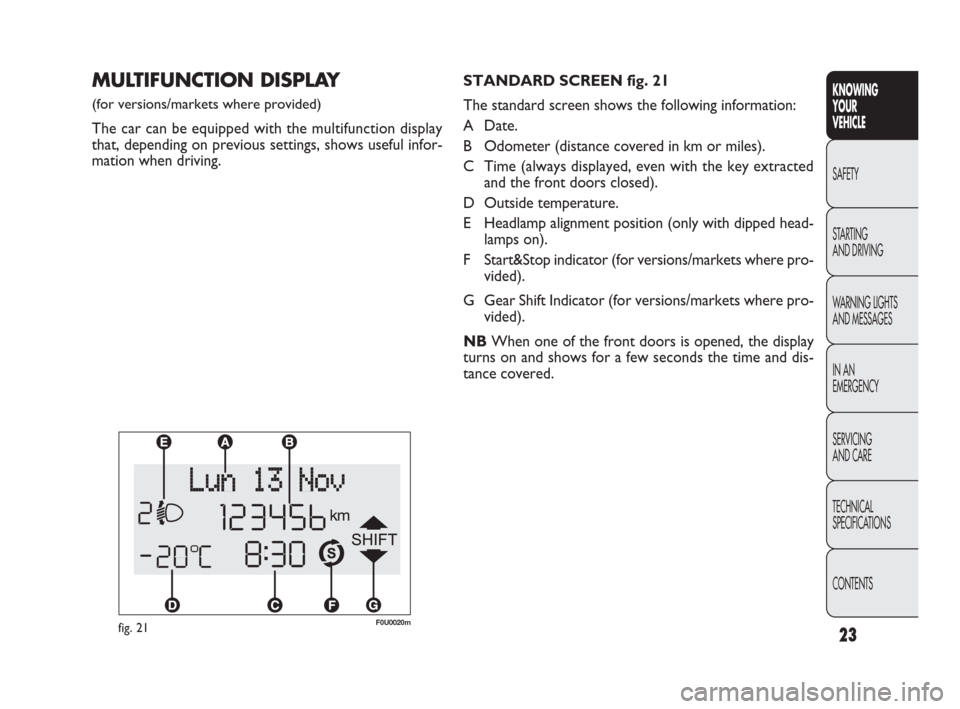
mation when driving.STANDARD SCREEN fig. 21
The standard screen shows the following information:
A Date.
B Odometer (distance covered in km or miles).
C Time (always displayed, even with the key extracted
and the front doors closed).
D Outside temperature.
E Headlamp alignment position (only with dipped head-
lamps on).
F Start&Stop indicator (for versions/markets where pro-
vided).
G Gear Shift Indicator (for versions/markets where pro-
vided).
NBWhen one of the front doors is opened, the display
turns on and shows for a few seconds the time and dis-
tance covered.
fig. 21F0U0020m
CONTENTS TECHNICAL
SPECIFICATIONS SERVICING
AND CARE IN AN
EMERGENCY WARNING LIGHTS
AND MESSAGES STARTING
AND DRIVING SAFETY
KNOWING
YOUR
VEHICLE
23
001-036 PUNTO FL EN 3ed 10-12-2009 15:55 Pagina 23
Page 33 of 270
32
KNOWING
YOUR
VEHICLE
SAFETY
STARTING
AND DRIVING
WARNING LIGHTS
AND MESSAGES
IN AN
EMERGENCY
SERVICING
AND CARE
TECHNICAL
SPECIFICATIONS
CONTENTS
AUTOCLOSE
(Automatic central locking with car moving)
When activated (On), this function automatically locks the
doors when the car speed exceeds 20 km/h.
To activate (On) or deactivate (Off) this function, proceed
as follows:
– press the MENU ESC button briefly: the display will show
a submenu;
– briefly press MENU ESC: On or Off will flash on the dis-
play (depending on previous setting);
– press +or –to make your choice;
– briefly press the MENU ESC button to go back to the
submenu screen or hold the button down to go back to
the main menu screen without saving;
– hold down MENU ESC again to go back to the standard
screen or main menu, depending on which point in the
menu you have reached. – briefly press the MENU ESC button to go back to the
menu screen or hold the button down to go back to the
standard screen without saving.
When the key is turned to MAR and the initial check stage
is over, the display will show the information selected via
the “First page” menu function.
SEE RADIO
(Relaying audio information)
With this function the display shows information relevant
to the sound system.
– Radio: selected radio station frequency or RDS message,
automatic tuning activation or AutoSTore;
– CD, MP3: track number;
– CD Changer: CD number and track number;
To show the sound system information in the display (On)
or clear it (Off), proceed as follows:
– briefly press MENU ESC: On or Off will flash on the dis-
play (depending on previous setting);
– press +or –to make your choice;
– briefly press the MENU ESC button to go back to the
menu screen or hold the button down to go back to the
standard screen without saving.
001-036 PUNTO FL EN 3ed 10-12-2009 15:55 Pagina 32
Page 36 of 270
35
KNOWING
YOUR
VEHICLE
SAFETY
STARTING
AND DRIVING
WARNING LIGHTS
AND MESSAGES
IN AN
EMERGENCY
SERVICING
AND CARE
TECHNICAL
SPECIFICATIONS
CONTENTS
BUTTON VOLUME
(Adjusting the button volume)
This function may be used to adjust (over 8 levels) the vol-
ume of the noise made when the MENU ESC, +e –but-
tons are pressed.
To set the desired volume, proceed as follows:
– briefly press MENU ESC: the previously set volume lev-
el will flash on the display;
– press +or –to set the value;
– briefly press the MENU ESC button to go back to the
menu screen or hold the button down to go back to the
standard screen without saving.
SEAT BELT BUZZ
(SBR buzzer reactivation
(for versions/markets where provided)
This function can be displayed only after a Fiat Dealer-
ship has deactivated the SBR system (see “SBR system”
in the “Safety” section).SERVICE
(Scheduled servicing)
Through this function it is possible to display information
related to regular scheduling intervals.
This information can be consulted as follows:
– briefly press MENU ESC: service intervals in km or mi,
depending on the previous setting, will be displayed (see
“Measurement units”);
– press the MENU ESC button briefly to return to the
menu screen or hold the button down to return to the
standard screen.
NBThe “Scheduled Servicing Plan” requires the vehicle
to be serviced every 30,000 km (or 18,000 mi). This indi-
cation will appear automatically, with the key at MAR, start-
ing from 2,000 km (or 1,240 mi) and will be displayed every
200 km (or 124 mi). Below 200 km the signals become
more frequent. The indication will appear in kilometres or
miles depending on the unit of measurement settings.
When the next scheduled service is approaching, the mes-
sage “Service” will appear on the display, followed by the
number of kilometres or miles left, when the key is turned
to MAR. Go to a Fiat Dealership, where the “Scheduled
Servicing Plan” operations will be performed and the mes-
sage will be reset.
001-036 PUNTO FL EN 3ed 10-12-2009 15:55 Pagina 35
Page 38 of 270
37
Values displayed
Outside temperature
Indicates the temperature outside the vehicle passenger
compartment.
Range
This indicates the approximate distance that may be trav-
elled with the fuel remaining in the tank, assuming that dri-
ving conditions do not change. The display will show the
reading “----” when the following events take place:
– value lower than 50 km (or 30 mi)
– car left parked with engine running for a long time.
Distance travelled
This value shows the distance covered from the start of
the new journey.
Average consumption
This value shows the approximate average fuel consump-
tion from the start of the new journey.
Current consumption
Indicates the fuel consumption. The value is constantly up-
dated. The message “----” will appear on the display if the
car is parked with the engine running.
Average speed
This value shows the car’s average speed based on the
overall time elapsed since the start of the new journey.TRIP COMPUTER
Introduction
The Trip computer is used to display information on car
operation when the key is turned to MAR. This function
allows you to define two separate trips, called “Trip A”
and “Trip B”, for monitoring the car’s “complete mission”
(journey) in a reciprocally independent manner.
Both functions can be reset (reset – start of a new jour-
ney).
“Trip A” is used to display the figures relating to:
– Outside temperature
– Range
– Distance travelled
– Average consumption
– Current consumption
– Average speed
– Journey time (driving time).
“Trip B”, available on multifunction display only, is used to
display the figures relating to:
– Distance travelled B
– Average consumption B
– Average speed B
– Travel time B (driving time).
NB“Trip B” functions may be excluded (see “Trip B on”).
“Range” and “Instant consumption” parameters cannot be
reset.
KNOWING
YOUR
VEHICLE
SAFETY
STARTING
AND DRIVING
WARNING LIGHTS
AND MESSAGES
IN AN
EMERGENCY
SERVICING
AND CARE
TECHNICAL
SPECIFICATIONS
CONTENTS
037-081 PUNTO FL EN 3ed 9-12-2009 13:39 Pagina 37
Page 39 of 270
38
F0U0022mfig. 28
New journey
The new journey begins after:
– “manual” resetting by the user, by pressing the relevant
button;
– “automatic” resetting, when the distance travelled reach-
es 99,999.9 km or when the journey time reaches 99.59
(99 hours and 59 minutes);
– disconnection and subsequent reconnection of the bat-
tery.
IMPORTANT The reset operation when “Trip A” details
are being displayed resets only the information associat-
ed with this function.
IMPORTANT The reset operation when “Trip B” details
are being displayed resets only the information associat-
ed with this function.
Start trip procedure
With the ignition key in the MAR position, reset by press-
ing the TRIP button and keeping it pressed for more than
2 seconds.
Trip Exit
To quit the Trip function: keep MENU ESC pressed for
over 2 seconds. Journey time
This value shows the time elapsed since the start of the
new journey.
IMPORTANT If information is not available, the message
“----” will appear instead of the Trip Computer values.
Counting of the different values will resume regularly when
normal operation is restored. This will not reset any of the
values displayed before the failure nor start a new jour-
ney.
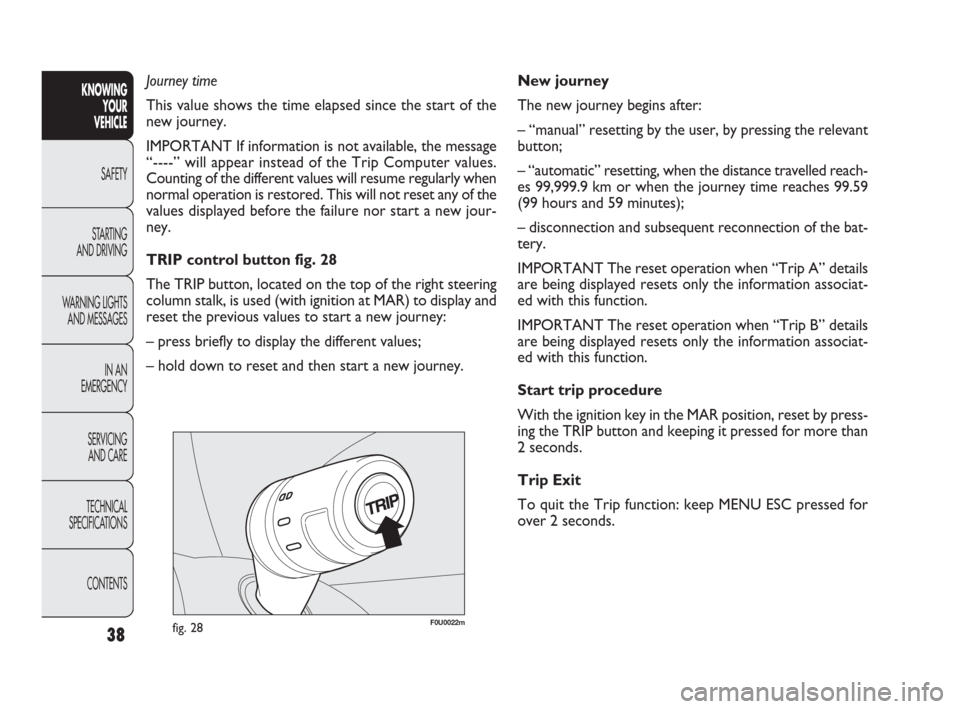
TRIP control button fig. 28
The TRIP button, located on the top of the right steering
column stalk, is used (with ignition at MAR) to display and
reset the previous values to start a new journey:
– press briefly to display the different values;
– hold down to reset and then start a new journey.KNOWING
YOUR
VEHICLE
SAFETY
STARTING
AND DRIVING
WARNING LIGHTS
AND MESSAGES
IN AN
EMERGENCY
SERVICING
AND CARE
TECHNICAL
SPECIFICATIONS
CONTENTS
037-081 PUNTO FL EN 3ed 9-12-2009 13:39 Pagina 38
Page 42 of 270
The fabric upholstery of your car is designed
to withstand normal wear and tear for
a long time. Some precautions are howev-
er needed. Avoid prolonged rubbing against cloth-
ing accessories, such as metal buckles, bosses,
Velcro strips and the like, which by applying a high
pressure on the fabric in a small area could cause
the breakage of some threads and damage the up-
holstery.
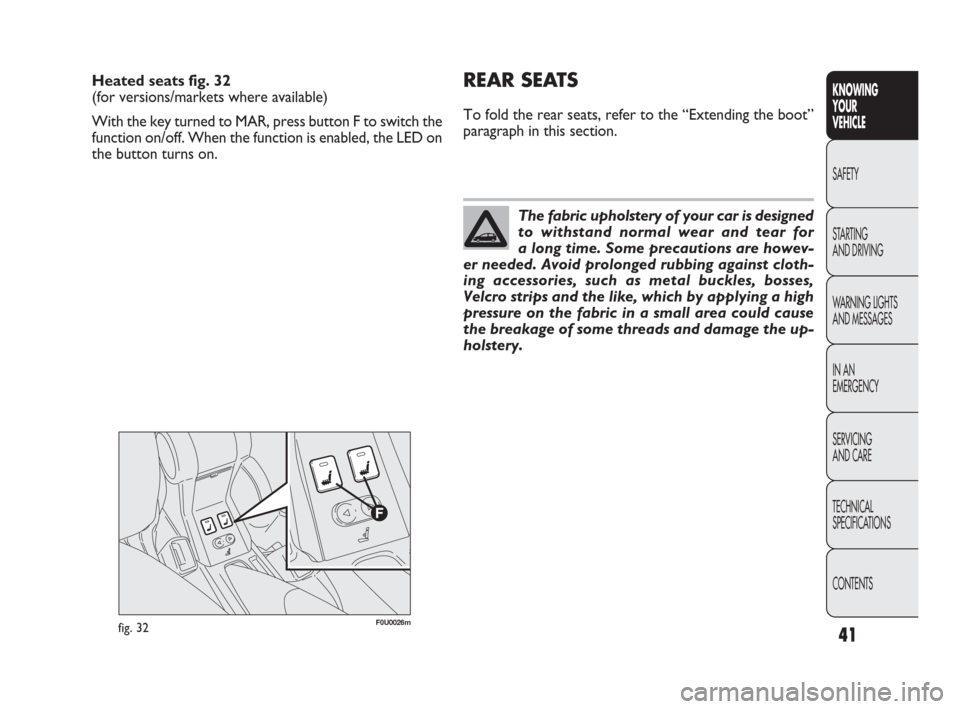
Heated seats fig. 32
(for versions/markets where available)
With the key turned to MAR, press button F to switch the
function on/off. When the function is enabled, the LED on
the button turns on.REAR SEATS
To fold the rear seats, refer to the “Extending the boot”
paragraph in this section.
fig. 32F0U0026m
41
KNOWING
YOUR
VEHICLE
SAFETY
STARTING
AND DRIVING
WARNING LIGHTS
AND MESSAGES
IN AN
EMERGENCY
SERVICING
AND CARE
TECHNICAL
SPECIFICATIONS
CONTENTS
037-081 PUNTO FL EN 3ed 9-12-2009 13:39 Pagina 41
Page 46 of 270
45
F0U0032mfig. 38
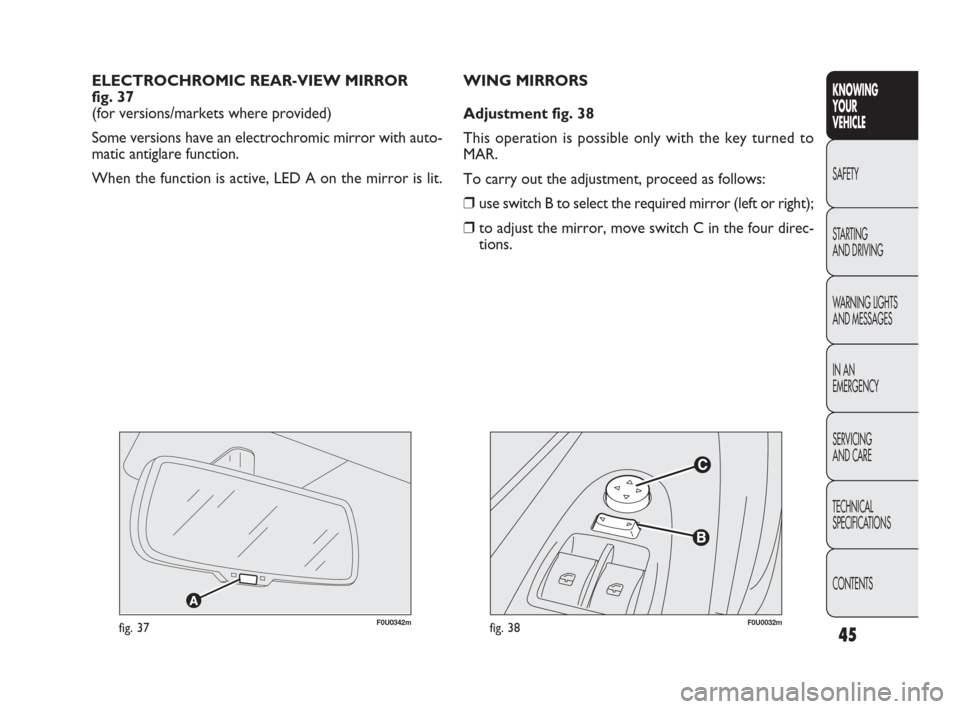
WING MIRRORS
Adjustment fig. 38
This operation is possible only with the key turned to
MAR.
To carry out the adjustment, proceed as follows:
❒use switch B to select the required mirror (left or right);
❒to adjust the mirror, move switch C in the four direc-
tions. ELECTROCHROMIC REAR-VIEW MIRROR
fig. 37
(for versions/markets where provided)
Some versions have an electrochromic mirror with auto-
matic antiglare function.
When the function is active, LED A on the mirror is lit. KNOWING
YOUR
VEHICLE
SAFETY
STARTING
AND DRIVING
WARNING LIGHTS
AND MESSAGES
IN AN
EMERGENCY
SERVICING
AND CARE
TECHNICAL
SPECIFICATIONS
CONTENTS
F0U0342mfig. 37
037-081 PUNTO FL EN 3ed 9-12-2009 13:39 Pagina 45
Page 62 of 270
F0U0042mfig. 49
The daytime running lights are an alterna-
tive to the dipped beam headlights for dri-
ving during the daytime in countries where it is com-
pulsory to have lights on during the day, and they
are also permitted in those countries where this not
obligatory. Daytime running lights cannot replace
dipped headlights when driving at night or through
tunnels. The use of daytime running lights is gov-
erned by the highway code of the country in which
you are driving. Keep to the rules.
WARNING
EXTERIOR LIGHTS
The left-hand stalk operates most of the external lights.
The ignition key has to be in the MAR position for the
exterior lights to come on. The instrument panel and the
various controls on the dashboard will be lit up when the
exterior lights are switched on.
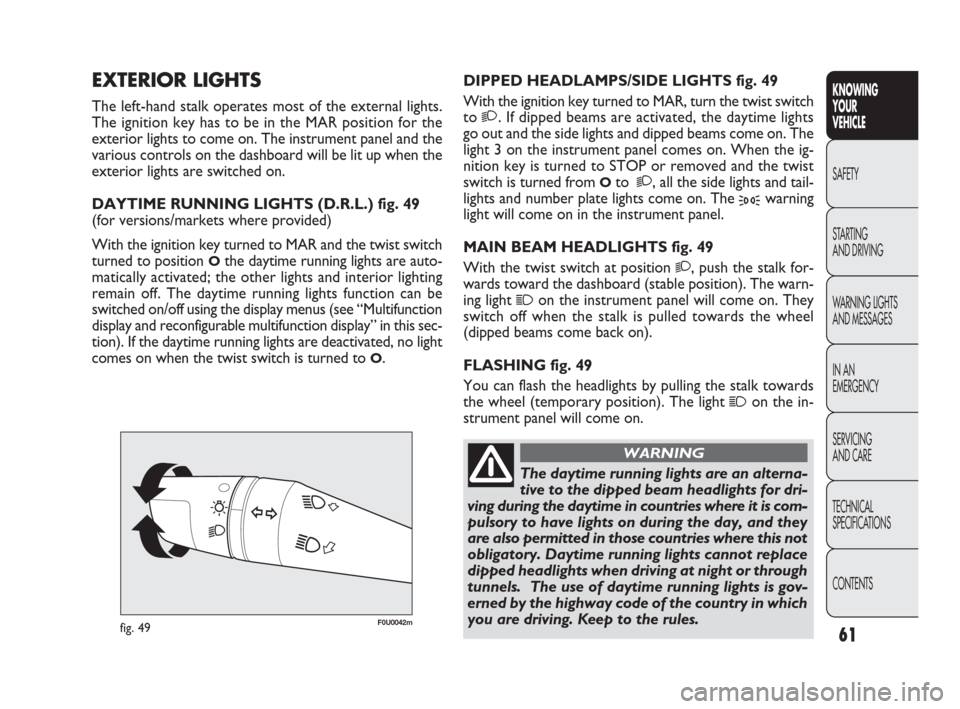
DAYTIME RUNNING LIGHTS (D.R.L.) fig. 49
(for versions/markets where provided)
With the ignition key turned to MAR and the twist switch
turned to position
Othe daytime running lights are auto-
matically activated; the other lights and interior lighting
remain off. The daytime running lights function can be
switched on/off using the display menus (see “Multifunction
display and reconfigurable multifunction display” in this sec-
tion). If the daytime running lights are deactivated, no light
comes on when the twist switch is turned to
O.DIPPED HEADLAMPS/SIDE LIGHTS fig. 49
With the ignition key turned to MAR, turn the twist switch
to
2. If dipped beams are activated, the daytime lights
go out and the side lights and dipped beams come on. The
light 3 on the instrument panel comes on. When the ig-
nition key is turned to STOP or removed and the twist
switch is turned from
Oto 2, all the side lights and tail-
lights and number plate lights come on. The
3warning
light will come on in the instrument panel.
MAIN BEAM HEADLIGHTS fig. 49
With the twist switch at position
2, push the stalk for-
wards toward the dashboard (stable position). The warn-
ing light
1on the instrument panel will come on. They
switch off when the stalk is pulled towards the wheel
(dipped beams come back on).
FLASHING fig. 49
You can flash the headlights by pulling the stalk towards
the wheel (temporary position). The light
1on the in-
strument panel will come on.
61
KNOWING
YOUR
VEHICLE
SAFETY
STARTING
AND DRIVING
WARNING LIGHTS
AND MESSAGES
IN AN
EMERGENCY
SERVICING
AND CARE
TECHNICAL
SPECIFICATIONS
CONTENTS
037-081 PUNTO FL EN 3ed 9-12-2009 13:39 Pagina 61
Page 63 of 270
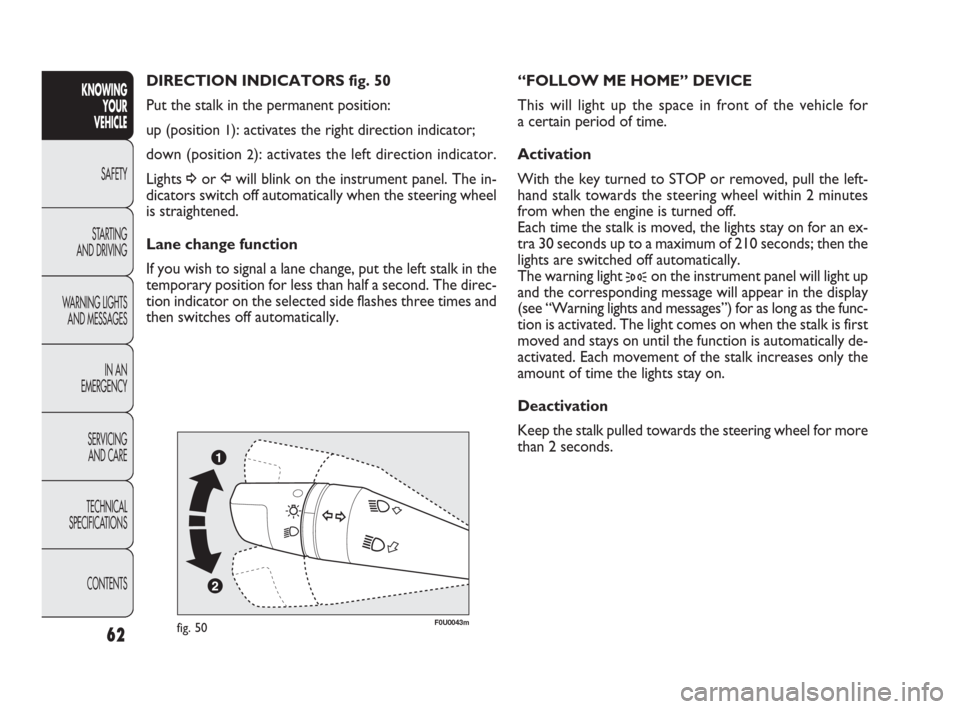
“FOLLOW ME HOME” DEVICE
This will light up the space in front of the vehicle for
a certain period of time.
Activation
With the key turned to STOP or removed, pull the left-
hand stalk towards the steering wheel within 2 minutes
from when the engine is turned off.
Each time the stalk is moved, the lights stay on for an ex-
tra 30 seconds up to a maximum of 210 seconds; then the
lights are switched off automatically.
The warning light
3on the instrument panel will light up
and the corresponding message will appear in the display
(see “Warning lights and messages”) for as long as the func-
tion is activated. The light comes on when the stalk is first
moved and stays on until the function is automatically de-
activated. Each movement of the stalk increases only the
amount of time the lights stay on.
Deactivation
Keep the stalk pulled towards the steering wheel for more
than 2 seconds.
fig. 50F0U0043m
62
KNOWING
YOUR
VEHICLE
SAFETY
STARTING
AND DRIVING
WARNING LIGHTS
AND MESSAGES
IN AN
EMERGENCY
SERVICING
AND CARE
TECHNICAL
SPECIFICATIONS
CONTENTS
DIRECTION INDICATORS fig. 50
Put the stalk in the permanent position:
up (position
1): activates the right direction indicator;
down (position
2): activates the left direction indicator.
Lights
¥or Îwill blink on the instrument panel. The in-
dicators switch off automatically when the steering wheel
is straightened.
Lane change function
If you wish to signal a lane change, put the left stalk in the
temporary position for less than half a second. The direc-
tion indicator on the selected side flashes three times and
then switches off automatically.
037-081 PUNTO FL EN 3ed 9-12-2009 13:39 Pagina 62
Page 65 of 270
“Smart washing” function
Pull the stalk towards the steering wheel (temporary po-
sition) to operate the windscreen washer.
Keeping the stalk pulled for more than half a second, with
just one movement it is possible to operate the washer jet
and the wiper at the same time.
The wiper stops working three strokes after releasing the
stalk. A further stroke 6 seconds later completes the wip-
ing operation.RAIN SENSOR
(for versions/markets where provided)
The rain sensor is located behind the rear-view mirror in
contact with the windscreen and has the purpose of au-
tomatically adjusting the frequency of the windscreen wiper
strokes depending on the intensity of the rain during in-
termittent operation.
IMPORTANT Keep the glass in the sensor area clean.
Activation
Move the twist switch on the right-hand stalk to
≤fig.
51. The activation of the sensor is signalled by a wiper
stroke. Through the setup menu it is possible to increase
the sensitivity of the rain sensor. The increasing of the rain
sensor sensitivity is also signalled by a stroke of the wipers.
If the windscreen washer is used with the rain sensor ac-
tivated, the normal washing cycle is performed, after which
the rain sensor resumes its normal automatic operation.
Deactivation
Move the stalk twist switch away from
≤fig. 51 or turn
the ignition key to STOP. When the engine is next start-
ed (key at MAR), the sensor will not be reactivated even
if the twist switch is still at
≤fig. 51. To activate the rain
sensor, you have to move the twist switch from
≤to an-
other position and then back to
≤. Rain sensor activa-
tion will be indicated by at least one wiper stroke, even if
the windscreen is dry.
64
KNOWING
YOUR
VEHICLE
SAFETY
STARTING
AND DRIVING
WARNING LIGHTS
AND MESSAGES
IN AN
EMERGENCY
SERVICING
AND CARE
TECHNICAL
SPECIFICATIONS
CONTENTS
Do not use the windscreen wipers to re-
move layers of snow or ice from the wind-
screen. In such conditions, the windscreen
wipers may be subjected to excessive stress,
prompting intervention from the motor protection
which prevents operation for a few seconds. If op-
eration is not restored, even after turning the key
and restarting the engine, go to a Fiat Dealership.
When released, the stalk returns to its default position and
the wipers automatically switch off.
With the twist switch at
≤, the windscreen wiper will
automatically adapt to the speed of the car.
IMPORTANT Replace the wiper blades as specified in the
“Maintenance and care” section.
037-081 PUNTO FL EN 3ed 9-12-2009 13:39 Pagina 64