drive FIAT QUBO 2010 1.G Owners Manual
[x] Cancel search | Manufacturer: FIAT, Model Year: 2010, Model line: QUBO, Model: FIAT QUBO 2010 1.GPages: 230, PDF Size: 4.38 MB
Page 4 of 230
KNOW YOUR VEHICLE
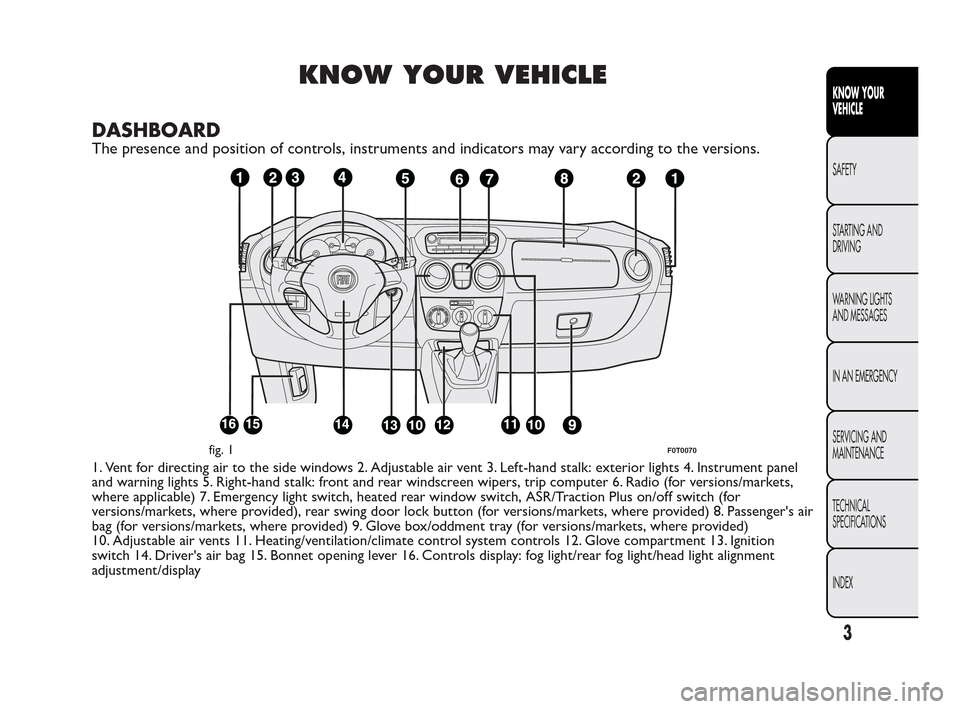
DASHBOARD
The presence and position of controls, instruments and indicators may vary according to the versions.
1. Vent for directing air to the side windows 2. Adjustable air vent 3. Left-hand stalk: exterior lights 4. Instrument panel
and warning lights 5. Right-hand stalk: front and rear windscreen wipers, trip computer 6. Radio (for versions/markets,
where applicable) 7. Emergency light switch, heated rear window switch, ASR/Traction Plus on/off switch (for
versions/markets, where provided), rear swing door lock button (for versions/markets, where provided) 8. Passenger's air
bag (for versions/markets, where provided) 9. Glove box/oddment tray (for versions/markets, where provided)
10. Adjustable air vents 11. Heating/ventilation/climate control system controls 12. Glove compartment 13. Ignition
switch 14. Driver's air bag 15. Bonnet opening lever 16. Controls display: fog light/rear fog light/head light alignment
adjustment/display
fig. 1F0T0070
3
KNOW YOUR
VEHICLE
SAFETY
ST
ARTING AND
DRIVING
WARNING LIGHTS
AND MESSAGES
IN AN EMERGENCY
SERVICING AND
MAINTENANCE
TECHNICAL
SPECIFICATIONS
INDEX
Page 9 of 230
Changing battery - key with remote control
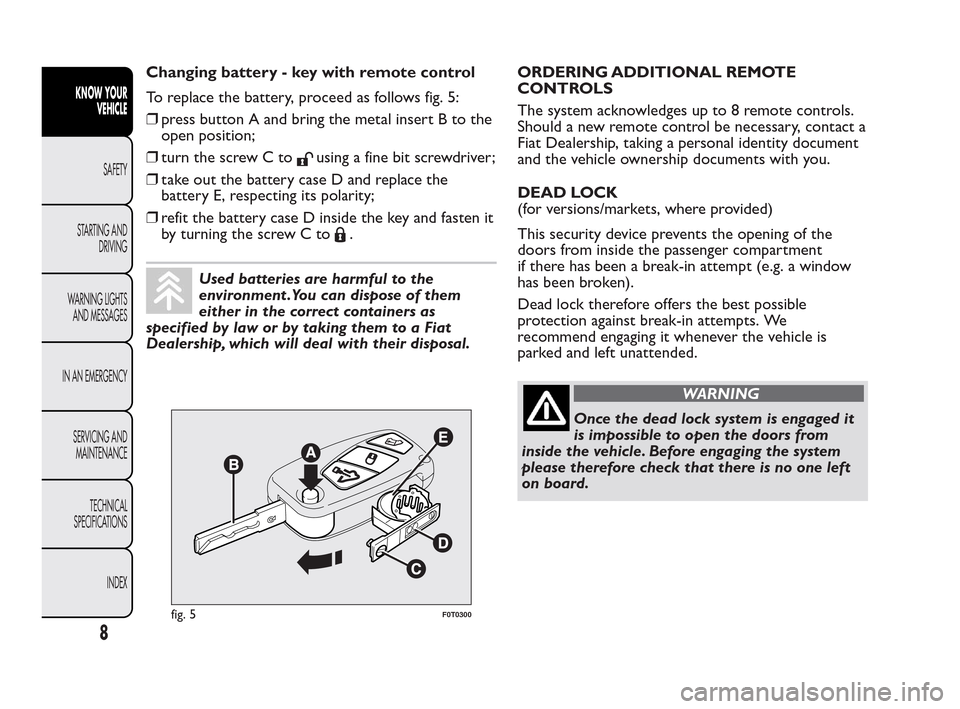
To replace the battery, proceed as follows fig. 5:
❒press button A and bring the metal insert B to the
open position;
❒turn the screw C to
using a fine bit screwdriver;
❒take out the battery case D and replace the
battery E, respecting its polarity;
❒refit the battery case D inside the key and fasten it
by turning the screw C to
.
Used batteries are harmful to the
environment .You can dispose of them
either in the correct containers as
specified by law or by taking them to a Fiat
Dealership, which will deal with their disposal.ORDERING ADDITIONAL REMOTE
CONTROLS
The system acknowledges up to 8 remote controls.
Should a new remote control be necessary, contact a
Fiat Dealership, taking a personal identity document
and the vehicle ownership documents with you.
DEAD LOCK
(for versions/markets, where provided)
This security device prevents the opening of the
doors from inside the passenger compartment
if there has been a break-in attempt (e.g. a window
has been broken).
Dead lock therefore offers the best possible
protection against break-in attempts. We
recommend engaging it whenever the vehicle is
parked and left unattended.
WARNING
Once the dead lock system is engaged it
is
impossible to open the doors from
inside the vehicle. Before engaging the system
please therefore check that there is no one left
on board.
fig. 5F0T0300
8
KNOW YOUR
VEHICLE
SAFETY
ST
ARTING AND
DRIVING
WARNING LIGHTS
AND MESSAGES
IN AN EMERGENCY
SERVICING AND
MAINTENANCE
TECHNICAL
SPECIFICATIONS
INDEX
Page 16 of 230
MULTIFUNCTION DISPLAY
The vehicle may be equipped with a multifunction
display that gives the driver useful information
depending on the previous settings.
STANDARD SCREEN
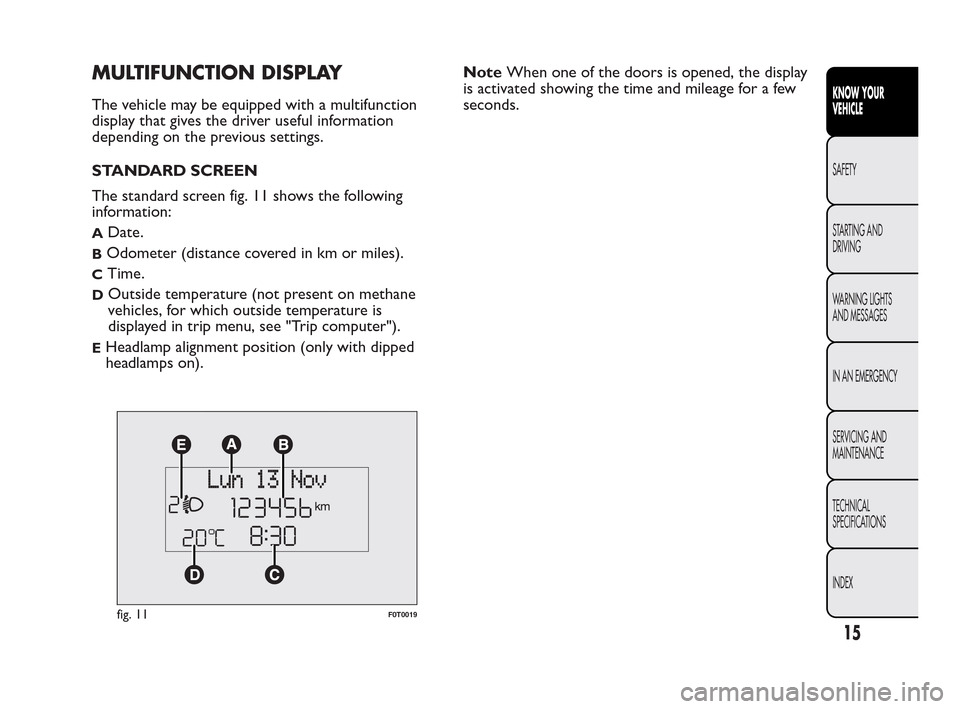
The standard screen fig. 11 shows the following
information:
ADate.
BOdometer (distance covered in km or miles).
CTime.
DOutside temperature (not present on methane
vehicles, for which outside temperature is
displayed in trip menu, see "Trip computer").
EHeadlamp alignment position (only with dipped
headlamps on).NoteWhen one of the doors is opened, the display
is activated showing the time and mileage for a few
seconds.
fig. 11F0T0019
15
KNOW YOUR
VEHICLE
SAFETY
ST
ARTING AND
DRIVING
WARNING LIGHTS
AND MESSAGES
IN AN EMERGENCY
SERVICING AND
MAINTENANCE
TECHNICAL
SPECIFICATIONS
INDEX
Page 20 of 230
Hold down MENU ESC:
- to quit the set up menu if you are in the main
menu;
- to quit the main menu if you are in another point of
the menu (e.g. at submenu option setting level, at
submenu level or at main menu option setting level);
- to save only the settings already stored (and
confirmed by pressing the MENU ESC button).
The setup menu page is timed. Only the changes
already stored by pressing the MENU ESC button are
saved when you come out of the menu.
On the standard screen, briefly press MENU ESC to
start browsing.
Press
orto browse within the menu.
NoteOnly the short menu may be accessed for
reasons of safety while the vehicle is moving ("Speed
Beep" setting). Stop the vehicle to access the full
menu.Adjusting the vehicle interior lighting
This function is available with the dipped beam
headlights on to adjust brightness of the instrument
panel, buttons and radio display.
To adjust the light intensity, proceed as follows:
❒press the MENU ESC button briefly to make the
display flash the previously set level;
❒press button
andto set the required
brightness level;
❒press the MENU ESC button briefly to return to
the menu screen or give the button a long press
to return to the standard screen without storing.
Speed limit (Speed Beep)
This function is used to set the vehicle speed limit
(km/h or mph). When this limit is exceeded the
driver is immediately alerted (see “Warning lights
and messages” section).
To set the desired speed limit, proceed as follows:
- briefly press the MENU ESC button: the display will
show the words (Speed Beep);
- press
orto select speed limit activation
(On) or deactivation (Off );
- if the function is on, press
orto select the
required speed limit and then press MENU ESC to
confirm;
19
KNOW YOUR
VEHICLE
SAFETY
ST
ARTING AND
DRIVING
WARNING LIGHTS
AND MESSAGES
IN AN EMERGENCY
SERVICING AND
MAINTENANCE
TECHNICAL
SPECIFICATIONS
INDEX
Page 30 of 230
WARNING
Once you have released the adjustment
le
ver, always check that the seat is
locked on the guides by trying to move it back
and forth. If it is not locked, the seat may move
unexpectedly and make you lose control of
the vehicle.
Backrest angle adjustment
Turn knob B fig. 16.
Height adjustment (driver only)
(for versions/markets, where provided)
Operate lever C fig. 16 to lift or lower the rear part
of the cushion to achieve the most comfortable
driving position.
IMPORTANT Adjustment must be carried out only
when seated in the relevant seat.
Driver seat lumbar adjustment
(for versions/markets, where provided)
Turn knob D fig. 16 to adjust the backrest support.Seat heating
(for versions/markets, where provided)
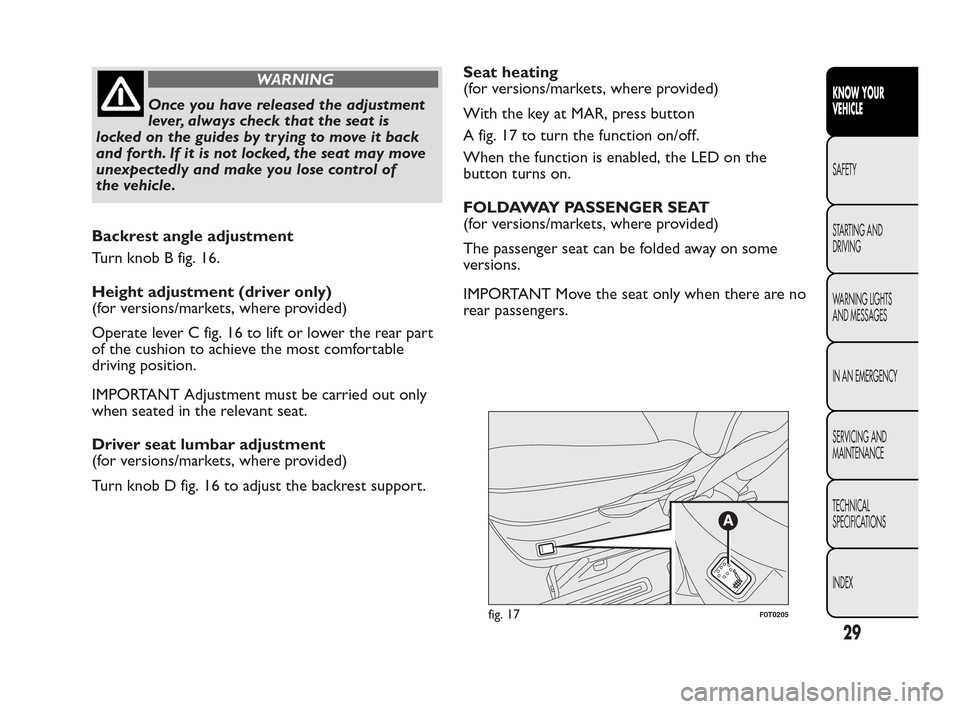
With the key at MAR, press button
A fig. 17 to turn the function on/off.
When the function is enabled, the LED on the
button turns on.
FOLDAWAY PASSENGER SEAT
(for versions/markets, where provided)
The passenger seat can be folded away on some
versions.
IMPORTANT Move the seat only when there are no
rear passengers.
fig. 17F0T0205
29
KNOW YOUR
VEHICLE
SAFETY
ST
ARTING AND
DRIVING
WARNING LIGHTS
AND MESSAGES
IN AN EMERGENCY
SERVICING AND
MAINTENANCE
TECHNICAL
SPECIFICATIONS
INDEX
Page 32 of 230
WARNING
When the passenger seat is folded away,
t
he space created cannot be used for
loading.When the vehicle is in motion, you are
therefore advised to remove or secure any
objects that might interfere with the driver. If
there is no partition between the cab and
the load compartment , tall objects or packages
may take up part of the passenger area. Make
sure that these items are well secured by using
the available hooks and that they cannot
interfere with the driver.
ACCESSING REAR SEATS (Combi versions)
Open one of the two sliding side doors to access the
rear seats (see "Doors" in this section).
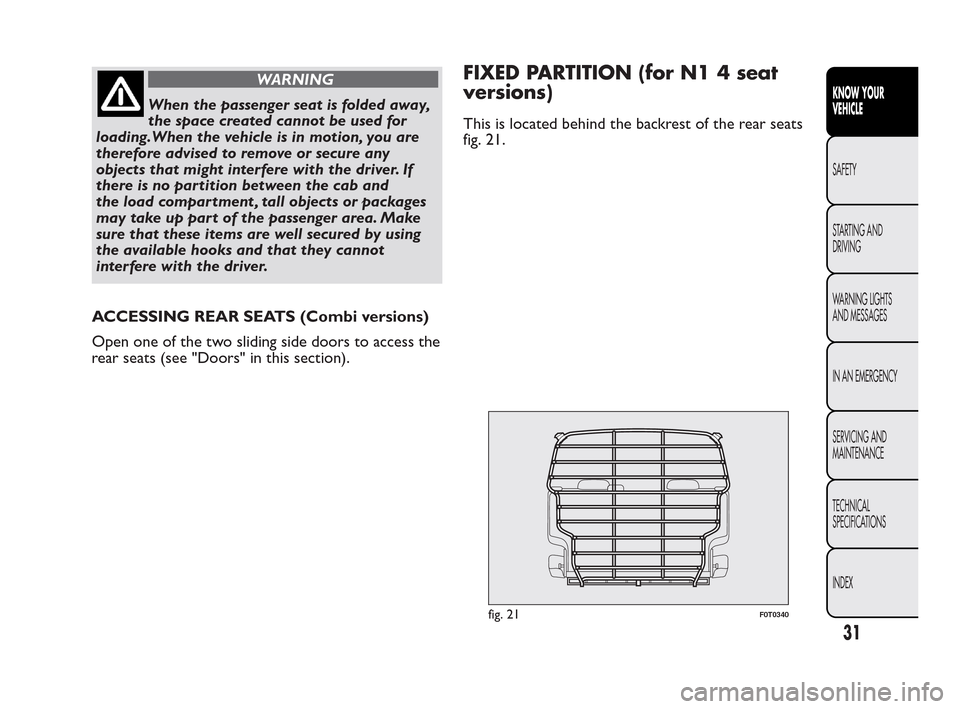
FIXED PARTITION (for N1 4 seat
versions)
This is located behind the backrest of the rear seats
fig. 21.
fig. 21F0T0340
31
KNOW YOUR
VEHICLE
SAFETY
ST
ARTING AND
DRIVING
WARNING LIGHTS
AND MESSAGES
IN AN EMERGENCY
SERVICING AND
MAINTENANCE
TECHNICAL
SPECIFICATIONS
INDEX
Page 55 of 230
FOG LIGHTS
(for versions/markets, where provided)
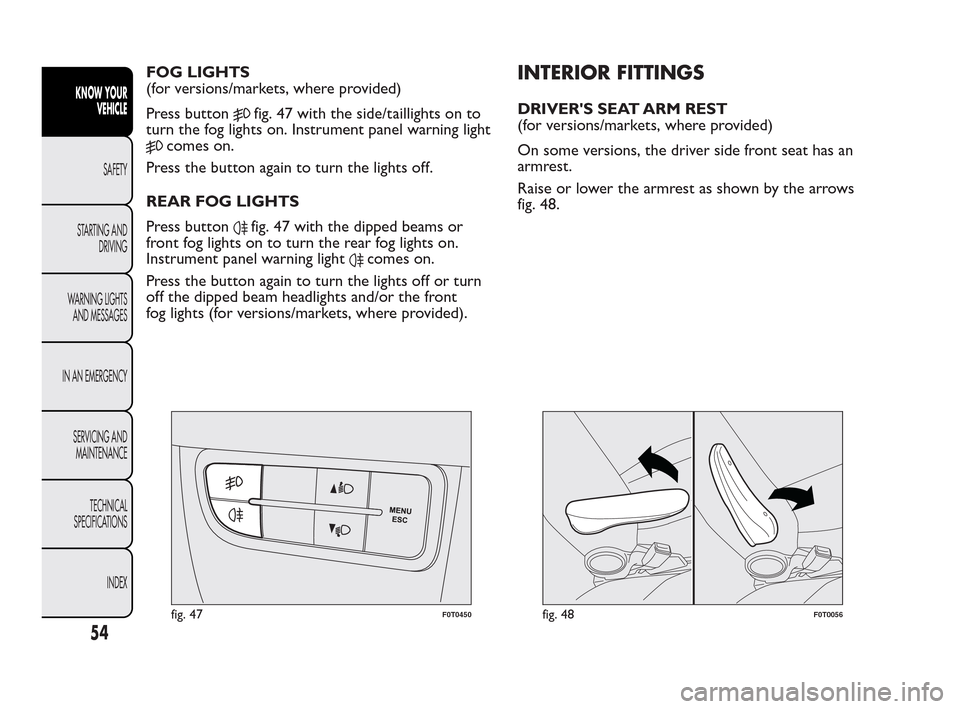
Press button
fig. 47 with the side/taillights on to
turn the fog lights on. Instrument panel warning light
comes on.
Press the button again to turn the lights off.
REAR FOG LIGHTS
Press button
fig. 47 with the dipped beams or
front fog lights on to turn the rear fog lights on.
Instrument panel warning light
comes on.
Press the button again to turn the lights off or turn
off the dipped beam headlights and/or the front
fog lights (for versions/markets, where provided).
INTERIOR FITTINGS
DRIVER'S SEAT ARM REST
(for versions/markets, where provided)
On some versions, the driver side front seat has an
armrest.
Raise or lower the armrest as shown by the arrows
fig. 48.
fig. 47F0T0450fig. 48F0T0056
54
KNOW YOUR
VEHICLE
SAFETY
ST
ARTING AND
DRIVING
WARNING LIGHTS
AND MESSAGES
IN AN EMERGENCY
SERVICING AND
MAINTENANCE
TECHNICAL
SPECIFICATIONS
INDEX
Page 57 of 230
IMPORTANT Always check that the cigar lighter is
switched off.
WARNING
The cigar lighter gets extremely hot .
Han
dle it carefully and make sure
children don't touch it : risk of fire and/or
burning.
ASHTRAY
(for versions/markets, where provided)
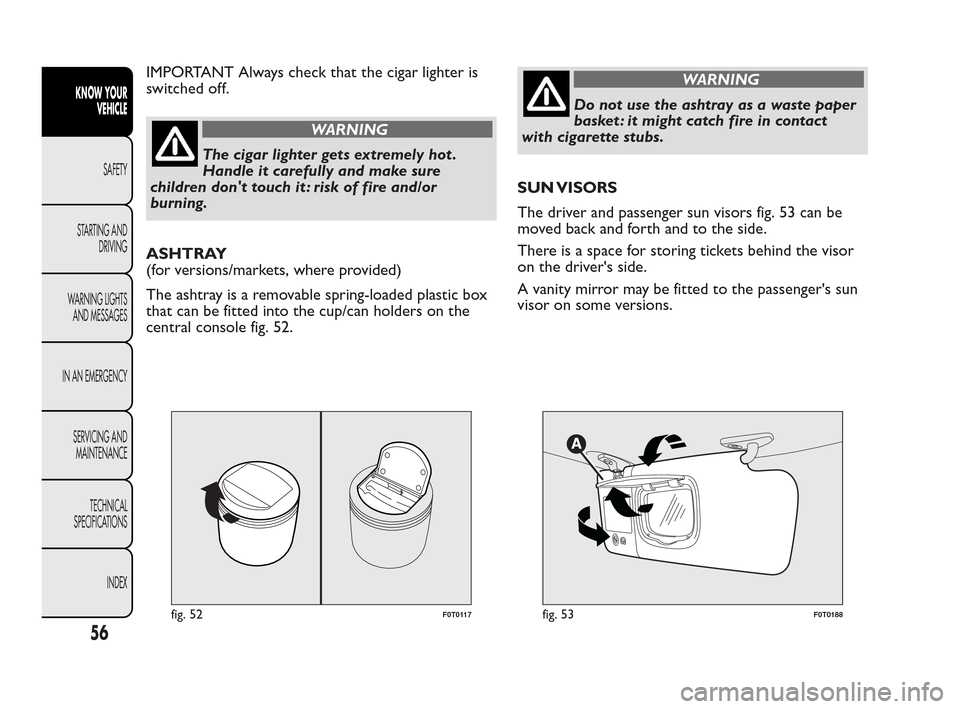
The ashtray is a removable spring-loaded plastic box
that can be fitted into the cup/can holders on the
central console fig. 52.
WARNING
Do not use the ashtray as a waste paper
bask
et : it might catch fire in contact
with cigarette stubs.
SUN VISORS
The driver and passenger sun visors fig. 53 can be
moved back and forth and to the side.
There is a space for storing tickets behind the visor
on the driver's side.
A vanity mirror may be fitted to the passenger's sun
visor on some versions.
fig. 52F0T0117fig. 53F0T0188
56
KNOW YOUR
VEHICLE
SAFETY
ST
ARTING AND
DRIVING
WARNING LIGHTS
AND MESSAGES
IN AN EMERGENCY
SERVICING AND
MAINTENANCE
TECHNICAL
SPECIFICATIONS
INDEX
Page 59 of 230
DOORS
DOOR CENTRAL LOCKING/UNLOCKING
Locking from the outside
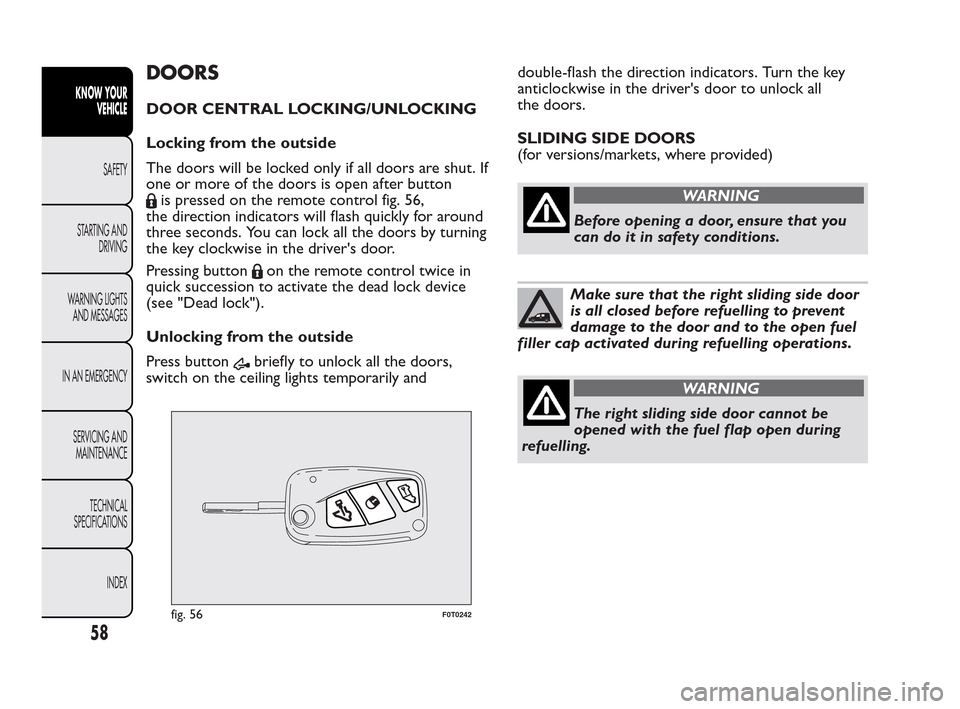
The doors will be locked only if all doors are shut. If
one or more of the doors is open after button
is pressed on the remote control fig. 56,
the direction indicators will flash quickly for around
three seconds. You can lock all the doors by turning
the key clockwise in the driver's door.
Pressing button
on the remote control twice in
quick succession to activate the dead lock device
(see "Dead lock").
Unlocking from the outside
Press button
briefly to unlock all the doors,
switch on the ceiling lights temporarily anddouble-flash the direction indicators. Turn the key
anticlockwise in the driver's door to unlock all
the doors.
SLIDING SIDE DOORS
(for versions/markets, where provided)
WARNING
Before opening a door, ensure that you
can
do it in safety conditions.
Make sure that the right sliding side door
is all closed before refuelling to prevent
damage to the door and to the open fuel
filler cap activated during refuelling operations.
WARNING
The right sliding side door cannot be
o
pened with the fuel flap open during
refuelling.
fig. 56F0T0242
58
KNOW YOUR
VEHICLE
SAFETY
ST
ARTING AND
DRIVING
WARNING LIGHTS
AND MESSAGES
IN AN EMERGENCY
SERVICING AND
MAINTENANCE
TECHNICAL
SPECIFICATIONS
INDEX
Page 62 of 230
WINDOWS
FRONT ELECTRIC WINDOWS
(for versions/markets, where provided)
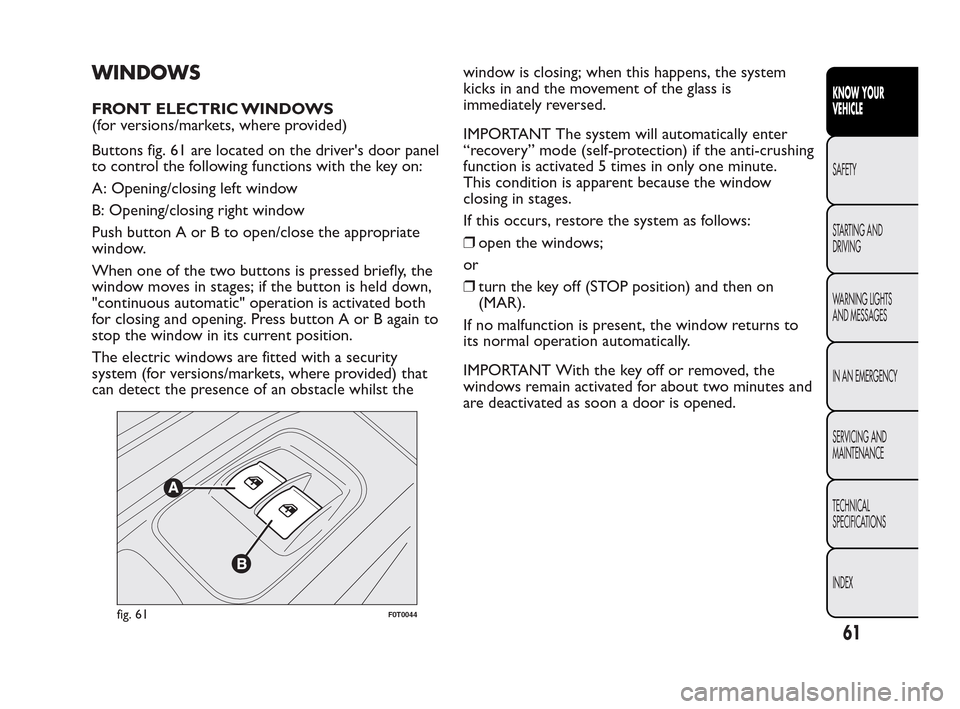
Buttons fig. 61 are located on the driver's door panel
to control the following functions with the key on:
A: Opening/closing left window
B: Opening/closing right window
Push button A or B to open/close the appropriate
window.
When one of the two buttons is pressed briefly, the
window moves in stages; if the button is held down,
"continuous automatic" operation is activated both
for closing and opening. Press button A or B again to
stop the window in its current position.
The electric windows are fitted with a security
system (for versions/markets, where provided) that
can detect the presence of an obstacle whilst thewindow is closing; when this happens, the system
kicks in and the movement of the glass is
immediately reversed.
IMPORTANT The system will automatically enter
“recovery” mode (self-protection) if the anti-crushing
function is activated 5 times in only one minute.
This condition is apparent because the window
closing in stages.
If this occurs, restore the system as follows:
❒open the windows;
or
❒turn the key off (STOP position) and then on
(MAR).
If no malfunction is present, the window returns to
its normal operation automatically.
IMPORTANT With the key off or removed, the
windows remain activated for about two minutes and
are deactivated as soon a door is opened.
fig. 61F0T0044
61
KNOW YOUR
VEHICLE
SAFETY
ST
ARTING AND
DRIVING
WARNING LIGHTS
AND MESSAGES
IN AN EMERGENCY
SERVICING AND
MAINTENANCE
TECHNICAL
SPECIFICATIONS
INDEX