buttons FIAT QUBO 2017 1.G Owners Manual
[x] Cancel search | Manufacturer: FIAT, Model Year: 2017, Model line: QUBO, Model: FIAT QUBO 2017 1.GPages: 260, PDF Size: 4.74 MB
Page 20 of 260
FStart&Stop function indication (for versions/
markets, where provided).
GGear Shift Indication (for versions/markets, where
provided).
NoteWhen one of the front doors is opened, the
display is activated, showing the time and mileage for
a few seconds.
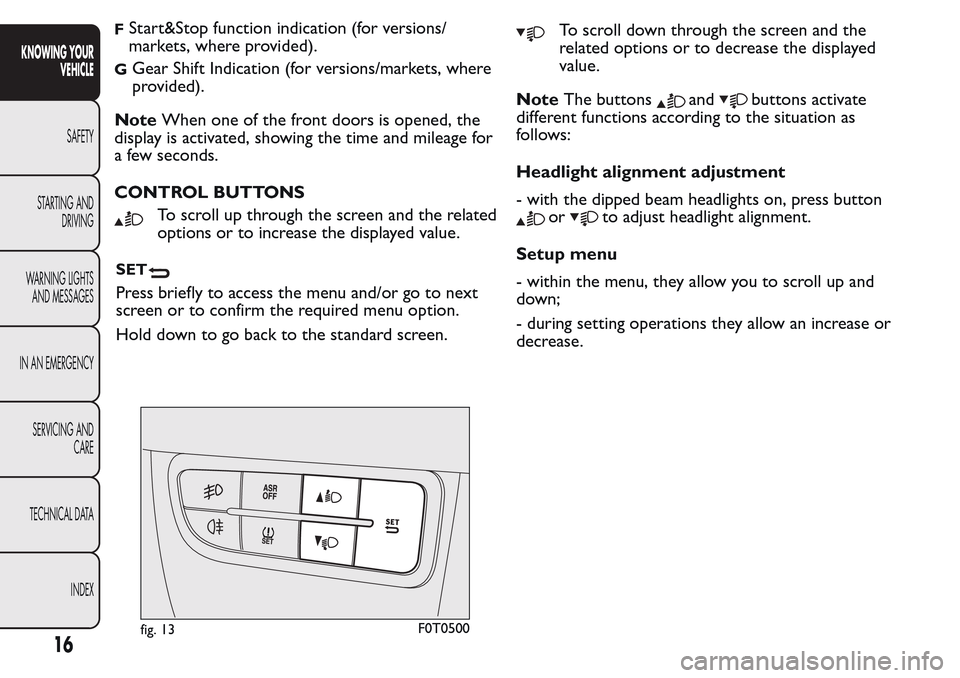
CONTROL BUTTONS
To scroll up through the screen and the related
options or to increase the displayed value.
SET
Press briefly to access the menu and/or go to next
screen or to confirm the required menu option.
Hold down to go back to the standard screen.
To scroll down through the screen and the
related options or to decrease the displayed
value.
NoteThe buttons
andbuttons activate
different functions according to the situation as
follows:
Headlight alignment adjustment
- with the dipped beam headlights on, press button
orto adjust headlight alignment.
Setup menu
- within the menu, they allow you to scroll up and
down;
- during setting operations they allow an increase or
decrease.
fig. 13F0T0500
16
KNOWING YOUR
VEHICLE
SAFETY
STARTING AND
DRIVING
WARNING LIGHTS
AND MESSAGES
IN AN EMERGENCY
SERVICING AND
CARE
TECHNICAL DATA
INDEX
Page 22 of 260
Setup menu functions
The fig. 14 menu comprises a series of functions
arranged in a circular way, which can be selected
through the
andbuttons to access the
different selection operations and settings (setup)
given in the following paragraphs. A submenu is
provided for some items (Setting the clock and Set
units).
The set-up menu is activated by pressing theSET
button briefly.
Single presses of the
orbuttons permit
navigation through the setup menu options.
Operating modes are different according to the
characteristics of the option selected.
Selecting an option from the main menu
without a submenu:
press theSET
button briefly to select the main
menu setting you wish to change;
- press the
orbuttons (with a single press)
to select the new setting;
press theSET
button briefly to save the new
setting and go back to the previous main menu
option.
Selecting an option from the main menu with
a submenu:
briefly press theSET
button to display the first
submenu option;
- press the
orbuttons (with a single press)
to scroll through all submenu options;press theSET
button briefly to select the
displayed submenu option and to open the relevant
settings menu;
- press the
orbuttons (with a single press)
to choose the new setting for this submenu option;
press theSET
button briefly to store the new
setting and go back to the previous submenu option.
Selecting “Date” and “Set Clock”:
- press theSET
button briefly to select the first
value to be changed (e.g. hours / minutes or year /
month / day).
- press the
orbuttons (with a single press)
to select the new setting;
- press theSET
button briefly to store the new
setting and at the same time go to the next set-up
menu option. If the processed option is the last one,
the system brings you back to the previously selected
option of the menu.
Hold down the SET
button:
- to exit the set-up menu if you are in the main
menu;
- to exit the main menu if you are in another point of
the menu (e.g.: at submenu option setting level, at
submenu level or at main menu option setting level);
- to save only the changes already stored by the
user (and confirmed by pressing theSET
button).
The set-up menu page is timed. When the menu is
exited due to the expiry of the time allowed, only
18
KNOWING YOUR
VEHICLE
SAFETY
STARTING AND
DRIVING
WARNING LIGHTS
AND MESSAGES
IN AN EMERGENCY
SERVICING AND
CARE
TECHNICAL DATA
INDEX
Page 23 of 260
the changes already stored by the user (and
confirmed by pressing theSET
button briefly)
will be saved.
From the standard screen, press theSET
button
briefly to start browsing.
Press the
orbuttons to navigate within the
menu.
NoteOnly the reduced menu can be accessed while
the vehicle is moving for safety reasons ("Speed
Beep" setting). Stop the vehicle to access the full
menu.
Adjusting the vehicle interior lighting
This function is available with the dipped beam
headlights on to adjust brightness of the instrument
panel, buttons and radio display.
To adjust the light intensity, proceed as follows:
press the SETbutton briefly to make
the display flash the previously set level;
press theorbutton to set the required
brightness level;
press the SETbutton briefly to go back to the
menu screen or hold the button down to go back
to the standard screen without saving.
Speed limit (Speed Beep)
This function makes it possible to set the vehicle
speed limit (km/h or mph). When this limit isexceeded the driver is immediately alerted (see
“Warning lights and messages” section).
To set the desired speed limit, proceed as follows:
- press theSET
button briefly, the display will
show the wording (Speed Beep);
- press the
orbutton to select speed limit
activation (On) or deactivation (Off );
- if the function is on, press
orbutton to
select the desired speed limit and then pressSET
to confirm.
NoteSetting is possible between 30 and 200 km/h,
or 20 and 125 mph, according to the previously
set unit. See the "Setting the unit of measurement
(Measurement unit)" paragraph described below. The
setting will increase/decrease by 5 units each time
button
/is pressed. Hold down the/
button to automatically increase/decrease the
setting rapidly. Complete the adjustment with single
presses of the button when you approach the desired
value.
- press theSET
button briefly to go back to the
menu screen or hold the button down to go back
to the standard screen without saving.
To cancel the setting, proceed as follows:
- press theSET
button briefly to make the
display flash (On);
- press button
, (Off ) will flash on the display;
- press theSET
button briefly to go back to the
menu screen or hold the button down to go back
to the standard screen without saving.
19
KNOWING YOUR
VEHICLE
SAFETY
STARTING AND
DRIVING
WARNING LIGHTS
AND MESSAGES
IN AN EMERGENCY
SERVICING AND
CARE
TECHNICAL DATA
INDEX
Page 26 of 260
- press buttonorto navigate through the
three submenus;
- once you have selected the submenu to be changed,
press theSET
button briefly;
- if you enter the "Distances" submenu, pressing the
SET
button briefly makes the display show
"km" or "mi" (depending on the previous setting);
- press button
orto select;
- if you enter the "Consumption" submenu, pressing
theSET
button briefly makes the display show
"km/l", "l/100km" or "mpg" (depending on the
previous setting);
If the set distance unit is "km", the display enables
setting of the fuel consumption unit (km/l or
l/100km).
If the set distance unit is "mi", the display shows the
amount of fuel consumed in "mpg".
- press button
orto select;
- when you enter the “Temperature” submenu,
pressing theSET
button briefly makes “°C” or
“°F” appear on the display depending on the previous
setting;
- press button
orto select;
When you have made the required settings, press the
SET
button briefly to go back to the submenu
screen or hold the button down to go back to
the main menu screen without saving.
- press theSET
button again to return to the
standard screen or to the main menu according
to where you are in the menu.Selecting the language (Language)
Messages on the display can be shown in the
following languages: Italian, German, English, Spanish,
French, Portuguese, Turkish and Dutch.
To set the desired language, proceed as follows:
briefly press theSET
button, the previously set
"language" starts flashing on the display;
- press button
orto select;
- press theSET
button briefly to go back to the
menu screen or hold the button down to go back
to the standard screen without saving.
Adjust the failure/warning buzzer volume
(Buzzer Volume)
With this function the volume of the buzzer which
accompanies the display of any failure/warning can be
adjusted according to 8 levels.
To set the desired volume, proceed as follows:
- briefly press theSET
button, the previously set
volume “level” will flash on the display;
- press the
orbutton to adjust;
- press theSET
button briefly to go back to the
menu screen or hold the button down to go back
to the standard screen without saving.
Adjusting the button volume (Button Vol.)
This function is used to set the volume of the
acoustic signal accompanying the activation of the
SET
,andbuttons through 8 levels.
22
KNOWING YOUR
VEHICLE
SAFETY
STARTING AND
DRIVING
WARNING LIGHTS
AND MESSAGES
IN AN EMERGENCY
SERVICING AND
CARE
TECHNICAL DATA
INDEX
Page 27 of 260
To set the desired volume, proceed as follows:
- briefly press theSET
button, the previously set
volume “level” will flash on the display;
- press the
orbutton to adjust;
- press theSET
button briefly to go back to the
menu screen or hold the button down to go back
to the standard screen without saving.
Reactivation of buzzer for S.B.R. signal (Belt
buzzer)
This function can be displayed only after a Fiat
Dealership has deactivated the SBR system (see "SBR
system" in the "Safety" section).
Scheduled Servicing (Service)
Using this function you can display information about
the mileage intervals for vehicle servicing.
To consult the information, proceed as follows:
- press theSET
button briefly: the display will
show when servicing is due in km or mi according to
the previous setting (see paragraph "Units of
measurement");
- briefly press theSET
button to go back to the
menu screen or hold the button down to go back
to the standard screen.NoteThe "Scheduled Servicing Plan" includes vehicle
maintenance at fixed intervals, refer to the
"Maintenance and care" chapter. The indication of
the "Service" function will appear automatically, with
the key in MAR position, starting from 2,000 km
(or 1,240 mi) and will be displayed every 200 km (or
124 mi).
Below 200 km servicing indications are more
frequent. The display will be in km or miles according
to the unit of measurement set. When the next
service is close, when the ignition is turned ON the
word "Service" appears in the display followed by
the remaining number of kilometres/miles. Go to a
Fiat Dealership, where the "Scheduled Service Plan"
operations will be performed and the message
will be reset.
Passenger airbag and side bag activation/
deactivation (Passenger bag)
(for versions/markets, where provided)
This function allows the passenger side airbag to be
activated/deactivated.
Proceed as follows:- press the SETbutton and, after the display
shows the message (Passenger bag: Off ) (to
deactivate) or the message (Passenger Bag: On)
(to activate) by pressing the
andbuttons,
press the SET
button again;
the confirmation request message will appear on
the display;
23
KNOWING YOUR
VEHICLE
SAFETY
STARTING AND
DRIVING
WARNING LIGHTS
AND MESSAGES
IN AN EMERGENCY
SERVICING AND
CARE
TECHNICAL DATA
INDEX
Page 28 of 260
press buttonsorto select (Yes)
(confirming activation/deactivation) or (No) (to
abort);
press the SETbutton button briefly: a message
confirming the selection will be displayed and you
will return to the menu screen or, pressing the
button for longer, you will return to the standard
screen without saving.
Exit Menu
This is the last function that closes the cycle of
settings listed in the menu screen.
Pressing theSET
button briefly will return the
display to the standard screen without storing.
Press button
to return to the first menu item on
the display (Speed Beep).
TRIP COMPUTER
General features
The Trip computer is used to display information on
vehicle operation when the ignition key is turned
to MAR. This function allows you to define two
separate trips, called "Trip A" and "Trip B", for
monitoring the "complete mission" (journey) of the
vehicle in a reciprocally independent manner. Both
functions can be reset (start of a new journey).
“Trip A” is used to display the values relating to:
Outside temperature (for Natural Power vehicles
equipped with temperature sensor)
Range
Distance travelled
Average consumption
Current consumption
Average speed
Travel time (driving time).
"Trip B", available on multifunction display only, is
used to display the values relating to:
Distance travelled B
Average consumption B
Average speed B
Travel time B (driving time).
24
KNOWING YOUR
VEHICLE
SAFETY
STARTING AND
DRIVING
WARNING LIGHTS
AND MESSAGES
IN AN EMERGENCY
SERVICING AND
CARE
TECHNICAL DATA
INDEX
Page 35 of 260
WARNING
All adjustments must be carried out only
with the vehicle stationary and the
engine off. Headrests must be adjusted so that
the head, rather than the neck, rests on them.
Only in this case they can protect your head
correctly.To maximise the protective action
provided by the headrest , adjust the seat back
so that your trunk is upright and keep your
head as close to the headrest as possible.
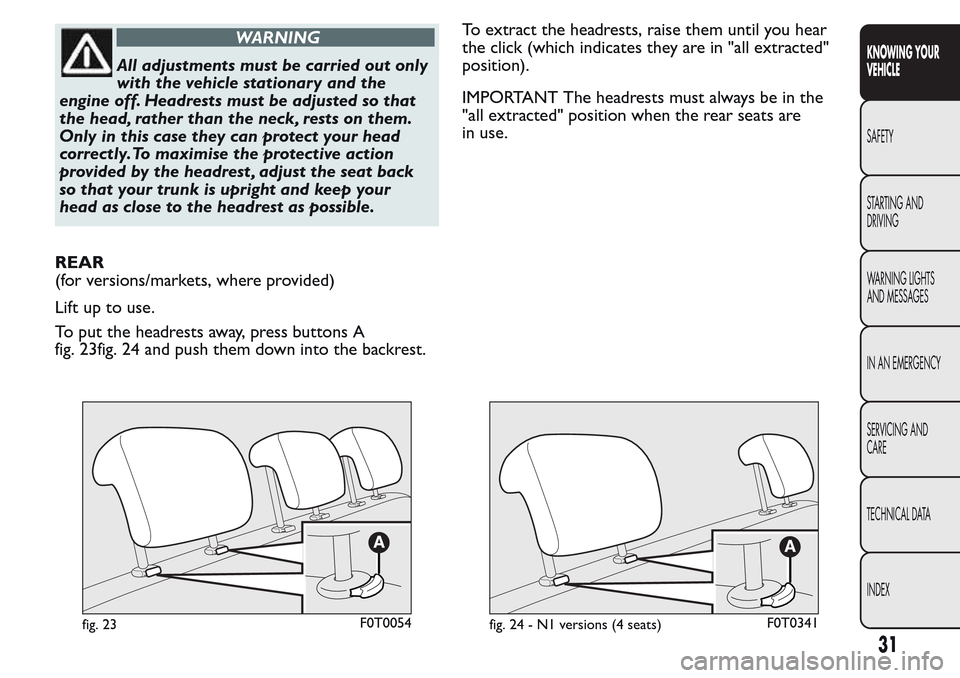
REAR
(for versions/markets, where provided)
Lift up to use.
To put the headrests away, press buttons A
fig. 23fig. 24 and push them down into the backrest.To extract the headrests, raise them until you hear
the click (which indicates they are in "all extracted"
position).
IMPORTANT The headrests must always be in the
"all extracted" position when the rear seats are
in use.
fig. 23F0T0054fig. 24 - N1 versions (4 seats)F0T0341
31
KNOWING YOUR
VEHICLE
SAFETY
STARTING AND
DRIVING
WARNING LIGHTS
AND MESSAGES
IN AN EMERGENCY
SERVICING AND
CARE
TECHNICAL DATA
INDEX
Page 62 of 260
WINDOWS
FRONT ELECTRIC WINDOWS
(for versions/markets, where provided)
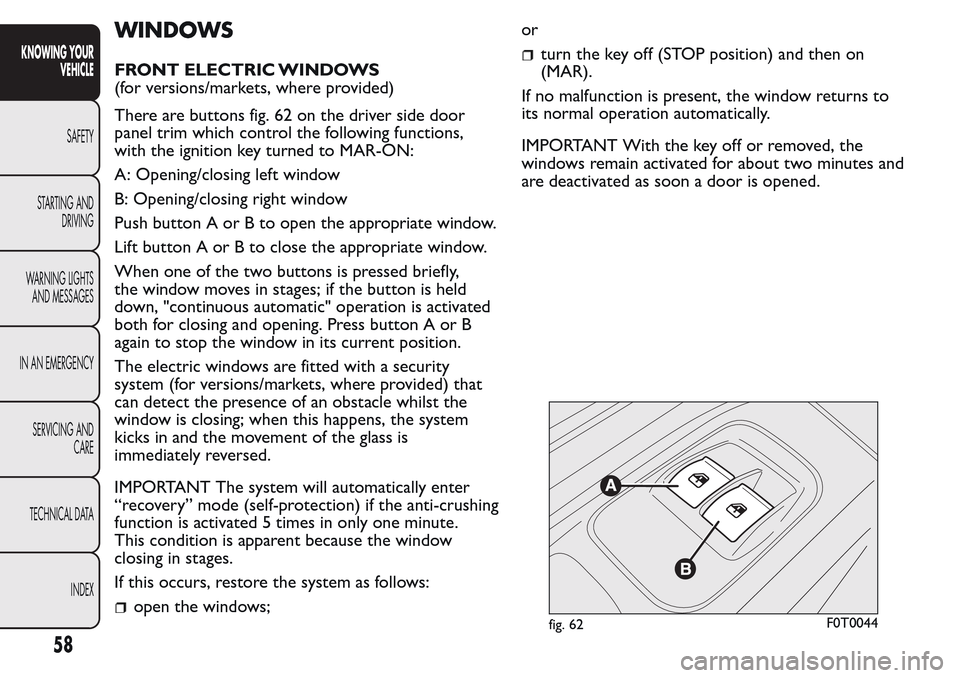
There are buttons fig. 62 on the driver side door
panel trim which control the following functions,
with the ignition key turned to MAR-ON:
A: Opening/closing left window
B: Opening/closing right window
Push button A or B to open the appropriate window.
Lift button A or B to close the appropriate window.
When one of the two buttons is pressed briefly,
the window moves in stages; if the button is held
down, "continuous automatic" operation is activated
both for closing and opening. Press button A or B
again to stop the window in its current position.
The electric windows are fitted with a security
system (for versions/markets, where provided) that
can detect the presence of an obstacle whilst the
window is closing; when this happens, the system
kicks in and the movement of the glass is
immediately reversed.
IMPORTANT The system will automatically enter
“recovery” mode (self-protection) if the anti-crushing
function is activated 5 times in only one minute.
This condition is apparent because the window
closing in stages.
If this occurs, restore the system as follows:
open the windows;or
turn the key off (STOP position) and then on
(MAR).
If no malfunction is present, the window returns to
its normal operation automatically.
IMPORTANT With the key off or removed, the
windows remain activated for about two minutes and
are deactivated as soon a door is opened.
fig. 62F0T0044
58
KNOWING YOUR
VEHICLE
SAFETY
STARTING AND
DRIVING
WARNING LIGHTS
AND MESSAGES
IN AN EMERGENCY
SERVICING AND
CARE
TECHNICAL DATA
INDEX
Page 75 of 260
Adjusting headlight alignment
Press the
orbuttons on the control
panelfig. 90.
The instrument panel display shows the position in
relation to the adjustment set.
Position 0 - one or two people in the front seats.
Position1-fivepeople.
Position2-fivepeople + load in the boot.
Position 3 - driver + maximum permitted load
stowed in the boot.
IMPORTANT Check the alignment of the light beams
each time the weight of the load transported
changes.
FOG LIGHT DIRECTION
(for versions/markets, where provided)
Contact a Fiat Dealership to have the direction
checked and, if necessary, adjusted.
ADJUSTING THE HEADLIGHTS WHEN
ABROAD
The dipped headlights are directed for operation in
the country where the vehicle was originally
purchased. In countries where you drive on the
other side of the road, you need to alter the beam
direction by affixing a specially designed self-adhesive
film in order not to dazzle the vehicles travelling in
the opposite direction.
ABS SYSTEM
This is an integral part of the braking system, which
prevents one or more wheels from locking or
slipping regardless of the road surface conditions and
braking intensity, giving the best control during
emergency braking.
The EBD system (Electronic Braking Force
Distribution) completes the system, allowing the
brake force to be distributed between the front and
rear wheels.
IMPORTANT For maximum efficiency of the braking
system, a bedding-in period of about 500 km is
needed: during this period it is better to avoid sharp,
repeated and prolonged braking.
SYSTEM INTERVENTION
The driver can tell the ABS system has come into
action because the brake pedal pulsates slightly and
the system gets noisier: it means that the vehicle
speed should be altered to suit the type of road
surface.
MECHANICAL BRAKE ASSIST (emergency
braking assistance)
(for versions/markets, where provided)
This system, which cannot be deactivated, recognises
emergency braking conditions (according to the
brake pedal operation speed) and provides an
additional hydraulic braking pressure to support that
71
KNOWING YOUR
VEHICLE
SAFETY
STARTING AND
DRIVING
WARNING LIGHTS
AND MESSAGES
IN AN EMERGENCY
SERVICING AND
CARE
TECHNICAL DATA
INDEX
Page 256 of 260
Left direction indicator
warning light.............................. 145
Lifting the vehicle....................... 180
Light beam direction .................. 70
Low battery charge warning
light ............................................. 135
Low engine oil level ................... 138
Low engine oil pressure
warning light.............................. 137
Luggage Compartment.............. 59
Main beam headlights................. 42
Main beam warning light .......... 145
Maintenance and care -
regular checks........................... 189
Maintenance and care -
Scheduled Servicing ................. 183
Maintenance and care -
scheduled servicing plan......... 184
Manual climate control
system ......................................... 39
Manually deactivating the
front airbag and side bag ........ 115
MSR system.................................. 76
Multifunction display
– Control buttons .................... 16
– Setup menu............................. 17
– Standard screen ..................... 15
Number plate lights................... 165Number plate lights (bulb
replacement) ............................. 165
On-board instruments............... 13
Ordering additional remote
controls ....................................... 9
Parking .......................................... 125
Parking lights ................................ 42
Parking sensor fault warning
light ............................................. 143
Parking sensors ........................... 84
Parking sensors (warning
light) ............................................ 143
Particulate filter (DPF) .............. 96
Partition ........................................ 30
Passenger compartment
fuse box ..................................... 175
Passenger compartment
fuse box table ........................... 177
Performance................................ 223
Pollen filter .................................. 197
Power steering fluid .................. 196
Power supply............................... 212
Pre-tensioners ............................ 100
pressure restoring...................... 156
Prolonged vehicle inactivity ..... 132
Protecting the environment ..... 96
Radio.............................................. 91Radio transmitters and
mobile phones ........................... 92
Rear ceiling light ......................... 167
Rear fog lights .............................. 51
– Warning light ......................... 144
Rear fog lights (changing a
bulb) ............................................ 163
Rear fog lights warning light .... 144
Rear light clusters ...................... 163
Rear light clusters (changing
a bulb)......................................... 163
Rear side windows ..................... 54
Rear window washer ................. 45
Rear window wiper .................... 45
Rear-view mirrors
– Interior rear-view mirror..... 33
– Wing mirrors ......................... 33
Refuelling...................................... 226
Refuelling the vehicle ................. 93
Removable ceiling light ............. 168
Replacing the battery ................ 198
Replacing the rear window
wiper blade................................ 202
Replacing the windscreen
wiper blades .............................. 202
Rev counter.................................. 13
KNOWING YOUR
VEHICLE
SAFETY
STARTING AND
DRIVING
WARNING LIGHTS
AND MESSAGES
IN AN EMERGENCY
SERVICING AND
CARE
TECHNICAL DATA
INDEX