start FIAT SCUDO 2008 2.G User Guide
[x] Cancel search | Manufacturer: FIAT, Model Year: 2008, Model line: SCUDO, Model: FIAT SCUDO 2008 2.GPages: 210, PDF Size: 3.32 MB
Page 31 of 210
30
SAFETY
DEVICES
CORRECT USE
OF THE
VEHICLE
WARNING
LIGHTS AND
MESSAGES
IN AN
EMERGENCY
VEHICLE
MAINTENANCE
TECHNICAL
SPECIFICATIONS
INDEX
DASHBOARD
AND
CONTROLS
FRONT WINDOW FAST
DEMISTING/
DEFROSTING (WINDSCREEN
AND SIDE WINDOWS)
Proceed as follows:
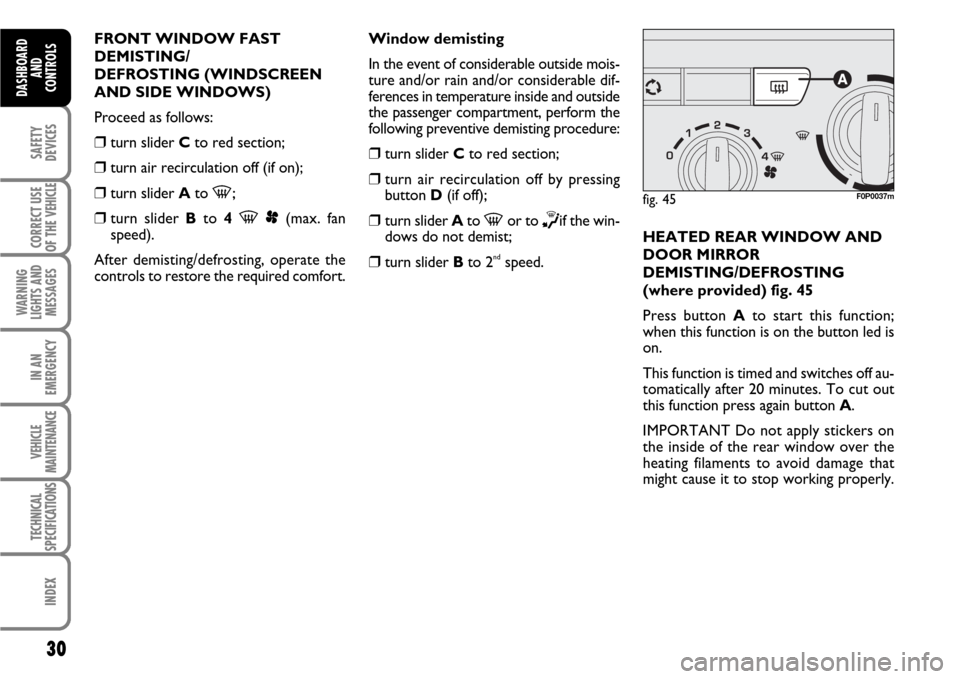
❒turn slider Cto red section;
❒turn air recirculation off (if on);
❒turn slider Ato -;
❒
turn slider Bto 4 -p(max. fan
speed).
After demisting/defrosting, operate the
controls to restore the required comfort.Window demisting
In the event of considerable outside mois-
ture and/or rain and/or considerable dif-
ferences in temperature inside and outside
the passenger compartment, perform the
following preventive demisting procedure:
❒turn slider Cto red section;
❒turn air recirculation off by pressing
button D(if off);
❒turn slider Ato -or to ∏if the win-
dows do not demist;
❒turn slider Bto 2ndspeed.HEATED REAR WINDOW AND
DOOR MIRROR
DEMISTING/DEFROSTING
(where provided) fig. 45
Press button Ato start this function;
when this function is on the button led is
on.
This function is timed and switches off au-
tomatically after 20 minutes. To cut out
this function press again button A.
IMPORTANT Do not apply stickers on
the inside of the rear window over the
heating filaments to avoid damage that
might cause it to stop working properly.
fig. 45F0P0037m
Page 36 of 210
35
SAFETY
DEVICES
CORRECT USE
OF THE
VEHICLE
WARNING
LIGHTS AND
MESSAGES
IN AN
EMERGENCY
VEHICLE
MAINTENANCE
TECHNICAL
SPECIFICATIONS
INDEX
DASHBOARD
AND CONTROLS
Window demisting
In the event of considerable outside mois-
ture and/or rain and/or considerable dif-
ferences in temperature inside and outside
the passenger compartment, perform the
following preventive demisting procedure:
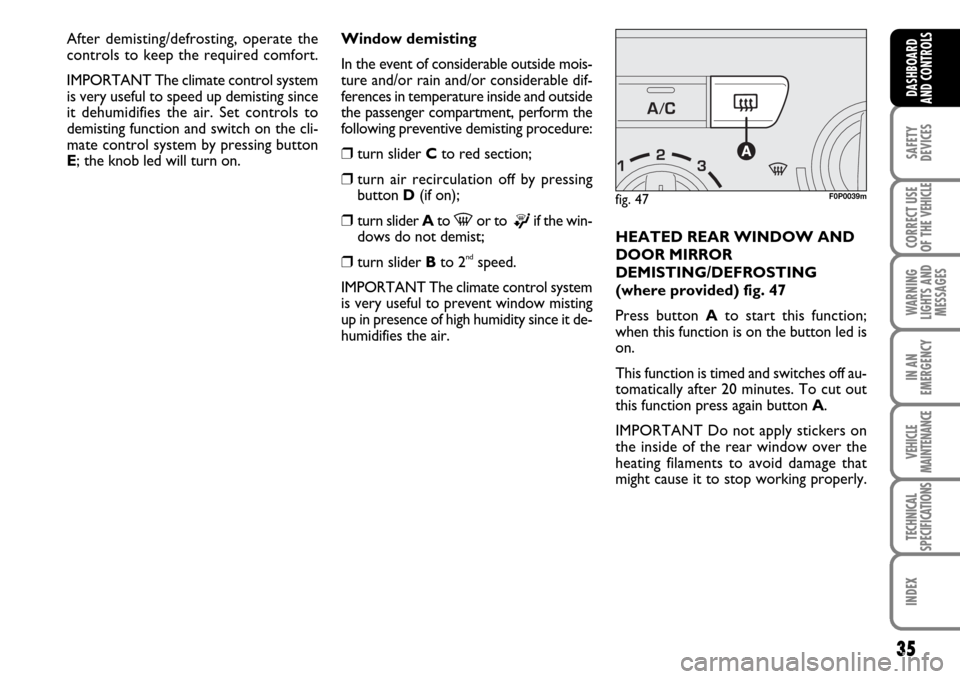
❒turn slider Cto red section;
❒turn air recirculation off by pressing
button D(if on);
❒turn slider Ato -or to ®if the win-
dows do not demist;
❒turn slider Bto 2ndspeed.
IMPORTANT The climate control system
is very useful to prevent window misting
up in presence of high humidity since it de-
humidifies the air.HEATED REAR WINDOW AND
DOOR MIRROR
DEMISTING/DEFROSTING
(where provided) fig. 47
Press button Ato start this function;
when this function is on the button led is
on.
This function is timed and switches off au-
tomatically after 20 minutes. To cut out
this function press again button A.
IMPORTANT Do not apply stickers on
the inside of the rear window over the
heating filaments to avoid damage that
might cause it to stop working properly.
fig. 47F0P0039m
After demisting/defrosting, operate the
controls to keep the required comfort.
IMPORTANT The climate control system
is very useful to speed up demisting since
it dehumidifies the air. Set controls to
demisting function and switch on the cli-
mate control system by pressing button
E; the knob led will turn on.
Page 39 of 210
38
SAFETY
DEVICES
CORRECT USE
OF THE
VEHICLE
WARNING
LIGHTS AND
MESSAGES
IN AN
EMERGENCY
VEHICLE
MAINTENANCE
TECHNICAL
SPECIFICATIONS
INDEX
DASHBOARD
AND
CONTROLS
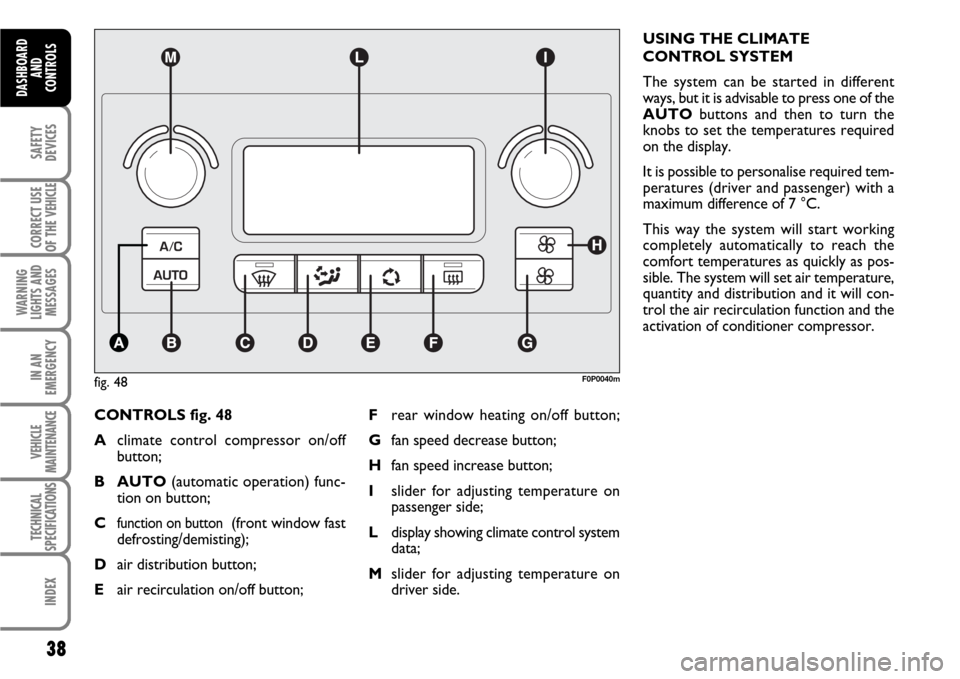
CONTROLS fig. 48
Aclimate control compressor on/off
button;
B AUTO(automatic operation) func-
tion on button;
C
function on button (front window fast
defrosting/demisting);
Dair distribution button;
Eair recirculation on/off button;USING THE CLIMATE
CONTROL SYSTEM
The system can be started in different
ways, but it is advisable to press one of the
AUTObuttons and then to turn the
knobs to set the temperatures required
on the display.
It is possible to personalise required tem-
peratures (driver and passenger) with a
maximum difference of 7 °C.
This way the system will start working
completely automatically to reach the
comfort temperatures as quickly as pos-
sible. The system will set air temperature,
quantity and distribution and it will con-
trol the air recirculation function and the
activation of conditioner compressor.
fig. 48F0P0040m
Frear window heating on/off button;
Gfan speed decrease button;
Hfan speed increase button;
Islider for adjusting temperature on
passenger side;
Ldisplay showing climate control system
data;
Mslider for adjusting temperature on
driver side.
Page 42 of 210

41
SAFETY
DEVICES
CORRECT USE
OF THE
VEHICLE
WARNING
LIGHTS AND
MESSAGES
IN AN
EMERGENCY
VEHICLE
MAINTENANCE
TECHNICAL
SPECIFICATIONS
INDEX
DASHBOARD
AND CONTROLS
AUTO button
(automatic operation on/off)
Pressing button AUTOthe system auto-
matically adjusts the amount and distribu-
tion of the air admitted to the passenger
compartment, cancelling all the previous
manual adjustments. Manual operation of
at least one automatic function (air recir-
culation, air distribution, fan speed or cli-
mate control compressor off).
IMPORTANT Should the system (after
manual settings) be no longer able to guar-
antee the required temperature set in the
passenger compartment, the set tempera-
ture value will start flashing to indicate this
condition, after one minute the AUTO
message will turn off.To restore system automatic control at
any time, after one or more manual ad-
justments, press button AUTO.
Pressing again button AUTOautomati-
cally aligns the temperature on the pas-
senger side with that on the driver side,
it is therefore possible to set the same
temperature and air distribution between
the two zones by turning the knob on dri-
ver side. This function is provided to sim-
plify temperature adjustment of the whole
passenger compartment when only the
driver is onboard. Separate operation of
set temperature and air distribution is re-
stored by pressing the button AUTO
again.Air recirculation on/off button E
Air recirculation works according to the
following operating logics:
❒automatic switching on, by pressing one
of the AUTObuttons and indicated by
the turning on of the AUTOicon on the
display.
❒manual switching on, by pressing but-
ton E, indicated by symbol
Ωon the
display;
❒manual switching off, by pressing but-
ton E, indicated by the turning off of
symbol
Ωon the display.
IMPORTANT The inside air recirculation
system makes it possible to reach the re-
quired heating or cooling conditions faster.
It is however inadvisable to use it on
rainy/cold days as it would considerably
increase the possibility of the windows
misting inside, especially if the climate con-
trol system is off.
Page 44 of 210

43
SAFETY
DEVICES
CORRECT USE
OF THE
VEHICLE
WARNING
LIGHTS AND
MESSAGES
IN AN
EMERGENCY
VEHICLE
MAINTENANCE
TECHNICAL
SPECIFICATIONS
INDEX
DASHBOARD
AND CONTROLS
Fast window demisting/defrosting
button C
Press this button: the climate control sys-
tem will automatically switch on all the
functions required for fast windscreen and
front side window demisting/defrosting,
that is:
❒switches on climate control compressor
when climatic conditions are suitable;
❒air recirculation off;
❒maximum air temperature HIon both
areas;
❒activates proper fan speed according to
engine coolant temperature to limit the
flow into the passenger compartment of
air not warm enough to demist the win-
dows;
❒directs air flow to windscreen and front
side windows vents;
❒turns heated rear window on.
IMPORTANT Fast demisting/defrosting
function stays on for about 3 minutes,
since engine coolant temperature reach-
es the proper temperature.When the max. demisting/defrosting func-
tion is on, the button led and the heated
rear window button led are on.
When the max. demisting/defrosting func-
tion is on, the only manual operations pos-
sible are manual adjustment of the fan
speed and switching heated rear window
off. Pressing the max. demisting/defrost-
ing button or the air recirculation buttons
or compressor off button or the AUTO
button, the system switches off the max.
demisting/defrosting function and restores
the operating conditions of the system pri-
or to turning it on.Heated rear window and door
mirror demisting/defrosting button
(where provided) F
Press this button to activate heated rear
window demisting/defrosting.
When this function is on, the button led
is on.
This function is timed and switches off au-
tomatically after about 20 minutes or by
pressing again the button or by turning the
engine off. It will not be switched on au-
tomatically when restarting the engine.
IMPORTANT Do not apply stickers on the
inside of the rear window over the heat-
ing filaments to avoid damage that might
cause it to stop working properly.
Page 49 of 210
48
SAFETY
DEVICES
CORRECT USE
OF THE
VEHICLE
WARNING
LIGHTS AND
MESSAGES
IN AN
EMERGENCY
VEHICLE
MAINTENANCE
TECHNICAL
SPECIFICATIONS
INDEX
DASHBOARD
AND
CONTROLS
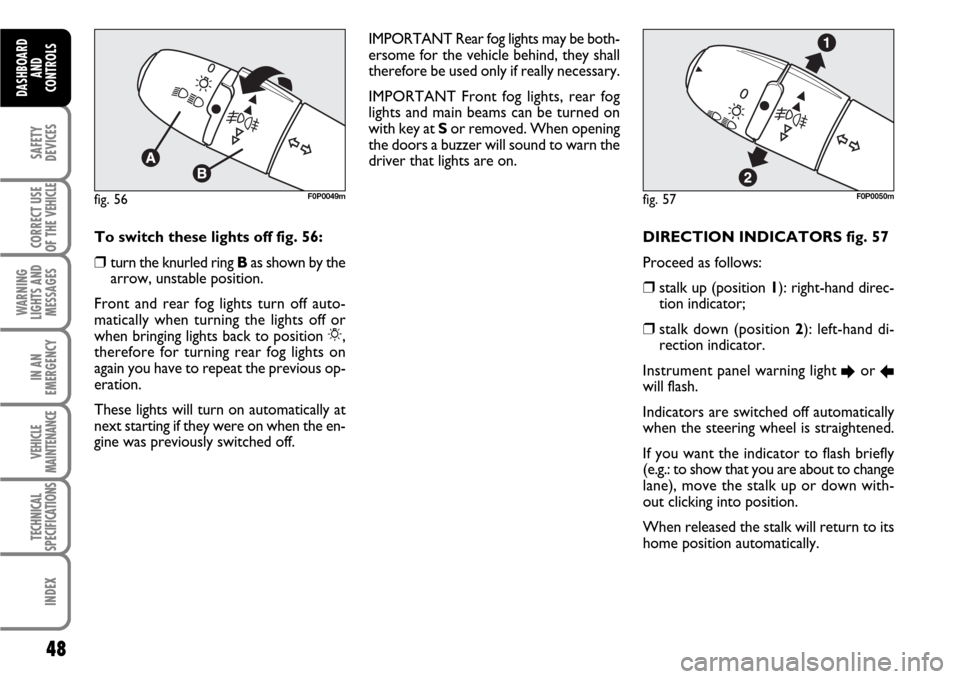
DIRECTION INDICATORS fig. 57
Proceed as follows:
❒stalk up (position 1): right-hand direc-
tion indicator;
❒stalk down (position 2): left-hand di-
rection indicator.
Instrument panel warning light
Eor Rwill flash.
Indicators are switched off automatically
when the steering wheel is straightened.
If you want the indicator to flash briefly
(e.g.: to show that you are about to change
lane), move the stalk up or down with-
out clicking into position.
When released the stalk will return to its
home position automatically.
fig. 57F0P0050mfig. 56F0P0049m
To switch these lights off fig. 56:
❒turn the knurled ring Bas shown by the
arrow, unstable position.
Front and rear fog lights turn off auto-
matically when turning the lights off or
when bringing lights back to position 6,
therefore for turning rear fog lights on
again you have to repeat the previous op-
eration.
These lights will turn on automatically at
next starting if they were on when the en-
gine was previously switched off.IMPORTANT Rear fog lights may be both-
ersome for the vehicle behind, they shall
therefore be used only if really necessary.
IMPORTANT Front fog lights, rear fog
lights and main beams can be turned on
with key at Sor removed. When opening
the doors a buzzer will sound to warn the
driver that lights are on.
Page 51 of 210
50
SAFETY
DEVICES
CORRECT USE
OF THE
VEHICLE
WARNING
LIGHTS AND
MESSAGES
IN AN
EMERGENCY
VEHICLE
MAINTENANCE
TECHNICAL
SPECIFICATIONS
INDEX
DASHBOARD
AND
CONTROLS
WINDOW WASHING
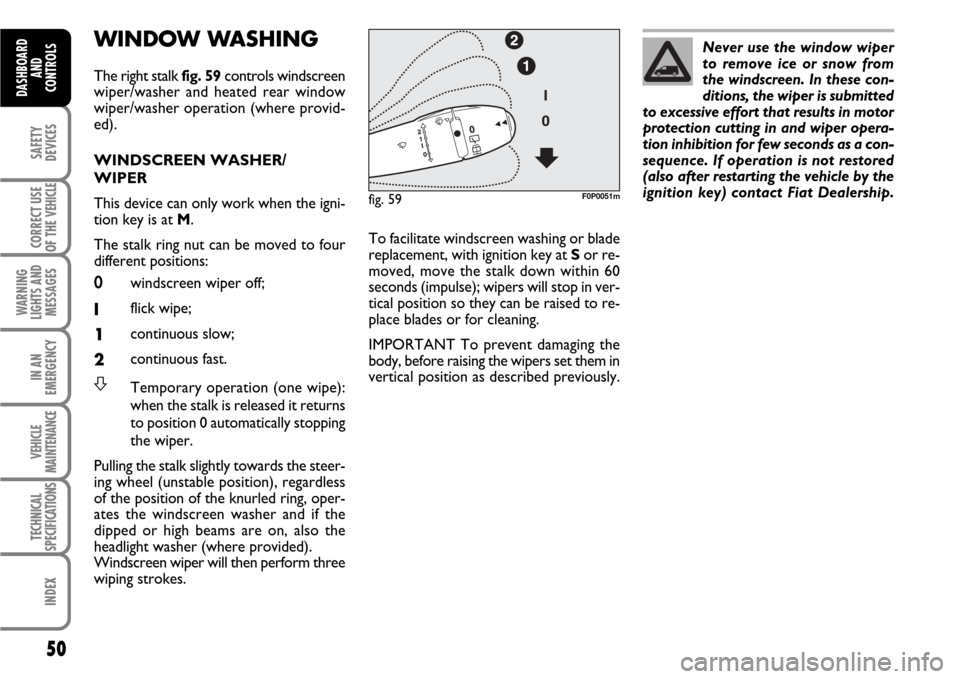
The right stalk fig. 59controls windscreen
wiper/washer and heated rear window
wiper/washer operation (where provid-
ed).
WINDSCREEN WASHER/
WIPER
This device can only work when the igni-
tion key is at M.
The stalk ring nut can be moved to four
different positions:
0windscreen wiper off;
Iflick wipe;
1continuous slow;
2continuous fast.
STemporary operation (one wipe):
when the stalk is released it returns
to position 0 automatically stopping
the wiper.
Pulling the stalk slightly towards the steer-
ing wheel (unstable position), regardless
of the position of the knurled ring, oper-
ates the windscreen washer and if the
dipped or high beams are on, also the
headlight washer (where provided).
Windscreen wiper will then perform three
wiping strokes.Never use the window wiper
to remove ice or snow from
the windscreen. In these con-
ditions, the wiper is submitted
to excessive effort that results in motor
protection cutting in and wiper opera-
tion inhibition for few seconds as a con-
sequence. If operation is not restored
(also after restarting the vehicle by the
ignition key) contact Fiat Dealership.
To facilitate windscreen washing or blade
replacement, with ignition key at Sor re-
moved, move the stalk down within 60
seconds (impulse); wipers will stop in ver-
tical position so they can be raised to re-
place blades or for cleaning.
IMPORTANT To prevent damaging the
body, before raising the wipers set them in
vertical position as described previously.
fig. 59F0P0051m
Page 54 of 210
53
SAFETY
DEVICES
CORRECT USE
OF THE
VEHICLE
WARNING
LIGHTS AND
MESSAGES
IN AN
EMERGENCY
VEHICLE
MAINTENANCE
TECHNICAL
SPECIFICATIONS
INDEX
DASHBOARD
AND CONTROLS
Rear window wiper
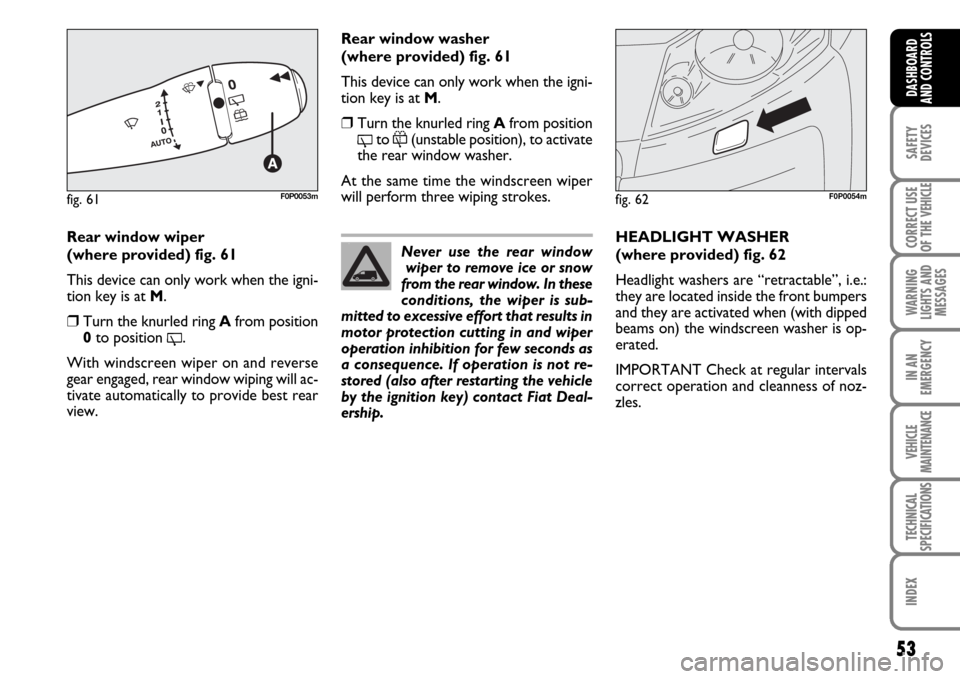
(where provided) fig. 61
This device can only work when the igni-
tion key is at M.
❒Turn the knurled ring Afrom position
0to position
'.
With windscreen wiper on and reverse
gear engaged, rear window wiping will ac-
tivate automatically to provide best rear
view.HEADLIGHT WASHER
(where provided) fig. 62
Headlight washers are “retractable”, i.e.:
they are located inside the front bumpers
and they are activated when (with dipped
beams on) the windscreen washer is op-
erated.
IMPORTANT Check at regular intervals
correct operation and cleanness of noz-
zles.
fig. 62F0P0054m
Never use the rear window
wiper to remove ice or snow
from the rear window. In these
conditions, the wiper is sub-
mitted to excessive effort that results in
motor protection cutting in and wiper
operation inhibition for few seconds as
a consequence. If operation is not re-
stored (also after restarting the vehicle
by the ignition key) contact Fiat Deal-
ership.
Rear window washer
(where provided) fig. 61
This device can only work when the igni-
tion key is at M.
❒Turn the knurled ring Afrom position
'to
&(unstable position), to activate
the rear window washer.
At the same time the windscreen wiper
will perform three wiping strokes.
fig. 61F0P0053m
Page 57 of 210
56
SAFETY
DEVICES
CORRECT USE
OF THE
VEHICLE
WARNING
LIGHTS AND
MESSAGES
IN AN
EMERGENCY
VEHICLE
MAINTENANCE
TECHNICAL
SPECIFICATIONS
INDEX
DASHBOARD
AND
CONTROLS
F0P0330m F0P0336mF0P0337m F0P0325m
F0P0328m
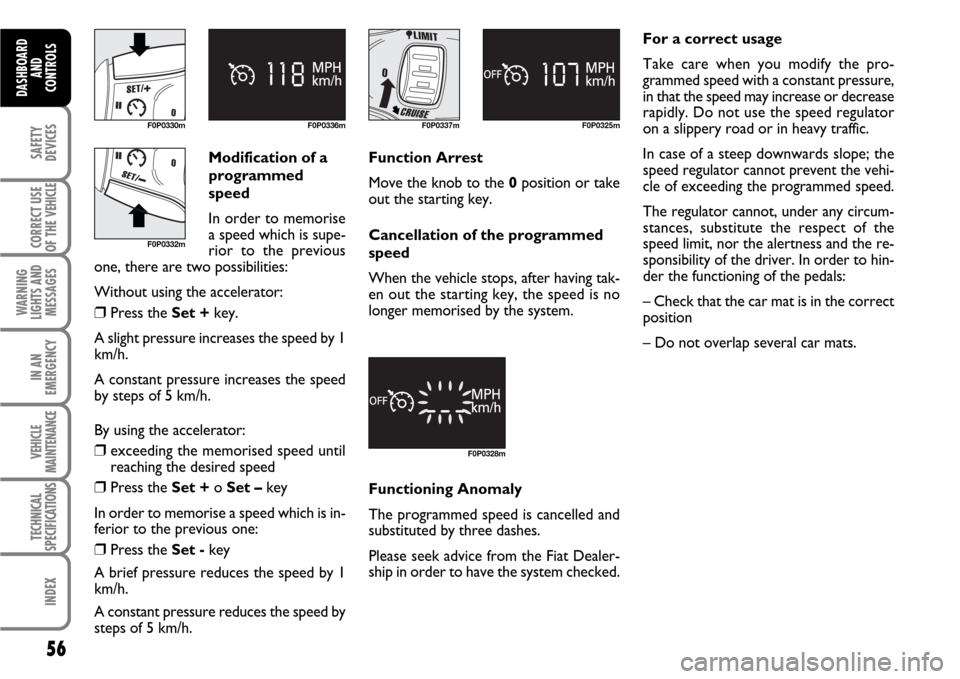
Modification of a
programmed
speed
In order to memorise
a speed which is supe-
rior to the previous
one, there are two possibilities:
Without using the accelerator:
❒Press the Set +key.
A slight pressure increases the speed by 1
km/h.
A constant pressure increases the speed
by steps of 5 km/h.
By using the accelerator:
❒exceeding the memorised speed until
reaching the desired speed
❒Press the Set + o Set –key
In order to memorise a speed which is in-
ferior to the previous one:
❒Press the Set -key
A brief pressure reduces the speed by 1
km/h.
A constant pressure reduces the speed by
steps of 5 km/h.Function Arrest
Move the knob to the 0position or take
out the starting key.
Cancellation of the programmed
speed
When the vehicle stops, after having tak-
en out the starting key, the speed is no
longer memorised by the system.
Functioning Anomaly
The programmed speed is cancelled and
substituted by three dashes.
Please seek advice from the Fiat Dealer-
ship in order to have the system checked.For a correct usage
Take care when you modify the pro-
grammed speed with a constant pressure,
in that the speed may increase or decrease
rapidly. Do not use the speed regulator
on a slippery road or in heavy traffic.
In case of a steep downwards slope; the
speed regulator cannot prevent the vehi-
cle of exceeding the programmed speed.
The regulator cannot, under any circum-
stances, substitute the respect of the
speed limit, nor the alertness and the re-
sponsibility of the driver. In order to hin-
der the functioning of the pedals:
– Check that the car mat is in the correct
position
– Do not overlap several car mats.
F0P0332m
Page 60 of 210
59
SAFETY
DEVICES
CORRECT USE
OF THE
VEHICLE
WARNING
LIGHTS AND
MESSAGES
IN AN
EMERGENCY
VEHICLE
MAINTENANCE
TECHNICAL
SPECIFICATIONS
INDEX
DASHBOARD
AND CONTROLS
F0P0333m F0P0341mF0P0345m F0P0339mF0P0342m
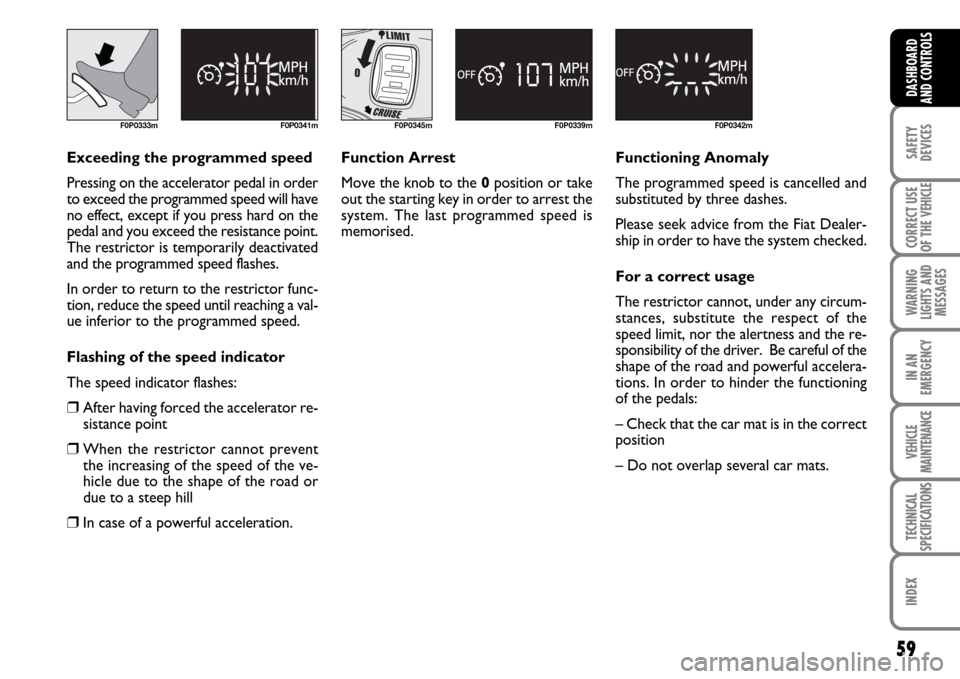
Exceeding the programmed speed
Pressing on the accelerator pedal in order
to exceed the programmed speed will have
no effect, except if you press hard on the
pedal and you exceed the resistance point.
The restrictor is temporarily deactivated
and the programmed speed flashes.
In order to return to the restrictor func-
tion, reduce the speed until reaching a val-
ue inferior to the programmed speed.
Flashing of the speed indicator
The speed indicator flashes:
❒After having forced the accelerator re-
sistance point
❒When the restrictor cannot prevent
the increasing of the speed of the ve-
hicle due to the shape of the road or
due to a steep hill
❒In case of a powerful acceleration.Function Arrest
Move the knob to the 0position or take
out the starting key in order to arrest the
system. The last programmed speed is
memorised.Functioning Anomaly
The programmed speed is cancelled and
substituted by three dashes.
Please seek advice from the Fiat Dealer-
ship in order to have the system checked.
For a correct usage
The restrictor cannot, under any circum-
stances, substitute the respect of the
speed limit, nor the alertness and the re-
sponsibility of the driver. Be careful of the
shape of the road and powerful accelera-
tions. In order to hinder the functioning
of the pedals:
– Check that the car mat is in the correct
position
– Do not overlap several car mats.