Speed FIAT SCUDO 2009 2.G Owner's Manual
[x] Cancel search | Manufacturer: FIAT, Model Year: 2009, Model line: SCUDO, Model: FIAT SCUDO 2009 2.GPages: 210, PDF Size: 3.32 MB
Page 47 of 210
46
SAFETY
DEVICES
CORRECT USE
OF THE
VEHICLE
WARNING
LIGHTS AND
MESSAGES
IN AN
EMERGENCY
VEHICLE
MAINTENANCE
TECHNICAL
SPECIFICATIONS
INDEX
DASHBOARD
AND
CONTROLS
WARMING THE PASSENGER
COMPARTMENT
Proceed as follows:
❒knob Aturned to red section;
❒slider Bturned to the required speed.
FAST HEATING
For fast heating of the passenger com-
partment, proceed as follows:
❒knob Aturned to red section;
❒turn air recirculation on;
❒knob Bturned to 4p(max. fan speed).
Then use the controls to keep the re-
quired comfort conditions and to turn air
recirculation off.
IMPORTANT With cold engine, you have
to wait for a few minutes to let the sys-
tem fluid reach the operating temperature.
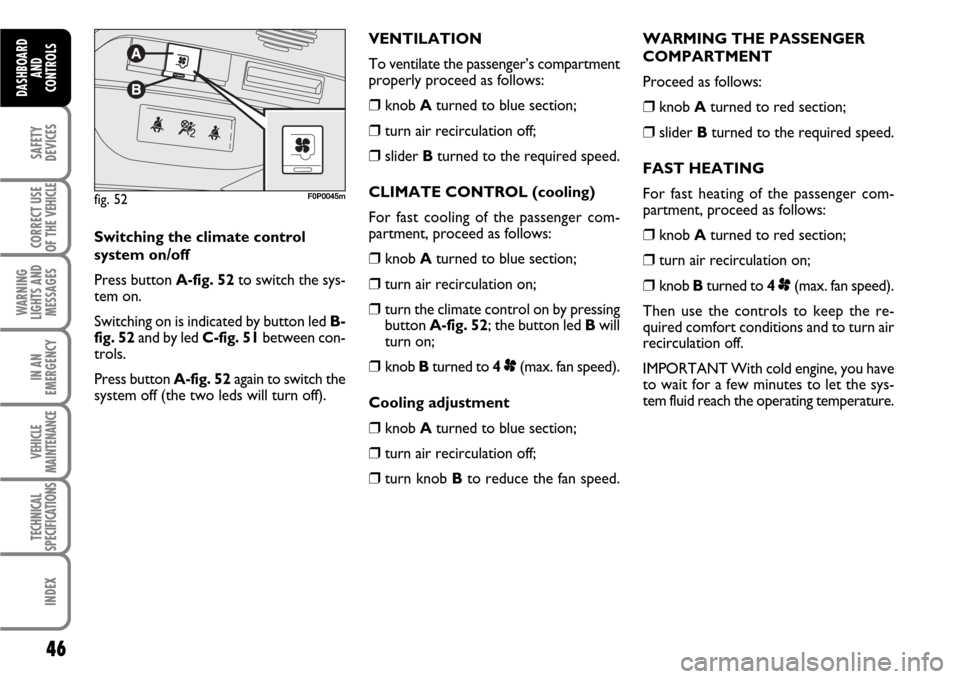
fig. 52F0P0045m
Switching the climate control
system on/off
Press button A-fig. 52to switch the sys-
tem on.
Switching on is indicated by button led B-
fig. 52and by led C-fig. 51between con-
trols.
Press button A-fig. 52again to switch the
system off (the two leds will turn off).VENTILATION
To ventilate the passenger’s compartment
properly proceed as follows:
❒knob Aturned to blue section;
❒turn air recirculation off;
❒slider Bturned to the required speed.
CLIMATE CONTROL (cooling)
For fast cooling of the passenger com-
partment, proceed as follows:
❒knob Aturned to blue section;
❒turn air recirculation on;
❒turn the climate control on by pressing
button A-fig. 52; the button led Bwill
turn on;
❒knob Bturned to 4p(max. fan speed).
Cooling adjustment
❒knob Aturned to blue section;
❒turn air recirculation off;
❒turn knob Bto reduce the fan speed.
Page 52 of 210
51
SAFETY
DEVICES
CORRECT USE
OF THE
VEHICLE
WARNING
LIGHTS AND
MESSAGES
IN AN
EMERGENCY
VEHICLE
MAINTENANCE
TECHNICAL
SPECIFICATIONS
INDEX
DASHBOARD
AND CONTROLS
The rain sensor (fitted on certain versions
only), is an electronic device coupled to
the windscreen wiper with the purpose of
adjusting automatically, during the inter-
mittent operation, the frequency of the
windscreen wiper strokes as to the rain
intensity.
The rain sensor will activate automatical-
ly when moving the stalk to AUTO; its
range varies gradually from windscreen
wiper off (no wipe) when the windscreen
is dry, to wiper at first continuous speed
with heavy rain.
The activation of the rain sensor is sig-
nalled by a control acquisition “stroke”. RAIN SENSOR
(where provided)
The rain sensor is located behind the dri-
ving mirror in contact with the windscreen
and has the purpose of adjusting auto-
matically, during the intermittent opera-
tion, the frequency of the windscreen
wiper strokes as to the rain intensity.
IMPORTANT Keep clean the glass in the
sensor area.
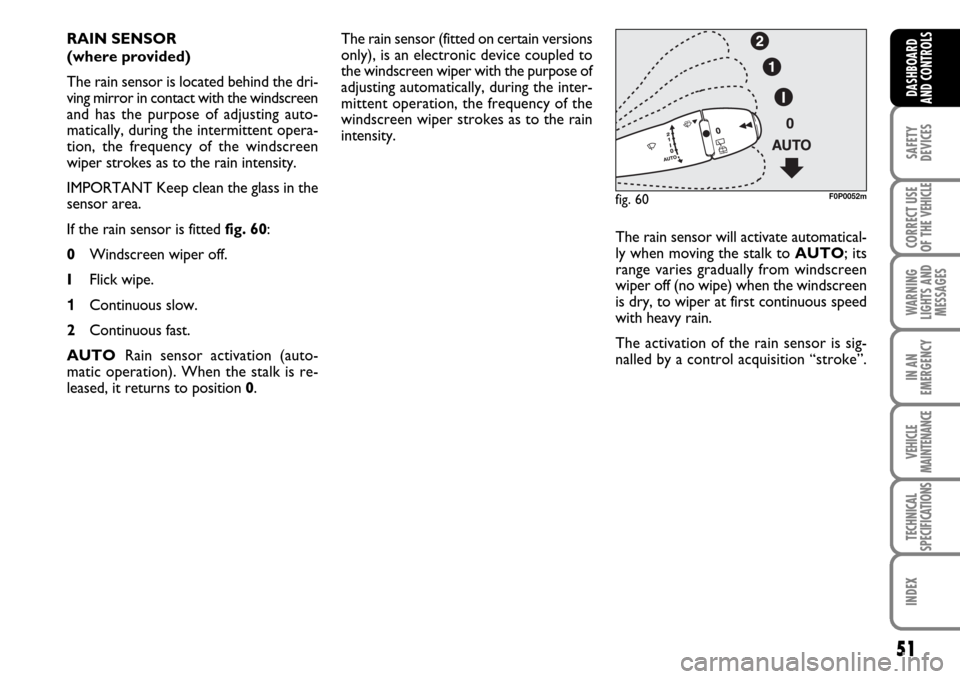
If the rain sensor is fitted fig. 60:
0Windscreen wiper off.
IFlick wipe.
1Continuous slow.
2Continuous fast.
AUTORain sensor activation (auto-
matic operation). When the stalk is re-
leased, it returns to position 0.
fig. 60F0P0052m
Page 55 of 210
54
SAFETY
DEVICES
CORRECT USE
OF THE
VEHICLE
WARNING
LIGHTS AND
MESSAGES
IN AN
EMERGENCY
VEHICLE
MAINTENANCE
TECHNICAL
SPECIFICATIONS
INDEX
DASHBOARD
AND
CONTROLS
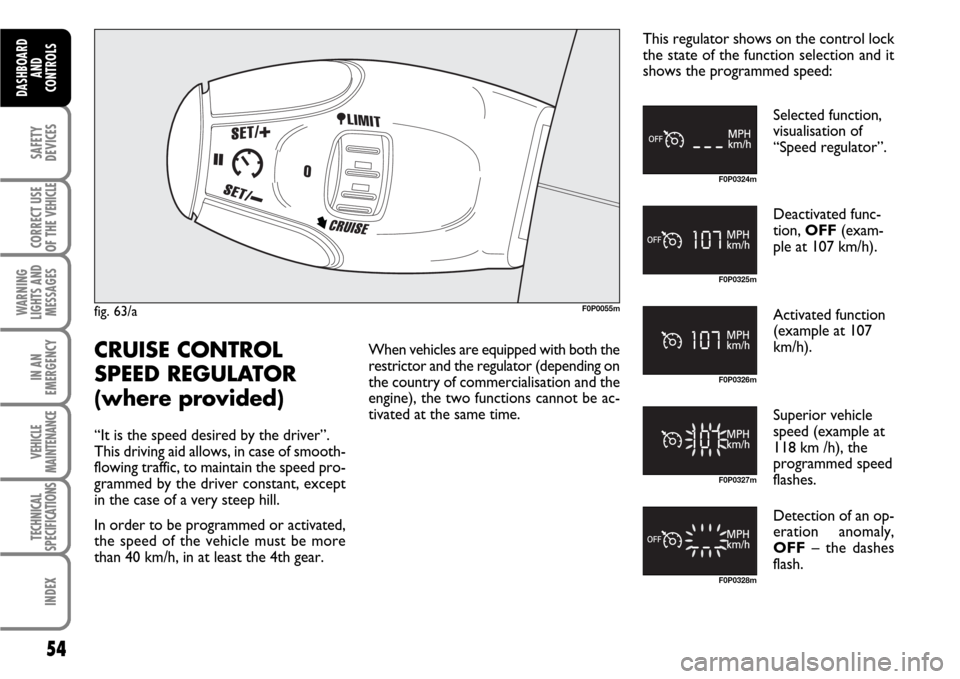
fig. 63/aF0P0055m
F0P0324m
F0P0325m
F0P0326m
F0P0327m
F0P0328m
CRUISE CONTROL
SPEED REGULATOR
(where provided)
“It is the speed desired by the driver”.
This driving aid allows, in case of smooth-
flowing traffic, to maintain the speed pro-
grammed by the driver constant, except
in the case of a very steep hill.
In order to be programmed or activated,
the speed of the vehicle must be more
than 40 km/h, in at least the 4th gear.When vehicles are equipped with both the
restrictor and the regulator (depending on
the country of commercialisation and the
engine), the two functions cannot be ac-
tivated at the same time.This regulator shows on the control lock
the state of the function selection and it
shows the programmed speed:
Selected function,
visualisation of
“Speed regulator”.
Deactivated func-
tion, OFF(exam-
ple at 107 km/h).
Activated function
(example at 107
km/h).
Superior vehicle
speed (example at
118 km /h), the
programmed speed
flashes.
Detection of an op-
eration anomaly,
OFF– the dashes
flash.
Page 56 of 210
55
SAFETY
DEVICES
CORRECT USE
OF THE
VEHICLE
WARNING
LIGHTS AND
MESSAGES
IN AN
EMERGENCY
VEHICLE
MAINTENANCE
TECHNICAL
SPECIFICATIONS
INDEX
DASHBOARD
AND CONTROLS
F0P0329m F0P0324m
F0P0330m F0P0331m
F0P0333m F0P0327mF0P0334m F0P0331m
F0P0334m F0P0325m
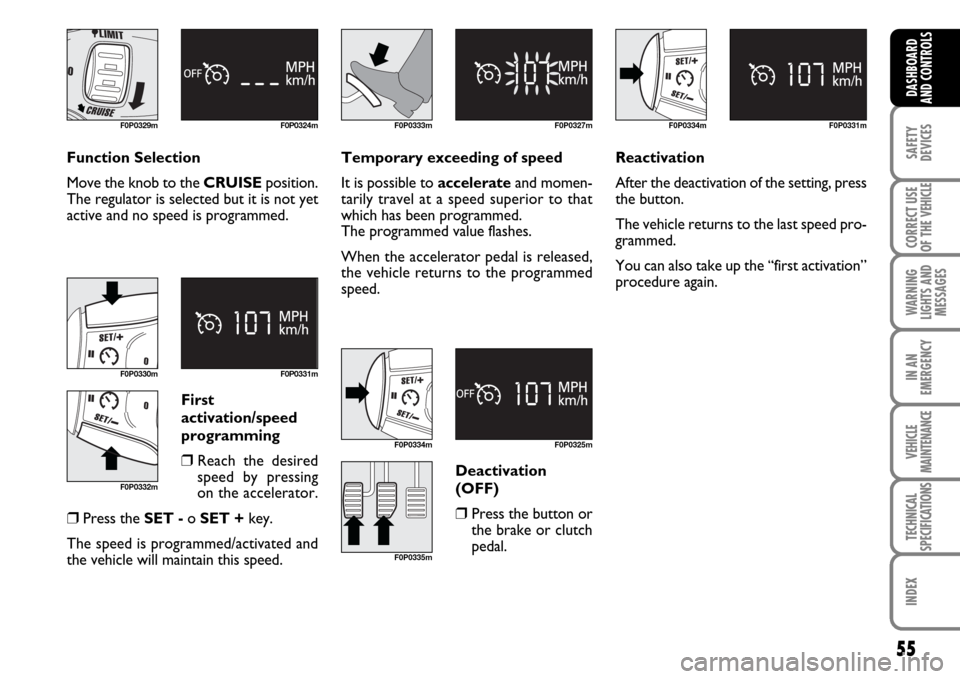
Function Selection
Move the knob to the CRUISEposition.
The regulator is selected but it is not yet
active and no speed is programmed.Temporary exceeding of speed
It is possible to accelerateand momen-
tarily travel at a speed superior to that
which has been programmed.
The programmed value flashes.
When the accelerator pedal is released,
the vehicle returns to the programmed
speed.
First
activation/speed
programming
❒Reach the desired
speed by pressing
on the accelerator.
❒Press the SET -o SET +key.
The speed is programmed/activated and
the vehicle will maintain this speed.Deactivation
(OFF)❒Press the button or
the brake or clutch
pedal.Reactivation
After the deactivation of the setting, press
the button.
The vehicle returns to the last speed pro-
grammed.
You can also take up the “first activation”
procedure again.
F0P0332m
F0P0335m
Page 57 of 210
56
SAFETY
DEVICES
CORRECT USE
OF THE
VEHICLE
WARNING
LIGHTS AND
MESSAGES
IN AN
EMERGENCY
VEHICLE
MAINTENANCE
TECHNICAL
SPECIFICATIONS
INDEX
DASHBOARD
AND
CONTROLS
F0P0330m F0P0336mF0P0337m F0P0325m
F0P0328m
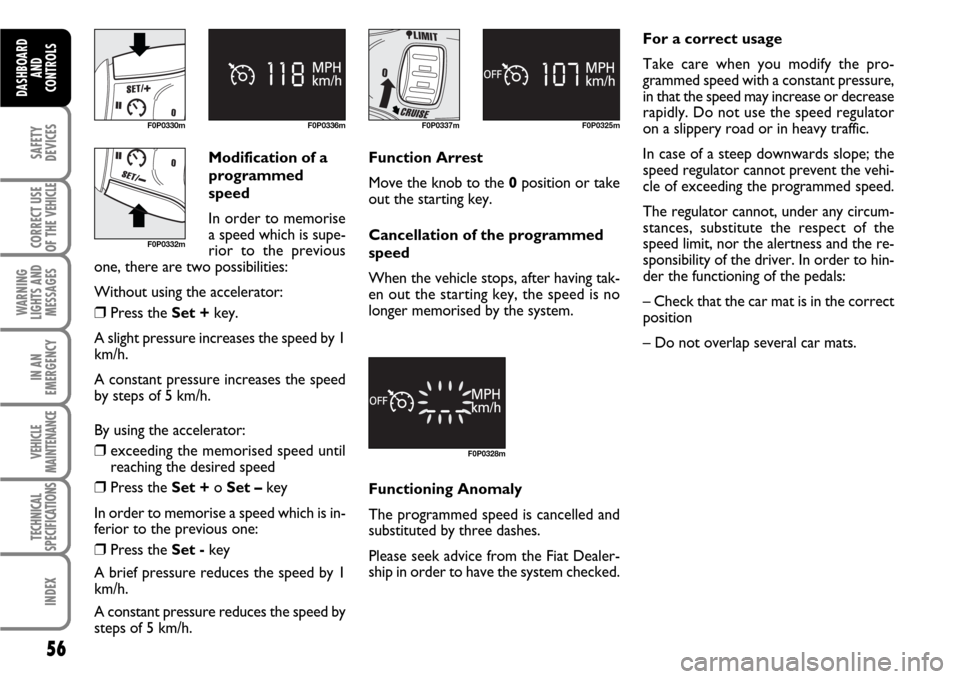
Modification of a
programmed
speed
In order to memorise
a speed which is supe-
rior to the previous
one, there are two possibilities:
Without using the accelerator:
❒Press the Set +key.
A slight pressure increases the speed by 1
km/h.
A constant pressure increases the speed
by steps of 5 km/h.
By using the accelerator:
❒exceeding the memorised speed until
reaching the desired speed
❒Press the Set + o Set –key
In order to memorise a speed which is in-
ferior to the previous one:
❒Press the Set -key
A brief pressure reduces the speed by 1
km/h.
A constant pressure reduces the speed by
steps of 5 km/h.Function Arrest
Move the knob to the 0position or take
out the starting key.
Cancellation of the programmed
speed
When the vehicle stops, after having tak-
en out the starting key, the speed is no
longer memorised by the system.
Functioning Anomaly
The programmed speed is cancelled and
substituted by three dashes.
Please seek advice from the Fiat Dealer-
ship in order to have the system checked.For a correct usage
Take care when you modify the pro-
grammed speed with a constant pressure,
in that the speed may increase or decrease
rapidly. Do not use the speed regulator
on a slippery road or in heavy traffic.
In case of a steep downwards slope; the
speed regulator cannot prevent the vehi-
cle of exceeding the programmed speed.
The regulator cannot, under any circum-
stances, substitute the respect of the
speed limit, nor the alertness and the re-
sponsibility of the driver. In order to hin-
der the functioning of the pedals:
– Check that the car mat is in the correct
position
– Do not overlap several car mats.
F0P0332m
Page 58 of 210
57
SAFETY
DEVICES
CORRECT USE
OF THE
VEHICLE
WARNING
LIGHTS AND
MESSAGES
IN AN
EMERGENCY
VEHICLE
MAINTENANCE
TECHNICAL
SPECIFICATIONS
INDEX
DASHBOARD
AND CONTROLS
F0P0055m
F0P0338m
F0P0339m
F0P0340m
F0P0341m
F0P0342m
“LIMIT” SPEED
RESTRICTOR
(where provided)
“It is the chosen speed which the driver
does not wish to exceed”. This selection
can be made when the engine is running,
when the vehicle is stationary or in gear.
The minimum speed which can be pro-
grammed is 30 km/h.
The speed of the vehicle answers to the
pressure of the driver’s foot until the re-
sistance point of the accelerator pedal, to
indicate that the programmed speed has
been reached. However, the pressure on
the accelerator pedal beyond this point of
resistance allows the programmed speed
to be exceeded.To recover the use of the restrictor, it is
sufficient to progressively release the pres-
sure on the accelerator pedal and return
below the programmed speed.
In vehicles equipped with speed restric-
tors and regulators (depending on the
country of commercialisation and the en-
gine), the two functions cannot be acti-
vated at the same time.
The manipulations can be carried out both
when the vehicle is stationary and when
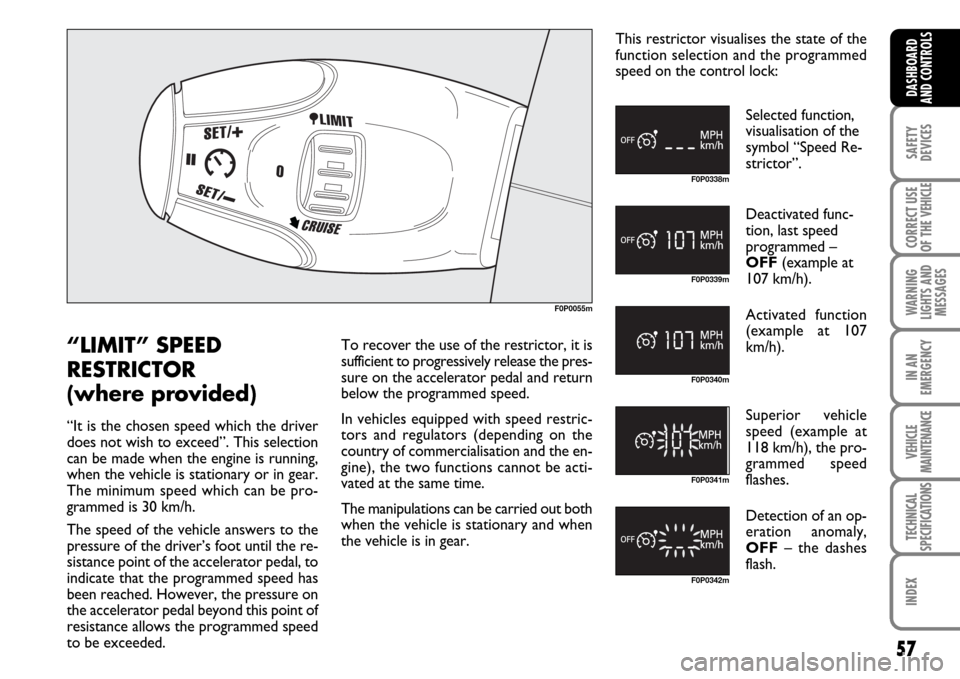
the vehicle is in gear.This restrictor visualises the state of the
function selection and the programmed
speed on the control lock:
Selected function,
visualisation of the
symbol “Speed Re-
strictor”.
Deactivated func-
tion, last speed
programmed –
OFF(example at
107 km/h).
Activated function
(example at 107
km/h).
Superior vehicle
speed (example at
118 km/h), the pro-
grammed speed
flashes.
Detection of an op-
eration anomaly,
OFF– the dashes
flash.
Page 59 of 210
58
SAFETY
DEVICES
CORRECT USE
OF THE
VEHICLE
WARNING
LIGHTS AND
MESSAGES
IN AN
EMERGENCY
VEHICLE
MAINTENANCE
TECHNICAL
SPECIFICATIONS
INDEX
DASHBOARD
AND
CONTROLS
F0P0343m F0P0338mF0P0330m
F0P0332mF0P0344m F0P0351m
F0P0334m
F0P0334mF0P0339m F0P0340m
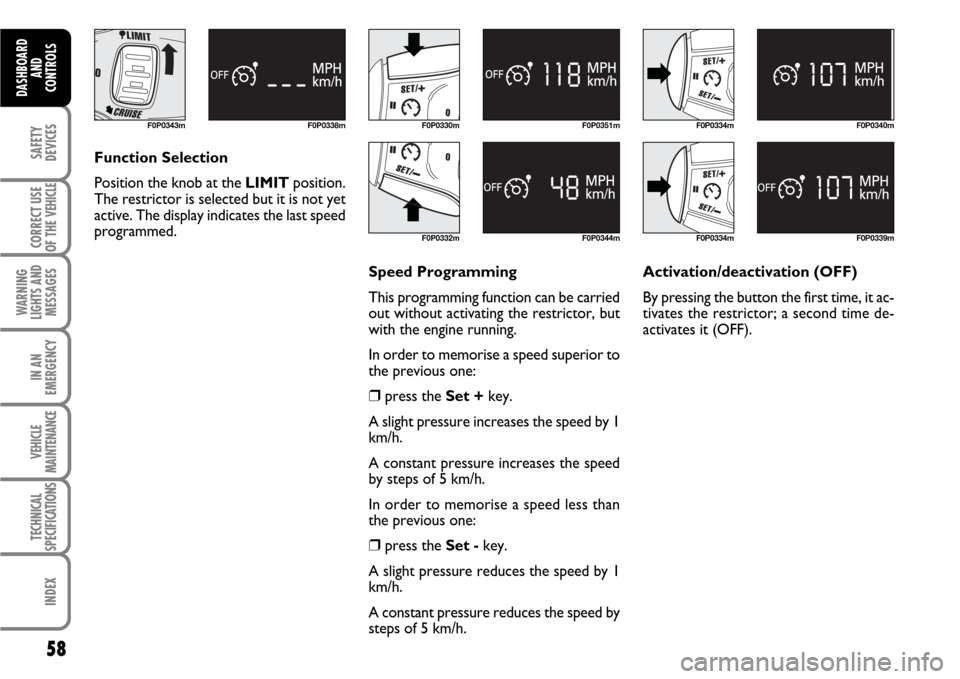
Function Selection
Position the knob at the LIMITposition.
The restrictor is selected but it is not yet
active. The display indicates the last speed
programmed.
Speed Programming
This programming function can be carried
out without activating the restrictor, but
with the engine running.
In order to memorise a speed superior to
the previous one:
❒press the Set +key.
A slight pressure increases the speed by 1
km/h.
A constant pressure increases the speed
by steps of 5 km/h.
In order to memorise a speed less than
the previous one:
❒press the Set -key.
A slight pressure reduces the speed by 1
km/h.
A constant pressure reduces the speed by
steps of 5 km/h. Activation/deactivation (OFF)
By pressing the button the first time, it ac-
tivates the restrictor; a second time de-
activates it (OFF).
Page 60 of 210
59
SAFETY
DEVICES
CORRECT USE
OF THE
VEHICLE
WARNING
LIGHTS AND
MESSAGES
IN AN
EMERGENCY
VEHICLE
MAINTENANCE
TECHNICAL
SPECIFICATIONS
INDEX
DASHBOARD
AND CONTROLS
F0P0333m F0P0341mF0P0345m F0P0339mF0P0342m
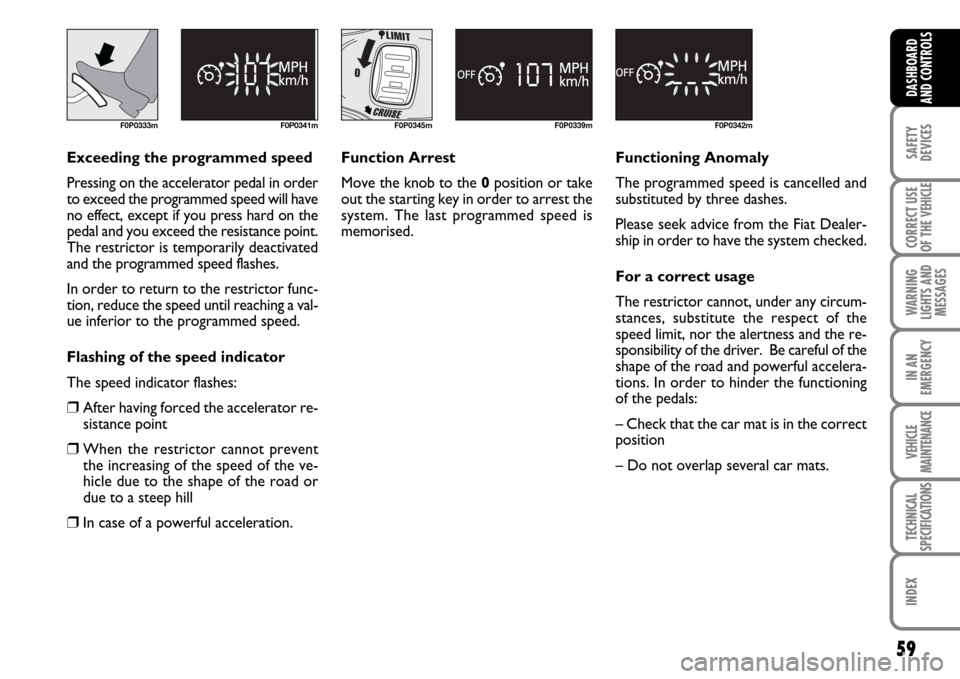
Exceeding the programmed speed
Pressing on the accelerator pedal in order
to exceed the programmed speed will have
no effect, except if you press hard on the
pedal and you exceed the resistance point.
The restrictor is temporarily deactivated
and the programmed speed flashes.
In order to return to the restrictor func-
tion, reduce the speed until reaching a val-
ue inferior to the programmed speed.
Flashing of the speed indicator
The speed indicator flashes:
❒After having forced the accelerator re-
sistance point
❒When the restrictor cannot prevent
the increasing of the speed of the ve-
hicle due to the shape of the road or
due to a steep hill
❒In case of a powerful acceleration.Function Arrest
Move the knob to the 0position or take
out the starting key in order to arrest the
system. The last programmed speed is
memorised.Functioning Anomaly
The programmed speed is cancelled and
substituted by three dashes.
Please seek advice from the Fiat Dealer-
ship in order to have the system checked.
For a correct usage
The restrictor cannot, under any circum-
stances, substitute the respect of the
speed limit, nor the alertness and the re-
sponsibility of the driver. Be careful of the
shape of the road and powerful accelera-
tions. In order to hinder the functioning
of the pedals:
– Check that the car mat is in the correct
position
– Do not overlap several car mats.
Page 81 of 210
80
SAFETY
DEVICES
CORRECT USE
OF THE
VEHICLE
WARNING
LIGHTS AND
MESSAGES
IN AN
EMERGENCY
VEHICLE
MAINTENANCE
TECHNICAL
SPECIFICATIONS
INDEX
DASHBOARD
AND
CONTROLS
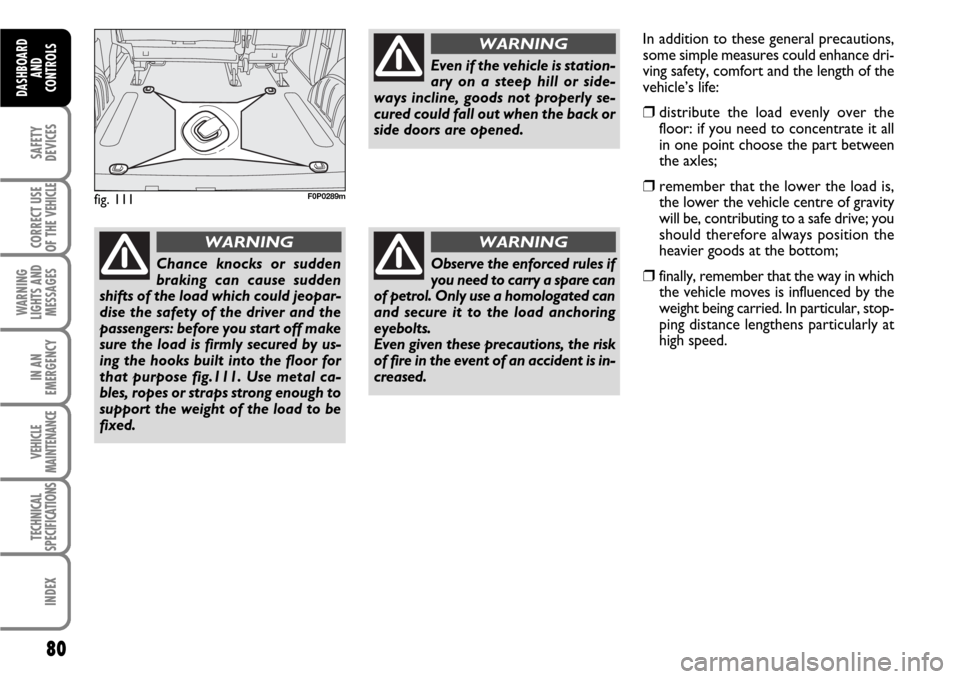
fig. 111F0P0289m
Chance knocks or sudden
braking can cause sudden
shifts of the load which could jeopar-
dise the safety of the driver and the
passengers: before you start off make
sure the load is firmly secured by us-
ing the hooks built into the floor for
that purpose fig.111. Use metal ca-
bles, ropes or straps strong enough to
support the weight of the load to be
fixed.
WARNING
Even if the vehicle is station-
ary on a steep hill or side-
ways incline, goods not properly se-
cured could fall out when the back or
side doors are opened.
WARNING
Observe the enforced rules if
you need to carry a spare can
of petrol. Only use a homologated can
and secure it to the load anchoring
eyebolts.
Even given these precautions, the risk
of fire in the event of an accident is in-
creased.
WARNING
In addition to these general precautions,
some simple measures could enhance dri-
ving safety, comfort and the length of the
vehicle’s life:
❒distribute the load evenly over the
floor: if you need to concentrate it all
in one point choose the part between
the axles;
❒remember that the lower the load is,
the lower the vehicle centre of gravity
will be, contributing to a safe drive; you
should therefore always position the
heavier goods at the bottom;
❒finally, remember that the way in which
the vehicle moves is influenced by the
weight being carried. In particular, stop-
ping distance lengthens particularly at
high speed.
Page 83 of 210
82
SAFETY
DEVICES
CORRECT USE
OF THE
VEHICLE
WARNING
LIGHTS AND
MESSAGES
IN AN
EMERGENCY
VEHICLE
MAINTENANCE
TECHNICAL
SPECIFICATIONS
INDEX
DASHBOARD
AND CONTROLS
ADJUSTING THE
HEADLIGHT BEAM
Proper adjustment of the headlight beams
is of vital importance for your safety and
comfort and also for the other road users.
In addition it is the subject of a precise reg-
ulation of the traffic code.
To ensure you and other drivers have the
best visibility conditions when travelling
with the headlights on, the headlights must
be set properly.
Contact Fiat Dealership to have the head-
lights properly adjusted.ABS SYSTEM
If you have never driven a vehicle with ABS
before, you should practice using the sys-
tem on slippery terrain, obviously with the
necessary safety precautions and keeping
to the Highway Code of the country you
are in. It is also a good idea to read the fol-
lowing information carefully.
The ABS system, integral with the braking
system, prevents the wheels from locking
when braking, makes the most of road grip
and gives the best control when emergency
braking under difficult road conditions.
System is completed by EBD (Electronic
Braking force Distribution), which dis-
tributes the braking action between front
and rear wheels.
IMPORTANT To have the maximum ef-
ficiency of the braking system, it is neces-
sary a setting period of about 500 km
(with new vehicle or after replacing brake
pads/discs): during this period it is better
to avoid sharp, repeated and prolonged
brakes.The ABS exploits the tyre-
road grip at the best, but it
cannot improve it; you should there-
fore take every care when driving on
slippery surfaces without taking un-
necessary risks.
WARNING
ABS SYSTEM INTERVENTION
The driver can tell the ABS system has
come into action because the brake pedal
pulsates slightly and the system gets noisi-
er: it means that the vehicle speed should
be altered to fit the type of road surface.
If the ABS system cuts in, it
is a sign that the grip be-
tween tyre and the road surface has
reached the limit: you must slow
down to match the speed to the road
grip available.
WARNING