audio FIAT SEDICI 2009 2.G Owners Manual
[x] Cancel search | Manufacturer: FIAT, Model Year: 2009, Model line: SEDICI, Model: FIAT SEDICI 2009 2.GPages: 270, PDF Size: 3.44 MB
Page 58 of 270
57
S S
T T
E E
E E
R R
I I
N N
G G
C C
O O
L L
U U
M M
N N
C C
O O
N N
T T
R R
O O
L L
S S
60G405
IGNITION SWITCH ............................................................ 58
LIGHTING/TURN SIGNAL CONTROL LEVER............ 63
WINDSHIELD WIPER AND WASHER LEVER............. 65
REAR WINDOW WIPER/WASHER SWITCH
(for versions/markets, where provided)........................... 66
TILT STEERING LOCK LEVER
(for versions/markets, where provided)........................... 67
REMOTE AUDIO CONTROLS
(for versions/markets, where provided)........................... 68
HORN...................................................................................... 68
CRUISE CONTROL
(for versions/markets, where provided)........................... 692
057-070 SEDICI LUM FL GB 1E 19-06-2009 10:32 Pagina 57
Page 69 of 270
68
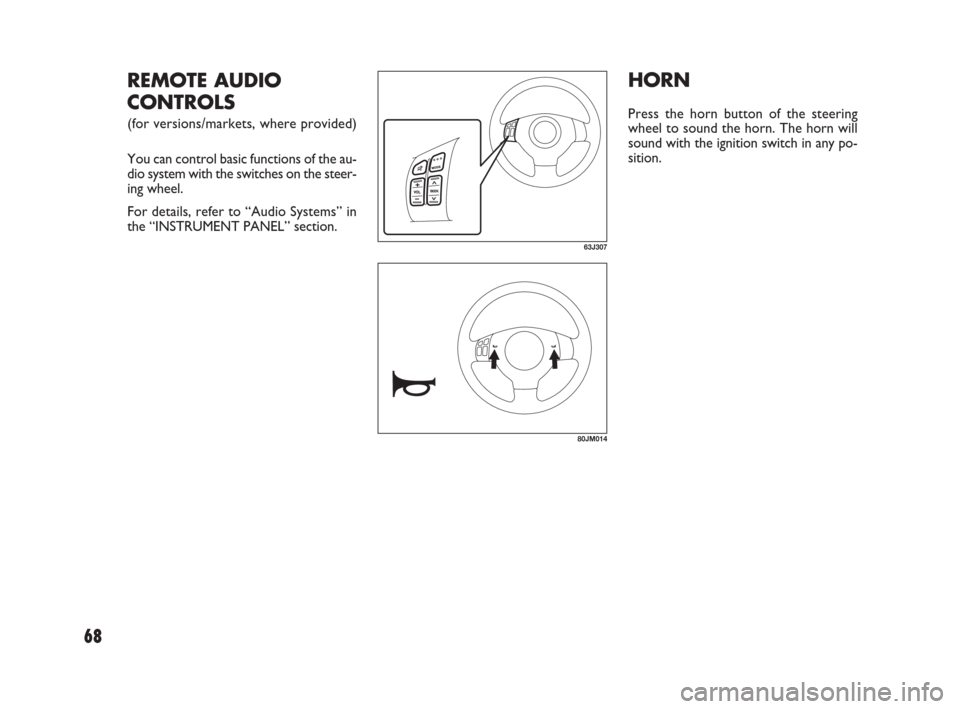
HORN
Press the horn button of the steering
wheel to sound the horn. The horn will
sound with the ignition switch in any po-
sition.
63J307
REMOTE AUDIO
CONTROLS
(for versions/markets, where provided)
You can control basic functions of the au-
dio system with the switches on the steer-
ing wheel.
For details, refer to “Audio Systems” in
the “INSTRUMENT PANEL” section.
80JM014
057-070 SEDICI LUM FL GB 1E 19-06-2009 17:04 Pagina 68
Page 72 of 270
71
I I
N N
S S
T T
R R
U U
M M
E E
N N
T T
P P
A A
N N
E E
L L
60G406
INSTRUMENT PANEL......................................................... 72
INSTRUMENT CLUSTER.................................................... 73
WARNING AND INDICATOR LIGHTS........................ 74
SPEEDOMETER..................................................................... 83
TACHOMETER ..................................................................... 84
FUEL GAUGE......................................................................... 84
TEMPERATURE GAUGE/OVERHEAT INDICATOR
LIGHT (for Diesel Engine Model) ...................................... 85
INFORMATION DISPLAY.................................................. 85
HAZARD WARNING SWITCH ....................................... 91FRONT FOG LIGHT SWITCH
(for versions/markets, where provided)........................... 91
“ESP OFF” SWITCH
(for versions/markets, where provided)........................... 92
2WD/ 4WD SWITCH
(for versions/markets, where provided)........................... 92
HEATED REAR WINDOW AND HEATED OUTSIDE
REARVIEW MIRRORS SWITCH
(for versions/markets, where provided)........................... 93
HEADLIGHT LEVELING SWITCH
(for versions/markets, where provided)........................... 94
GLOVE BOX.......................................................................... 94
CIGARETTE LIGHTER AND ASHTRAY
(for versions/markets, where provided)........................... 95
THEFT DETERRENT LIGHT.............................................. 95
HEATING AND AIR CONDITIONING SYSTEM ........ 96
HEATING SYSTEM
(for versions/markets, where provided)........................... 97
MANUAL HEATING AND AIR CONDITIONING
SYSTEM (for versions/markets, where provided) ......... 100
AUTOMATIC HEATING AND AIR CONDITIONING
SYSTEM (Climate Control)
(for versions/markets, where provided)........................... 104
AUDIO SYSTEMS.................................................................. 110
3
071-128 SEDICI LUM FL GB 1E 19-06-2009 12:05 Pagina 71
Page 73 of 270
72
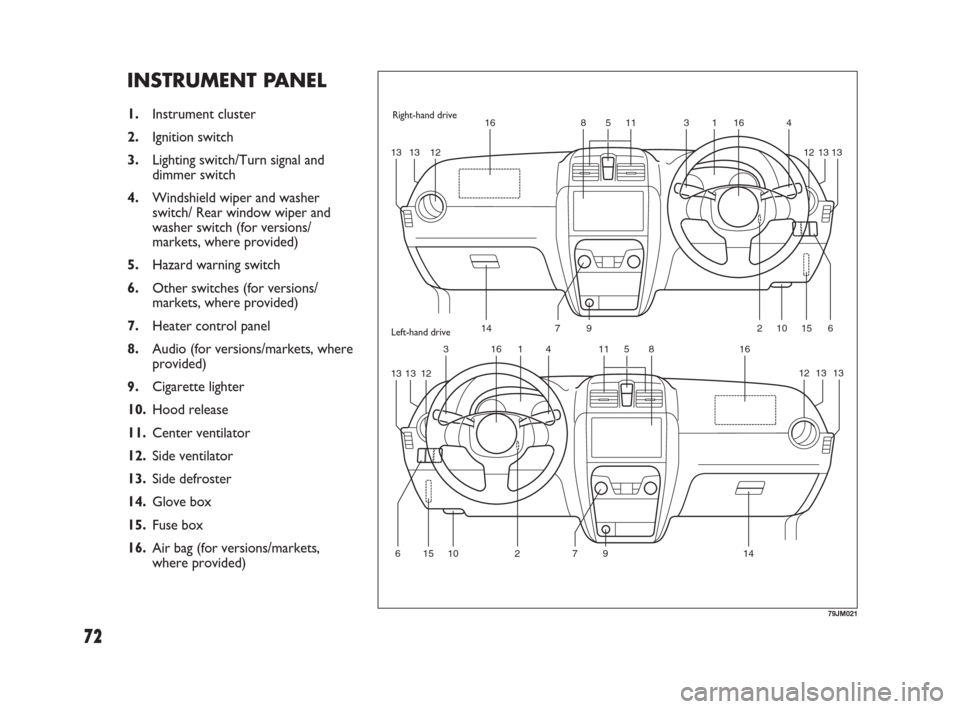
INSTRUMENT PANEL
1.Instrument cluster
2.Ignition switch
3.Lighting switch/Turn signal and
dimmer switch
4.Windshield wiper and washer
switch/ Rear window wiper and
washer switch (for versions/
markets, where provided)
5.Hazard warning switch
6.Other switches (for versions/
markets, where provided)
7.Heater control panel
8.Audio (for versions/markets, where
provided)
9.Cigarette lighter
10.Hood release
11.Center ventilator
12.Side ventilator
13.Side defroster
14.Glove box
15.Fuse box
16.Air bag (for versions/markets,
where provided)
3
1516145 11 816
27914106
4
1016318511 16
131312131312
131312131312
7 141526 9
79JM021
Right-hand drive
Left-hand drive
071-128 SEDICI LUM FL GB 1E 19-06-2009 12:05 Pagina 72
Page 111 of 270
110
AUDIO SYSTEMS
❒Driving on extremely bumpy roads
which cause severe vibrations may
cause sound to skip.
❒This unit uses a precision mechanism.
Even in the event that trouble arises,
never open the case, disassemble the
unit, or lubricate the rotating parts.
Please bring the unit to an authorized
Fiat Dealership. MAINTENANCE
If you do not use the air conditioner for
a long period, such as during winter, it may
not give the best performance when you
start using it again. To help maintain op-
timum performance and durability of your
air conditioner, it needs to be run peri-
odically. Operate the air conditioner at
least once a month for one minute with
the engine idling. This circulates the re-
frigerant and oil and helps protect the in-
ternal components.
Your air conditioner is equipped with air
filters. Clean or replace them as specified
in the “Maintenance Schedule” in the “IN-
SPECTION AND MAINTENANCE” sec-
tion. Have this job done by your Fiat Deal-
ership as the lower glove box must be
lowered for this job.
NOTE Your vehicle uses the air condi-
tioning refrigerant HFC-134a, commonly
called “R-134a”. R-134a replaced R-12
around 1993 for automotive applications.
Other refrigerants are available, including
recycled R-12, but only R-134a should be
used in your vehicle.
IMPORTANT Using the wrong refriger-
ant may damage your air conditioning sys-
tem. Use R-134a only. Do not mix or re-
place the R-134a with other refrigerants.
79J188
Too high a volume when dri-
ving can put the driver’s life
at risk and that of other people.
Therefore the volume should always
be adjusted in such a way that it is al-
ways possible to hear the noises of
the surrounding environment (e.g.:
horns, ambulance, police sirens, etc.).
WARNING
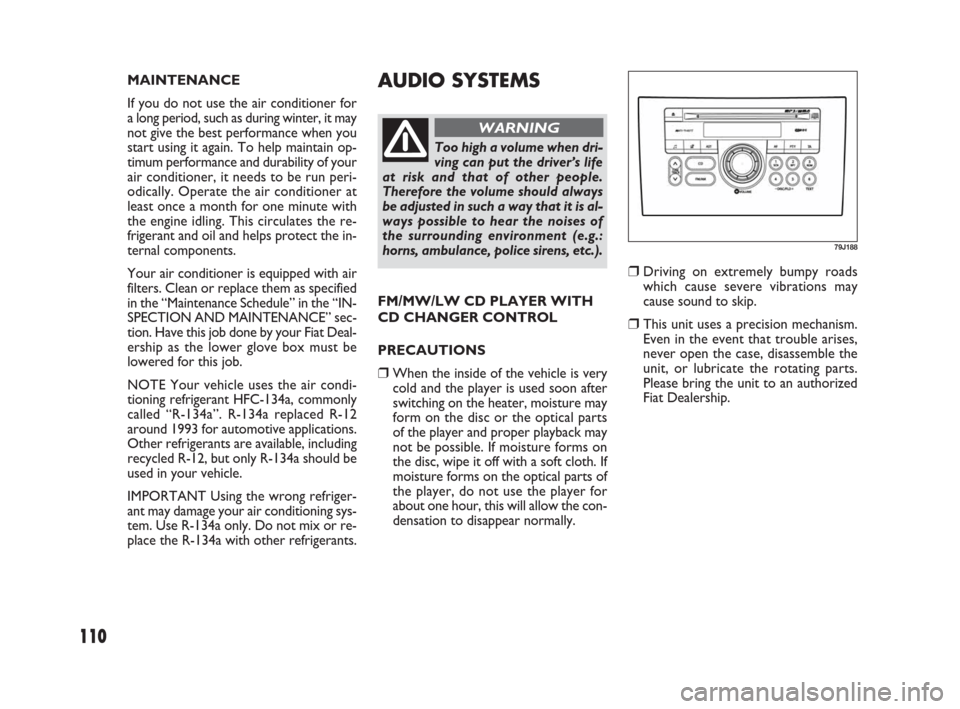
FM/MW/LW CD PLAYER WITH
CD CHANGER CONTROL
PRECAUTIONS
❒When the inside of the vehicle is very
cold and the player is used soon after
switching on the heater, moisture may
form on the disc or the optical parts
of the player and proper playback may
not be possible. If moisture forms on
the disc, wipe it off with a soft cloth. If
moisture forms on the optical parts of
the player, do not use the player for
about one hour, this will allow the con-
densation to disappear normally.
071-128 SEDICI LUM FL GB 1E 19-06-2009 12:05 Pagina 110
Page 114 of 270
113
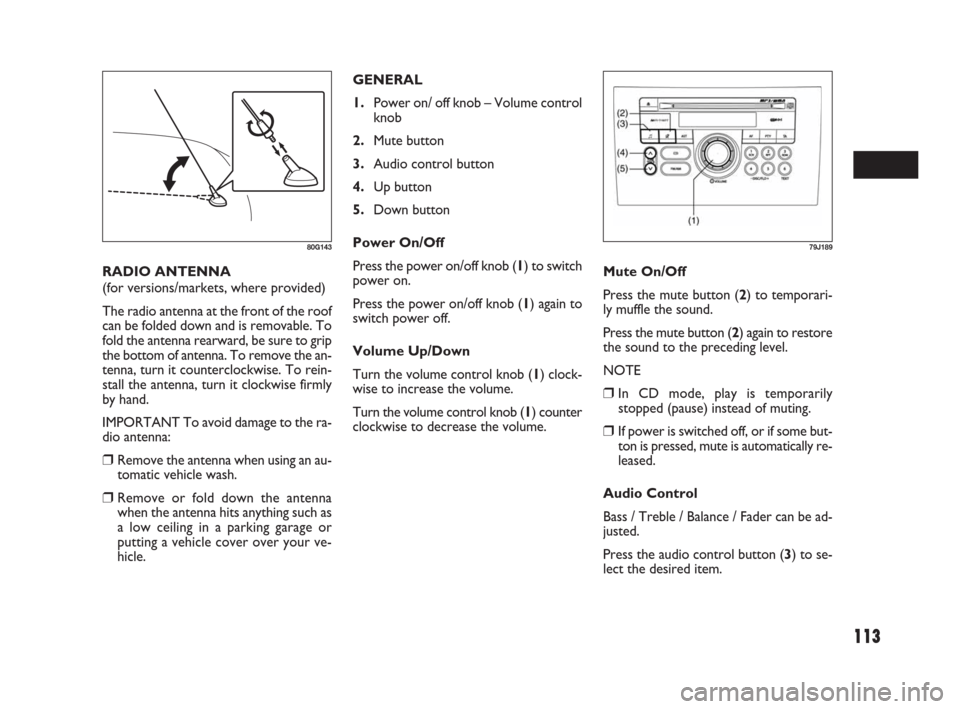
GENERAL
1.Power on/ off knob – Volume control
knob
2.Mute button
3.Audio control button
4.Up button
5.Down button
Power On/Off
Press the power on/off knob (1) to switch
power on.
Press the power on/off knob (1) again to
switch power off.
Volume Up/Down
Turn the volume control knob (1) clock-
wise to increase the volume.
Turn the volume control knob (1) counter
clockwise to decrease the volume. RADIO ANTENNA
(for versions/markets, where provided)
The radio antenna at the front of the roof
can be folded down and is removable. To
fold the antenna rearward, be sure to grip
the bottom of antenna. To remove the an-
tenna, turn it counterclockwise. To rein-
stall the antenna, turn it clockwise firmly
by hand.
IMPORTANT To avoid damage to the ra-
dio antenna:
❒Remove the antenna when using an au-
tomatic vehicle wash.
❒Remove or fold down the antenna
when the antenna hits anything such as
a low ceiling in a parking garage or
putting a vehicle cover over your ve-
hicle.
80G143
Mute On/Off
Press the mute button (2) to temporari-
ly muffle the sound.
Press the mute button (2) again to restore
the sound to the preceding level.
NOTE
❒In CD mode, play is temporarily
stopped (pause) instead of muting.
❒If power is switched off, or if some but-
ton is pressed, mute is automatically re-
leased.
Audio Control
Bass / Treble / Balance / Fader can be ad-
justed.
Press the audio control button (3) to se-
lect the desired item.
79J189
071-128 SEDICI LUM FL GB 1E 19-06-2009 12:05 Pagina 113
Page 115 of 270
114
NOTE The Auto Volume Control (AVC)
function automatically adjusts (increas-
es/decreases) the sound volume in accor-
dance with vehicle speed.
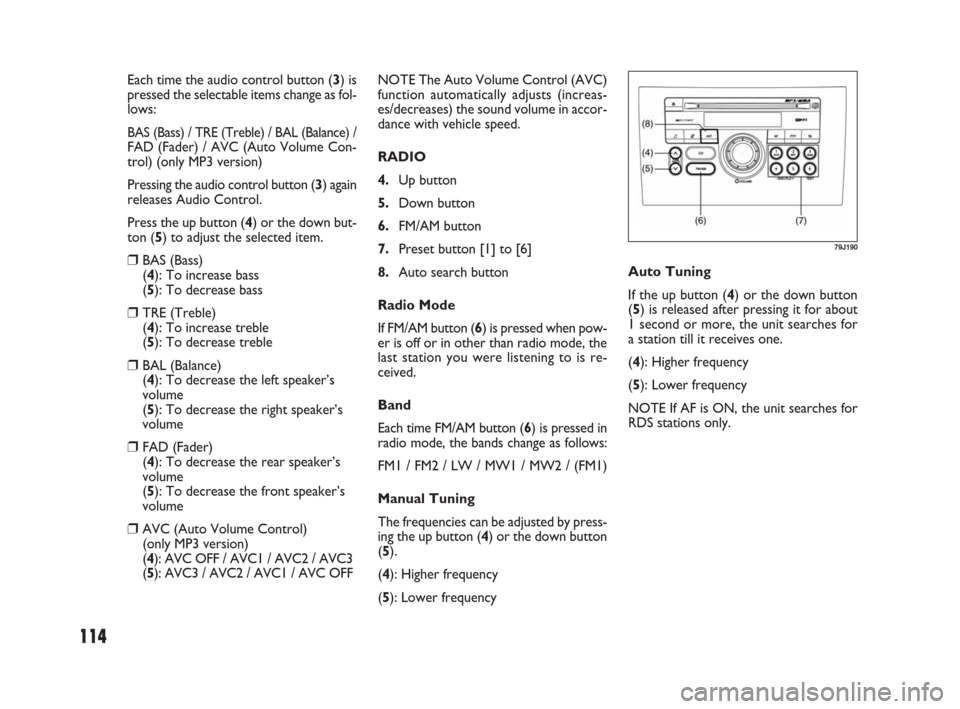
RADIO
4.Up button
5.Down button
6.FM/AM button
7.Preset button [1] to [6]
8.Auto search button
Radio Mode
If FM/AM button (6) is pressed when pow-
er is off or in other than radio mode, the
last station you were listening to is re-
ceived.
Band
Each time FM/AM button (6) is pressed in
radio mode, the bands change as follows:
FM1 / FM2 / LW / MW1 / MW2 / (FM1)
Manual Tuning
The frequencies can be adjusted by press-
ing the up button (4) or the down button
(5).
(4): Higher frequency
(5): Lower frequency Each time the audio control button (3) is
pressed the selectable items change as fol-
lows:
BAS (Bass) / TRE (Treble) / BAL (Balance) /FAD (Fader) / AVC (Auto Volume Con-
trol) (only MP3 version)
Pressing the audio control button (3) again
releases Audio Control.
Press the up button (4) or the down but-
ton (5) to adjust the selected item.
❒BAS (Bass)
(4): To increase bass
(5): To decrease bass
❒TRE (Treble)
(4): To increase treble
(5): To decrease treble
❒BAL (Balance)
(4): To decrease the left speaker’s
volume
(5): To decrease the right speaker’s
volume
❒FAD (Fader)
(4): To decrease the rear speaker’s
volume
(5): To decrease the front speaker’s
volume
❒AVC (Auto Volume Control)
(only MP3 version)
(4): AVC OFF / AVC1 / AVC2 / AVC3
(5): AVC3 / AVC2 / AVC1 / AVC OFFAuto Tuning
If the up button (4) or the down button
(5) is released after pressing it for about
1 second or more, the unit searches for
a station till it receives one.
(4): Higher frequency
(5): Lower frequency
NOTE If AF is ON, the unit searches for
RDS stations only.
79J190
071-128 SEDICI LUM FL GB 1E 19-06-2009 12:05 Pagina 114
Page 121 of 270
120
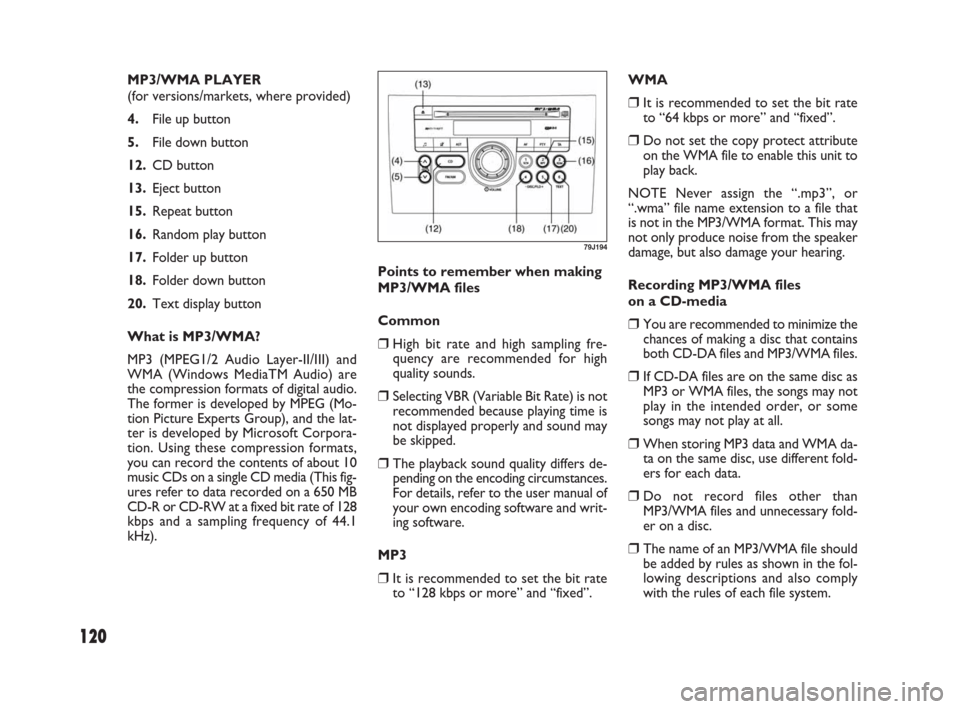
MP3/WMA PLAYER
(for versions/markets, where provided)
4.File up button
5.File down button
12.CD button
13.Eject button
15.Repeat button
16.Random play button
17.Folder up button
18.Folder down button
20.Text display button
What is MP3/WMA?
MP3 (MPEG1/2 Audio Layer-II/III) and
WMA (Windows MediaTM Audio) are
the compression formats of digital audio.
The former is developed by MPEG (Mo-
tion Picture Experts Group), and the lat-
ter is developed by Microsoft Corpora-
tion. Using these compression formats,
you can record the contents of about 10
music CDs on a single CD media (This fig-
ures refer to data recorded on a 650 MB
CD-R or CD-RW at a fixed bit rate of 128
kbps and a sampling frequency of 44.1
kHz).Points to remember when making
MP3/WMA files
Common
❒High bit rate and high sampling fre-
quency are recommended for high
quality sounds.
❒Selecting VBR (Variable Bit Rate) is not
recommended because playing time is
not displayed properly and sound may
be skipped.
❒The playback sound quality differs de-
pending on the encoding circumstances.
For details, refer to the user manual of
your own encoding software and writ-
ing software.
MP3
❒It is recommended to set the bit rate
to “128 kbps or more” and “fixed”.WMA
❒It is recommended to set the bit rate
to “64 kbps or more” and “fixed”.
❒Do not set the copy protect attribute
on the WMA file to enable this unit to
play back.
NOTE Never assign the “.mp3”, or
“.wma” file name extension to a file that
is not in the MP3/WMA format. This may
not only produce noise from the speaker
damage, but also damage your hearing.
Recording MP3/WMA files
on a CD-media
❒You are recommended to minimize the
chances of making a disc that contains
both CD-DA files and MP3/WMA files.
❒If CD-DA files are on the same disc as
MP3 or WMA files, the songs may not
play in the intended order, or some
songs may not play at all.
❒When storing MP3 data and WMA da-
ta on the same disc, use different fold-
ers for each data.
❒Do not record files other than
MP3/WMA files and unnecessary fold-
er on a disc.
❒The name of an MP3/WMA file should
be added by rules as shown in the fol-
lowing descriptions and also comply
with the rules of each file system.
79J194
071-128 SEDICI LUM FL GB 1E 19-06-2009 12:05 Pagina 120
Page 122 of 270
121
❒The file extension “.mp3” or “.wma”
should be assigned to each file de-
pending on the file format.
❒You may encounter trouble in playing
MP3/WMA files or displaying the in-
formation of MP3/WMA files recorded
with certain writing software or CD
recorders.
❒This unit does not have a play list func-
tion.
❒Although Multi-session recording is
supported, the use of Disc-at-Once is
recommended.
Compression formats MP3
❒Bit rate
MPEG1 Audio Layer II : 64k – 320 kbps
MPEG1 Audio Layer III : 32k – 320 kbps
MPEG2 Audio Layer II : 64k – 320 kbps
MPEG2 Audio Layer III : 8k – 160 kbps
❒Sampling frequency
MPEG1 Audio Layer II/III : 44.1 k/48 k/32
kHz
MPEG2 Audio Layer II/III : 22.05 k/24 k/
16 kHz
WMA (Ver.7, Ver.8, Ver. 9*)
❒Bit rate 32 k – 192 kbps
❒Sampling frequency 44.1 k/48 k/32 kHz
* WMA 9 Professional/LossLess/Voice are not
supported.
Supported file systems
ISO 9660 Level 1/Level 2, Apple Extension
to ISO 9660, Joliet, Romeo
Maximum number of files/folders
❒Maximum number of files: 511 (files +
folders)
❒Maximum number of files in one fold-
er: 255
❒Maximum depth of trees: 8
❒Maximum number of folders: 255 (Root
folder is included.)
MP3/WMA Mode
MP3/WMA mode is selected by pressing
the CD button (12) when power is off or
in other modes.
NOTE
❒MP3/WMA mode is not selected if no
MP3/WMA disc is in the unit.
❒If the mode has changed to CD chang-
er mode, press the CD button (12)
again.
Disc Insert/Eject
To insert a disc, make sure that its label-
side is up. To eject it, press the eject but-
ton (13).
NOTE The “CD IN” indicator remains lit
while a disc is in the unit. Be careful not to
insert a disc when the “CD IN” indicator
is lit.File Up/Down
The desired file can be selected by press-
ing the file up button (4) or the file down
button (5).
(4): Next file
(5): Preceding file (Press it twice.)
Folder Up/Down
The desired folder can be selected by
pressing the folder up button (17) or the
folder down button (18).
(17): Next folder
(18): Preceding folder
Fast Forward/Fast Reverse
Play speed increases while the button (4)
or (5) is kept depressed.
(4): Fast forward
(5): Fast reverse
NOTE
❒When the present file in REPEAT play
mode comes to its end, it returns to
normal play.
❒If Fast Forward is kept to the end of the
disc, it returns to the first file.
071-128 SEDICI LUM FL GB 1E 19-06-2009 12:05 Pagina 121
Page 127 of 270
126
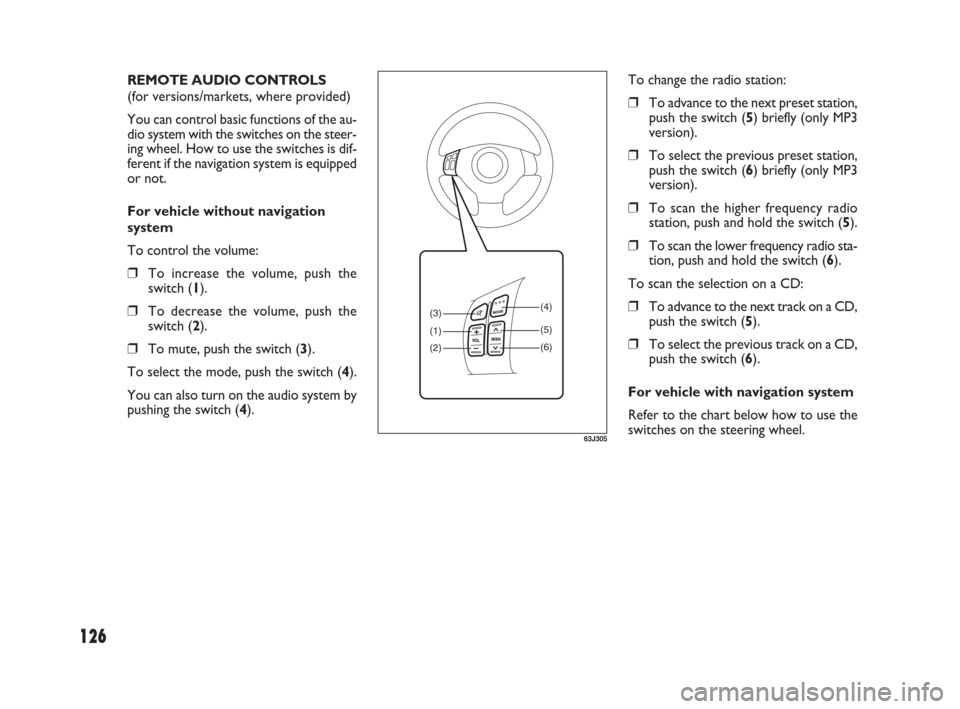
To change the radio station:
❒To advance to the next preset station,
push the switch (5) briefly (only MP3
version).
❒To select the previous preset station,
push the switch (6) briefly (only MP3
version).
❒To scan the higher frequency radio
station, push and hold the switch (5).
❒To scan the lower frequency radio sta-
tion, push and hold the switch (6).
To scan the selection on a CD:
❒To advance to the next track on a CD,
push the switch (5).
❒To select the previous track on a CD,
push the switch (6).
For vehicle with navigation system
Refer to the chart below how to use the
switches on the steering wheel. REMOTE AUDIO CONTROLS
(for versions/markets, where provided)
You can control basic functions of the au-
dio system with the switches on the steer-
ing wheel. How to use the switches is dif-
ferent if the navigation system is equipped
or not.
For vehicle without navigation
system
To control the volume:
❒To increase the volume, push the
switch (1).
❒To decrease the volume, push the
switch (2).
❒To mute, push the switch (3).
To select the mode, push the switch (4).
You can also turn on the audio system by
pushing the switch (4).
(3)
(1)
(2)(4)
(5)
(6)
63J305
071-128 SEDICI LUM FL GB 1E 19-06-2009 12:05 Pagina 126